50.4k
50.4k

Introduction
Many organizations have standardized on data lakes built on open table formats like Apache Iceberg and Delta Lake. As the cost of cloud storage dropped and the pain of vendor lock-in grew, open formats gave teams a way to store data once and query it from anywhere. The benefit is that data stays open, portable, and queryable by multiple engines, giving organizations the freedom to choose the tools that best fit their stack. But that flexibility comes at a cost for real-time analytics.
Teams hit a wall because lake formats were designed for open storage and interoperability, not for speed. Without the specialized indexes, caching, and tight query engine optimizations required for real-time workloads, queries in data lakes quickly become slow and expensive at scale.
Today, we're announcing that ClickHouse is data lake ready. You can query your data in place, pointing ClickHouse directly at your Iceberg and Delta Lake files or through any number of vendor or open-source catalogs. You can accelerate your analytics by loading data into ClickHouse's native storage engine for sub-second, high-concurrency queries. And you can write results back to open formats, keeping your entire ecosystem interoperable.
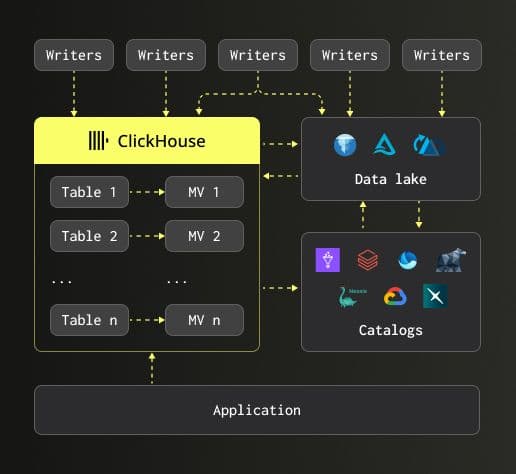
The road to data lake ready
Two years of engineering went into making this possible. Here's how we got here.
To be truly data lake ready, a query engine needs to do three things well: process Parquet files quickly, work with open table formats like Iceberg and Delta Lake, and integrate with the catalogs that sit on top. Here's how we've built out each of these capabilities over the past two years.
We started by shipping initial support for the Apache Iceberg format (23.3), allowing the data to be read natively on object storage and giving users their first way to use ClickHouse as a query engine for lake data. We followed that with Parallel Replicas (25.8), enabling query execution to be distributed across multiple nodes for lake-scale workloads.
From there, we invested heavily in Parquet, the foundational file format underneath Iceberg and Delta Lake tables. We added row group skipping using Parquet metadata (23.8), enabled fast counts, and allowed file name metadata to be used in filters to avoid unnecessary file reads. In (23.7)we improved Parquet write performance. On the storage side, we extended support to Azure Blob Storage (23.5), so ClickHouse wasn't limited to S3 and GCS.
In 24.12, we introduced our first catalog support with Unity Catalog, along with schema evolution. Users could now query Iceberg data from a catalog managed by an external service, with ClickHouse automatically detecting when columns were added, removed, renamed, or their types changed. The Polaris catalog was supported as well.
We also put significant effort in integrating the Delta Rust Kernel into ClickHouse, replacing our original Delta Lake reader. Rather than reinventing the wheel, we built on the community's open-source kernel, and in doing so unlocked Delta Lake reads, writes, changed data feed support, schema evolution, time travel, partition pruning, and statistic-based pruning.
Catalog support kept expanding in 25.3 where we added AWS Glue and Delta Lake support for the Unity Catalog. Since then we've added support for Microsoft OneLake, Iceberg REST Catalog, and AWS Glue, providing a truly catalog-agnostic solution, letting users decide how they wish to manage their tables. In 25.4, we added time travel for Iceberg, letting users query previous snapshots of their data. This is especially important for data warehouse-style workloads where auditability and point-in-time queries matter. In 25.6, we shipped JSON in Parquet support and deeper Iceberg history introspection, giving users more visibility into how their tables evolve over time.
25.8 was one of the most significant releases for our data lake evolution. A new native Parquet reader brought page-level parallelism and removed the extra Arrow layer, reading Parquet files directly into ClickHouse's in-memory format. The result? 1.8x faster reads on average across ClickBench and blazing fast performance.
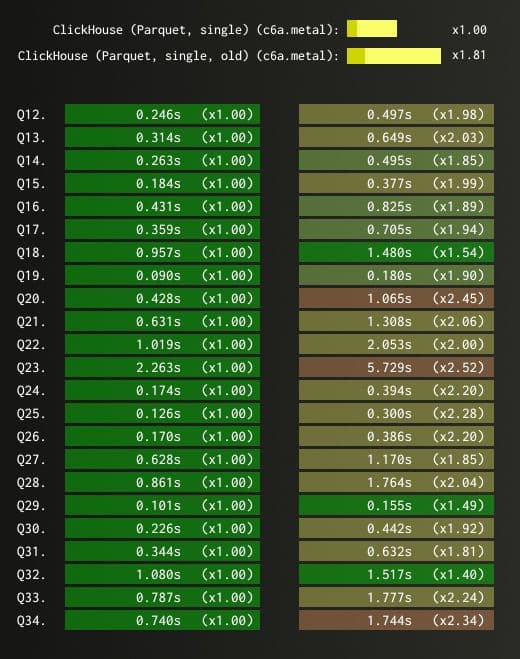
We also added full support for insert, delete, update, and alter schema operations on Iceberg tables, enabling interactive DML without importing data into ClickHouse. Investments continued in our support for underlying object storage, with significant performance improvements for Azure Blob Storage.
In (25.9), we focused on stability across Iceberg, Delta Lake, and cloud storage integrations, with improvements to schema resolution and metadata consistency.
And we're not done. Later this year, we'll ship even more catalog support and continue investing in performance and interoperability. Lots of exciting developments ahead!
So what does all of this engineering work add up to?
Three ways to use ClickHouse with your data lake
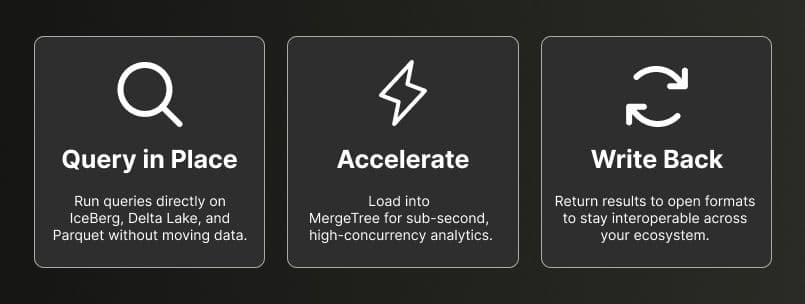
Your data lake now gets the full power of ClickHouse. Same SQL, same experience, no matter which catalog or cloud you’re on. Here are three ways to use it today.
Query in place, at speed
ClickHouse can now query data directly on your data lake without moving it anywhere. Point it at your Iceberg, Delta Lake, or Parquet data in S3, GCS, or Azure, and query it immediately. Under the hood, ClickHouse reads metadata from the open table format and infers the schema automatically. It works with catalogs like AWS Glue, Unity Catalog, REST Catalog, and more.
In some cases ClickHouse will also be faster than other query engines. But the bigger advantage is flexibility: ClickHouse is both cloud-agnostic and catalog-agnostic. No matter where your data lives or which catalog manages it, ClickHouse provides a single query engine that can access it all.
You can even federate across multiple catalogs and JOIN data between them using the same SQL.
Your data lake simply appears as another database in ClickHouse.
Let’s take this scenario: imagine your data team needs to investigate a spike in user churn. The data lives in Iceberg on S3 and is managed through AWS Glue. Instead of building a pipeline to move that data somewhere queryable, they point ClickHouse at it and start exploring immediately. Same SQL, instant access, no waiting on engineering.
The following query points directly at an Iceberg table in S3 and returns the number of records and quantiles for the fare amount:
SELECT
count(),
quantiles(0.5, 0.75, 0.9, 0.99)(fare_amount)
FROM icebergS3('https://storage.googleapis.com/biglake-public-nyc-taxi-iceberg/public_data/nyc_taxicab/');┌────count()─┬─quantiles(0.⋯are_amount)─┐
│ 1293069366 │ [9,14,22,52] │
└────────────┴──────────────────────────┘
1 row in set. Elapsed: 50.068 sec. Processed 1.29 billion rows, 17.55 GB (25.83 million rows/s., 350.58 MB/s.)
Peak memory usage: 63.12 MiB.Or connect to a catalog and query any table it manages. You'll first need to set up some permissions that will charge usage to your own Google account:
export PROJECT_ID="<project_id>"
export EMAIL="<email>"
gcloud services enable biglake.googleapis.com --project=$PROJECT_ID
gcloud projects add-iam-policy-binding $PROJECT_ID
--member="user:$EMAIL"
--role="roles/biglake.viewer"
gcloud projects add-iam-policy-binding $PROJECT_ID
--member="user:$EMAIL"
--role="roles/storage.objectViewer"
gcloud auth application-default set-quota-project $PROJECT_ID
gcloud auth application-default login
--scopes="https://www.googleapis.com/auth/cloud-platform,https://www.googleapis.com/auth/iam"Once you've done that, you can create a database that points to the BigLake catalog:
CREATE DATABASE biglake
ENGINE = DataLakeCatalog('https://biglake.googleapis.com/iceberg/v1/restcatalog')
SETTINGS
catalog_type = 'biglake',
google_adc_client_id = '',
google_adc_client_secret = '',
google_adc_refresh_token = '',
google_adc_quota_project_id = '',
warehouse = 'gs:///';You'll need to read the credentials from your credentials file into the settings in the example above.
At the time of writing, Iceberg support is still beta, so you'll need to configure the
allow_database_iceberg=1setting
Once the database is created, you can query the tables in it:
SELECT
count(),
avg(fare_amount),
max(fare_amount),
quantiles(0.5, 0.75, 0.9, 0.99)(fare_amount),
median(fare_amount)
FROM biglake.`public_data.nyc_taxicab`
GROUP BY ALL;Row 1:
──────
count(): 1293069366 -- 1.29 billion
avg(fare_amount): 12.325858933602774
max(fare_amount): 998310
quantiles(0.⋯are_amount): [9,14,22,52]
median(fare_amount): 9
1 row in set. Elapsed: 51.147 sec. Processed 1.29 billion rows, 17.55 GB (25.28 million rows/s., 343.19 MB/s.)
Peak memory usage: 122.69 MiB.SELECT
toHour(pickup_datetime) AS hour,
avg(trip_distance) AS avg_distance,
avg(total_amount) AS avg_fare,
count() AS trips
FROM biglake.`public_data.nyc_taxicab`
GROUP BY hour
ORDER BY hour ASC;┌─hour─┬───────avg_distance─┬───────────avg_fare─┬────trips─┐
│ 0 │ 8.112041044132008 │ 15.526927635270393 │ 47879195 │ -- 47.88 million
│ 1 │ 6.785222437788446 │ 15.052749704027802 │ 34934869 │ -- 34.93 million
│ 2 │ 7.407750625736156 │ 14.76697933689647 │ 25650987 │ -- 25.65 million
│ 3 │ 7.657523650630094 │ 15.283234402593072 │ 18652780 │ -- 18.65 million
│ 4 │ 9.31540622346101 │ 17.573114561330925 │ 13776900 │ -- 13.78 million
│ 5 │ 11.588025098571462 │ 19.706420763167998 │ 12637532 │ -- 12.64 million
│ 6 │ 9.745398309303608 │ 15.61424064665526 │ 27208315 │ -- 27.21 million
│ 7 │ 5.029114605823485 │ 14.334673041209152 │ 46858474 │ -- 46.86 million
│ 8 │ 5.997686015180531 │ 14.345667705243487 │ 58135645 │ -- 58.14 million
│ 9 │ 6.3355125177348155 │ 14.340152953723262 │ 60083794 │ -- 60.08 million
│ 10 │ 4.418390507581312 │ 14.416366144054908 │ 59271469 │ -- 59.27 million
│ 11 │ 5.419518100945745 │ 14.62377920076008 │ 61551480 │ -- 61.55 million
│ 12 │ 6.216885853896169 │ 14.697381827240532 │ 64966072 │ -- 64.97 million
│ 13 │ 5.475978455895815 │ 15.154941814778102 │ 64817919 │ -- 64.82 million
│ 14 │ 6.652825409842271 │ 15.684872166503094 │ 67360670 │ -- 67.36 million
│ 15 │ 6.423309499236642 │ 15.801439058909274 │ 64772331 │ -- 64.77 million
│ 16 │ 6.299770010900412 │ 16.67369163194398 │ 56957482 │ -- 56.96 million
│ 17 │ 4.95315626472069 │ 16.038749112293292 │ 67184352 │ -- 67.18 million
│ 18 │ 4.456214572757751 │ 15.188949293837657 │ 79296851 │ -- 79.30 million
│ 19 │ 5.145068799707873 │ 14.685932167610192 │ 80469021 │ -- 80.47 million
│ 20 │ 4.601634515827461 │ 14.8398186781247 │ 75007166 │ -- 75.01 million
│ 21 │ 5.646558343981034 │ 15.039326033758444 │ 73539351 │ -- 73.54 million
│ 22 │ 6.50326126765614 │ 15.357166060024737 │ 70622385 │ -- 70.62 million
│ 23 │ 6.2432607112900405 │ 15.618929242378396 │ 61432633 │ -- 61.43 million
│ ᴺᵁᴸᴸ │ ᴺᵁᴸᴸ │ ᴺᵁᴸᴸ │ 1693 │
└──────┴────────────────────┴────────────────────┴──────────┘
25 rows in set. Elapsed: 129.854 sec. Processed 1.29 billion rows, 17.55 GB (9.96 million rows/s., 135.17 MB/s.)
Peak memory usage: 651.80 MiB.Accelerate your analytics
Querying data directly on your lake works well for exploration and ad hoc analysis. But when you need sub-second response times at high concurrency, reading files over the network becomes a bottleneck. That’s when you load your data into MergeTree, ClickHouse’s native storage engine. It applies indexing, compression, and smart data skipping. The same query that took seconds scanning files on S3 now runs orders of magnitude faster.
Think about what that unlocks. Say you’re building a customer-facing analytics dashboard. Your users expect sub-second response times, and you’ve got hundreds of them querying concurrently. Querying files directly on object storage for every query isn’t going to cut it. Milliseconds of latency matter.
Once the data is stored in MergeTree, ClickHouse can apply a range of optimizations designed specifically for analytical workloads. Sparse primary indexes ensure only the relevant data granules are read instead of scanning entire datasets. Multiple layers of caching, including query result caching, predicate-level caching, local SSD caching, and distributed caches, further reduce the amount of data that needs to be read from storage.
Just as importantly, the data format and query engine are designed together. MergeTree supports rich data types, including efficient JSON handling, and enables engine-level optimizations that simply aren’t possible when querying open files directly. The result is the difference between offering analytics and delivering real-time, sub-second analytics at scale.
Let's have a look at what the acceleration workflow with BigLake looks like. First, we'll create a native table in ClickHouse:
CREATE TABLE nyc_taxi
(
`pickup_datetime` DateTime64(6, 'UTC'),
`dropoff_datetime` DateTime64(6, 'UTC'),
`passenger_count` Int64,
`trip_distance` Decimal(10, 0),
`payment_type` String,
`fare_amount` Decimal(10, 0),
`tip_amount` Decimal(10, 0),
`total_amount` Decimal(10, 0),
`pickup_location_id` String,
`dropoff_location_id` String
)
ENGINE = MergeTree
ORDER BY pickup_datetimeNext, we'll ingest the data from the BigLake catalog:
INSERT INTO nyc_taxi
SELECT
pickup_datetime,
dropoff_datetime,
passenger_count,
trip_distance,
payment_type,
fare_amount,
tip_amount,
total_amount,
pickup_location_id,
dropoff_location_id
FROM biglake.`public_data.nyc_taxicab`;1293069366 rows in set. Elapsed: 683.687 sec. Processed 1.29 billion rows, 17.55 GB (1.89 million rows/s., 25.67 MB/s.)
Peak memory usage: 2.65 GiB.And then, we can write some queries against it:
SELECT
toHour(pickup_datetime) AS hour,
avg(trip_distance) AS avg_distance,
avg(total_amount) AS avg_fare,
count() AS trips
FROM nyc_taxi
GROUP BY hour
ORDER BY hour ASC;┌─hour─┬───────avg_distance─┬───────────avg_fare─┬────trips─┐
│ 0 │ 8.111754213915164 │ 15.526378625225163 │ 47880888 │ -- 47.88 million
│ 1 │ 6.785222437788446 │ 15.052749704027802 │ 34934869 │ -- 34.93 million
│ 2 │ 7.407750625736156 │ 14.76697933689647 │ 25650987 │ -- 25.65 million
│ 3 │ 7.657523650630094 │ 15.283234402593072 │ 18652780 │ -- 18.65 million
│ 4 │ 9.31540622346101 │ 17.573114561330925 │ 13776900 │ -- 13.78 million
│ 5 │ 11.588025098571462 │ 19.706420763167998 │ 12637532 │ -- 12.64 million
│ 6 │ 9.745398309303608 │ 15.61424064665526 │ 27208315 │ -- 27.21 million
│ 7 │ 5.029114605823485 │ 14.334673041209152 │ 46858474 │ -- 46.86 million
│ 8 │ 5.997686015180531 │ 14.345667705243487 │ 58135645 │ -- 58.14 million
│ 9 │ 6.3355125177348155 │ 14.340152953723262 │ 60083794 │ -- 60.08 million
│ 10 │ 4.418390507581312 │ 14.416366144054908 │ 59271469 │ -- 59.27 million
│ 11 │ 5.419518100945745 │ 14.62377920076008 │ 61551480 │ -- 61.55 million
│ 12 │ 6.216885853896169 │ 14.697381827240532 │ 64966072 │ -- 64.97 million
│ 13 │ 5.475978455895815 │ 15.154941814778102 │ 64817919 │ -- 64.82 million
│ 14 │ 6.652825409842271 │ 15.684872166503094 │ 67360670 │ -- 67.36 million
│ 15 │ 6.423309499236642 │ 15.801439058909274 │ 64772331 │ -- 64.77 million
│ 16 │ 6.299770010900412 │ 16.67369163194398 │ 56957482 │ -- 56.96 million
│ 17 │ 4.95315626472069 │ 16.038749112293292 │ 67184352 │ -- 67.18 million
│ 18 │ 4.456214572757751 │ 15.188949293837657 │ 79296851 │ -- 79.30 million
│ 19 │ 5.145068671830865 │ 14.685932167610192 │ 80469021 │ -- 80.47 million
│ 20 │ 4.601634515827461 │ 14.8398186781247 │ 75007166 │ -- 75.01 million
│ 21 │ 5.646558343981034 │ 15.039326033758444 │ 73539351 │ -- 73.54 million
│ 22 │ 6.50326126765614 │ 15.357166060024737 │ 70622385 │ -- 70.62 million
│ 23 │ 6.2432607112900405 │ 15.618929242378396 │ 61432633 │ -- 61.43 million
└──────┴────────────────────┴────────────────────┴──────────┘
24 rows in set. Elapsed: 13.578 sec. Processed 1.29 billion rows, 31.03 GB (95.23 million rows/s., 2.29 GB/s.)
Peak memory usage: 26.40 MiB.If you want to run through this comparison yourself, head over to our getting started guide to run through this yourself.
But what about the data you’ve just accelerated? What if you want those results available to other tools in your ecosystem?
Interoperability
Just because your data is in MergeTree doesn’t mean it has to stay there. You can write results back out to Iceberg or Delta Lake for reverse ETL scenarios. Whether you’re writing directly to the data lake or pulling data in to accelerate and then pushing results back, ClickHouse maintains full interoperability with the open ecosystem. It’s in our open-source DNA. You’re not locked in.
Your analytics team runs a segmentation model in ClickHouse and identifies your highest-value customers. Instead of exporting a CSV and emailing it around, they write the results back to Iceberg. Now your data science team picks it up in Spark, marketing accesses it through their BI tool, and the data never left the data lake.
For example, if we want to write aggregated results back to an Iceberg table, we can do the following:
CREATE TABLE output_iceberg (
Url String,
Cnt UInt64
) ENGINE = IcebergS3(‘[https://your-bucket.s3.amazonaws.com/output/](https://your-bucket.s3.amazonaws.com/output/)’, ‘key’, ‘secret’);INSERT INTO output_iceberg
SELECT url, count() AS cnt
FROM hits_accelerated
GROUP BY url
ORDER BY cnt DESC;As of 25th March 2026, Iceberg write support to a catalog is not yet possible, but the capability is coming soon.
The resulting Iceberg table is readable by any Iceberg-compatible engine: Spark, Trino, DuckDB, you name it.
With ClickHouse you can now read from the lake and query in place, accelerate your queries by loading into MergeTree, and write results back to open formats. You may find yourself using all three or just one. The source of truth always remains your data lake.
Does this work with your stack? Yes. It should.
What’s supported
ClickHouse works with the formats, catalogs, and cloud storage you’re already using. On the format side: Iceberg, Delta Lake, Parquet, ORC, Avro, and Hudi. For catalogs: AWS Glue, Unity Catalog, REST Catalog, Polaris, and more. For storage: S3, GCS, and Azure Blob Storage. And the operations go beyond reads. You get writes, DML, time travel, and schema evolution.
For the full breakdown, check out the support matrix
Conclusion
Open formats gave teams the freedom to store data once and query it from anywhere. With ClickHouse, that data lake is now a first-class database. Point it at any catalog, on any cloud, and you're querying immediately. Same SQL, same engine, full interoperability with the open ecosystem. You don't have to migrate your data, rebuild your pipelines, or trade the openness you built your stack on for performance.
And this matters more now than it did two years ago. As teams build agentic applications, AI-powered observability tools, and natural language analytics interfaces on top of their lake data, the requirements look a lot like real-time analytics: high concurrency, low latency, and access to full-fidelity data at scale. Tanya Bragin, VP of Product & Marketing, wrote about how this shift toward AI is redrawing the database market and why the infrastructure choices teams make today will shape what they can build tomorrow.
We’re excited about what’s ahead. Try it out for yourself and let us know what you think.
Get started
Get started with the data lake guide | View the full support matrix | Try ClickHouse Cloud
Interested in seeing how ClickHouse works on your data? Get started with ClickHouse Cloud in minutes and receive $300 in free credits.
Sign up