50.3k
50.3k
TL;DR;
Today, we're announcing ClickCannon, an open-source benchmarking tool for ClickHouse. What began as an internal project to benchmark observability workloads and build sizing recommendations for ClickStack evolved into a generic framework for replaying data, simulating users, and measuring workload performance at scale. In this post, we'll cover:
- The challenges of benchmarking realistic observability workloads
- How we replay real production data at controlled throughput
- The concurrency architecture that enables high-throughput workload generation
- How we simulate realistic user behavior and query patterns
- How we collect, analyze, and compare benchmark results
Find ClickCannon at https://github.com/ClickHouse/ClickCannon.
Intro
As ClickStack adoption has grown over the past year, one question kept coming up:
How much hardware do I need to run ClickHouse?
Whether users are running Managed ClickStack or deploying the open-source stack themselves, they want to know how much CPU, memory, and disk are required to handle their observability workload.
Answering that question required us to build a sizing model, which in turn became a benchmarking exercise. We needed to understand how different schemas, ingestion rates, query patterns, and hardware configurations behaved under realistic observability workloads.
Existing tools helped with parts of the problem, but none gave us the level of control we needed over both inserts and queries. What started as an internal tool for sizing observability deployments eventually grew into something much more flexible.
As the project evolved, we realized we weren’t just building a benchmarking framework for observability. We had inadvertently built a generic workload testing tool for ClickHouse.
The same primitives that allowed us to replay OpenTelemetry data, simulate users, and measure performance at scale could be applied to almost any insert and query workload. That’s why we’ve decided to open-source it.
Today, we’re pleased to announce ClickCannon, a generic benchmarking tool for ClickHouse that allows you to benchmark custom insert and query workloads with fine-grained control over throughput, concurrency, and user behavior.
The challenges of benchmarking observability
How do you go about benchmarking observability? The performance of an observability system is shaped by the interaction between the table schema, the rate at which data is ingested, and the query workload generated by users.
Any sizing model, therefore, needs a way to capture these variables. We’ll begin with ingest throughput, as it is one of the most important inputs and often the easiest for users to estimate.
Benchmarking inserts
We measure throughput as uncompressed throughput because it’s the metric most observability users already understand when sizing workloads or migrating from other platforms, and it avoids the variability introduced by different compression algorithms, transfer formats, and data characteristics.
Most observability workloads have a relatively steady stream of incoming data with occasional spikes, alongside users continuously searching logs, filtering traces, and exploring recent events.
The primary challenge here is sustaining ingest throughput to reproduce a specific workload size. Let’s say you wanted to hit 100 MiB/s of uncompressed throughput for a given hardware configuration. We’re not looking for 50 MiB/s nor 200 MiB/s, it needs to be as close to 100 MiB/s as possible. Then you need to repeat it for 1 GiB/s, and then up to 5 GiB/s (or about 12.3 PiB/month) of controlled throughput.
Benchmarking queries
At the same time, observability is a real-time problem. Data is continuously ingested as users query recent events, filter traces, inspect logs, and jump between time ranges. A useful benchmark, therefore, cannot just measure inserts in isolation. It needs to simulate realistic query workloads while data is still arriving, allowing us to model different levels of user activity and concurrency alongside ingestion.
The underlying ClickHouse schema can also be tuned and optimized in different ways, with each choice affecting storage, ingest, and query performance. We'll discuss this problem in the second part of this blog post, where we used ClickCannon to optimize the default ClickStack schema.
Using representative data and choosing formats
Before we could benchmark anything, we first needed representative data. One of the core principles of the project was that we wanted to benchmark with real observability workloads rather than purely synthetic data. Synthetic datasets are useful for isolating specific behaviors, but they often fail to capture the cardinality, distributions, and access patterns seen in production systems.
Fortunately, we had access to around 2 TiB of real OpenTelemetry trace data from our own internal environments that we could use as the foundation for our benchmarks.
We converted this data to ClickHouse Native format with ZSTD compression, choosing this as our input data format.
Previous benchmarks have shown this to be the most efficient format for sending data to ClickHouse, enabling the highest ingest throughput with the lowest overhead. For this reason its also the format over which Open Telemetry collectors insert into ClickHouse, thus ensuring it is representative of real-world workloads. Keeping this compressed in ZSTD made sense for the sake of both disk space usage, insert efficiency, and ensuring the original workload was representative of real work production.
For users wishing to use ClickCanon, clickhouse-local can be used to convert existing data sets into this format.
Benchmarking inserts and limiting throughput
With realistic data in hand, the first challenge was controlling ingest throughput. Different users operate at different scales, and so our benchmarks were targeted at a wide range of throughput and hardware configurations, ranging from 1 TiB/month all the way to 20 PiB/month of uncompressed data.
Our initial thought was to use the ClickHouse client. This is already incredibly powerful and would of allowed us to avoid writing anything beyond a shell script.
However, after testing multiple client settings, we couldn’t find a reliable way to limit the bytes per second of uncompressed data at the network or disk level. My next idea was to limit this at the TCP level with a custom proxy. ClickHouse would still handle all of the fast multi-threaded decode/insert of Native data, and I would only have to write a TCP rate limiter. While this approach was effective, it still left us needing to orchestrate the ClickHouse client to gain more control over the individual blocks of data being sent (more on that later).
If we were going to hit our top-end throughput targets while also manipulating the data, we needed a more customized approach than trying to fiddle with ClickHouse client CLI parameters.
Since I already had some Go code on disk for the TCP speed limiter, and as one of the former lead maintainers of both ch-go and clickhouse-go, I decided to write a prototype for my own multi-threaded reader/inserter.
This also allowed us to pull some more precise metrics from the stream, such as compressed/uncompressed bytes, row count, block count, etc - useful metrics in reporting final sizing recommendations.
As the maintainer of the OpenTelemetry ClickHouse exporter, I had also already run some experiments with ch-go to build a zero-allocation ingest pipeline for our main logs/trace loop and was comfortable optimizing concurrency and memory allocations.
If you’re unfamiliar with
ch-govsclickhouse-go,ch-gois the bare bones low-level client and optimized for performance, while clickhouse-go is the high-level client and optimized for developers with the interfaces it exposes. Both are fast, butch-gogives us the memory controls we need.
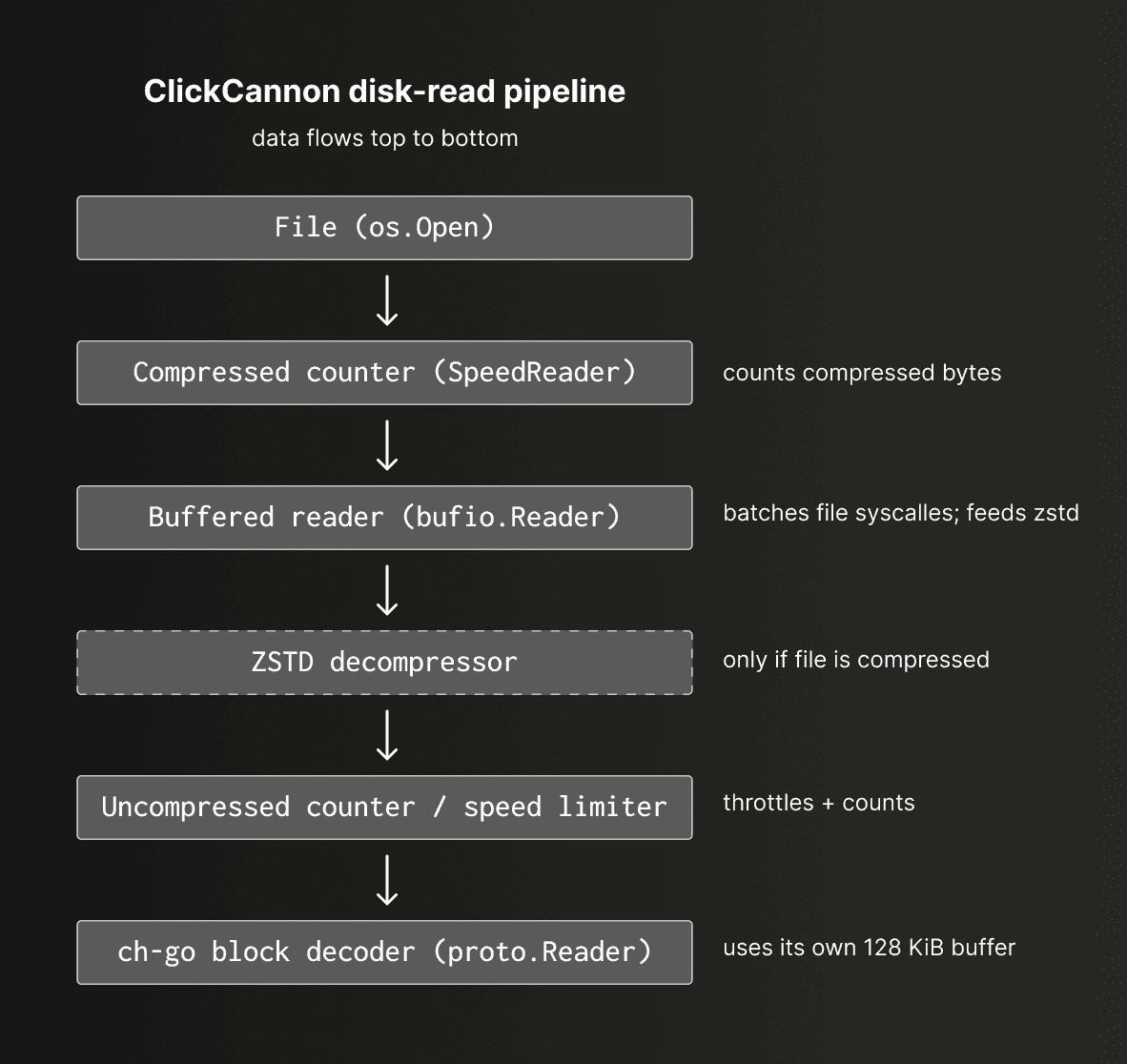
The resulting pipeline was constructed using a standard Go reader interface. The disk pipeline operates in this order: file, compressed counter, buffered reader, ZSTD decompressor, uncompressed counter (which also acts as our speed limiter), and then finally a ch-go block decoder.
Note the need to decompress the data. Since our throughput limits are based on uncompressed bytes, throttling must occur after decompression.
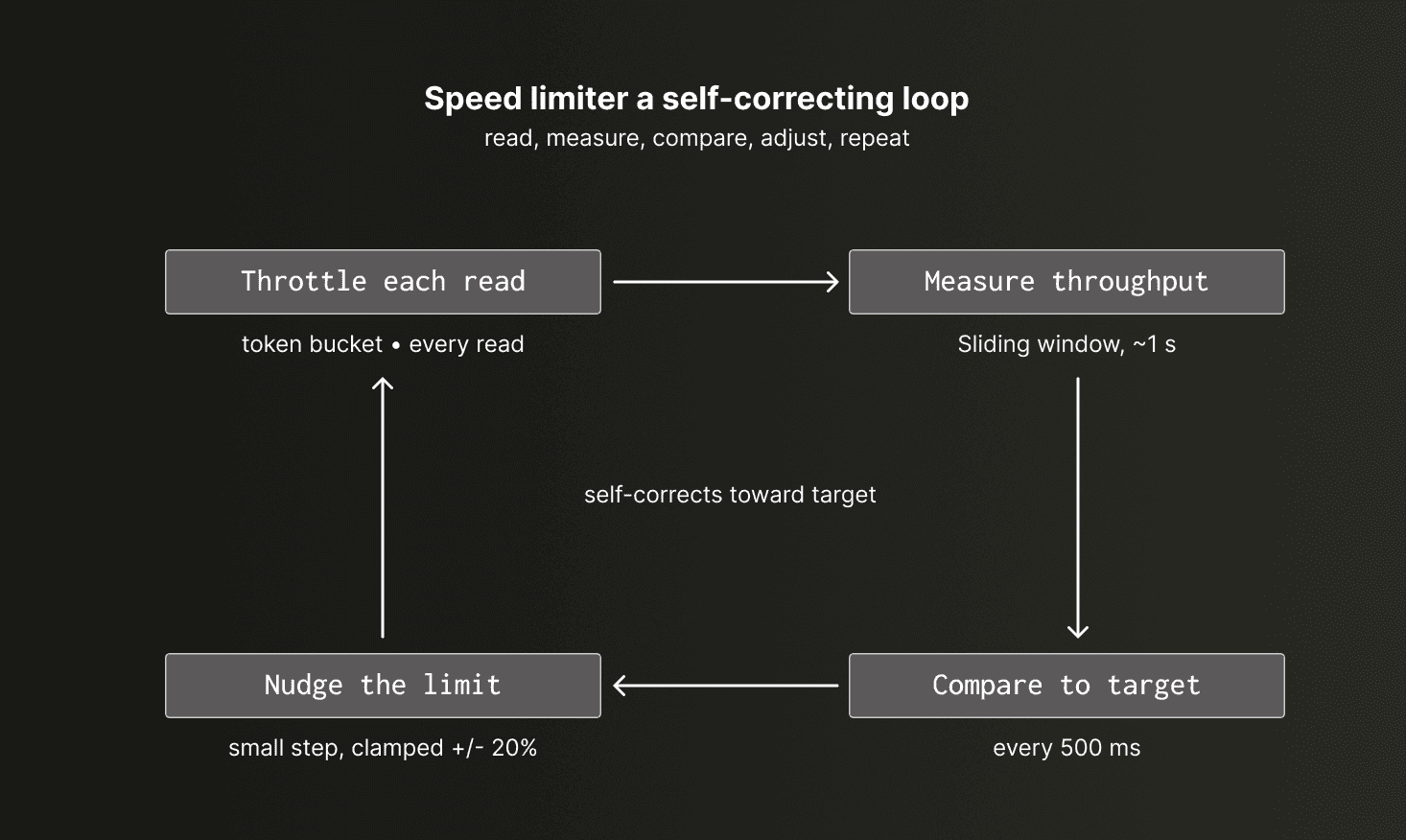
The speed limiter is a reader that takes a bytes/s target and holds to it with a feedback loop. A sliding window measures actual throughput while a lightweight controller nudges the working limit toward the target, and a token-bucket gate enforces that limit on each read.
With the basics of the pipeline in place, we move to the concurrency pipeline that powers ClickCannon and delivers the throughput we need.
Get started today
Interested in seeing how ClickHouse works on your data? Get started with ClickHouse Cloud in minutes and receive $300 in free credits.
Sign upAchieving performance with concurrency
Concurrency was both the solution and the cause of many problems in this project. The final ClickCannon config file alludes to some of the knobs we had to add to tune to optimize the concurrency of the tool, including goroutine counts, block retirement, and buffered channel sizes
user:
enabled: true
duration: 1h
threads: 10
ramp_duration: 30s
clickhouse_dsn: tcp://localhost:9000
connections_per_thread: 2
database: otel
table: otel_traces
dataset_unix_start: 1758585600
dataset_unix_end: 1758631499
workflows:
- type: queries
name: "Example workload"
random: false
think_time:
min: 1s
max: 5s
time_anchor: now
default_time_range:
type: uniform
round: 1m
min: 15m
max: 4h
default_settings:
max_execution_time: "60"
time_range_cadence: per_query
vars:
Example: "value"
Env: "prod"
preflight_cadence: once
preflight_queries:
- sql: |
SELECT max(Timestamp) AS DatasetMaxTS
FROM {database:Identifier}.{table:Identifier}
binds: [DatasetMaxTS]
settings:
max_execution_time: "30"
queries:
- name: "Trace count"
sql: |
SELECT count()
FROM {database:Identifier}.{table:Identifier}
WHERE Timestamp >= {time_start:DateTime64(3)}
AND Timestamp <= {time_end:DateTime64(3)}
settings:
max_execution_time: "30"
perf:
p50: 500ms
p90: 3s
p95: 2s
p99: 5sCurious users can find a full description of the config options here.
I should clarify our need for concurrency in the first place: one thread isn’t enough. We quickly found that one thread is easily bottlenecked by disk and ZSTD decompression. When testing on an EC2 instance backed by NVMe storage, we were only seeing a fraction of a gigabyte in throughput - well below the throughput capacity of the disks.
Initially, this was simply solved by throwing more goroutines at the problem, with each one handling its own file and being responsible for its own inserts. Architecturally, this simple end-to-end pipeline is easy to reason about, but it also couples read and insert throughput together. If decompression is slow, the inserts stall. If inserts are slow, reads stall. We needed to be able to scale reads and inserts independently, which forced us to rethink the architecture.
Introducing workers
To address this, we have two types of “workers” in ClickCannon - disk and insert workers, each using the same pattern. Each also has a scheduler, allowing them to be scaled and work independently. For example, we can configure a pool of 20 disk workers and 20 insert workers.
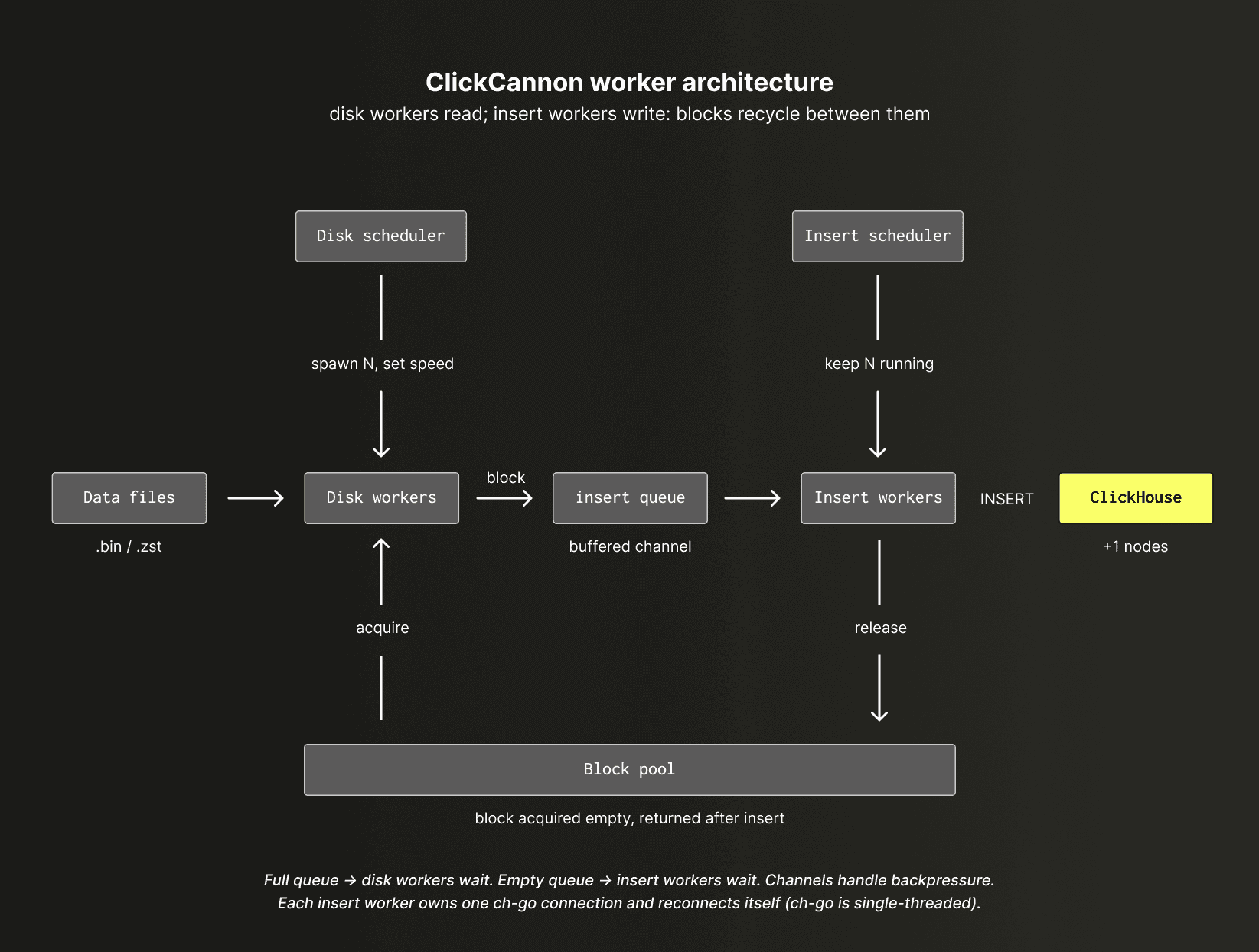
Disk workers will read until the block pool is empty, and inserter workers will insert until the insert queue is empty. As long as the disk workers keep reading blocks, the insert workers will insert. As long as the insert workers insert and return blocks to the pool, the disk workers will have space to continue reading.
With the magic of Go channels, everything blocks correctly to keep the flow running. Parameters are tuned per benchmark config to ensure there are enough goroutines for each kind of worker, depending on our throughput targets.
The disk scheduler ensures there are enough workers for the given file set, and also commands the speed limit per worker. The insert scheduler ensures there are always N workers running.
Note that
ch-goonly offers single-threaded connections, so we have to manage our own reconnects per insert worker.
Decoupling reads and inserts gave us the flexibility to scale each stage independently, but throughput still depends on the efficiency of the individual workers. The workers need to be carefully designed to avoid becoming a bottleneck.
Reusable block queue
The key abstraction that connects the disk and insert workers and ensures pipeline efficiency is the block.
Rather than passing raw byte streams between stages, disk workers decode data into reusable ch-go blocks and hand them off to insert workers through a shared queue. This gives us a clean boundary between reading and inserting while minimizing allocations and memory copies.
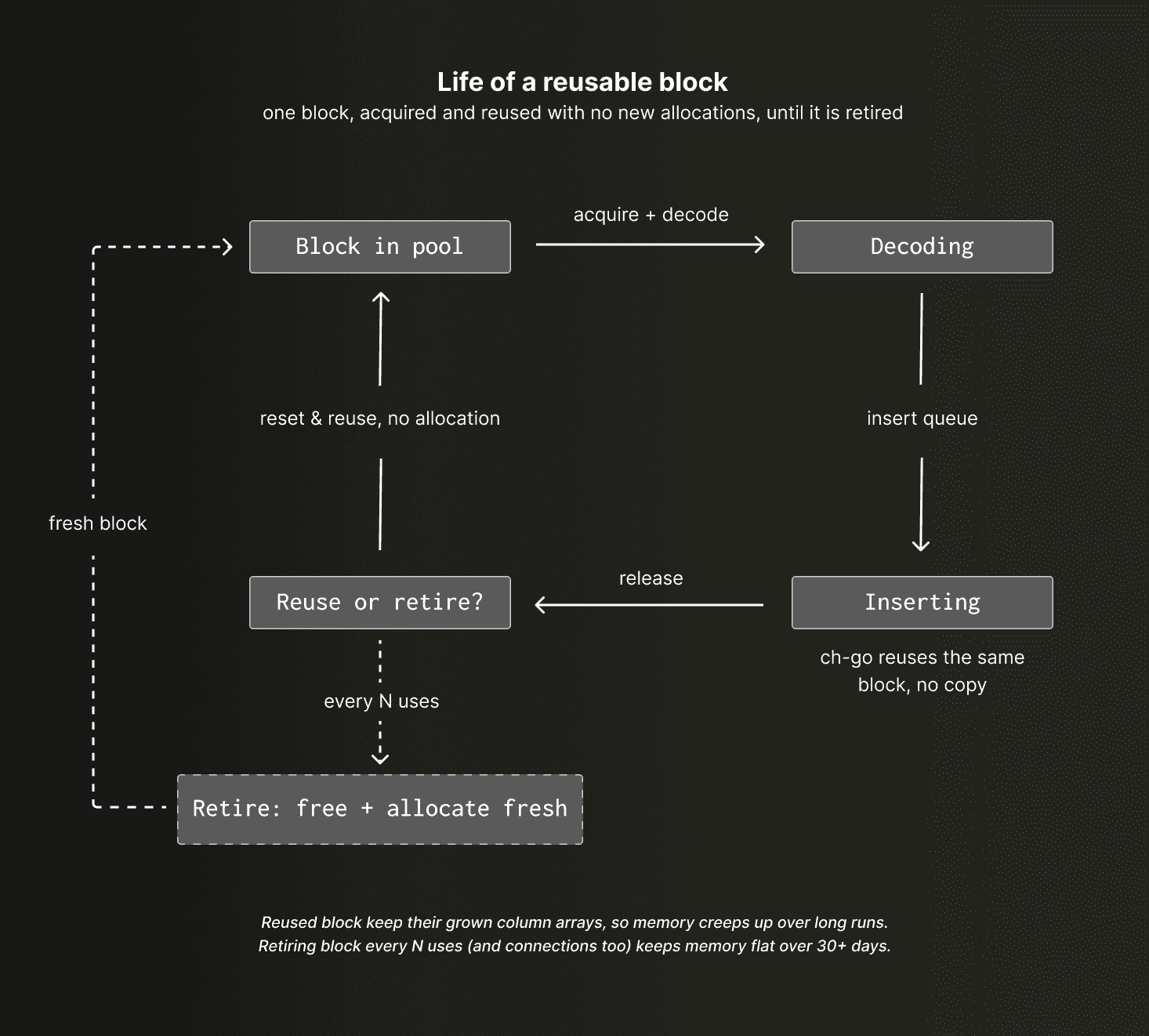
Each read call for ch-go requires a block to decode the byte stream into. A block can be pre-allocated in memory with the known column types and a healthy estimate of rows to reduce allocation overhead. Blocks are put into a pool (a Go channel under the hood) that allows reusing blocks.
Each read call first acquires a block from the block pool, decodes it, and then pushes it into an insert queue (another channel that holds a block pointer).
On the insert side, ch-go allows us to reuse the same exact block structure in memory and return the inserted blocks back to the pool.
Note, this is totally safe to do in
ch-go, and is one of the reasons it outperforms the clickhouse-go module.
This means we can read a block from disk, manipulate it as needed (for example, shift timestamps to the current time), and then insert it without doing any new allocations to the column data.
While blocks are cleanly reset before and after each use, the memory they reserve is intentionally retained and reused. Over long-running benchmarks, however, we observed memory gradually increasing as internal arrays grew to accommodate larger-than-expected blocks and then remained at their expanded size for future reuse.
Since benchmark runs can last for days or even weeks, this slow accumulation eventually became a problem.
To address this, we added logic for block retirement. After a configurable number of uses, blocks are completely de-allocated, and the pool allocates fresh replacements. The same principle was applied to connections, whose internal buffers could also grow over time. After adding these safeguards, we observed memory remaining flat for over 30 days of testing on the same process.
Realistic inserts
Benchmarking inserts is not as simple as running an insert command and then reading the response latency from the server. We need to ensure the parts are being written to disk with the correct (configurable) batch size, and that data is arriving at the target throughput for extended periods of time.
More importantly, the temporal distribution of the data needs to match that throughput. Observability data is inherently time-based, and if the spacing between event timestamps does not reflect the rate at which data is being inserted, the resulting storage layout, ClickHouse merge behavior, and query patterns will no longer be representative of a real system.
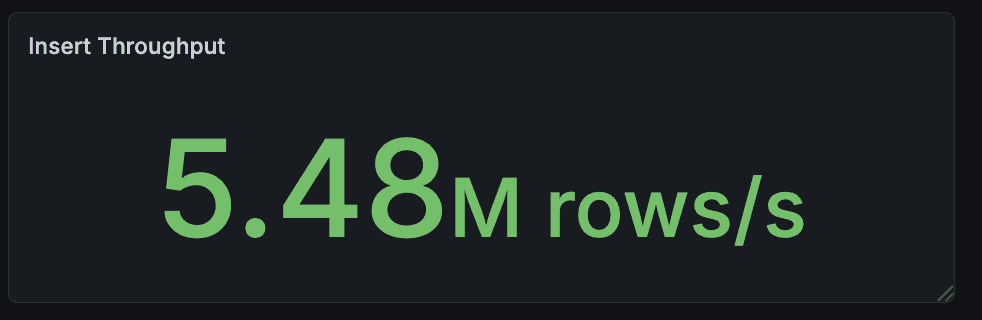
For example, if we replayed the data as fast as we could, it wouldn't necessarily be at the same rate that the data was originally captured.
This is why we have the speed limiter, and also why we shift timestamps. We can take our 2 TiB of data and shift the timestamps so that each row is inserted as if it were a real-time stream at the configured throughput. This ensures the data density over time remains representative of the target workload, while also keeping part creation and compression behavior realistic enough for meaningful benchmarks (keep compression in mind for later, when we cover generated data).
Simulating users
Much like the first attempt at insert benchmarks, user queries started simple with hardcoded queries. We wanted to ensure our OTel schema was seeing the same queries it would see in the real world from the ClickStack UI. For this, we scraped some of the most common queries as a sequential list that flowed in the same way as a real investigation would.After many iterations of switching queries around, it became clear that we needed something more advanced, and while there were plenty of tools that we could’ve used, none of them quite did exactly what we needed. Given that we've developed custom insert tooling, it made sense to extend this to support our query workload requirements.
Using the same scheduler/worker pattern from the disk/insert roles, we added one for users.
Each goroutine represents a single user - scaling users means just adding more goroutines. Each route/user will run through the list either randomly or sequentially and execute queries, with random warmup times to represent users ramping and prevent “thundering herd” problems.
Before each query (or before the entire sequence), we can also run a set of “pre-flight” queries. These are ClickHouse-powered parameterized queries that can be chained together to pull context that can be used for the subsequent queries.
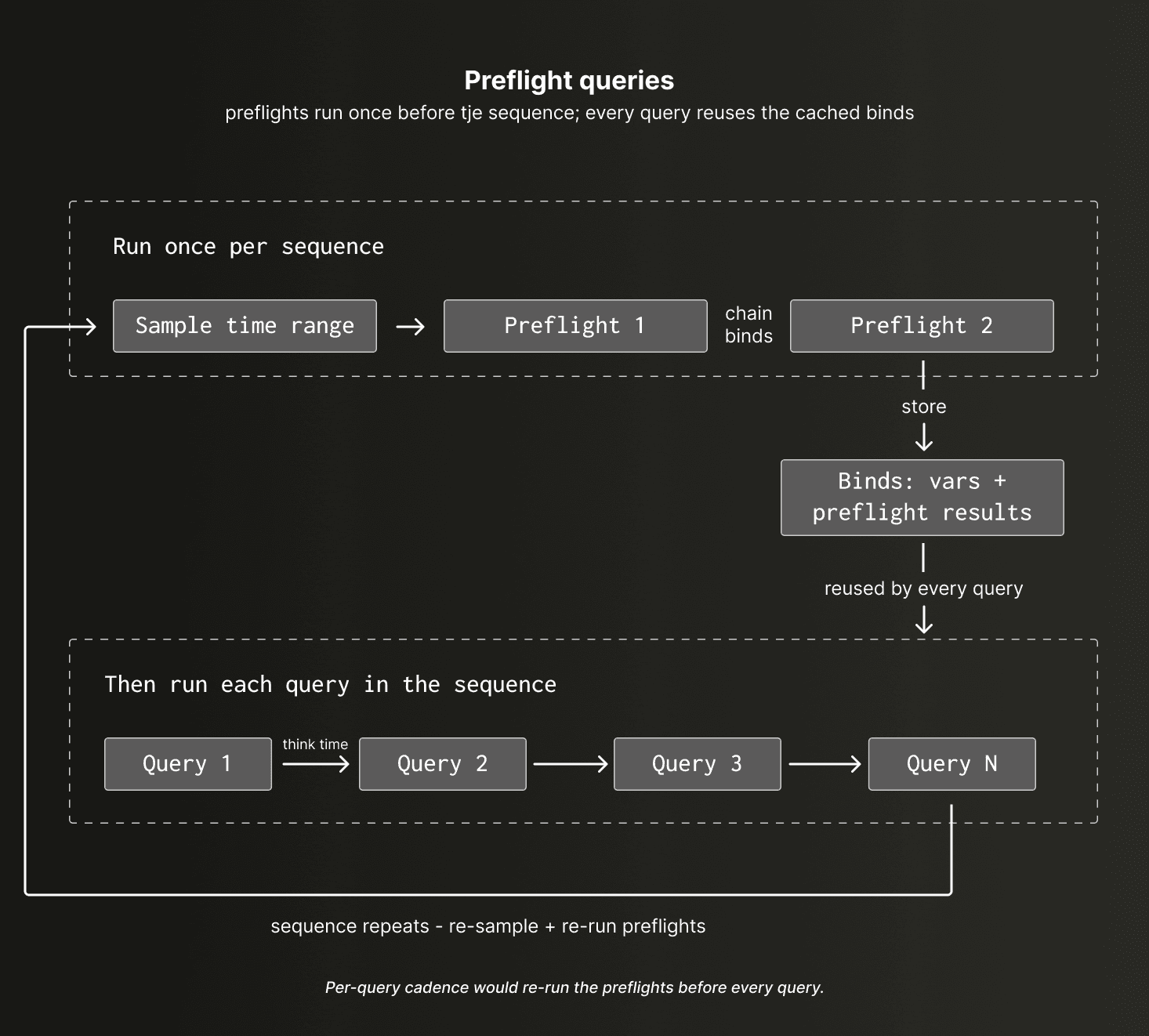
For example, if we wanted to filter traces by a service name but didn’t want to hardcode the service name, a pre-flight query can pull a randomly selected service name from that same time range of data and then bind the resulting value to a variable. Then, any subsequent query with a service name dependency can reference this parameter to have a value injected.
This, combined with time range sampling options, random delay configuration, and seeded random number generation, gave us a solid foundation for running realistic query workflows.
Finally, user queries are also generated with a lookback from the current timestamp, which means we’re correctly sampling new data that is written to disk as well as old parts that have merged. This provides representative query patterns for observability, reproducing the common access pattern where users query the most recent data.
Generating realistic query workloads is useful, but without good measurements, they're little more than expensive stress tests. We wanted to understand how changes to schemas, indexes, settings, and hardware configurations affected the actual user experience. That meant collecting metrics from every stage of the benchmark and measuring latency from the perspective of the application rather than the database. ClickHouse provides a query log, but since we're interested in end-to-end latency as experienced by a user, we measure from the start and end of the query call itself.
But where do all of these metrics go?
Metrics
You guessed it, ClickHouse!
There are two sides to monitoring a benchmark like this. First, we need to understand how ClickCannon itself is performing: whether workers are keeping up, queues are backing up, throughput is stable, and query latency is behaving as expected. Second, we need to monitor ClickHouse as the target database, since the whole point of the benchmark is to understand how the server behaves under a given workload.
For the ClickCannon pipeline, the tool captures 45 different metrics in the form of counters, gauges, and samples. A Go channel buffers these metrics, and a worker flushes them periodically to a separate ClickHouse database.
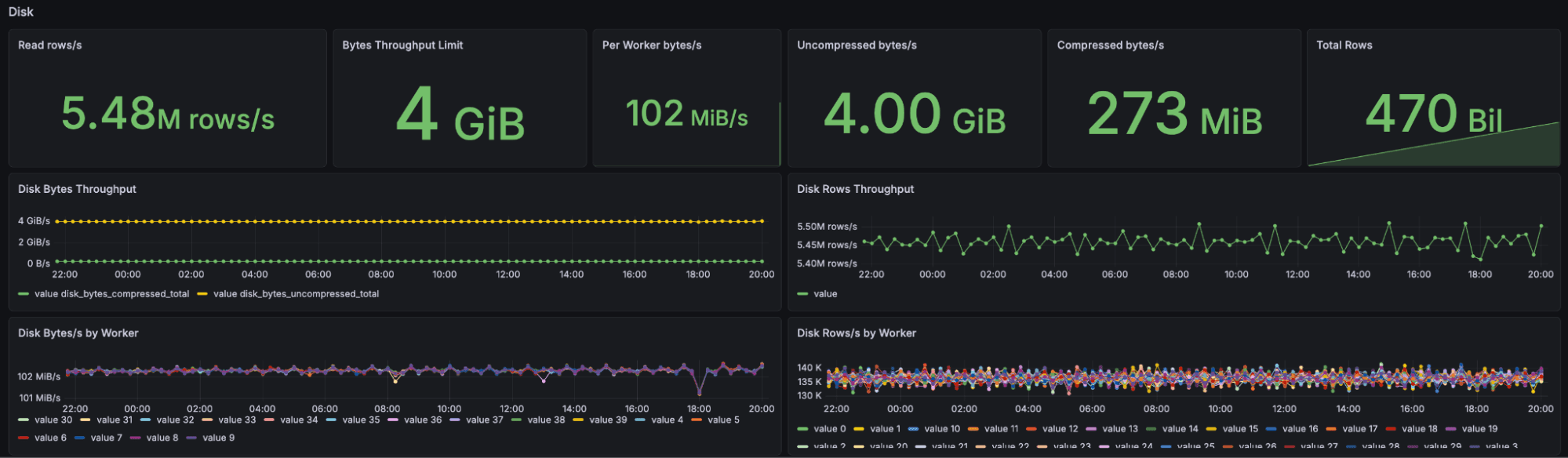
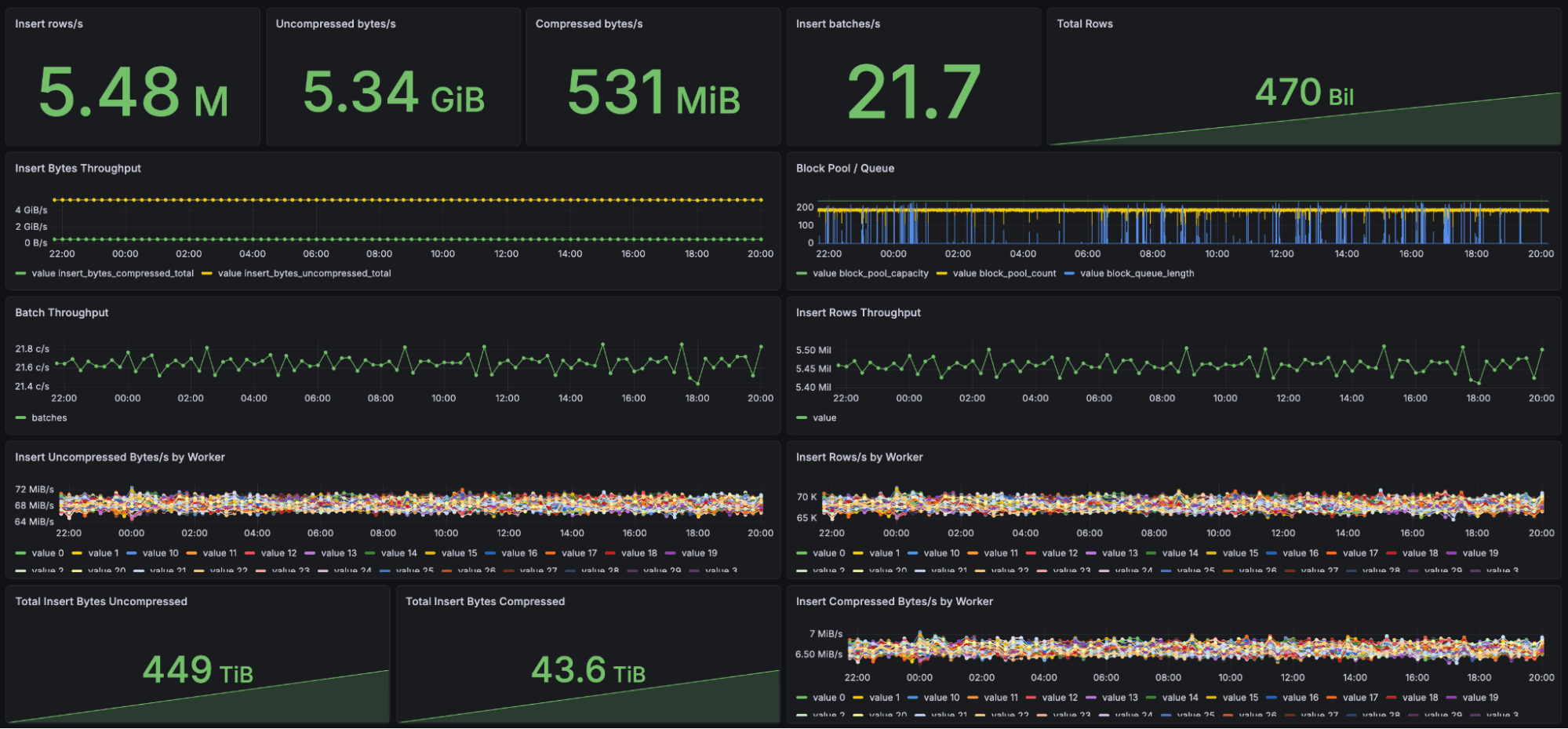
We use a Grafana dashboard to monitor the runs in real-time, and then the ClickHouse MCP with Claude to analyze and compare results. Some of our best insights have come from our MCP server analyzing the raw metrics data.
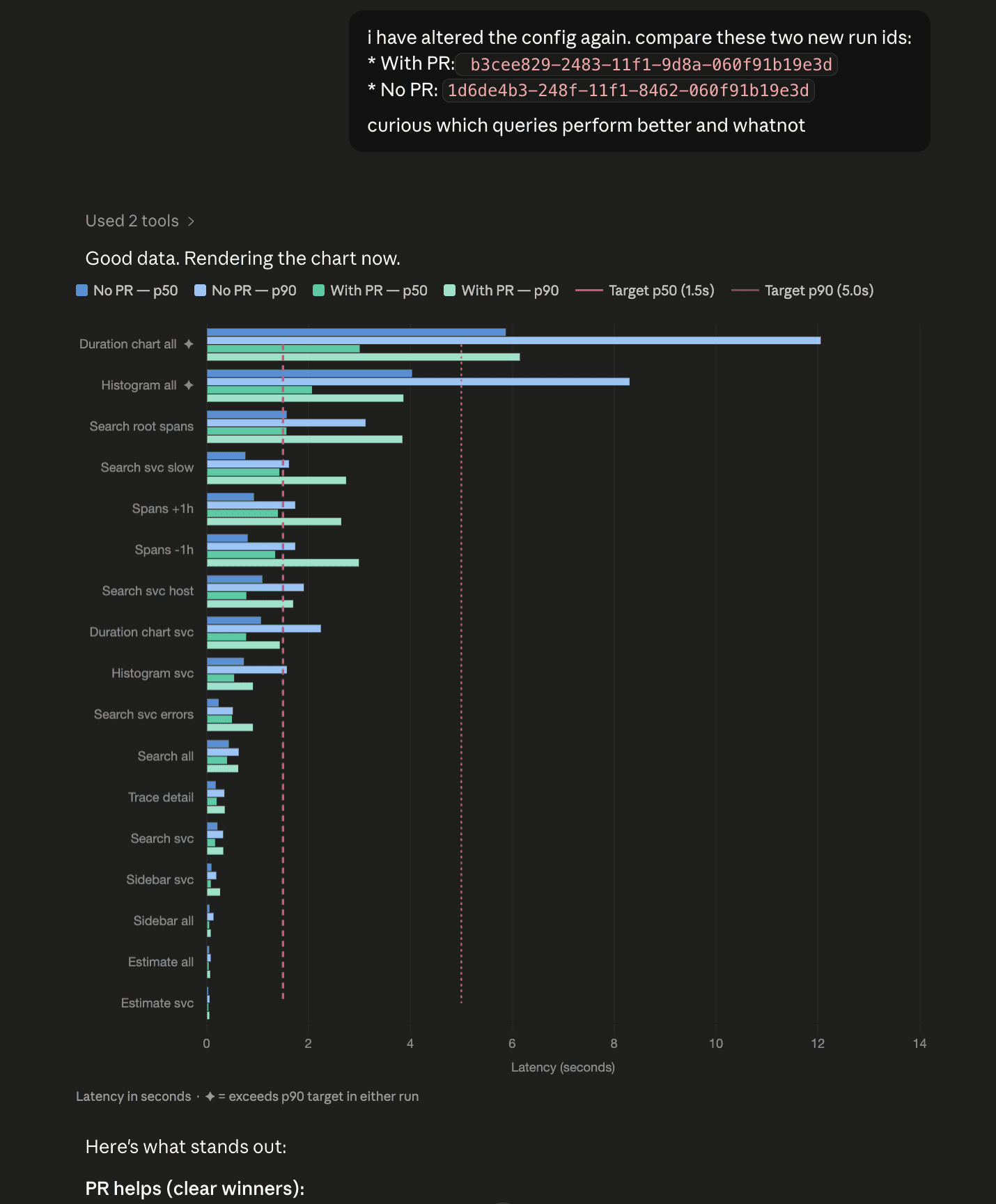
To evaluate schema changes and query workloads, we use Claude with the ClickHouse MCP server to compare benchmark runs and identify performance differences.
Metrics for the ClickHouse service are observed on a separate Grafana dashboard. ClickHouse already exposes an extensive set of internal metrics, along with a built-in dashboard that makes it easy to understand server behavior during a benchmark. Rather than duplicate that functionality, we rely on those existing metrics and simply reproduce the out-of-the-box dashboards to Grafana, keeping ClickCannon focused on workload generation and measurement. The program intentionally does not scrape server metrics itself, ensuring the act of monitoring does not influence the performance of the system being benchmarked.
Generated data
Releasing a tool and then asking people to source 2 TiB of data just to run it is quite inconvenient. We thus also added the ability to generate data using code-defined profiles. Unique values for service names and attribute map keys are weighted and sampled into realistic-appearing logs and traces. It won’t give the same realistic workloads and beautiful spans like real data that has been replayed, but it can be used to simulate edge case workloads and is often sufficient.
ClickHouse has excellent compression and benefits from repeated sequences of data. This can easily lead to misleading benchmark results if a small sample dataset is repeatedly replayed or looped without careful consideration of how the data is distributed. In some cases, synthetic data is actually the better option because it allows cardinality, value distributions, and event patterns to be controlled explicitly.
We exploit these generation capabilities ourselves to reproduce certain user workloads for which we don’t have sample data. For example, we are able to control the number of spans and keys for a trace waterfall, which helps us test index performance for needle-in-haystack queries (especially for map keys) and large (1000s of spans) traces. It also helps close the gap between synthetic benchmarks and real-world observations. The generated data can be intentionally less predictable, allowing us to reproduce the chaotic workloads, shifting cardinalities, and uneven access patterns commonly seen in some observability environments.
A generic benchmarking tool for ClickHouse
By the time we had finished benchmarking observability workloads, we realized we had built something much more general.
The same primitives that allowed us to replay telemetry data at controlled throughput, simulate concurrent users, execute realistic query workloads, and collect detailed performance metrics could be applied to almost any ClickHouse workload. Whether benchmarking real-time analytics, observability, or data warehousing, the core requirements remain similar.
Rather than keep the tool internal, we decided to open-source ClickCannon as a generic benchmarking tool for ClickHouse.
Conclusion
There are still, of course, gaps that other benchmarking tools have already solved, but ClickCannon is very well suited to our requirements and the kinds of workloads we care about. It gave us the flexibility to model realistic observability workloads, customize every stage of the pipeline, and experiment with ideas that would have been difficult to achieve with conventional tooling while still meeting our throughput targets. After solving the obscure memory bugs and learning how to balance the various test parameters, we were able to push incredible amounts of throughput from a single machine. If you’d like to try it yourself, ClickCannon is available at https://github.com/ClickHouse/ClickCannon.
In the next post in this series, we’ll look at how we used ClickCannon to benchmark and improve the default ClickStack schema. We’ll explore the methodology we use to measure changes, how we continuously refine our out-of-the-box configuration, and the performance gains we were able to achieve along the way. Most importantly, we’ll show how these benchmarks allowed us to build practical sizing recommendations for ClickStack, enabling users to specify an ingestion rate and retention period and receive a realistic estimate of the resources required to run their workload.
Get started today
Interested in seeing how ClickHouse works on your data? Get started with ClickHouse Cloud in minutes and receive $300 in free credits.
Sign up