50.5k
50.5k

TL;DR
ClickHouse now has a new full-text search built for analytics and observability, combining fast multi-token search with large-scale aggregation in a single engine.
That makes it a compelling alternative to Elasticsearch for log analytics.
This benchmark shows why.
The last remaining moat closes
For years, the choice was simple: Elasticsearch for text search, ClickHouse for analytics.
Now ClickHouse does both.
ClickHouse now includes a redesigned full-text search powered by inverted indexes. But unlike traditional search engines, matching documents are fed directly into the same vectorized analytical engine that already excels at filtering, aggregations, and large-scale scans.
That combination matters most when search is only the first step. In observability, especially log analytics, search is rarely just about finding text. Users search for an error pattern, then count it's occurrences, group it by service, drill into a more narrow time frame, or isolate affected hosts.
In other words: logs are analytical data that happen to contain text.
In this benchmark, we compare the OSS versions of ClickHouse and Elasticsearch on a realistic OpenTelemetry log workload across datasets up to 50 billion rows.
Teaser: Across all tested dataset scales, ClickHouse runs the full-text analytical workload 2-6x faster than Elasticsearch. ClickHouse also stores the OTel log dataset far more compactly than Elasticsearch.
The full benchmark is reproducible end to end: source data, schemas, queries, ingestion scripts, and measurements are published in our public GitHub repository.
We now describe the benchmark setup and methodology, then examine how both systems store OTel logs on disk before comparing storage footprint and query runtimes.
Get started today with Managed ClickStack
For teams that want this in production, Managed ClickStack brings fast log search and high-speed analytics together in one managed observability stack.
Try Managed ClickStackBenchmark setup
Before we get to the results, here is the complete benchmark setup: dataset, queries, hardware, and system configuration.
If you only care about outcomes, you can jump ahead to storage footprint and query runtimes.
Dataset
The benchmark uses a realistic OpenTelemetry log dataset generated by our OpenTelemetry demo application, producing structured service logs similar to those found in modern observability pipelines.
To make the benchmark fully reproducible, the source data is published as Parquet files in a public Amazon S3 bucket.
- Region: eu-west-3 (Europe — Paris)
- Public bucket: s3://public-pme/text_bench
- Direct URL: https://public-pme.s3.eu-west-3.amazonaws.com/text_bench/part_{000..009}.parquet
- File layout: each Parquet file contains 1 billion log rows, sorted by timestamp
- Tip: run EC2 benchmark instances in eu-west-3 to avoid cross-region ingest latency and egress charges
From this source data, we loaded identical benchmark datasets into both ClickHouse and Elasticsearch at three scales:
| Data set | Rows |
|---|---|
| Small | 1 billion |
| Medium | 10 billion |
| Large | 50 billion |
This lets us evaluate how both systems behave from single-billion-row deployments up to large-scale production observability workloads.
Queries
To evaluate realistic full-text analytical search performance, we use a suite of nine OpenTelemetry log queries, each built around single- or multi-token full-text search and often followed by filtering, counting, grouping, ranking, or time-based aggregation.
The queries are implemented for both systems using their native query languages (SQL for ClickHouse; Query DSL and ES|QL for Elasticsearch).
The suite is designed to reflect typical log-analysis workflows in tools like Kibana or ClickStack, where users search for an error message, then immediately filter, count, group, rank, or analyze it over time.
The query mix covers four common investigation patterns:
Q1–Q3: Incident drill-down and log retrieval
Locate matching log lines for given terms, apply filters, and inspect the relevant events.
| Query | ClickHouse SQL | Elasticsearch Query DSL | Elasticsearch ESQL |
|---|---|---|---|
| Q1 | Link | Link | Link |
| Q2 | Link | Link | Link |
| Q3 | Link | Link | Link |
Q4–Q5: Top-line error and match counts
Count matching records or compare match volumes across subsets.
Q6–Q7: Service-level breakdowns
Group matching logs by dimensions such as service name, host, or severity to identify where issues pile up.
Q8–Q9: Time-based trend analysis
Aggregate matches into time buckets to reveal spikes, regressions, or recurring patterns.
Together, these queries model typical tasks in log analysis from selective log retrieval to large-scale analytical search comprehensively.
Hardware and system versions
Both systems were benchmarked on identical, isolated single-node environments to ensure a fair apples-to-apples comparison. Each engine ran on its own dedicated EC2 instance with the same CPU, memory, and storage configuration.
| System | Instance | CPU / RAM | Storage | Version |
|---|---|---|---|---|
| ClickHouse | AWS EC2 m6i.8xlarge | 32 vCPUs / 128 GiB RAM | gp3 (16k IOPS, 1,000 MB/s) | OSS v26.3 |
| Elasticsearch | AWS EC2 m6i.8xlarge | 32 vCPUs / 128 GiB RAM | gp3 (16k IOPS, 1,000 MB/s) | OSS v9.3.2 |
System configuration
ClickHouse
ClickHouse used a standard MergeTree table with the OpenTelemetry log schema, including native data types for timestamps, numerics, strings, and maps. The table was ordered by:
(ServiceName, Timestamp)This sorting key improves locality for common log-analysis queries that filter by service and time range, while also improving compression.
A full-text index was created on the Body column.
Elasticsearch
Elasticsearch used an equivalent index mapping with the same logical schema and matching physical sort order:
index.sort = (ServiceName ASC, Timestamp ASC)Key mapping choices:
Bodymapped astextwith the standard analyzer (full-text searchable)- Structured string dimensions mapped as
keyword - Map-like attribute fields mapped as
flattened TraceFlagsandSeverityNumbermapped asbytecodec: best_compressionenabled to minimize on-disk footprint
This mirrors ClickHouse semantics as closely as Elasticsearch allows while following storage best practices.
To ensure stable single-node performance, we used these JVM and OS settings
- Heap fixed at
30 GiB(-Xms30g -Xmx30g) to retain CompressedOops bootstrap.memory_lock: truevm.max_map_count=262144
Shard layout
The benchmark used single-node storage-optimized layouts with no replicas in either system.
Per dataset, ClickHouse used a single shard (single table), and Elasticsearch used multiple shards, following best practices for optimal shard size (50GB per shard).
All Elasticsearch shards were force-merged into a single segment per shard before measurement (following best practices). This improves storage efficiency and does not prevent parallel search execution, because Lucene can still partition a single segment logically at query time.
Data loading
ClickHouse loaded the Parquet files directly using native Parquet ingestion.
Elasticsearch does not support reading Parquet natively, so data was streamed from Parquet files, converted to NDJSON, and ingested through the Bulk API.
A quick note on ingestion: this post focuses on analytical log search performance, so we did not run a full, systematic ingest benchmark. However, during dataset preparation, loading the 50B OTel log records into the single-node ClickHouse instance took under 4 hours out of the box. For the comparable single-node Elasticsearch setup, we had to tune the ingest pipeline and settings to achieve acceptable throughput, and even then the same load took multiple days (~5 days).
Ingestion throughput is a critical production concern for observability systems, so we may cover the OTel log ingest side in a dedicated follow-up benchmark.
With the data loaded into both systems, we now turn to the methodology used to compare query performance fairly.
Methodology
To reflect real observability workflows, we benchmarked both systems under cold and hot conditions.
Cold runs simulate first-touch queries over previously unseen time ranges, where the required log data must be loaded from disk.
Hot runs simulate repeated execution once the same data is already cached.
Caches considered in this benchmark
Three cache layers can influence query latency:
-
Linux page cache
The operating system’s file cache, which avoids re-reading data from disk. -
Filter-evaluation caches
Engine-level caches that remember prior predicate/filter results to speed up repeated filtering work.- ClickHouse: query condition cache
- Elasticsearch: node query cache
-
Full query-result caches
Caches that store complete query responses for identical repeated queries.- ClickHouse: query cache
- Elasticsearch: shard request cache
To focus on core execution performance, we disabled full query-result caches during benchmarking. Otherwise, we would mostly be measuring the speed of repeated in-memory result lookups, which is not very interesting here. We kept filter-evaluation caches enabled, however, because they are part of the engines’ normal execution path.
Measuring cold runs
For a cold run, we fully shut down both systems, dropped the Linux page cache, restarted the servers, and only then executed a query.
This means:
- no data pages were cached in memory
- the engine had to load required data from disk
- runtime reflects storage efficiency, pruning ability, and raw execution speed
Each query in the OTel log query suite was executed under these cold-start conditions, and the reported cold totals are the sum of all per-query runtimes.
Measuring hot runs
Hot runs kept both systems running between executions without dropping the Linux page cache.
For each query:
- the same query was executed three times in a row
- full query-result caches remained disabled
- filter-evaluation caches remained enabled
- the fastest of the three runs was recorded as the hot result
This isolates repeated-query performance without allowing full result reuse.
Each query in the OTel log query suite was measured under these conditions, and the reported hot totals are the sum of all per-query runtimes.
Elasticsearch Query DSL vs ES|QL
Elasticsearch results shown in the main charts use Query DSL. We also implemented the full suite in ES|QL, but observed consistently slower runtimes in our tests, so Query DSL serves as the stronger Elasticsearch baseline throughout the main benchmark.
The public benchmark repository includes the corresponding cold and hot per-query comparison charts for Query DSL vs ES|QL.
With the benchmark methodology established, we next examine how both systems store OTel logs on disk. That on-disk layout is essential context for the results that follow.
What about OpenSearch?
This benchmark focuses on Elasticsearch, not OpenSearch. We chose Elasticsearch as the baseline because it remains the best-known reference point for full-text log search. OpenSearch is closely related and often chosen by teams looking for an Elasticsearch-compatible, AWS-native, or lower-cost option.
We did not run the full benchmark suite against OpenSearch for this post, so the results below should be read strictly as ClickHouse vs. Elasticsearch. But for teams comparing OpenSearch vs. ClickHouse for log analytics, the core architectural question is the same: search is usually only the first step. Once matching log rows need to be filtered, counted, grouped by service, or aggregated over time, the workload becomes analytical, and that is where ClickHouse is designed to pull ahead.
How OTel logs are stored on disk
To better understand the storage footprint results in the next section, we first look at how Elasticsearch and ClickHouse store and compress ingested OTel logs on disk. The following diagram provides a simplified sketch.
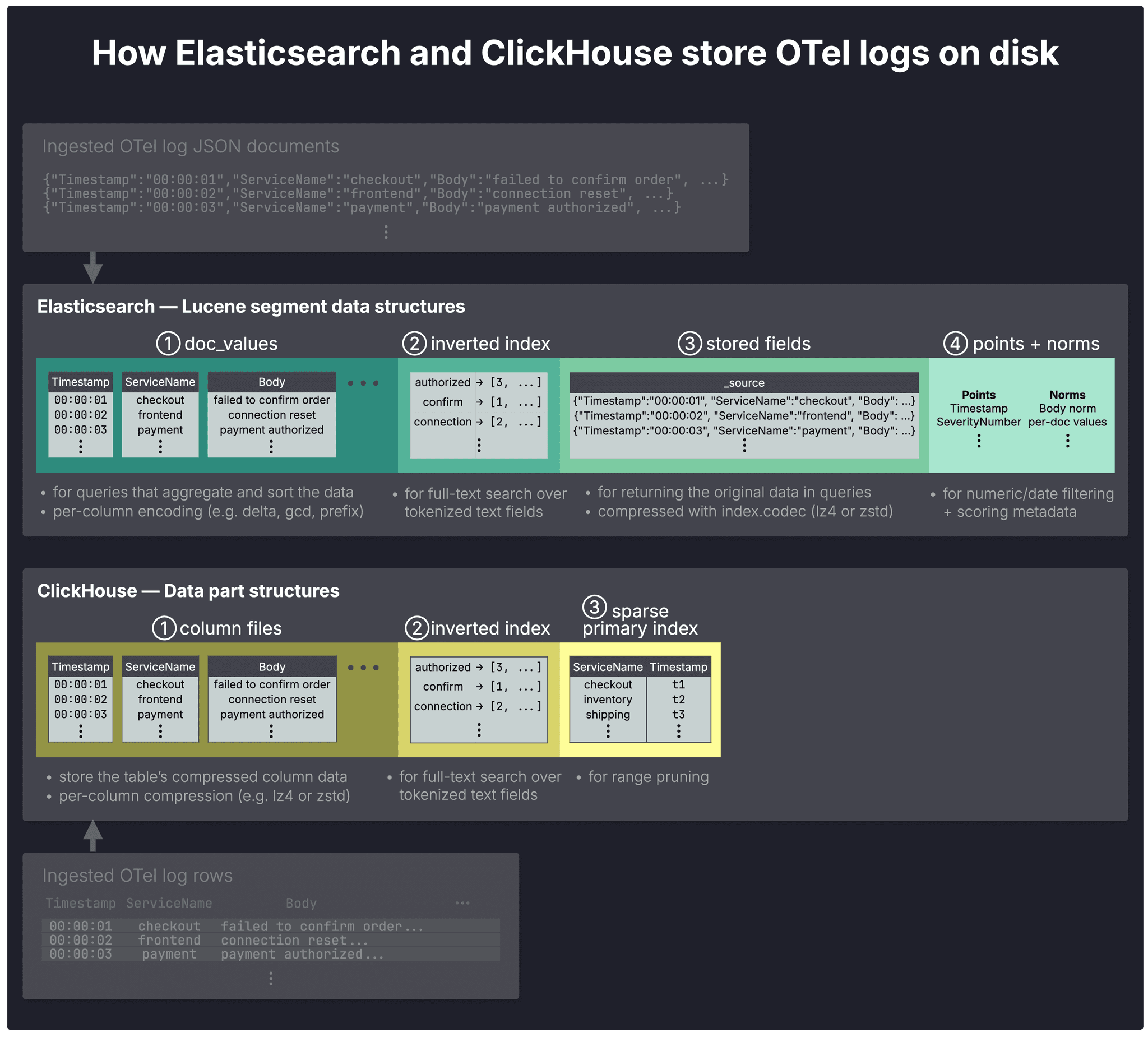
In both systems, ingested OTel log data is ultimately written into immutable on-disk units:
- Lucene segments in Elasticsearch and
- data parts in ClickHouse
These units logically belong to shards (not shown in the diagram) and are continuously merged in the background into larger ones. Segments typically grow to about 5 GB and parts to about 150 GB, though larger forced merges are possible in both systems.
In Elasticsearch, shards in turn make up indexes, as described here; ClickHouse shards are described here.
Within those on-disk units, both systems organize data into specialized structures that serve four main purposes: fast aggregations, full-text search, returning original documents, and pruning irrelevant data during query execution.
Columnar storage for fast aggregations
Both systems use ① columnar storage: aggregation queries read only the referenced columns, scan fewer bytes due to per-column compression, and execute vectorized (SIMD) operations on contiguous data.
In Elasticsearch doc_values each column is automatically encoded individually with specialized codecs such as delta and gcd, depending on data type and cardinality. However, no general-purpose compression algorithm such as lz4 or zstd is applied.
In ClickHouse, compression codec(s) are also applied per column file. ClickHouse supports general-purpose (e.g. lz4 and zstd), specialized (e.g. delta and gcd), and encryption codecs (e.g. AES_128), which can also be chained per column.
Inverted indexes for full-text search
Both systems use an ② inverted index as the basic data structure for full-text search.
Stored fields and _source
In Elasticsearch ③ stored fields serve as a document store for returning original field values in query responses. By default, they also store _source, which contains the original ingested JSON documents. Stored fields are compressed using the algorithm defined by the index.codec setting: lz4 by default, or zstd for higher compression ratios at the cost of slower performance.
Why _source matters for logs
For log analytics, returning the original ingested document is often essential. In Elasticsearch OSS, that makes _source hard to avoid in practice; Enterprise tiers can instead use synthetic _source.
In ClickHouse, there is no separate equivalent structure: original rows are reconstructed directly from the values stored in the column files.
Sparse indexing for pruning
ClickHouse uses sparse indexing: because OTel log records are stored on disk in sorted order, the engine can group them into blocks, record value ranges for each block in a ③ sparse primary index, and skip blocks that fall entirely outside the requested range.
Lucene has a related sparse-indexing capability for sorted data, but Elasticsearch does not expose it as a separate storage category in the _disk_usage output used for this comparison.
Also note that in Elasticsearch the inverted index is not used only for full-text search. For all string fields except Body, we used the keyword type, while Timestamp uses a date type and numeric fields use numeric types. All these types by default also populate the inverted index for exact-match filtering, with values indexed as-is and without analysis. This means filters on these fields can be resolved efficiently through the inverted index, making it the closest analogue to ClickHouse’s sparse primary index in this comparison.
Points and norms for filtering and scoring
In Elasticsearch, ④ points support efficient filtering and range queries on numeric and date fields, while norms store per-document scoring factors for text relevance.
ClickHouse does not use a separate points structure: numeric and date filtering is handled through columnar scans plus sparse primary and skipping indexes. ClickHouse also does not currently score full-text search results, which is not relevant for our logging use case.
Now that the storage building blocks are clear, we can turn to their combined effect on disk usage.
OTel log storage footprint
The storage structures above explain where bytes go. To compare overall footprint fairly, we first aligned the major variables that most affect disk usage:
-
Same on-disk order: Data is sorted on disk by the same keys — (ServiceName, Timestamp) in ClickHouse via the sorting key, and in Elasticsearch via index sorting on the same fields.
-
Same compression algorithm: The main structures that store original log content use the same compression algorithm. ZSTD for ClickHouse column files and ZSTD for Elasticsearch stored fields.
-
Same full-text inverted-index scope: Both systems build a full-text inverted index only on the Body field. In Elasticsearch, all other string fields are mapped as keyword, meaning they support exact-match filtering but are not analyzed for full-text search.
Finally, as mentioned earlier, the comparison uses a storage-optimized single-node setup: no replicas in either system, one shard in ClickHouse, and multiple shards in Elasticsearch, following best practices for optimal shard size (50GB per shard), and force-merged to one segment per shard.
With that in mind, the chart below shows the OTel log storage footprint in both systems for 1B, 10B, and 50B stored OTel log records.
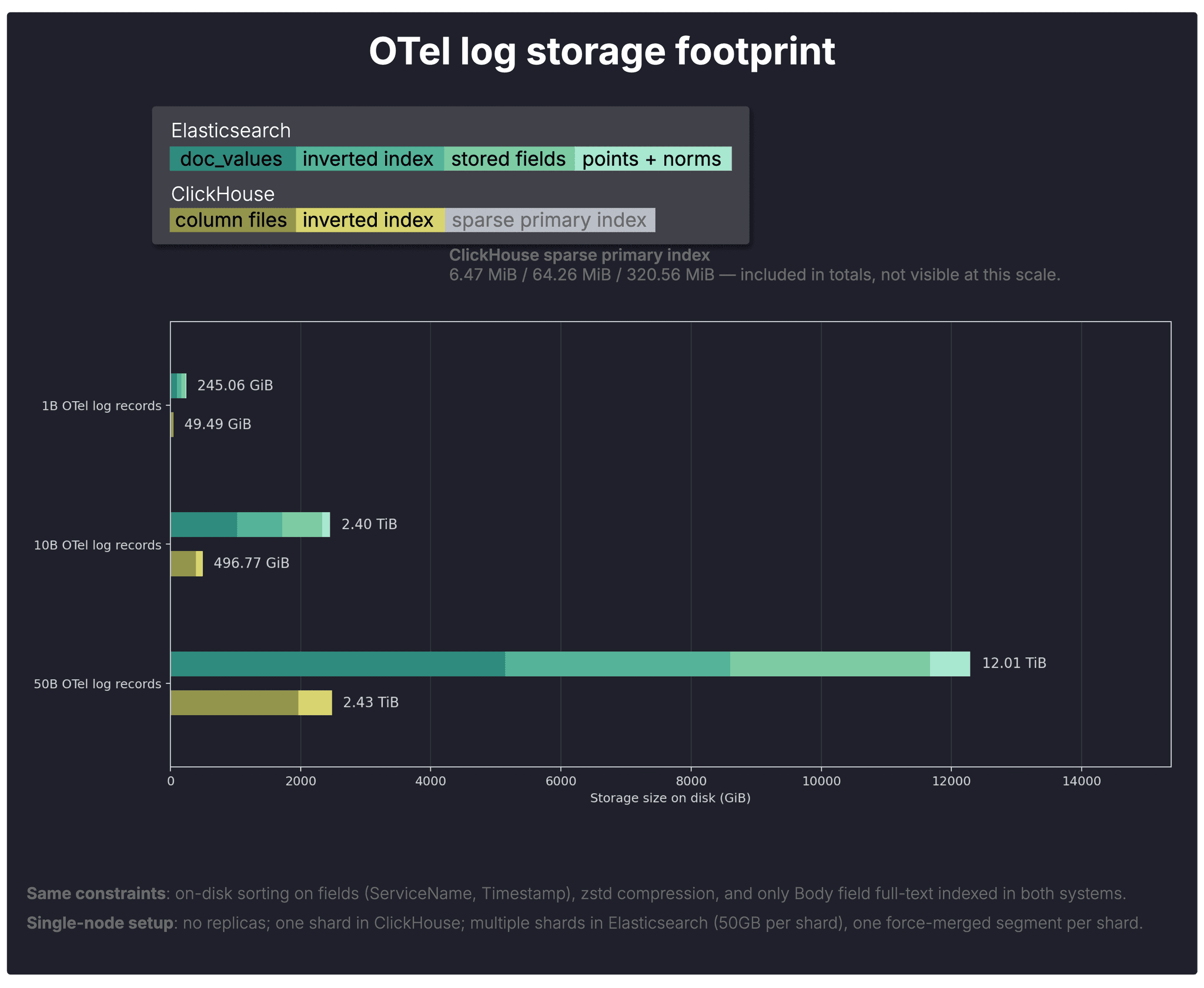
To make the totals easier to interpret, the chart breaks them down into the individual on-disk data structures introduced in the previous section. The legend maps each colored segment to its corresponding structure in Elasticsearch and ClickHouse, while the underlying sizes come from Elasticsearch’s _disk_usage API and ClickHouse’s parts system table.
Note: The ClickHouse sparse primary index is included in the totals, but not visible at this scale (6.47 MiB / 64.26 MiB / 320.56 MiB).
Overall storage footprint
Overall, ClickHouse stores the same OTel log data in roughly one-fifth the space required by Elasticsearch.
This is consistent across all three scales.
- 1B: ClickHouse 49.49 GiB vs Elasticsearch 245.06 GiB → 4.95× less in ClickHouse
- 10B: ClickHouse 496.84 GiB vs Elasticsearch 2.40 TiB → 4.95× less in ClickHouse
- 50B: ClickHouse 2.43 TiB vs Elasticsearch 12.01 TiB → 4.95× less in ClickHouse
Columnar storage footprint
The main column-oriented storage structures already differ sharply. Elasticsearch’s doc_values alone take substantially more space than ClickHouse’s column files.
- 1B: ClickHouse 39.33 GiB vs Elasticsearch 102.49 GiB → 2.61× less in ClickHouse
- 10B: ClickHouse 393.54 GiB vs Elasticsearch 1.00 TiB → 2.61× less in ClickHouse
- 50B: ClickHouse 1.92 TiB vs Elasticsearch 5.02 TiB → 2.61× less in ClickHouse
Notably, ClickHouse includes every OTel log field in its column files, whereas Body, the largest field in the dataset, is excluded from Elasticsearch’s doc_values because it is mapped as text and therefore populates only the inverted index.
Compression efficiency of ClickHouse
This already hints at the main reason for the overall storage gap: ClickHouse compresses its column files extremely well.
- 1B: uncompressed 642.42 GiB → compressed 39.33 GiB → 16.33× compression
- 10B: uncompressed 6.26 TiB → compressed 393.54 GiB → 16.29× compression
- 50B: uncompressed 31.31 TiB → compressed 1.92 TiB → 16.29× compression
Note that higher ratios are possible when optimizing data types and on-disk ordering specifically for compression. In an nginx log example, ClickHouse reaches up to 178× compression.
Storage breakdown by data structure
The table below summarizes the per-structure on-disk footprint across both systems and all three scales.
| Scale | System | Total on disk | Columnar store | Inverted index | Stored fields | Points + norms | Sparse primary index |
|---|---|---|---|---|---|---|---|
| 1B | Elasticsearch | 245.06 GiB | 102.49 GiB (doc_values) | 68.37 GiB | 61.54 GiB | 12.36 GiB | — |
| 1B | ClickHouse | 49.49 GiB | 39.33 GiB | 10.15 GiB | — | — | 6.47 MiB |
| 10B | Elasticsearch | 2.40 TiB | 1.00 TiB (doc_values) | 690.12 GiB | 616.18 GiB | 123.62 GiB | — |
| 10B | ClickHouse | 496.84 GiB | 393.54 GiB | 103.24 GiB | — | — | 64.26 MiB |
| 50B | Elasticsearch | 12.01 TiB | 5.02 TiB (doc_values) | 3.37 TiB | 3.00 TiB | 617.55 GiB | — |
| 50B | ClickHouse | 2.43 TiB | 1.92 TiB | 515.78 GiB | — | — | 320.56 MiB |
Why Elasticsearch’s storage footprint is larger
Elasticsearch’s larger index partly reflects broader search features such as phrase queries, fuzzy matching, wildcard search, and ranking-related metadata, which typical OTel log analysis queries like those in this benchmark generally do not rely on.
To test how much that matters for storage consumption here, we also ran reduced-feature Elasticsearch variants.
A moderate variant that disabled norms (norms parameter set to false) and reduced the main Body text field to document-only postings (index_options set to docs) lowered total footprint by only about 2%.
Larger storage reductions (~20% smaller on disk, still 4 times larger than ClickHouse) required much more aggressive disabling of indexing (index parameter set to false) on additional fields, producing a configuration that is less representative of typical Elasticsearch log deployments (for example, filtering would become much slower on most OTel fields beyond the small subset referenced by our query suite).
In both cases, the total query runtime changed only marginally, additional charts for hot and cold runtimes for both Query DSL and ESQL are in our github repository here.
More than a storage win
Smaller footprint gives ClickHouse several advantages over Elasticsearch for large-scale log analytics:
- Lower storage cost. Storing the same OTel log data in much less space directly reduces the cost of keeping large log volumes online.
- Lower query I/O. Fewer on-disk bytes means less data to read during scans, filtering, and aggregation, which partly helps explain the runtime gains shown in the next section.
- More ingest headroom. Smaller on-disk structures reduce pressure on the storage subsystem, giving more headroom for the sustained write throughput typical of modern observability pipelines, which is consistent with the ingestion anecdote above, where the 50B-row load completed far faster in ClickHouse.
The effect is amplified further by the fact that ClickHouse OSS supports S3-backed storage for its native MergeTree engine out of the box, so keeping large volumes of raw logs online becomes materially more economical.
OTel log query runtimes
We first look at the cold-run totals, then drill into the per-query breakdown to explain them. Finally, we examine hot runs to see how the picture changes once data is cached.
Total cold runtime
The chart below shows the total cold runtime across the full OTel log query suite on datasets with 1B, 10B, and 50B stored records.
As a reminder, the suite reflects typical log-analysis workloads in tools like Kibana or ClickStack, where full-text search is combined with aggregations and filtering to investigate incidents, errors, and trends.
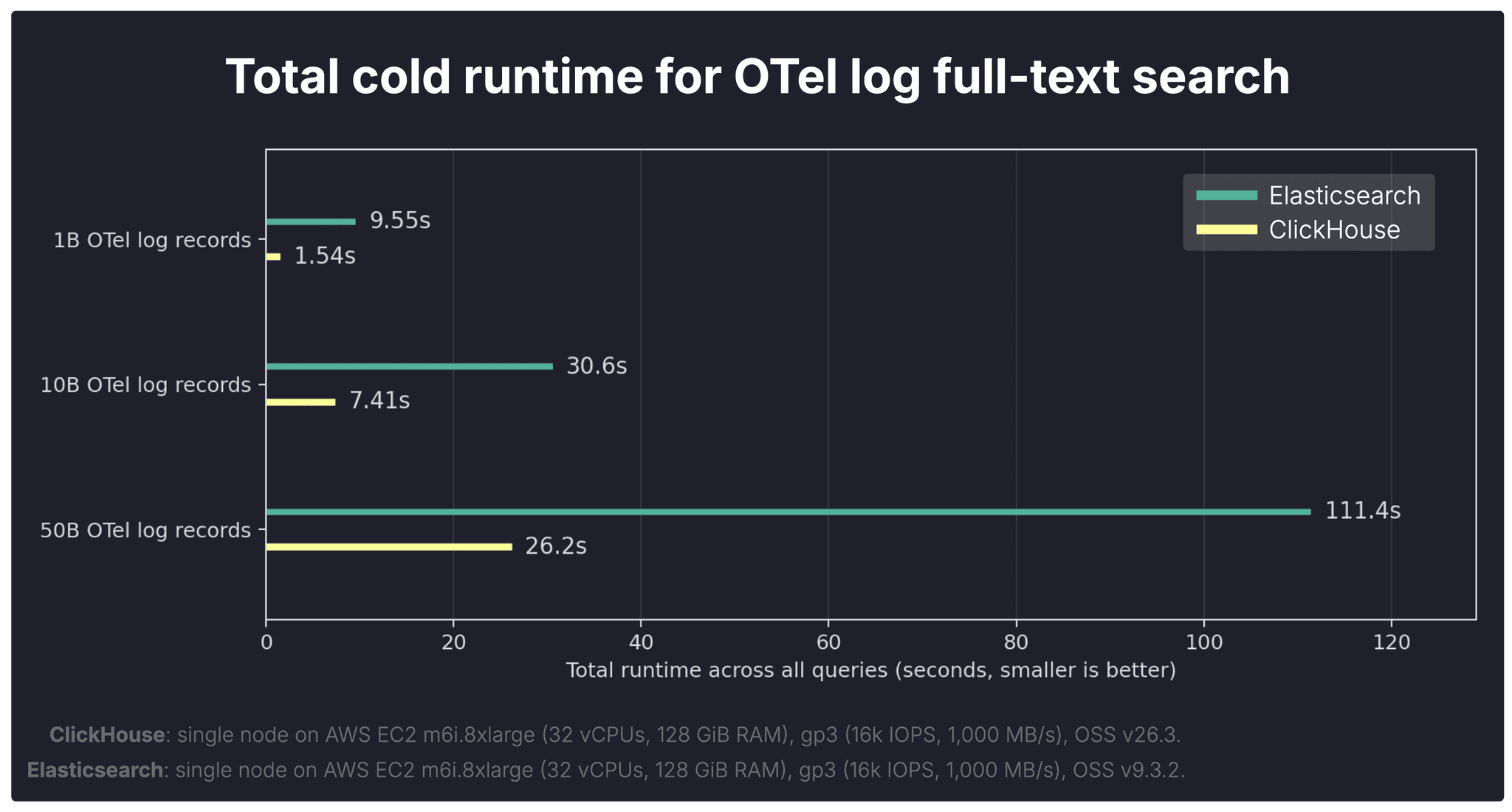
As mentioned earlier, for a cold run, we fully shut down both systems, dropped the Linux page cache, started the systems again, and only then executed the query. This reflects runtime when no data is cached and the engine must load the required data from disk.
Each query in the OTel log query suite was executed under these cold-start conditions, and the chart above sums the resulting per-query runtimes.
Cold queries are not an edge case in observability.
Engineers often investigate newly emerging incidents, jump to previously unseen time ranges, or search older retained logs. In those situations, warm caches cannot be assumed.
Overall, ClickHouse completes the full cold query suite substantially faster than Elasticsearch across all three scales.
- 1B: ClickHouse 1.54s vs Elasticsearch 9.55s → 6.20× faster in ClickHouse
- 10B: ClickHouse 7.41s vs Elasticsearch 30.6s → 4.13× faster in ClickHouse
- 50B: ClickHouse 26.2s vs Elasticsearch 111.4s → 4.25× faster in ClickHouse
The next question is where that lead comes from, so we break the totals down by query shape.
Cold runtime by query: where ClickHouse pulls ahead most
The per-query breakdown shows that ClickHouse’s largest cold-run gains appear on queries that combine full-text filtering with heavier downstream aggregation work.
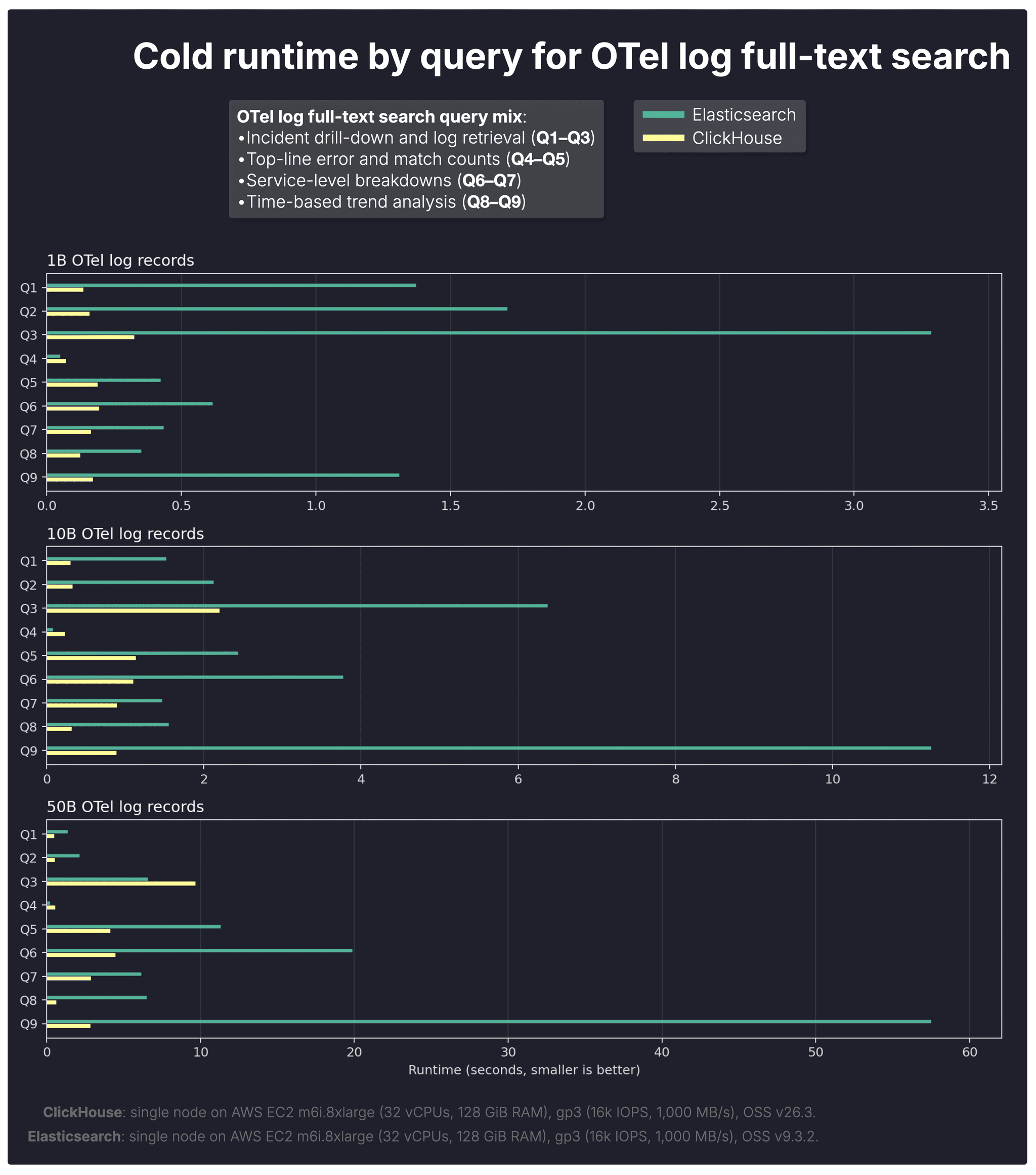
Overall, the more the workload shifts from pure retrieval toward search + analytics, as it does in typical log analytics queries, the stronger ClickHouse’s advantage becomes.
-
Q8–Q9 trend-analysis queries show the widest gaps at larger scales, where many matching rows must be grouped into time buckets and counted.
-
Q6–Q7 service breakdown queries also widen materially with scale, reflecting multi-group aggregation over large result sets.
-
Q1–Q3 incident drill-down queries stay comparatively closer, as they are more retrieval-oriented and involve less post-filter aggregation.
That aligns with our earlier benchmarks (on aggregations, and on JSON analytics), where ClickHouse significantly outperformed Elasticsearch on large-scale GROUP BY and count workloads. Those same aggregation strengths remain visible here once text matches are found.
Cold runs highlight storage efficiency and raw execution speed. But observability workloads also involve repeated queries over warm data, so we next compare hot runtimes.
Total hot runtime
The chart below shows the total hot runtime across the full OTel log query suite on datasets with 1B, 10B, and 50B stored records.
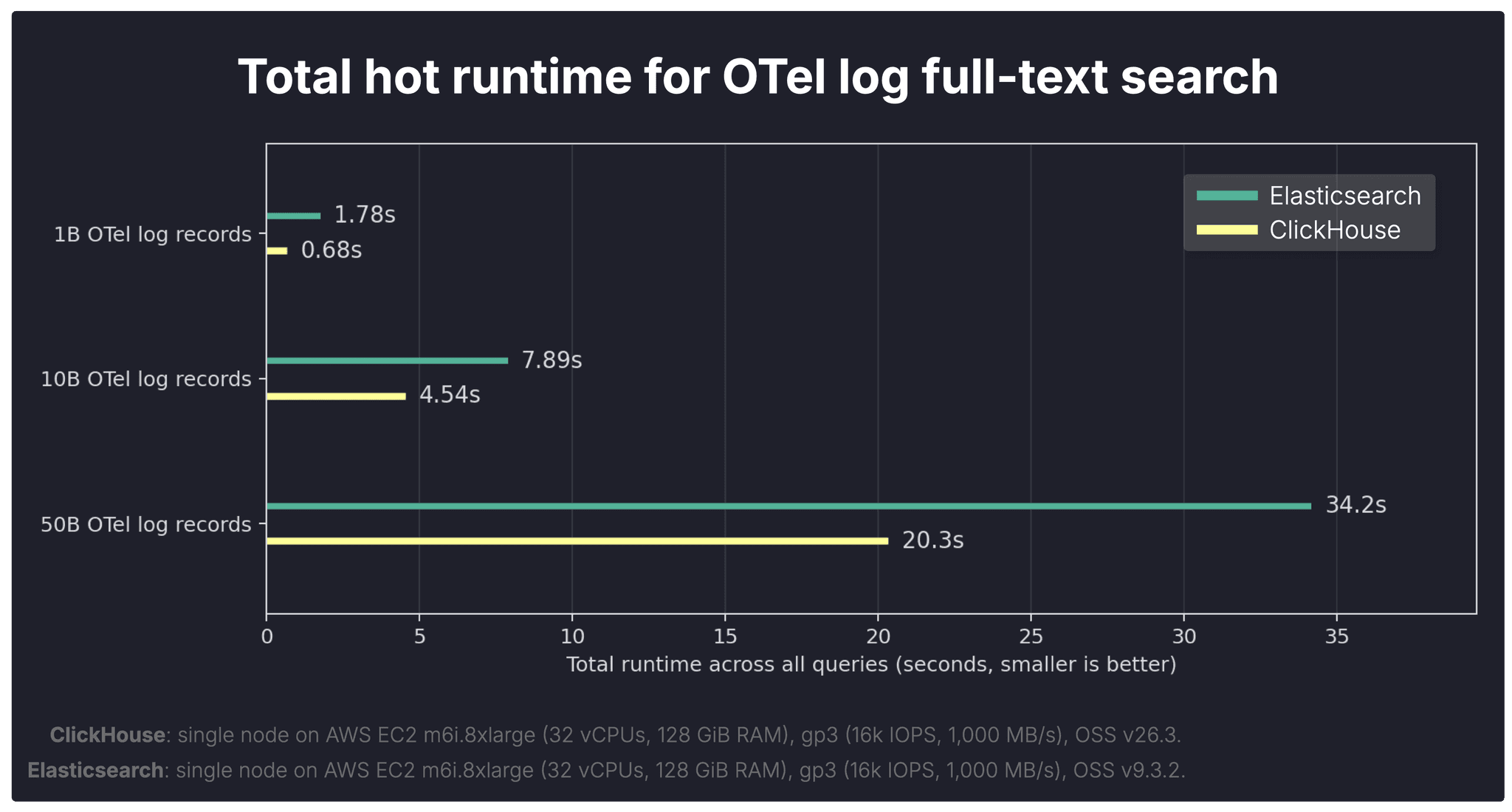
As a reminder, unlike the cold runs above, hot runs keep the systems running between executions, so the Linux page cache remains available. For each query, we execute the same query three times in a row, with query-result caches disabled in both systems, but with their equivalent filter-evaluation caches left enabled. We then take the fastest of the three runs as the hot result.
Each query in the OTel log query suite was measured under these conditions, and the chart above sums the resulting per-query runtimes.
Hot queries matter too in observability.
Dashboards auto-refresh, investigations rerun similar filters, and interactive drill-down often revisits the same working set.
With warm caches, the gap narrows, but ClickHouse still completes the full query suite faster than Elasticsearch at every scale.
- 1B: ClickHouse 0.68s vs Elasticsearch 1.78s → 2.62× faster in ClickHouse
- 10B: ClickHouse 4.54s vs Elasticsearch 7.89s → 1.74× faster in ClickHouse
- 50B: ClickHouse 20.3s vs Elasticsearch 34.2s → 1.69× faster in ClickHouse
To understand why, we again break results down by query type.
Hot runtime by query: caching narrows the gap, but not uniformly
With warm caches, some query gaps narrow noticeably, but the per-query breakdown shows that caching does not eliminate the underlying execution-model differences between the two systems.
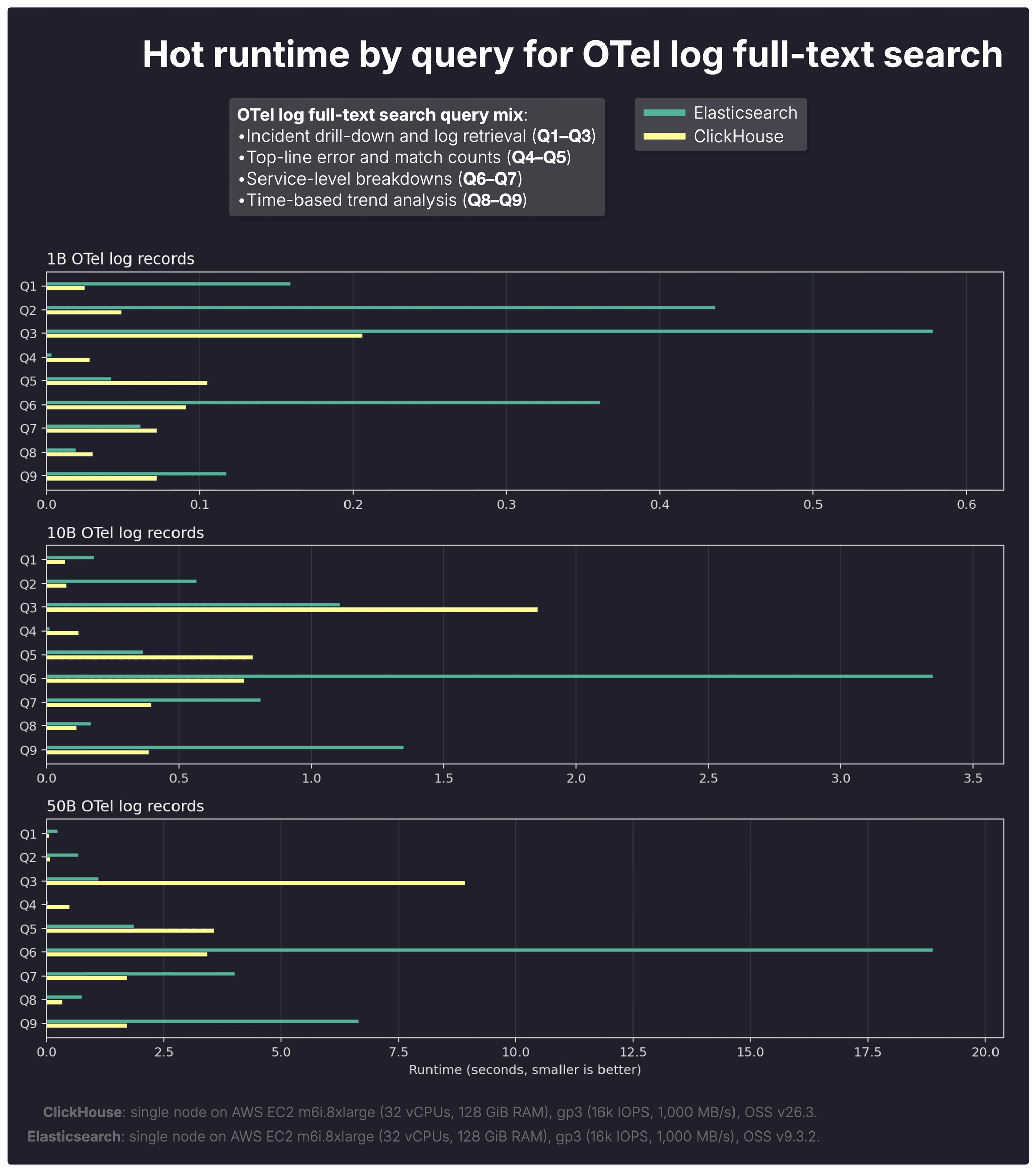
Overall, caching narrows the gap for retrieval-heavy queries, but not for search-plus-analytics workloads, where downstream aggregation still dominates.
- Q1–Q3 incident drill-down queries move closer under hot conditions, which is consistent with both systems benefiting from cached predicate evaluation.
That said, the equivalent caches are not identical in granularity: Elasticsearch caches which documents matched a filter before, while ClickHouse caches filter results at the level of granules (row blocks). ClickHouse can therefore skip whole granules quickly, but still needs to identify the concrete matching rows within the surviving granules.
- Q6–Q9 service breakdown and trend-analysis queries still show clear ClickHouse advantages, especially at larger scales, because these queries continue to spend substantial time in downstream aggregation after matching rows have been identified.
At larger scales, Elasticsearch’s hot-run advantage from its finer-grained filter cache also appears to weaken. A plausible explanation is increasing cache pressure: with more data and more distinct working sets, cached document-level filter results may be retained less effectively, reducing the practical benefit of that finer granularity.
The OSS comparison is complete. Now, a quick look at how ClickHouse Cloud simplifies scaling for the same workload.
Bonus: Scaling the same workload in ClickHouse Cloud
In many analytical workloads, techniques such as materialized views can pre-aggregate data and reduce how much data must be scanned by queries.
Log analytics is different.
During incident response, engineers often need the original raw events: search for an error message, inspect surrounding logs, isolate affected hosts, break results down by service, and pivot repeatedly with new filters. That makes aggressive pre-aggregation far less useful than in traditional BI workloads.
When raw data must still be queried, the practical way to go faster is simple: add more compute.
In ClickHouse Cloud, compute is separated from storage, so additional replica nodes (replicating compute, not data) can join instantly without reshuffling data first. All nodes read from the same shared object storage.
Parallel replicas make query execution scale horizontally by distributing data reads across the replica node fleet.
As more nodes participate, the same query can fan out across more machines, reducing runtime. The chart below shows the effect on the 50B-row query suite.
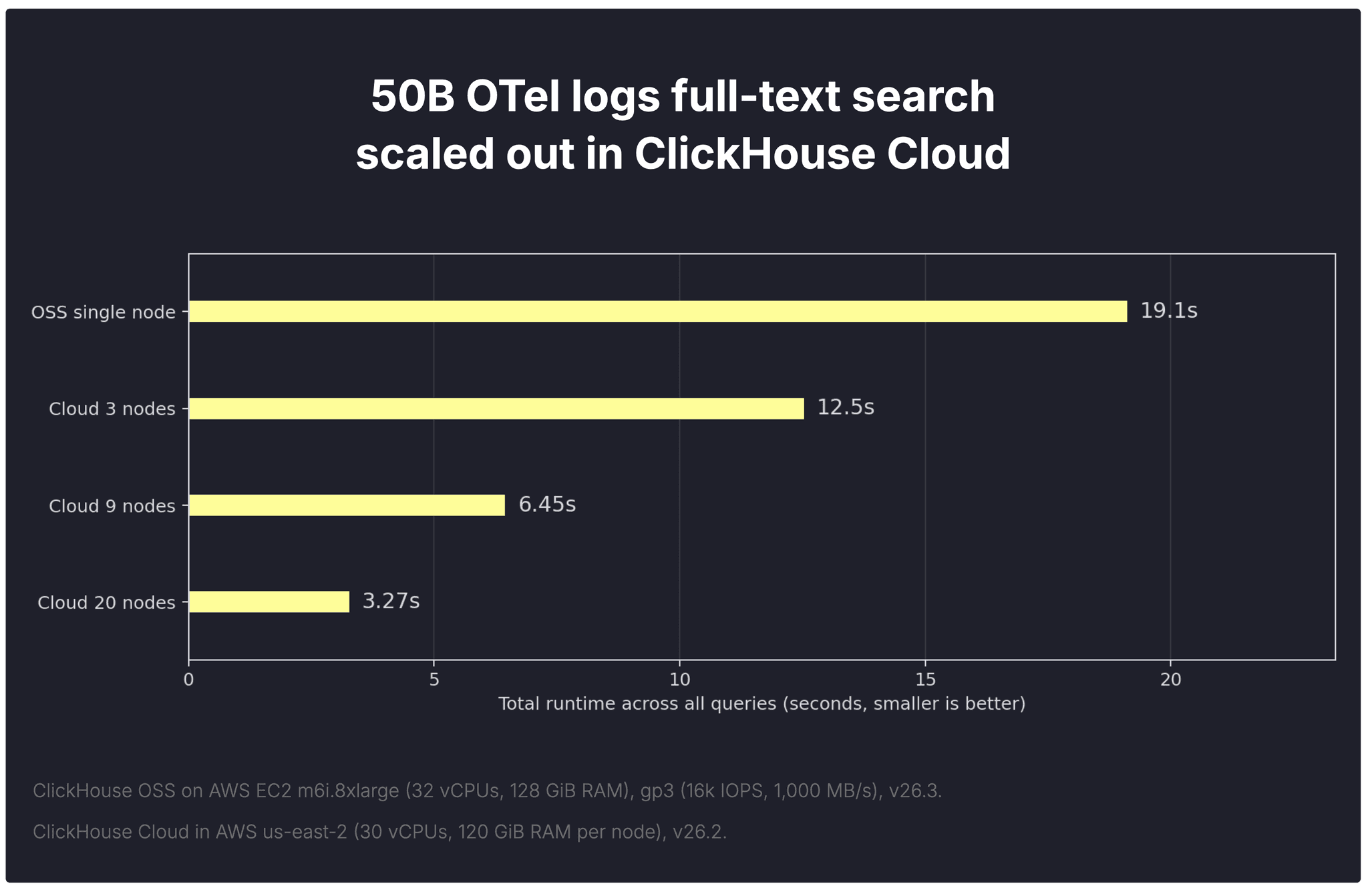
Compared with the OSS single-node baseline (19.1s), the same workload drops to 12.5s on 3 nodes, 6.45s on 9 nodes, and 3.27s on 20 nodes. The practical effect is that log search and analysis feel much more interactive, whether that is a human exploring ClickStack dashboards or an agent querying logs in a loop.
This becomes even more powerful with index sharding. As the storage section showed, the full-text index on the 50B OTel dataset is already about half a TiB (515.78 GiB). Index sharding spreads the analysis of that index across the replica fleet, mirroring how parallel replicas already spread data reads.
On a 50B-row table, ClickHouse measured a 5.8× speedup for full-text index analysis.
Cloud scale-out is a bonus. Even without it, the single-node OSS benchmark already tells a clear story.
The bigger picture
This benchmark completes the picture: first, ClickHouse beat Elasticsearch on aggregations, then on JSON analytics, and now on full-text analytical search.
ClickHouse now does search and still keeps its world-class aggregation engine
ClickHouse full-text search is purpose-built for analytics and observability, enabling fast multi-token search with aggregations over billions or trillions of rows.
This benchmark confirms it: across a realistic OpenTelemetry log workload of up to 50 billion rows, ClickHouse consistently delivered the stronger overall result.
-
Far smaller storage footprint — roughly 5× less disk space, translating into lower storage cost, lower query I/O, and more room for sustained ingest.
-
Much faster cold queries — 4× to 6× faster when data had to be read from disk, which matters because cold queries are routine in observability.
-
Faster hot queries — still roughly 1.7× to 2.6× faster with warm caches, keeping dashboards, drill-down, and repeated analysis responsive.
The widest gaps appeared on workloads that combined text search with grouping, counting, and time-series breakdowns.
In observability, search is rarely the end of the query.
That is where ClickHouse pulls away.
For teams that want this in production, Managed ClickStack brings fast log search and high-speed analytics together in one managed observability stack.
Try Managed ClickStackObservability is one powerful use case. For a more playful example, try GitTrends, our interactive ClickHouse full-text search demo built on 10B+ GitHub events.