50.5k
50.5k
TLDR;
- Full-text Search is now GA in ClickHouse, delivering native inverted indexes for fast, scalable token-based search across large text datasets.
- Dramatic performance gains: up to 7–10x faster queries compared to traditional approaches for cold queries and even more for hot.
- Purpose-built for analytics and observability, enabling fast multi-token search with aggregation over billions or trillions of rows.
- More powerful than Bloom filters for text workloads, with deterministic results, better scalability, and significantly faster query performance at scale.
"With ClickHouse Full-text Search, we are seeing a 96% reduction in the number of granules scanned compared to queries without the index. For our benchmark workload, query latency improved consistently by almost 7x."
Introduction
We're pleased to announce that Full-text Search in ClickHouse is now generally available and ready for production use.
This milestone marks the culmination of a journey to bring powerful, native text search capabilities to ClickHouse. Since its initial conception, the implementation has gone through multiple iterations, each refining performance, usability, and integration with the broader ClickHouse architecture.
Most recently, our focus has been on ensuring strong performance on object storage, enabling ClickHouse Cloud users to benefit from the same speed and efficiency that open source users have come to expect. Achieving this required a series of targeted optimizations, which we will explore in detail in a follow up post alongside comprehensive benchmark results.
In this announcement, we will introduce the core benefits of Full-text Search, provide guidance on when to use it, and demonstrate how it behaves in real world scenarios.
What is Full-text Search in ClickHouse?
Full-text Search in ClickHouse is implemented as an inverted index, similar to the approach used in search technologies such as Lucene. At a high level, a text index stores a mapping from tokens to the row numbers that contain each token. This structure allows ClickHouse to quickly identify which rows may match a search condition, itself consisting of tokens, without scanning every value in a column. Fundamentally, these indices accelerate text based filtering.
Tokens are generated through a process called tokenization. Prior to tokenization, pre-processing functions can be applied to string values to modify the string values and in turn change the resulting search behavior e.g. lowercasing for case insensitive search. As an example consider the following:
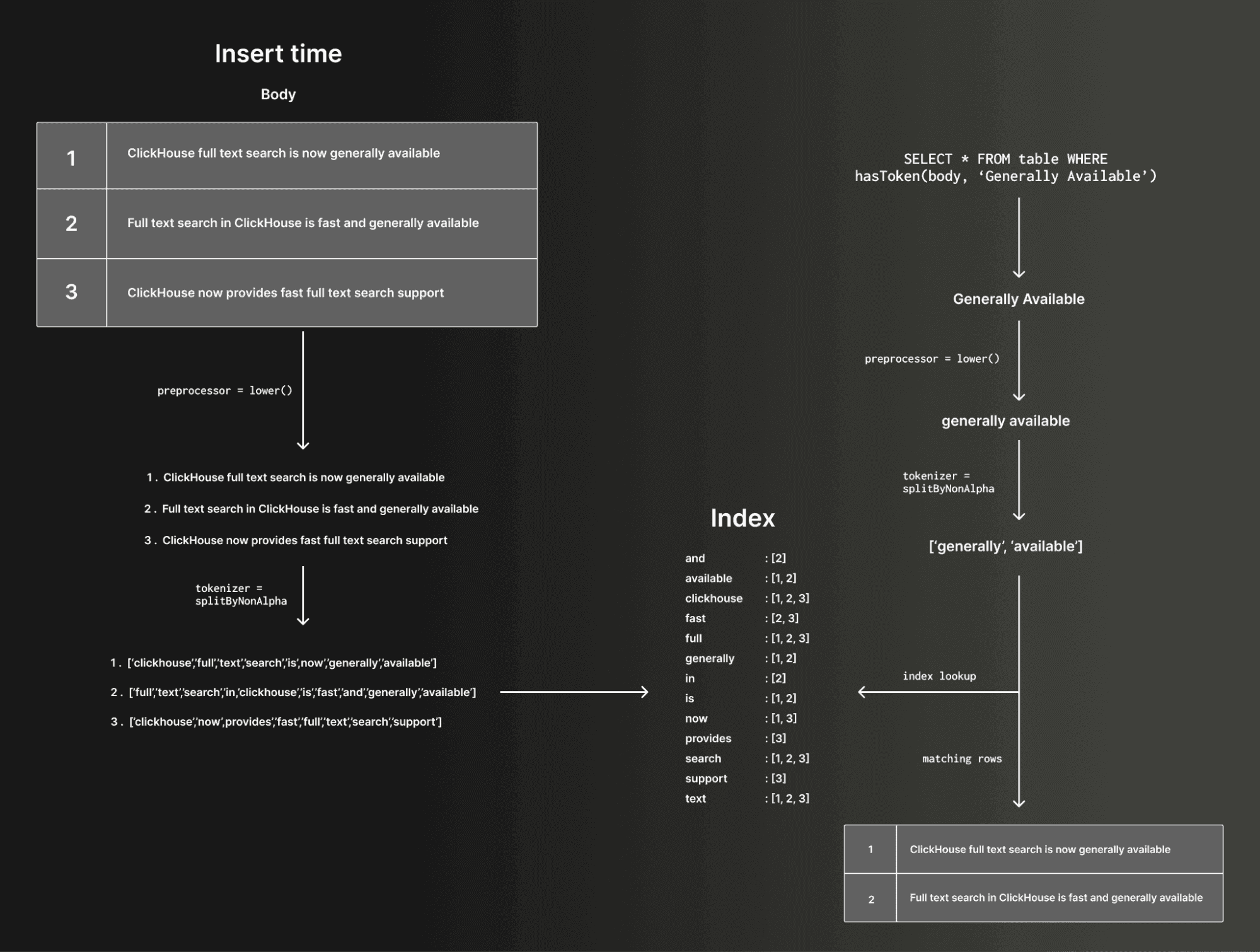
When a text index is defined on a column, this tokenization process is applied to the column's values at insert time (or when the index is materialized), and the resulting token-to-row mapping is stored internally. At query time, the same tokenization logic is applied to the search string. The inverted index is then used to efficiently identify candidate rows that contain the requested token or tokens.
Text indices thus enable fast searches for single tokens and multiple tokens within string columns. In addition to plain strings, text indices can be used with arrays of strings, as well as map keys and values.
Currently, the text index does not directly accelerate phrase searches where one token must follow another in sequence. However, multi-token search can still be used to narrow the candidate set before phrase matching is performed using standard linear scanning on the remaining granules. In this way, phrase searches can still benefit indirectly. Direct acceleration of phrase searches is planned for a future iteration.
As we'll show in the examples below, the tokenization and processing is configurable in ClickHouse using standard SQL expressions. Users can control how both the indexed data and the query text are split into tokens. This affects matching behavior as well as performance. For example, n-gram or sparse n-gram tokenizers can be used to support substring style matching. Different tokenization strategies allow users to tune for specific use cases and tradeoffs.
A forthcoming engineering focused blog will cover how this is implemented in ClickHouse's columnar architecture in more detail, as well as provide benchmark results vs previous techniques used in ClickHouse as well as other more traditional search engines.
When should I use Full-text Search indices?
Full-text Search in ClickHouse is designed to accelerate string based filtering at scale. It is particularly effective for queries that search for tokens within large volumes of text data, workloads that might previously have relied on techniques such as Bloom filter skip indices to speed up string matching. With text indices, users can efficiently search across String columns, arrays of strings, and map keys and values. Support for additional semi structured types will continue to evolve.
Historically, users accelerated string search in ClickHouse with Bloom filter–based skip indexes. While useful, Bloom filters are probabilistic and operate at granule level, meaning they can produce false positives and only answer coarse set-membership questions such as whether a token may exist in a range of data. They also require careful tuning and do not natively support multi-token search. Text indexes take a fundamentally different approach. They build a deterministic inverted index over tokens, storing row-level information that enables precise term lookups with no false positives from the index itself. While text indexes are larger than Bloom filters, they deliver significantly better scalability and performance for large text corpora are now the recommended approach to string matching at scale.
This makes Full-text Search a strong fit for analytical workloads that combine filtering and aggregation over very large datasets. One of the unique advantages of ClickHouse is the ability to search and then immediately aggregate over billions or even trillions of rows. Searching petabytes of data and computing aggregates in the same query is fully aligned with ClickHouse's core strengths as a high-performance analytical database.
Observability is a natural example. In ClickStack, Full-text Search is already integrated to accelerate log search. These workloads typically involve filtering logs by specific terms and then performing aggregations, grouping, and visualizations. Log data is simply another form of analytical data that happens to contain large volumes of text. Fast token matching combined with real time analytics is exactly the scenario Full-text Search is built for.
It is important to be clear about what Full-text Search in ClickHouse is not. It is not a relevance engine and does not implement scoring models such as TF IDF or BM25, nor does it store positional information for advanced phrase ranking. It is designed to accelerate token based filtering, not to replace dedicated search engines built for rich NLP and relevance driven use cases. If you need sophisticated ranking and linguistic features, a traditional search engine may be a better fit. If you need extremely fast token and string matching over terabytes or petabytes of data, combined with real time aggregation and analytics, ClickHouse Full-text Search is purpose built for that workload.
User story - Ryft.io
During the beta phase, ClickHouse Cloud users began enabling Full-text Search on their existing production workloads to validate performance and usability at scale.
One of those customers was Ryft.io, a platform that automates Apache Iceberg table maintenance and compaction based on real usage patterns, helping teams keep their lakehouse efficient and continuously optimized. Customers provide their query logs, and Ryft analyzes how tables are accessed to manage and optimize them over time.
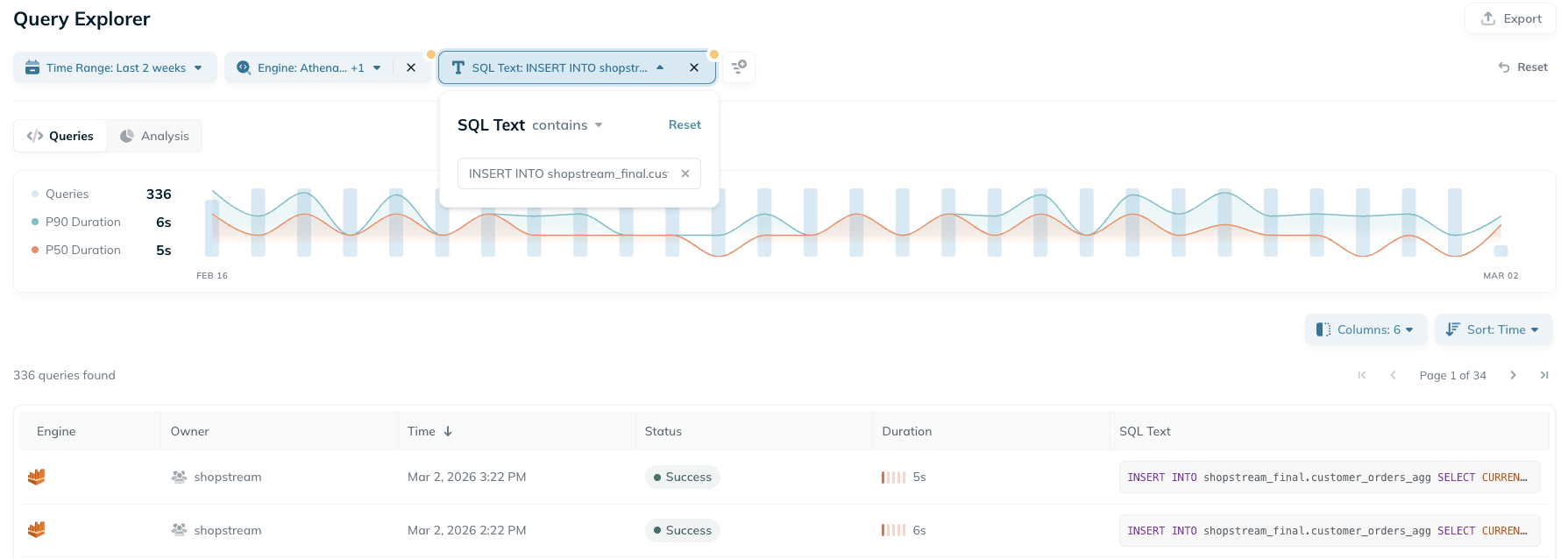
As part of this workflow, Ryft now uses ClickHouse Full-text Search to power free text search across hundreds of millions of historical queries:
"With ClickHouse Full-text Search, we are seeing up to 96% reduction in the number of granules scanned compared to queries without the index. For our benchmark workload, query latency improved by almost 7x. This has fundamentally changed the usability of free text search in our query analysis engine. Now, we can offer a seamless search experience and clearly demonstrate the performance impact and optimization value Ryft delivers over time."
Guy Gadon, Co-Founder & VP R&D at Ryft
User story - Icite
Icite was built for Security Operations to give teams identity specific context and enable confident, scalable threat response. It provides a clear view of who a user is, what they can access, what actions that access allows, and what they have actually done with it. Most importantly, it enables teams to quickly isolate and contain access to reduce risk in real time.
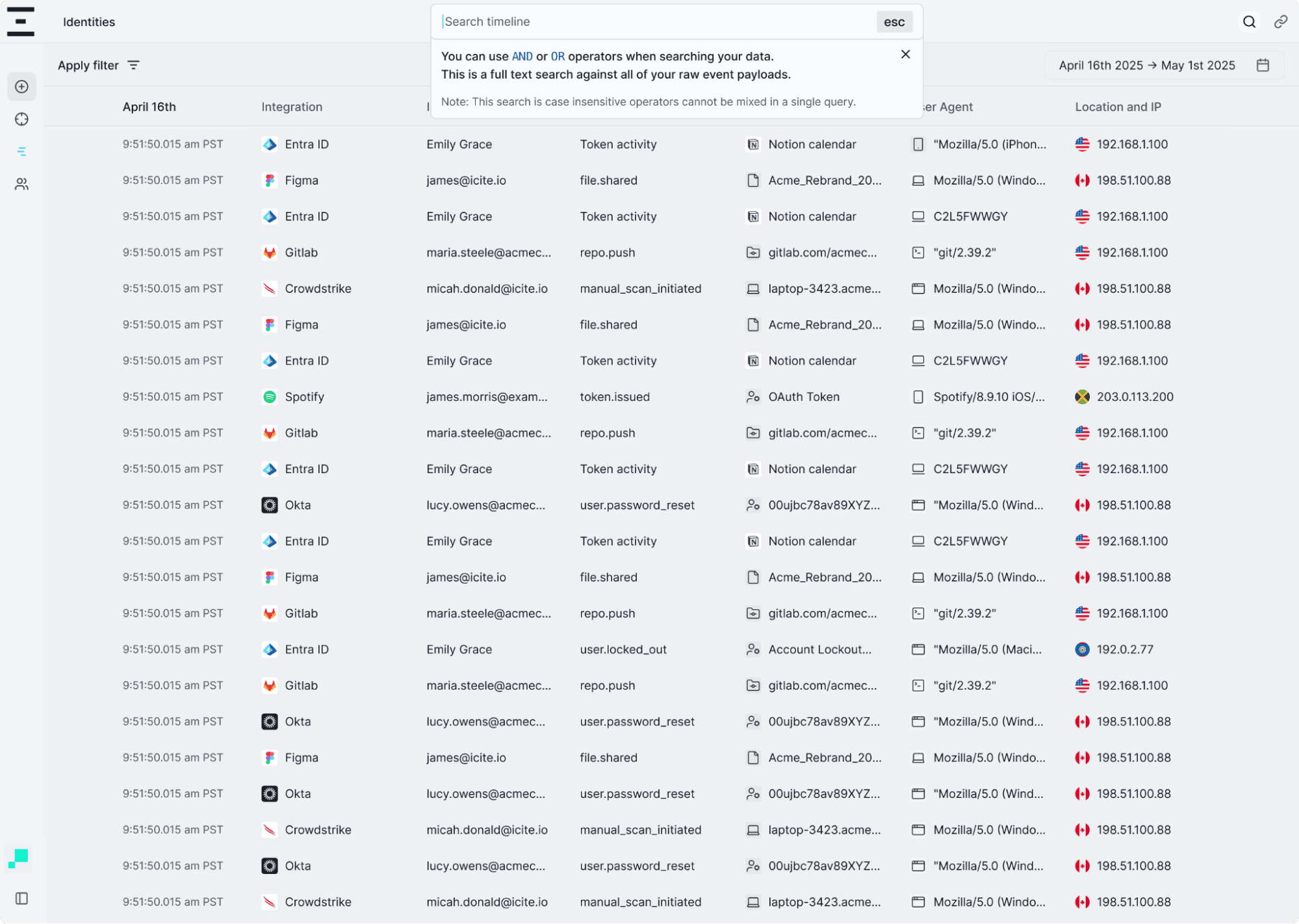
"Full-text search in ClickHouse has fundamentally changed how we search across our log data. We ingest millions of events from diverse sources, storing the raw payload in a String column, and previously multi-term searches could take 30 to 45 seconds using linear scans. With the new inverted index, those same queries now complete in around 400 milliseconds. This has allowed us to deliver a fast, interactive search experience across our entire log corpus without introducing additional infrastructure or duplicating data outside ClickHouse."
Kevin Manson, Principal Cloud Engineer at Icite
With Full-text Search now generally available, we look forward to more customers unlocking the same benefits across their analytical and observability workloads.
How do I use Full-text Search?
Full-text Search is enabled by declaring a text index on a table. You choose the column to index, then specify a tokenizer and an optional preprocessor. The tokenizer controls how values are split into tokens, while the preprocessor lets you transform the input before tokenization, for example, lowercasing for case-insensitive search. There are also advanced tuning options for the index, including caching, which you can find in our docs.
In the example below, we add a text index to the GitHub Events dataset, available in our public demo environment. It contains over 10 billion rows, with each row representing a public GitHub event such as an issue, comment, watch, or pull request across all repositories. We have previously published examples of analyzing this dataset for structured analytics, but text heavy analysis at this scale has historically been much harder to do efficiently.
CREATE TABLE github.github_events(
...
body String,
...
INDEX fts_body body TYPE text(
tokenizer = splitByNonAlpha,
preprocessor = lowerUTF8(body)
),
INDEX bloom_body tokens(lower(body)) TYPE bloom_filter(0.01) GRANULARITY 8
)
ENGINE = MergeTree
ORDER BY (repo_id, event_type, created_at);See here for the full table schema.
One question we can now answer quickly is: how often is "ClickHouse" mentioned across GitHub comments over time?
All queries here are the fastest of 3 runs (effectively hot filesystem cache). We use a 32-core node in ClickHouse Cloud to execute queries.
First, if we disable both the text index and the Bloom filter, we force a linear scan. Even with ClickHouse parallelism, scanning gigabytes of text is not fast enough for interactive analytics:
SELECT
toStartOfMonth(created_at) AS month,
count() AS count
FROM github.github_events
WHERE hasTokenCaseInsensitive(body, 'ClickHouse')
GROUP BY month
ORDER BY month ASC
SETTINGS enable_full_text_index = 0, use_skip_indexes = 0;┌──────month─┬─count─┐
│ 2015-02-01 │ 1 │
│ 2016-06-01 │ 68 │
│ 2016-07-01 │ 60 │
│ 2016-08-01 │ 53 │
│ 2016-09-01 │ 42 │
—omitted for brevity
119 rows in set. Elapsed: 193.018 sec. Processed 10.50 billion rows, 2.96 TB (54.40 million rows/s., 15.34 GB/s.)Note that we use the
hasTokenCaseInsensitivefunction to achieve case-insensitive matching.
Next, we can enable the Bloom filter index while keeping the text index disabled. This improves performance with about 80% of granules pruned.
SELECT
toStartOfMonth(created_at) AS month,
count() AS count
FROM github.github_events
WHERE hasAny(tokens(lower(body)), ['clickhouse'])
GROUP BY month
ORDER BY month ASC
SETTINGS enable_full_text_index = 0, use_skip_indexes = 1, use_query_condition_cache = 0;119 rows in set. Elapsed: 143.293 sec. Processed 2.16 billion rows, 729.00 GB (15.05 million rows/s., 5.09 GB/s.)Currently, in order for the Bloom Filter index to be used, the expression has to match that used in the index specification i.e.
tokens(lower(body).
The overhead of the bloom filter here is surprising. Although the amount of data scanned is significantly lower, the performance improvement is not as dramatic. Although we could improve this, it requires tuning to get good results:
Finally, we enable the Full-text Search index. Now, ClickHouse can use the inverted index to identify matching rows efficiently, dramatically reducing the amount of data that needs to be read:
SELECT
toStartOfMonth(created_at) AS month,
count() AS count
FROM github.github_events
WHERE hasToken(body, 'ClickHouse')
GROUP BY month
ORDER BY month ASC
SETTINGS use_query_condition_cache = 0;119 rows in set. Elapsed: 0.422 sec. Processed 334.92 million rows, 1.36 GB (794.41 million rows/s., 3.23 GB/s.)In this case, the query is both simpler and substantially faster: we can write a natural predicate and let the index handle tokenization and preprocessing. The result is a dramatic reduction in scanned granules and a step-change in query latency, turning what was previously a heavy scan into something that feels interactive even at multi-billion-row scale.
For more details on the query syntax supported for matching, as well as the preprocessors and tokenizers, see the documentation.
How much faster is Full-text Search?
As shown above, the performance gains from Full-text Search can be dramatic. While the example focused on a single term over a single dataset, and individual results will vary by workload, we consistently see meaningful improvements. For most real-world search queries, users can expect 7 to 10x faster performance for cold queries and even more for hot.
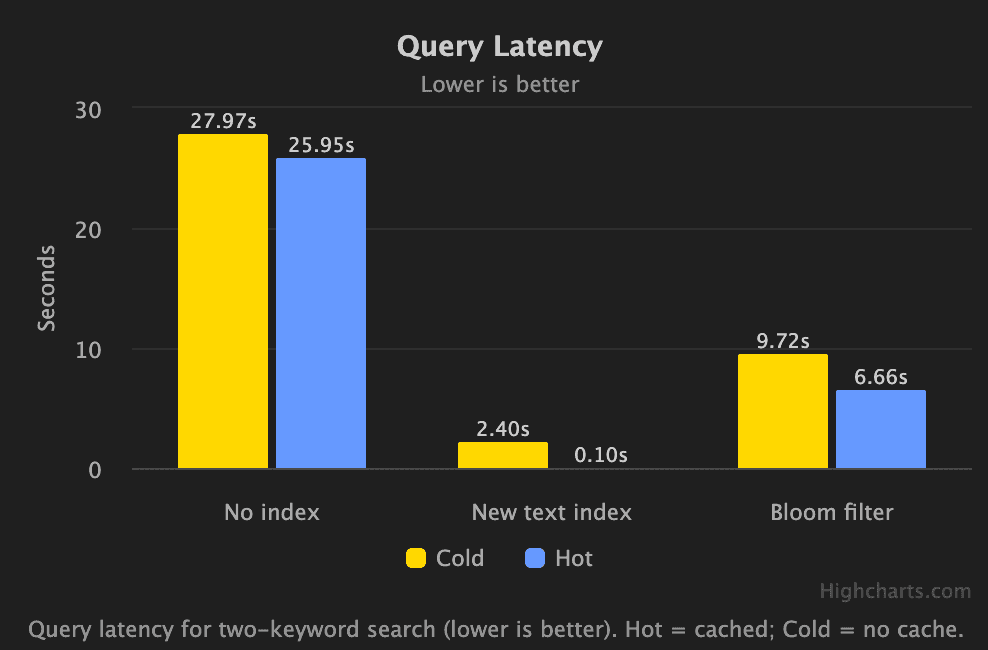
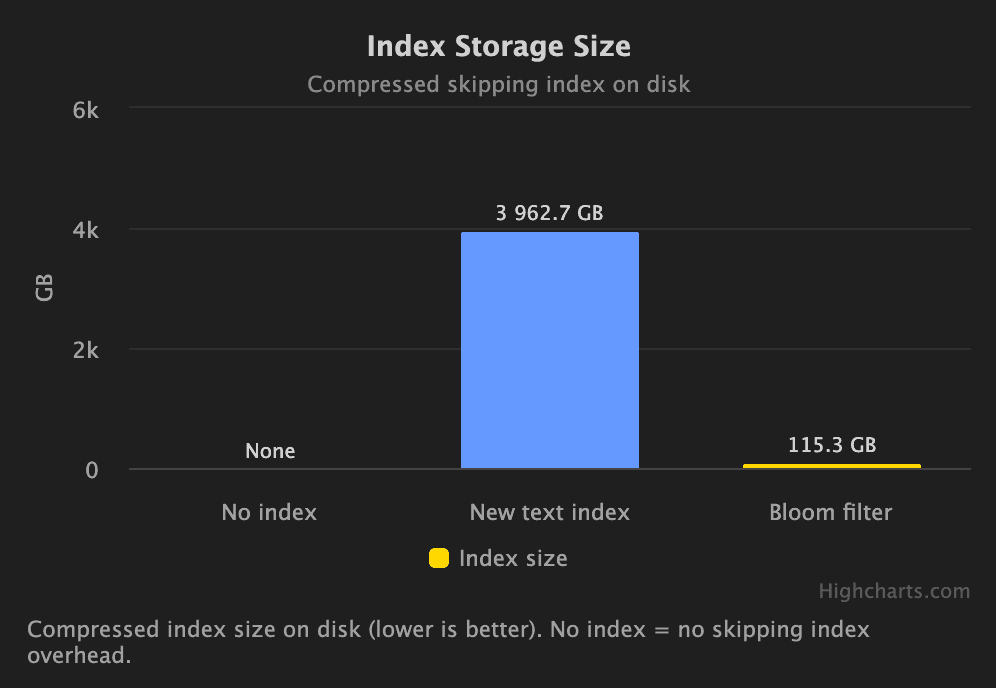
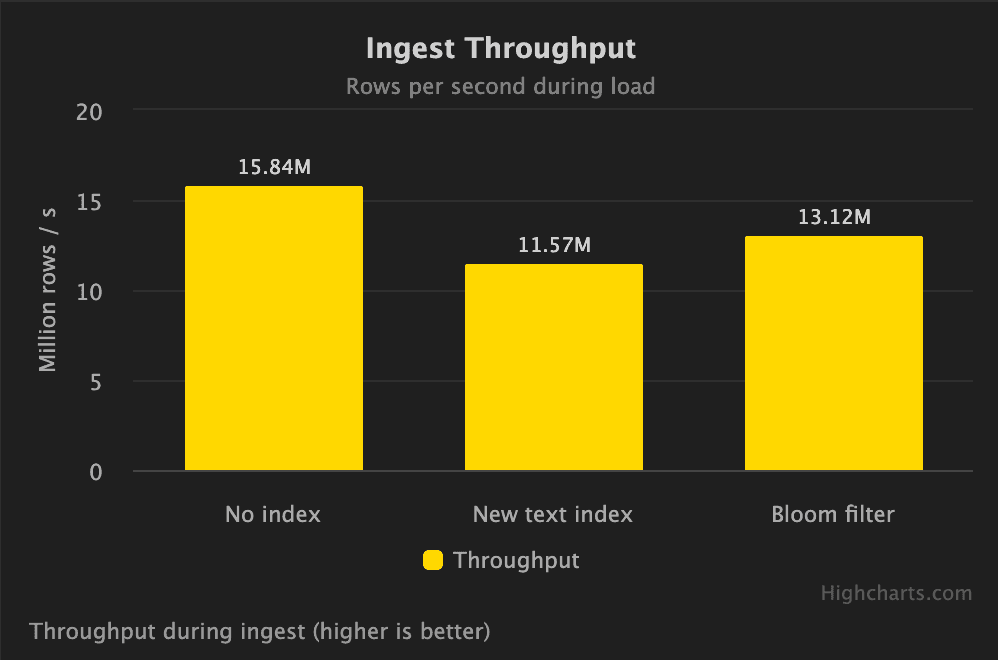
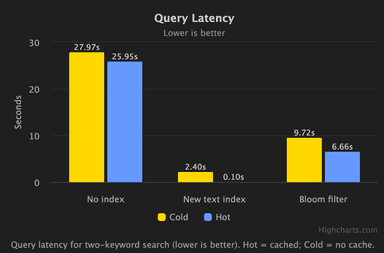
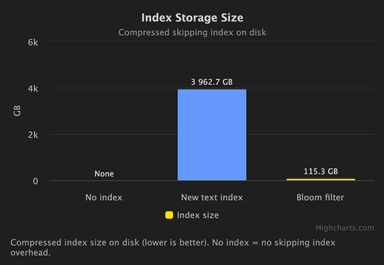
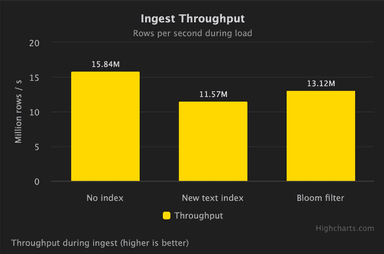
To validate this more broadly, we benchmarked Full-text Search on 50 TB of log data with 59 vCPU and 256GB of RAM in ClickHouse Cloud. In addition to query latency, we measured storage overhead and insert performance. The index introduces additional write cost, with insert throughput reduced by ~50 percent compared to no index. However, the query performance gains are substantial: up to 10 times faster for cold queries, and even greater improvements when data is cached on local nodes. Compared to Bloom filter-based approaches, Full-text Search is typically slightly slower on inserts but delivers multiple times faster performance at query time.
The animation below illustrates the impact on end-to-end query latency across representative workloads.
There is also a storage tradeoff. Full-text Search indexes are larger than Bloom filters, and both are larger than having no index at all. The difference is visible when comparing index sizes directly for our Github dataset:
SELECT
name,
type,
formatReadableSize(data_compressed_bytes) AS compressed_bytes,
formatReadableSize(data_uncompressed_bytes) AS uncompressed_bytes
FROM system.data_skipping_indices
WHERE (`table` = 'github_events') AND (database = 'github') AND ((name = 'bloom_body') OR (name = 'fts_body'));┌─name───────┬─type─────────┬─compressed_bytes─┬─uncompressed_bytes─┐
1. │ fts_body │ text │ 215.84 GiB │ 223.13 GiB │
2. │ bloom_body │ bloom_filter │ 7.04 GiB │ 7.24 GiB │
└────────────┴──────────────┴──────────────────┴────────────────────┘
2 rows in set. Elapsed: 0.003 sec.That said, in ClickHouse Cloud the cost of storage is often a small fraction of overall infrastructure spend. At approximately $25 per TB per month, even a sizable index is rarely a dominant cost driver for large analytical workloads, with overall compression remaining strong.
For example, if we look at the compression rate for the GitHub table, it is about 9x before considering the text index. This reduces to around 6x when we factor in the text index.
SELECT
formatReadableSize(sum(data_compressed_bytes)) AS compressed_size,
formatReadableSize(sum(data_uncompressed_bytes)) AS un_compressed_size
FROM system.columns
WHERE (`table` = 'github_events') AND (database = 'github');┌─compressed_size─┬─un_compressed_size─┐
│ 477.09 GiB │ 4.23 TiB │
└─────────────────┴────────────────────┘
1 row in set. Elapsed: 0.004 sec.There are still open questions for some scenarios, particularly around how the index interacts with node level and distributed caching layers in observability workloads. For this reason, we have not yet made it the default in ClickStack, but we expect to address these considerations and expand default usage in the near future.
GitSearch - a Full-text Search demo
The examples above illustrate the mechanics and performance characteristics, but the best way to understand Full-text Search is to try it yourself. To make this easy, we have built an interactive public demo, GitTrends, on top of the same GitHub Events dataset.
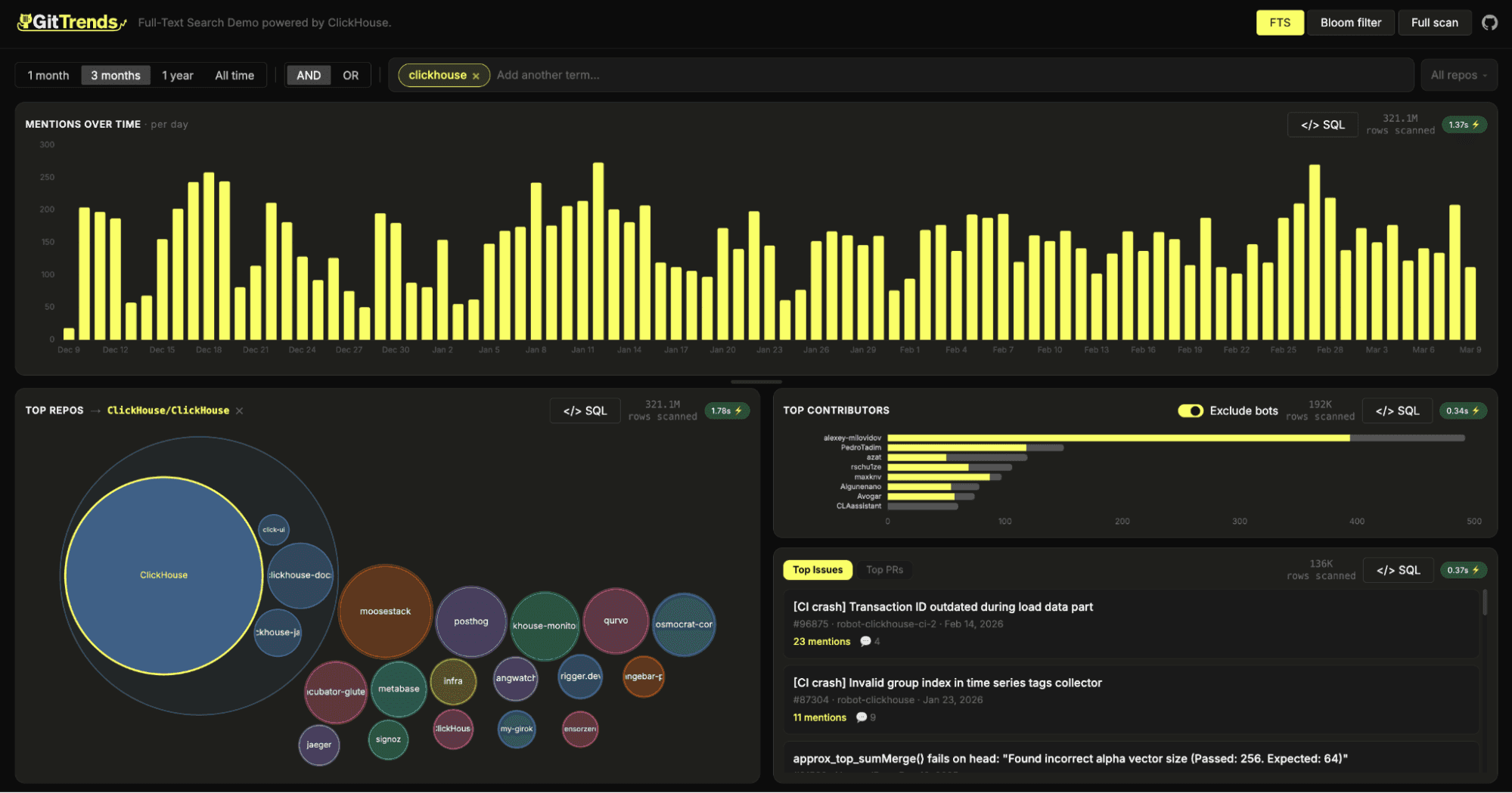
In the demo, you can search for any technology term and instantly see how mentions trend over time across all public GitHub repositories.
Users can then drill into specific repositories where that technology appears, analyze how it shows up in issues and pull requests, and explore how interest in a given project evolves. You can even compare multiple technologies side by side, offering a lightweight alternative to tools like Google Trends for understanding activity and momentum within the developer ecosystem.
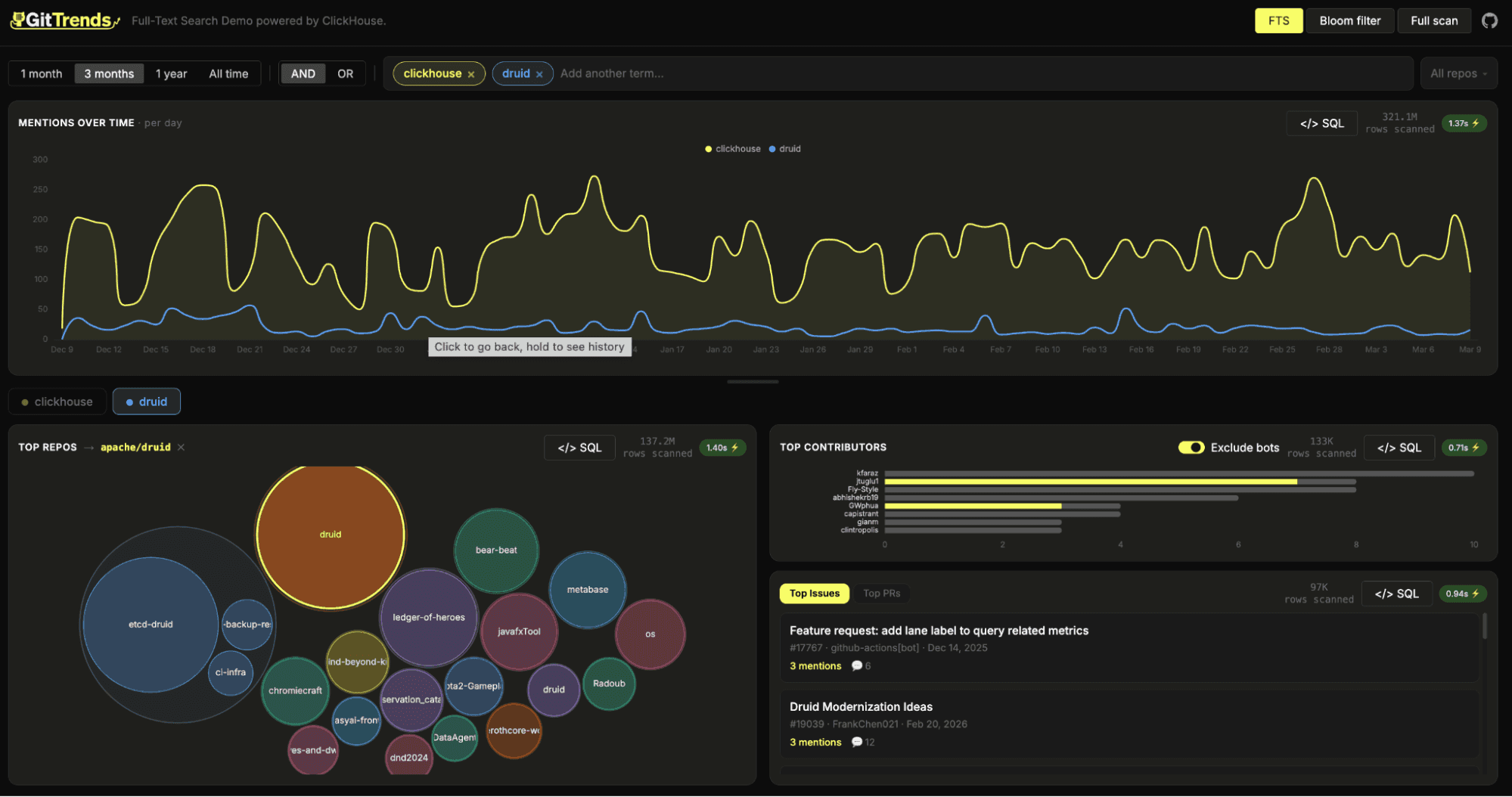
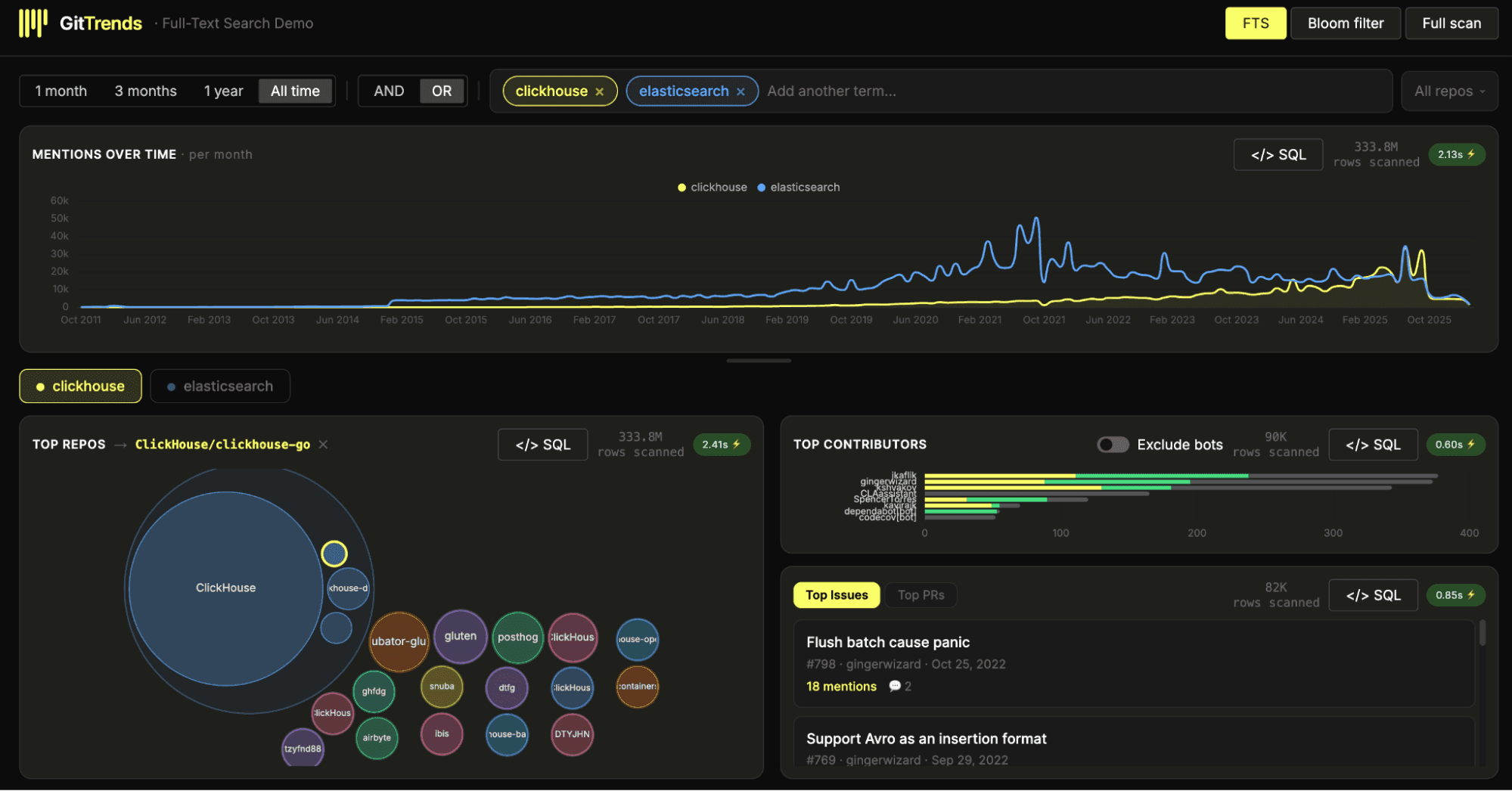
All of this is powered by Full-text Search. For those who want to explore the performance differences directly, the UI also allows you to toggle between Full-text Search, Bloom filter based search, and a linear scan, so you can see the impact of each approach in real time.
As in all of our public demos, we'll keep the dataset updated (hourly) so our users can benefit from GitHub analytics for free.
Conclusion
We are delighted to announce that Full-text Search in ClickHouse is now generally available and ready for production use. After multiple iterations and significant performance work, including optimizations for object storage in ClickHouse Cloud, we are excited for users to begin benefiting from fast, native text search at scale.
To celebrate the GA release, we are hosting a webinar on March 11th with the engineering team, where we will take a deeper dive into the internals, design decisions, and benchmark results behind Full-text Search.
We look forward to seeing how the community applies this powerful new capability across analytics, observability, and beyond, and to hearing the success stories that follow.
Get started today
Interested in seeing how ClickHouse works on your data? Get started with ClickHouse Cloud in minutes and receive $300 in free credits.
Sign up