50.5k
50.5k


Today we're excited to announce that executable UDFs are now available in public beta on ClickHouse Cloud. You can write a function in Python, upload it as a zip to your cluster, and call it from SQL like any built-in. ClickHouse manages a pool of long-lived sandboxed processes and routes rows through them at query speed. The function is callable anywhere SQL is: ad-hoc queries, joins, even materialized views that fire on every insert.
This isn't a brand-new idea. We've shipped executable UDFs in self-hosted ClickHouse for a while. Our 2023 post on calling OpenAI from SQL walked through the same mechanism. What's new today is that you don't need to run your own server to use it. The model code lives where the data is, runs in a managed sandbox, and the deployment surface is one upload screen in the Cloud console.
To show what this unlocks, we built a demo. A small PyTorch autoencoder scores ~6 billion equity trade ticks for anomalousness, inline with ingest. A Next.js front-end consumes the embeddings. Full source for the notebook, UDF bundle, SQL, and webapp is in this repo.
The problem this solves
You have a trained model. You have a stream of data in ClickHouse. Getting them into the same room used to mean one of three options.
-
Stand up a separate scoring service. Now you maintain a model server, an ingest pipeline that routes rows to it, and a way to write the scores back into ClickHouse. The model is no longer near the data in any meaningful sense.
-
Translate the model into pure SQL. Workable for some tree-based models. Painful for anything with embeddings. Every retrain means regenerating thousands of lines of SQL by hand.
-
Batch score offline and join later. Loses freshness. The "anomaly" on a trade that just hit is only useful if you can react to it now.
Executable UDFs collapse all three into one. Write the inference code as a normal Python file. Point ClickHouse at it. Call it from SQL. The function runs inline with whatever query needs it, including inside a materialized view, which is exactly what we do here.
What we built
Last year we wrote "Building StockHouse", showing how ClickHouse handles a continuous firehose of stock trade ticks in real time. That post stopped at the ingest and query layer. The natural next question is: what if you wanted to apply a learned model to every trade as it lands?
We picked an unsupervised anomaly-detection setup because it shows off the shape of the problem cleanly.
- A small autoencoder (~270K parameters) is trained on 50M historical trade ticks. Its inputs: a hashed ticker, 7 numeric features (price, size, exchange, etc.), and 6 cyclical-encoded temporal features.
- For each trade, the model produces a 32-dim embedding and a reconstruction error. High error means the model wasn't trained on patterns like this trade. It's anomalous in shape compared to what's normal for that symbol's history.
- The UDF that wraps this model is
embed_trade. It's the only ML-specific piece in the system. Everything else is plain SQL: the score aggregation, the per-symbol baselines, the views.
Here's the data flow:
┌───────────────────────────┐
│ default.trades │ ← upstream feed (e.g. Polygon)
└──────────────┬────────────┘
│ INSERT
▼
┌───────────────────────────┐
│ trades_embeddings_mv │ ← fires on every INSERT
│ (calls embed_trade UDF) │
└──────────────┬────────────┘
│
▼
┌───────────────────────────┐
│ default.trades_embeddings│ ← same trade + 32-dim
│ │ embedding + recon_score
└──────────────┬────────────┘
▲ │
│ │ refresh hourly
│ ▼
│ ┌──────────────────────┐
│ │ trades_baselines │ ← per-symbol score
│ │ trades_dim_baselines │ distribution stats
│ └──────────────────────┘
│
└──── consumed by webapp queries
(anomalies are defined relative
to each symbol's own baselines)Every INSERT INTO trades flows through the materialized view, gets
scored, and lands in trades_embeddings. The webapp never re-runs the
model. It only reads trades_embeddings and two cheap baseline tables.
The expensive inference happens exactly once per trade, inline with
ingest, and every downstream query is a normal aggregation.
Training the autoencoder
The model itself is small and unremarkable as ML goes, but the training
pipeline is worth a quick look because it has to produce artifacts the
UDF can load at runtime. The full walkthrough lives in
notebook/train_and_deploy_udf.ipynb.
A summary:
-
Stream training data into Parquet chunks. A SELECT against
default.tradesderives the 14 input features server-side (price, size, exchange, condition-code count, hashed ticker, and cyclical encodings of hour and day of week). The notebook pulls the result viaquery_arrow_streamand writes 5M-row Parquet chunks to local disk. Nothing is held in memory. -
Fit a
StandardScalerincrementally. Welford's algorithm viapartial_fitgives the same mean and variance as a singlescaler.fit()over the full dataset, with bounded memory. We fit on the 7 base numeric features only. The hashed ticker is an integer key and the cyclical features are already on a sensible scale. -
Train the autoencoder.
TradeAutoencoderV2is a 4-layer encoder into a 32-dim latent, with a symmetric decoder back to the numeric feature space. The sym embedding lookup happens at the input layer,sym_idx = xxHash32(sym) % NUM_HASH_BUCKETS. Loss is MSE on the reconstructed numeric features. Training streams rows out of the Parquet chunks via anIterableDatasetand stops when a 200-batch moving-average loss fails to improve for 5 windows. -
Save two artifacts.
scaler_params.ptholdsmean_andscale_as Float32 tensors.trade_autoencoder_v2.ptholds the modelstate_dictplus aconfigdict with the constructor kwargs. The UDF'smain.pyreads these at startup and reconstructs the model. -
Package the bundle. A final notebook cell zips
main.py,requirements.txt, and the two.ptfiles intoembed_trade.zip, ready to upload.
Deploying the UDF on Cloud
The deployment surface is a single upload screen in the Cloud console. You give it a name, a zip containing your code and model files, and a few runtime parameters.
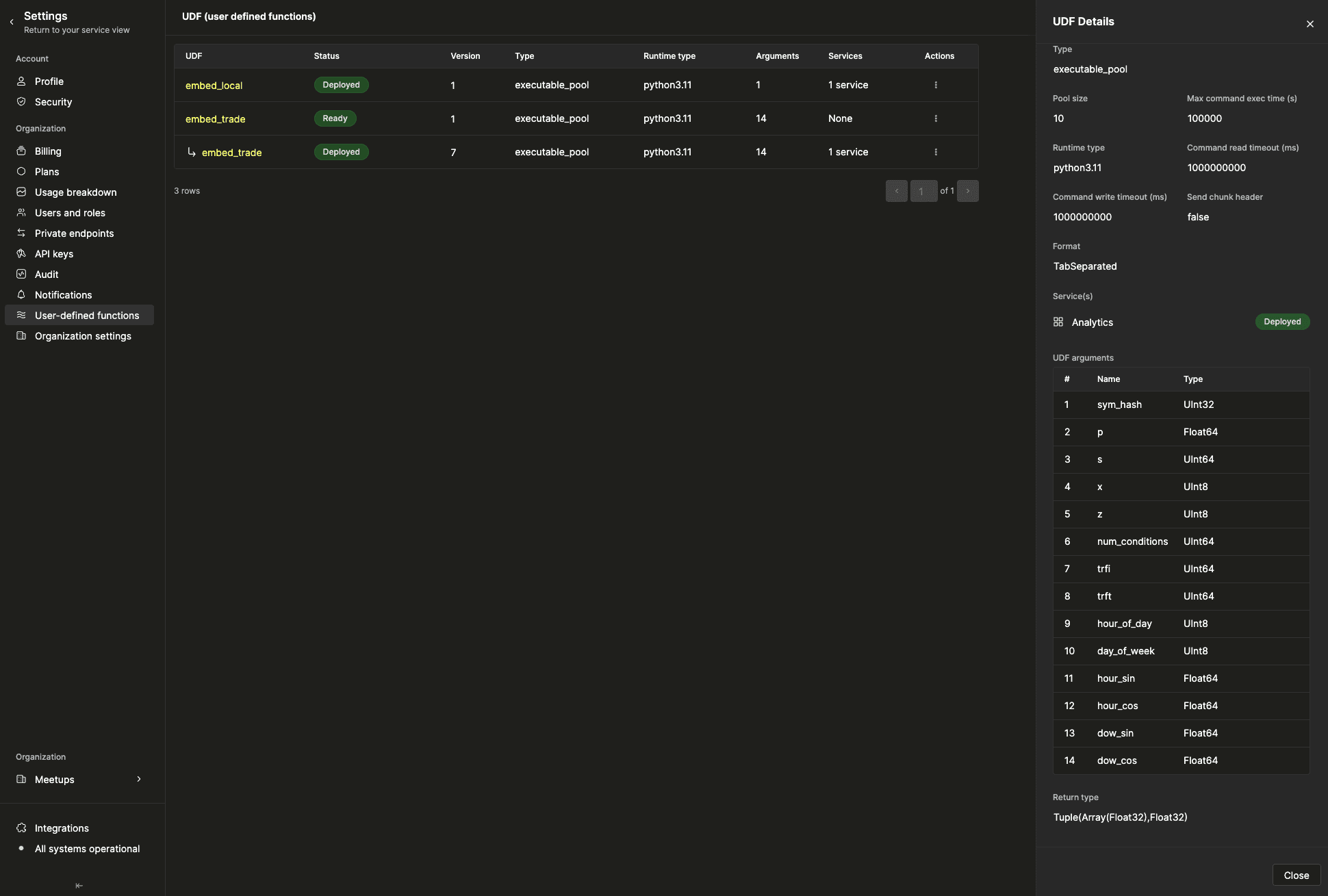
For embed_trade we use:
- Type:
executable_pool. Long-lived processes, hot model in memory. - Pool size:
10per replica. Each process loads the 2MB model at startup (~1.5s) and reuses it for every subsequent call. - Runtime:
python3.11. Dependencies (torch==2.4.1,numpy==1.26.4) come from therequirements.txtin the zip. - Format:
TabSeparated. The UDF reads one TSV line per input row on stdin and prints(embedding, recon_score)on stdout. - 14 arguments, each with an explicit ClickHouse type. The signature
matches the autoencoder's training schema exactly. See
udf/cloud-deployment.mdfor the full table.
The function is then callable from SQL like any built-in:
WITH
fromUnixTimestamp64Milli(t, 'America/New_York') AS ts,
embed_trade(
xxHash32(sym), p, s, x, z, toUInt64(length(c)), trfi, trft,
toUInt8(toHour(ts)), toUInt8(toDayOfWeek(ts, 1)),
sin((toHour(ts) * 2 * pi()) / 24),
cos((toHour(ts) * 2 * pi()) / 24),
sin((toDayOfWeek(ts, 1) * 2 * pi()) / 7),
cos((toDayOfWeek(ts, 1) * 2 * pi()) / 7)
) AS result
SELECT
sym, i, x, p, s, c, t, q, z, trfi, trft, inserted_at,
result.2 AS recon_score,
result.1 AS embedding
FROM stockhouse.trades limit 10;The interesting part isn't that you can do this. It's where you can put the call.
Scoring every trade, inline with ingest
We wire embed_trade into a materialized view:
CREATE MATERIALIZED VIEW trades_embeddings_mv
TO trades_embeddings
AS
WITH
fromUnixTimestamp64Milli(t, 'America/New_York') AS ts,
embed_trade(
xxHash32(sym), p, s, x, z, toUInt64(length(c)), trfi, trft,
toUInt8(toHour(ts)), toUInt8(toDayOfWeek(ts, 1)),
sin((toHour(ts) * 2 * pi()) / 24),
cos((toHour(ts) * 2 * pi()) / 24),
sin((toDayOfWeek(ts, 1) * 2 * pi()) / 7),
cos((toDayOfWeek(ts, 1) * 2 * pi()) / 7)
) AS result
SELECT
sym, i, x, p, s, c, t, q, z, trfi, trft, inserted_at,
result.2 AS recon_score,
result.1 AS embedding
FROM trades;Every INSERT INTO trades fires this MV. The Python pool scores
the batch and lands the result in trades_embeddings. There's no other
mover, no other service, no separate scheduler. Just SQL.
This is the part that wasn't possible before executable UDFs landed in
Cloud. The equivalent service architecture would be a Kafka consumer
reading from trades, batching rows, posting to a model server, writing
the results back. Same end state, several more moving parts. Here it's
one DDL statement.
The performance shape is unsurprising. Cost per row is the model forward pass (a few milliseconds on a warm pool) plus the TSV serialization. ClickHouse batches rows into the UDF in chunks. The pool runs a handful of in-flight invocations in parallel. We backfilled ~6B historical rows at ~35K rows/sec sustained over several hours on a 3-replica cluster with no manual scaling. Same UDF, same MV, same SQL.
Making "anomalous" mean something
The autoencoder gives us a raw recon_score per trade. That's a number
between roughly 0.00002 and 1,000,000+ across the dataset. A naive
"trades above 0.062 are anomalous" filter (using the global 99th
percentile from the model's training distribution) sounds reasonable
until you actually look at the data.
A handful of symbols, like BRK.A and LLY, score every single trade above that threshold because their share prices are unusually high. Their entire distribution sits in the right tail of the global one. A "100% anomalous" stat for those symbols is technically correct and practically useless.
So we redefine "anomaly" relative to each symbol's own history. For
every symbol, we maintain its lifetime p95 of recon_score. A trade
is anomalous for that symbol if it exceeds the symbol's own p95. About
5% of trades qualify in a typical window, by construction. When that
fraction spikes well above 5%, the symbol is having a genuinely unusual
window.
The per-symbol baseline lives in another ClickHouse table:
CREATE TABLE trades_baselines (
sym LowCardinality(String),
p50 Float32,
p95 Float32,
p99 Float32,
-- ...
computed_at DateTime
)
ENGINE = MergeTree
ORDER BY sym;A refreshable materialized view repopulates it every hour:
CREATE MATERIALIZED VIEW trades_baselines_mv
REFRESH EVERY 1 HOUR
TO trades_baselines
AS
SELECT
sym,
quantiles(0.5, 0.95, 0.99)(recon_score) AS qs,
qs[1] AS p50, qs[2] AS p95, qs[3] AS p99,
-- ...
FROM trades_embeddings
WHERE NOT has(c, 15) AND NOT has(c, 12) -- exclude auction prints
GROUP BY sym;Refreshable MVs atomically truncate and replace the target table on each
refresh. Plain MergeTree is the right engine: no FINAL, no dedup
logic, no read-time overhead.
The leaderboard query then joins live trades against the baselines table to count anomalies per symbol relative to their own baseline:
SELECT
e.sym,
countIf(e.recon_score > b.p95) AS anomaly_count,
round(sumIf(e.s, e.recon_score > b.p95) * 100.0 / sum(e.s), 2) AS pct_of_volume
FROM stockhouse.trades_embeddings AS e
INNER JOIN stockhouse.trades_baselines AS b ON e.sym = b.sym
WHERE e.t >= now() - INTERVAL 1 HOUR
GROUP BY e.sym
ORDER BY pct_of_volume DESC
LIMIT 50;This query goes from ~1.7s (recomputing baselines inline as a CTE) to ~0.27s (joining against the pre-computed table). Same answer, roughly 6x faster. The expensive part is materialized exactly once an hour instead of on every page load.
The webapp
The webapp is a Next.js + Click UI + Highcharts demo. It consumes
trades_embeddings and the baseline tables.
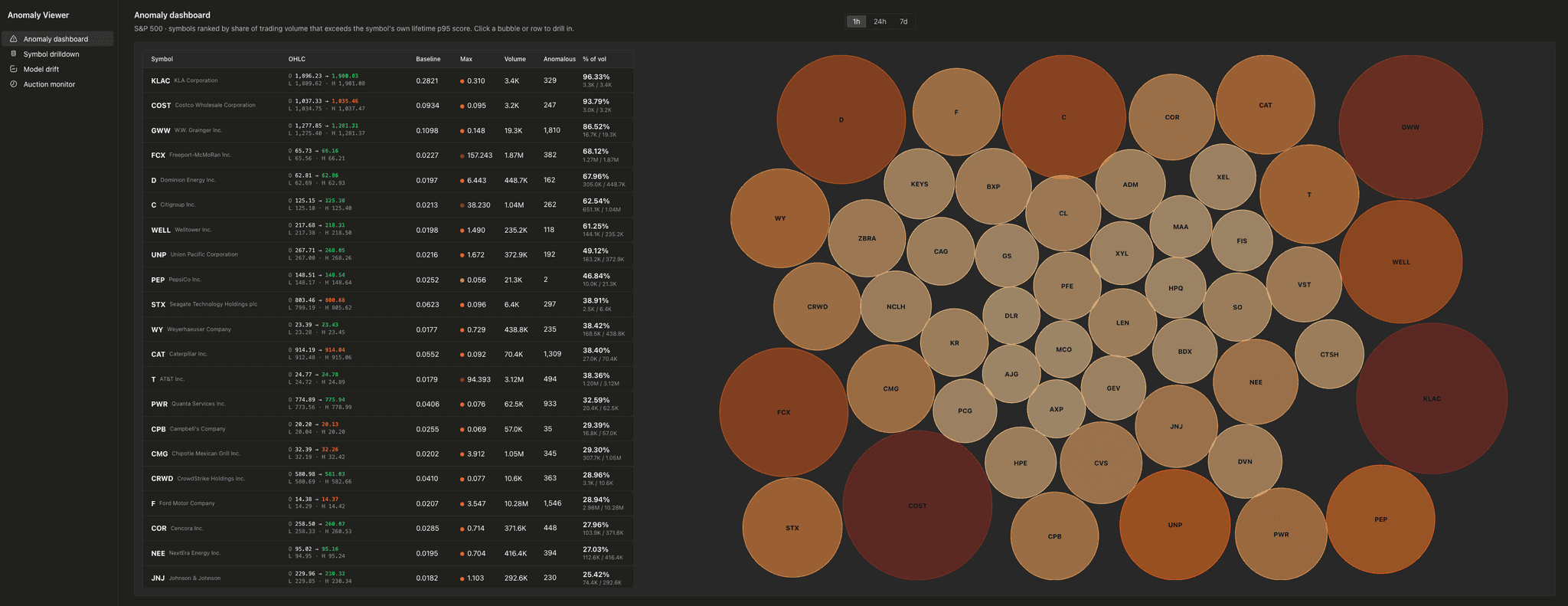
The anomaly dashboard ranks S&P 500 symbols by share of trading volume that exceeds their own baseline.
The packed-bubble chart sizes and colors each symbol by pct_of_volume,
the share of total trading volume in the window that came from trades
above the symbol's lifetime p95. Symbols with redder, larger bubbles had
unusually anomaly-heavy windows. The table on the left carries the same
sort, with OHLC, max score, and the per-symbol baseline alongside.
The symbol drilldown zooms in on one ticker.
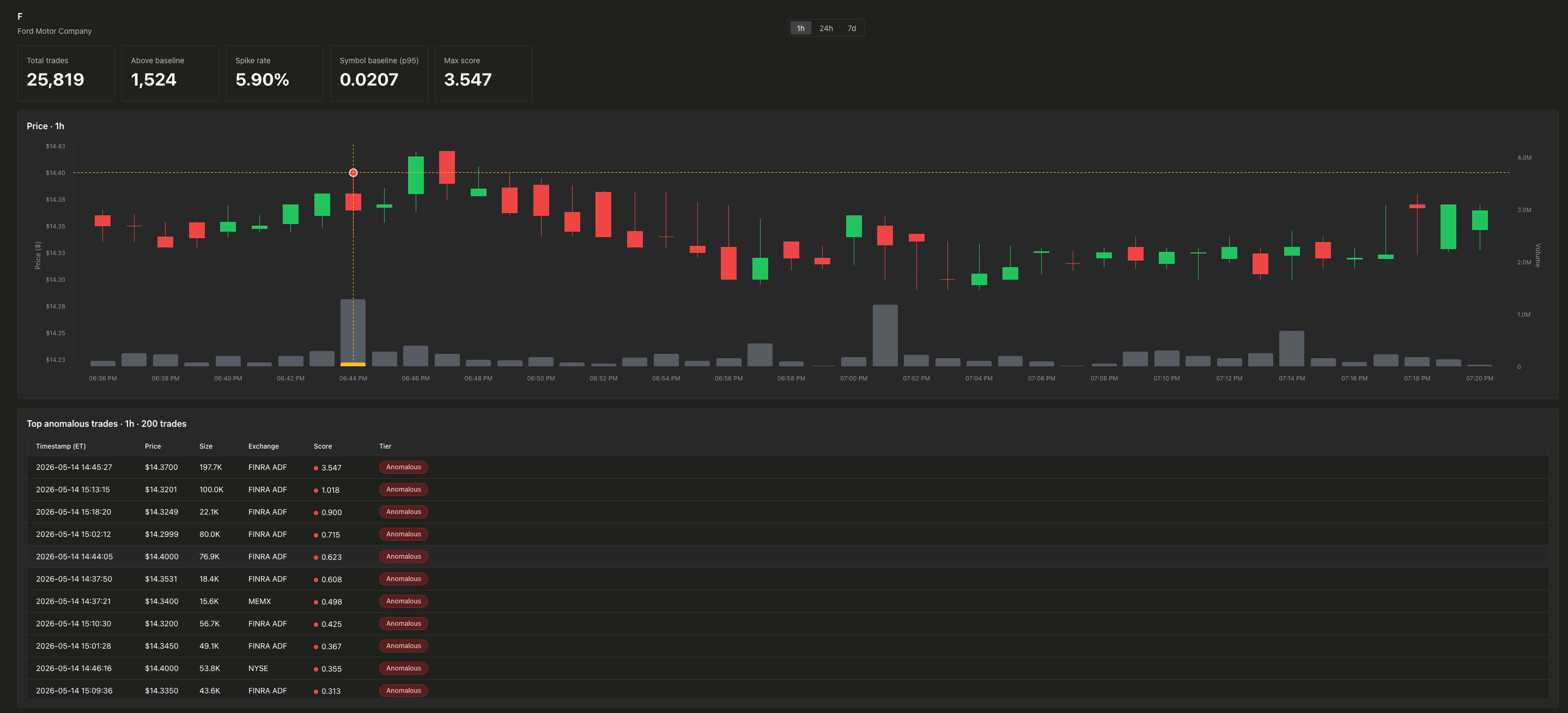
A candlestick and volume pane sits on top. Both axes overlap a single plot area, with the price axis stretched downward to push candles into the top 65% and volume bars into the bottom 30%. Hover any row in the anomalous-trades table and the corresponding candle's volume bar fills yellow, sized to that trade's share of the bucket's total volume. Crosshairs snap to the candle center.
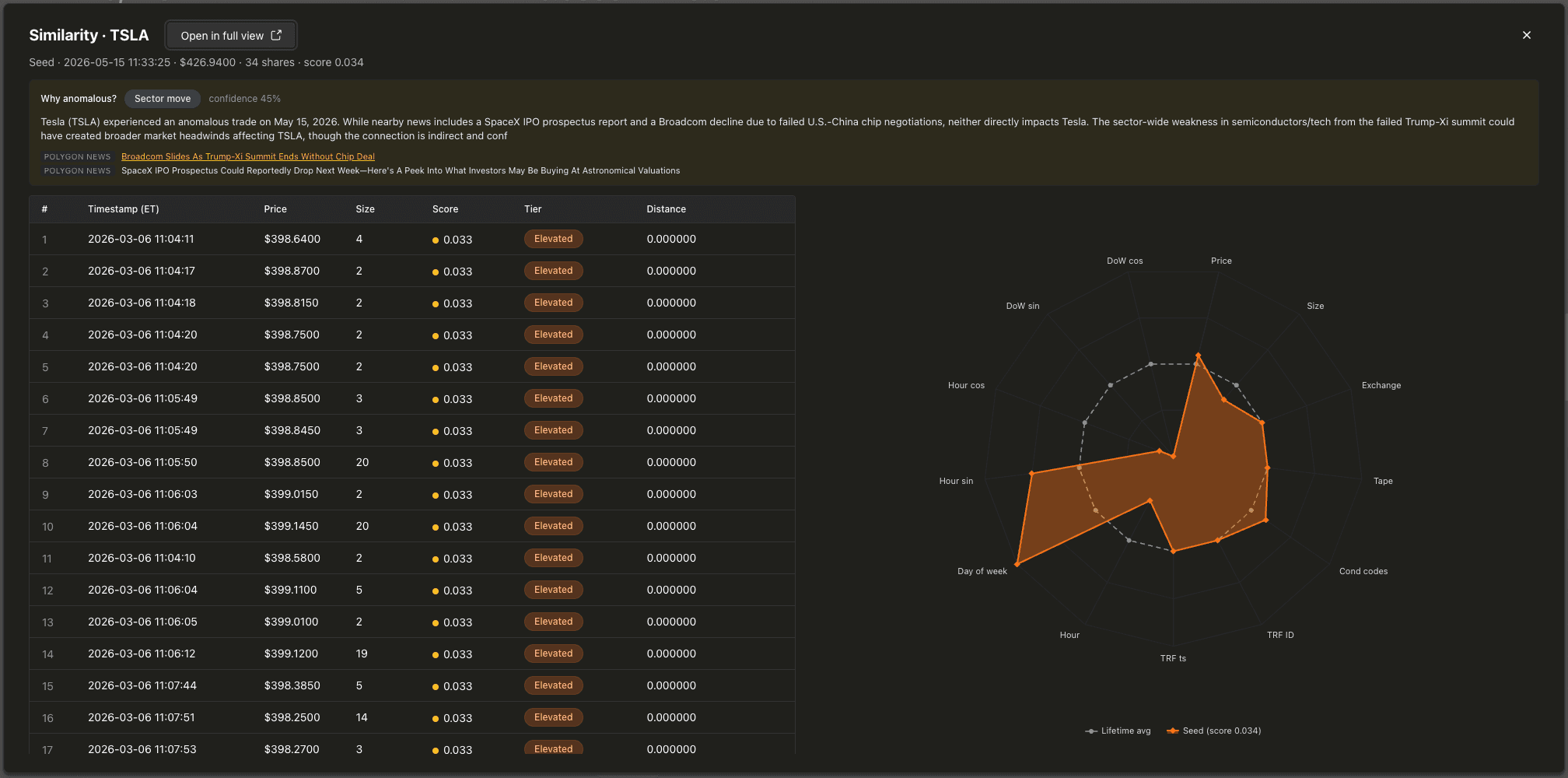
The similarity search opens as a modal over the drilldown when you click a trade.
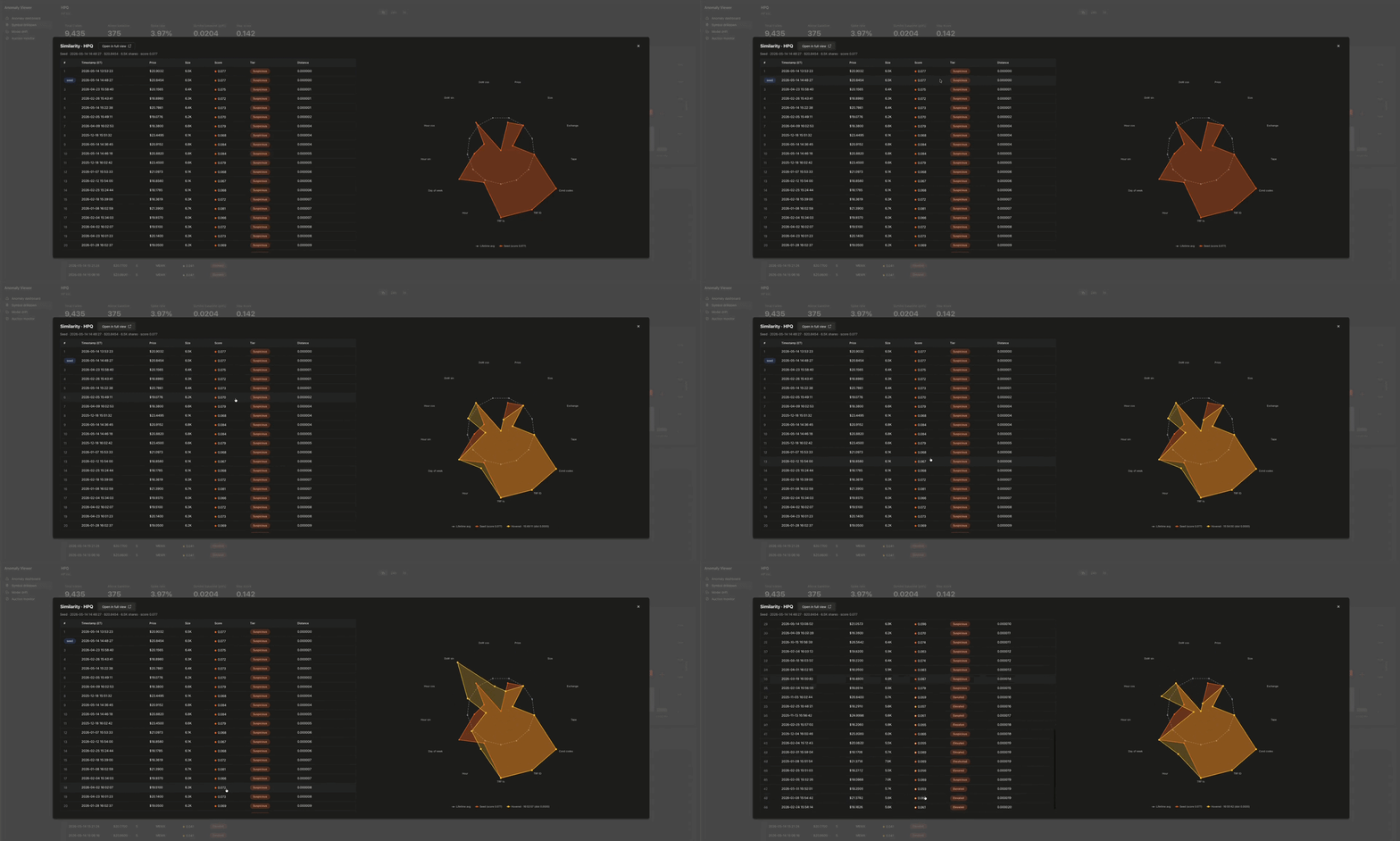
The radar chart plots each trade's 13 input dimensions, normalized
against the symbol's lifetime min, max, and avg per dim. Because the avg
always maps to 0.5, the baseline series renders as a perfect 13-sided
polygon at the chart's midpoint. Easy to spot deviations from. Hover a
similar-trade row to overlay it. The 50 most-similar trades come from
cosineDistance(embedding, target_embedding) over the same symbol's
embedding column.
The model drift monitor tracks the score distribution over time.
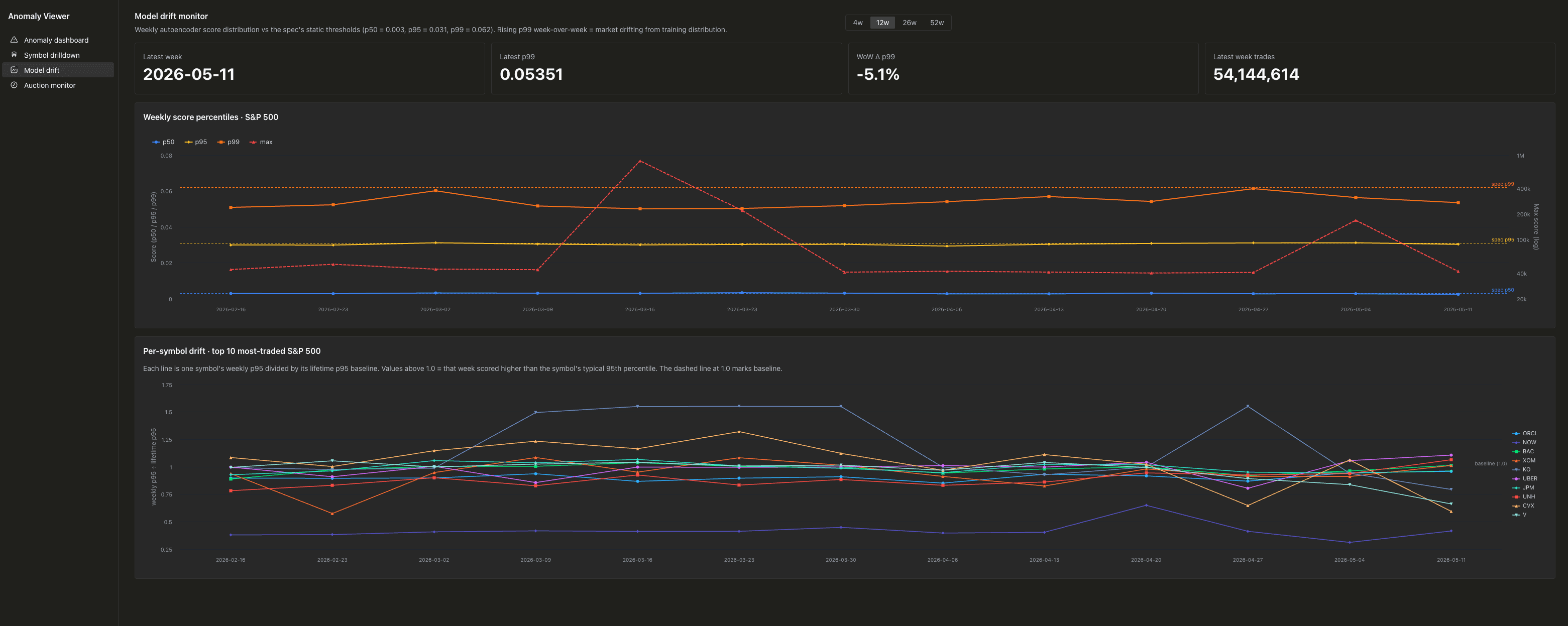
Weekly p50, p95, p99, and max of recon_score, with horizontal
reference lines at the static thresholds the model was originally
calibrated against. If the p99 line starts climbing week over week, the
market has drifted from the model's training distribution and it's time
to retrain.
The auction print monitor is the home for the extreme tail. Opening (c=12) and closing (c=15) auction prints score in the thousands to millions because of their massive share sizes.
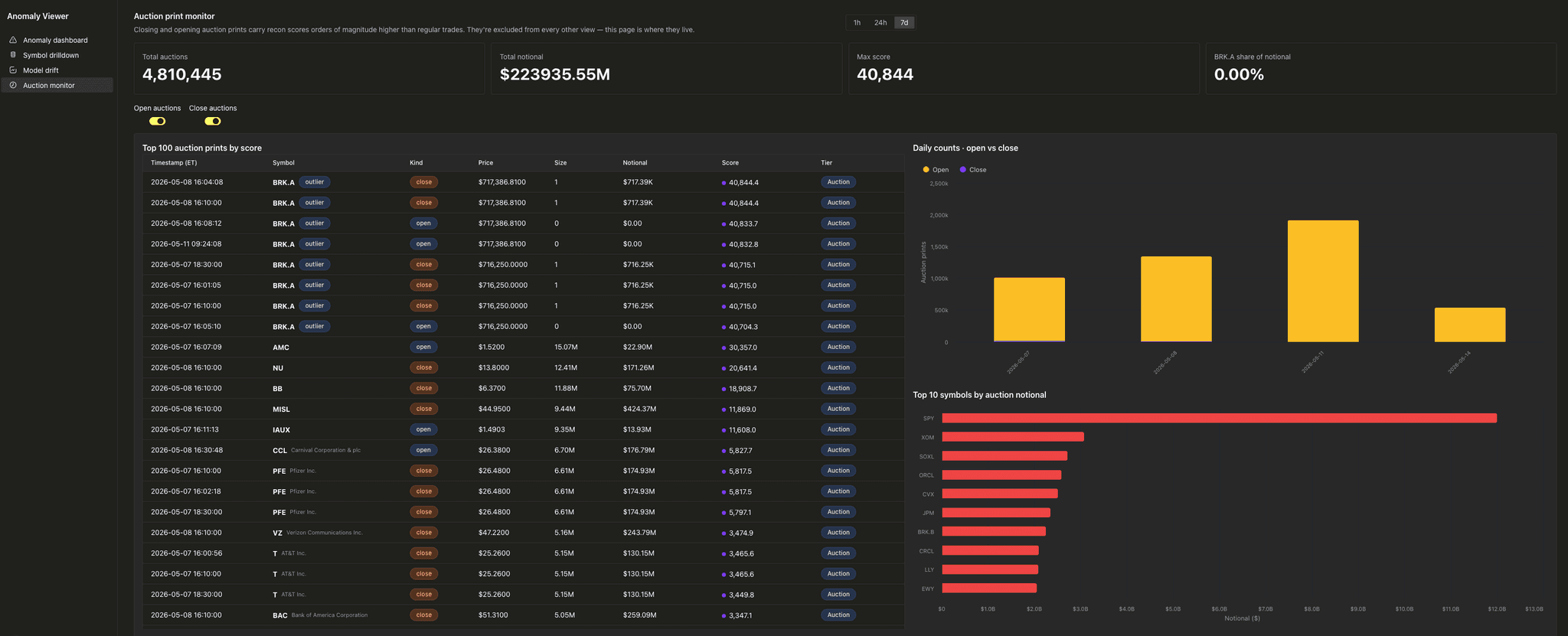
They'd dominate every other view if we didn't filter them out everywhere else. Here they get their own page.
One more thing: network-access UDFs (private beta)
Everything you've seen so far runs on the deterministic path. embed_trade
scores rows at ingest, baselines refresh hourly, the webapp reads
pre-computed tables. No external calls anywhere on the read path. That's
the shape you want for the load-bearing pieces: cheap, predictable, no
upstream that can disappear on you.
But once a trade has been flagged as anomalous, the obvious next question is why. That answer lives outside ClickHouse — in news APIs, SEC filings, halt notices, social signals. To pull those in we need network access from the UDF.
Network-access executable UDFs are in private beta on ClickHouse Cloud. Once enabled, the UDF runtime can make outbound HTTPS calls to any allowed host. We added two new UDFs in this repo to use it:
nearby_events
Given (sym, t, window_min), calls two external sources and returns a
JSON array of events near that trade time:
- Massive News API (Polygon recently rebranded as Massive;
api.polygon.ioendpoints still respond as before). - SEC EDGAR (free, public, no API key).
SELECT
sym,
JSONLength(nearby_events(sym, t, 120)) AS n_events
FROM stockhouse.trades_embeddings
WHERE recon_score > 1.0
LIMIT 5;You could almost do this with url(). The differences that make it a
UDF:
- In-process composition. Polygon's results and EDGAR's filings get
deduped, sorted, and capped in a single Python call. Chaining two
url()calls in SQL would force the same logic into aUNION ALLwith downstreamarrayJoin/groupArrayplumbing — workable, but uglier. - Auth in env. The Polygon API key is read from
POLYGON_API_KEYat pool-process startup. It never appears in SQL. - Per-process LRU cache. Each pool worker keeps recent results
keyed by
(sym, minute, window). The same trade hovered twice in the UI costs one API call, not two. - Connection reuse. A long-lived
requests.Session()per process keeps HTTP connections alive for the duration of that worker, which is hours.
classify_trade
Given (sym, t), fetches context via nearby_events's internals, then
asks Anthropic Claude to classify the most likely cause of the
anomalous trade. Returns a typed tuple:
WITH classify_trade('LLY', 1778777944818) AS c
SELECT c.1 AS cause, c.2 AS confidence, c.3 AS summary;The cause is constrained to a fixed taxonomy: earnings, m_and_a,
halt, rumor, sector_move, block_trade, no_news_found. We
enforce this via Anthropic's tool-use mechanism. The model is
required to call a tool whose input_schema includes an enum on the
cause field, so the response is guaranteed to be parseable and the
cause is guaranteed to be one of the known values. No regex parsing of
free-form prose, no "the model returned something close to 'earnings'
but with extra words" follow-up logic.
Remember the similarity modal from the webapp? classify_trade and
nearby_events drive a "Why anomalous?" panel pinned to the top of
that modal. When you open a trade, the panel hits both UDFs in parallel
and shows:
- A badge with the classified cause and a confidence number
- A 1–2 sentence summary written by the model
- A short list of the news headlines and filings that drove the call
Why this matters
url() has been in ClickHouse for years and it's good for ad-hoc
fetches. What network-access UDFs add is the rest of the picture:
stateful clients, auth lifecycle, multi-step pipelines, structured
LLM output, and per-process caching. The boundary between "code that
needs to run" and "data that needs to be queried" gets thinner.
You can put a 200-line Python function with three API calls and an LLM
prompt into a SELECT. Nobody else has to learn it exists.
Want to try it on your cluster? Network-access UDFs are in private beta — reach out to ClickHouse Cloud support to get it enabled!
What's interesting about this
Most ML-on-streaming-data architectures pay an integration tax. The model lives somewhere. The data lives somewhere else. The glue between them is its own system. The setup in this repo flattens that. There's a ClickHouse Cloud cluster, a 2MB Python file, and one DDL statement that binds them together.
Every piece of UI logic in the webapp is a SQL query. Anomaly detection is the only ML in the system, and even that's not "ML in the webapp", it's a column in a table. The "how anomalous is this symbol's last hour" calculation, the "find me similar trades by cosine distance" query, the per-symbol p95 baseline, the materialized views that keep it all fresh: standard SQL features, running against standard ClickHouse tables.
Executable UDFs in Cloud don't add new abstractions on top of ClickHouse. They give you a way to make Python part of your SQL.
Reproduce it
The full project is at https://github.com/clickhouse/stock-anomaly-udf.
stock-anomaly-udf/
├── notebook/ # Train the autoencoder, export weights, package the UDF zip
├── udf/ # The deployable bundle: main.py, model weights, deployment notes
├── sql/ # Source schema, the auto-embed MV, two refreshable baseline MVs
└── web/ # Next.js demo appQuickstart
-
Get the UDF onto your cluster.
- Zip the contents of
udf/embed_trade/:cd udf/embed_trade && zip embed_trade.zip main.py requirements.txt *.pt - Upload via the Cloud UDF deployment UI. Configure per
udf/cloud-deployment.md.
- Zip the contents of
-
Run the SQL files in order:
:run sql/01_source_schema.sql :run sql/02_embeddings_mv.sql :run sql/03_score_baselines.sql :run sql/04_dim_baselines.sql -
Backfill historical data (optional). Bulk INSERT into
trades_embeddingsusing the same SELECT pattern as the MV, scoped to any time range. The MV in step 2 will catch every subsequent INSERT intodefault.tradesautomatically. -
Start the webapp:
cd web cp .env.example .env.local # fill in CH_HOST/PORT/USER/PASS/DB npm install npm run devOpen http://localhost:3000.
The notebook in notebook/ walks through training your own autoencoder
end to end. It streams training data from default.trades into Parquet
chunks, fits a StandardScaler incrementally, trains with early
stopping, and zips the artifacts into a deployable bundle.
Try executable UDFs
Public beta is live in ClickHouse Cloud today. Drop us a note if you put something interesting together with it!
Get started today
Interested in seeing how ClickHouse works on your data? Get started with ClickHouse Cloud in minutes and receive $300 in free credits.
Sign up