50.5k
50.5k
TL;DR
Index sharding distributes the analysis of primary and secondary indexes across replicas, freeing working memory for query execution and accelerating index analysis by up to 7.7× in our tests on a 50 billion row table.
The next bottleneck to scale
ClickHouse was built to be fast at scale.
But "scale" means a lot of different things to a lot of different people. For the ClickHouse engineering team, it is a cycle: focus on a number perceived to be large, make an effort to change its perception to be normal, find another number. The numbers we've focused on recently have been index sizes and index analysis time.
Parallel replicas, introduced in ClickHouse 23.3, made query execution scale horizontally by distributing data reading across the fleet.
Index sharding extends that same principle one step earlier: the index analysis phase that happens before any data is read at all.
Until now, ClickHouse has been operating under an assumption: every replica loads the entire index from object storage into working memory.
For most workloads, this is a non-issue. Indexes are small, working memory is plentiful, and ClickHouse's sparse index design keeps things lean by design.
But at a truly massive scale, hundreds of billions of rows, petabytes of data, dozens of replicas, the primary key index alone can reach 100GB or more per replica. Add vector search indexes, bloom filters, and full-text search indexes on top of that, and you're looking at a very expensive proposition: the same enormous index loaded redundantly across every single replica.
Index Sharding changes the contract. Instead of every replica loading everything, indexes are partitioned across the fleet. Each replica owns a slice, and together they cover it all.
The result is three compounding wins:
- Dedicating less working memory for indexes per replica as you scale out
- Horizontally scalable index analysis due to the work being spread across more machines in parallel
- Faster individual processing because of a dramatic increase in locality of reference.
How index analysis works
When data is written to a ClickHouse MergeTree table, it is organized into parts: immutable, self-contained units of column data. As each part is written, ClickHouse builds its indexes inline and stores them alongside the column data in object storage.
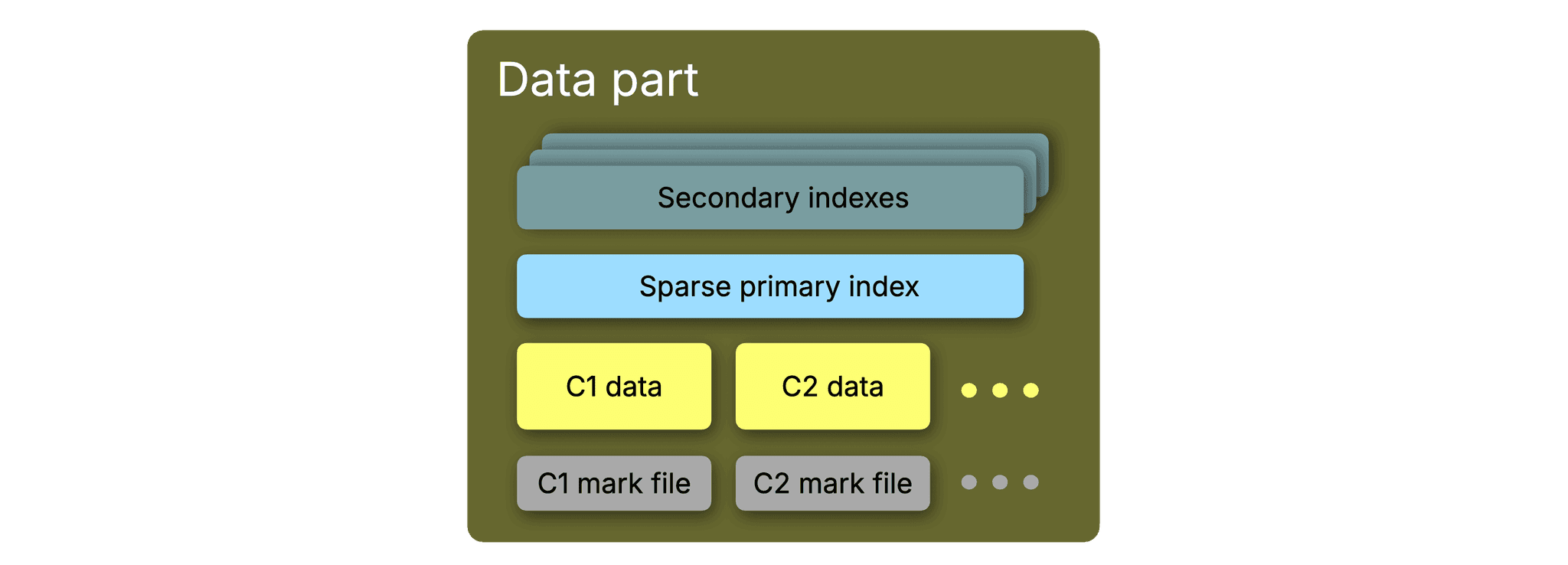
In ClickHouse Cloud, this means the primary key index, the mark files, and any secondary indexes all live in the same location as the part data itself.
When a query arrives that touches an indexed column, ClickHouse must load those index files from object storage into working memory before it can determine which granules are worth reading.
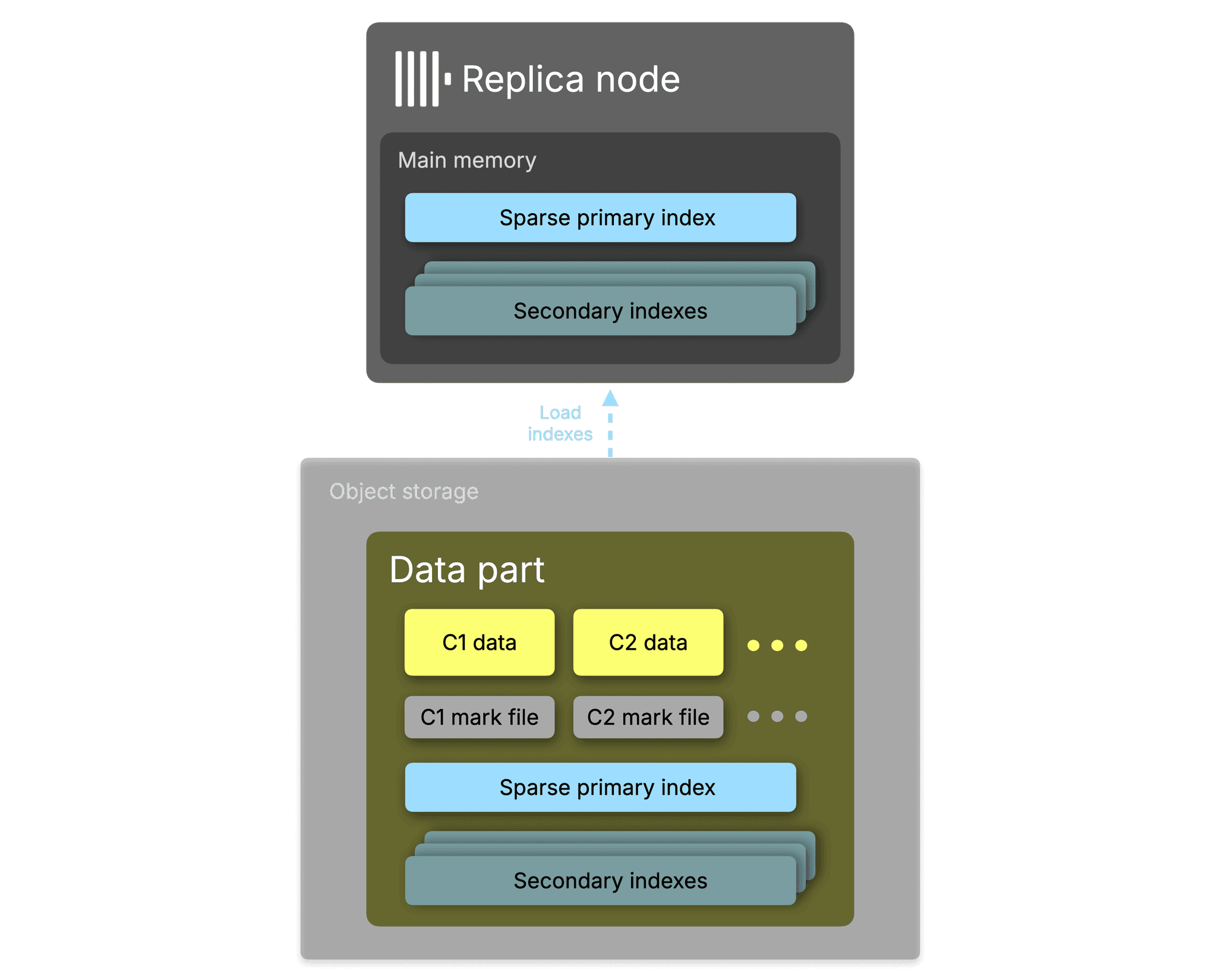
The index cannot be consulted on disk or directly in object storage; it must be resident in memory for the analysis to work.
This is what makes index memory a fixed cost per replica: every replica that participates in query analysis must have the relevant indexes loaded before it can do any analyzing. ClickHouse's primary index is intentionally sparse. Rather than tracking every row, it stores one entry (called a mark) per granule: a block of 8,192 rows by default.
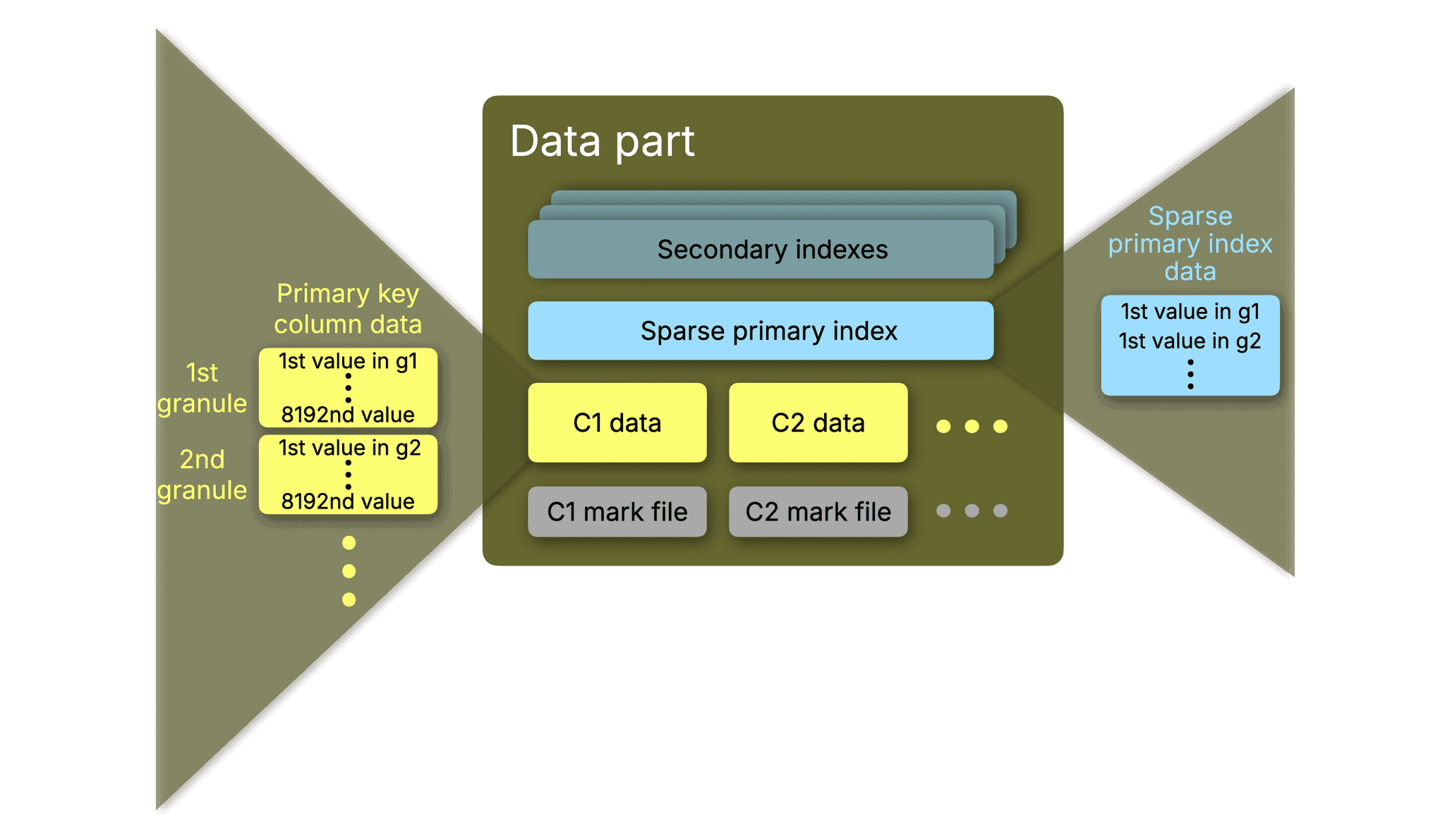
This makes the index small enough to fit entirely in memory while still providing the fast binary search used to skip over data that the index identifies as irrelevant.
When you run a query with a WHERE clause that reads indexed columns, ClickHouse performs index analysis: a two-step process that first removes any irrelevant partitions from the query when a table has been configured with a partitioning key. It then scans the marks for each data part to find which granules might contain matching rows, skips the rest entirely, then streams only the selected granules off disk. This is what gives ClickHouse its characteristic speed. On a well-indexed table, it reads a tiny fraction of the data.
The same mechanism applies to secondary indexes: bloom filters for set membership tests, text indexes for full-text search, and vector indexes for approximate nearest neighbor, all of which are loaded from their respective index files into working memory to drive granule skipping.
For a typical table with billions of rows, this is perfectly manageable. The bottleneck emerges at the high end of the scale curve.
The bottleneck: indexes don't scale horizontally alongside replicas
In ClickHouse Cloud, all replicas share storage. A table with five petabytes of data living in object storage doesn't need that data duplicated across replicas; only the compute is replicated. The data stays in one place, and replicas stream what they need when they need it.
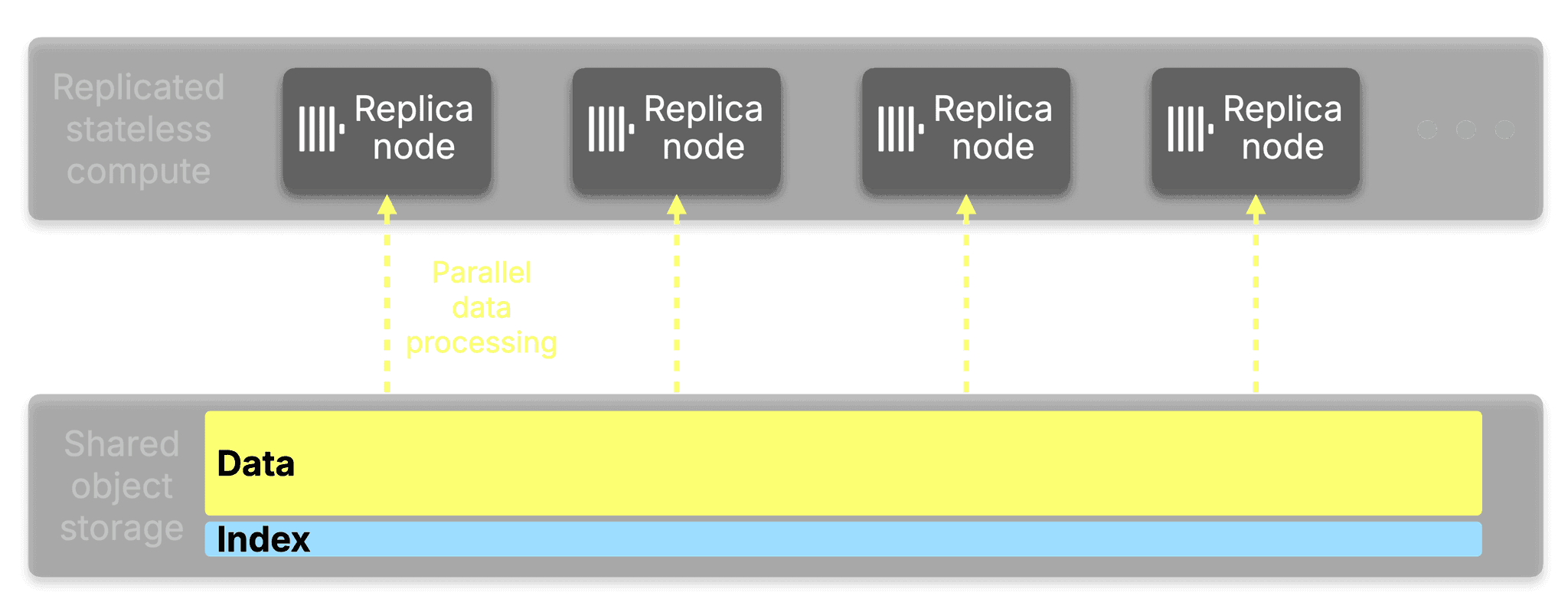
But until now, indexes did not share the same fate. While every index is stored alongside the data in object storage, every replica that serves queries must load the active primary key index from object storage into its own working memory.
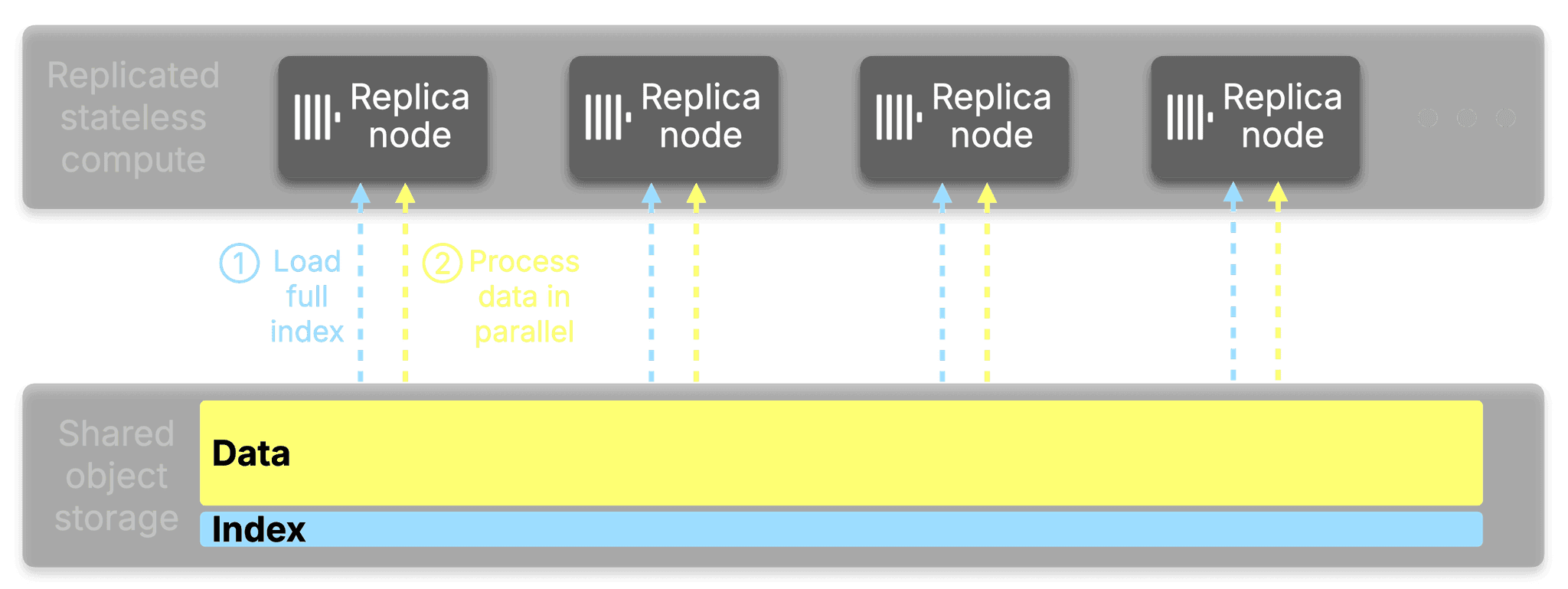
Every replica that evaluates a bloom filter or a text index loads that index too, or pushes the skip index evaluation from index analysis down to data read via use_skip_indexes_on_data_read. If you add replicas to handle more query concurrency or more throughput, each new replica brings its own copy of the full index.
At petabyte scale, the primary key alone can reach 100-400 GiB per replica in memory. With secondary index marks on top, and a growing popularity for vector search and full-text search, the memory cost of adding replicas becomes a significant portion of working memory; memory that could be used to process queries instead.
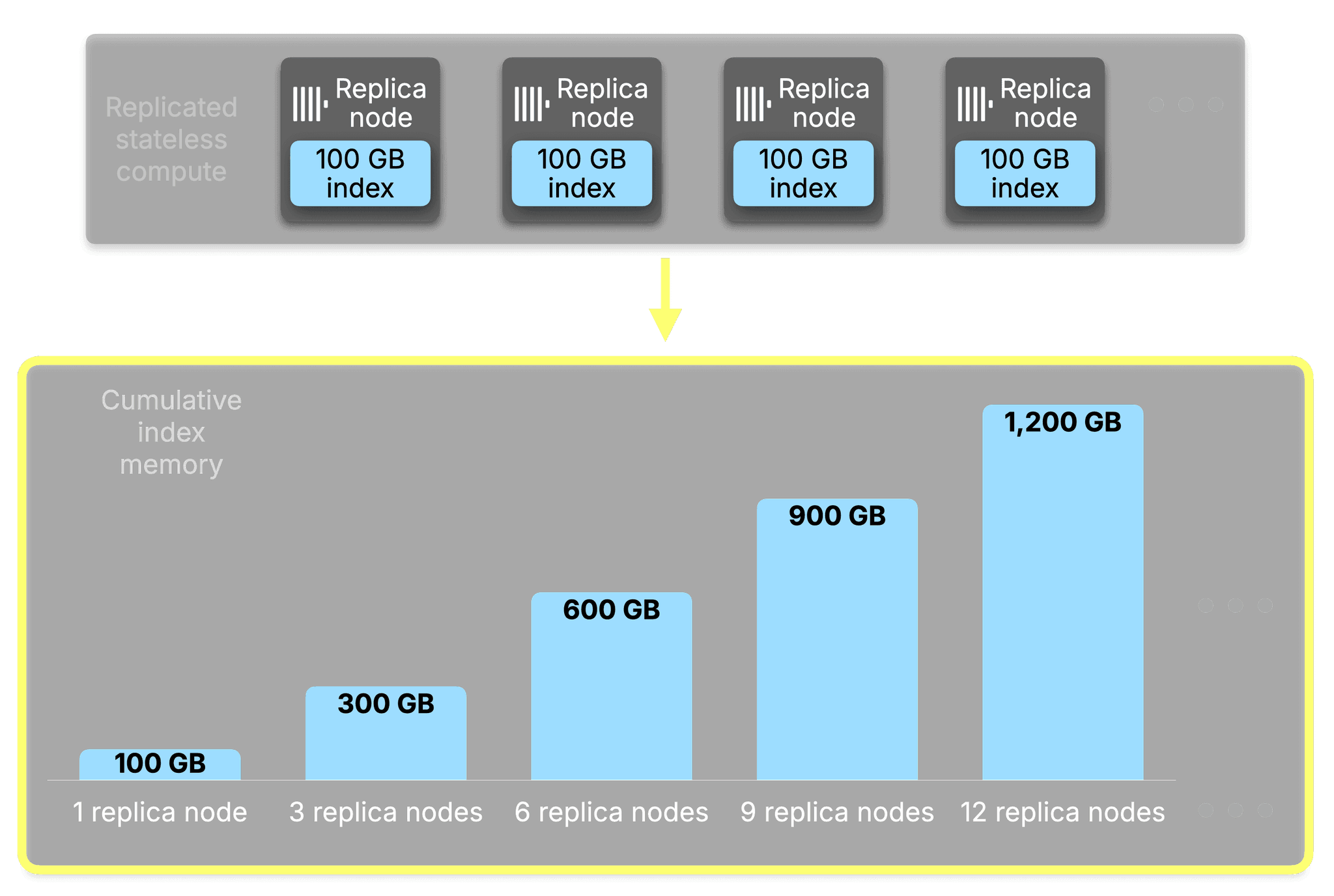
The bottleneck is that the more replicas you add, precisely to get more horizontally scaled performance, the worse the situation gets. For a 100 GB index, the cumulative working memory consumed across the fleet scales directly with replica count:
| Replicas | Index memory per replica | Cumulative index memory |
|---|---|---|
| 1 | 100 GB | 100 GB |
| 3 | 100 GB | 300 GB |
| 6 | 100 GB | 600 GB |
| 9 | 100 GB | 900 GB |
| 12 | 100 GB | 1.2 TB |
Every replica holds the same identical index. Every byte of that index is replicated in full across the fleet, and the bill grows with every node you add.
Index sharding and the core concepts
The core insight behind Index Sharding is simple:
If you have N replicas, each one only needs to be responsible for 1/N of the entire index.
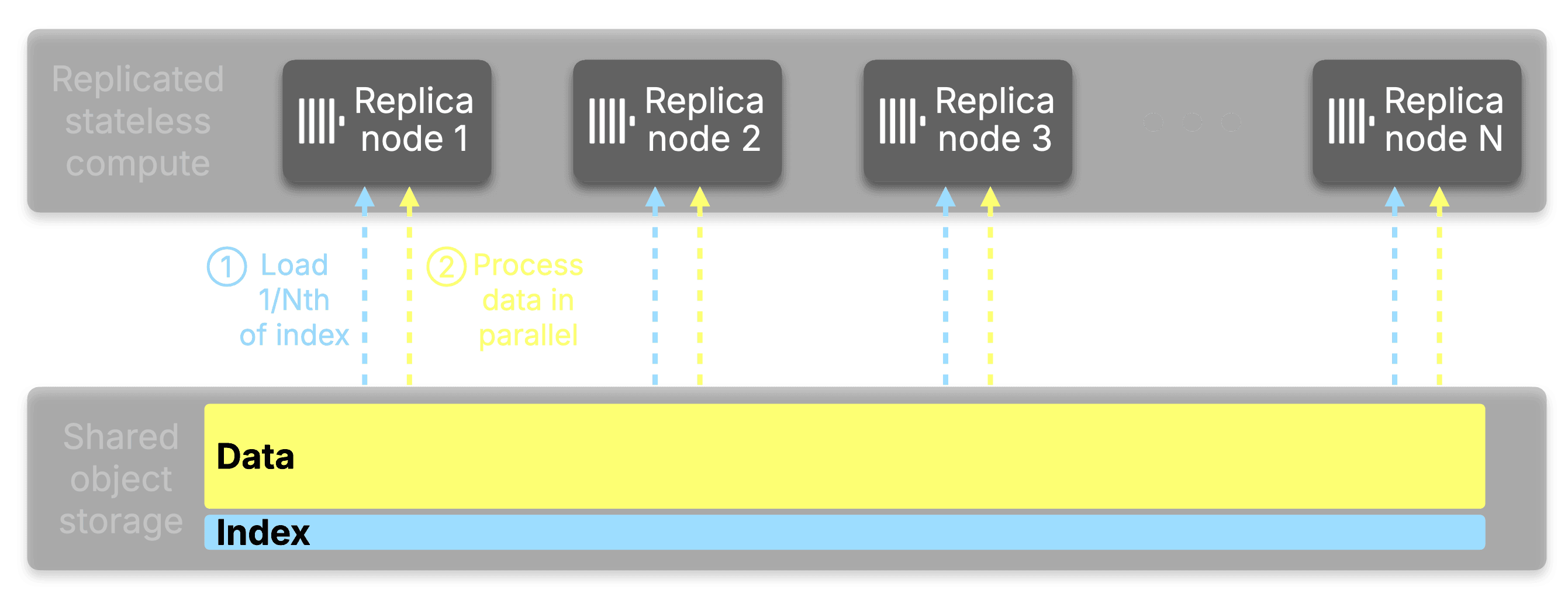
Here's how it works: When a query arrives, instead of the query initiator loading and analyzing the full index locally, it distributes the work out across all available replicas. Each replica receives a subset of the data parts to analyze via a virtual hash ring; a technique referred to as consistent hashing. Each replica loads its assigned portion of the index from object storage, performs the analysis, and returns the ranges of granules that matched. The initiator merges these results into a complete picture of what needs to be read, without any single node ever touching the whole thing.
The actual data reading then proceeds using parallel replicas in the normal way, with each replica responsible for reading the data it analyzed.
You can see this distribution in action with EXPLAIN indexes=1:
EXPLAIN indexes=1
SELECT UserID FROM hits
WHERE UserID = 1
SETTINGS distributed_index_analysis = 1
FORMAT LineAsString;Indexes:
PrimaryKey
Keys: UserID
Condition: (UserID in [...])
Parts: 208/208
Granules: 247702/143169495
Distributed:
Address: replica-1:9000 Parts received: 35 Granules received: 45094
Address: replica-2:9000 Parts received: 47 Granules received: 53988
Address: replica-3:9000 Parts received: 43 Granules received: 47387
Address: replica-4:9000 Parts received: 43 Granules received: 56130
Address: replica-5:9000 Parts received: 40 Granules received: 45103The same distribution sketched as a diagram:
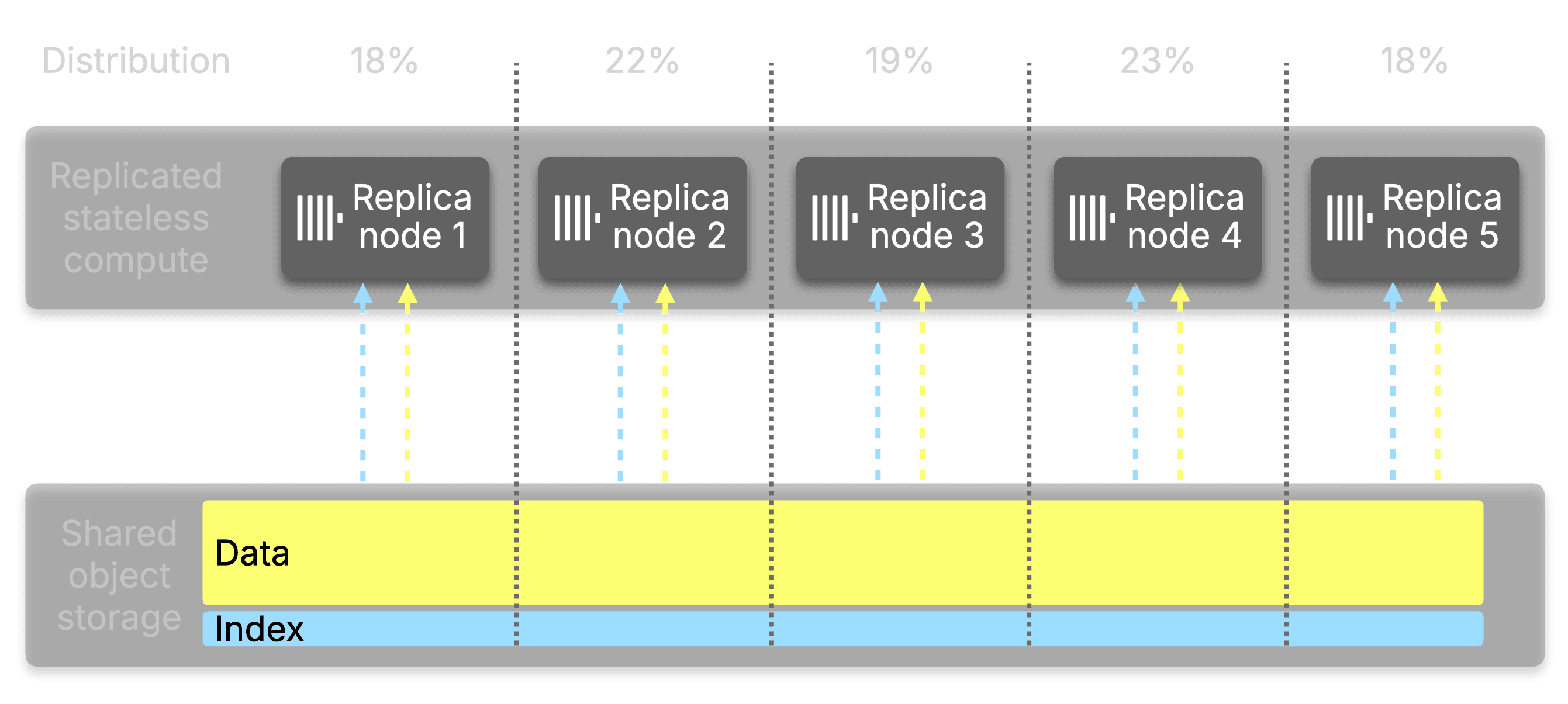
The distribution covers all index types.
Primary key indexes, bloom filters, full-text search indexes, and vector search indexes are all included. This matters especially for secondary indexes, which can be an even larger size relative to the table. A table with multiple text or vector indexes can easily accumulate hundreds of gigabytes of index data that previously had to be replicated across every node.
What happens when a replica is added to the service?
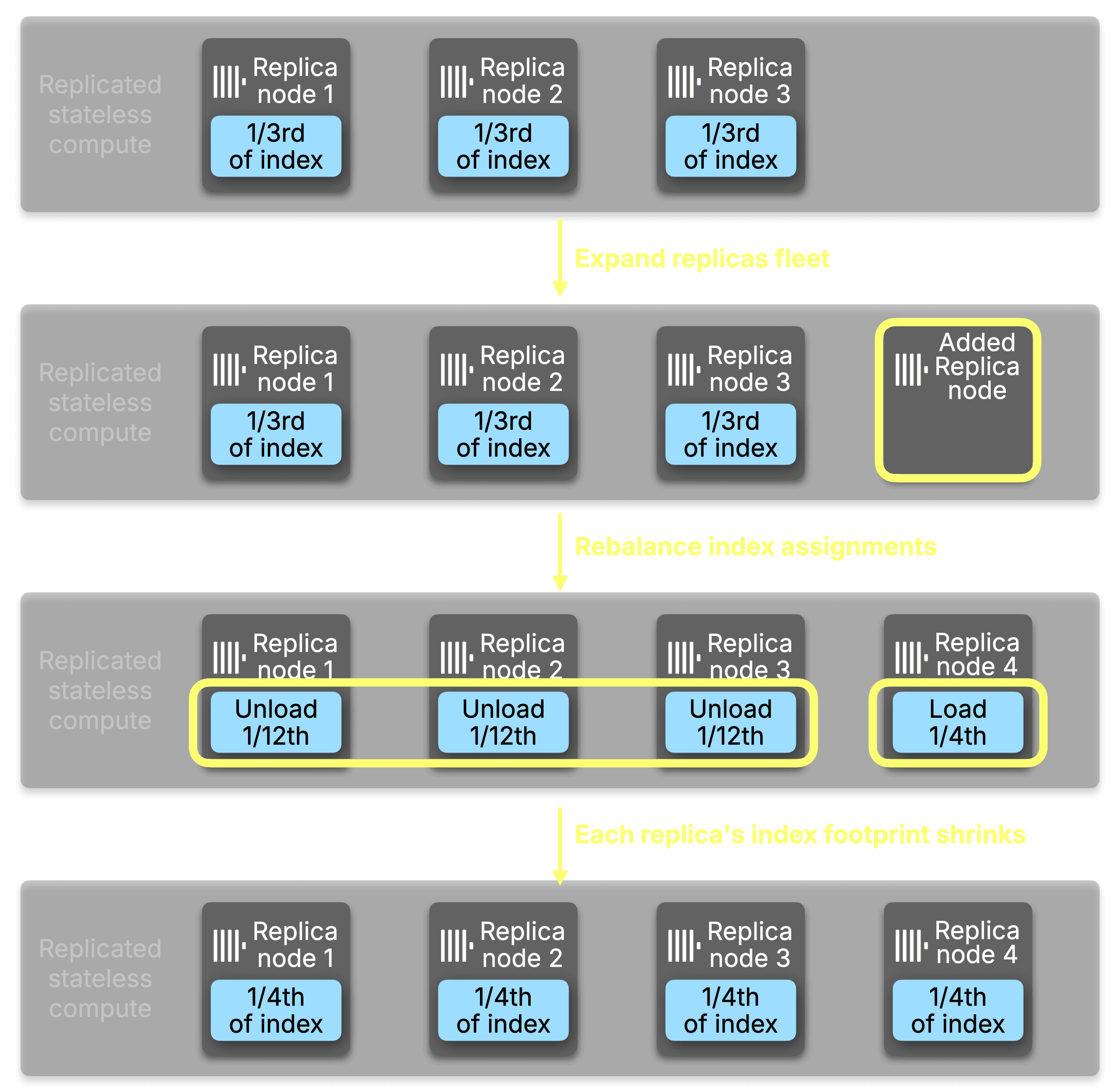
When a replica is added to the service, part assignments are rebalanced across the new replica count. As a new replica brings itself into the service, it can optionally arrive with its primary key cache and its mark cache pre-populated with both prewarm_primary_key_cache and prewarm_mark_cache enabled. If not enabled, the new replica starts with less memory initially consumed and loads its assigned indexes from object storage on demand as analysis requests arrive. When use_primary_key_cache is enabled, existing replicas detect that certain parts are no longer their responsibility and unload them in the background, reclaiming working memory automatically.
This is where ClickHouse Cloud's compute-storage separation pays a particular dividend.
In a traditional shared-nothing architecture, adding a replica means moving or copying data to the new node before it can participate in query execution. In ClickHouse Cloud, the data never moves. All replicas read from the same shared object storage, so a new replica is available to serve index analysis requests as soon as it has loaded its assigned index slice. The cost of scaling out is bounded entirely by index loading time, not data transfer.
The result is that the memory benefits of Index Sharding compound at exactly the moment you want them to: as you scale out, each replica's index footprint shrinks, and adding that next replica costs only the time it takes to warm up a fraction of the total index.
How does ClickHouse protect itself from failure to analyze?
Transient failure handling is a crucial component to account for in distributed systems. There are a handful of reasons that a request for index analysis on a specific part will fail transiently. Common cases include network failures during a request between the initiator and the responsible replica, and the responsible replica not yet having the requested part loaded, but the list of how things can go wrong in a distributed system receives new and exciting entries every day; so let’s talk about how we handle known cases.
When the initiator distributes an index analysis across all replicas, replicas respond with analysis for each part they are asked to analyze. In the event of a failure for a specific part, our solution is simple: fall back to analyzing the part locally. Instead of retrying the replica that produced an initial failure, the initiator will load the part’s index into local memory and run the analysis. Future requests will continue to reach out to the responsible node, and any failures will result in the fallback to the initiator’s memory.
How does index sharding reduce memory usage on replicas?
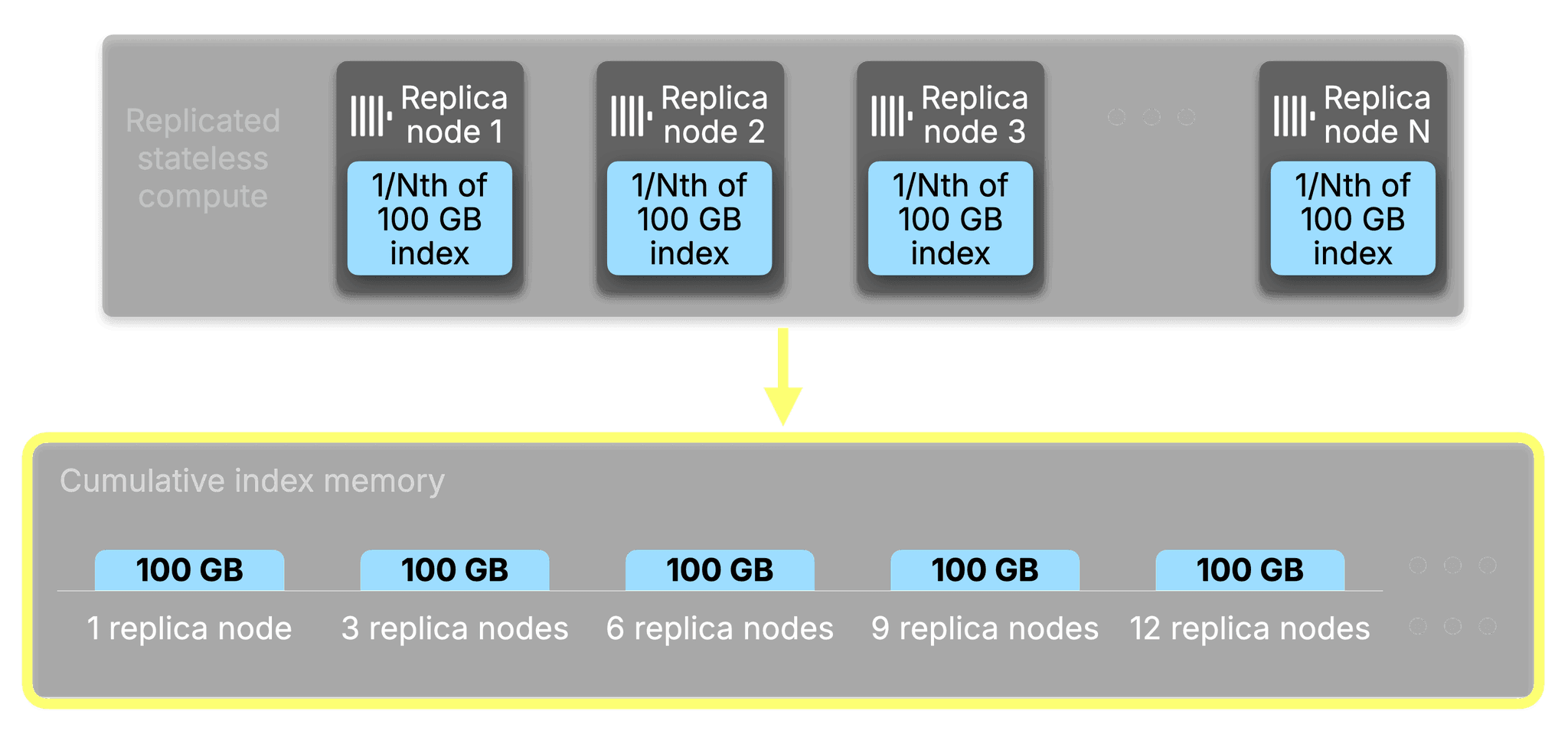
Before index sharding, the relationship between replicas and index memory was linear and unavoidable. A 100GB index across three replicas consumed 300GB of working memory in aggregate. Scale to nine replicas and that number became 900GB, with every replica carrying the full weight regardless of how many others were doing the same job.
With the introduction of index sharding, the cumulative working memory consumed by indexes across your entire fleet is now statically bounded to the size of the index itself, regardless of how many replicas you run. Add more replicas, and the cumulative total stays flat while each individual replica's share shrinks proportionally.
Let's visualize an example of how index analysis might get assigned across a ClickHouse cluster. On a table with a 16GB primary key across 25 parts, with Distributed Index Analysis enabled on 10 replicas, the memory distribution looked like this:
| Replica | Primary Key Memory | Parts Assigned |
|---|---|---|
| replica-1 | 3.57 MB | 193 |
| replica-2 | 3.41 MB | 210 |
| replica-3 | 3.69 MB | 219 |
| replica-4 | 3.72 MB | 226 |
| replica-5 | 3.84 MB | 226 |
Each replica holds only what it needs. The 16GB index lives once in aggregate across the fleet, not once per node within it. This changes the economics of scaling out. You can increase replica count for concurrency and throughput without being forced to provision ever-larger instances just to absorb index memory overhead.
The working memory freed on each replica is available for what it was always meant for: processing queries.
How does index sharding increase analysis performance?
There is a second benefit that compounds with the first: when index analysis is distributed, it is also faster.
Without index sharding, index analysis is fundamentally bound to a single node from the perspective of a single query. One node does all the work, scanning through marks for potentially hundreds of millions of granules, before any data reading can begin. For tables with heavy and highly-selective secondary indexes like vector search and full-text search, this analysis phase is often the dominant cost of a query.
Distributing the analysis across replicas turns that single bottleneck into a distributed one. Each replica works on its slice simultaneously, and the initiator merges compact range results rather than doing the full evaluation itself. More replicas means more parallelism, and more parallelism means faster analysis.
On a 50 billion row table (17,000 parts, 6 million marks), benchmarked at 10 replicas:
| Query type | Without distributed index analysis | With distributed index analysis | Speedup |
|---|---|---|---|
| Primary key range query | 1.0s | 0.23s | 4.3x |
| Bloom filter lookup | 8.5s | 1.1s | 7.7x |
| Vector search | 6.5s | 0.9s | 7.2x |
| Full-text index search | 3.1s | 0.53s | 5.8x |
The gains compound further as you add replicas. Scaling from 10 to 20 replicas with Index Sharding enabled:
| Query type | 10 replicas | 20 replicas | Additional speedup |
|---|---|---|---|
| Primary key range query | 0.23s | 0.16s | 1.4x |
| Bloom filter lookup | 1.1s | 0.65s | 1.7x |
| Vector search | 0.9s | 0.52s | 1.7x |
| Full-text index search | 0.53s | 0.37s | 1.4x |
Without index sharding, adding replicas increases data read throughput, but doesn't help index analysis at all. It remains single-node work. With it, every replica you add contributes to both analysis throughput and memory distribution. For queries where index analysis is the bottleneck, which is common on large tables with secondary indexes, especially full-text and vector search, this is the difference between index analysis being a tax you pay on every query versus a force multiplier you gain from your investment in replicas.
What kind of workloads will this benefit the most?
Index sharding works best where index analysis is already a meaningful part of query cost: large tables with multiple secondary indexes, high replica counts, and selective filters that lean heavily on those indexes to eliminate granules before data reading begins. Full-text search, vector similarity, and bloom filter indexes are the clearest examples. Each can occupy gigabytes of working memory per replica on large tables, and once a table crosses into that territory, both the memory savings and the analysis parallelism compound with every replica added.
To ensure the coordination overhead of distributing analysis is always justified, index sharding activates automatically once two table-level thresholds are met. The first is distributed_index_analysis_min_parts_to_activate (default: 10), which requires a minimum part count before distribution is attempted. The second, and more important, is distributed_index_analysis_min_indexes_bytes_to_activate (default: 1073741824, i.e. 1GB), which requires the combined uncompressed size of all indexes on disk to exceed 1GB. Below that threshold, loading indexes locally is fast and cheap. Above it, the cost of analysis starts to shape query latency and per-replica working memory in ways that distribution meaningfully addresses.
Both thresholds are table-level settings and can be adjusted to match your workload:
ALTER TABLE my_favorite_table MODIFY SETTING
    distributed_index_analysis_min_parts_to_activate = 20,
distributed_index_analysis_min_indexes_bytes_to_activate = 21474836480; -- 20 GBBoth conditions need to be met when distributed_index_analysis is enabled for the analysis to upgrade from local to distributed, ensuring that smaller analyses remain performant.
Can I see a demo?
On an internal database of ours with a merge table over eight sub-tables, we can produce a query of SELECT * ... LIMIT 1 to guarantee the selection of all granules and let query processing limit our query. In a compact explanation of index analysis, we can identify that there are ten total replicas that the index analysis is being distributed to:
EXPLAIN indexes=1 select * from merge_table.merge_table LIMIT 1
SETTINGS distributed_index_analysis = 1
FORMAT LineAsString;

Expression ((Project names + (Projection + Change column names to column identifiers)))
  Limit (preliminary LIMIT)
    ReadFromMerge
      Expression
        ReadFromMergeTree (merge_table.merge_table)
        Indexes:
          MinMax
            Condition: true
            Parts: 1877/1877
            Granules: 292646425/292646425
          Partition
            Condition: true
            Parts: 1877/1877
            Granules: 292646425/292646425
          PrimaryKey
            Condition: true
            Parts: 1877/1877
            Granules: 292646425/292646425
            Distributed:
              Replicas: 10
              Parts send: 1074
              Parts received: 1074
              Granules send: 279134908
              Granules received: 279134908
          Ranges: 1877
Tables: 8If we expand the analysis by removing compact=1 and zoom in on portions, we can see that two tables qualify themselves from distributed analysis because of their size:
EXPLAIN indexes=1 select * from merge_table.merge_table LIMIT 1
SETTINGS distributed_index_analysis = 1
FORMAT LineAsString;

Expression ((Project names + (Projection + Change column names to column identifiers)))
...
			Expression
        ReadFromMergeTree (merge_table.table-1)
        Indexes:
				...
          PrimaryKey
            Condition: true
            Parts: 11/11
            Granules: 1314708/1314708
          Ranges: 11
      Expression
        ReadFromMergeTree (merge_table.table-2)
        Indexes:
          ...
          PrimaryKey
            Condition: true
            Parts: 112/112
            Granules: 76119629/76119629
            Distributed:
              Address: replica-1:9000
              Parts send: 24
              Parts received: 24
              Granules send: 16902011
	              Granules received: 16902011
              Address: replica-2:9000
              Parts send: 21
              Parts received: 21
              Granules send: 13104084
              Granules received: 13104084
              ...
          Ranges: 112
      Expression
        ReadFromMergeTree (merge_table.table-3)
        Indexes:
          ...
          PrimaryKey
            Condition: true
            Parts: 14/14
            Granules: 41/41
          Ranges: 14
      Expression
        ReadFromMergeTree (merge_table.table-4)
        Indexes:
          ...
          PrimaryKey
            Condition: true
            Parts: 21/21
            Granules: 1955/1955
          Ranges: 21
      Expression
        ReadFromMergeTree (merge_table.table-5)
        Indexes:
          ...
          PrimaryKey
            Condition: true
            Parts: 401/401
            Granules: 654988/654988
          Ranges: 401
      Expression
        ReadFromMergeTree (merge_table.table-6)
        Indexes:
          ...
          PrimaryKey
            Condition: true
            Parts: 962/962
            Granules: 203015279/203015279
            Distributed:
              Address: replica-1:9000
              Parts send: 195
              Parts received: 195
              Granules send: 43951345
              Granules received: 43951345
              Address: replica-2:9000
              Parts send: 172
              Parts received: 172
              Granules send: 37951746
              Granules received: 37951746
              ...
      Expression
        ReadFromMergeTree (merge_table.table-7)
        ...
          PrimaryKey
            Condition: true
            Parts: 253/253
            Granules: 11413730/11413730
          Ranges: 253
      Expression
        ReadFromMergeTree (merge_table.table-8)
        Indexes:
          ...
          PrimaryKey
            Condition: true
            Parts: 103/103
            Granules: 125095/125095
Ranges: 103The results we receive are a surprisingly even distribution of granules across the two distributed analyses, with the rest of the tables
Distributed across 5 replicas (table-2 and table-6):
| Replica | Parts Assigned | Granules Assigned |
|---|---|---|
| replica-1 | 193 | 51,055,830 |
| replica-2 | 210 | 51,297,728 |
| replica-3 | 219 | 60,853,356 |
| replica-4 | 226 | 57,846,820 |
| replica-5 | 226 | 58,081,174 |
Analyzed locally on the initiator (all tables below threshold):
| Table | Parts | Granules |
|---|---|---|
| table-1 | 11 | 1,314,708 |
| table-3 | 14 | 41 |
| table-4 | 21 | 1,955 |
| table-5 | 401 | 654,988 |
| table-7 | 253 | 11,413,730 |
| table-8 | 103 | 125,095 |
Full EXPLAIN output for distributed index analysis (click to expand)
EXPLAIN indexes=1 select * from merge_table.merge_table LIMIT 1
SETTINGS distributed_index_analysis = 1
FORMAT LineAsString;

Expression ((Project names + (Projection + Change column names to column identifiers)))
  Limit (preliminary LIMIT)
    ReadFromMerge
      Expression
        ReadFromMergeTree (merge_table.table-1)
        Indexes:
          MinMax
            Condition: true
            Parts: 11/11
            Granules: 1314708/1314708
          Partition
            Condition: true
            Parts: 11/11
            Granules: 1314708/1314708
          PrimaryKey
            Condition: true
            Parts: 11/11
            Granules: 1314708/1314708
          Ranges: 11
      Expression
        ReadFromMergeTree (merge_table.table-2)
        Indexes:
          MinMax
            Condition: true
            Parts: 112/112
            Granules: 76119629/76119629
          Partition
            Condition: true
            Parts: 112/112
            Granules: 76119629/76119629
          PrimaryKey
            Condition: true
            Parts: 112/112
            Granules: 76119629/76119629
            Distributed:
              Address: replica-1:9000
              Parts send: 24
              Parts received: 24
              Granules send: 16902011
              Granules received: 16902011
              Address: replica-2:9000
              Parts send: 21
              Parts received: 21
              Granules send: 13104084
              Granules received: 13104084
              Address: replica-3:9000
              Parts send: 20
              Parts received: 20
              Granules send: 12832693
              Granules received: 12832693
              Address: replica-4:9000
              Parts send: 23
              Parts received: 23
              Granules send: 16373147
              Granules received: 16373147
              Address: replica-5:9000
              Parts send: 24
              Parts received: 24
              Granules send: 16907694
              Granules received: 16907694
          Ranges: 112
      Expression
        ReadFromMergeTree (merge_table.table-3)
        Indexes:
          MinMax
            Condition: true
            Parts: 14/14
            Granules: 41/41
          Partition
            Condition: true
            Parts: 14/14
            Granules: 41/41
          PrimaryKey
            Condition: true
            Parts: 14/14
            Granules: 41/41
          Ranges: 14
      Expression
        ReadFromMergeTree (merge_table.table-4)
        Indexes:
          MinMax
            Condition: true
            Parts: 21/21
            Granules: 1955/1955
          Partition
            Condition: true
            Parts: 21/21
            Granules: 1955/1955
          PrimaryKey
            Condition: true
            Parts: 21/21
            Granules: 1955/1955
          Ranges: 21
      Expression
        ReadFromMergeTree (merge_table.table-5)
        Indexes:
          MinMax
            Condition: true
            Parts: 401/401
            Granules: 654988/654988
          Partition
            Condition: true
            Parts: 401/401
            Granules: 654988/654988
          PrimaryKey
            Condition: true
            Parts: 401/401
            Granules: 654988/654988
          Ranges: 401
      Expression
        ReadFromMergeTree (merge_table.table-6)
        Indexes:
          MinMax
            Condition: true
            Parts: 962/962
            Granules: 203015279/203015279
          Partition
            Condition: true
            Parts: 962/962
            Granules: 203015279/203015279
          PrimaryKey
            Condition: true
            Parts: 962/962
            Granules: 203015279/203015279
            Distributed:
              Address: replica-1:9000
              Parts send: 195
              Parts received: 195
              Granules send: 43951345
              Granules received: 43951345
              Address: replica-2:9000
              Parts send: 172
              Parts received: 172
              Granules send: 37951746
              Granules received: 37951746
              Address: replica-3:9000
              Parts send: 190
              Parts received: 190
              Granules send: 38465035
              Granules received: 38465035
              Address: replica-4:9000
              Parts send: 203
              Parts received: 203
              Granules send: 41708027
              Granules received: 41708027
              Address: replica-5:9000
              Parts send: 202
              Parts received: 202
              Granules send: 40939126
              Granules received: 40939126
          Ranges: 962
      Expression
        ReadFromMergeTree (merge_table.table-7)
        Indexes:
          MinMax
            Condition: true
            Parts: 253/253
            Granules: 11413730/11413730
          Partition
            Condition: true
            Parts: 253/253
            Granules: 11413730/11413730
          PrimaryKey
            Condition: true
            Parts: 253/253
            Granules: 11413730/11413730
          Ranges: 253
      Expression
        ReadFromMergeTree (merge_table.table-8)
        Indexes:
          MinMax
            Condition: true
            Parts: 103/103
            Granules: 125095/125095
          Partition
            Condition: true
            Parts: 103/103
            Granules: 125095/125095
          PrimaryKey
            Condition: true
            Parts: 103/103
            Granules: 125095/125095
Ranges: 103How can I try out index sharding for myself?
Index Sharding is available today in private preview on ClickHouse Cloud for SharedMergeTree tables. If you are running workloads at a scale where index memory is a constraint, or where index analysis time is a meaningful component of query latency, we want to hear from you.
To request access, reach out to your ClickHouse account team or contact us at clickhouse.com/contact
Get started with ClickHouse Cloud today and receive $300 in credits. At the end of your 30-day trial, continue with a pay-as-you-go plan, or contact us to learn more about our volume-based discounts. Visit our pricing page for details.