50.5k
50.5k
Another month goes by, which means it’s time for another release!
The ClickHouse 26.5 release contains 38 new features 🌹 51 performance optimizations 🦋 224 bug fixes 🐞
This release sees a record number of performance optimizations, with highlights including ORDER BY … LIMIT pushdown through joins (up to 20× faster), a new GROUP BY … LIMIT shortcut that avoids building unnecessary groups, a new filesystem table function for running SQL directly against your local file system, and more!
New contributors
A special welcome to all the new contributors in 26.5! The growth of ClickHouse's community is humbling, and we are always grateful for the contributions that have made ClickHouse so popular.
Below are the names of the new contributors:
Abhinav Agarwal, Ahaan, Alex Kuleshov, Ashrith Bandla, Asish Kumar, Callum C, Felix Bernhard, Flavio Malavazi, Ian Rakhmatullin, Ilya Perstenev, JackFielding, Joe Redfern, Larry Snizek, Luc Leray, Rahul Nair, Roy Sindre Norangshol, Venkata Vineel, Vincent Voyer, Yue, Yue Ni, functioncrafter, ibrahim karimeddin, mohaidoss, perst20, peter15914, sayondeep, zhangzhibiao, zxuhan7
Hint: if you’re curious how we generate this list… here.
You can also view the slides from the presentation.
Push ORDER BY … LIMIT through JOIN
Contributed by Alexey Milovidov
“We optimize ClickHouse in every version, we optimize it more, and there is no end in optimizations” – Alexey Milovidov during the ClickHouse release 26.5 webinar
Moving more work before joins
In recent releases, ClickHouse has been steadily moving more work before joins, so less data has to pass through them. For example, ClickHouse already pushes down complex OR conditions in JOIN queries to filter each table earlier, before the join happens. It also supports runtime filters, which are created from the right-hand side of a join and applied to the left-hand side before the join runs.
This release continues that theme, but pushes down a different kind of work: not a WHERE predicate, but the ORDER BY … LIMIT clause, a pattern that appears frequently in analytical workloads.
From “join then limit” to “limit then join”
If the outermost SELECT of a LEFT JOIN query ends with ORDER BY … LIMIT, and the sort key depends only on columns from the left table, ClickHouse can push that ORDER BY … LIMIT below the join.
The same applies to RIGHT JOIN queries when the sort key depends only on columns from the right table.
For example, this query running over TPC-H tables asks for the 100 most recent orders, enriched with customer information:
SELECT
o_orderkey,
o_orderdate,
o_totalprice,
c_name,
c_mktsegment
FROM orders
LEFT JOIN customer ON o_custkey = c_custkey
ORDER BY
o_orderdate DESC,
o_orderkey DESC
LIMIT 100;Here, the ORDER BY uses only columns from orders, the preserved side of the LEFT JOIN. That means ClickHouse does not need to join every order with its customer before applying the limit.
Without the optimization, the plan is forced to do the expensive join first:
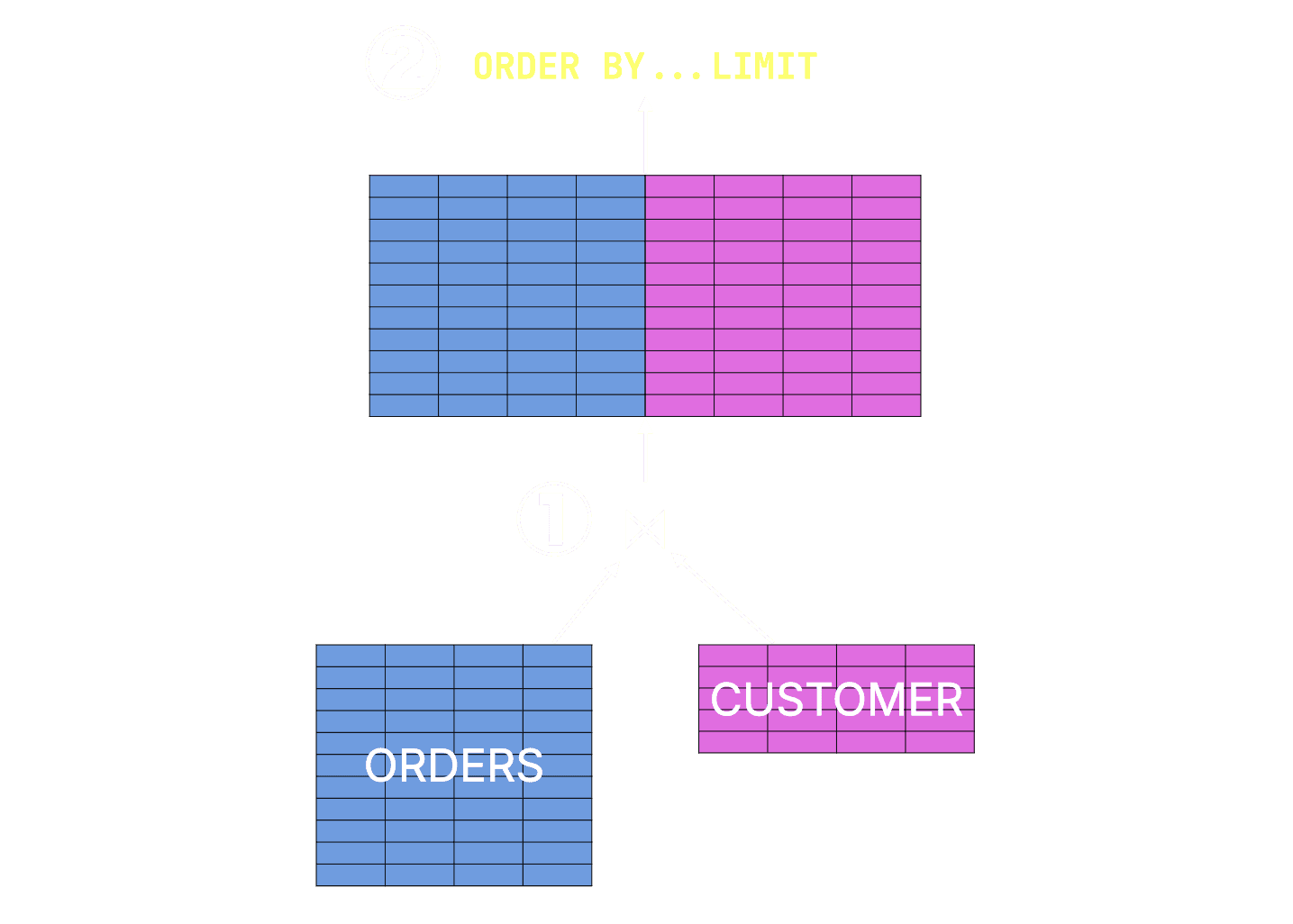
With the new optimization, ClickHouse can flip the work around: it can first find the top 100 rows from orders, and then join only those few rows with customer.
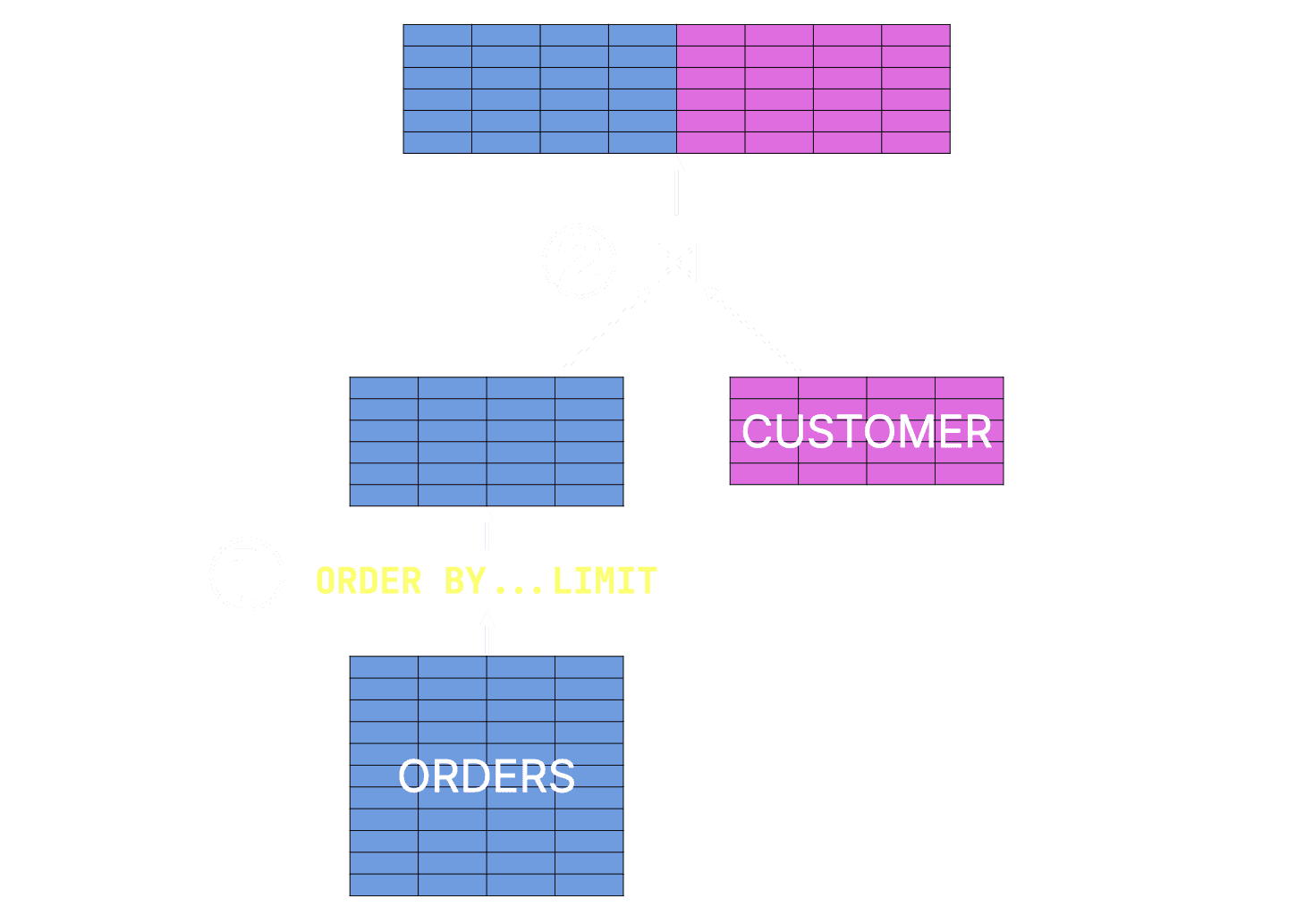
You can also see the change in the query plan obtained via EXPLAIN. With the optimization enabled, the plan contains a Limit and Sorting step on the orders table side, before the join with the customer table:
Join
...
Limit
Sorting
ReadFromMergeTree (sf100.orders)
...
ReadFromMergeTree (sf100.customer)A nice side effect is that ClickHouse already treats the pushed-down ORDER BY … LIMIT part as a first-class query pattern. As covered in our dedicated Top-N optimization post, ClickHouse has accumulated several engine-level optimizations for this pattern.
This optimization is controlled by the new query_plan_top_k_through_join setting, which is enabled by default.
Benchmark: 20× faster and 175× less memory
To evaluate the impact, we created and loaded the TPC-H schema with a scale factor of 100 on an AWS EC2 m6i.8xlarge instance with 32 vCPUs and 128 GiB of RAM.
First, we ran the query with the new ORDER BY … LIMIT pushdown disabled by setting query_plan_top_k_through_join = 0. We executed the query three times and used the fastest run as the baseline:
Elapsed: 2.153 sec. Processed 165.00 million rows, 3.23 GB (76.65 million rows/s., 1.50 GB/s.)
Peak memory usage: 1.87 GiB.
Elapsed: 1.878 sec. Processed 165.00 million rows, 3.23 GB (87.87 million rows/s., 1.72 GB/s.)
Peak memory usage: 1.88 GiB.
Elapsed: 2.197 sec. Processed 165.00 million rows, 3.23 GB (75.10 million rows/s., 1.47 GB/s.)
Peak memory usage: 1.87 GiB.Then we ran the same query with the optimization enabled by setting query_plan_top_k_through_join = 1:
Elapsed: 0.093 sec. Processed 165.22 million rows, 2.18 GB (1.78 billion rows/s., 23.45 GB/s.)
Peak memory usage: 11.46 MiB.
Elapsed: 0.092 sec. Processed 165.22 million rows, 2.18 GB (1.80 billion rows/s., 23.70 GB/s.)
Peak memory usage: 13.72 MiB.
Elapsed: 0.092 sec. Processed 165.22 million rows, 2.18 GB (1.79 billion rows/s., 23.53 GB/s.)
Peak memory usage: 10.98 MiB.Using the fastest run from each configuration, the difference is significant:
| Setting | Fastest runtime | Peak memory | Data read |
|---|---|---|---|
| Pushdown disabled | 1.878 sec | 1.88 GiB | 3.23 GB |
| Pushdown enabled | 0.092 sec | 10.98 MiB | 2.18 GB |
| Improvement | 20.4× faster | ~175× less memory | 1.5× less data read |
This benchmark already shows a 20.4× runtime improvement and around 175× lower peak memory usage.
These numbers are not a fixed ceiling. The benefit depends on the size of the input tables, the width of the joined rows, the selected columns, and the LIMIT value.
GROUP BY … LIMIT with no ORDER BY
Contributed by Amos Bird
Extending Top-N optimizations to GROUP BY
ClickHouse already treats Top-N queries as a first-class query pattern. As covered in our dedicated Top-N optimization post, ClickHouse has accumulated several engine-level optimizations for queries with ORDER BY … LIMIT, including streaming execution, read-in-order, lazy reading, and data-skipping-based Top-N pruning.
This release extends the same idea to another shape: GROUP BY … LIMIT queries without ORDER BY.
Consider a query that groups by a key and then applies LIMIT, but has no ORDER BY, no HAVING clause, and no window function. In that case, the query does not ask for the smallest keys, the largest keys, the most frequent keys, or keys in any particular order. It only asks for any N distinct grouping keys.
For example, because we already had the TPC-H dataset loaded for the previous section’s benchmark, we can reuse it here. This query asks for any 100 distinct order keys from the lineitem table:
SELECT l_orderkey
FROM lineitem
GROUP BY l_orderkey
LIMIT 100;From “group everything, then limit” to “keep only N groups”
In TPC-H scale factor 100, lineitem contains 600 million rows and 150 million distinct l_orderkey values.
Without the new optimization, ClickHouse treats the query like a regular GROUP BY: as it scans the input, every new l_orderkey creates a new entry in the aggregation hash table. Only after the aggregation result has been built does LIMIT 100 reduce the output to 100 rows.
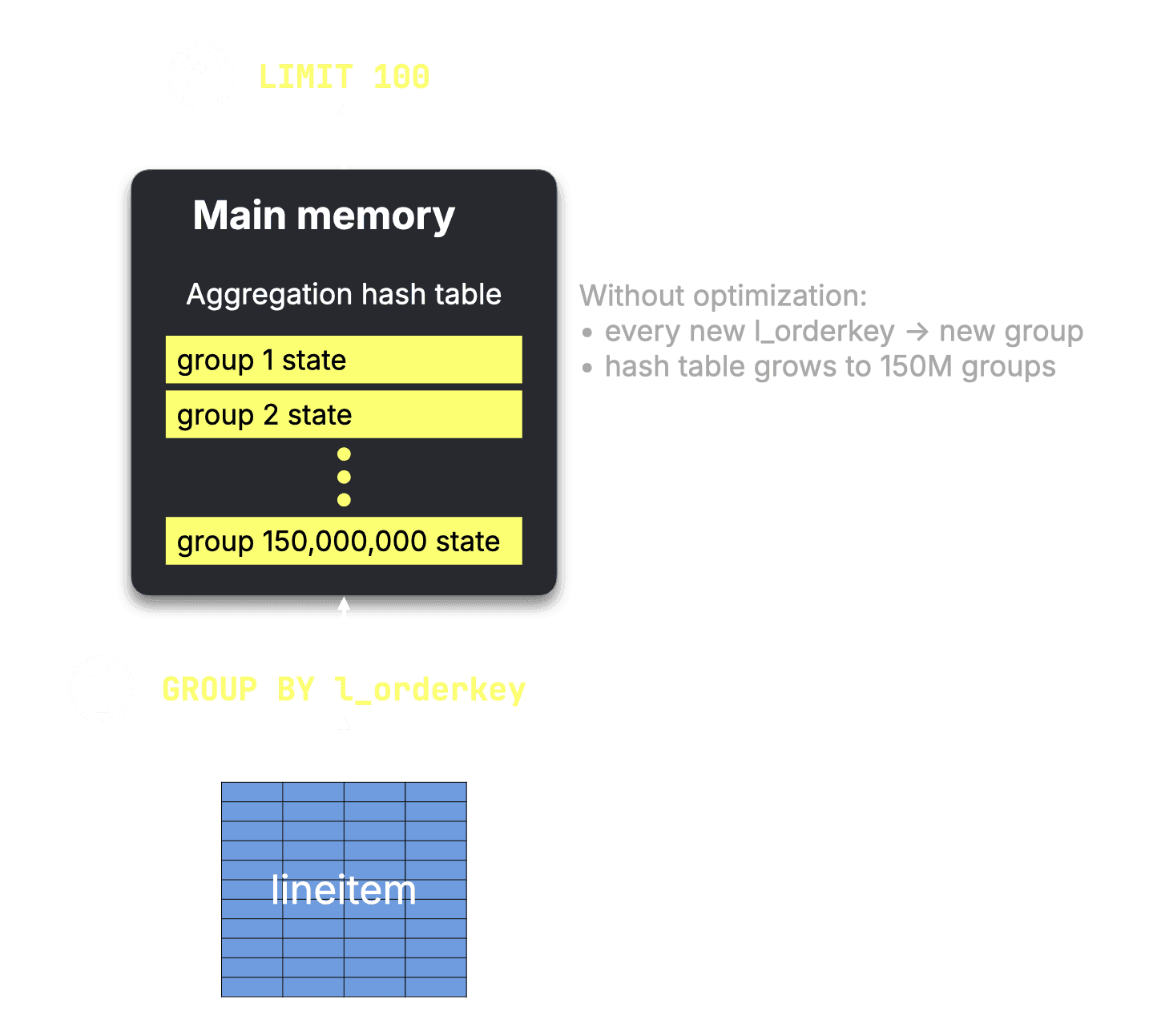
With this release, ClickHouse recognizes this special pattern and avoids building groups that cannot affect the result. The optimization is controlled by the new optimize_trivial_group_by_limit_query setting, which is enabled by default.
For eligible queries, ClickHouse internally sets the aggregation limit to LIMIT + OFFSET and uses group_by_overflow_mode = 'any'. In practice, this means that once the aggregation hash table contains the first 100 distinct l_orderkey values, new keys are ignored instead of being added as new groups.
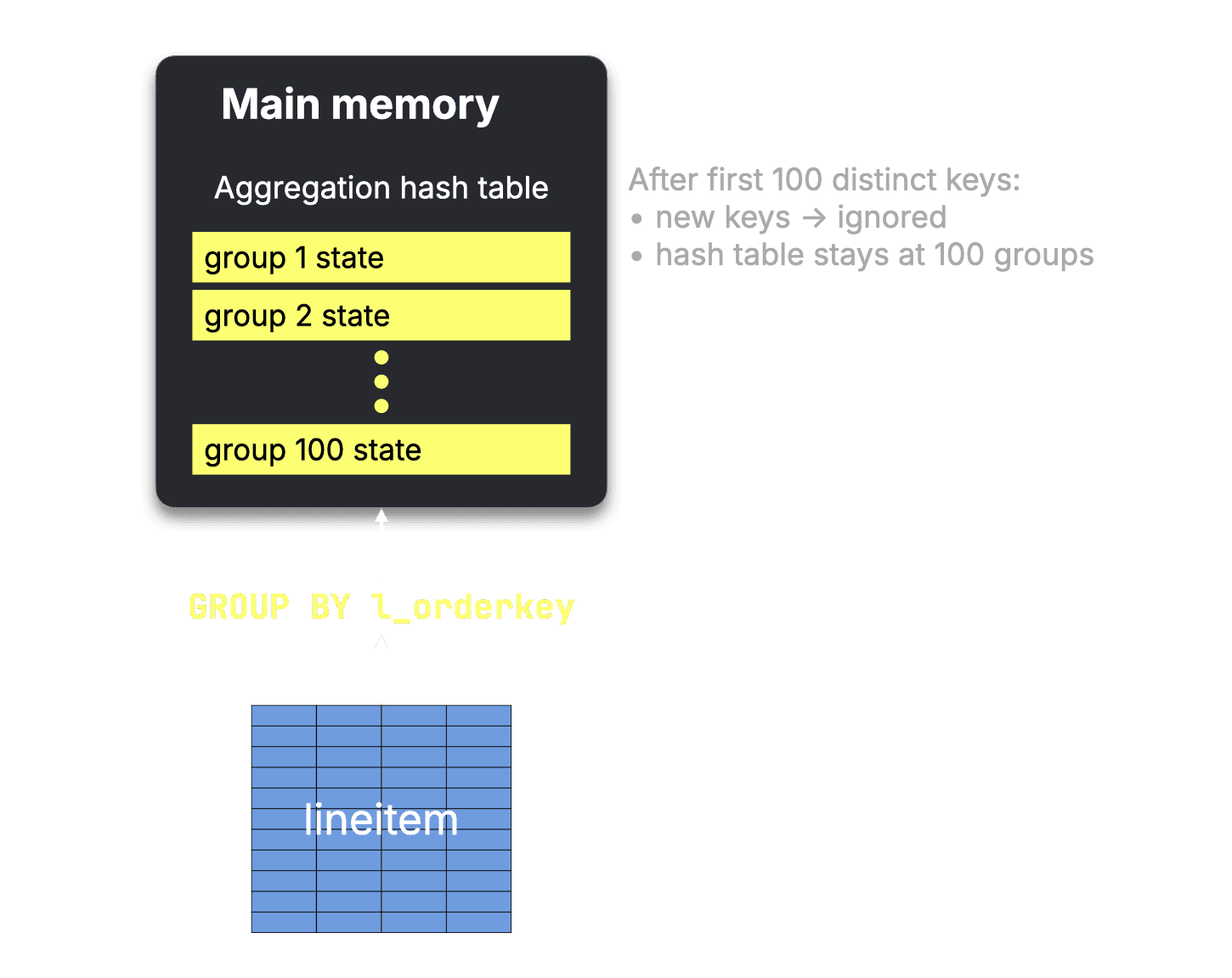
The scan still processes the input, but the aggregation state in main memory stays tiny: 100 groups instead of growing toward 150 million.
Benchmark: 11.9× faster and 185× less memory
To evaluate the impact, we ran the query again on an AWS EC2 m6i.8xlarge instance with 32 vCPUs and 128 GiB RAM. First, we disabled the optimization by setting optimize_trivial_group_by_limit_query = 0 and used the fastest of three runs as the baseline:
Elapsed: 0.853 sec. Processed 600.04 million rows, 2.40 GB (703.29 million rows/s., 2.81 GB/s.)
Peak memory usage: 8.60 GiB.
Elapsed: 0.806 sec. Processed 600.04 million rows, 2.40 GB (744.07 million rows/s., 2.98 GB/s.)
Peak memory usage: 8.58 GiB.
Elapsed: 0.809 sec. Processed 600.04 million rows, 2.40 GB (742.06 million rows/s., 2.97 GB/s.)
Peak memory usage: 8.57 GiB.Then we ran the same query with the optimization enabled by setting optimize_trivial_group_by_limit_query = 1:
Elapsed: 0.069 sec. Processed 600.04 million rows, 2.40 GB (8.76 billion rows/s., 35.03 GB/s.)
Peak memory usage: 47.54 MiB.
Elapsed: 0.070 sec. Processed 600.04 million rows, 2.40 GB (8.54 billion rows/s., 34.16 GB/s.)
Peak memory usage: 47.54 MiB.
Elapsed: 0.068 sec. Processed 600.04 million rows, 2.40 GB (8.79 billion rows/s., 35.17 GB/s.)
Peak memory usage: 47.55 MiB.Using the fastest run from each configuration:
| Setting | Fastest runtime | Rows processed | Data read | Peak memory |
|---|---|---|---|---|
| Optimization disabled | 0.806 sec | 600.04 million | 2.40 GB | 8.58 GiB |
| Optimization enabled | 0.068 sec | 600.04 million | 2.40 GB | 47.55 MiB |
| Improvement | 11.9× faster | same | same | ~185× less memory |
The optimized query is 11.9× faster and uses about 185× less peak memory.
The filesystem table function
Contributed by Ilya Perstenev, Ilya Yatsishin, Alexey Milovidov
ClickHouse 25.6 also introduces the filesystem table function, which lets us list and analyze a directory as a queryable table.
The full schema exposed by filesystem covers everything you'd expect for filesystem introspection:
DESCRIBE filesystem();┌─name──────────────┬─type───────────────────────────────────────────────┐
│ path │ String │
│ name │ String │
│ type │ Enum8('none' = 0, 'not_found' = 1, 'regular' = 2, ⋯│
│ size │ Nullable(UInt64) │
│ depth │ UInt16 │
│ modification_time │ Nullable(DateTime64(6)) │
│ is_symlink │ Bool │
│ content │ Nullable(String) │
│ owner_read │ Bool │
│ owner_write │ Bool │
│ owner_exec │ Bool │
│ group_read │ Bool │
│ group_write │ Bool │
│ group_exec │ Bool │
│ others_read │ Bool │
│ others_write │ Bool │
│ others_exec │ Bool │
│ set_gid │ Bool │
│ set_uid │ Bool │
│ sticky_bit │ Bool │
│ file │ String │
└───────────────────┴────────────────────────────────────────────────────┘If we call it with no arguments, using clickhouse-local, it will list files in the current directory:
SELECT path, name FROM filesystem();┌─path──────────────────────────────────────────────┬─name──────────────────────┐
│ /Users/markhneedham/projects/release-posts/26.5 │ clickhouse │
│ /Users/markhneedham/projects/release-posts/26.5 │ .claude │
└───────────────────────────────────────────────────┴───────────────────────────┘It has access to the same parts of the file system as the user who launched ClickHouse. If you call it via ClickHouse Server, it will list the files in the user_files directory.
I have a lot of large video files on my machine, and I (or rather Claude!) usually have to run a bunch of Unix commands to find them. With this new function, it’s as simple as the following query:
SELECT path, name, formatReadableSize(size), modification_time
FROM filesystem('/Users/markhneedham/projects/videos')
WHERE type = 'regular' AND name LIKE '%.braw'
ORDER BY size DESC
LIMIT 3
FORMAT Vertical;Row 1:
──────
path: /Users/markhneedham/projects/videos/20260212-Sample
name: A001_10150625_C183 2.braw
formatReadableSize(size): 26.75 GiB
modification_time: 2025-10-15 06:25:08.529999
Row 2:
──────
path: /Users/markhneedham/projects/videos/20260217-AsyncInserts
name: A001_09290151_C176.braw
formatReadableSize(size): 21.70 GiB
modification_time: 2025-09-29 01:51:47.820000
Row 3:
──────
path: /Users/markhneedham/projects/videos/20260123-PGCHStack
name: A001_08021314_C119.braw
formatReadableSize(size): 21.54 GiB
modification_time: 2025-08-02 13:14:33.260000And I’ve wrapped this query up into a skill that Claude can use to more quickly find files to delete to free up space.
url_base for the url table function
Contributed by Alexey Milovidov
If you use the url table function regularly, you've probably typed the same base URL dozens of times. The new url_base setting lets you set it once and use relative paths everywhere instead.
Working with the Amazon customer review dataset, we could set the URL base like this:
SET url_base = 'https://datasets-documentation.s3.eu-west-3.amazonaws.com/amazon_reviews/';We could then query the 2014 reviews like this:
SELECT
count(),
round(avg(star_rating), 2) AS stars,
round(avg(helpful_votes), 2) AS votes
FROM url('amazon_reviews_2014.snappy.parquet')┌──count()─┬─stars─┬─votes─┐
│ 44127569 │ 4.23 │ 0.96 │
└──────────┴───────┴───────┘And if we want to query 2015:
SELECT
count(),
round(avg(star_rating), 2) AS stars,
round(avg(helpful_votes), 2) AS votes
FROM url('amazon_reviews_2015.snappy.parquet')┌──count()─┬─stars─┬─votes─┐
│ 41905631 │ 4.25 │ 0.74 │
└──────────┴───────┴───────┘Negative LIMIT BY
Contributed by Nihal Z. Miaji
The 26.5 release also adds negative limit by, which lets us pick rows from the end of each group, rather than the beginning.
We’ll use my favorite UK property prices dataset to demonstrate how it works, starting with the following query that finds the median price by district for all the counties that contain the term Yorkshire:
SELECT county, district, median(price)
FROM uk_price_paid
WHERE county ILIKE '%Yorkshire%'
GROUP BY ALL
ORDER BY median(price) DESC;┌─county───────────────────┬─district─────────────────┬─median(price)─┐
│ NORTH YORKSHIRE │ NORTH YORKSHIRE │ 263000 │
│ NORTH YORKSHIRE │ HARROGATE │ 185000 │
│ NORTH YORKSHIRE │ HAMBLETON │ 170000 │
│ NORTH YORKSHIRE │ RYEDALE │ 160000 │
│ NORTH YORKSHIRE │ RICHMONDSHIRE │ 150000 │
│ NORTH YORKSHIRE │ CRAVEN │ 149250 │
│ NORTH YORKSHIRE │ SELBY │ 144995 │
│ EAST RIDING OF YORKSHIRE │ EAST RIDING OF YORKSHIRE │ 132000 │
│ WEST YORKSHIRE │ LEEDS │ 129997 │
│ NORTH YORKSHIRE │ SCARBOROUGH │ 120000 │
│ SOUTH YORKSHIRE │ SHEFFIELD │ 115000 │
│ WEST YORKSHIRE │ KIRKLEES │ 114950 │
│ WEST YORKSHIRE │ WAKEFIELD │ 112997.5 │
│ SOUTH YORKSHIRE │ ROTHERHAM │ 102500 │
│ WEST YORKSHIRE │ CALDERDALE │ 101000 │
│ WEST YORKSHIRE │ BRADFORD │ 100000 │
│ SOUTH YORKSHIRE │ DONCASTER │ 98500 │
│ SOUTH YORKSHIRE │ BARNSLEY │ 95000 │
│ WEST YORKSHIRE │ EAST YORKSHIRE │ 94950 │
└──────────────────────────┴──────────────────────────┴───────────────┘We could already select the first two rows per county group, i.e., the two districts with the highest median price per county:
SELECT county, district, median(price)
FROM uk_price_paid
WHERE county ILIKE '%Yorkshire%'
GROUP BY ALL
ORDER BY median(price) DESC
LIMIT 2 BY county┌─county───────────────────┬─district─────────────────┬─median(price)─┐
│ NORTH YORKSHIRE │ NORTH YORKSHIRE │ 262000 │
│ NORTH YORKSHIRE │ HARROGATE │ 185000 │
│ EAST RIDING OF YORKSHIRE │ EAST RIDING OF YORKSHIRE │ 130972.5 │
│ WEST YORKSHIRE │ LEEDS │ 130000 │
│ WEST YORKSHIRE │ KIRKLEES │ 115000 │
│ SOUTH YORKSHIRE │ SHEFFIELD │ 115000 │
│ SOUTH YORKSHIRE │ ROTHERHAM │ 105000 │
└──────────────────────────┴──────────────────────────┴───────────────┘But with negative limit by, we can also select the last two rows per county group, i.e., the two districts with the lowest median price per county.
SELECT county, district, median(price)
FROM uk_price_paid
WHERE county ILIKE '%Yorkshire%'
GROUP BY ALL
ORDER BY median(price) DESC
LIMIT -2 BY county;┌─county───────────────────┬─district─────────────────┬─median(price)─┐
│ NORTH YORKSHIRE │ SELBY │ 145000 │
│ EAST RIDING OF YORKSHIRE │ EAST RIDING OF YORKSHIRE │ 132500 │
│ NORTH YORKSHIRE │ SCARBOROUGH │ 122000 │
│ SOUTH YORKSHIRE │ DONCASTER │ 99000 │
│ WEST YORKSHIRE │ BRADFORD │ 97500 │
│ SOUTH YORKSHIRE │ BARNSLEY │ 94950 │
│ WEST YORKSHIRE │ EAST YORKSHIRE │ 94950 │
└──────────────────────────┴──────────────────────────┴───────────────┘Multi-path SQL/JSON
Contributed by Kevinyhzou, Alexey Milovidov
When using the JSON_VALUE and JSON_QUERY functions, we can now pass a tuple or array of paths and receive a tuple or array of strings, with JSON parsed only once.
We’re going to work with a JSON string representing the Open House conference, printed out using the new prettyPrintJSON function:
WITH '{
"name": "Open House 2026",
"tagline": "The real-time database for AI conference",
"dates": {
"workshops": "2026-05-26",
"conference": ["2026-05-27", "2026-05-28"]
},
"venue": {
"name": "Convene 100 Stockton",
"address": "40 O''Farrell St, San Francisco, CA 94108"
}
}' AS conf
SELECT prettyPrintJSON(conf)
FORMAT Raw;{
"name": "Open House 2026",
"tagline": "The real-time database for AI conference",
"dates": {
"workshops": "2026-05-26",
"conference": [
"2026-05-27",
"2026-05-28"
]
},
"venue": {
"name": "Convene 100 Stockton",
"address": "40 O'Farrell St, San Francisco, CA 94108"
}
}
1 row in set. Elapsed: 0.003 sec.To return strings, for example, if we want to return a tuple containing the name and venue, we use the JSON_VALUE function:
WITH '{
"name": "Open House 2026",
"tagline": "The real-time database for AI conference",
"dates": {
"workshops": "2026-05-26",
"conference": ["2026-05-27", "2026-05-28"]
},
"venue": {
"name": "Convene 100 Stockton",
"address": "40 O''Farrell St, San Francisco, CA 94108"
}
}' AS conf
SELECT JSON_VALUE(conf, ('$.name', '$.venue.name'));┌─JSON_VALUE(conf, ('$.name', '$.venue.name'))─┐
│ ('Open House 2026','Convene 100 Stockton') │
└──────────────────────────────────────────────┘We can also pass in the JSON paths as an array rather than a tuple:
WITH '{
"name": "Open House 2026",
"tagline": "The real-time database for AI conference",
"dates": {
"workshops": "2026-05-26",
"conference": ["2026-05-27", "2026-05-28"]
},
"venue": {
"name": "Convene 100 Stockton",
"address": "40 O''Farrell St, San Francisco, CA 94108"
}
}' AS conf
SELECT JSON_VALUE(conf, ['$.name', '$.venue.name']);┌─JSON_VALUE(conf, ['$.name', '$.venue.name'])─┐
│ ['Open House 2026','Convene 100 Stockton'] │
└──────────────────────────────────────────────┘But dates.conference is an array, so if we try to retrieve that using JSON_VALUE, we’ll return an empty string:
WITH '{
"name": "Open House 2026",
"tagline": "The real-time database for AI conference",
"dates": {
"workshops": "2026-05-26",
"conference": ["2026-05-27", "2026-05-28"]
},
"venue": {
"name": "Convene 100 Stockton",
"address": "40 O''Farrell St, San Francisco, CA 94108"
}
}' AS conf
SELECT JSON_VALUE(conf, ('$.name', '$.dates.conference'));┌─JSON_VALUE(c⋯nference'))─┐
│ ('Open House 2026','') │
└──────────────────────────┘We can read the individual values from that array using zero-based array indexing:
WITH '{
"name": "Open House 2026",
"tagline": "The real-time database for AI conference",
"dates": {
"workshops": "2026-05-26",
"conference": ["2026-05-27", "2026-05-28"]
},
"venue": {
"name": "Convene 100 Stockton",
"address": "40 O''Farrell St, San Francisco, CA 94108"
}
}' AS conf
SELECT JSON_VALUE(conf, ('$.dates.conference[0]', '$.dates.conference[1]'));┌─JSON_VALUE(co⋯ference[1]'))─┐
│ ('2026-05-27','2026-05-28') │
└─────────────────────────────┘Alternatively, if we want to return the dates as an array and the whole venue object, we should rather use JSON_QUERY:
WITH '{
"name": "Open House 2026",
"tagline": "The real-time database for AI conference",
"dates": {
"workshops": "2026-05-26",
"conference": ["2026-05-27", "2026-05-28"]
},
"venue": {
"name": "Convene 100 Stockton",
"address": "40 O''Farrell St, San Francisco, CA 94108"
}
}' AS conf
SELECT JSON_QUERY(conf, ('$.dates.conference', '$.venue'))
FORMAT Raw;The output, formatted for readability, is shown below:
(
'[["2026-05-27","2026-05-28"]]',
'[{"name":"Convene 100 Stockton","address":"40 O\'Farrell St, San Francisco, CA 94108"}]'
)Note that JSON_QUERY always wraps its result in [], so an array value gets double-wrapped.
Web Terminal
Contributed by Alexey Milovidov
The 26.5 release also sees the introduction of an experimental in-browser clickhouse-client. You can enabled it by adding the following to a config file:
config.d/webterminal.yaml
allow_experimental_webterminal: trueYou can then navigate to http://localhost:8123/webterminal, where you'll see something like this:
Query cache for subqueries
Contributed by Nikita Barannik, Vincent Voyer
It's now possible to control query caching on a per-subquery basis.
It's also been possible to enabled the query cache fo the outmost query, using the use_query_cache setting like this:
SELECT * FROM (SELECT * FROM table)
SETTINGS use_query_cache = 1;If we want to to enable query cache for subquery, from 26.5, we can use that setting as a suffix to the subquery:
SELECT *
FROM (
SELECT *
FROM table
SETTINGS use_query_cache = 1
);We can also enable propagation of the query cache into all subqueries using the use_query_cache_for_subqueries setting:
SELECT * FROM (SELECT * FROM table)
SETTINGS use_query_cache_for_subqueries = 1;Or, we could enable propagation of query cache into all subqueries but disable it in one of them:
SELECT *
FROM (SELECT * FROM table1) t1
NATURAL JOIN (SELECT * FROM table2 SETTINGS use_query_cache = 0) t2
SETTINGS use_query_cache_for_subqueries = 1;Get started today
Interested in seeing how ClickHouse works on your data? Get started with ClickHouse Cloud in minutes and receive $300 in free credits.
Sign up