50.3k
50.3k
Introduction
ClickHouse has become the storage engine of choice for modern observability. Its columnar architecture and execution model make it exceptionally fast for logs, traces, and wide event data at massive scale. Companies such as Netflix, Tesla, Anthropic, and OpenAI rely on it to power demanding telemetry workloads.
But database speed alone does not guarantee observability performance. To consistently deliver low latency queries under heavy, high cardinality workloads, queries must be shaped to work with the internals of the engine. ClickStack bridges that gap by tightly integrating the UI with ClickHouse, embedding optimization best practices directly into how queries are generated and executed.
In this post, we explore how that integration accelerates observability today and how we plan to extend those optimizations even further.
True speed requires planning
ClickHouse is fast by design. Its performance comes from innovations across both the storage and query processing layers.
However, these architectural advantages only translate into real world speed when queries are written to take advantage of them. Observability workloads are demanding and poorly shaped queries can bypass pruning, inflate intermediate state, and waste CPU and memory. Building an observability solution on top of ClickHouse requires more than simply exposing arbitrary SQL. Queries must align with how the engine stores, prunes, and processes data.
Even with a mature query analyzer, optimization still matters. We are not yet at a point where every query is automatically rewritten into its most efficient form.
ClickStack addresses this by tightly coupling the observability UI with ClickHouse itself. Rather than simply passing through user generated SQL, it carefully constructs and rewrites queries to ensure they are executed in the most efficient way possible. This includes techniques such as breaking complex queries into smaller stages, reshaping them to maximize pruning, and minimizing the amount of data read while remaining conscious of CPU and memory usage. The goal is to consistently align query patterns with the engine's strengths.
We explore several of these optimizations below and how, over time, we plan to expose them as opinionated APIs, allowing others to benefit from the same query formulation strategies outside the ClickStack interface.
Progressive time window pagination for search
One of the most common access patterns in ClickStack is simple search. Users open the search dialog to browse logs or traces, typically over the last 15 minutes or the last hour. Occasionally, they expand that range to days or even weeks. The intent is rarely to retrieve everything. Instead, users are scanning, looking for signals, patterns, or specific events.
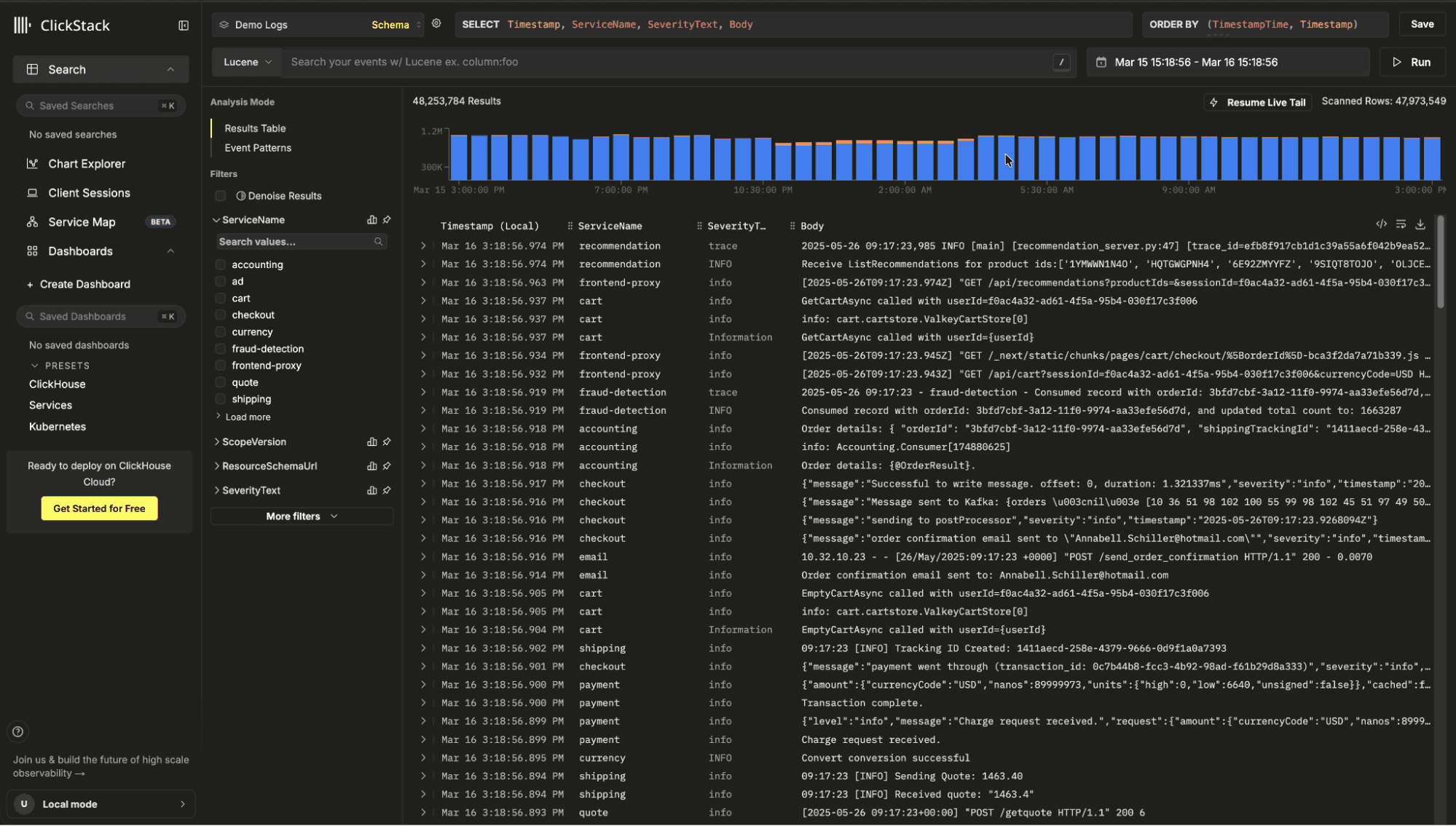
The key insight is that we do not need a complete result set before returning data. We only need enough rows to populate the first page. By delivering results incrementally, users see data almost immediately and can begin investigating. In practice, most users refine their query before paging deeply into historical data. That behavior allows us to optimize for fast time to first result rather than full range completeness. A naive implementation might issue a single query across the entire requested range:
SELECT *
FROM logs
WHERE timestamp BETWEEN now() - INTERVAL 30 DAY AND now()
ORDER BY timestamp DESC
LIMIT 500;This forces ClickHouse to scan and sort across the full 30 day range before applying the offset, potentially reading far more data than necessary.
Instead, ClickStack searches progressively, starting with the most recent window:
SELECT *
FROM logs
WHERE timestamp >= now() - INTERVAL 6 HOUR
ORDER BY timestamp DESC
LIMIT 500;If insufficient rows are found, it expands to older windows, for example the previous 6 hours, then 12 hours, then 24 hours, applying pagination only within each bounded window. If sufficient results have been accumulated, we can terminate further scans.
This approach pairs naturally with ClickHouse's optimize_read_in_order capability. When the ORDER BY clause aligns with the table's primary key, ClickHouse can read data in key order without a separate global sort. In ClickStack, OpenTelemetry tables can be ordered by a time based key such as toStartOfMinute(timestamp), so descending time queries align with the physical layout. Combined with bounded time windows, this allows ClickHouse to return the newest rows quickly with minimal extra sorting or scanning.
Chunked queries
A similar technique is used for charting, but with a different objective. In search, we optimize for fast time to the first result and may terminate early. For charts, users expect a complete visualization across the full time range. Instead of running one large aggregation query, we split the range into granularity aligned windows and execute them independently.
For example, a 30 day chart at 5 minute resolution might otherwise require a single aggregation over billions of rows. Rather than executing this as one monolithic query, ClickStack divides the time range into bucket aligned windows. Each window becomes its own query, scanning a smaller slice of partitions.
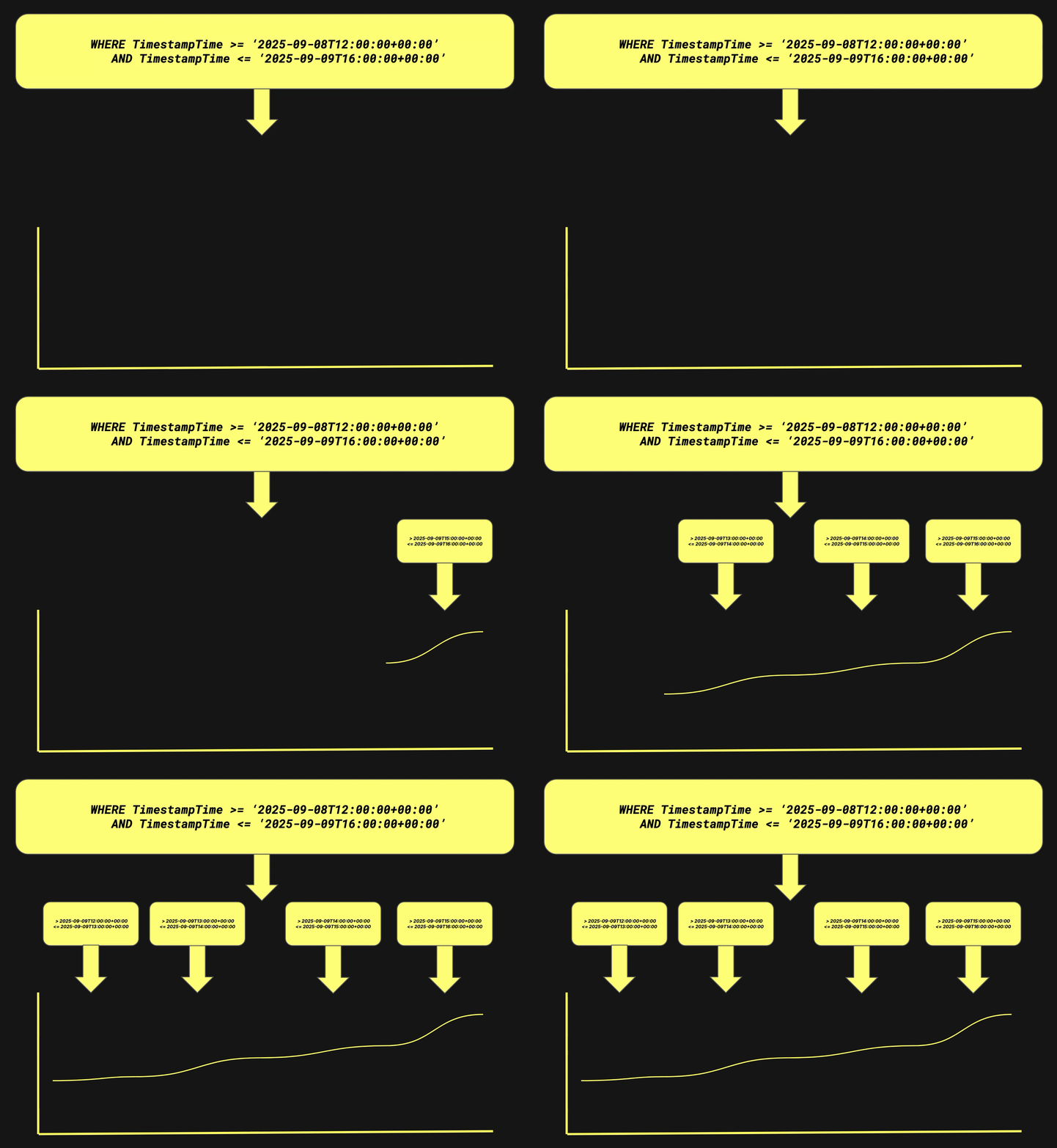
These queries can run in parallel, and their results are concatenated client side in order. Windows are aligned to bucket boundaries to ensure aggregation buckets are never split. The result is a progressive loading effect.
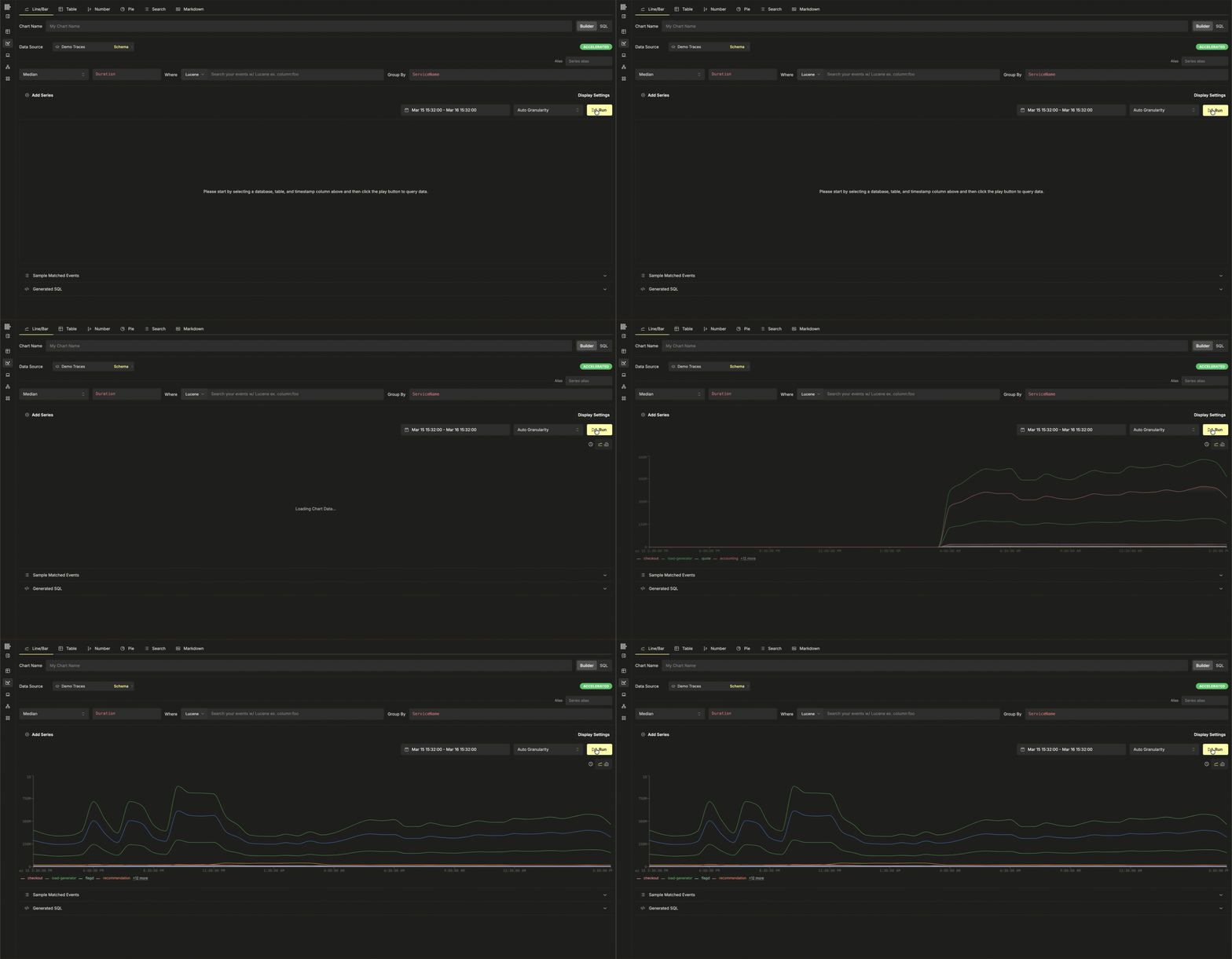
This matters because a single large aggregation over billions of rows can monopolize cluster resources or even time out. Chunking constrains each scan lowering memory consumption, and allowing progressive rendering.
Automatic use of materialized columns
Another early optimization in ClickStack was the automatic use of materialized columns for map attributes.
Observability data is inherently semi structured. Resource attributes such as Kubernetes labels and span attributes are commonly stored as arbitrary key value pairs using the Map type. This allows flexible ingestion without requiring users to define every possible column in advance. However, querying map keys at runtime is expensive. ClickHouse must read the map structure processing all keys within it, increasing IO and CPU usage.
Recently users have begun to use the JSON type which creates a dedicated typed subcolumn for each attribute. This mitigates the disadvantages of the map type but does come with its own insert overhead costs.
Consider a simplified trace table schema:
CREATE TABLE otel.otel_traces
(
`Timestamp` DateTime64(9) CODEC(Delta(8), ZSTD(1)),
`TraceId` String CODEC(ZSTD(1)),
`SpanId` String CODEC(ZSTD(1)),
`ServiceName` LowCardinality(String) CODEC(ZSTD(1)),
`ResourceAttributes` Map(LowCardinality(String), String) CODEC(ZSTD(1)),
`SpanAttributes` Map(LowCardinality(String), String) CODEC(ZSTD(1)),
`Duration` UInt64 CODEC(ZSTD(1)),
-- Materialized column extracted at ingest time
`PodName` String MATERIALIZED ResourceAttributes['k8s.pod.name'],
INDEX idx_res_attr_key mapKeys(ResourceAttributes) TYPE bloom_filter(0.01) GRANULARITY 1,
INDEX idx_res_attr_value mapValues(ResourceAttributes) TYPE bloom_filter(0.01) GRANULARITY 1,
INDEX idx_duration Duration TYPE minmax GRANULARITY 1
)
ENGINE = MergeTree
PARTITION BY toDate(Timestamp)
ORDER BY (ServiceName, SpanName, toDateTime(Timestamp));Without materialization, a filter would look like:
ResourceAttributes['k8s.pod.name'] = 'payments-7f9d8c'With materialization, the query becomes:
PodName = 'payments-7f9d8c'By extracting the attribute at ingest time into a physical column, we avoid runtime map extraction. ClickHouse can read only the required column instead of scanning and decoding the entire map structure. Regular columns also benefit from better compression and more effective pruning.
ClickStack automatically detects when a commonly used attribute has been materialized. If a user filters on k8s.pod.name, the generated query transparently targets the PodName column. Users get fast filters on common attributes and stable performance at high data volumes, without needing to manage schema optimizations themselves.
Automatic use of materialized views with cost selection
A more recent optimization in ClickStack is automatic use of materialized views. In ClickStack, users build dashboards, charts, search experiences, session replay, and service maps from sources, where each source maps to an underlying ClickHouse table. Since the start of this year, sources can also have one or more incremental materialized views attached, designed to pre-aggregate the most common, aggregation-heavy visualizations.
In ClickHouse, an incremental materialized view is not a static snapshot. It is closer to an always-on trigger: as new data is inserted into the source table, the view runs an aggregation on each inserted block and writes the resulting aggregation states into a separate target table. Over time, those partial states are merged in the background, producing the same result you would get by aggregating the raw data at query time, but at a fraction of the cost.
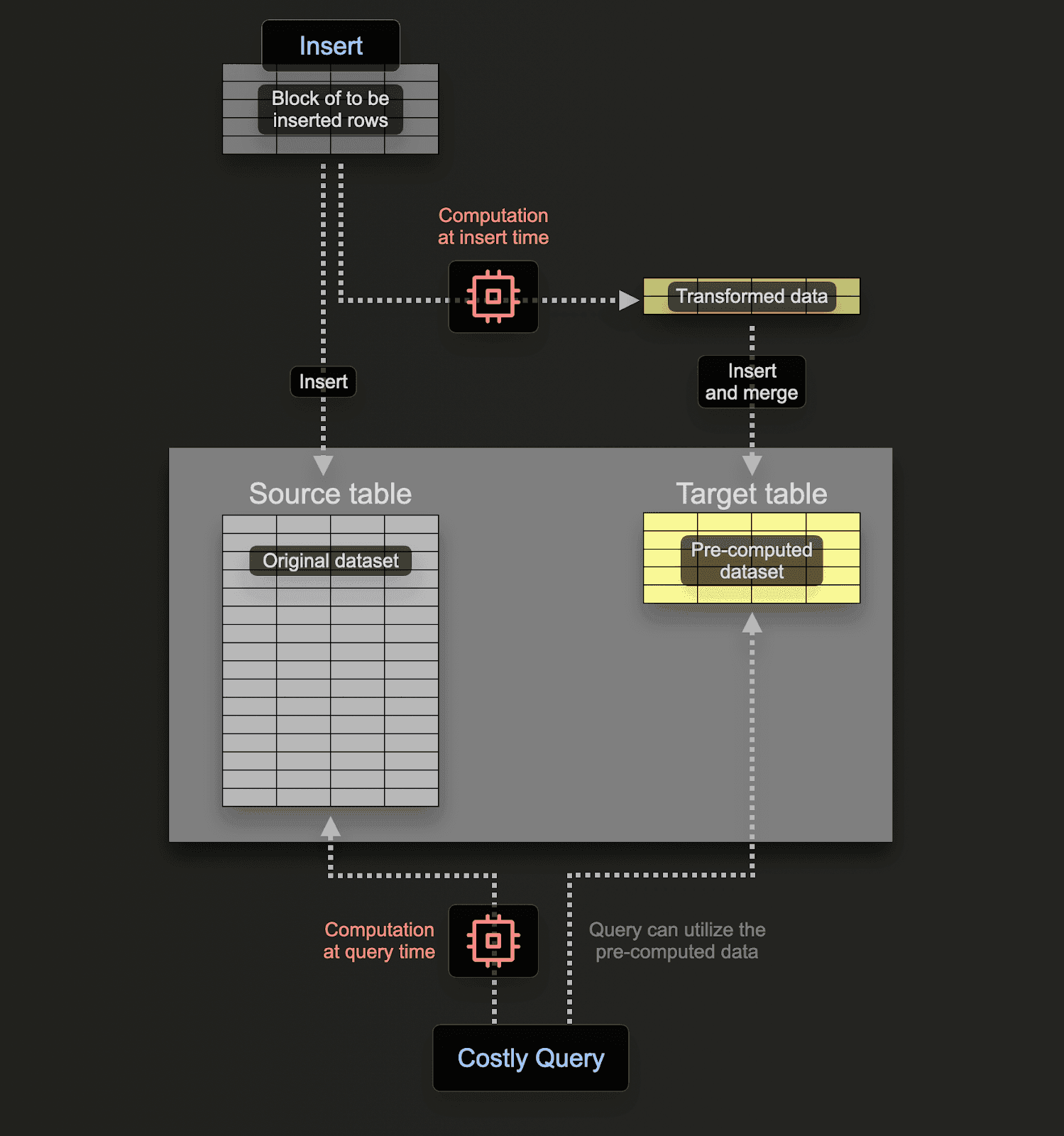
Effectively the user is shifting the cost of the query from query time to insert time, with the cost amortized across all of the inserts, such that the read time performance is lightweight and fast.
Consider a concrete example. Suppose a common visualization needs "request count and average duration per minute, grouped by service and status code":
SELECT
toStartOfMinute(Timestamp) AS time,
ServiceName,
StatusCode,
count() AS count,
avg(Duration) AS avg_duration
FROM otel.otel_traces
WHERE Timestamp >= now() - INTERVAL 24 HOUR
GROUP BY time, ServiceName, StatusCode
ORDER BY time;-- results omitted for brevity
38210 rows in set. Elapsed: 0.790 sec. Processed 166.45 million rows, 2.99 GB (210.65 million rows/s., 3.79 GB/s.) Peak memory usage: 598.18 MiB.Instead of recomputing this over raw traces every time a dashboard loads, we create a target table that stores aggregation states:
CREATE TABLE otel.otel_traces_1m
(
`Timestamp` DateTime,
`ServiceName` LowCardinality(String),
`StatusCode` LowCardinality(String),
`count` SimpleAggregateFunction(sum, UInt64),
`avg__Duration` AggregateFunction(avg, UInt64)
)
ENGINE = AggregatingMergeTree
ORDER BY (Timestamp, ServiceName, StatusCode);And then define the incremental materialized view that continuously maintains those states as data is inserted:
CREATE MATERIALIZED VIEW otel_v2.otel_traces_1m_mv
TO otel.otel_traces_1m
AS
SELECT
toStartOfMinute(Timestamp) AS Timestamp,
ServiceName,
StatusCode,
count() AS count__,
avgState(Duration) AS avg__Duration
FROM otel.otel_traces
GROUP BY Timestamp, ServiceName, StatusCode;Querying the pre-aggregated table is then lightweight, using less resources:
SELECT
toStartOfMinute(Timestamp) AS time,
ServiceName,
StatusCode,
sum(count) AS count,
avgMerge(avg__Duration) AS avg_duration
FROM otel_v2.otel_traces_1m
WHERE Timestamp >= now() - INTERVAL 24 HOUR
GROUP BY time, ServiceName, StatusCode
ORDER BY time;38246 rows in set. Elapsed: 0.027 sec. Processed 41.22 thousand rows, 1.57 MB (1.52 million rows/s., 57.80 MB/s.) Peak memory usage: 21.34 MiB.In this example our query is 30x faster and uses 28x less memory.
Once a materialized view is created, users simply register them with a source:
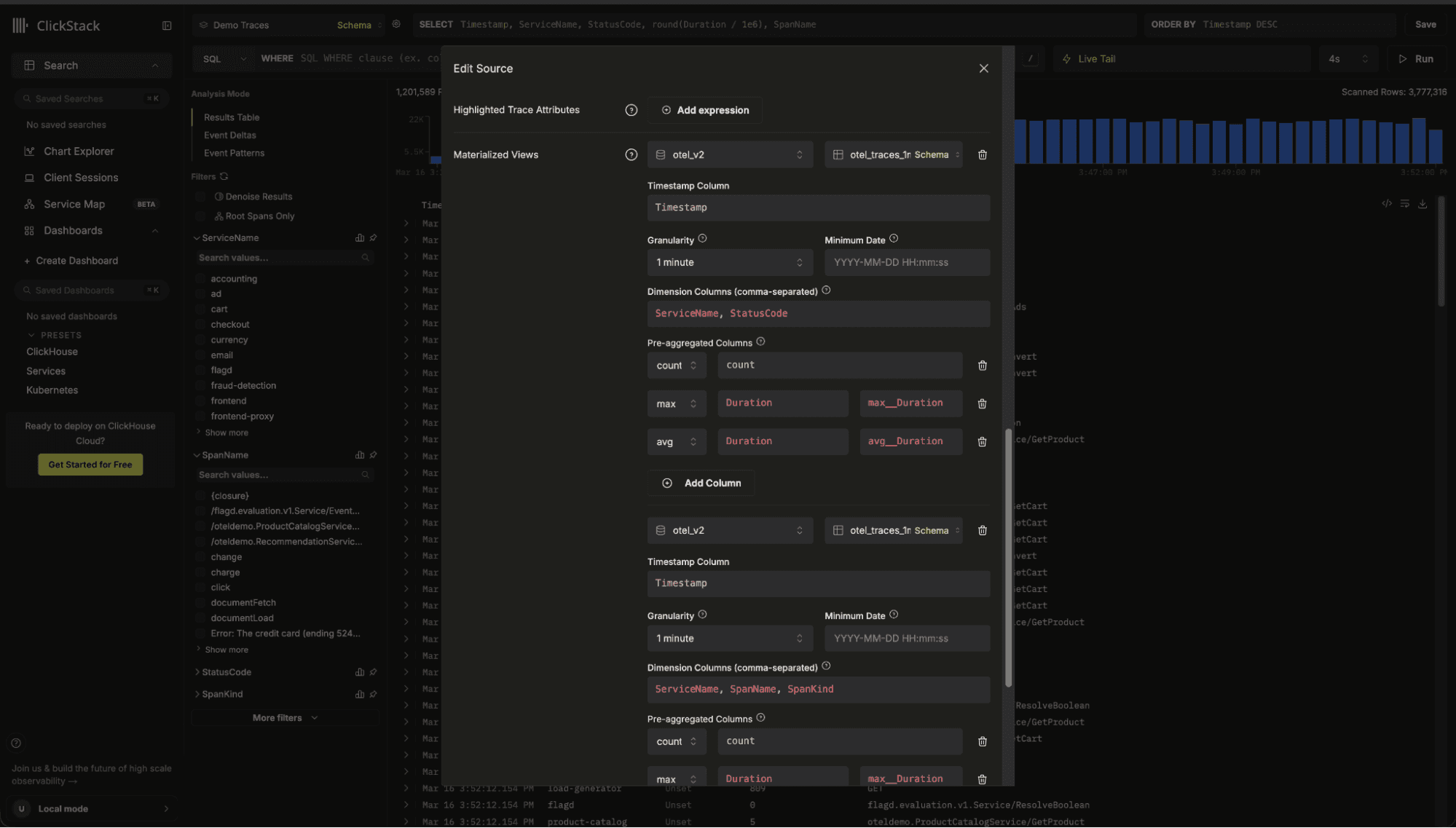
When a visualization or alert runs, ClickStack evaluates the base table and any registered views, rewrites the query for each compatible candidate, and selects the best option using a cost model driven by ClickHouse EXPLAIN ESTIMATE. This indicates the number of rows the query will need to read:
EXPLAIN ESTIMATE
SELECT
toStartOfMinute(Timestamp) AS time,
ServiceName,
StatusCode,
sum(count) AS count,
avgMerge(avg__Duration) AS avg_duration
FROM otel.otel_traces_1m
WHERE Timestamp >= (now() - toIntervalHour(24))
GROUP BY
time,
ServiceName,
StatusCode
ORDER BY time ASC┌─database─┬─table──────────┬─parts─┬──rows─┬─marks─┐
1. │ otel_v2 │ otel_traces_1m │ 1 │ 41220 │ 5 │
└──────────┴────────────────┴───────┴───────┴───────┘
1 row in set. Elapsed: 0.006 sec.If multiple materialized views could satisfy the query, ClickStack automatically chooses the view which minimizes the scanned rows and granules. If no view is compatible, it falls back to the source table, so dashboards keep working without changes while still benefiting from acceleration whenever possible.
From the end user's perspective, this acceleration is completely automatic. They continue to build dashboards and explore data exactly as before. There is no need to rewrite queries, change chart definitions, or select a specific table. When a compatible materialized view exists, ClickStack transparently routes the query to it.
The only visible differences are improved performance and a subtle acceleration indicator in the UI. A lightning bolt icon signals that the visualization is being served from a materialized view. Users can click this icon to see which view was selected and confirm that the query was accelerated. Otherwise, the experience remains unchanged, just faster performance at scale.
Query rewriting to exploit indices
ClickHouse provides several types of data skipping indices, including MinMax, set, Text and Bloom filters. These indices store metadata at the granule level, typically around 8,192 rows per granule. Instead of indexing individual rows, they allow ClickHouse to determine whether an entire granule can be skipped before reading it. The fastest data to process is the data you never read.
Users can attach MinMax indices to numeric columns, Bloom filters to string columns, or text indices for tokenized full text search. However, for these indices to be used effectively, queries must be written in a way that matches the index expression. Not all functions can exploit all index types. This is a deliberate design choice in ClickHouse to ensure correctness and predictable behavior.
ClickStack detects the skip indices defined on a table and rewrites queries to ensure the analyzer correctly infers their use. This guarantees that the correct index-aware functions are used, minimizing IO and avoiding unnecessary granule scans.
Consider the common case where users search logs using a Lucene-style query string. They are not writing SQL.
Consider the full-text logs schema:
CREATE TABLE otel_logs (
Body String,
...
INDEX idx_body_text Body TYPE text(tokenizer = splitByNonAlpha)
)Suppose a user searches for the term "error" over a defined time period. A naive implementation might issue the following:
SELECT *
FROM otel_logs
WHERE (Timestamp >= '2026-01-01')
AND (Timestamp < '2026-03-14')
AND (Body ILIKE '% error %');1 row in set. Elapsed: 0.708 sec. Processed 91.56 million rows, 14.91 GB (129.37 million rows/s., 21.06 GB/s.)This works, but does not exploit the text index. ClickStack, however, detects the index is available and uses the hasAllTokens() function - specifically designed to leverage the text index:
SELECT *
FROM otel_logs
WHERE (Timestamp >= '2026-01-01')
AND (Timestamp < '2026-03-14')
AND hasAllTokens(Body, 'error');1 row in set. Elapsed: 0.029 sec. Processed 2.86 million rows, 22.92 MB (97.87 million rows/s., 784.96 MB/s.)For multi-word phrases such as "connection refused", ClickStack combines index usage with a confirmation filter to preserve ordering semantics:
SELECT *
FROM otel_logs
WHERE (Timestamp >= '2026-01-01')
AND (Timestamp < '2026-03-14')
AND hasAllTokens(Body, 'connection refused')
AND (lower(Body) LIKE lower('%connection refused%'));The result is a single multi-token lookup against the text index, dramatically reducing scanned granules.
Similar care is needed if exploiting bloom filters. In this case, ClickStack detects the expression used for the bloom filter index and ensures it combines this appropriately with the appropriate functions for matching. Consider the following (simplified) schema for logs:
CREATE TABLE otel_logs (
Body String,
INDEX idx_body_bloom tokens(lower(Body))
TYPE bloom_filter(0.001)
GRANULARITY 8
)Note we lower the body to achieve case insensitive matching.
Suppose a user searches for "error", this requires use of the hasToken function but also requires us to combine this with the lower function to ensure the index is used. ClickStack detects the expression, reflecting this in the final transpiled SQL:
SELECT *
FROM otel_logs
WHERE (Timestamp >= '2026-01-01')
AND (Timestamp < '2026-03-14')
AND hasAll(
tokens(lower(Body)),
tokens(lower('error'))
);The key is that the left side exactly matches the stored index expression. This allows ClickHouse to activate the Bloom filter and skip granules that definitely do not contain the token.
The same principle applies to Map-based columns, such as LogAttributes and ResourceAttributes for default OTel tables. These often have Bloom filter indices on mapKeys(...) and mapValues(...) designed to allow granules to be skipped if an attribute key or value is not present.
When a user searches for:
LogAttributes.error.message:"Failed"ClickStack must do more than translate this to:
LogAttributes['error.message'] ILIKE '%Failed%'To activate a Bloom filter on mapKeys(LogAttributes), ClickStack appends an index hint that signals to the planner that the key is being accessed:
AND indexHint(mapContains(LogAttributes, 'error.message'))This hint does not change query correctness - it simply tells ClickHouse to return the granules which match the filter but NOT read them (saving the Map I/O access). This allows ClickHouse to skip entire granules that do not contain that key at all. For high-cardinality semi structured data, this can eliminate vast portions of the dataset before any row-level evaluation occurs.
Skip indices in ClickHouse are powerful, but they only work when queries precisely match the index definition. Small differences in function usage can mean the difference between skipping granules and scanning them and thus fast queries and slow.
By inspecting the schema and rewriting queries to mirror index expressions exactly, ClicKStack ensures defined indices are actually used, delivering predictable performance without requiring users to hand-tune SQL.
Primary key awareness
In ClickHouse, the primary key plays a central role in data pruning. Unlike traditional databases where primary keys enforce uniqueness, in ClickHouse the primary key defines the physical sort order of data. Queries that filter or order using expressions aligned with the primary key allow the engine to quickly eliminate large ranges of data without scanning them.
In ClickStack, users are free to define their own schemas and primary keys - aligning these with their common access patterns. However, we provide sensible defaults for OpenTelemetry logs, traces, and metrics that are optimized for common observability workloads. These typically combine temporal components with Timestamp. For example, a common key might look like:
ORDER BY (toStartOfMinute(Timestamp), ServiceName)This structure allows queries to efficiently prune data both by time and by service.
To ensure the primary key is fully exploited, ClickStack rewrites timestamp filters so they align with the expressions used in the key. For example, if a user filters on a time range, the naïve query might look like:
SELECT *
FROM otel_logs
WHERE Timestamp >= '2026-03-14 10:00:00'
AND Timestamp < '2026-03-14 11:00:00'
ORDER BY Timestamp DESC;If the table is ordered by toStartOfMinute(Timestamp), ClickStack augments the filter to match the key expression:
SELECT *
FROM otel_logs
WHERE toStartOfMinute(Timestamp) >= toStartOfMinute('2026-03-14 10:00:00')
AND toStartOfMinute(Timestamp) < toStartOfMinute('2026-03-14 11:00:00')
AND Timestamp >= '2026-03-14 10:00:00'
AND Timestamp < '2026-03-14 11:00:00'
ORDER BY toStartOfMinute(Timestamp) DESC;By including the primary key expression in the filter, ClickHouse can prune partitions and granules much more aggressively. In practice, this can significantly reduce the amount of data scanned.
The same optimization applies when the primary key uses coarser expressions such as toStartOfDay(Timestamp). ClickStack automatically adds filters on both the derived expression and the raw timestamp, ensuring precise filtering across narrow time windows while still enabling efficient index pruning. In internal testing, this approach reduced query latency by roughly 25%, with larger gains possible for complex queries.
Intelligent sampling
Some ClickStack features require analyzing very large datasets to generate visual insights. Running these queries across billions of rows would be computationally expensive and could significantly increase latency and resource consumption. To keep the interface responsive while still providing accurate insights, ClickStack applies intelligent sampling techniques that reduce the amount of data read while preserving representative results.
The goal of sampling is not simply to reduce the dataset size. It must also ensure that the sample is deterministic when necessary and statistically representative of the larger dataset. Depending on the feature, ClickStack applies different sampling strategies that balance accuracy and performance.
Below are several examples of how sampling is used throughout ClickStack.
Event Deltas - deterministic part-offset sampling
The Event Deltas feature compares the attribute distribution of events inside a selected time-series region ("outliers") with those outside it ("inliers"). This requires retrieving full rows for a small set of representative events from each group.
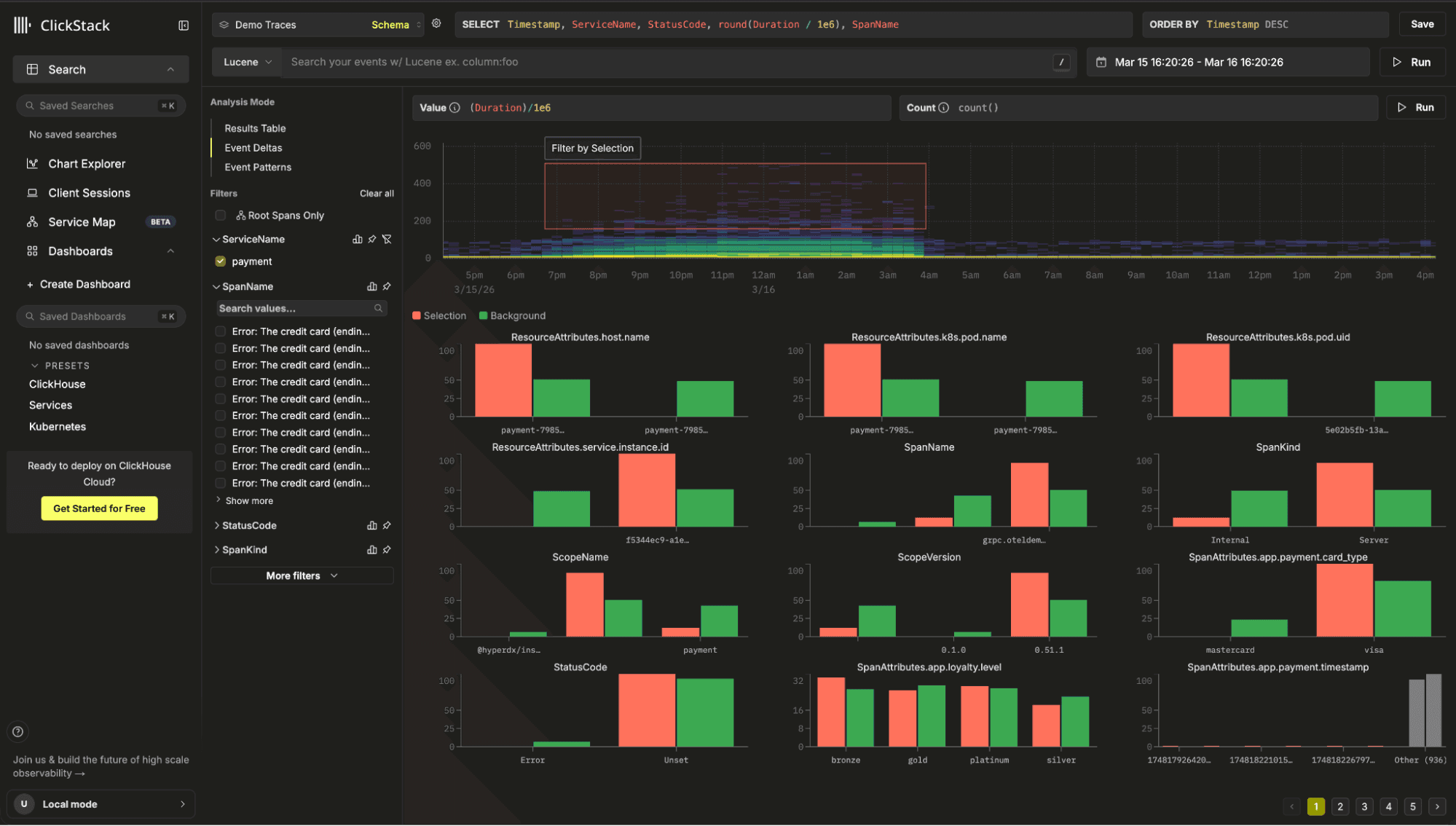
For example, suppose a user selected the inliers as being the subset between a specific date range where the Duration was between 500 and 1000. A naive approach to sampling might attempt to fetch rows using:
SELECT *
FROM otel_traces
WHERE Timestamp >= 1700000000
AND Timestamp <= 1700003600
AND Duration >= 500
AND Duration <= 1000
ORDER BY rand()
LIMIT 1000;However, in ClickHouse LIMIT is applied after rows are read and filtered. When combined with ORDER BY rand(), this results in a full scan and global sort.
ClickStack instead uses a two-pass deterministic sampling technique based on internal row addresses.
WITH PartIds AS (
SELECT tuple(_part, _part_offset)
FROM otel_traces
WHERE Timestamp >= 1700000000
AND Timestamp <= 1700003600
AND Duration >= 500
AND Duration <= 1000
ORDER BY cityHash64(SpanId) DESC
LIMIT 1000
)The _part and _part_offset columns represent the internal storage location of rows within ClickHouse parts. To keep samples stable across queries, ClickStack orders rows using cityHash64(SpanId). Since span IDs are randomly generated identifiers, their hash distributes rows uniformly. This produces a stable sample without relying on rand(). The effective sample size is also adaptive i.e. sampleSize = clamp(500, ceil(totalRows * 0.01), 5000).
The resulting offsets returned from this query are used to select a subset of rows.
SELECT *
FROM otel_traces
WHERE Timestamp >= 1700000000
AND Timestamp <= 1700003600
AND Duration >= 500
AND Duration <= 1000
AND indexHint((_part, _part_offset) IN PartIds)
ORDER BY cityHash64(SpanId) DESC
LIMIT 1000;Wrapping these addresses inside indexHint() allows the planner to prune granules that do not contain the selected rows, while avoiding any reading of the data. The result is a deterministic sample that avoids scanning the entire dataset.
Value distribution sampling for facets
Another common workflow is showing top attribute values within a filtered dataset. When searching in ClickStack, facets appear alongside the results to show which fields are present and provide a representative sample of values for those fields. This helps users quickly understand the shape of the data and guides them in refining their filters.
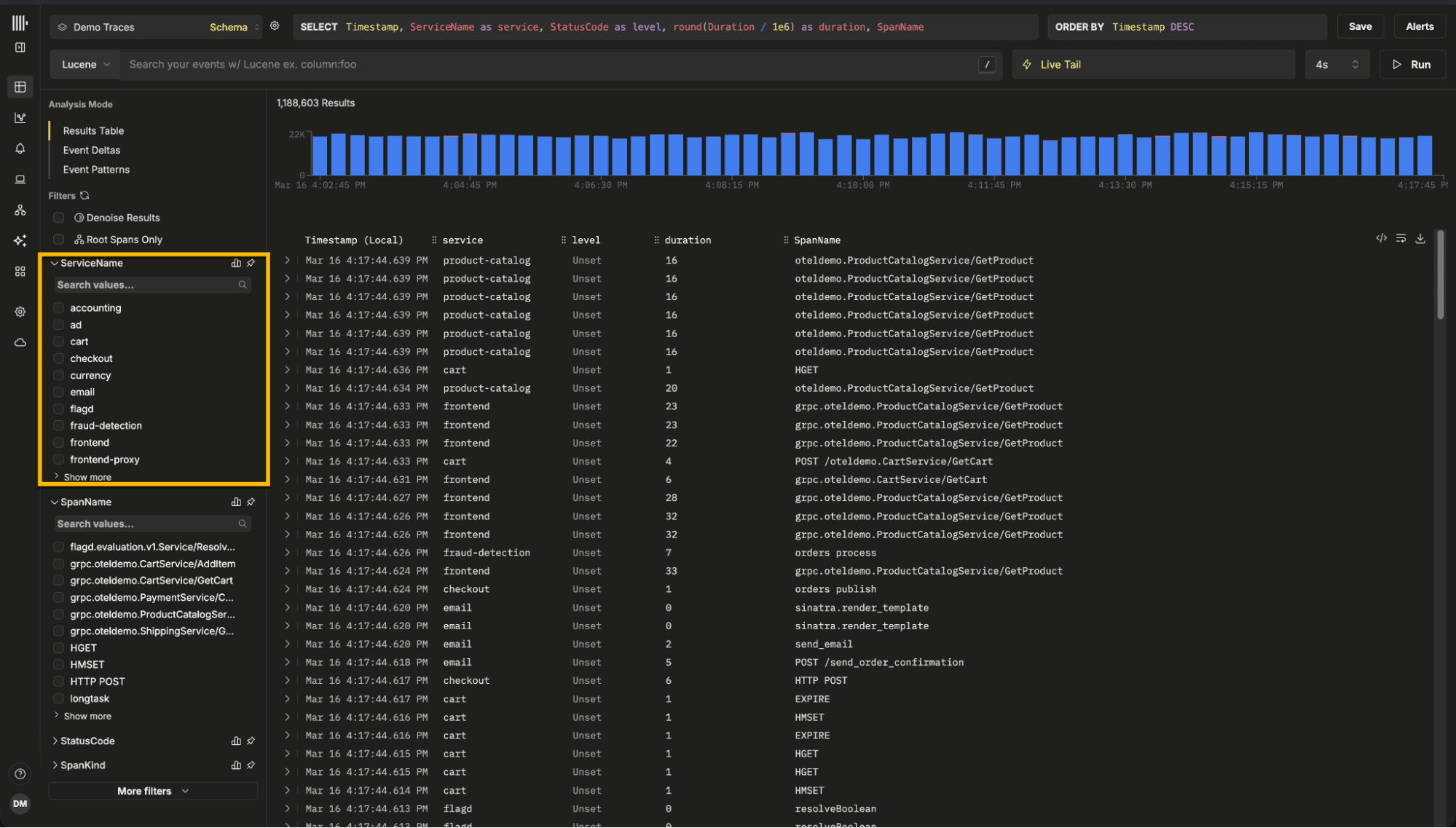
Computing exact distributions over billions of rows would be expensive. Instead, ClickStack performs adaptive modulo sampling. For example, suppose we wish to generate values for the resource attribute http.status_code.
WITH tableStats AS (
SELECT
count() AS total,
greatest(CAST(total / 100000 AS UInt32), 1) AS sample_factor
FROM otel_logs
WHERE Timestamp >= '2024-01-01'
AND Timestamp < '2024-03-01'
)
SELECT
SpanAttributes['http.status_code'] AS value,
count() AS count
FROM otel_logs
WHERE Timestamp >= '2026-01-01'
AND Timestamp < '2026-03-01'
AND cityHash64(Timestamp, rand()) %
(SELECT sample_factor FROM tableStats) = 0
GROUP BY value
ORDER BY count DESC
LIMIT 100;The sample_factor dynamically adjusts the sampling rate so that roughly 100,000 rows are processed regardless of dataset size. This ensures the query remains fast while still producing a representative distribution.
Unlike the delta sampling technique, this query still scans matching rows but dramatically reduces the number of rows passed into the GROUP BY, which is where most of the computational cost occurs.
Note that if users wish to obtain the complete set of values for a column, they can select "Show More" for a full analysis of the dataset.
Sampling for Event Patterns
ClickStack also provides Event Patterns, allowing users to identify recurring log templates and anomalies.
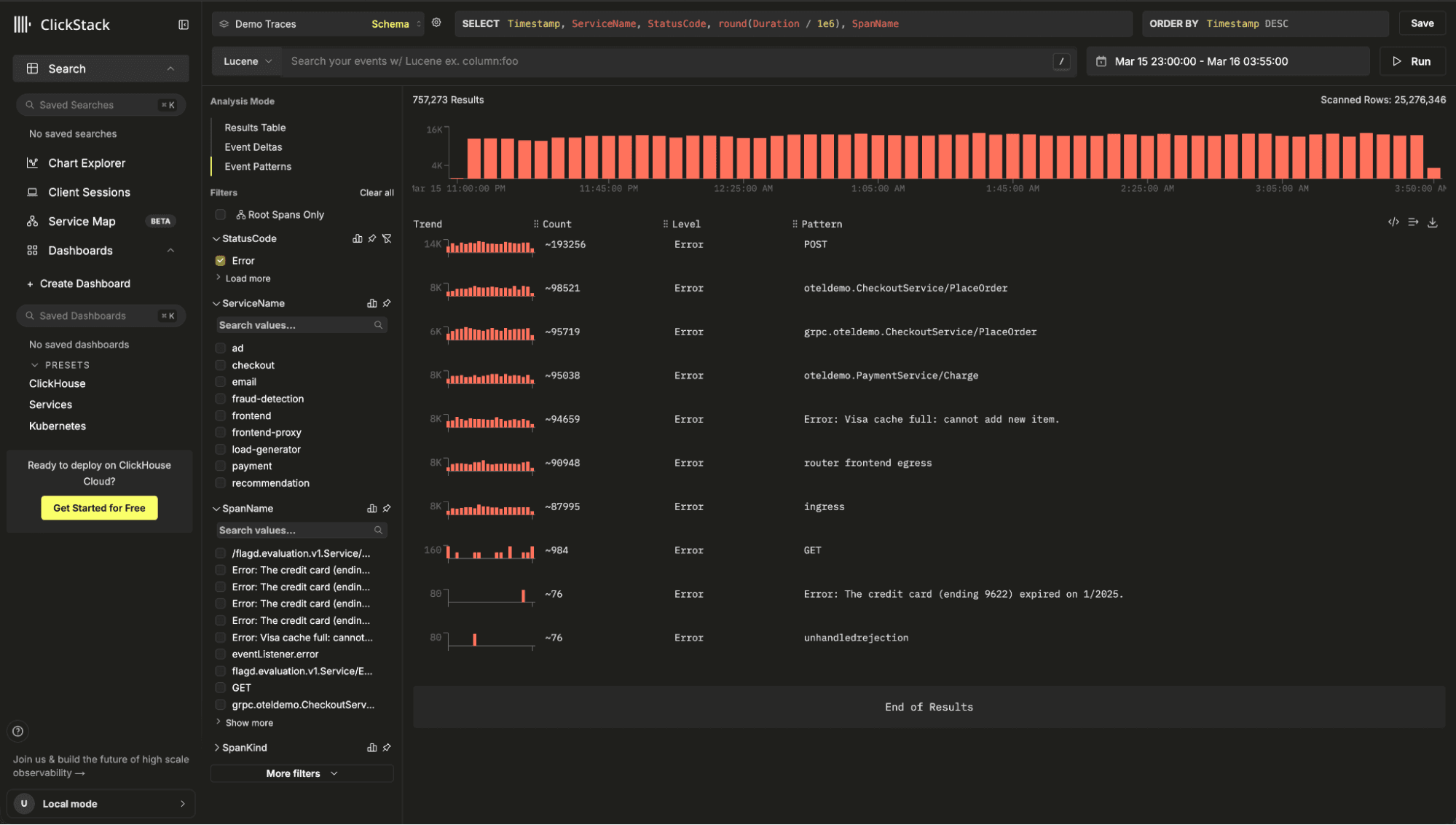
Under the hood, this feature uses Drain3, a high-performance log template mining algorithm. Drain3 incrementally builds clusters of similar log messages using a fixed-depth parse tree, allowing it to identify patterns quickly even in large datasets.
Rather than running clustering at ingestion time, ClickStack executes it at query time. This allows users to analyze patterns dynamically within any filtered subset of data. Running clustering during ingestion would introduce significant overhead at ClickStack's ingestion rates, which can reach gigabytes per second across petabytes of data.
To read more about Event patterns see our dedicated blog post.
To keep the analysis interactive, ClickStack samples a representative subset of events before clustering:
WITH
now64(3) AS ts_to,
ts_to - INTERVAL 900 SECOND AS ts_from,
tableStats AS (
SELECT count() AS total
FROM otel_logs
WHERE TimestampTime >= ts_from
AND TimestampTime <= ts_to
)
SELECT
Body,
TimestampTime,
SeverityText,
ServiceName
FROM otel_logs
WHERE TimestampTime >= ts_from
AND TimestampTime <= ts_to
AND if(
(SELECT total FROM tableStats) <= 10000,
1,
cityHash64(TimestampTime, rand()) % greatest(CAST((SELECT total FROM tableStats) / 10000, 'UInt32'), 1) = 0
)
LIMIT 10000;This query adaptively samples up to 10,000 events, ensuring that clustering completes in a few seconds while still capturing dominant and anomalous patterns.
These sampling strategies highlight a recurring theme in ClickStack's design: interactive observability requires balancing accuracy, performance, and resource usage, with many features relying on careful use of the underlying database engine.
Importance of settings
Many of the optimizations described above involve deliberate query rewrites or algorithmic techniques. However, a significant portion of ClickStack's performance comes from ensuring the right settings are used with ClickHouse.
ClickHouse is an evolving system, with new performance features and execution optimizations introduced in nearly every release. Taking advantage of these improvements requires understanding when they apply and enabling the right settings to ensure they are used effectively. ClickStack continuously tracks these developments and adjusts its query settings accordingly, ensuring that new optimizations benefit observability workloads without requiring any manual configuration from users.
One example is Top-N query optimization. Queries such as "show the latest logs", "top error messages", or "slowest requests" typically take the form ORDER BY … LIMIT N. Recent ClickHouse releases introduced skip-index-driven Top-N filtering through the use_skip_indexes_for_top_k setting. This allows the engine to use metadata from skip indices to eliminate entire granules before reading any rows. Instead of scanning a table and sorting afterward, ClickHouse can prune large sections of data up front. In testing with typical ClickStack log search workloads, this alone has delivered 2-3x performance improvements, with larger gains depending on the data distribution.
Another recent improvement is streaming evaluation of skip indices. Historically, ClickHouse evaluated skip indexes before reading table data, which could introduce startup delays, particularly when the index itself was large. Modern versions now interleave index evaluation with data reads, allowing the engine to skip granules dynamically during execution.
① Index scan, granule selection, and ② query execution are concurrent
This significantly reduces query startup time and improves performance for queries with LIMIT, since the engine can stop both index evaluation and data reads as soon as enough rows are found. More details here.
Finally, ClickStack takes advantage of lazy materialization, a newer optimization that defers loading non-essential columns until they are actually needed by the query plan. For example, when executing a query such as:
ORDER BY Timestamp DESC
LIMIT 100;ClickHouse can first identify the top rows using only the ordering column, and only then fetch the remaining columns for those rows. This reduces I/O and memory usage, especially for wide observability tables containing many attributes.
By default, ClickHouse applies this optimization only when result sets are relatively small. Based on typical ClickStack access patterns, we found that significantly larger result sets still benefit from this behavior. As a result, ClickStack increases the threshold (query_plan_max_limit_for_lazy_materialization) so that lazy materialization applies to a broader range of queries.
Individually, these improvements may appear minor. Together, they represent an important principle in building a high-performance observability platform: performance is about consistently taking advantage of small optimizations throughout the stack.
Exposing ClickStack APIs for faster observability for all
All of the optimizations described above exist for a simple reason: users should not have to think about how to write the perfect SQL query to analyze observability data. ClickStack abstracts these details away.
Today, all the above optimizations are primarily exposed through the ClickStack interface itself. The UI generates queries, applies the appropriate settings, rewrites predicates, and selects the most efficient execution strategy. The user simply asks questions of their data.
Our longer-term goal is to make these optimizations available beyond the UI through a set of purpose-built APIs. Rather than exposing raw SQL endpoints, these APIs will represent common observability tasks as focused operations. For example, an endpoint might retrieve the most recent errors for a service, identify anomalous traces, or compute latency trends over time. Internally, these operations may involve multiple queries, optimized execution strategies, and carefully tuned settings, but externally they appear as simple, high-level functions.
This approach has several benefits. It allows developers to embed ClickStack directly into their own observability workflows and applications without needing deep ClickHouse expertise. It also provides a more reliable interface for automation and AI-driven analysis.
Our recently introduced Notebooks experience, currently in private preview, already uses these internal tools. Instead of relying on an LLM to generate complex SQL queries, notebooks call specialized endpoints designed for specific analytical tasks. These endpoints encapsulate the best query strategies for ClickStack, delivering better performance and more predictable results. In practice, this also improves reliability, since large language models are not yet well suited to consistently producing highly optimized ClickHouse SQL.
Over time, we plan to make these tools publicly accessible. External applications will be able to call them directly, or connect through protocols such as Model Context Protocol (MCP) to power AI-driven observability experiences. This will allow developers to build custom tools, assistants, and workflows that inherit the same performance characteristics as the ClickStack interface.
This is an ongoing journey. It involves defining the right abstractions, building stable APIs, and introducing authentication and access controls. But the goal is clear: make the performance benefits of ClickStack available everywhere, enabling anyone to build fast, scalable observability solutions on top of ClickHouse.
Get started today
Interested in seeing how ClickHouse works on your data? Get started with ClickHouse Cloud in minutes and receive $300 in free credits.
Sign up