50.3k
50.3k

In the previous post, we explored why high cardinality creates challenges for Prometheus and other series-oriented time-series databases. We looked at how the underlying storage model, where every unique combination of labels creates an independent time series, introduces memory overhead, write amplification, operational complexity, and query-time tradeoffs as dimensionality and churn increase.
You’ll often hear us say that ClickHouse is not significantly affected by high cardinality when used for observability workloads. That’s true for the workloads we usually mean, but it needs qualification. ClickHouse still pays for cardinality, mostly at query time rather than during ingestion.
In this post, we'll explore why ClickHouse, and more broadly column-oriented databases, handle high-cardinality observability data so differently from systems such as Prometheus.
We'll also cover where this model is weaker than Prometheus. ClickHouse is not a drop-in Prometheus replacement, and this approach requires a different way of thinking about telemetry, instrumentation, and aggregation.
Why cardinality is different in ClickHouse
To understand why high cardinality behaves differently in ClickHouse, we first need to rethink how observability data is modeled. Rather than treating telemetry as millions of independently maintained time series, ClickHouse encourages a shift toward representing metrics as rows in a table containing attributes and measurements that can later be aggregated at query time.
This is often referred to as the "wide events" approach, popularized by practitioners such as Charity Majors. If it helps, you can think of this simply as logs with metrics attached. Let’s first explore how this differs from a traditional Prometheus-style metric model.
Metrics as wide events
It’s important to emphasize that we are not attempting to directly model Prometheus metrics, metric types, or PromQL semantics inside ClickHouse, although work in this area is underway and the model certainly has benefits, which we’ll explore later. Instead, the wide events approach encourages a broader shift away from the traditional Prometheus metric model toward an event-style model for observability data.
In this model, telemetry is represented as timestamped events containing dimensions, attributes, and numeric measurements, rather than as independently maintained time series. Instead of storing a metric as a separate series with its own identity and lifecycle, each event contains contextual attributes alongside one or more numeric measurements. Queries then dynamically aggregate these events into the desired views, rates, summaries, or time buckets at read time.
Importantly, this is often a more relaxed and natural way to produce telemetry. Rather than defining strict metric schemas in advance, applications simply emit structured events with numeric values. A common pattern in ClickHouse observability deployments is to store metrics directly alongside logs using wide event schemas such as otel_logs.
For example, rather than defining multiple separate metrics for response times, request counts, status codes, and hosts, a service might simply emit events like:
logger.Info("request completed",
zap.String("host", "host-42"),
zap.String("application", "checkout-service"),
zap.String("request_path", "/api/payments"),
zap.Uint16("status", responseStatus),
zap.Uint64("response_time", responseTime),
zap.Uint64("size", responseSize),
)With wide events, the request itself becomes the natural unit of telemetry. All contextual dimensions and measurements remain attached to the same event. In a Prometheus-style model, the same information would typically be decomposed across multiple metric definitions, counters, gauges, histograms, and label combinations. Once collapsed into aggregates this way, the individual signals are lost and unrecoverable. Wide events invert this: aggregates are derived from the raw events rather than replacing them, so any spike on a graph can be traced back to the exact requests that produced it.
Get started today
Interested in seeing how ClickHouse works on your observability data? Get started with Managed ClickStack in ClickHouse Cloud in minutes and receive $300 in free credits.
Sign upColumnar Storage
When embracing the wide events model, our initial intuition might be to take inspiration from traditional analytical workloads and model each label as a dedicated column. While this can work well for stable schemas, it is rarely practical in observability and is not a wide event schema. Labels are often dynamic, high cardinality, and unpredictable, making rigid upfront schema definitions difficult to maintain and poorly suited to real-world telemetry data.
CREATE TABLE metrics
(
`time` DateTime CODEC(Delta(4), ZSTD(3)),
`host` LowCardinality(String),
`application` LowCardinality(String),
`request_path` String,
`remote_addr` IPv4,
`remote_user` LowCardinality(String),
`request_type` LowCardinality(String),
`request_protocol` LowCardinality(String),
`status` UInt16,
`domain_referer` LowCardinality(String),
`browser` LowCardinality(String),
`device` LowCardinality(String),
`response_time` UInt16,
`size` Decimal(7, 1)
)
ENGINE = MergeTree
ORDER BY (host, toStartOfMinute(time), status, application, request_path, remote_addr)The schema above, while optimized with a column per label, isn't realistic in highly dynamic environments where new metrics are frequently added. This is not a recommended wide event schema.
To handle this dynamic structure, we recommend the Map type for ClickHouse.
For reasons discussed in depth in our documentation, we recommend using the Map type rather than the JSON type for observability workloads.
The Map type stores labels as key-value pairs, where the key represents the label name and the value represents the label value. Its primary limitation is that all keys and values must share the same type, with the map defined as Map<String, type>. In practice, this usually means values are stored as strings. While this is flexible, it can require query-time casting if values need to be interpreted as numeric or other strongly typed data.
Historically, Map also had an important disadvantage at read time. Reading a single label required reading the entire map structure and all labels associated with it, creating significant I/O overhead. However, recent support for sharded maps largely mitigates this issue by allowing more selective access to map contents.
For our earlier example, a table schema for wide events might look like:
CREATE TABLE events
(
`time` DateTime CODEC(Delta(4), ZSTD(3)),
`labels` Map(LowCardinality(String), String),
`response_time` UInt16 MATERIALIZED toUInt16(labels['response_time']),
`host` LowCardinality(String) MATERIALIZED labels['host'],
`status` LowCardinality(String) MATERIALIZED labels['status'],
`application` LowCardinality(String) MATERIALIZED labels['application'],
INDEX idx_labels_keys mapKeys(labels) TYPE text(tokenizer = array),
INDEX idx_labels_vals mapValues(labels) TYPE text(tokenizer = array)
)
ENGINE = MergeTree
ORDER BY (host, toStartOfMinute(time), status, application)
SETTINGS
map_serialization_version = 'with_buckets',
max_buckets_in_map = 32,
map_buckets_strategy = 'sqrt';Note that the settings here force sharding of the map. Further details here.
In principle, this schema is very similar to the one used by ClickStack for OpenTelemetry logs, albeit significantly simplified. In ClickStack, resource and scope attributes effectively serve as dynamic label maps.
The schema then exploits the same techniques discussed below, such as text indexes over map keys and values. So rather than thinking in terms of "series objects", ClickHouse simply stores rows of data containing a timestamp, a sharded map of labels, and regular numeric columns for metric values.
We have also materialized keys from the labels map that we expect to be filtered on or accessed frequently, so they can exist as dedicated columns on disk. This materialization occurs automatically at insert time and enables ClickHouse to filter, prune, and read these dimensions directly without accessing the labels map at query time, reducing I/O for common access patterns.
The same approach can also be applied to frequently queried numeric values. In the example above, response_time is materialized from the map into a dedicated typed column because it is expected to be aggregated regularly. This avoids repeated map access and query-time casting when computing operations such as avg(response_time) or percentile calculations.
Importantly, materialized columns can also be added after data has already been ingested. Newly inserted rows will physically store the materialized column on disk, while older rows can still resolve the value indirectly from the underlying map when queried. For example, if we later decide that labels['region'] has become a common filter, we could add:
ALTER TABLE events
ADD COLUMN region LowCardinality(String)
MATERIALIZED labels['region'];New data will immediately benefit from direct column access, pruning, and improved compression, while historical rows still remain queryable via region without requiring a full table rewrite.
Internally, a Map is represented as an array of key-value pairs, with bucketed serialization that distributes keys across multiple independent buckets based on a hash of the label name. This means that queries that read a specific label only need to access the bucket containing that key, rather than the full map structure. Metric columns themselves are stored independently and compressed separately from the labels.
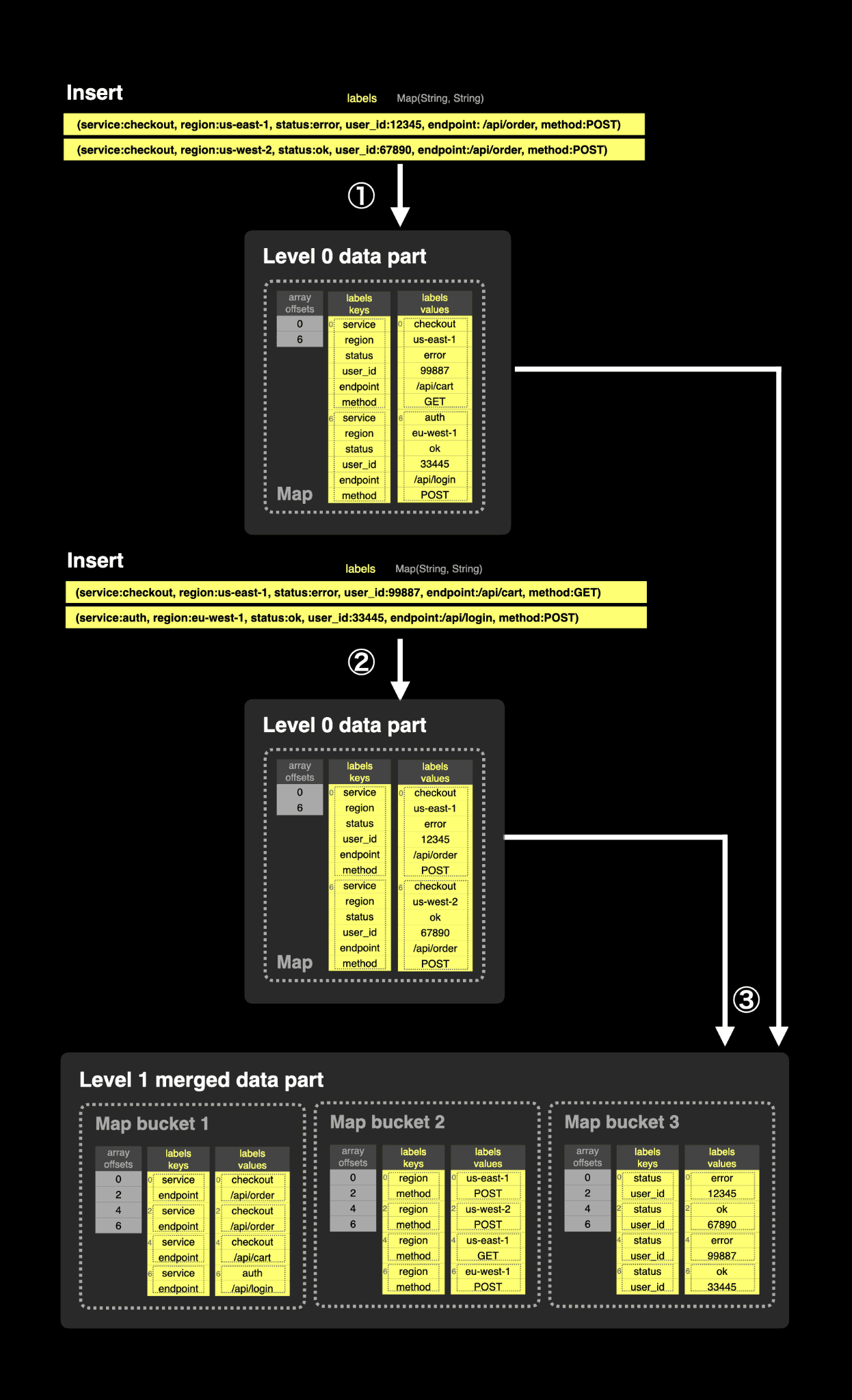
① Each insert initially creates a Level 0 part using the default
Maplayout, where keys and values are stored as flat arrays without bucketing. ② Additional inserts create more Level 0 parts in the same format. Since these parts are small, scanning the full key and value arrays is typically inexpensive. ③ During background merges, ClickHouse rewrites theMapinto bucketed storage by hashing keys into smaller independent buckets. When accessing a key such aslabels['status'], ClickHouse computes the key hash and reads only the corresponding bucket rather than the full map, significantly reducing read-time I/O. In practice, this can improve single-key lookup performance by 2–49× depending on map size.
Prometheus does the opposite. In Prometheus, each new label combination creates a new series object with its own metadata, chunks, and indexing overhead. In ClickHouse, adding a new combination of label values does not create a new structural object or in-memory series representation. It simply adds another row containing a different set of label values. When rows are inserted, they are written to disk as a part, sorted by the target table’s primary key - in this case, the host, timestamp with a granularity of one minute, status, and application. Codecs can be applied to each column before ZSTD compression to minimize future I/O during reads.
To manage the number of parts per table, a background merge job periodically combines smaller parts into larger ones, while preserving the specified sort order, until they reach a configurable compressed size (typically ~150 GB). Over time, this process creates a hierarchical structure of merged parts.
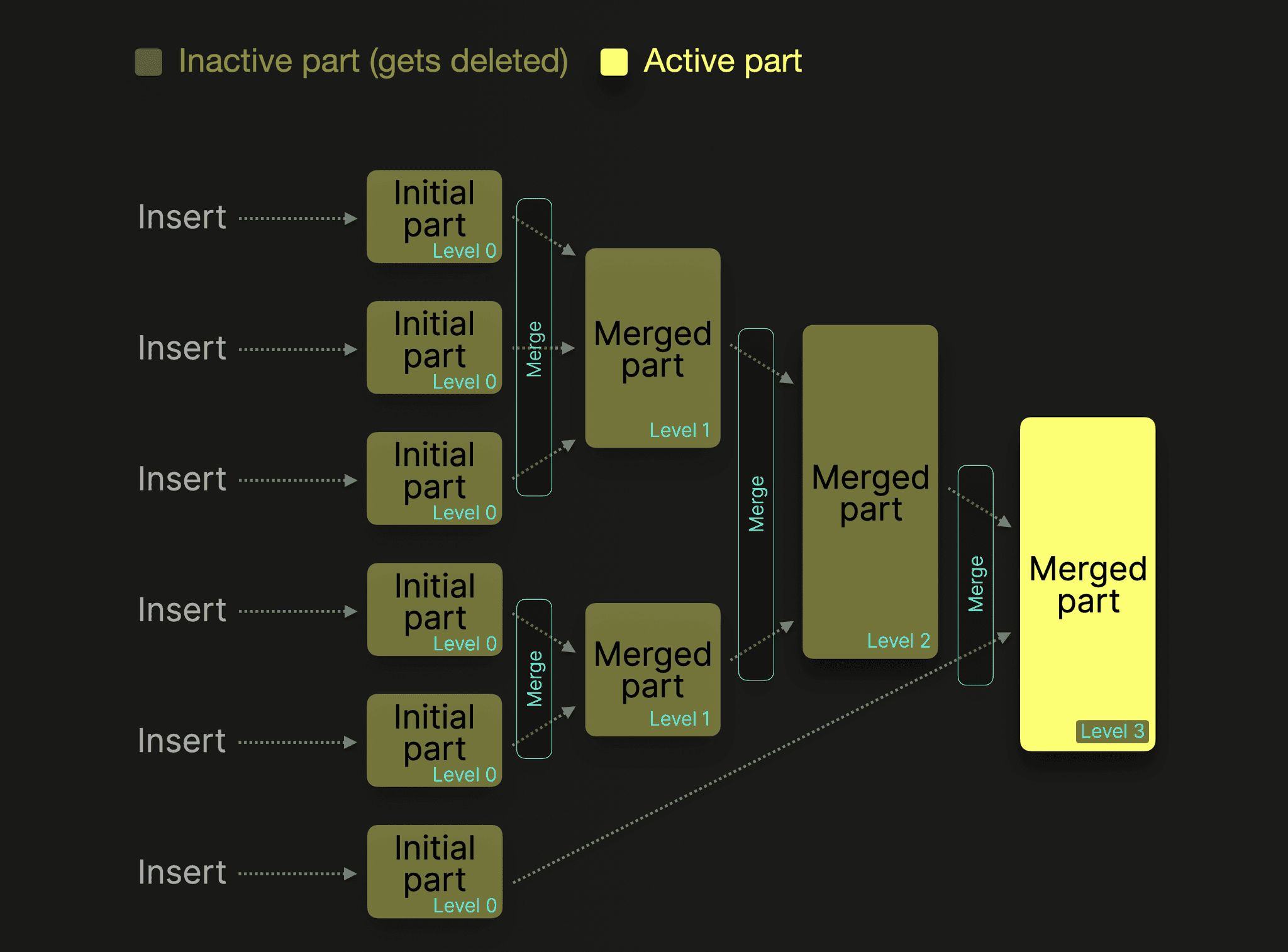
At insert time, ClickHouse writes rows, not series objects.
Benefits of columnar storage
The column orientation and sorting of the table still provide several important benefits, even when the labels themselves are stored in a Map rather than as fully independent columns.
-
Fast filtering with data pruning - A sparse index is built over the table’s sorting key, which in this case consists of commonly filtered dimensions materialized from the label map, followed by the timestamp.
In the example above, labels such as host, status, and application are materialized into dedicated columns and included in the ordering key. Data is stored in parts, with each part divided into granules of roughly 8,000 rows. For each granule, ClickHouse records the first value of the sorting key columns rather than indexing every row, which is why the index is considered sparse.
Because the data is physically ordered by frequently queried dimensions and then by time, rows with similar values are naturally grouped together on disk. This allows ClickHouse to efficiently prune granules when queries filter on common labels such as host, application, status, or a time range. Instead of scanning the entire dataset, it can skip large sections of irrelevant data and read only the granules likely to contain matching rows, significantly reducing I/O and improving query performance.
Secondary indexes over
mapKeys(labels)andmapValues(labels)further complement this. These inverted indexes allow ClickHouse to prune granules even when filtering on labels that are not materialized into dedicated columns, helping retain flexibility for highly dynamic dimensions.
-
Compression - Even with labels stored inside a Map, ClickHouse still achieves excellent compression for observability workloads. Data is physically ordered by commonly filtered dimensions such as host, status, and application, followed by time. This naturally groups together rows with similar label sets, metric values, and repeated strings, creating strong locality that compression algorithms can exploit effectively.
Materializing frequently queried labels into dedicated columns further improves compression. Since rows with the same values are stored contiguously on disk, dictionary encoding and compression codecs become significantly more effective.
Metric columns that have been materialized, such as
response_timein the above example, remain fully column-oriented and are compressed independently using both type-specific codecs and general-purpose compression algorithms such as ZSTD. Numeric columns can additionally benefit from codecs such as Delta or Gorilla.The Map structure itself also compresses effectively. Label keys are highly repetitive across rows, while many label values exhibit strong temporal locality in real workloads - Use of materialized map labels in the primary key helps with this locality. Combined with sharded map serialization, this allows ClickHouse to maintain strong compression characteristics even with highly dynamic label sets.
-
Reduced I/O - Reduced I/O - Queries only need to read the granules, columns, and map buckets required to satisfy the query. Frequently filtered labels and metrics, such as
host,response_time, andstatusare materialized into dedicated columns, allowing many common queries to avoid accessing the label map entirely. Because these materialized columns are part of the sorting key, ClickHouse can efficiently prune granules before reading metric data.For labels stored only inside the sharded
Map, ClickHouse reads only the bucket containing the requested keys rather than the full label structure. This significantly reduces I/O compared to earlier map implementations while preserving the flexibility of dynamic labels.The schema also defines inverted indexes over
mapKeys(labels)andmapValues(labels). These indexes allow ClickHouse to further prune granules when queries filter on non-materialized labels, avoiding reads of granules that cannot contain the requested label names or values. This provides efficient filtering even for highly dynamic dimensions such ascontainer_idorpod_idwithout requiring every label to become a dedicated column.Because metric columns are stored independently and contiguously on disk, ClickHouse can also efficiently apply vectorized query execution, reading large batches of values continuously into memory for high analytical throughput.
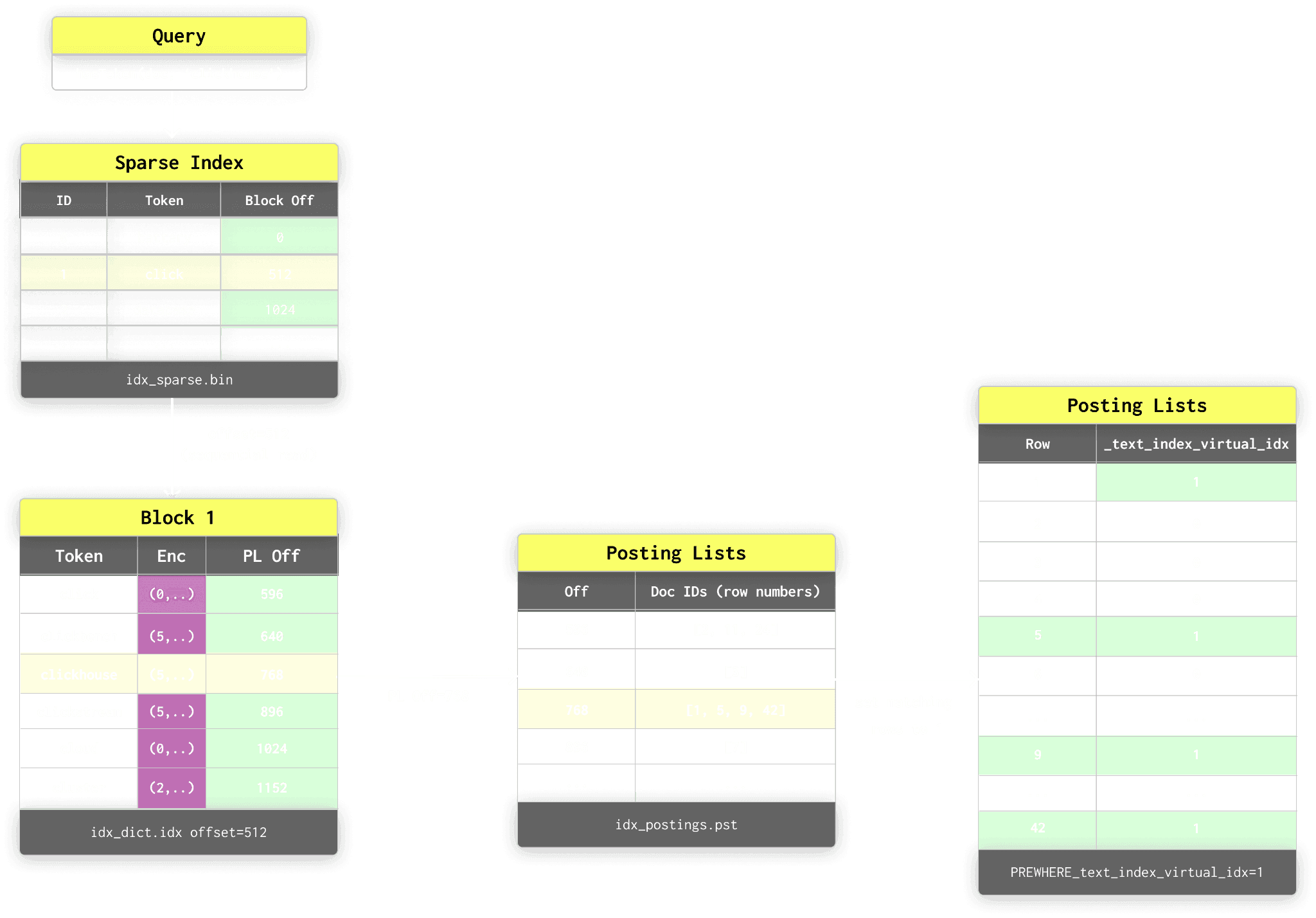
At query time, the text index uses a layered lookup process to efficiently resolve matching rows without scanning the full dataset, using a sparse index, dictionary blocks and posting listings. For more details, see our dedicated post.
Bloom filter indices can also be used for this purpose and may be sufficient for many workloads. In practice, the best choice depends on the label distribution, query patterns, and the selectivity of the applied filters.
-
Analytical aggregations - In this model, metrics are represented as numeric columns, such as
response_time. Aggregations become straightforward and efficient. If we want to compute something likeavg(response_time), ClickHouse only needs to read theresponse_timecolumn for the rows that match the query filters. Thanks to the sparse index and secondary filters, the engine can identify the specific granule ranges that satisfy the filters and only read those ranges from disk. Those ranges can be processed in parallel across all CPU cores and servers in a cluster. This gives us effective predicate pushdown at the storage level.As a result, aggregation performance is not directly tied to cardinality as in a series-based model. It is more closely related to the number of rows that match the query filters. Only the relevant metric column needs to be read for the matching rows. Filters on high-cardinality columns are often beneficial because they tend to reduce the number of rows scanned. In contrast, queries with no filters or filters on low-cardinality columns will typically require more data to be read, which requires parallelized reads for performance.
Example
Consider the earlier metrics table. In our example, this stores 5 billion response times and sizes for our application. Some of the columns in this data naturally have high cardinality, and you would avoid using them as labels in any traditional time series database like Prometheus.
SELECT count()
FROM events
┌────count()─┐
│ 5339783200 │ -- 5.34 billion
└────────────┘
1 row in set. Elapsed: 0.004 sec.The following shows the cardinality of each column, as well as the total cardinality if we were to represent this using a time series model.
SELECT
uniq(host),
uniq(application),
uniq(labels['request_path']),
uniq(labels['remote_addr']),
uniq(labels['remote_user']),
uniq(labels['request_type']),
uniq(labels['request_protocol']),
uniq(status),
uniq(labels['domain_referer']),
uniq(labels['browser']),
uniq(labels['device'])
FROM events
FORMAT Vertical
Row 1:
──────
uniq(host): 100
uniq(application): 1000
uniq(arrayEl⋯est_path')): 881432
uniq(arrayEl⋯ote_addr')): 258115
uniq(arrayEl⋯ote_user')): 995890
uniq(arrayEl⋯est_type')): 5
uniq(arrayEl⋯protocol')): 7
uniq(status): 15
uniq(arrayEl⋯_referer')): 369
uniq(arrayEl⋯'browser')): 9
uniq(arrayEl⋯ 'device')): 11
SELECT uniq(host, application, labels['request_path'], labels['remote_addr'], labels['remote_user'], labels['request_type'], labels['request_protocol'], status, labels['domain_referer'], labels['browser'], labels['device']) AS total_time_series
FROM events
┌─total_time_series─┐
│ 5239274309 │ -- 5.24 billion
└───────────────────┘Clearly, the number of time series here is significant, almost the same as the number of rows at 5.2 billion.
Rows are not the same as time series. You can add many more data points for an existing series, increasing the row count without increasing the number of distinct series. In most datasets, the total number of rows will far exceed the number of time series. In this example, each row even stores two metrics, response time and size, so the relationship between rows, samples, and series is rarely one-to-one.
Now consider the following query, which runs in milliseconds executed on a 32-core machine. It computes an average on the above table for the response time, grouping to 1-minute intervals, bucketing by the status, and limiting to a specific day:
SELECT
toStartOfMinute(time) AS minute,
labels['status'] as status,
avg(response_time)
FROM metrics
WHERE (time >= '2025-02-23 08:00:00') AND (time <= '2025-02-23 12:00:00')
GROUP BY
minute,
status
ORDER BY minute ASC
┌──────────────minute─┬─status─┬─avg(response_time)─┐
│ 2025-02-23 08:00:00 │ 403 │ 5065.290909090909 │
│ 2025-02-23 08:00:00 │ 500 │ 5327.543933054393 │
│ 2025-02-23 08:00:00 │ 302 │ 5119.796687088722 │
..
3084 rows in set. Elapsed: 0.122 sec. Processed 49.21 million rows, 340.04 MB (404.24 million rows/s., 2.79 GB/s.)
Peak memory usage: 726.64 MiB.This is an example of a query that would be challenging to execute in Prometheus. You would need to access many independent series in order to compute this.
Note that this query computes a simple average over event-style data, grouped into fixed one-minute buckets. It is not semantically identical to the earlier
avg_over_time(...[5m])example. The results may look similar on a chart, but the underlying computation model is different - see "When Prometheus still makes sense".
Narrowing to fewer "series" reduces the amount of data that needs to be read. For example:
SELECT
toStartOfMinute(time) AS minute,
avg(response_time)
FROM events
WHERE application = '603' AND host = '3' AND status = '200' GROUP BY minute
ORDER BY minute ASC
┌──────────────minute─┬─avg(response_time)─┐
│ 2025-01-24 00:00:00 │ 3680.4615384615386 │
│ 2025-01-24 00:01:00 │ 5515.153846153846 │
..
5 rows in set. Elapsed: 0.078 sec. Processed 53.40 million rows, 479.93 MB (681.97 million rows/s., 6.13 GB/s.)
Peak memory usage: 613.54 MiB.In the latter case, we read significantly less data thanks to the inverted index, as reflected in the query execution time. To narrow to a specific series, you would just add filters for all columns.
Metrics can also remain inside the labels map and be accessed dynamically at query time when they are not frequently queried enough to justify materialization. While we generally recommend materializing commonly aggregated metrics such as response_time, observability workloads often contain many lower-frequency measurements that are queried only occasionally. In these cases, accessing the metric directly from the map can be perfectly reasonable.
For example, suppose events also contain a size attribute representing the response payload size. We may only occasionally want to compute total traffic volume over time. Rather than materializing another dedicated column, we can access and cast the value directly from the map:
SELECT
toStartOfMinute(time) AS minute,
sum(toDecimal32(labels['size'], 1)) AS total_traffic
FROM events
WHERE application = '603'
GROUP BY minute
ORDER BY minute ASC
┌──────────────minute─┬─total_traffic─┐
│ 2025-01-24 00:00:00 │ 89167 │
│ 2025-01-24 00:01:00 │ 352724 │
│ 2025-01-24 00:02:00 │ 284684 │
…
4 rows in set. Elapsed: 1.138 sec. Processed 53.31 million rows, 13.60 GB (46.84 million rows/s., 11.95 GB/s.)This flexibility is one of the advantages of the wide events model. Frequently queried dimensions and metrics can be materialized into optimized columns, while less common attributes remain dynamically accessible without requiring rigid upfront schema definitions.
When high cardinality still has a cost in ClickHouse
ClickHouse does not make cardinality free.
Some costs move to read time, especially for large GROUP BY operations.
Suppose we wish to group by the request_path. We're now grouping by a high cardinality column at read time and accessing the map.
SELECT
toStartOfMinute(time) AS minute,
labels['request_path'] as request_path,
avg(response_time)
FROM events
WHERE toDate(time) = '2025-01-24'
GROUP BY
minute,
request_path
ORDER BY minute ASC
-- we'll omit the results :)
0 rows in set. Elapsed: 9.433 sec. Processed 153.23 million rows, 63.85 GB (16.24 million rows/s., 6.77 GB/s.)
Peak memory usage: 22.82 GiB.The cost is visible in both memory usage and elapsed time.
Performant grouping by very high-cardinality columns does incur memory overhead, since aggregation states must be built in memory. However, ClickHouse supports spilling to disk when thresholds are exceeded, making these workloads manageable rather than catastrophic. They can even be remarkably performant at high cardinality with controls to limit the memory consumption in exchange for performance:
SELECT
toStartOfMinute(time) AS minute,
labels['request_path'] as request_path,
avg(response_time)
FROM events
WHERE toDate(time) = '2025-01-24'
GROUP BY
minute,
request_path
ORDER BY minute ASC
-- Start external aggregation around 10 GB
SETTINGS max_bytes_before_external_group_by = 10000000000
0 rows in set. Elapsed: 13.930 sec. Processed 153.23 million rows, 63.85 GB (11.00 million rows/s., 4.58 GB/s.)
Peak memory usage: 9.57 GiB.More practically, however, how would you even visualize almost a million distinct lines in an observability dashboard?
If your workload genuinely requires rendering millions of individual series, ClickHouse may not be the ideal tool. But if you need to compute aggregates across those millions of series, such as totals or averages, ClickHouse is extremely well-suited.
When ClickHouse makes sense
ClickHouse is particularly well-suited to event-style observability data such as logs and traces enriched with metrics, where high cardinality is natural rather than accidental. It also excels at long-term trend analysis, SLIs, KPIs, and broader business metrics that require analysis over extended time horizons. Whenever metrics are derived from events and require flexible time- and dimension-based aggregation, the columnar model plays to ClickHouse’s strengths.
Importantly, ClickHouse is not structurally impacted by short-lived, ephemeral dimensions such as container_id, pod_id, or other dynamically generated identifiers common in modern environments. These are simply column values.
The practical consequence of this is significant. You can store your full-fidelity metric data in ClickHouse without needing to aggressively sample, pre-aggregate, or strip labels purely to control cardinality. Instead of designing your schema to avoid explosions, you can model your data naturally and let query patterns determine what is read.
When Prometheus still makes sense
Prometheus absolutely still makes sense in many scenarios, not least because of its broad ecosystem support, mature operational tooling, and deeply integrated alerting capabilities.
It was built around a metrics-first model where samples are scraped into distinct time series, and it supports multiple metric types: counters, gauges, histograms, and summaries. Each type encodes assumptions about how the data should be interpreted. Counters handle rates and resets. Histograms and summaries support latency and distribution analysis. These semantics are deeply embedded in PromQL and the surrounding ecosystem.
In an event-style model in ClickHouse, metrics are typically stored as numeric columns on events and aggregated at query time. In practice, these values often behave more like gauges than strict Prometheus-style counters. Like Prometheus, ClickHouse fundamentally stores numbers (histograms aside), with semantics emerging from query logic rather than the storage layer itself.
Conversely, Prometheus assumes regularly sampled series and provides first-class semantics for counters, rates, histograms, and range vectors. ClickHouse instead operates over timestamped events, making it better aligned with flexible event-style aggregation over high-cardinality observability data rather than strict time-series semantics.
For highly targeted single-series lookups and plotting, Prometheus often performs extremely well. Its inverted index resolves label intersections quickly, and reading a single compressed series is efficient. ClickHouse can achieve similar performance when the ordering key aligns with the filter, but it may scan more data in some cases. The difference is rarely dramatic, but this is a scenario where Prometheus is very strong.
Prometheus also works extremely well when cardinality is controlled and predictable. For moderate numbers of long-lived series, real-time alerting, and traditional monitoring workflows, it is highly effective. It integrates seamlessly with stacks such as LGTM, where Prometheus and its distributed counterparts, such as Mimir, are first-class citizens. While distributed systems address scalability concerns, they retain the underlying series-based model, meaning cardinality still requires deliberate management.
ClickHouse for Prometheus metrics
ClickHouse’s open-source observability stack, ClickStack, supports Prometheus-style metrics (Open Telemetry metrics), but it should not be viewed as a drop-in replacement for Prometheus or for long-established Prometheus-compatible systems. The underlying storage and query model are fundamentally different, with ClickStack favoring an event-oriented approach over a strict time-series model.
As a result, querying for Prometheus-style metrics in ClickStack is exposed through higher-level query builders and abstractions with more limited capabilities than native PromQL today. This is largely due to the complexity of fully reproducing Prometheus semantics, particularly around counters, histograms, range vectors, and the broader PromQL execution model.
If you require mature, battle-tested PromQL support deeply integrated into dashboards, alerts, and operational workflows, Prometheus remains the obvious choice. That said, PromQL support in ClickHouse continues to evolve, with recent encouraging developments. Manually translating complex PromQL queries into SQL can also be non-trivial, particularly for histograms and range-vector functions - but possible with the help of LLMs.
Prometheus remains the better fit for moderate-cardinality metrics, PromQL-centric alerting, and targeted series lookups.
Conclusion
High cardinality is not "free" in ClickHouse, but the costs appear in very different places compared to traditional time-series systems. By shifting from a series-oriented model to wide events stored in column-oriented tables, ClickHouse avoids the per-series write amplification, memory overhead, and operational fragility that make cardinality so challenging in systems such as Prometheus. Instead, the tradeoffs move primarily to query-time aggregation and data modeling decisions, areas where ClickHouse’s columnar execution model, compression, pruning, and parallelization are particularly strong.