50.5k
50.5k
Another month goes by, which means it’s time for another release!
ClickHouse version 26.1 contains 25 new features 🧤 43 performance optimizations 🛷 176 bug fixes ⛄
This release sees deduplication of asynchronous inserts with materialized views, new syntax for indexing projections, support for Variant in all functions, and more!
New contributors
A special welcome to all the new contributors in 26.1! The growth of ClickHouse's community is humbling, and we are always grateful for the contributions that have made ClickHouse so popular.
Below are the names of the new contributors:
Aleksandr Tolkachev, Alex Soffronow Pagonidis, Alexey Bakharew, Andrew Slabko, Arsen Muk, Binnn-MX, Cole Smith, Daniel Muino, Fabian Ponce, Govind R Nair, Hechem Selmi, JIaQi, Jack Danger, JasonLi-cn, Jeremy Aguilon, Josh Carp, Julio Jordan, Karun, Karun Anantharaman, Kirill Kopnev, LeeChaeRok, MakarDev, Matt Klein, Michael Jarrett, Paresh Joshi, Revertionist, Sam Kaessner, Seva Potapov, Shaurya Mohan, Sümer Cip, Xuewei Wang, Yonatan-Dolan, alsugiliazova, gayanMatch, ggmolly, htuall, ita004, jetsetbrand, lijingxuan92, matanper, mostafa, pranavt84, punithns97, rainac1, speeedmaster, withlin
Hint: if you’re curious how we generate this list… here.
You can also view the slides from the presentation.
Deduplication of asynchronous inserts with materialized views
Contributed by Sema Checherinda
ClickHouse achieves high insert throughput by writing independent data parts without global synchronization, then merging them later in the background. However, creating and merging too many small parts is expensive, so inserts must be batched for optimal performance.
As mentioned in the blog post initially introducing async inserts: Using ClickHouse is like driving a Formula One car 🏎. The power is there, but you need to be in the right gear for top insert speed. Batching can be handled manually by the client or automatically by ClickHouse using asynchronous inserts, which perform server-side batching transparently.
Why batching alone is not enough
As also described in the original blog post introducing asynchronous inserts, batching alone is not sufficient in real-world ingestion pipelines. Inserts must also be idempotent. Network failures, timeouts, or node crashes can make it unclear whether an insert actually reached durable storage, forcing clients to retry the same insert.
Automatic deduplication for idempotent inserts
ClickHouse has long supported automatic deduplication for idempotent inserts into tables using *MergeTree family engines. When enabled, ClickHouse assigns a deduplication identifier to each insert, either derived from a hash of the inserted data or explicitly provided by the client via an insert deduplication token. These identifiers are tracked in Keeper and used to detect and ignore duplicate inserts on retries. This mechanism makes client-side batched inserts safe to retry without risking duplicate data.
Deduplication for asynchronous inserts
Asynchronous inserts build on the same foundation, but apply deduplication at flush time rather than per client request. Individual INSERTs are first collected in an in-memory buffer. When the buffer is flushed, ClickHouse computes one deduplication hash (or token) per source insert contained in the batch.
The problem with dependent materialized views (before 26.1)
However, prior to ClickHouse 26.1, this mechanism did not work reliably when tables had dependent incremental materialized views. While the source table could correctly deduplicate retried async inserts, the transformed data written by materialized views could still be duplicated, making async inserts unsafe in pipelines that relied on views.
This release fixes that. Deduplication now works end-to-end for asynchronous inserts and their dependent materialized views. Retries are handled consistently across all tables involved, allowing async inserts to be safely retried without producing duplicate data, even in complex ingestion pipelines.
To make this concrete, the following example shows how asynchronous inserts and retries are deduplicated end-to-end in the presence of a dependent materialized view.
Example: deduplicated asynchronous inserts with a materialized view
We start with a simple base table that stores raw values:
CREATE TABLE events
(
value UInt64
)
ENGINE = MergeTree
ORDER BY value;The target table for our materialized view stores the sum of all raw values inserted into the base table:
CREATE TABLE events_mv_target
(
sum UInt64
)
ENGINE = SummingMergeTree
ORDER BY tuple();Our materialized view reacts to all inserts into the base table and writes the sum of newly inserted values into the target table. Because the target table uses a SummingMergeTree engine, partial aggregates written by the materialized view are combined incrementally via background data part merges:
CREATE MATERIALIZED VIEW events_mv
TO events_mv_target
AS
SELECT
sum(value) AS sum
FROM events;With this schema in place, the diagrams below illustrate how asynchronous INSERTs are buffered, deduplicated, and written to both the base table and the materialized view target table. First for an initial batch, and then for a retry.
Diagram 1: initial asynchronous inserts with a dependent materialized view
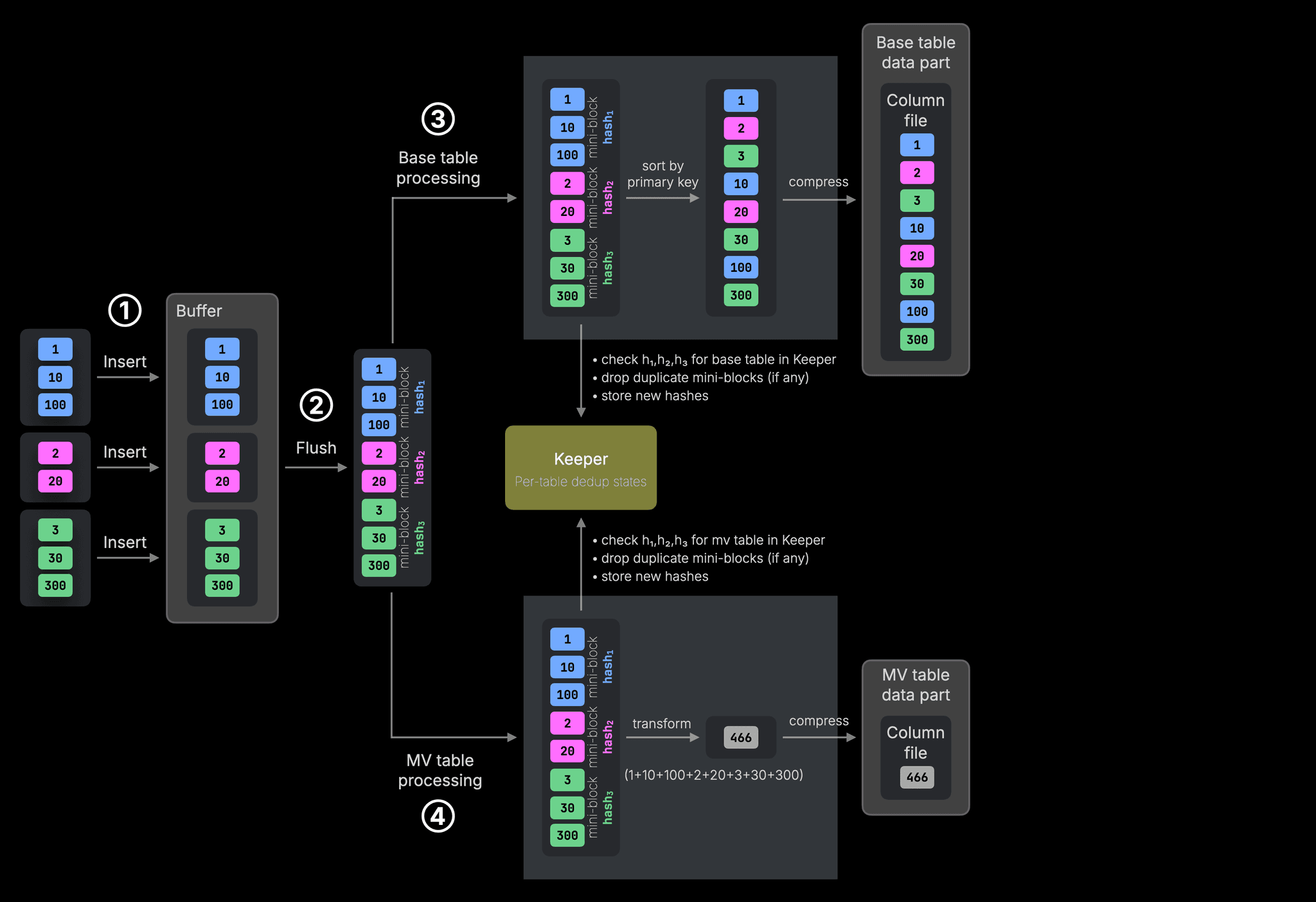
① Three independent INSERTs are buffered and ② flushed together as a single batch. During the flush, the buffered inserts are concatenated into one (or more) in-memory blocks, bounded by max_insert_block_size. ClickHouse computes one deduplication hash per source INSERT and carries these hashes alongside the data during insert processing.
The resulting in-memory block is first handed over to ③ base table processing, where each deduplication hash is checked independently against the base table’s deduplication state in Keeper. Any duplicate mini-blocks are filtered out, after which the remaining data is sorted by the primary key and written in compressed form as a new base table data part.
The same in-memory block and deduplication hashes are also handed over to ④ materialized view processing. Deduplication is performed independently for the materialized view target table, after which the data is transformed using the view’s SELECT query and written in compressed form as a data part in the materialized view target table.
Diagram 2: retry with a dependent materialized view
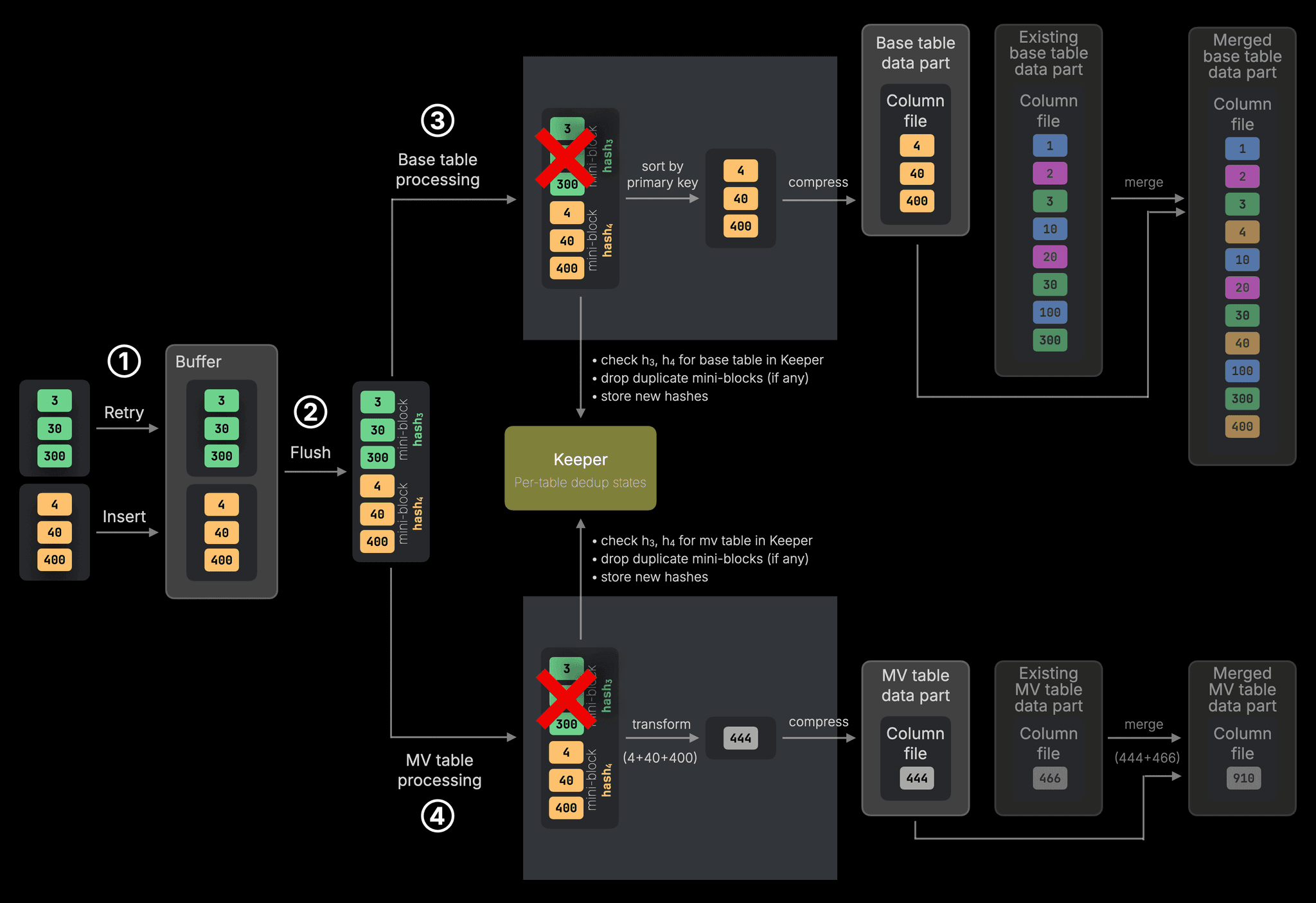
① A second batch of asynchronous INSERTs is buffered, consisting of one retried INSERT and one new INSERT. ② When the buffer is flushed, ClickHouse computes deduplication hashes for both and detects that the retried INSERT has already been processed.
During ③ base table processing, the mini-block corresponding to the retried INSERT is filtered out using the stored deduplication state in Keeper. Only the new data is sorted and written as a new base table data part.
The same filtering happens independently during ④ materialized view processing. The retried mini-block is dropped before the materialized view transformation is applied, ensuring that only the new data contributes to the aggregated result.
Background merges are shown for completeness only; they are independent of asynchronous inserts and deduplication and are part of normal MergeTree operation.
Key takeaway: Deduplication is scoped per table in ClickHouse. Base tables and materialized views track duplicates independently. As a result, retries are filtered consistently across all tables involved, and materialized views never skip or duplicate data just because the base table saw it first.
New syntax for indexing projections
Contributed by Amos Bird
In the ClickHouse 25.6 and 25.11 releases, we made projections behave like true secondary indexes. Instead of storing complete data copies, a projection can store only the sorting key plus a _part_offset pointer back into the base table, greatly reducing storage overhead.
In the following schema, we create by_time and by_town projections using this technique:
CREATE OR REPLACE TABLE uk.uk_price_paid_with_proj
(
price UInt32,
...
PROJECTION by_time (
SELECT _part_offset ORDER BY date
),
PROJECTION by_town (
SELECT _part_offset ORDER BY town
)
)
ENGINE = MergeTree
ORDER BY (postcode1, postcode2, addr1, addr2);In ClickHouse 26.1, we have a new syntax for indexing projections. We can define the by_time and by_town and projections like this instead:
CREATE OR REPLACE TABLE uk.uk_price_paid_with_proj
(
price UInt32,
...
PROJECTION by_time INDEX date TYPE basic,
PROJECTION by_town INDEX town TYPE basic
)
ENGINE = MergeTree
ORDER BY (postcode1, postcode2, addr1, addr2);Faster DISTINCT over LowCardinality columns
Contributed by Nihal Z. Miaji
ClickHouse already treats LowCardinality columns as a first-class optimization target. In a recent release, we significantly improved GROUP BY performance for LowCardinality keys by parallelizing the aggregation merge phase, removing a long-standing bottleneck for small, fixed-key aggregations. (The engineer behind that optimization also blogged about his journey)
In ClickHouse 26.1, DISTINCT joins GROUP BY as another operator that benefits from dedicated LowCardinality optimizations.
This optimization was originally introduced as a Christmas engineering gift and is described in more detail in the accompanying post.
At a high level: When a DISTINCT query operates on a LowCardinality column, ClickHouse can now avoid unnecessary work by operating directly on the column’s dictionary representation instead of materializing full values. This reduces CPU work, improves cache locality, and significantly speeds up DISTINCT queries on columns with a small number of unique values.
Together, these optimizations make both GROUP BY and DISTINCT much faster on LowCardinality data, a common pattern in analytical workloads with dimensions such as status codes, categories, regions, or enums.
Introspection and diagnostics for MergeTree tables and Keeper
ClickHouse is designed to be deeply observable, using SQL to observe itself. From system tables and logs to specialized introspection functions, internal behavior such as queries, merges, parts, replication, and coordination can be inspected directly with SQL running on ClickHouse itself.
ClickHouse 26.1 adds several new tools in this spirit. This release introduces new system tables, extends existing ones, and adds a new table function to improve visibility into MergeTree internals and Keeper state. These features make it easier to debug performance issues, reason about index usage, and operate ClickHouse reliably at scale.
A new system table: zookeeper_info contributed by Smita Kulkarni
The new system table zookeeper_info allows you to introspect your Keeper cluster and provides information such as cluster size, latency, leadership status, data volume, and more.
SELECT *
FROM system.zookeeper_info;Row 1:
──────
zookeeper_cluster_name: zookeeper
host: localhost
port: 9181
index: 0
is_connected: 1
is_readonly: 0
version: v26.2.1.90-testing-a44e1...
avg_latency: 1
max_latency: 100
min_latency: 0
packets_received: 4598
packets_sent: 4738Web UI and HTTP interface for Keeper contributed by Alexander Tolkachev and Artem Brustovetskii
Next to the new system table (see previous section), ClickHouse 26.1 also introduces a embedded web dashboard for monitoring, health checks, and storage management of Keeper. The dashboard allow you to navigate across the data stored in Keeper, inspect the node content, and even directly edit the node content straight from the UI.
You can watch Alexey demoing the dashboard in the release webinar.
Besides the dashboard, there is now also an API allowing operators to inspect cluster status, execute commands, and manage Keeper storage through a web browser or HTTP clients.
Together, the system table, web UI, and HTTP API provide multiple ways to inspect and operate Keeper, depending on whether you prefer SQL, a browser-based interface, or programmatic access.
Information on files in system.parts contributed by Gayan Match
ClickHouse stores data as immutable parts: directories on disk containing compressed column files, indexes, and metadata.
The system table system.parts allows you to introspect all currently existing parts. In ClickHouse 26.1, it gains a new files column, making it possible to inspect how many files each part consists of, a useful signal for understanding on-disk layout, schema complexity, and insert, query, and merge behavior.
SELECT name, rows, marks, bytes, files
FROM system.parts
WHERE database = 'default' AND table = 'github_events';┌─name─────────────┬───────rows─┬─marks──┬──────────bytes─┬─files─┐
│ all_0_0_0_288 │ 4430017383 │ 576807 │ 332974330897 │ 145 │
│ all_1_1_0_288 │ 853559 │ 108 │ 77871986 │ 196 │
│ all_2_2_0_288 │ 22523075 │ 2783 │ 1618742341 │ 196 │
│ all_3_3_0_288 │ 855252 │ 107 │ 42151604 │ 202 │
│ all_4_4_0_288 │ 612539497 │ 75810 │ 45082755883 │ 188 │
│ all_5_5_0_288 │ 1082739624 │ 138264 │ 123406140554 │ 145 │
│ all_6_6_0_288 │ 1546160205 │ 191296 │ 101227190998 │ 198 │
│ all_7_2820_6_288 │ 2225987644 │ 278473 │ 157837202094 │ 192 │
└───────────────────┴────────────┴────────┴────────────────┴───────┘mergeTreeAnalyzeIndexes table function contributed by Azat Khuzhin
The existing mergeTreeIndex table function can be used to introspect the contents of the primary index and marks files of MergeTree tables. In other words, to see what's inside these files on disk.
In ClickHouse 26.1, we introduce a complementary table function, mergeTreeAnalyzeIndexes, designed to show how those indexes are actually applied at query time. For a given query, it returns the exact row ranges within each data part that will be scanned after applying the primary index and data skipping indexes.
This makes it possible to see, in detail, how ClickHouse prunes data during query execution, which parts are touched, which ranges survive index filtering, and what is ultimately read, providing a powerful tool for understanding and debugging index effectiveness.
SELECT *
FROM mergeTreeAnalyzeIndexes(
default, github_events, repo_name = 'ClickHouse/ClickHouse'
);SELECT * FROM mergeTreeAnalyzeIndexes(
default, github_events, repo_name = 'ClickHouse/ClickHouse')Table (ASCII):
┌─part_name──────────┬─ranges──────────────────────────────────────────────────┐
│ all_0_0_0_288 │ [(101,102),(2149,2150),(6938,6940),(81644,... │
│ all_1_1_0_288 │ [(0,1),(10,11),(12,15),(18,19),(20,22),(27... │
│ all_2_2_0_288 │ [(0,1),(8,9),(32,33),(295,296),(300,301),(... │
│ all_3_3_0_288 │ [(0,2),(9,13),(15,18),(21,22),(26,27),(98,... │
│ all_4_4_0_288 │ [(21,22),(309,310),(1041,1043),(10038,1003... │
│ all_5_5_0_288 │ [(55,56),(854,855),(2423,2424),(22336,2233... │
│ all_6_6_0_288 │ [(64,65),(893,894),(2721,2723),(24902,2490... │
│ all_7_2820_6_288 │ [(12,13),(207,208),(2688,2691),(32469,3247... │
└────────────────────┴─────────────────────────────────────────────────────────┘reverseBySeparator
Contributed by Xuewei Wang
ClickHouse 26.1 also introduces the reverseBySeparator function. This function reverses a delimited collection without conversion to an array.
For example:
SELECT reverseBySeparator('benchmark.clickhouse.com', '.') AS x┌─x────────────────────────┐
│ com.clickhouse.benchmark │
└──────────────────────────┘We might previously have achieved the same thing by using the arrayStringConcat, reverse, and splitByChar functions:
SELECT arrayStringConcat(
reverse(
splitByChar('.','benchmark.clickhouse.com')
),
'.'
) AS x;Support for Variant in all functions
Contributed by Bharat Nallan
The Variant type, introduced in ClickHouse 24.1, is now supported in all functions.
Let’s look at a query that works in 26.1, but didn’t in previous versions.
SELECT length('ClickHouse'::Variant(String, UInt32));This query used to throw this error:
Received exception:
Code: 43. DB::Exception: Illegal type Variant(String, UInt32) of argument of function length: In scope SELECT length(CAST('ClickHouse', 'Variant(String, UInt32)')). (ILLEGAL_TYPE_OF_ARGUMENT)But now returns the length of the string ClickHouse:
┌─length(CAST(⋯ UInt32)'))─┐
│ 10 │
└──────────────────────────┘Or, imagine we have the following table and inserted values:
CREATE TABLE test (
v Variant(UInt32, String, Array(String))
);
INSERT INTO test VALUES
('ClickHouse'),
(42),
(10),
(['We', 'Love', 'Clickhouse']);Let’s say we want to return the rows with a value greater than 10:
SELECT *
FROM test
WHERE v > 10;Before ClickHouse 26.1, we’d see this error:
Received exception:
Code: 43. DB::Exception: Illegal types of arguments (`Variant(Array(String), String, UInt32)`, `UInt8`) of function `greater`: In scope SELECT * FROM test WHERE v > 10. (ILLEGAL_TYPE_OF_ARGUMENT)Whereas in 26.1, we see the following:
┌─v──┐
│ 42 │
└────┘Text index improvements
This release sees a couple of improvements to the text index, which reached beta status in ClickHouse 25.12.
First up, it now supports a sparseGrams tokenizer, which was contributed by Anton Popov and Konstantin Vedernikov.
The sparseGrams function itself was added in ClickHouse 25.5. It finds all substrings of a given string that have a length of at least n, where the hashes of the (n-1) -grams at the borders of the substring are strictly greater than those of any (n-1)-gram inside the substring. It uses CRC32 as a hash function.
During the search, the query engine can take the longest ngrams from the search string and ignore covered shorter ngrams. It will use fewer, more specific, rare tokens for searching.
Let’s explore how this works using the Hacker News dataset. We’ll first create a table using the splitByNonAlpha tokenizer:
CREATE TABLE hackernews
(
`id` Int64,
`deleted` Int64,
`type` String,
`by` String,
`time` DateTime64(9),
`text` String,
`dead` Int64,
`parent` Int64,
`poll` Int64,
`kids` Array(Int64),
`url` String,
`score` Int64,
`title` String,
`parts` Array(Int64),
`descendants` Int64,
INDEX inv_idx(text) TYPE text(
tokenizer = 'splitByNonAlpha'
)
GRANULARITY 128
)
ENGINE = MergeTree
ORDER BY time;And then another table that uses the sparseGrams tokenizer:
CREATE TABLE hackernews_sparseGrams
(
`id` Int64,
`deleted` Int64,
`type` String,
`by` String,
`time` DateTime64(9),
`text` String,
`dead` Int64,
`parent` Int64,
`poll` Int64,
`kids` Array(Int64),
`url` String,
`score` Int64,
`title` String,
`parts` Array(Int64),
`descendants` Int64,
INDEX inv_idx(text) TYPE text(
tokenizer = sparseGrams(3, 20, 5),
preprocessor = lower(text)
)
GRANULARITY 128
)
ENGINE = MergeTree
ORDER BY time;Inserting around 28 million records into the hackernews table takes the following time on an Apple M2 Max:
28737557 rows in set. Elapsed: 120.358 sec. Processed 28.74 million rows, 4.98 GB (238.77 thousand rows/s., 41.36 MB/s.)
Peak memory usage: 1.36 GiB.And the hackernews_sparseGrams table:
28737557 rows in set. Elapsed: 1162.247 sec. Processed 28.74 million rows, 4.98 GB (24.73 thousand rows/s., 4.28 MB/s.)
Peak memory usage: 4.37 GiB.We can also see how much space is taken by the various text indices:
SELECT table,
formatReadableSize(sum(data_compressed_bytes)) AS data,
formatReadableSize(sum(secondary_indices_compressed_bytes)) AS secondaryIndices
FROM system.parts
WHERE table LIKE 'hackernews%'
GROUP BY ALL;┌─table──────────────────┬─data─────┬─secondaryIndices─┐
│ hackernews │ 6.77 GiB │ 2.00 GiB │
│ hackernews_sparseGrams │ 6.77 GiB │ 16.19 GiB │
└────────────────────────┴──────────┴──────────────────┘The secondary index for the table using sparse grams takes up 14 GiB, compared to the other one. The total space taken up by that table is 23 GiB compared to just under 9 GiB, so it’s a substantial increase.
Let’s query the dataset to find the users who post the most about relational databases. First against hackernews:
SELECT by, count()
FROM hackernews
WHERE text LIKE '%relational database%'
GROUP BY ALL
ORDER BY count() DESC
LIMIT 10;10 rows in set. Elapsed: 1.482 sec. Processed 28.74 million rows, 9.77 GB (19.39 million rows/s., 6.59 GB/s.)
Peak memory usage: 169.01 MiB.
10 rows in set. Elapsed: 1.454 sec. Processed 28.74 million rows, 9.77 GB (19.76 million rows/s., 6.72 GB/s.)
Peak memory usage: 168.84 MiB.
10 rows in set. Elapsed: 1.392 sec. Processed 28.64 million rows, 9.74 GB (20.58 million rows/s., 7.00 GB/s.)
Peak memory usage: 169.69 MiB.The minimum query time is 1.392 seconds. Now, let’s run the same query against hackernews_sparseGrams:
SELECT by, count()
FROM hackernews_sparseGrams
WHERE text LIKE '%relational database%'
GROUP BY ALL
ORDER BY count() DESC
LIMIT 10;10 rows in set. Elapsed: 0.934 sec. Processed 22.18 million rows, 6.09 GB (23.76 million rows/s., 6.52 GB/s.)
Peak memory usage: 184.26 MiB.
10 rows in set. Elapsed: 0.883 sec. Processed 22.03 million rows, 6.05 GB (24.94 million rows/s., 6.85 GB/s.)
Peak memory usage: 192.22 MiB.
10 rows in set. Elapsed: 1.043 sec. Processed 22.18 million rows, 6.09 GB (21.26 million rows/s., 5.84 GB/s.)
Peak memory usage: 185.10 MiB.This one has a minimum query time of 0.883 seconds, which is around 36% quicker.
Secondly, the text index can now be applied to arrays of Strings or FixedStrings. For example, we could create the following table:
CREATE TABLE tab
(
key UInt64,
val Array(String),
INDEX idx(val) TYPE text(
tokenizer = 'splitByNonAlpha', preprocessor = lower(val))
);And would then be able to write the following query that would make use of the index:
SELECT count() FROM tab
WHERE hasAllTokens(val, 'clickhouse');QBit promoted to beta
Contributed by Raufs Dunamalijevs
QBit, a data type for vector embeddings that lets you tune search precision at runtime, was introduced in ClickHouse 25.10.
As of ClickHouse 26.1, it has been moved to beta.
Open-source Kubernetes operator
Contributed by Grigory Pervakov
And finally, over the years we have had many requests for us to open-source a Kubernetes operator.
Well, now we have, and it supports automated cluster provisioning, vertical and horizontal scaling, configuration management, and more.
You can read more in the blog post - Introducing the Official ClickHouse Kubernetes Operator: Seamless Analytics at Scale.