50.5k
50.5k
GitHub generates a constant stream of issues, pull requests, and comments. Those are known as GitHub events. Over time, these billions of events capture the complete lifecycle of technology: how frameworks, libraries, and tools rise and fade. But capturing that immense data stream and turning it into a real-time trends analyzer is a challenge.
GitTrends make this possible. It is a new open-source demo application that works like a specialized Google Trends for the tech world, letting you search and compare any topic, technology, or keyword trends across over 10 billion GitHub events in real time.
It is now available at https://gittrends.clickhouse.com
GitTrends is a public demo built to showcase ClickHouse's full-text search capabilities. It is fully functional, but may be missing some features or have the occasional bug.
How can you use GitTrends?
Type a search term into GitTrends and instantly see how many times it was mentioned across issues, pull requests, and comments in every GitHub repository. This gives you an overview of a technology's popularity over time, the repositories driving the conversation, the developers most actively talking about it, and the actual issues and pull requests where the term appears.
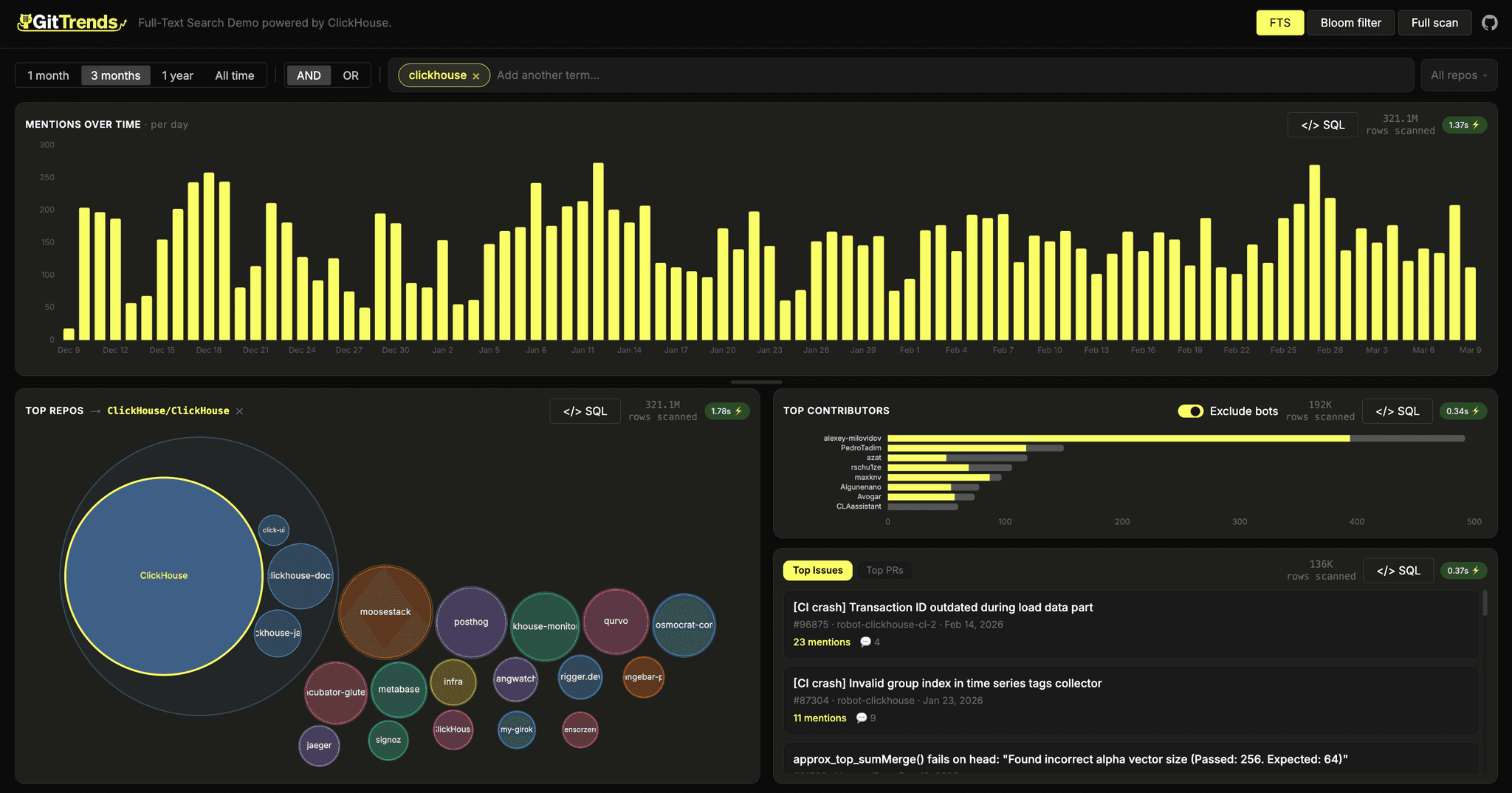
But GitTrends gets really interesting when you start comparing.
Compare tech adoption
Search and compare mention trends for any keywords, exactly like Google Trends but built on the world's most relevant data source for open-source technology. Compare ClickHouse vs Druid to see how two analytics databases have traded momentum over time, or track Claude vs OpenAI to watch the AI landscape shift in real developer conversations.
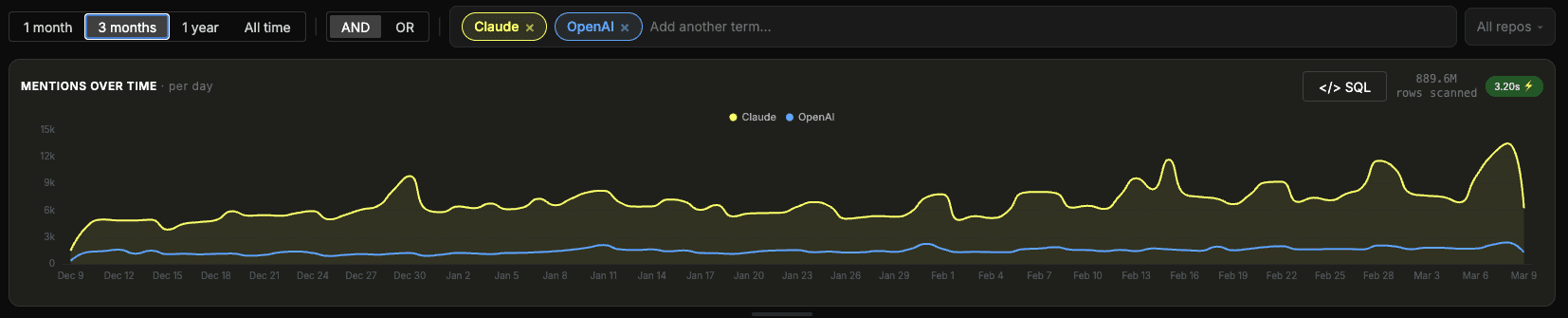
Identify Ecosystems
Identify the top repositories driving the conversation around any topic. Is ClickHouse discussed mostly in its own ecosystem, or is it bleeding into data engineering and observability projects? Is OpenAI mentioned across a broad range of repos while Claude is concentrated in a handful?
Knowing where a technology lives tells you as much as knowing how popular it is.
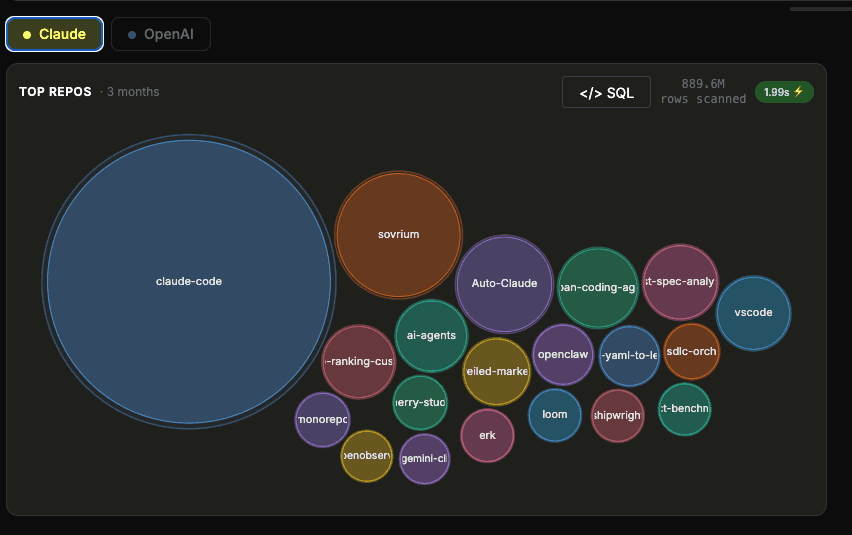
Drill into the Source
Move from a high-level trend to the actual conversations behind it. Select any repository and explore its underlying activity: the most active contributors, and the most mentioned issues and PRs driving the trend.
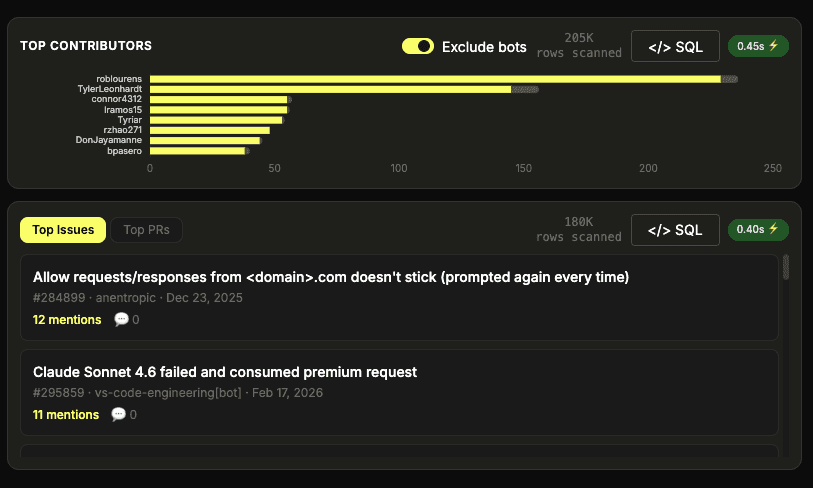
Full-Text Search at Scale
GitTrends is built around a simple idea: search any term in real time, across nearly 10 billion GitHub events with no data transformation. Rather than querying pre-computed answers, you index the raw text and search it directly at query time. That's the all promise behind the new full-text search feature recently released in ClickHouse. Simply build a text index on a text column and use full-text search.
What makes ClickHouse particularly powerful here is that full-text Search and aggregation live in the same engine. A single query can search raw text and aggregate results in one pass, with no joins across systems, no data movement, and no latency penalty. That combination is what makes the experience feel instant rather than just fast.
The GitHub events dataset, nearly 10 billion rows of issues, pull requests, and comments, is a deliberate stress test. GitTrends still delivers fast search across all of it.
To highlight the performance of the new full-text search index, GitTrends includes a live query performance comparison. For any search, you can toggle between using full-text Search, bloom filter and a full table scan and watch the difference play out in real time.
It is the clearest demonstration of what the right index buys you at scale.
Look under the hood
GitTrends is fully open and built to be explored at every layer.
How is the data ingested?
We have been ingesting the GitHub events dataset for some time and exposing it in our SQL Playground so anyone can explore it with SQL. We also documented several example queries and analyses on this page.
The ingestion script used to load the data into ClickHouse is available here.
Note that GitHub introduced changes to the Events API payloads starting in October 2025. As a result, certain fields differ from earlier data, which can affect analyses and make trend detection across the full history less accurate. More details are available in the GitHub changelog.
What SQL query is running behind each chart?
Every chart in GitTrends is backed by a real query. Click the SQL button on any chart to open it in the SQL playground, where you can inspect it, edit it, and run it yourself.
SELECT
toStartOfDay(created_at) AS bucket,
count() AS count
FROM github.github_events
WHERE
event_type IN ('IssueCommentEvent','IssuesEvent','PullRequestEvent','PullRequestReviewCommentEvent','PullRequestReviewEvent')
AND hasAllTokens(body, 'clickhouse')
AND created_at >= (now() - toIntervalMonth(1))
AND 1=1
GROUP BY bucket
ORDER BY bucket ASC
SETTINGS
enable_parallel_replicas = 1,
enable_full_text_index = 1,
use_skip_indexes = 1,
query_plan_direct_read_from_text_index = 1,
use_skip_indexes_on_data_read = 1Each search type, full-text search, bloom filter, and full table scan, has its own query so you can see exactly what changes under the hood.
How is the application built?
Interested in running GitTrends locally or adapting the approach to your own dataset?
Most of the demo was developed with Claude Code. The complete source code and step by step deployment instructions are available on GitHub.
Give the demo a try at https://gittrends.clickhouse.com and share with us any feedback.