50.5k
50.5k

Today, we're launching chDB 4 together with Hex, where it is available along with the new Pandas-like DataStore API as a native integration. If you work in Hex notebooks, you can start using chDB 4 immediately — no local installation, no infrastructure to manage. Write Pandas, run ClickHouse, ship from Hex.
Data practitioners have long been split into two camps: those who think in SQL and those who think in function chains. SQL has decades of compiler-level optimizations — vectorized SIMD execution, JIT compilation, logical and physical plan optimization — all battle-tested in engines like ClickHouse. Pandas, on the other hand, has become the lingua franca of data science, deeply embedded in notebook environments like Hex and Jupyter Notebook ecosystem and the muscle memory of millions of data scientists.
What if you didn't have to choose?
chDB is an in-process OLAP SQL engine powered by ClickHouse. With chDB, you can embed a powerful SQL engine in your app without installing a server.
chDB 4 introduces Data Store — a new component that lets you write familiar Pandas code while executing it on the ClickHouse engine. No new API to learn. No SQL translation by hand. Just the Pandas code you (and your LLM) already know how to write, running on one of the fastest analytical engines in the world.
The problem with eager execution
Consider a typical Pandas workflow:
import pandas as pd
df = pd.read_parquet("users.parquet")
df = df[df["age"] > 30]
df = df.sort_values("salary", ascending=False)
df = df.head(100)Simple enough. But here's what actually happens under the hood:
- The entire Parquet file is loaded into memory — depending on data types and compression, the in-memory representation can be significantly larger than the compressed on-disk size. For highly compressed string-heavy data, this inflation can reach 4x or more; for dense numeric columns, it may be closer to 1.5–2x.
- A full-table filter is applied, producing a second copy.
- A full sort is performed.
- Finally, only 100 rows are kept.
Pandas executes each step eagerly and independently, with no global view of the pipeline. While pd.read_parquet() does support a filters parameter for row-group-level predicate pushdown (via PyArrow) and a columns parameter for column pruning, these optimizations require the user to explicitly specify them at read time — they aren't inferred from downstream operations. A chained pipeline like the one above won't benefit from them automatically. Every intermediate step materializes a new DataFrame in memory.
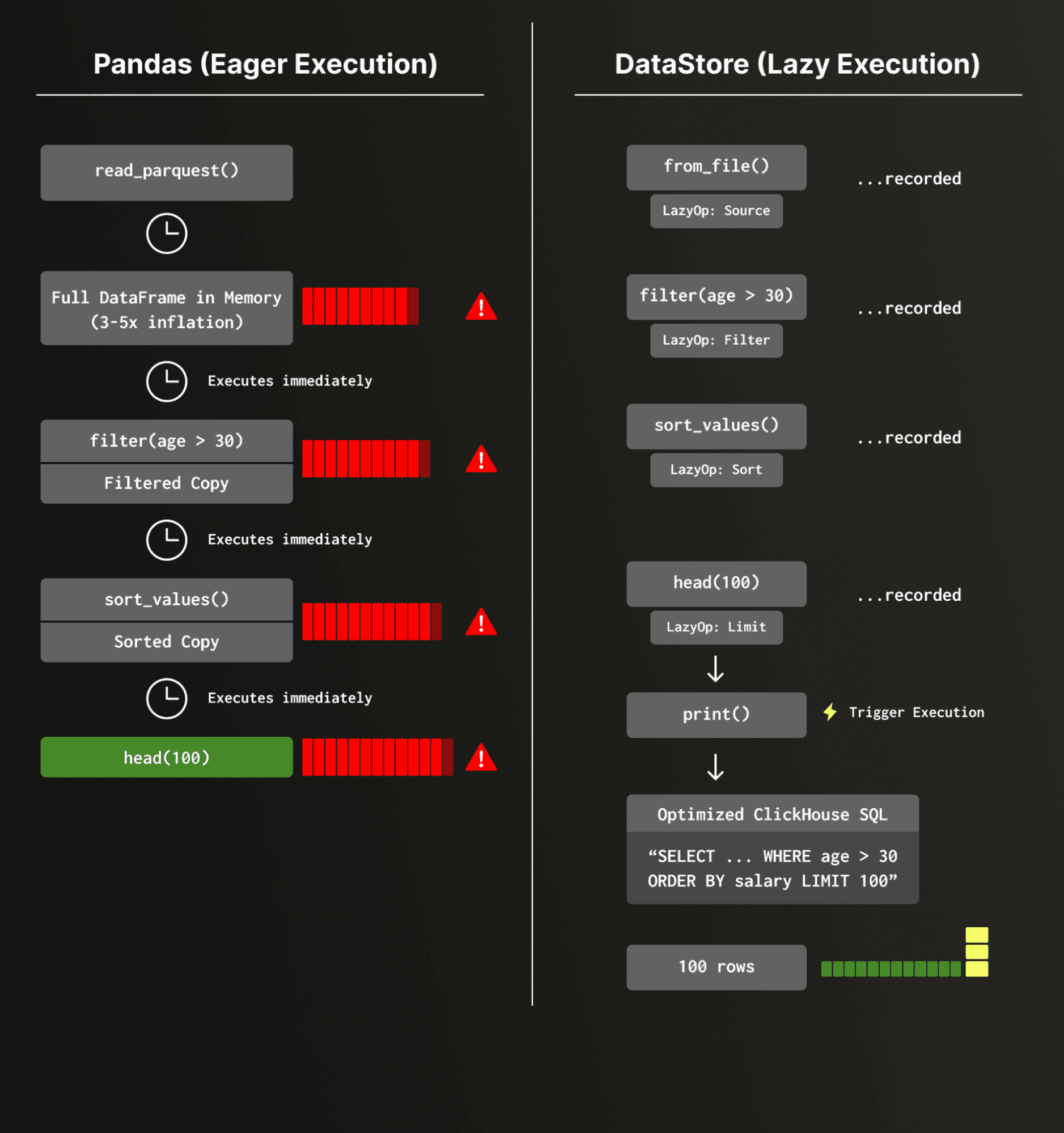
This is fine for small datasets on a laptop. It breaks down fast in production feature engineering pipelines, where data scientists prototype on small samples and then hand off to engineers who must rewrite everything to handle full-scale data — often introducing subtle inconsistencies between research and production.
How Data Store works
Data Store is built on a four-layer architecture that transforms Pandas-style code into optimized ClickHouse execution:
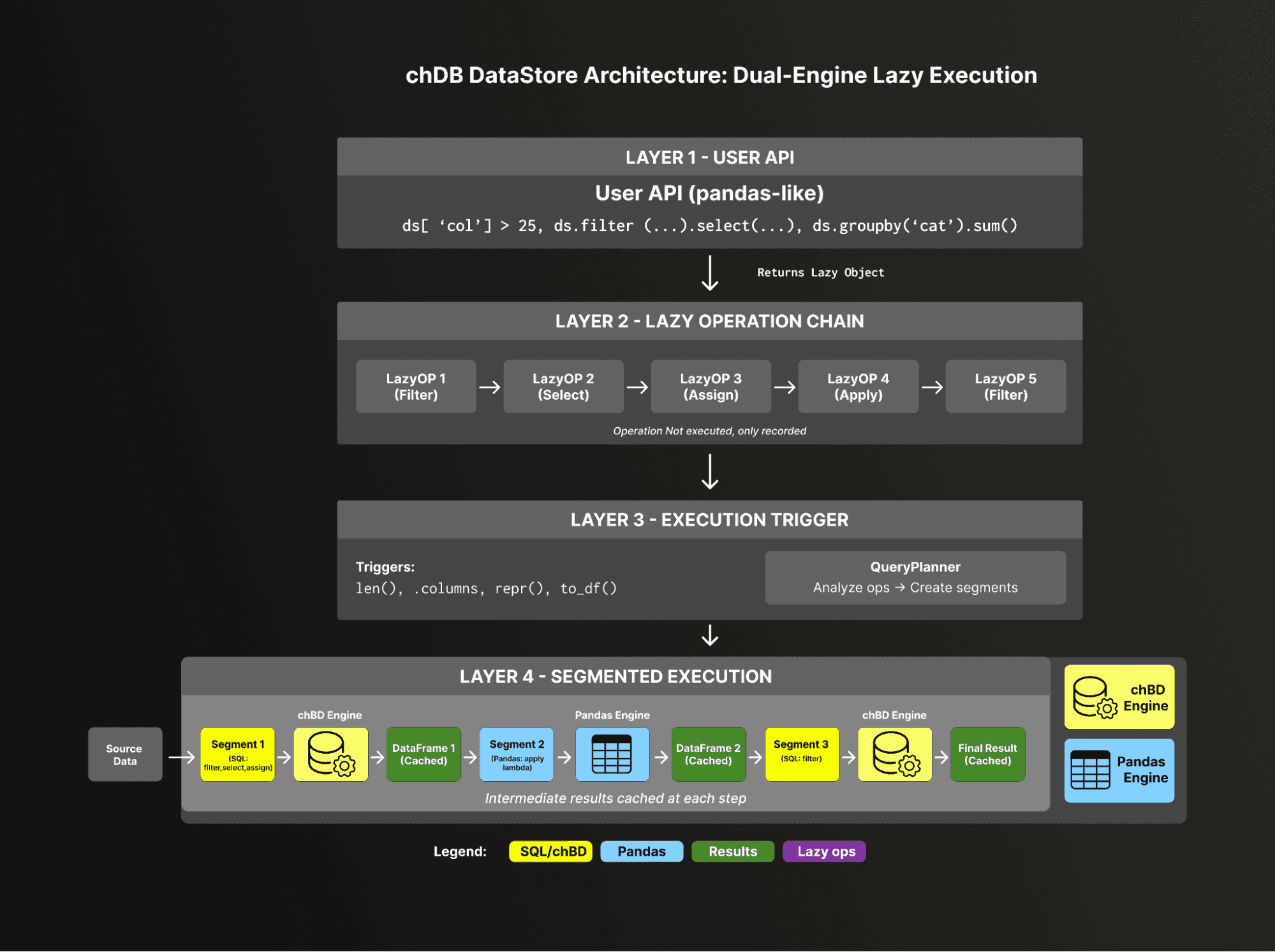
At the top, Layer 1 provides the familiar Pandas API — ds['col'] > 25, ds.filter(...), ds.groupby('cat').sum(). Every call returns a lazy object instead of executing immediately.
Layer 2 records these operations as a chain of LazyOp objects — filter, select, assign, apply, and more — without touching any data.
Layer 3 waits for a natural trigger like print(), len(), or .columns, then hands the operation chain to the QueryPlanner, which also determines how to split the pipeline into segments and route each to the appropriate engine.
Finally, Layer 4 executes the plan, with each segment running on either the chDB (ClickHouse) engine or the Pandas engine, and cached DataFrames flowing between them via Python's memoryview to minimize data copying.
Let's see this in action.
Lazy execution
Instead of running each operation immediately, Data Store records your Pandas-style operations as a lazy pipeline and only executes when you actually need results:
from chdb import DataStore
ds = DataStore.from_file("users.parquet")
ds = ds[ds["age"] > 30]
ds = ds.sort_values("salary", ascending=False)
ds = ds.head(100)
# Nothing has executed yet.
# Execution happens here — compiled to optimized SQL, run on ClickHouse:
print(ds)At execution time, the full pipeline is compiled into ClickHouse SQL with optimizations like filter pushdown, column pruning, and limit propagation. The ClickHouse engine then processes the query using its vectorized, multi-threaded execution pipeline — the same engine that powers analytical workloads at massive scale.
Want to see what will happen before it runs? Use explain():
print(ds.explain())================================================================================
Execution Plan
================================================================================
[1] 📊 File: users.parquet
Operations:
────────────────────────────────────────
[2] 🚀 [chDB] WHERE: age > 30
[3] 🚀 [chDB] ORDER BY: salary DESC
[4] 🚀 [chDB] LIMIT: 100Every operation is routed to the ClickHouse engine. No data was copied into Pandas at all until the final result.
Low-overhead DataFrame exchange
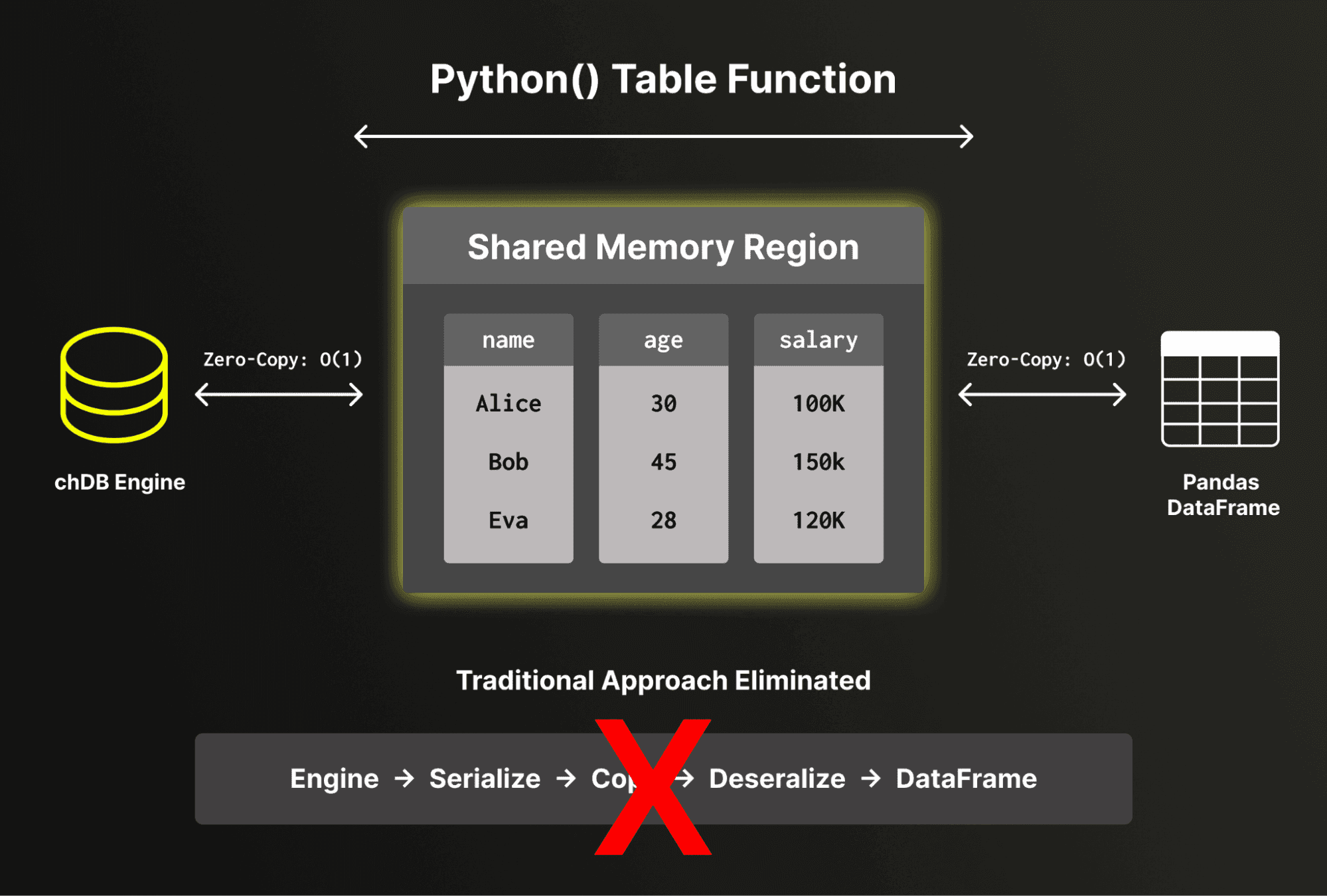
One of the key engineering achievements in chDB 4 is low-overhead data exchange between ClickHouse and Pandas. chDB directly reads and writes Pandas DataFrame structures without serialization or deserialization overhead. By bypassing the traditional serialize-deserialize cycle, chDB exposes ClickHouse's internal memory buffers directly to Pandas, avoiding full data copies for numeric and fixed-width columns. For variable-length data such as strings, some conversion overhead is unavoidable due to differences in internal representation between ClickHouse and Pandas.
For the common case of numeric-heavy analytical workloads, this means the cost of crossing the boundary between ClickHouse and Pandas is effectively constant, regardless of data size. This matters not just for final results, but is critical for the segment execution model described next.
Segment execution: seamless Pandas fallback
ClickHouse supports over 300 built-in functions, but Pandas has its own vast ecosystem of operations — custom accessors, string methods, and user-defined transformations. What happens when you use a Pandas function that has no ClickHouse equivalent?
This is where Layer 4 from the architecture diagram comes in. The query planner analyzes your pipeline and splits it into segments at boundaries where ClickHouse can't handle an operation — automatically routing each segment to the right engine:
ds = DataStore.from_file("data.parquet")
ds = ds[ds["age"] > 25] # → chDB segment
ds["name_upper"] = ds["name"].str.title() # → Pandas segment (str.title)
ds = ds.sort_values("age") # → chDB segment
print(ds.explain())Segment 1 [chDB] (from source): WHERE age > 25
Segment 2 [Pandas]: Assign name_upper = name.str.title()
Segment 3 [chDB] (via Python() table function): ORDER BY ageThe pipeline is automatically split into three segments:
- chDB reads the Parquet file and applies the filter.
- The result is passed (via
memoryview) to Pandas for the.str.title()operation. - The result is passed back to chDB for sorting via ClickHouse's
Python()table function.
Each transition between engines has minimal overhead thanks to the buffer protocol. You get ClickHouse performance where possible and Pandas compatibility everywhere else — without writing a single line of glue code.
A note on optimization boundaries: When a Pandas segment sits in the middle of a pipeline, the ClickHouse query optimizer cannot see through it. This means that segments after a Pandas operation (like Segment 3 above) operate on an in-memory intermediate result rather than the original data source, and cannot benefit from source-level optimizations like Parquet row-group skipping. For best performance, try to keep Pandas-only operations toward the end of your pipeline where possible.
Unified data sources
Because Data Store sits on top of the ClickHouse engine, it inherits ClickHouse's broad data source support. You can process data from local files, object storage, or remote databases — all through the same Pandas-style API:
# Local Parquet
ds = DataStore.from_file("events.parquet")
# Remote S3
ds = DataStore.uri("s3://bucket/path/to/data.parquet")
# Query a PostgreSQL table
ds = DataStore.from_sql("SELECT * FROM users", engine="postgresql://...")
# Even mix sources in SQL
ds = DataStore.from_sql("""
SELECT u.name, e.event_type, e.timestamp
FROM file('users.parquet') u
JOIN postgresql('host:5432', 'db', 'events', 'user', 'pass') e
ON u.id = e.user_id
""")This is particularly powerful for feature engineering in machine learning. Instead of writing ETL scripts to combine data from multiple systems into a single DataFrame, you can define the pipeline declaratively and let ClickHouse optimize the execution — much like a materialized view, but with Pandas ergonomics.
Smart caching for interactive workflows
In notebook environments like Hex, data scientists often sprinkle print() statements throughout their code to inspect intermediate results. In a lazy execution engine, each print() triggers execution. Without caching, code like this would execute the upstream pipeline twice:
ds = DataStore.from_file("data.parquet")
ds = ds[ds["value"] > 100]
print(ds) # Triggers execution
ds = ds.sort_values("value")
print(ds) # Would re-execute the filter without cachingData Store includes an automatic caching mechanism that transparently stores intermediate results. After the first print(), the filtered result is cached. When you continue building on the same pipeline, the cache is reused. It is automatically invalidated when the pipeline changes or the data source is modified — no manual cache() calls required.
chDB 4 on Hex
Hex is an AI analytics platform that unifies deep analysis, conversation self-serve and ad hoc exploration in a single experience – enhanced by agents. Confidently take agents into production by leveraging the Context Studio to observe agents and compound context to make them better over time.
Hex agents and the ClickHouse engine are already a natural pairing, and we are excited to deepen the partnership by strengthening a core workflow. Hex users already use Pandas for data exploration and transformation, with chDB 4 their existing code gets faster without changing how they write it. It comes pre-installed in Hex, with a seamless one-click option to securely connect to your ClickHouse instance.
What this looks like in practice
In a Hex notebook, the workflow is identical to the examples above. Create a new Python cell, and write standard Pandas code against Data Store:
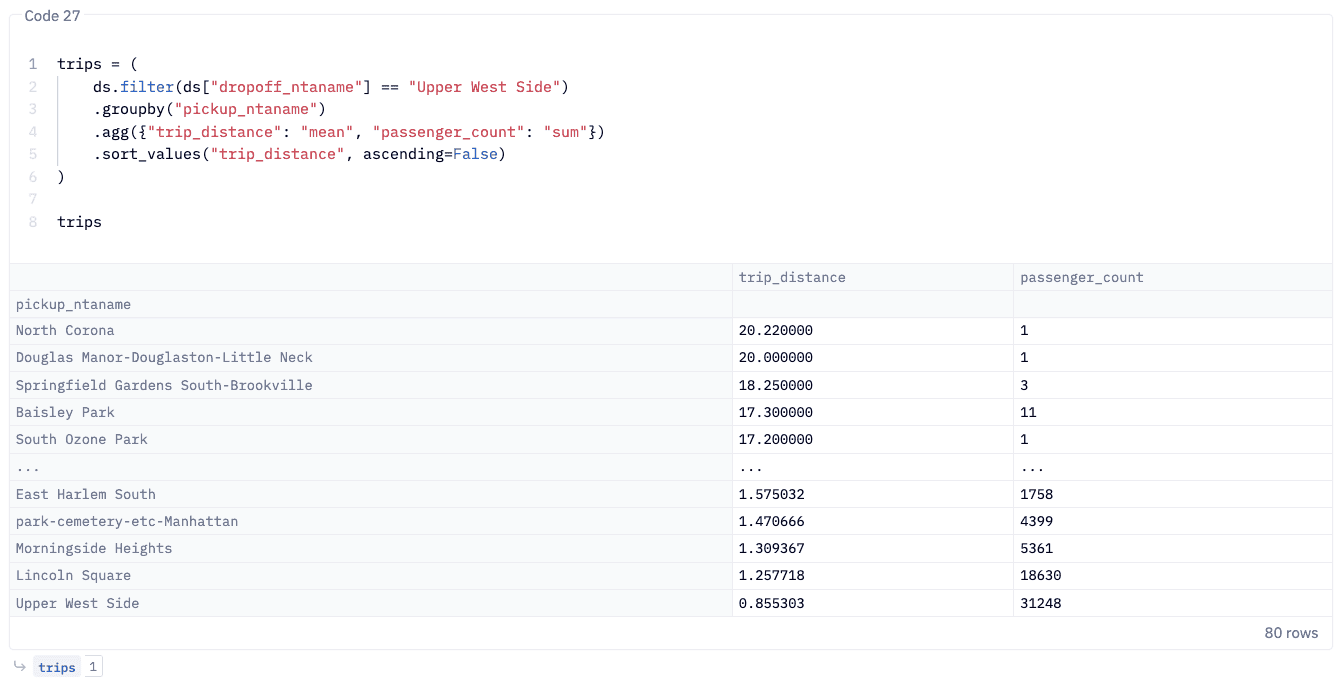
The result renders in Hex's interactive table view, and from there you can pipe it into Hex's built-in charting, feed it into a Hex App for stakeholders, or continue transforming it in the next cell.
The interactive, cell-by-cell workflow in Hex maps directly to Data Store's lazy execution model: each cell builds the pipeline, and execution is deferred until you access the results. The lazy execution and smart caching mean that re-running cells or iterating on your analysis doesn't re-scan the source data unnecessarily.
Why Hex + chDB
For data teams already using Hex, chDB 4 solves a common friction point: Pandas is great for expressiveness but struggles with scale. Until now, the options were to rewrite in SQL, move to Spark, or accept slow cell execution on large datasets. chDB 4 eliminates that tradeoff. You write Pythonic function chaining logics, and the ClickHouse engine handles the heavy lifting.
For teams evaluating Hex, chDB 4 adds another reason to adopt it: a notebook environment where Pandas code runs at analytical database speed, with no ops overhead.
Pandas compatibility: getting the details right
Making a ClickHouse-backed engine behave like Pandas is harder than it sounds. One particularly interesting challenge is row ordering.
ClickHouse is a massively parallel engine. When you read a file, multiple threads process different chunks simultaneously. Without an explicit ORDER BY, the result order is non-deterministic — whichever thread finishes first contributes its rows first. This is expected behavior for a database, but Pandas users expect df.head(10) to always return the first 10 rows from the source.
Data Store preserves source ordering by default using internal row-ID tracking, ensuring that Pandas-style operations produce identical results regardless of ClickHouse's parallel execution. For users who prioritize throughput over ordering guarantees, a Performance mode is available:
from chdb.datastore import config
config.set_execution_mode("performance") # Skip order preservation for speedThis lets you trade strict Pandas compatibility for higher parallelism — useful in production pipelines where you control the ordering explicitly.
Behavioral compatibility and known differences
Data Store aims for high behavioral compatibility with Pandas. Every Data Store operation is mirrored against an equivalent Pandas operation and the results are compared — column names, data values, data types, and row ordering. That said, some edge-case differences between ClickHouse and Pandas semantics are worth noting:
- NaN vs NULL: Pandas uses
NaNfor missing floating-point values, while ClickHouse distinguishes betweenNaNandNULL. Data Store normalizes these where possible, but subtle differences may appear in operations that distinguish between the two. - String sorting: ClickHouse sorts strings in byte order (effectively UTF-8), which may differ from Pandas' default locale-sensitive sorting in certain edge cases.
- Integer overflow: ClickHouse silently wraps on integer overflow, while Pandas (with NumPy backend) also wraps but may behave differently with nullable integer types.
For the vast majority of data science workflows, these differences are invisible. For a complete list of known differences and workarounds, see the Pandas Differences Guide. If you encounter an unlisted edge case, please file an issue — we actively work to close any remaining gaps.
Built for AI-assisted development
An often underestimated advantage of Pandas compatibility is its seamless integration with modern LLMs. Because Pandas has been a staple of data science for over a decade, models like Claude are expert-level Pandas programmers. They can generate complex data pipelines in idiomatic Pandas with high reliability.
With Data Store, all of that generated code runs on ClickHouse automatically. Your AI coding assistant doesn't need to learn a new API — it writes the Pandas code it already knows, and chDB handles the optimization. In Hex, where AI-assisted code generation is built into the notebook experience, this creates a particularly powerful loop: ask the AI to build a pipeline, and it runs at ClickHouse speed with zero manual optimization.
Looking ahead: Python free-threading and native UDFs
The segment execution model works well today, but crossing the engine boundary — even with minimal overhead — still means the ClickHouse query optimizer can't see through Pandas operations. We're watching the development of Python's free-threaded mode (no-GIL) with great interest. Python 3.14 officially supports the free-threaded build (via PEP 779), which removes the Global Interpreter Lock and enables true multi-threaded Python execution.
This opens up new possibilities: in the future, we could explore registering Python functions as ClickHouse UDFs that execute within the vectorized pipeline without the GIL forcing single-threaded serialization. Achieving this will require significant integration work beyond just removing the GIL — including safe FFI boundaries, memory management coordination, and thread-safe Python object access — but the no-GIL foundation is a critical prerequisite that is now in place.
The long-term vision is to keep the entire pipeline in ClickHouse's execution engine, even when using Python-defined transformations — combining the expressiveness of Python with the full power of ClickHouse's parallel execution.
Get started
pip install --upgrade chdb>=4.0.0import chdb.datastore as pd
df = pd.DataFrame({"name": ["Alice", "Bob", "Charlie"], "age": [25, 30, 35]})
result = df[df["age"] > 25].sort_values("name")
print(result)If you already have Pandas code, the migration is a single import change — swap import pandas as pd for import chdb.datastore as pd, and your existing pipeline runs on ClickHouse.
You can get started on Hex using this tutorial and benefit from an extended trial using the link below: https://app.hex.tech/signup/clickhouse-30
chDB is an in-process SQL OLAP engine powered by ClickHouse. It runs directly in your Python process with no server, no network overhead, and no setup — just import chdb.
Get started today
Interested in seeing how ClickHouse works on your data? Get started with ClickHouse Cloud in minutes and receive $300 in free credits.
Sign up