50.4k
50.4k
The fastest analytical queries are the ones that read the least data. We know we say that a lot, but that’s only because it’s true!
ClickHouse has several ways to make this happen. In this blog post, we'll use a dataset of UK property sales to walk through three index-based pruning techniques - so you know exactly what to reach for and when.
Pruning technique #1: Primary index
The first pruning technique, the primary key, is one of the first things that you learn when creating a table. A table’s primary key determines the sort order of the data within a data part.
Table parts are comprised of granules, each containing 8,192 rows by default. ClickHouse’s primary index stores the primary key column values for the first row in every granule.
In the diagram below, data is sorted by the primary key, C1, and rows are organized into granules (g1 to g4). We use 3 rows per granule in this diagram for clarity. The primary index stores the first value for each granule, i.e., 10 for g1, 20 for g2, and so on.
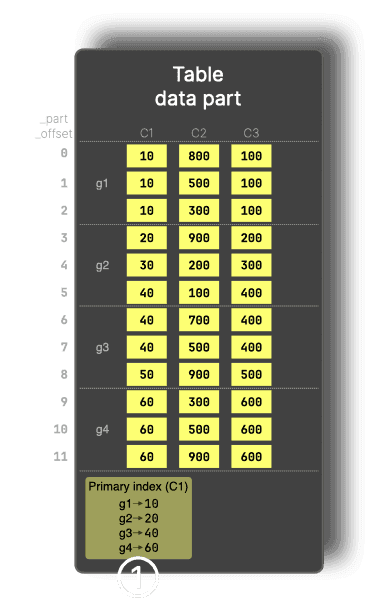
The primary index allows entire granules to be skipped before reading them, based on the filter condition on the primary key. For example, for a query that contains WHERE C1 > 60, granules g1 and g2 are pruned using the index, so only the remaining data is read.
Pruning technique #2: Lightweight projections
Our next pruning technique is lightweight projections, which was first introduced in ClickHouse 25.6 and received a more user-friendly syntax in ClickHouse 26.1.
Projections in ClickHouse are automatically maintained, hidden table copies stored in a different sort order, and therefore with a different primary index. These alternative layouts can speed up queries that benefit from those orderings. The downside is that projections duplicated the base table’s data on disk.
Lightweight projections behave like a secondary index without duplicating full rows. Instead of storing complete data copies, they store only their sorting key plus a _part_offset pointer back into the base table. This greatly reduces storage overhead but means that any other returned columns must be read from the base table.
We can see how this works by updating our diagram to add a lightweight projection on C2:
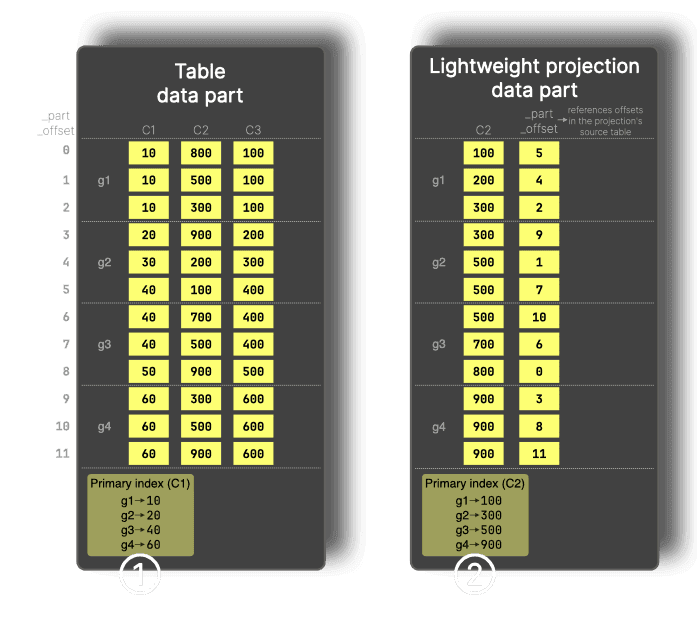
For filters on a column that is not part of the primary key, such as WHERE C2 > 900, ClickHouse can use a lightweight projection, which stores the sorted projection key (C2) values plus _part_offset values and provides its own primary index (②) that allows granules to be pruned for filters on the projection key.
Pruning technique #3: Skip indexes
Our final technique is skip indexes. One such skip index is the minmax index, which records the minimum and maximum values for a column for each granule.
Minmax indexes have been supported in ClickHouse for more than five years, but we’ve recently added support for automatically creating these indexes for every column of a specific type in a table.
The advantage of a minmax index over a lightweight projection is that it doesn’t duplicate the column values on disk. However, something to keep in mind is that the column on which we apply a minmax index needs to be somewhat correlated with the primary-key, otherwise the index won’t effectively prune data.
In the diagram below, the minmax index (③) records the minimum and maximum values of C3 for each granule.
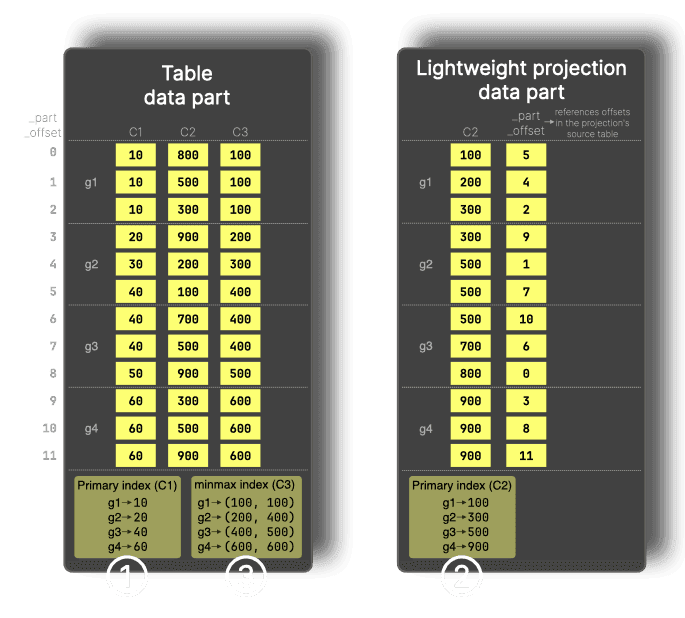
For a filter like WHERE C3 > 600, granules g1 to g3 can be skipped because their maximum value is below 600, so only g4 needs to be read.
Pruning in action: UK property dataset
Now that we’ve got a high-level understanding of each of the pruning techniques, let’s learn how to put them into action on a real-life dataset. We’ll be using the UK property prices dataset, which contains details of property sales in the UK.
We’ll run all queries on an Apple Mac M2 Max with 64GB of RAM.
Ingesting the UK property dataset
Let’s start by creating the table:
CREATE OR REPLACE TABLE uk_price_paid
(
price UInt32,
date Date,
postcode1 LowCardinality(String),
postcode2 LowCardinality(String),
type Enum8('terraced' = 1, 'semi-detached' = 2, 'detached' = 3, 'flat' = 4, 'other' = 0),
is_new UInt8,
duration Enum8('freehold' = 1, 'leasehold' = 2, 'unknown' = 0),
addr1 String,
addr2 String,
street LowCardinality(String),
locality LowCardinality(String),
town LowCardinality(String),
district LowCardinality(String),
county LowCardinality(String)
)
ENGINE = MergeTree
ORDER BY (postcode1, postcode2, addr1, addr2);The primary key (which is the same as the order by statement unless otherwise specified) is (postcode1, postcode2, addr1, addr2).
Once the table’s created, we’ll ingest the data:
INSERT INTO uk_price_paid
SELECT *
FROM file('uk_all.parquet');I created uk_all.parquet by first importing the data from pp-complete.csv (as documented) and then exporting it to Parquet.
The output of running the insert query is shown below:
30452463 rows in set. Elapsed: 5.366 sec. Processed 30.45 million rows, 170.44 MB (5.68 million rows/s., 31.76 MB/s.)
Peak memory usage: 774.00 MiB.This dataset contains 30 million rows, which is relatively small by ClickHouse’s standards. We could increase the amount of data by ingesting the Parquet multiple times, but there’s a faster way, using ATTACH PARTITION.
The following command duplicates all the parts in the table, doubling the amount of data:
ALTER TABLE uk_price_paid
ATTACH PARTITION ID 'all'
FROM uk_price_paid;I ran it several times so that we have a decent amount of data to work with. For reference, the following is the output from running the query three times:
0 rows in set. Elapsed: 0.167 sec.
0 rows in set. Elapsed: 0.458 sec.
0 rows in set. Elapsed: 0.412 sec.We can write the following query to return the count of records in our table:
SELECT count()
FROM uk_price_paid;┌───count()─┐
│ 243619704 │ -- 243.62 million
└───────────┘
1 row in set. Elapsed: 0.001 sec.Filtering by primary index
Let’s start by writing a query that filters on the primary key. The following query returns the number of properties sold in Croydon (a suburb of London) as well as the average sale price:
SELECT postcode1, count(), avg(price)
FROM uk_price_paid
WHERE postcode1 LIKE 'CR%'
GROUP BY ALL
ORDER BY count() DESC
SETTINGS
output_format_pretty_single_large_number_tip_threshold=0,
use_query_condition_cache=0;The output of running the query is shown below:
┌─postcode1─┬─count()─┬─────────avg(price)─┐
│ CR0 │ 573952 │ 264860.4016363738 │
│ CR2 │ 219464 │ 287568.45715014765 │
│ CR4 │ 192912 │ 218234.12212822426 │
│ CR3 │ 155304 │ 306863.8307319837 │
│ CR8 │ 147880 │ 373809.7425480119 │
│ CR7 │ 141152 │ 211355.8734413965 │
│ CR5 │ 123112 │ 355812.51777243486 │
│ CR6 │ 47920 │ 384279.0923205342 │
│ CR9 │ 352 │ 12324871.113636363 │
│ CR24 │ 16 │ 25000 │
└───────────┴─────────┴────────────────────┘10 rows in set. Elapsed: 0.030 sec.
10 rows in set. Elapsed: 0.015 sec.
10 rows in set. Elapsed: 0.021 sec.The best query time was 15 milliseconds, which is not bad for a query on a table containing more than 200 million records.
If we prefix this query with EXPLAIN indexes=1, pretty=1, compact=1, we can see the query plan:
┌─explain─────────────────────────────────────────────┐
1. │ Output: postcode1, count(), avg(price) │
2. │ │
3. │ Sorting (Sorting for ORDER BY) │
4. │ └──Aggregating │
5. │ └──ReadFromMergeTree (default.uk_price_paid) │
6. │ Indexes: │
7. │ PrimaryKey │
8. │ Keys: │
9. │ postcode1 │
10. │ Condition: (postcode1 in ['CR', 'CS')) │
11. │ Parts: 36/36 │
12. │ Granules: 235/29751 │
13. │ Search Algorithm: binary search │
14. │ Ranges: 36 │
└─────────────────────────────────────────────────────┘On line 12, we can see that the query engine only needed to process 235 of the 29,751 granules (less than 1%) to run this query.
We can see how many rows were processed by querying the system.query_log table:
SELECT event_time, query, read_rows
FROM system.query_log
WHERE type = 'QueryFinish' AND query NOT LIKE '%query_log%'
ORDER BY event_time DESC
LIMIT 1
FORMAT Vertical;Row 1:
──────
event_time: 2026-04-09 10:37:22
query: SELECT postcode1, count(), avg(price)...
read_rows: 1687552 -- 1.69 millionOur query reads 1.6 million rows from a potential 243 million, so it’s fair to say the primary index has done a good job of reducing the data we need to read.
The primary index will be effective when filtering multiple columns that are part of the primary key, provided they form a prefix of the entire key.
Our primary key is (postcode1, postcode2, addr1, addr2), so filtering on, for example, postcode1 and postcode2 will be efficient.
SELECT postcode1, postcode2, count(), avg(price)
FROM uk_price_paid
WHERE postcode1 LIKE 'CR%' AND postcode2 LIKE '4%'
GROUP BY ALL
ORDER BY count() DESC
LIMIT 10
SETTINGS
output_format_pretty_single_large_number_tip_threshold=0,
use_query_condition_cache=0;┌─postcode1─┬─postcode2─┬─count()─┬─────────avg(price)─┐
│ CR4 │ 4FD │ 2496 │ 136439.84935897434 │
│ CR4 │ 4FF │ 2056 │ 111415.15953307394 │
│ CR4 │ 4FE │ 1376 │ 98730.37790697675 │
│ CR4 │ 4LT │ 1320 │ 104595.98787878788 │
│ CR0 │ 4UX │ 1240 │ 118912.51612903226 │
│ CR8 │ 4DZ │ 1200 │ 103860 │
│ CR0 │ 4TX │ 1184 │ 110415.50675675676 │
│ CR0 │ 4HB │ 1152 │ 162919.75694444444 │
│ CR0 │ 4FG │ 1144 │ 230394.2097902098 │
│ CR0 │ 4GA │ 1032 │ 211535.29457364342 │
└───────────┴───────────┴─────────┴────────────────────┘
10 rows in set. Elapsed: 0.015 sec. Processed 638.98 thousand rows, 3.30 MB (42.27 million rows/s., 218.59 MB/s.)
Peak memory usage: 3.92 MiB.This query processes just over 630,000 rows out of 243 million.
Filtering only on postcode2, which is part of the primary key, but isn’t the first key column, won’t be as efficient:
SELECT postcode1, postcode2, count(), avg(price)
FROM uk_price_paid
WHERE postcode2 LIKE '4%'
GROUP BY ALL
ORDER BY count() DESC
LIMIT 10
SETTINGS
output_format_pretty_single_large_number_tip_threshold=0,
use_query_condition_cache=0;┌─postcode1─┬─postcode2─┬─count()─┬─────────avg(price)─┐
│ TR8 │ 4LX │ 3328 │ 67047.70913461539 │
│ CR4 │ 4FD │ 2496 │ 136439.84935897434 │
│ SS16 │ 4TY │ 2328 │ 85003.52233676976 │
│ NR29 │ 4NW │ 2328 │ 36411.996563573884 │
│ SS16 │ 4TQ │ 2184 │ 88534.72161172162 │
│ SS16 │ 4TD │ 2160 │ 67603.75925925926 │
│ BS4 │ 4EY │ 2104 │ 100474.69201520912 │
│ RG22 │ 4UR │ 2096 │ 143119.3893129771 │
│ BB11 │ 4JZ │ 2096 │ 29956.74427480916 │
│ LS1 │ 4ES │ 2088 │ 256009.9655172414 │
└───────────┴───────────┴─────────┴────────────────────┘
10 rows in set. Elapsed: 0.787 sec. Processed 138.82 million rows, 572.89 MB (176.47 million rows/s., 728.26 MB/s.)
Peak memory usage: 146.53 MiB.It now scans 138 million rows and takes 50 times longer to return a result. If we explain this query, we’ll see the following output:
┌─explain───────────────────────────────────────────────────────────┐
1. │ Expression (Project names) │
2. │ Limit (preliminary LIMIT) │
3. │ Sorting (Sorting for ORDER BY) │
4. │ Expression ((Before ORDER BY + Projection)) │
5. │ Aggregating │
6. │ Expression (Before GROUP BY) │
7. │ Expression ((WHERE + Change column names to column id⋯│
8. │ ReadFromMergeTree (default.uk_price_paid) │
9. │ Indexes: │
10. │ PrimaryKey │
11. │ Keys: │
12. │ postcode2 │
13. │ Condition: (postcode2 in ['4', '5')) │
14. │ Parts: 11/11 │
15. │ Granules: 16950/29744 │
16. │ Search Algorithm: generic exclusion search │
17. │ Ranges: 7066 │
└───────────────────────────────────────────────────────────────────┘The query engine can use the primary key to exclude almost half of the granules (line 15), but on line 16, we see it’s using the generic exclusion search algorithm.
The efficiency of this algorithm depends on the cardinality difference between the postcode2 column and its predecessor key column, postcode1. You can see a step-by-step example in the documentation, but the takeaway is that the algorithm is efficient when the predecessor column has low(er) cardinality, but not so efficient when it has high(er) cardinality.
In the next section, we’re going to see how to filter more efficiently by columns that aren’t part of the primary key at all.
Filtering by lightweight projection
Filtering by primary index is the best technique, and making sure that you sort the data by the columns that you’re most likely to filter against is a good thing to keep in mind when designing your tables.
But often, we want to query by other columns as well. For example, let’s say we want to find the number of properties sold by town when the district = ‘BURNLEY’:
SELECT town, count(), round(avg(price)) AS avgPrice, argAndMax(date, price)
FROM uk_price_paid
WHERE district = 'BURNLEY'
GROUP BY ALL
ORDER BY count() DESC LIMIT 10
SETTINGS
use_query_condition_cache = 0;┌─town─────────┬─count()─┬─avgPrice─┬─argAndMax(date, price)──┐
│ BURNLEY │ 485808 │ 84552 │ ('2020-03-01',68945000) │
│ NELSON │ 200 │ 67794 │ ('2004-12-10',170000) │
│ ACCRINGTON │ 120 │ 61303 │ ('2022-11-30',223995) │
│ COLNE │ 88 │ 68455 │ ('2000-12-21',185000) │
│ ROSSENDALE │ 40 │ 124490 │ ('2007-09-10',237000) │
│ BARNOLDSWICK │ 32 │ 26488 │ ('1999-06-04',38000) │
│ BLACKBURN │ 32 │ 56500 │ ('2004-09-24',78000) │
│ BLACKPOOL │ 24 │ 40833 │ ('1999-07-23',44000) │
│ PRESTON │ 8 │ 221995 │ ('2022-12-09',221995) │
│ CLITHEROE │ 8 │ 250000 │ ('2020-07-16',250000) │
└──────────────┴─────────┴──────────┴─────────────────────────┘The output from running this query several times is shown below:
10 rows in set. Elapsed: 0.428 sec. Processed 240.96 million rows, 480.72 MB (562.98 million rows/s., 1.12 GB/s.)
Peak memory usage: 841.37 KiB.
10 rows in set. Elapsed: 0.466 sec. Processed 219.79 million rows, 438.38 MB (471.16 million rows/s., 939.77 MB/s.)
Peak memory usage: 852.86 KiB.
10 rows in set. Elapsed: 0.481 sec. Processed 207.87 million rows, 414.50 MB (432.32 million rows/s., 862.05 MB/s.)
Peak memory usage: 844.83 KiB.The query engine has to process almost all the rows in the dataset in order to answer this query.
Let’s see if we can improve the performance by adding a lightweight projection on the district column:
ALTER TABLE uk_price_paid
ADD PROJECTION by_district INDEX district TYPE basic;We’ll materialize that projection so that we can use it straight away:
ALTER TABLE uk_price_paid
MATERIALIZE PROJECTION by_district
SETTINGS mutations_sync=1;0 rows in set. Elapsed: 14.480 sec.Now, let’s run the query with the projection:
SELECT town, count(), round(avg(price)) AS avgPrice, argAndMax(date, price)
FROM uk_price_paid
WHERE district = 'BURNLEY'
GROUP BY ALL
ORDER BY count() DESC LIMIT 10
SETTINGS
use_query_condition_cache = 0,
optimize_use_projections = 1;optimize_use_projections is enabled by default, but we included it here for completeness. If you turn it off, projections won’t be used. It’s useful for sanity checking that your projection is actually working!
The timings of running the above query are shown below:
10 rows in set. Elapsed: 0.023 sec.
10 rows in set. Elapsed: 0.056 sec.
10 rows in set. Elapsed: 0.046 sec.For the BURNLEY query, using a lightweight projection on the district column reduces the query time from 428 milliseconds to 23 milliseconds, a 94% improvement.
Let’s now have a look at what’s going on under the hood. I initially prefixed the query with the same explain clause that we used earlier:
EXPLAIN indexes=1, pretty=1, compact= 1
SELECT town, count(), round(avg(price)) AS avgPrice, argAndMax(date, price)
FROM uk_price_paid
WHERE district = 'BURNLEY'
GROUP BY ALL
ORDER BY count() DESC LIMIT 10
SETTINGS
use_query_condition_cache = 0,
optimize_use_projections = 1;┌─explain─────────────────────────────────────────────────┐
│ Output: town, count(), avgPrice, argAndMax(date, price) │
│ │
│ Limit (preliminary LIMIT) │
│ └──Sorting (Sorting for ORDER BY) │
│ └──Aggregating │
│ └──ReadFromMergeTree (default.uk_price_paid) │
│ Indexes: │
│ PrimaryKey │
│ Condition: true │
│ Parts: 6/6 │
│ Granules: 29741/29741 │
│ Ranges: 6 │
└─────────────────────────────────────────────────────────┘This output doesn’t help us as it only includes the base query plan with the primary key index information. We need to also add projections=1 so that projection analysis is included in the output:
EXPLAIN indexes=1, projections=1, pretty=1, compact= 1
SELECT town, count(), round(avg(price)) AS avgPrice, argAndMax(date, price)
FROM uk_price_paid
WHERE district = 'BURNLEY'
GROUP BY ALL
ORDER BY count() DESC LIMIT 10
SETTINGS
use_query_condition_cache = 0,
optimize_use_projections = 1,
output_format_pretty_max_value_width=65,
output_format_pretty_row_numbers=1;┌─explain───────────────────────────────────────────────────────────┐
1. │ Output: town, count(), avgPrice, argAndMax(date, price) │
2. │ │
3. │ Limit (preliminary LIMIT) │
4. │ └──Sorting (Sorting for ORDER BY) │
5. │ └──Aggregating │
6. │ └──ReadFromMergeTree (default.uk_price_paid) │
7. │ Indexes: │
8. │ PrimaryKey │
9. │ Condition: true │
10. │ Parts: 11/11 │
11. │ Granules: 29744/29744 │
12. │ Ranges: 11 │
13. │ Projections: │
14. │ Name: by_district │
15. │ Description: Projection has been analyzed and wil⋯│
16. │ Condition: (district in ['BURNLEY', 'BURNLEY']) │
17. │ Search Algorithm: binary search │
18. │ Parts: 11 │
19. │ Marks: 72 │
20. │ Ranges: 11 │
21. │ Rows: 589824 │
22. │ Filtered Parts: 0 │
└───────────────────────────────────────────────────────────────────┘Let’s go through what’s happening here, starting with the Indexes section:
The primary key index couldn't help with this query - Condition: true on Row 9 means it applied no filtering, so all 11 parts (Row 10) and 29,744 granules (Row 11) have to be considered.
Moving on to the Projections section
Filtered Parts: 0on Row 22 indicates that no parts could be eliminated entirely, which meansBURNLEYappears in all 11 parts.- Row 19 narrows the search to 72 granules (or marks)
- Each granule contains 8,192 rows by default, which gives us the count on line 21 (72 * 8,192=589,824)
- Those 72 granules are spread across 11 parts (Row 18), and since
BURNLEYrows are stored contiguously within each part, that gives us one continuous range per part - 11 ranges in total (Row 20).
The table below shows the times without projection and with projection for districts with both more and fewer properties sold than Burnley:
| District | Matching rows | No projection (ms) | Projection (ms) | Improvement |
|---|---|---|---|---|
| BIRMINGHAM | 3,543,672 | 341 | 82 | 76% |
| SHEFFIELD | 1,975,368 | 368 | 44 | 88% |
| CROYDON | 1,448,472 | 364 | 48 | 86% |
| WAKEFIELD | 1,322,216 | 382 | 50 | 87% |
| WIRRAL | 1,301,168 | 358 | 39 | 89% |
| SOUTHWARK | 999,432 | 367 | 30 | 92% |
| SUTTON | 875,872 | 361 | 45 | 87% |
I ran the query three times with the projection and three times without it, and took the lowest times.
We see at least a 75% improvement in query time for all these districts when using the projection.
One cool feature of lightweight projections is that we can combine them to get row-level filtering across multiple independent sort orders.
For example, we could add another lightweight projection on the date column:
ALTER TABLE uk_price_paid
ADD PROJECTION by_date INDEX date TYPE basic;
ALTER TABLE uk_price_paid
MATERIALIZE PROJECTION by_date
SETTINGS mutations_sync=1;A query that filters by both district and date (e.g. finding properties sold in Manchester in January 2023) would use both of these lightweight projections:
SELECT town,
count(),
round(avg(price)) AS avgPrice,
argAndMax(date, price)
FROM uk_price_paid
WHERE (district = 'MANCHESTER') AND (date BETWEEN '2023-01-01' AND '2023-01-31')
GROUP BY ALL
ORDER BY count() DESC
LIMIT 10
SETTINGS
use_query_condition_cache = 0,
optimize_use_projections = 1;┌─town───────┬─count()─┬─avgPrice─┬─argAndMax(date, price)─┐
│ MANCHESTER │ 3656 │ 266818 │ ('2023-01-13',3000000) │
│ SALFORD │ 24 │ 341667 │ ('2023-01-31',670000) │
└────────────┴─────────┴──────────┴────────────────────────┘The explain output for this query is shown below:
┌─explain───────────────────────────────────────────────────────────┐
1. │ Output: town, count(), avgPrice, argAndMax(date, price) │
2. │ │
3. │ Limit (preliminary LIMIT) │
4. │ └──Sorting (Sorting for ORDER BY) │
5. │ └──Aggregating │
6. │ └──ReadFromMergeTree (default.uk_price_paid) │
7. │ Indexes: │
8. │ PrimaryKey │
9. │ Condition: true │
10. │ Parts: 11/11 │
11. │ Granules: 29744/29744 │
12. │ Ranges: 11 │
13. │ Projections: │
14. │ Name: by_district │
15. │ Description: Projection has been analyzed and wil⋯│
16. │ Condition: (district in ['MANCHESTER', 'MANCHESTE⋯│
17. │ Search Algorithm: binary search │
18. │ Parts: 11 │
19. │ Marks: 247 │
20. │ Ranges: 11 │
21. │ Rows: 2023424 │
22. │ Filtered Parts: 0 │
23. │ Name: by_date │
24. │ Description: Projection has been analyzed and wil⋯│
25. │ Condition: and((date in (-Inf, 19388]), (date in ⋯│
26. │ Search Algorithm: binary search │
27. │ Parts: 11 │
28. │ Marks: 71 │
29. │ Ranges: 11 │
30. │ Rows: 581632 │
31. │ Filtered Parts: 0 │
└───────────────────────────────────────────────────────────────────┘Each projection independently works out which parts and granules match for their filter condition and the set of rows to read from the base table is the intersection of both.
To see the impact of the lightweight projections individually and together, we’re going to create a couple of extra tables, each containing one of the lightweight projections.
First up, uk_price_paid_by_date will only have the by_date lightweight projection:
CREATE TABLE uk_price_paid_by_date
CLONE AS uk_price_paid;
ALTER TABLE uk_price_paid_by_date
DROP PROJECTION by_district;And uk_price_paid_by_district will only have the by_district lightweight projection:
CREATE TABLE uk_price_paid_by_district
CLONE AS uk_price_paid;
ALTER TABLE uk_price_paid_by_district
DROP PROJECTION by_date;We’ll now run our previous query that finds properties sold in Manchester in January 2023 against each table. We’ll run it against each table three times, recording the lowest time and the rows processed:
| Table | Query time (ms) | Rows processed |
|---|---|---|
uk_price_paid | 52 | 2.24 million |
uk_price_paid_by_district | 67 | 8.03 million |
uk_price_paid_by_date | 347 | 243.46 million |
We don't really see much improvement with just the by_date lightweight projection. Even though the projection has narrowed down the matching rows to around 500,000 (properties sold in January 2023), those rows are scattered across all 243 million rows in the base table, so the query engine still has to visit most of the data to retrieve them and then filter the district to Manchester.
We can confirm what we’re seeing above by writing the following query to work out how many granules need to be scanned to find all the matching rows for properties sold in January 2023:
SELECT
uniqExact((_part, intDiv(_part_offset, 8192))) AS granulesWithMatchingRows,
(
SELECT sum(marks)
FROM system.parts
WHERE (`table` = 'uk_price_paid_by_date') AND active
) AS totalGranules,
round((granulesWithMatchingRows / totalGranules) * 100, 2) AS pct
FROM uk_price_paid_by_date
WHERE (date >= '2023-01-01') AND (date <= '2023-01-31');┌─granulesWithMatchingRows─┬─totalGranules─┬──pct─┐
│ 29724 │ 29755 │ 99.9 │
└──────────────────────────┴───────────────┴──────┘We’re scanning 29,724 granules, or around 243,499,008 rows (29,724*8,192), to find the matching rows.
Let’s have a look at another example where we’re filtering more specifically by date and more liberally by district. The following query finds property sales on 1st February 2023 in Manchester, Birmingham, Sutton, and Wirral:
SELECT town,
count(),
round(avg(price)) AS avgPrice,
argAndMax(date, price)
FROM uk_price_paid
WHERE (district IN ('MANCHESTER', 'BIRMINGHAM', 'SUTTON', 'WIRRAL'))
AND (date = '2023-02-01')
GROUP BY ALL
ORDER BY count() DESC
LIMIT 10
SETTINGS
use_query_condition_cache = 0,
optimize_use_projections = 1;And again, we’ll run it against each table three times, recording the lowest time and the rows processed:
| Table | Query time (ms) | Rows processed |
|---|---|---|
uk_price_paid | 85 | 58.92 million |
uk_price_paid_by_district | 352 | 207.67 million |
uk_price_paid_by_date | 99 | 75.85 million |
This time, by_date does a better job of filtering the data than by_district, but we get the best performance when both lightweight projections work together.
Filtering by minmax index
Our final pruning technique is the minmax index, a type of skip index. As a quick reminder, any column we add a skip index to must be correlated with the primary key; otherwise, the index won’t be effective.
We’re going to add a minmax index to the price column to filter prices more efficiently. Prices are loosely correlated with postcode because properties in the same geographic area tend to sell in similar price ranges: expensive London postcodes (SW1, W1) cluster toward the high end, while rural postcodes cluster toward the lower end. This means that the query engine should be able to skip granules when searching by price.
We can add the minmax index with the following query:
ALTER TABLE uk_price_paid
ADD INDEX price_minmax price TYPE minmax GRANULARITY 1;We’ll materialize that index so that we can use it straight away:
ALTER TABLE uk_price_paid
MATERIALIZE INDEX price_minmax
SETTINGS mutations_sync=1;Next, we’re going to write a query to find the district that has the most properties sold for more than £10,000,000:
SELECT
district,
count(),
formatReadableQuantity(avg(price)) AS avgPrice
FROM uk_price_paid
WHERE price > 10000000
GROUP BY ALL
ORDER BY count() DESC
LIMIT 10
SETTINGS use_query_condition_cache = 0,
use_skip_indexes = 1;The
use_skip_indexessetting is true by default, but we can turn it off to see the impact of skip indexes.
The result of running the query is shown below:
┌─district───────────────┬─count()─┬─avgPrice──────┐
│ CITY OF WESTMINSTER │ 13880 │ 32.61 million │
│ KENSINGTON AND CHELSEA │ 7120 │ 19.22 million │
│ CAMDEN │ 3616 │ 34.78 million │
│ CITY OF LONDON │ 2448 │ 50.09 million │
│ TOWER HAMLETS │ 2392 │ 43.70 million │
│ MANCHESTER │ 1752 │ 24.71 million │
│ SOUTHWARK │ 1712 │ 37.31 million │
│ BIRMINGHAM │ 1520 │ 27.66 million │
│ ISLINGTON │ 1504 │ 35.81 million │
│ LEEDS │ 1328 │ 24.94 million │
└────────────────────────┴─────────┴───────────────┘I ran this query three times without the skip index (use_skip_indexes=0):
10 rows in set. Elapsed: 0.347 sec. Processed 243.62 million rows, 1.09 GB (701.77 million rows/s., 3.13 GB/s.)
Peak memory usage: 6.21 MiB.
10 rows in set. Elapsed: 0.506 sec. Processed 243.62 million rows, 1.09 GB (481.02 million rows/s., 2.15 GB/s.)
Peak memory usage: 6.21 MiB.
10 rows in set. Elapsed: 0.390 sec. Processed 243.62 million rows, 1.09 GB (624.22 million rows/s., 2.78 GB/s.)
Peak memory usage: 6.21 MiB.And then three times with the skip index (use_skip_indexes=1):
10 rows in set. Elapsed: 0.312 sec. Processed 116.41 million rows, 578.67 MB (373.50 million rows/s., 1.86 GB/s.)
Peak memory usage: 5.46 MiB.
10 rows in set. Elapsed: 0.306 sec. Processed 116.41 million rows, 578.67 MB (380.51 million rows/s., 1.89 GB/s.)
Peak memory usage: 5.46 MiB.
10 rows in set. Elapsed: 0.304 sec. Processed 116.41 million rows, 578.67 MB (382.48 million rows/s., 1.90 GB/s.)
Peak memory usage: 5.49 MiB.The best time without the skip index was 234 milliseconds, compared to 304 milliseconds with the skip index, a roughly 23% improvement.
The query with the skip index was processing about 1/2 as many rows. We can see what data was being ignored by explaining the query:
EXPLAIN indexes=1, projections=1, pretty=1, compact=1The output is shown below:
┌─explain────────────────────────────────────────────────┐
1. │ Output: district, count(), avgPrice │
2. │ │
3. │ Limit (preliminary LIMIT) │
4. │ └──Sorting (Sorting for ORDER BY) │
5. │ └──Aggregating │
6. │ └──ReadFromMergeTree (default.uk_price_paid) │
7. │ Indexes: │
8. │ PrimaryKey │
9. │ Condition: true │
10. │ Parts: 11/11 │
11. │ Granules: 29744/29744 │
12. │ Skip │
13. │ Name: price_minmax │
14. │ Description: minmax GRANULARITY 1 │
15. │ Condition: (price in [10000001, +Inf)) │
16. │ Parts: 11/11 │
17. │ Granules: 14214/29744 │
18. │ Ranges: 6034 │
└────────────────────────────────────────────────────────┘From line 17, we can see that the skip index excluded just over 15,000 granules.
Conclusion
This blog post has taken us through three index-based pruning techniques offered by ClickHouse: primary index, lightweight projections, and skip indexes.
The primary index is the most powerful. You should design your ORDER BY around your most common filter columns.
Lightweight projections are a good option for filtering on non-primary key columns. Combining multiple projections lets ClickHouse intersect its results for even better pruning.
And finally, skip indexes like minmax work best when the target column is correlated with the primary key; without that correlation, they won't help much.
Get started today
Interested in seeing how ClickHouse works on your data? Get started with ClickHouse Cloud in minutes and receive $300 in free credits.
Sign up