50.5k
50.5k
Postgres managed by ClickHouse went into public beta in May. It is a fully managed, NVMe-backed Postgres service that is natively integrated with ClickHouse. Since then it has had a busy summer. We shipped fine-grained access control, a redesigned console, a Terraform provider, MCP support, a Stripe integration, usage metering, and a set of changes deeper in the stack. The common thread across most of it is a deep push towards making ClickHouse Cloud the best data platform for both OLTP + OLAP. Here is everything in one place.
A redesigned console
Open any Postgres service now and you land on a redesigned homepage that brings the things you check most into a single view. There is a service info card, at-a-glance health stats for used storage, active connections, disk IOPS, and your restore window, with deep links straight into Backups and point-in-time restore. Below that, a Resource usage section charts IOPS, CPU, disk, and connection count over whatever time period you pick, and a Query insights section breaks down queries per second, query latency, and operations.
The rest of the create and management experience got the same treatment:
- Reworked create flow. The custom configuration step has been rebuilt for a cleaner, less cluttered experience.
- Smarter region defaults. The region closest to you is pre-selected on the create page, so you do not have to hunt for it.
- Downscale safety guard. When you scale down, sizes that would not fit your existing data are disabled, so you cannot pick a target that loses data.
- Monitoring improvements. You can now search across metrics, and configuring a metric is smoother.
- Read replica topology view. A new visualization shows your primary and read replicas with draggable nodes, so the layout is easy to inspect at a glance.
Fine-grained access control
Managed Postgres now supports fine-grained, per-service access control. You no longer have to make a teammate an organization admin just to let them work on a single Postgres service, and the permissions apply the same way across the Cloud Console and the public REST API.
There are two levels:
- View. Read-only inside the service, plus read-only access to that service through the public API.
- Manage. Full administrative control, including settings changes, backups, restore and point-in-time recovery, read replicas, and replication configuration.
A few details that make this work in practice: list endpoints honor these permissions, so each user sees only the services they have view access to. Sensitive fields like connection passwords are hidden from view-only users. And existing organization-admin access is preserved, so nothing changes for current admins.
For a walkthrough of assigning roles, the full list of API permissions, and examples for common team setups, see the Managed Postgres RBAC documentation.
Infrastructure as code (Terraform)
The Terraform provider for ClickHouse managed Postgres is now available in alpha. You can manage a Postgres instance as code, in the same configuration as the rest of your ClickHouse Cloud infrastructure. It covers the full instance lifecycle, including create, resize, HA changes, configuration, and password rotation, along with streaming read replicas and point-in-time restore. Existing services and their CA certificates are available as data sources.
resource "clickhouse_postgres_service" "example" {
name = "my-postgres"
cloud_provider = "aws"
region = "us-east-1"
size = "m6gd.large"
# High-availability mode ("none", "async", or "sync")
ha_type = "async"
tags = {
environment = "production"
team = "data"
}
}The docs have the full schema and more examples. It is alpha, so the provider ships with an alpha warning, and more features are on the way.
Provision through Stripe
You can now provision Postgres by ClickHouse services through Stripe. Stripe Connect handles the payment side, including onboarding, payouts, and compliance, so platforms and marketplaces can offer managed Postgres to their own customers without building that plumbing themselves. With a few commands you can provision an instance with the options you would expect in the Stripe catalog, such as custom instance sizes, Postgres versions, and HA settings.
Postgres to Postgres Migrations
We launched Postgres to Postgres ClickPipes for Postgres services as part of beta. The feature that sets it apart from other tools on the market is automated schema migration as part of the pipe itself. We also made progress on managed, automated post-migration steps, with automatic sequence resetting now landing in PeerDB.
We wrote up the details, including a demo, in a separate post: ClickPipes Postgres to Postgres.
Usage metering and billing
Billing for Postgres services started on June 15 at Beta prices. Usage from all Postgres services is now reported through the same metering pipeline used by ClickHouse Cloud and is visible alongside your other services on the Usage Breakdown page.
You get a unified breakdown per service across compute, storage, backups, ClickPipes, and data transfer, with a daily usage chart for spotting trends and spikes over any time period. As with ClickHouse Cloud services, all usage is shown at list price, and you can drill into each dimension from the tabs at the top of the chart.
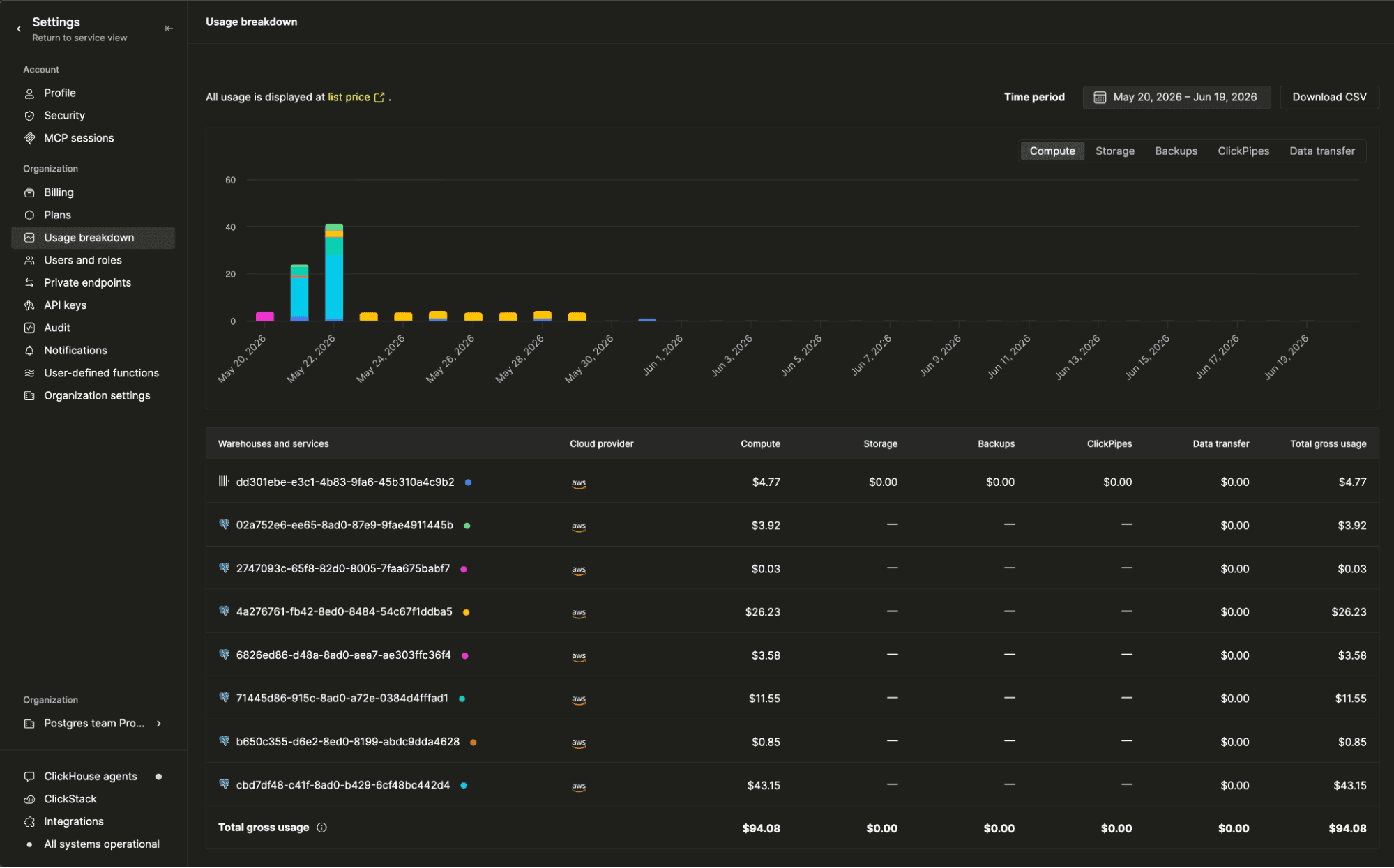
Usage also flows through the rest of the billing experience:
- Periodic billing statements. Postgres services appear as line items in your monthly statement, broken down by usage dimension, so finance teams see one consolidated bill for ClickHouse and Postgres together.
- Statement CSV downloads. The full per-service, per-day usage breakdown exports via Download CSV, ready to feed into your own cost reporting, chargeback, or FinOps tooling.
Want to estimate what a workload will cost? The pricing calculator lets you size a configuration and see the price.
Capacity reserved ahead of demand
The AI boom is consuming cloud compute at a rapid pace, and the largest instance types are getting harder to secure. Even at our scale, and even with strong relationships across the cloud providers, capacity is no longer something to take for granted at the demand levels we are seeing.
To stay ahead of that, managed Postgres now uses dynamic capacity reservations on AWS. The system allocates and resizes AWS On-Demand Capacity Reservations based on current usage, and it keeps that reserved capacity spread across availability zones. When you provision a new service, resize an existing one, or fail over to a standby, the instances you need are already held for you, including the large shapes that are hardest to get.
For you, that means reliability you do not have to plan around. Capacity is reserved ahead of demand rather than requested the moment you need it, which lowers the chance of a shortfall during a new provision, a resize, or a routine VM recycle, and it keeps failovers landing on the right instance type when it matters most.
This is rolling out across our AWS regions now.
Faster, leaner extensions
This drop also includes work on the Postgres extensions behind managed Postgres:
- pg_clickhouse, the unified query layer that lets an application span Postgres transactions and ClickHouse analytics.
- pg_re2, which brings RE2-based regular expressions to Postgres and recently reached v0.2.0. Benchmarks are in re2bench.
- pg_stat_ch, an extension that exports Postgres statistics and query activity into ClickHouse. It is what feeds the query insights and monitoring you see in the console.
The headline change this cycle was in pg_clickhouse, which moved its binary driver from clickhouse-cpp to the new header-only clickhouse-c library, its first public use (see the C integration docs). The switch removes the conflict between C++ exceptions and Postgres's own error handling, so the extension runs on much more stable code paths. It lets the extension allocate through Postgres memory contexts directly rather than straddling two memory models, and it drops heavy vendored dependencies, which cuts build times and shrinks the compiled extension from 4.9 MB to 1.4 MB on x86-64 Linux. The release also fixes UInt16 values to convert to int32 instead of int16, and it installs as a normal minor update with no reload, restart, or ALTER EXTENSION UPDATE required. pg_stat_ch made the same move to clickhouse-c, so both extensions now ride on one lean client.
Wrapping up
All of this shipped in less than a month since the beta. Access control, the redesigned console, Terraform, MCP, Stripe, migrations, billing, capacity reservations, and the extensions underneath all landed in that window. That is the summer drop for managed Postgres. Most of it comes down to one thing: meeting your Postgres where your team already lives, from per-service permissions and Terraform to MCP, Stripe, and a consolidated bill. A few pieces, Terraform and the extensions in particular, are still moving quickly, so expect more soon.
Get started
Sign up for ClickHouse Cloud to provision an NVMe-backed Postgres service, set up native CDC into ClickHouse, and query across both with pg_clickhouse. Every new account includes $300 in free credits. To learn more, visit the Postgres managed by ClickHouse page or jump into the documentation.