50.7k
50.7k
TL;DR
Replicate data from MySQL and MariaDB into ClickHouse Cloud in just a few clicks for blazing-fast analytics. Now with parallel snapshotting, improved reliability and observability, and programmatic configuration (Cloud API, Terraform).
At ClickHouse, we’re big fans of using the right tool for the right job. Soon after the release of the first native Change Data Capture (CDC) connector in ClickPipes (Postgres), we worked on bringing the same experience to customers that were outgrowing MySQL for analytical workloads: keep OLTP focused on serving mission-critical operational workloads, and offload complex analytical queries, reports, and business intelligence workloads to OLAP at ClickHouse speed.
The challenge? There is no cookie cutter approach to building a new CDC connector for an entirely different source database, so feature completeness and stabilization takes not only time, but also production mileage. After moving over 1PB of data for hundreds of production customers, we’re ready to announce that the MySQL CDC connector is now Generally Available!
“For Kit, ClickHouse has been the fastest database out there, by a big margin. What do you do if your app runs on MySQL? You could spend a year building an ETL pipeline and maintain it forever. Or, one button press in ClickPipes and you're running analytical workloads on your production data at ClickHouse speed. As a side benefit, you get audit logging and soft deletes for free.”
— Matthew Severini, Senior Software Engineer at Kit
Get started today
Sign up for ClickHouse Cloud today to try out the MySQL CDC connector for ClickPipes!
Sign upWhat’s new?
Parallel snapshotting for faster initial loads and resyncs
Snapshotting is a critical operation to guarantee data consistency in CDC pipelines, but it often means processing and ingesting hundreds of GBs from a production instance. You want it to be fast, so you get up and running and recover from failure fast, but have as little impact as possible upstream.
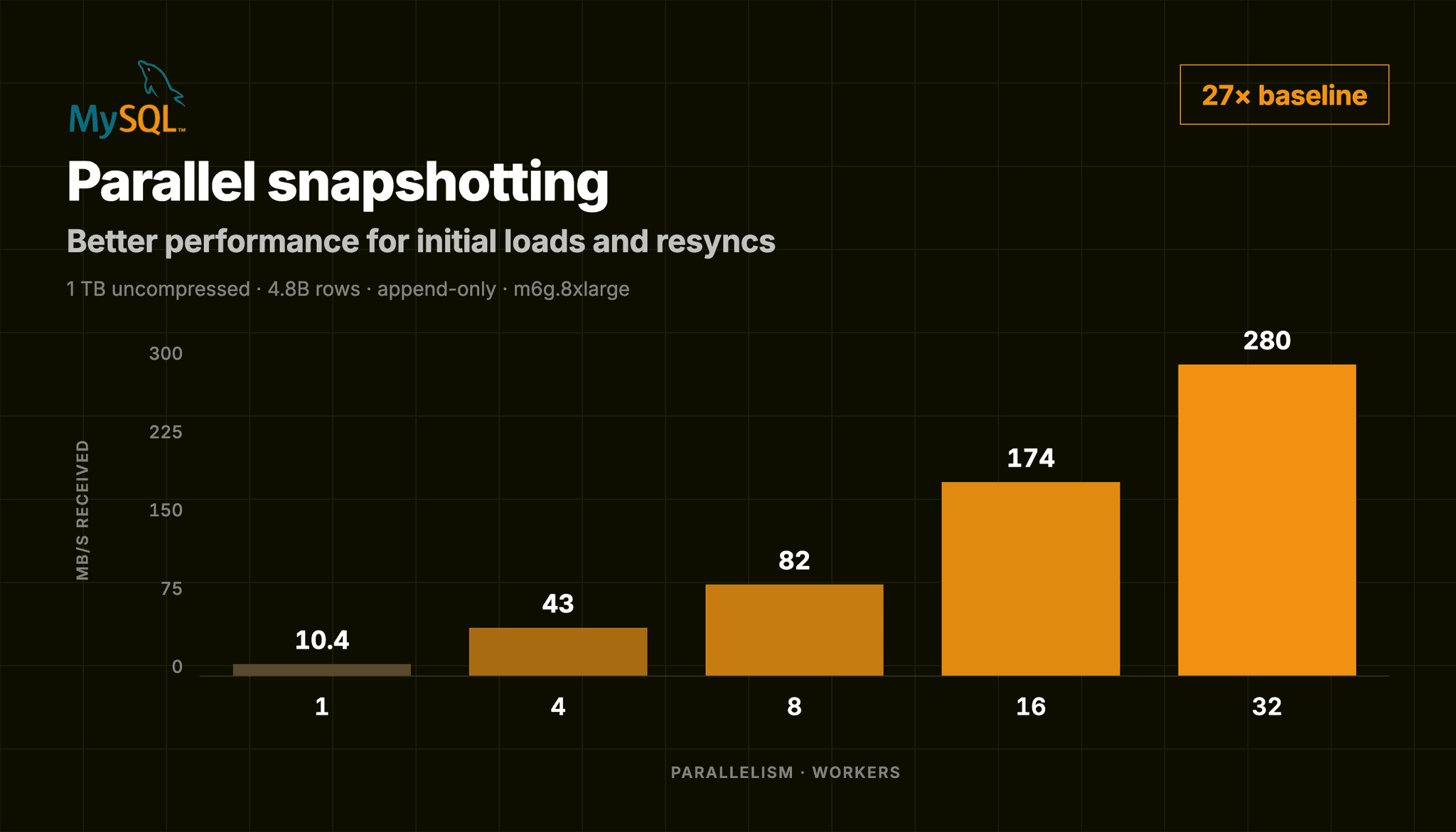
In the initial implementation, fast snapshots required you to manually pick a specific logical partition key column of a specific type (numeric or temporal) for a shot at parallel processing; all other scenarios would fall back to a slow, single-threaded scan. That’s all behind us now: ClickPipes automatically detects a suitable logical partition key from the table’s primary key (now including string and UUID types, too) and distributes the work to make your snapshots fast by default. In our benchmarks, that's the difference between a 1TB snapshot taking over a day on a single thread and finishing in about an hour distributed across 32 workers.
Safer defaults for production environments
CDC is a gentle beast, and there are many failure modes that can easily lead to scenarios where replication is not able to resume without a full resync. To reduce that risk, MySQL CDC ClickPipes now require:
-
GTID-based replication: while the original implementation of MySQL CDC ClickPipes exposed this configuration as optional, it is now the default for new ClickPipes. Why make this change? File position-based replication is a legacy mechanism in MySQL and ties resumption to a specific
(binlog file, offset)on a specific server, which breaks on failover and requires manual intervention. From MySQL v5.6.5 (and MariaDB 10.0.2), a more reliable and topology-independent mechanism based on global transaction identifiers (GTIDs) is available that allows resuming replication automatically after failover scenarios. -
(At least) 72-hour binlog retention: MySQL CDC ClickPipes can only resume replication if the binlog segment containing the last GTID it processed hasn't been purged yet. We observed many irrecoverable errors that could've been avoided if the binlog hadn't prematurely rotated during a failure scenario or an extended pause, purging the segment a pipe needed to resume from. A minimum of 72 hours gives a ClickPipe enough runway to recover from a worst-case outage or handle backpressure on the ClickHouse side before that happens, forcing a full resync.
Both requirements are validated at pipe creation, so you’ll need to ensure configuration upstream matches before creating a new ClickPipe. If you're using file position-based replication in an active MySQL CDC ClickPipe, we strongly recommend migrating it to GTID-based replication, and creating any new ClickPipes using the new GTID default. It’s important to note that configuring GTID will not impact existing pipes using the legacy mechanism; these can coexist.
Improved observability for easier troubleshooting
Although the connector has been fully integrated into the ClickHouse Cloud experience from the get-go, CDC ClickPipes was underdeveloped on the observability side: debugging a slow CDC pipe used to mean some level of guessing, or filing a support ticket to find out whether the bottleneck was upstream in MySQL, downstream in ClickHouse, or somewhere in between.
For GA, we have extended the built-in metrics and monitoring to also report on resource utilization and lag. The following metrics are now available in the ClickPipes UI and the ClickHouse Cloud Prometheus endpoint:
Resource utilization
You can now independently investigate scenarios where CDC ClickPipes might need to be scaled (e.g. during snapshotting or traffic bursts), rule out resource saturation as a root cause for replication lag, and other basic troubleshooting workflows.
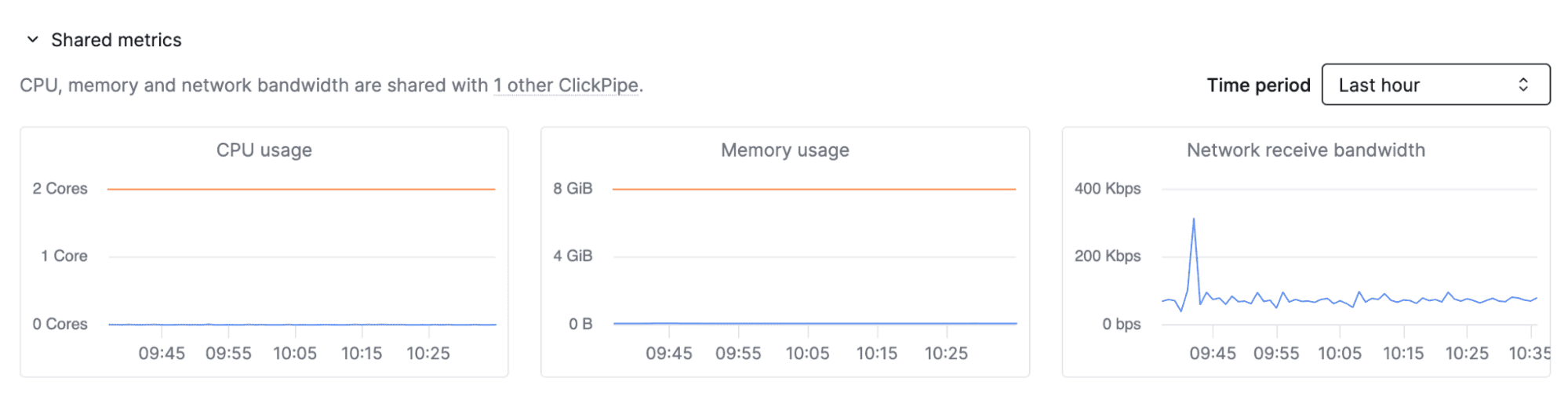
CPU usage: cores consumed against the allocation for all CDC ClickPipes in the service, or how much compute the pull and push processes are using right now.
Memory usage: memory consumed against the allocation for all CDC ClickPipes in the service, or how much RAM the pull and push processes are holding onto right now.
Network receive bandwidth: inbound throughput on the pipe, or how much data is being pulled from the source per second.
Replication lag
It's now also easier to understand the freshness of your data, and whether delays in replication are on the source side, ClickHouse side, or in between.
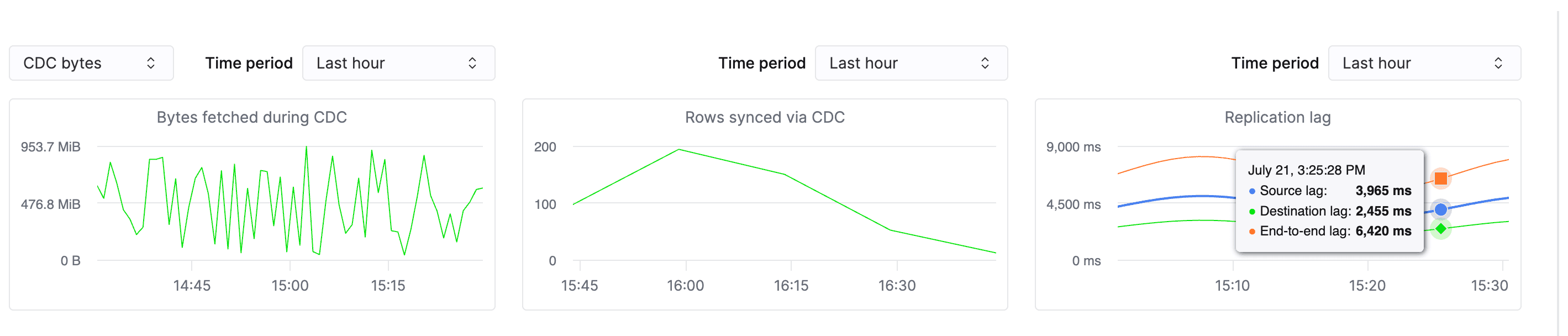
Source lag: how far behind the pull process is from MySQL's live binlog, or the time between a change happening in MySQL and ClickPipes pulling it.
Destination lag: how long it takes pulled changes to land in ClickHouse, or the time between a change being pulled and being queryable at the destination.
End-to-end lag: the sum of both metrics above, or total time from a change happening in MySQL to it showing up in ClickHouse.
Terraform and OpenAPI support
ClickOps (i.e. clicking buttons in a user interface) is useful for onboarding, but teams wrangling production deployments require standard tooling like Terraform to provision and manage resources in a safe, deterministic, and version-controlled way. Like other ClickPipes types, MySQL CDC ClickPipes can be managed using Open API and Terraform (v3.14.0+). If you’d like to bring your existing ClickPipes under source control, follow the steps in this blogpost to import these resources into your Terraform state.
Not all work that went into making the MySQL CDC connector GA-ready fits under a neat headline: from data type fidelity to smaller reliability fixes, our team put countless hours into making the connector production- and enterprise-ready. If you’re curious to go more granular, we encourage you to point your agent at the PeerDB repo for a complete overview of changes. 🤖
Pricing
As part of this transition, billing for MySQL CDC ClickPipes is now active as of September 1, 2026 and will be reflected in the next billing cycle for your ClickHouse Cloud account. The connector has a predictable pricing model based on data volume, with a fixed compute cost per service that is shared across all CDC ClickPipes of any type. The MySQL CDC connector is 5-10x more cost-effective than using third-party ETL tools, reflecting our commitment to offering ClickPipes as a seamless and affordable option to connect ClickHouse Cloud and your various data sources. For more details, see the ClickPipes billing documentation.
Getting started with the MySQL CDC connector
The MySQL CDC connector is available to new and existing ClickHouse Cloud customers, in all service tiers. To get started, navigate to the Data Sources tab in the ClickHouse Cloud console, configure the connection details for your MySQL or MariaDB database, and you’re good to go!
For step-by-step instructions, frequently asked questions, and gotchas, check out the documentation for MySQL ClickPipes.
Ready to accelerate analytics on MySQL data?
Try the MySQL CDC connector today and experience a fully managed, native integration experience with ClickHouse Cloud — the world’s fastest analytics database.
Try the MySQL CDC connector today