51k


Connect Power BI to ClickHouse directly, over Arrow Flight SQL.
ClickHouse stores data in columns. Power BI stores data in columns. Until now, getting from one to the other meant turning that data into rows and back again.
Today we're announcing the ClickHouse Arrow Flight connector for Power BI, now in public preview. It connects Power BI directly to ClickHouse over Arrow Flight SQL, the open standard the data ecosystem has been converging on, and keeps your data columnar the whole way.
In practice, that means three things: refreshes run straight from the Power BI service with nothing to deploy in between, large loads are faster, and ClickHouse does far less work to serve them.
Why a new connector?
The existing ClickHouse connector for Power BI is built on ODBC. It has served a lot of dashboards well, and it remains fully supported. But Power BI's connectivity is moving toward Arrow-native drivers, and the new connector is built for where the platform is heading. The reason comes down to the shape of the data.
ODBC was designed in the early nineties and moves data in rows. So every refresh takes columnar data out of ClickHouse, turns it into rows, ships the rows, and turns them back into columns inside Power BI. It works. It is also a bit like translating a book into another language and back so two people who speak the same language can read it.
The new connector skips the translation.
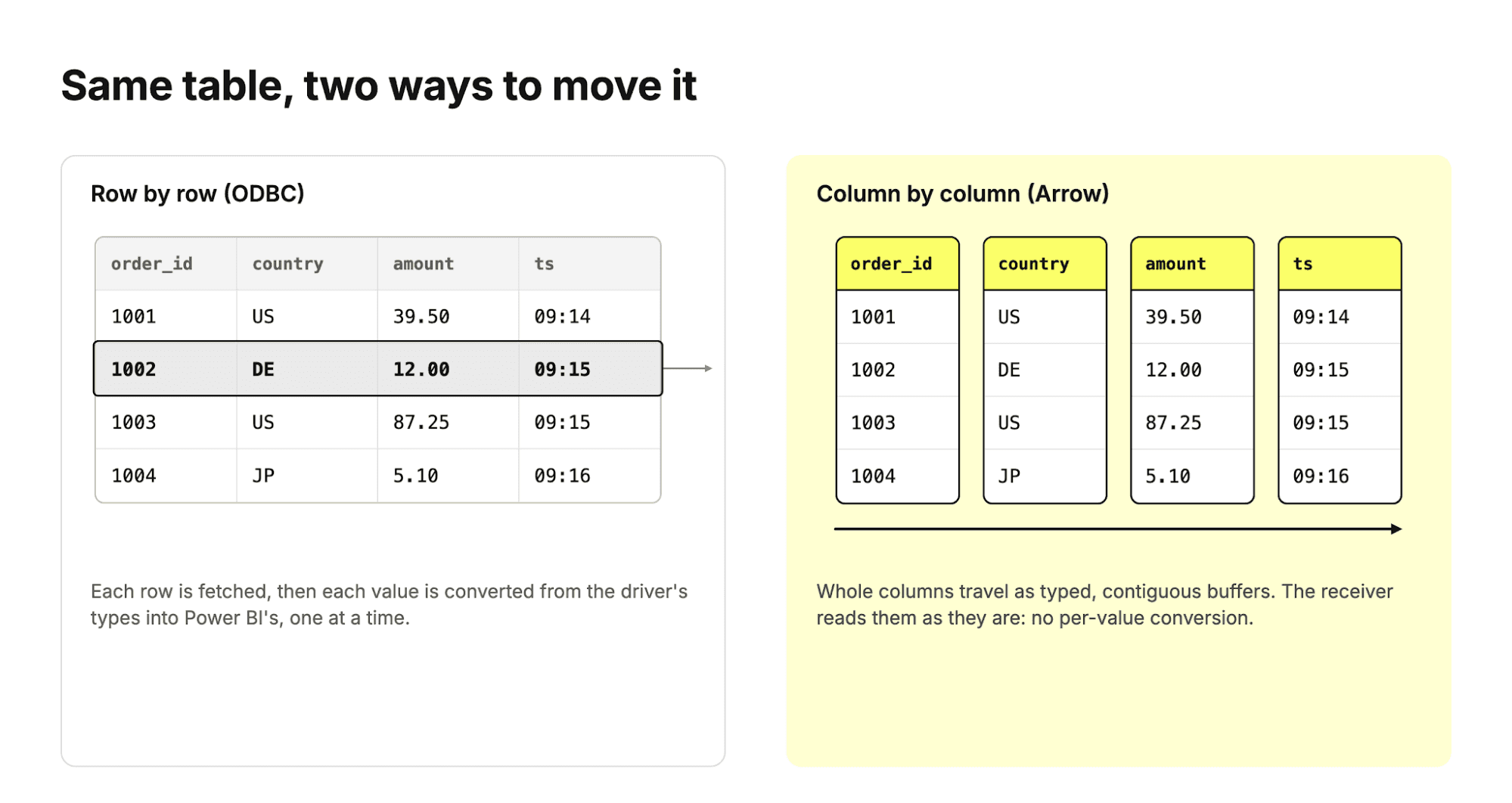
Rows versus columns: the same table moved two ways. Example data.
What is Arrow Flight SQL, anyway?
ClickHouse has had an Arrow Flight interface since 25.8, and we substantially reworked it around 26.4, but we never really introduced it. So here is the short version. It is three ideas stacked on top of each other.
- Apache Arrow is a standard way to lay out a table in memory, column by column, with typed, contiguous buffers. If two programs both speak Arrow, one can hand a table to the other without converting anything.
- Arrow Flight is a protocol for sending those Arrow tables over the network, built on gRPC. The batches go on the wire in the same layout they have in memory.
- Arrow Flight SQL adds the database part: send a SQL query, get Arrow batches back, plus the metadata calls a client needs to discover tables and types.
There is a fourth name you will see next to these: ADBC (Arrow Database Connectivity). It is the client-side API, the Arrow-native counterpart to ODBC and JDBC. An application talks ADBC, and an ADBC driver speaks Flight SQL to the server.
We have one of those too: ClickHouse maintains its own open-source ADBC driver for applications that want an Arrow-native client (it talks to ClickHouse over HTTP). The Power BI connector doesn't need it, since Power BI ships the Flight SQL driver itself, but it is there if you are building something of your own.
From ClickHouse's side, it is one more interface on one more port. A few lines of Python are enough to see it work:
import pyarrow.flight as flight
client = flight.FlightClient("grpc+tls://<host>:9090")
token = client.authenticate_basic_token("default", "<password>")
options = flight.FlightCallOptions(headers=[token])
# Send SQL, get Arrow back.
info = client.get_flight_info(
flight.FlightDescriptor.for_command("SELECT country, count() FROM orders GROUP BY country;"),
options,
)
table = client.do_get(info.endpoints[0].ticket, options).read_all()
print(table)That table is a real Arrow table. Nothing was parsed from text, and no value was converted on the way.
Why is everyone betting on Arrow?
Because the alternative is every tool inventing its own way to hand data to every other tool, and paying a conversion tax at each border.
Over the last few years the data ecosystem has quietly converged on Arrow as the shared format. Apache Spark uses it to move data between the JVM and Python. pandas can back its DataFrames with Arrow, and Polars is built on Arrow's memory model from the ground up. DataFusion is a query engine that is Arrow-native end to end, and DuckDB reads and writes Arrow without copying. On the transformation side, dbt v2 and its Fusion engine talk to warehouses through ADBC drivers.
And now the last mile is catching up: BI and visualization tools. Microsoft has been moving Power BI and Fabric connectivity onto ADBC and Flight SQL, which is what makes this connector possible.
"Our goal is to make Microsoft Fabric the easiest place to connect, integrate, and get value from data wherever it lives. The new ClickHouse connector leverages Fabric's modern data connectivity stack with ADBC and Flight SQL, bringing customers a high-performance, open-standards-based path to their ClickHouse data."
Faisal Mohamood, Corporate Vice President of Data Integration at Microsoft
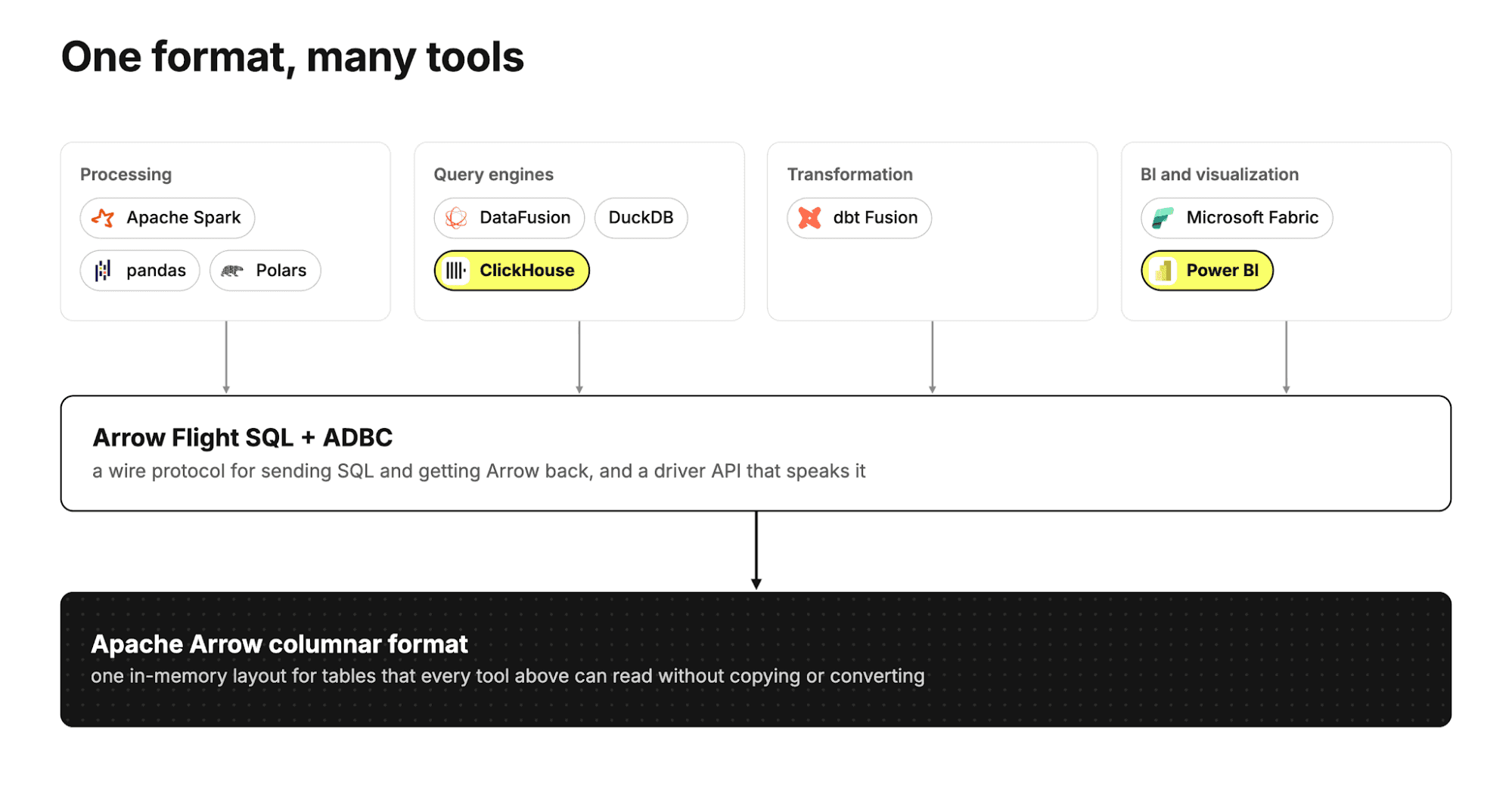
One columnar format underneath, one protocol on the wire, and a growing list of tools on top.
For a columnar database this is good news twice over. The data never has to leave its natural shape, and one well-built interface serves a whole ecosystem of clients.
How does the new connector work?
The Power BI service already ships an ADBC driver for Flight SQL. The new connector uses it to open a gRPC connection, encrypted with TLS, directly to ClickHouse's Arrow Flight interface. Queries go out as SQL. Results come back as Arrow record batches.
That's it 🙂
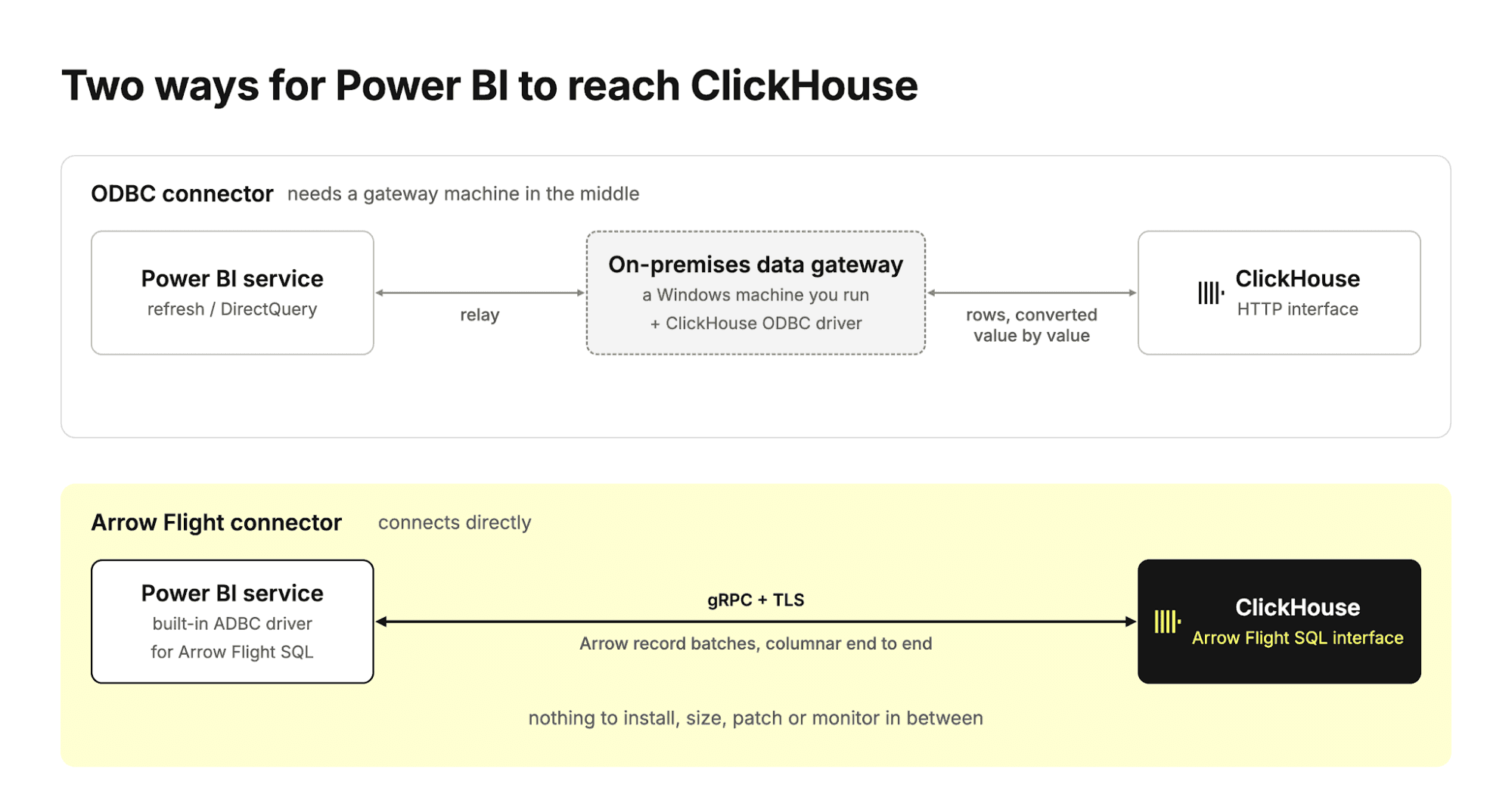
The ODBC connector needs a gateway machine between the Power BI service and ClickHouse. The Arrow Flight connector connects directly.
Because the Power BI service makes that connection itself, there is no on-premises data gateway to deploy, size or patch, and no driver to install. When you create the connection in Power BI, the "Data gateway" field simply reads (none).
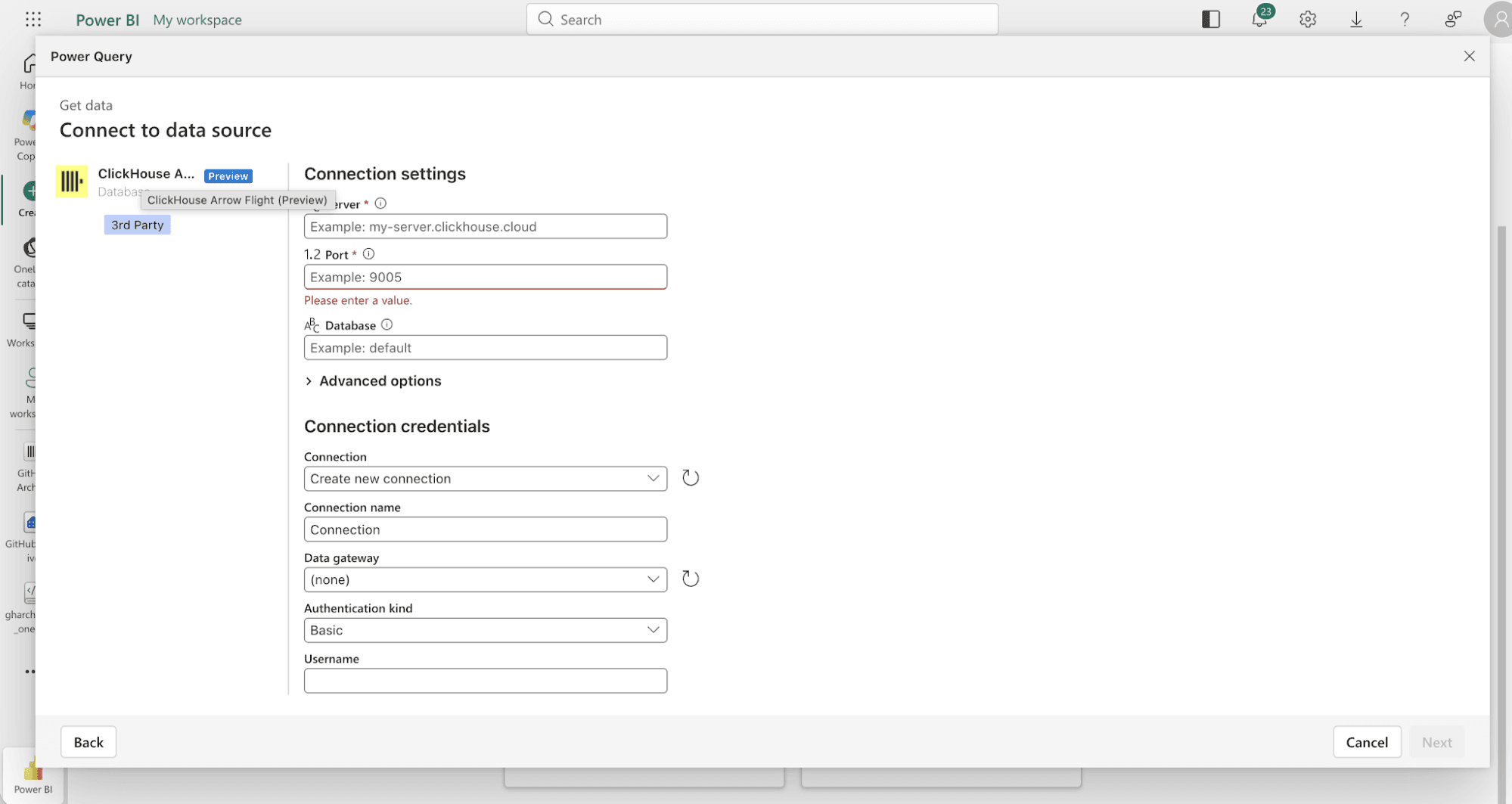
ClickHouse Arrow Flight (Preview) in Power BI, with Data gateway set to (none).
Beyond moving data, the connector does the things you would expect from a first-class Power BI source:
- Query folding. Filters, sorts, group-bys and inner joins you build in Power Query are pushed down to ClickHouse as SQL, so ClickHouse does the heavy lifting and Power BI receives only what it needs.
- Faithful types. Decimal and UInt64 values reach Power Query exactly, with no detour through floating point on the way. (Power BI's data model then applies its own number types, so pick "Fixed decimal" for columns where exactness matters.)
- Encrypted by default. Every connection is gRPC over TLS with full certificate validation. There is no plaintext mode.
- Native queries. When you want full control, Value.NativeQuery passes your SQL through as written.
Ok, but is it faster?
Yes. Here is what we measured.
We loaded the same table through both connectors in the Power BI service: 10 million rows, 20 columns, a realistic mix of integers, decimals, timestamps and strings (including a few high-cardinality ones, because real tables have those). Arrow Flight connected directly. ODBC went through a gateway VM we placed close to ClickHouse, in a neighboring cloud region, with the current ODBC driver, to give it the best conditions we could. We alternated the two, three runs each.
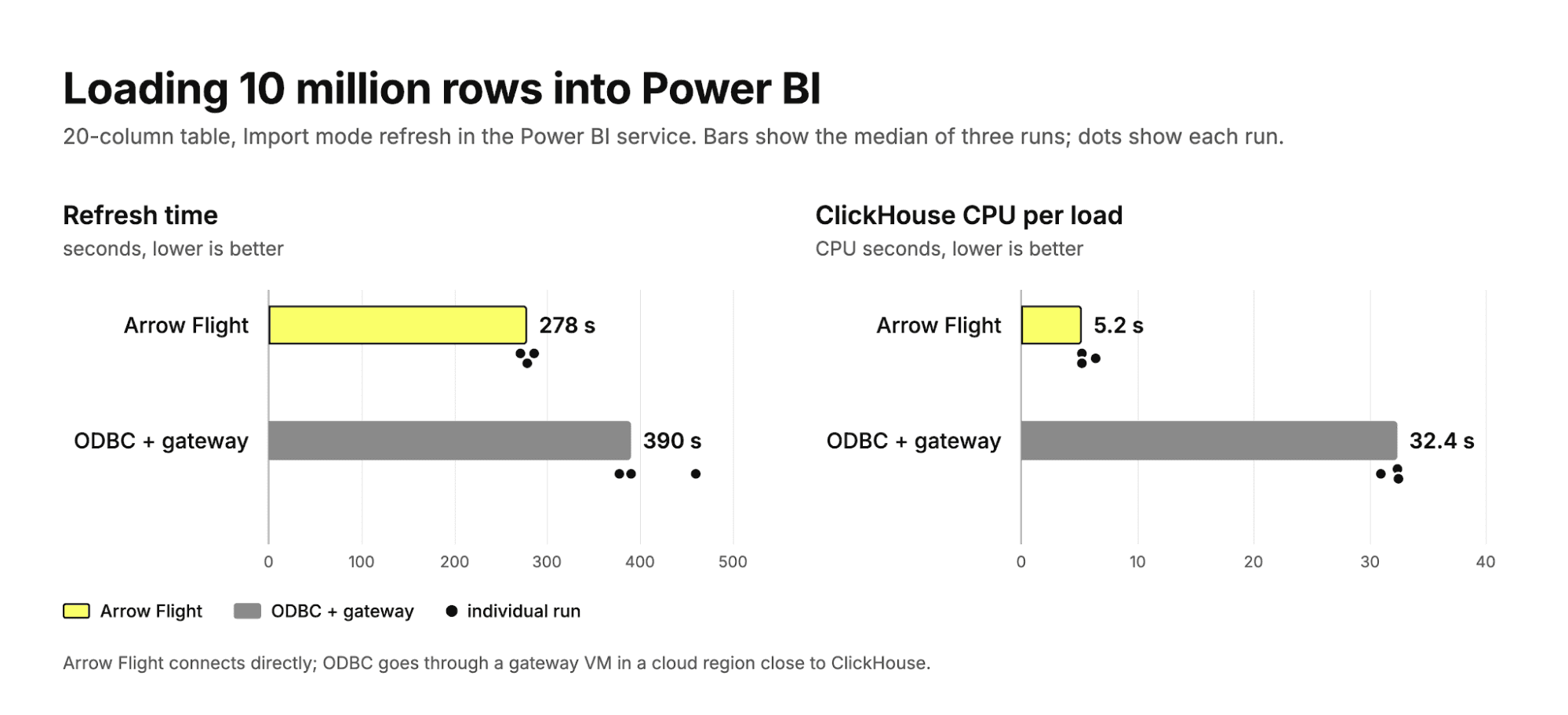
Import-mode refresh of 10 million rows in the Power BI service. Bars show the median of three runs; dots show each run.
| Arrow Flight (no gateway) | ODBC + gateway | |
|---|---|---|
| Refresh time, median | 278 s | 390 s |
| Refresh time, all runs | 271 / 278 / 286 s | 377 / 390 / 460 s |
| Time ClickHouse spent on the query | about 5 s | about 150 s |
| ClickHouse CPU per load | 5.2 s | 32.4 s |
| Machines you run in between | none | one gateway VM, busy at about 40% of 4 vCPUs for about 2.5 minutes per refresh |
🔬 Test setup. ClickHouse Cloud service in AWS us-west-2, running ClickHouse 26.11 on three 16 GiB replicas. Power BI workspace on shared capacity in Azure West US. Gateway on a 4 vCPU / 16 GB Azure VM in West US 2, with the October 2026 gateway build and ClickHouse ODBC driver 1.5.5. Both semantic models load the same table with no transformations, and the loaded data was verified identical on both paths.
So the refresh is about 1.4x faster, and ClickHouse does roughly 6x less CPU work to serve it. With ODBC, the query stays open for two and a half minutes while rows are pulled through the driver. With Arrow Flight, ClickHouse is done in about five seconds.
If ClickHouse answers in 5 seconds instead of 150, why isn't the refresh 30 times faster? Because most of a refresh happens after the data arrives. Power BI compresses those 10 million rows into its in-memory model, and that work is the same whichever connector delivered them. What Arrow Flight changes is everything before that point.
A few things to keep in mind
This is a public preview, and we'd love your feedback. Import mode is where the connector works best today, and DirectQuery support is still maturing, with improvements already on the way. For the current list of known limitations and how they are progressing, see the ClickHouse Power BI documentation, and follow the open issues in the connector's GitHub repository.
How can I try it?
On ClickHouse Cloud, open a support ticket and ask for Arrow Flight to be enabled on your service.
On self-managed ClickHouse (26.5 or later), enable the interface with a port and a certificate:
<clickhouse>
<arrowflight_port>9090</arrowflight_port>
<arrowflight>
<enable_ssl>true</enable_ssl>
<ssl_cert_file>/path/to/server.crt</ssl_cert_file>
<ssl_key_file>/path/to/server.key</ssl_key_file>
</arrowflight>
</clickhouse>Then, in the Power BI service:
- Choose Get data and search for ClickHouse Arrow Flight.
- Enter your server and the Arrow Flight port (9090 on ClickHouse Cloud), and optionally a database.
- Sign in with your ClickHouse username and password.
- Pick your tables and load.
That is the whole setup: no driver to install, and nothing to deploy in between.
The connector is open source, and we would love to hear what works and what doesn't. Issues and feedback are welcome in the connector repository.
Happy dashboarding!
Get started today
Interested in seeing how ClickHouse works on your data? Get started with ClickHouse Cloud in minutes and receive $300 in free credits.
Sign up