50.6k
50.6k
Another month goes by, which means it’s time for another release!
ClickHouse Winter Release contains 25 new features 🧤 43 performance optimizations 🛷 183 bug fixes ⛄
This release sees the text-index and QBit data type become production-ready. It’s also now possible to batch "infinite" inserts by time, and there are performance improvements for joins, JSON parsing, and inserts with min-max indices.
New contributors
A special welcome to all the new contributors in 26.2! The growth of ClickHouse's community is humbling, and we are always grateful for the contributions that have made ClickHouse so popular.
Below are the names of the new contributors:
4ertus2,Aaron Knudtson,AlyHKafoury,Andre Hora,Andrey Tarasov,Ashwath,Ben Wu,Christoph Viebig,Dan McCombs,Dmitry Kovalev,Dmitry Plotnikov,Federico Ginosa,Gerald Latkovic,Hasyimi Bahrudin,Ivan Gorin,Kien Nguyen Tuan,Mostafa Mohamed Salah,MyeongjunKim,Padraic Slattery,Rahul,Raquel Barbadillo,Visakh Unnikrishnan,daun-gatal,dimbo4ka,dk-github,jayvenn21,murphy-4o,phulv94,sunyeongchoi,vanchaklar,Álvaro Niño
Hint: if you’re curious how we generate this list… here.
You can also view the slides from the presentation.
Batching of "infinite" inserts by time
Contributed by Mostafa Mohamed Salah
One of my favorite real-time datasets is the Wikimedia recent changes feed, which streams changes across various Wikimedia properties.
You can see how it works by navigating to https://stream.wikimedia.org/v2/stream/recentchange. An example of an event is shown below:
event: message
id: [{"topic":"eqiad.mediawiki.recentchange","partition":0,"offset":-1},{"topic":"codfw.mediawiki.recentchange","partition":0,"timestamp":1772536525049}]
data: {"$schema":"/mediawiki/recentchange/1.0.0","meta":{"uri":"https://commons.wikimedia.org/wiki/Category:Taken_with_Nikon_D3100","request_id":"55711a7f-6053-4592-97c4-45d54e6319f7","id":"9106b913-64f9-4dff-a325-ac43492cc81d","domain":"commons.wikimedia.org","stream":"mediawiki.recentchange","dt":"2026-03-03T11:15:25.048Z","topic":"codfw.mediawiki.recentchange","partition":0,"offset":2029032842},"id":3219900521,"type":"categorize","namespace":14,"title":"Category:Taken with Nikon D3100","title_url":"https://commons.wikimedia.org/wiki/Category:Taken_with_Nikon_D3100","comment":"[[:File:Ferrari 550 Maranello - Flickr - Alexandre Prévot (3).jpg]] added to category","timestamp":1772536523,"user":"Rkieferbot","bot":true,"notify_url":"https://commons.wikimedia.org/w/index.php?diff=1175166536&oldid=1019467923&rcid=3219900521","server_url":"https://commons.wikimedia.org","server_name":"commons.wikimedia.org","server_script_path":"/w","wiki":"commonswiki","parsedcomment":"File:Ferrari 550 Maranello - Flickr - Alexandre Prévot (3).jpg added to category"}Each event has three properties;
event- The event type, which is almost alwaysmessage.id- An identifier for the event.data- A JSON object representing the change itself.
We can use cURL at the terminal to stream just the data part of each event:
curl -sS --globoff \
-H 'Accept: application/json' \
--no-buffer \
"https://stream.wikimedia.org/v2/stream/recentchange"To load this data into ClickHouse, we need to first create a table. We could break the data down into individual columns, but this is a good opportunity to use the JSON data type:
CREATE table wiki (
json JSON
);We can then update our cURL command to stream the data in:
curl -sS --globoff \
-H 'Accept: application/json' \
--no-buffer \
"https://stream.wikimedia.org/v2/stream/recentchange" |
./clickhouse client --query="INSERT INTO wiki FORMAT JSONAsObject"If we open another tab and connect to our ClickHouse Server, we’ll see that no data has been ingested. This is because the default values for min_insert_block_size_rows and min_insert_block_size_bytes are 1,000,000 and 268 MB, respectively. The Wikimedia changes dataset only produces 10 rows per second, so we’ll be waiting for quite some time!
We can set these parameters to low values to work around this problem, as we saw how to do in the following video:
This works, but we don’t know how often the data will be flushed to the table. ClickHouse 26.2 introduces a new setting, input_format_max_block_wait_ms, that lets you define the block flush interval in terms of time rather than size. This setting only works when used with input_format_connection_handling, which ensures that if the connection closes unexpectedly, any remaining data in the buffer will be parsed and processed instead of being treated as an error
We can therefore update our ingestion code to read like this if we want to ingest data every 3 seconds:
curl -sS --globoff \
-H 'Accept: application/json' \
--no-buffer \
"https://stream.wikimedia.org/v2/stream/recentchange" |
./clickhouse client --query="INSERT INTO wiki FORMAT JSONAsObject" --min_insert_block_size_rows=0 \
--min_insert_block_size_bytes=0 \
--input_format_max_block_wait_ms 3000 \
--input_format_connection_handling 1On another tab, we can check how many records have been ingested, sleeping for one second after each execution of the query:
while true; do
./clickhouse client "SELECT now(), count() FROM wiki FORMAT TabSeparated"
sleep 1
doneWe’ll see the following output, where the count updates more or less every third row:
2026-03-03 11:47:11 13898
2026-03-03 11:47:12 13898
2026-03-03 11:47:13 14008
2026-03-03 11:47:14 14008
2026-03-03 11:47:15 14008
2026-03-03 11:47:17 14128
2026-03-03 11:47:18 14128
2026-03-03 11:47:19 14128
2026-03-03 11:47:20 14213The animation below illustrates how the input_format_max_block_wait_ms setting works. This setting defines a time-based flush interval for the in-memory blocks the server builds while processing incoming data. When the timeout expires, the current block is written to a new data part, allowing the inserted rows to become visible for queries
Embedded ClickStack
ClickStack is our observability platform that unifies logs, traces, metrics, and sessions into a single high-performance solution. It comprises ClickHouse, OpenTelemetry, and the ClickStack UI (previously known as HyperDX).
Before ClickHouse 26.2, if you wanted to use ClickStack, you had two options: spin up Docker containers or use Managed ClickStack.
As of ClickHouse 26.2, we are introducing a new distribution method: ClickStack UI embedded in ClickHouse. The ClickStack UI is now distributed and embedded directly in the ClickHouse binary, making it easier than ever to explore observability data with ClickHouse. Simply navigate to https://localhost:8123, select “ClickStack”, and start exploring.
You can read more in Introducing ClickStack embedded in ClickHouse.
Production-ready: Text index and QBit data type
The text index has been in development since 2022, reaching experimental status in ClickHouse 25.9 and going into beta in ClickHouse 25.12. As of ClickHouse 26.2, the text index is production-ready, so give it a try and let us know how you get on.
Joining the text-index in production-ready status is the QBit data type for vector embeddings, which enables runtime tuning of search precision. Introduced in ClickHouse 25.10 and promoted to beta in 26.1, QBit is now fully production-ready as of 26.2.
Table function primes
Contributed by Nihal Miaji
The ClickHouse 26.2 release also introduces a new system.primes table. As the name suggests, this table returns prime numbers.
The following query returns the first ten prime numbers, the sum of those prime numbers, and the tenth prime number:
SELECT groupArray(prime), max(prime), sum(prime)
FROM primes(10);Row 1:
──────
groupArray(prime): [2,3,5,7,11,13,17,19,23,29]
max(prime): 29
sum(prime): 129This function is super fast. The following query calculates the min, max, and sum of the first 1 billion prime numbers:
SELECT min(prime), max(prime), sum(prime)
FROM primes(1000000000);┌─min(prime)─┬──max(prime)─┬───────────sum(prime)─┐
│ 2 │ 22801763489 │ 11138479445180240497 │
└────────────┴─────────────┴──────────────────────┘
1 row in set. Elapsed: 36.444 sec. Processed 1.00 billion rows, 8.00 GB (27.44 million rows/s., 219.51 MB/s.)
Peak memory usage: 348.15 KiB.And it took just over 36 seconds! 🤯
It's been a couple of days since Pi Day, but did you know that Euler's solution to the Basel problem connects prime numbers to π? Euler proved that ∑ 1/n² = π²/6, which can also be expressed as an infinite product over all primes. We can approximate this with ClickHouse's primes table function:
SELECT sqrt(6 * exp(sum(log(pow(prime, 2) / (pow(prime, 2) - 1)))))
FROM primes(10000000)┌─sqrt(multipl⋯), 1)))))))─┐
│ 3.141592653079655 │
└──────────────────────────┘
1 row in set. Elapsed: 0.415 sec. Processed 10.00 million rows, 80.00 MB (24.10 million rows/s., 192.78 MB/s.)
Peak memory usage: 141.38 KiB.Faster RIGHT and FULL JOIN
Contributed by Yarik Briukhovetskyi
This release improves the performance of RIGHT OUTER and FULL OUTER JOINs, two of the many join types supported by ClickHouse.
As a reminder, when a left table and a right table are joined:
SELECT...
FROM left_table JOIN right_table ON ...a RIGHT OUTER JOIN also returns rows from the right_table that have no match on the left side, filling the left-table columns with default values.
A FULL OUTER JOIN returns unmatched rows from both tables, filling the missing columns with default values on the respective side.
These join types require additional work compared to inner or left joins, so to understand the optimization in this release, we first need to look at how ClickHouse executes joins internally.
Join pipeline in ClickHouse
ClickHouse executes joins using a parallel hash-join algorithm by default, whose physical query plan (“query pipeline”) is sketched below.
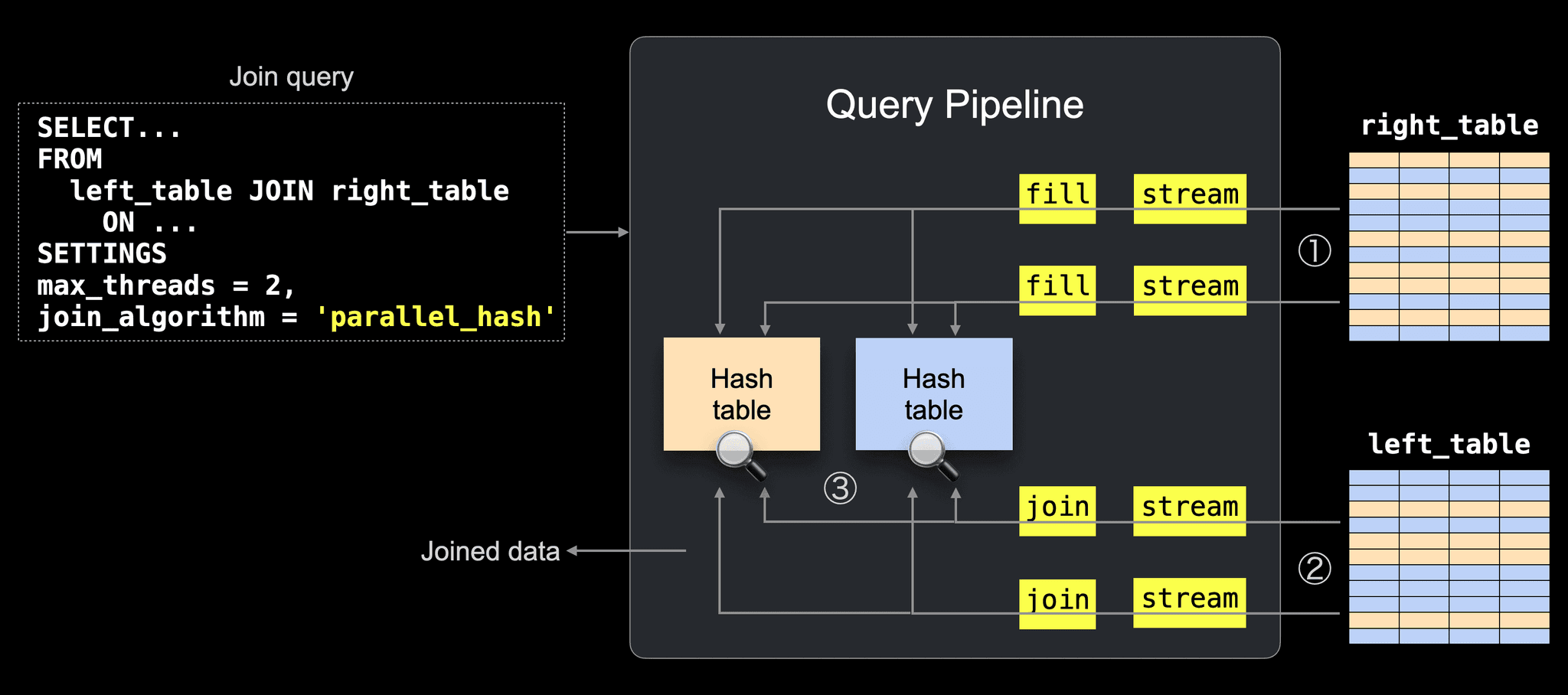
① The right table is partitioned into N buckets, which are processed by N threads in parallel (N = max_threads, by default the number of CPU cores, 2 in the example), with one in-memory hash table built per bucket.
② The left table is partitioned the same way and processed in parallel, so matching rows reach the corresponding hash table.
③ Rows are joined by probing the matching hash table, producing the final result.
With this execution model in mind, the behavior of different OUTER JOIN types becomes easier to understand.
Why LEFT OUTER JOIN is cheap
In a LEFT OUTER JOIN, unmatched rows are naturally available in the pipeline.
All rows from the left table are streamed (②) and probed against the hash tables (③).
If no match is found, the row can immediately be emitted with default values for the right table columns.
Why RIGHT / FULL OUTER JOIN is harder
For RIGHT OUTER JOIN and FULL OUTER JOIN, the situation is different.
These joins must also return rows from the right table that never matched any left-side row.
But the right table is consumed earlier when building the hash tables (①), so those rows are no longer visible in the main pipeline flow.
To produce the final result, ClickHouse must iterate over the right table data and generate the rows that were never matched.
Parallel generation of unmatched rows (26.2)
Previously, this post-processing step ran in a single thread.
Since 26.2, unmatched rows from the right table are generated in parallel, with one thread per right table bucket.
This is controlled by a new parallel_non_joined_rows_processing setting (enabled by default).
Performance improvement
To illustrate the impact, we use the anonymized web analytics dataset that we loaded on an AWS m6i.8xlarge instance (32 cores, 128 GB RAM) backed by a gp3 EBS volume.
The query below performs a FULL OUTER self-join counting user navigation steps, including page-to-page transitions as well as entry and exit visits.
SELECT count()
FROM hits AS t1
FULL JOIN hits AS t2
ON t1.URL = t2.Referer
AND t1.UserID = t2.UserID
AND t1.URL != ''
AND t2.Referer != '';First, we run the same query three times with parallel_non_joined_rows_processing = 0, reproducing the behavior of previous releases.
Below are the execution statistics printed by clickhouse-client:
1 row in set. Elapsed: 35.367 sec. Processed 199.99 million rows, 17.91 GB (5.65 million rows/s., 506.30 MB/s.)
Peak memory usage: 19.53 GiB.
1 row in set. Elapsed: 35.128 sec. Processed 199.99 million rows, 17.91 GB (5.69 million rows/s., 509.74 MB/s.)
Peak memory usage: 19.53 GiB.
1 row in set. Elapsed: 35.538 sec. Processed 199.99 million rows, 17.91 GB (5.63 million rows/s., 503.86 MB/s.)
Peak memory usage: 19.53 GiB.Next, we run the same query three times with parallel_non_joined_rows_processing = 1 (the default setting):
1 row in set. Elapsed: 11.226 sec. Processed 299.98 million rows, 18.11 GB (26.72 million rows/s., 1.61 GB/s.)
Peak memory usage: 19.66 GiB.
1 row in set. Elapsed: 11.133 sec. Processed 299.98 million rows, 18.11 GB (26.94 million rows/s., 1.63 GB/s.)
Peak memory usage: 19.64 GiB.
1 row in set. Elapsed: 11.210 sec. Processed 299.98 million rows, 18.11 GB (26.76 million rows/s., 1.62 GB/s.)
Peak memory usage: 19.67 GiB.This is a 3.2× speedup, reducing runtime from ~35s to ~11s.
More performance improvements
Contributed by Pavel Kruglov and Raúl Marín
OUTER JOINs are not the only thing that got faster.
This release also includes optimizations for JSON parsing, uniq calculations, and minmax index creation.
Faster JSON parsing
Parsing for the JSON data type has been optimized.
Each bar in the PR’s test screenshot compares old vs. new performance, showing roughly 1.2×–2.8× speedups.

Faster uniq calculation
For queries without GROUP BY, uniq over numeric types now batches inserts when possible, reducing CPU overhead and improving performance.
The PR’s performance tests show consistent improvements, with speedups of roughly ~1.15×.

Faster INSERT with minmax indexes
Minmax index computation during INSERT is now more efficient, removing an unnecessary data copy and using vectorized min/max values calculation for numeric columns. This reduces insert latency when many indexed columns are present.
The PR’s performance tests show roughly ~1.2× faster inserts into tables with minmax indexes.

Speaking of minmax indexes, this release also makes them easier to use.
Automatic enabling of minmax indices
Contributed by Michael Jarrett
This release introduces a simpler way to enable minmax indexes at the table level automatically for temporal columns.
Minmax indexes are one of the key mechanisms ClickHouse uses to prune data early for queries that filter on indexed columns, alongside the sparse primary index and lightweight projections.
Before looking at the syntax, let’s briefly recap how pruning works in ClickHouse and where minmax indexes fit.
A quick reminder: pruning in ClickHouse
The fastest analytical queries are the ones that read the least data.
Analytical workloads typically filter contiguous ranges of rows and then aggregate the results, so performance depends on skipping as much data as possible.
ClickHouse achieves this by storing data sorted by the primary key, C1 in the chart below, and organizing rows into granules (g1–g4), the smallest processing units in ClickHouse, each covering 8,192 rows by default (shown with only 3 rows per granule in the chart for clarity).
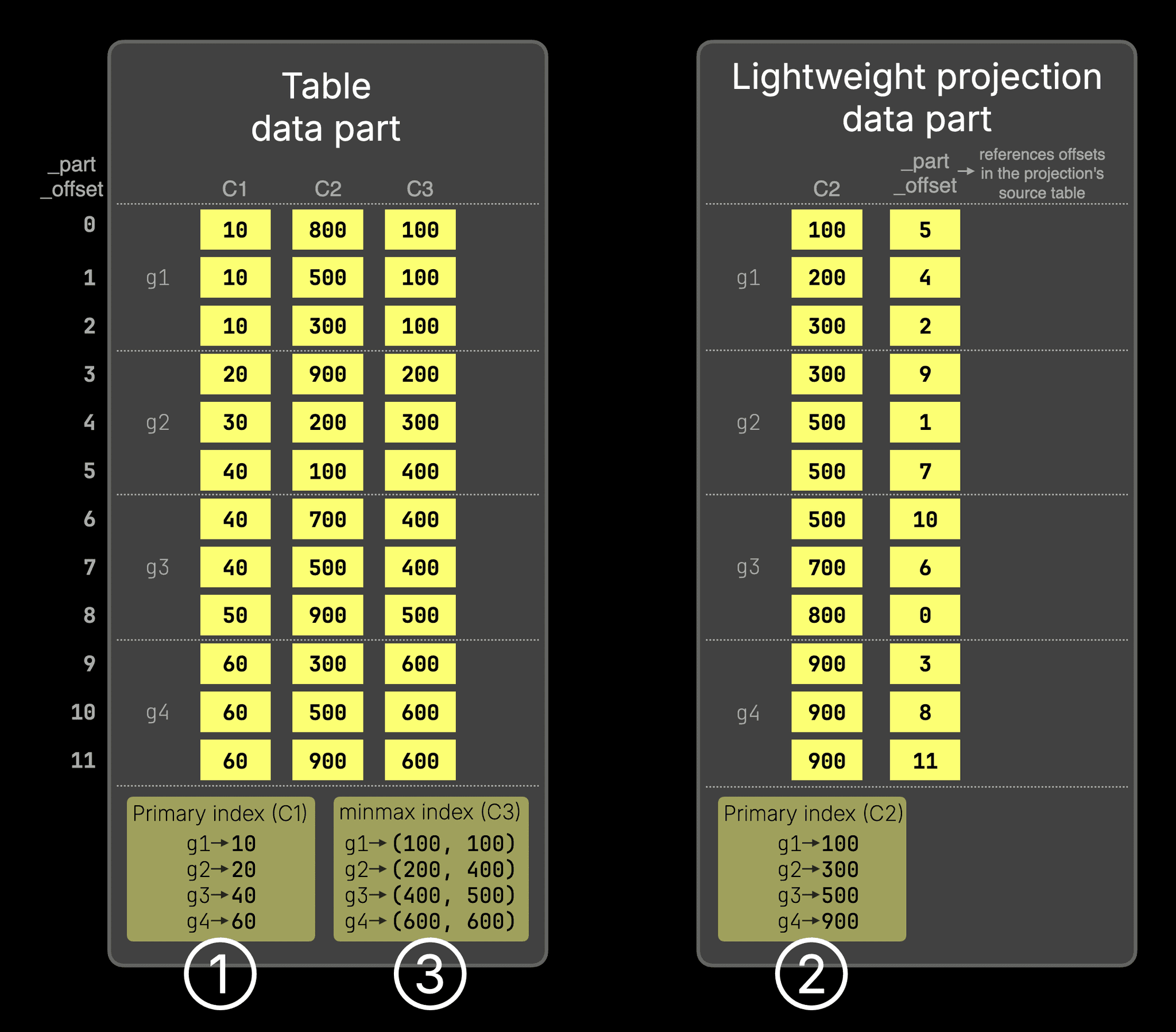
Based on this granule organization, ClickHouse can apply different pruning techniques to skip entire granules for queries that filter on indexed columns:
① Primary index
The primary index (①) stores the first primary key column value from each granule and allows entire granules to be skipped before reading them, based on the filter condition on the primary key.
For example, for WHERE C1 > 60, granules g1 and g2 are pruned using the index, so only the remaining data is read.
② Lightweight projections
For filters on a column that is not part of the primary key, such as WHERE C2 > 900, ClickHouse can use a lightweight projection, which stores the sorted projection key (C2) values plus _part_offset values and provides its own primary index (②) that allows granules to be pruned for filters on the projection key.
③ Minmax indexes
However, even lightweight projections still duplicate the projection key column values on disk.
If the filtered column, for example, C3, is correlated with the primary-key order, ClickHouse can prune granules using a minmax index instead of a projection.
In the chart above, the minmax index (③) records the minimum and maximum values of C3 for each granule.
For a filter like WHERE C3 > 600, granules g1–g3 can be skipped because their maximum value is below 600, so only g4 needs to be read.
The same minmax metadata can also accelerate Top-N queries like
SELECT * FROM T ORDER BY C3 DESC LIMIT 3, allowing ClickHouse to skip granules that cannot influence the result.
Automatically enabling minmax indexes
Because minmax indexes are so useful, ClickHouse provides a simple way to enable them automatically for entire classes of columns, without defining them manually per column.
Version 25.1 introduced MergeTree table settings
• add_minmax_index_for_numeric_columns
• add_minmax_index_for_string_columns
Version 26.2 extends this to temporal columns (Date / DateTime / Time types) with the setting
• add_minmax_index_for_temporal_columns
As an example:
CREATE TABLE pageviews (
event_time DateTime,
...
)
SETTINGS add_minmax_index_for_temporal_columns = 1;Since event_time is a temporal column, ClickHouse automatically creates a minmax index for it when this setting is enabled, without requiring an explicit index definition.
This approach has several advantages:
- No need to think about which columns should have a minmax index
- No need to define indexes manually per column
- Minmax indexes are compact and only loaded when a query filters on the corresponding column, so they add little overhead but can significantly speed up queries when needed
Time-Based One-Time Passwords
Contributed by Denis Kamenskii, Vladimir Cherkasov
You can now do secure interactive authentication in clickhouse-client, with Google Authenticator, 1Password, Okta, and similar.
You'll first need to generate a TOTP-compatible secret:
base32 -w32 < /dev/urandom | head -15RN2JMUDXJARFMPUYKXGH3N35DPGRCSUThen you can use that to generate a QR code that you can scan with your authenticator app:
qrencode -t ansiutf8 'otpauth://totp/ClickHouse?issuer=ClickHouse&secret=5RN2JMUDXJARFMPUYKXGH3N35DPGRCSU'This will generate a QR code that you can scan with your authenticator app.
Next, we'll configure the user in ClickHouse:
config.d/users.yaml
users:
totp_user:
password_sha256_hex: 1464acd6765f91fccd3f5bf4f14ebb7ca69f53af91b0a5790c2bba9d8819417b
time_based_one_time_password:
secret: 5RN2JMUDXJARFMPUYKXGH3N35DPGRCSU
period: 30
digits: 6
algorithm: SHA1
networks:
ip: '::/0'
profile: default
quota: defaultAnd then we can connect to ClickHouse using the user we just created:
./clickhouse client --user totp_userYou'll be prompted to enter your password, followed by the TOTP code from your authenticator app.