 50.5k
50.5k
Real-time analytics is the practice of ingesting, processing and querying data within milliseconds to seconds of an event occurring — so teams can act on what's happening now, not what happened yesterday. Unlike batch analytics, where data is collected over hours or days and processed after the fact, real-time data analytics makes every event queryable the moment it arrives.
Real-time analytics systems are built on top of event streams, which consist of a series of events ordered in time. An event is something that’s already happened. It could be the addition of an item to the shopping cart on an e-commerce website, the emission of a reading from an Internet of Things (IoT) sensor, or a shot on goal in a football (soccer) match.
An example of an event (from an imaginary IoT sensor) is the following:
{
"deviceId": "sensor-001",
"timestamp": "2023-10-05T14:30:00Z",
"eventType": "temperatureAlert",
"data": {
"temperature": 28.5,
"unit": "Celsius",
"thresholdExceeded": true
}
}Organizations can discover insights about their customers by aggregating and analyzing events like this. This has traditionally been done using batch analytics, and in the next section, we’ll compare batch and real-time analytics.
Key Takeaways
- Definition: Real-time analytics processes data and delivers insights milliseconds after an event occurs, enabling immediate action.
- Real-time vs. batch: Unlike batch processing, which analyzes data in groups with high latency (hours/days), real-time analytics is continuous and event-driven.
- Core use cases: Crucial for fraud detection, dynamic pricing, observability, personalization, and any scenario requiring instant decision-making.
- Required technology: Relies on high-ingestion, low-latency analytical databases (like ClickHouse) that can handle high concurrency.
Real-time analytics: definition and meaning
Real-time analytics — sometimes written "real time analytics" or "real-time analysis" — refers to the ability to collect, process and query data the instant it is generated, so that the resulting insights reflect what is happening right now rather than what happened in the last batch window.
In practice, "real-time" in this context typically means end-to-end latencies measured in milliseconds to low seconds: an event is produced, ingested into an analytical store, and made available for querying within that window. This distinguishes real-time data analysis from near-real-time (seconds to minutes) and batch (minutes to hours) approaches.
The term covers a spectrum of patterns:
- Streaming analytics — continuous queries over unbounded event streams (e.g. anomaly detection on sensor data)
- On-demand analytics — ad-hoc queries against fresh data that was ingested moments ago (e.g. a dashboard filtering the last 5 minutes of clicks)
- Operational analytics — embedding analytical queries directly into production applications so end-users see live metrics (e.g. a logistics app showing real-time delivery ETAs)
How real-time analytics works
A real-time analytics pipeline moves data through four stages, each measured in milliseconds to seconds:
-
Event generation — applications, sensors, or user interactions produce events. Each event is a timestamped record: a click, a transaction, a log line.
-
Streaming ingestion — events flow into a message broker such as Apache Kafka or Redpanda, which buffers and orders them. The broker decouples producers from consumers, allowing independent scaling.
-
Real-time analytics processing — a real-time analytical database (like ClickHouse) subscribes to the stream and ingests events continuously. Unlike batch ETL, there is no "wait for the window to close" step — data is written and indexed on arrival. Materialized views can transform or aggregate data at insert time, further reducing query latency.
-
Query and action — users or applications issue SQL queries against data that is seconds old. Results power dashboards, alerts, recommendation engines, or automated responses. Because the data is fresh and the queries are fast, organisations can react to what is happening rather than reviewing what already happened.
The critical difference from batch analytics is the absence of a scheduled processing step. Data flows continuously, and insights are always current.
What is the difference between real-time analytics and batch analytics?
When comparing real-time analytics with batch analytics, the key difference is latency i.e. how long it takes from when an event happens until you gain insight from it.
Batch analytics
The diagram below shows what a typical batch analytics system looks like from the perspective of an individual event:
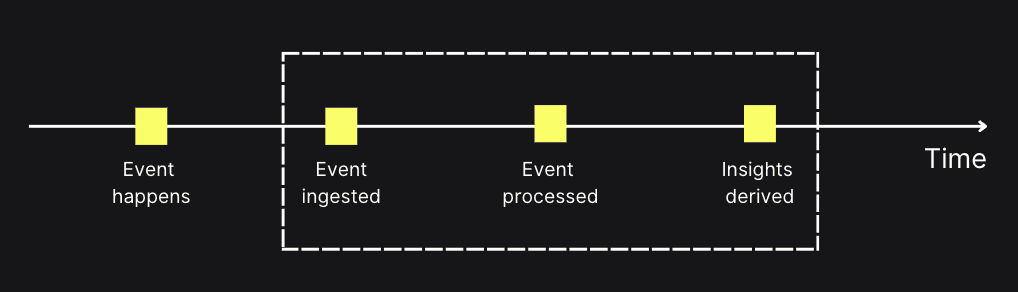
In batch systems, data is collected over a period of time and then processed together. That means there’s a significant gap between when an event occurs and when you can act on it. Traditionally, this was the only way to analyze data: for example, aggregating all events at the end of each day. This approach works well for use cases like daily reporting or long-term trend analysis, but it produces stale insights and prevents fast reactions.
Real-time analytics
By contrast, real-time analytics processes each event as soon as it happens:
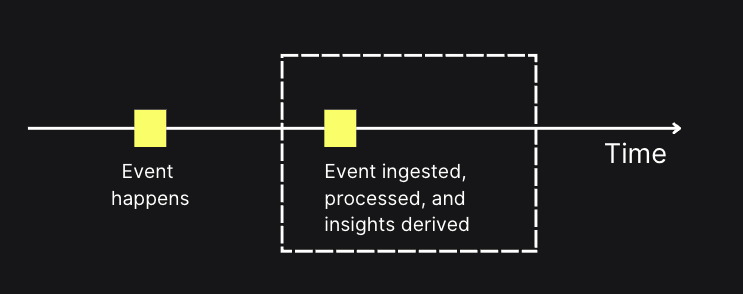
With real-time analytics, insights are available almost instantly, enabling organizations to respond to changes, anomalies, or opportunities as they occur. This is critical in domains like fraud detection, personalization, observability, and operational monitoring, where delays can mean missed opportunities or increased risk.
While the diagrams show the flow, the table below summarizes the practical differences between real-time and batch analytics across a few key dimensions:
| Dimension | Real-time analytics | Batch analytics |
|---|---|---|
| Latency | Seconds / milliseconds | Minutes to hours |
| Processing model | Continuous, event-driven | Periodic, bulk processing |
| Data freshness | Up-to-the-moment | Delayed until batch completes |
| Best suited for | Fraud detection, personalization, monitoring, anomaly detection | Reporting, historical analysis, trend tracking |
Benefits of real-time analytics
In today's fast-paced world, organizations rely on real-time analytics to stay agile and responsive to ever-changing conditions. A real-time analytics system can benefit a business in many ways.
Better decision-making
Decision-making can be improved by having access to actionable insights via real-time analytics. When business operators can see events as they’re happening, it makes it much easier to make timely interventions.
For example, if we make changes to an application and want to know whether it’s having a detrimental effect on the user experience, we want to know this as quickly as possible so that we can revert the changes if necessary. With a less real-time approach, we might have to wait until the next day to do this analysis, by which type we’ll have a lot of unhappy users.
New products and revenue streams
Real-time analytics can help businesses generate new revenue streams. Organizations can develop new data-centered products and services that give users access to analytical querying capabilities. These products are often compelling enough for users to pay for access.
In addition, existing applications can be made stickier, increasing user engagement and retention. This will result in more application use, creating more revenue for the organization.
Improved customer experience
With real-time analytics, businesses can gain instant insights into customer behavior, preferences, and needs. This lets businesses offer timely assistance, personalize interactions, and create more engaging experiences that keep customers returning.
Real-time analytics use cases
The actual value of real-time analytics becomes evident when we consider its practical applications. Let’s examine some of them.
Fraud detection
Fraud detection is about detecting fraudulent patterns, ranging from fake accounts to payment fraud. We want to detect this fraud as quickly as possible, flagging suspicious activities, blocking transactions, and disabling accounts when necessary.
This use case stretches across industries: healthcare, digital banking, financial services, retail, and more.
Instacart is North America's leading online grocery company, with millions of active customers and shoppers. It uses ClickHouse as part of Yoda, its fraud detection platform. In addition to the general types of fraud described above, it also tries to detect collusion between customers and shoppers.
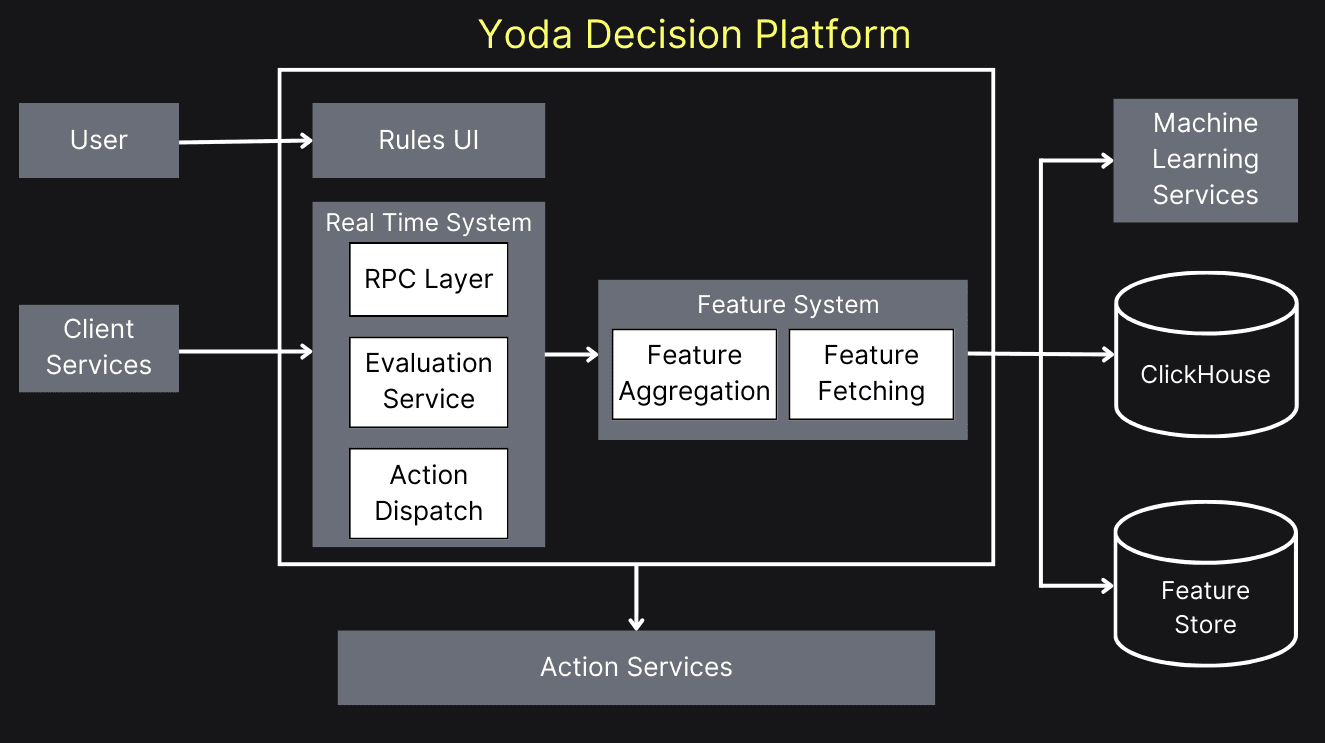
They identified the following characteristics of ClickHouse that enable real-time fraud detection:
ClickHouse supports LSM-tree based MergeTree family engines. These are optimized for writing which is suitable for ingesting large amounts of data in real-time.
ClickHouse is designed and optimized explicitly for analytical queries. This fits perfectly with the needs of applications where data is continuously analyzed for patterns that might indicate fraud.
➡️ Learn more about how Instacart use ClickHouse for the fraud detection use case in the video recording and blog post.
Time-sensitive decision making
Time-sensitive decision-making refers to situations where users or organizations need to make informed choices quickly based on the most current information available. Real-time analytics empowers users to make informed choices in dynamic environments, whether they're traders reacting to market fluctuations, consumers making purchasing decisions, or professionals adapting to real-time operational changes.
Coinhall provides its users with real-time insights into price movements over time via a candlestick chart, which shows the open, high, low, and close prices for each trading period. They needed to be able to run these types of queries quickly and with a large number of concurrent users.
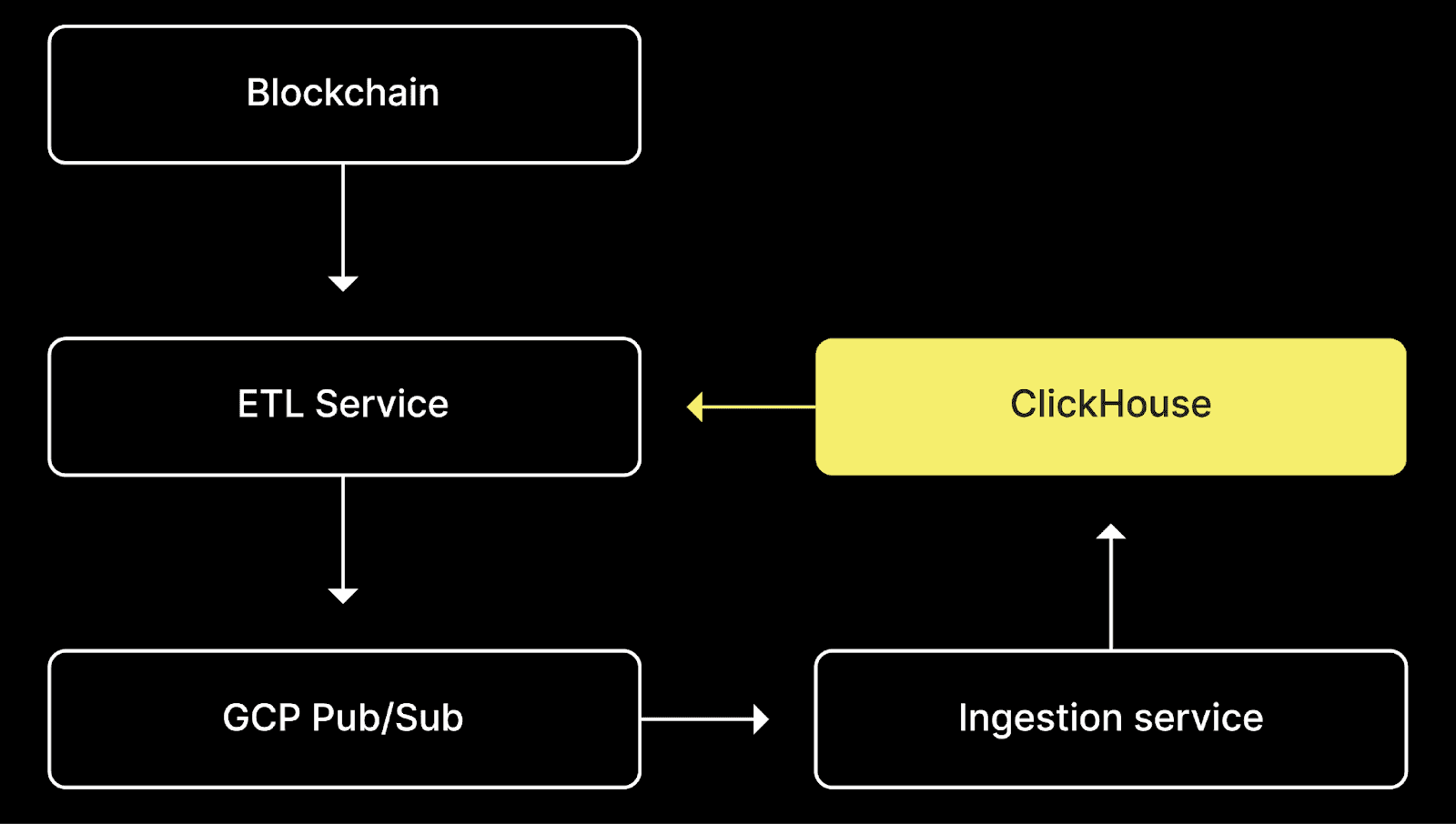
In terms of performance, ClickHouse was the clear winner, executing candlestick queries in 20 milliseconds, compared to 400 milliseconds or more for the other databases. It ran latest-price queries in 8 milliseconds, outpacing the next-best performance (SingleStore) which came in at 45 milliseconds. Finally, it handled ASOF JOIN queries in 50 milliseconds, while Snowflake took 20 minutes and Rockset timed out.
➡️ Learn more about how Coinhall uses ClickHouse for the time-sensitive decision making use case.
Observability
Many organizations run online services, and if something goes wrong, they need to be able to solve the problem as quickly as possible. Real-time analytics enables them to debug issues as they happen, using logs, events, and traces. This use case has high insert workloads and the need for low-latency analytical queries.
LangChain is a popular software framework that helps users build applications that use large language models. They have built a commercial product called LangSmith, a unified developer platform for LLM application observability and evaluation that uses ClickHouse under the hood.
LangSmith lets users understand what’s going on in their LLM applications and allows them to debug agentic workflows. It also helps developers detect excessive token use, a costly problem they want to detect as soon as possible.
When working with LLM applications, there are invariably many moving pieces with chained API calls and decision flows. This makes it challenging to understand what's going on under the hood, with users needing to debug infinite agent loops or cases with excessive token use. Seeing an obvious need here, LangSmith started as an observability tool to help developers diagnose and resolve these issues by giving clear visibility and debugging information at each step of an LLM sequence.
We wanted something that was architecturally simple to deploy and didn’t make our infrastructure more complicated. We looked at Druid and Pinot, but these required dedicated services for ingestion, connected to queuing services such as Kafka, rather than simply accepting INSERT statements. We were keen to avoid this architectural complexity,
➡️ Learn more about how LangChain uses ClickHouse for the observability user case.
There are also many other use cases, including:
- Real-time ad analytics: Give buyers and sellers the ability to slice and dice ad performance data.
- Content recommendation: Show users fresh and interesting content each time they log in, considering the content they typically consume and interact with.
- Anomaly detection: In real-time, identify unusual patterns in data that might indicate a problem that needs addressing.
- Usage-based pricing: Precise metering through real-time analytics prevents overages and ensures fair charging in dynamic cloud environments.
- Short-term forecasting: Computing predicted demand using the latest usage data, sliced and diced across multiple dimensions.
Characteristics of a real-time analytics system
The system we build must have specific characteristics to achieve the benefits and use cases described in the previous two sections.
Ingestion speed
We’re predominantly working with streaming data, the value of which decreases over time. Therefore, we need a fast data ingestion process to make the data available for querying. We should see a change in the real-time analytics system as soon as it happens.
There will always be some lag between when the data is generated and when it’s available for querying. We need that lag to be as small as possible.
Query speed
Once the data is ingested, we must ensure it can be queried quickly. We should aim for web page response times, i.e., a query's time to run and return a result should be sub-second and ideally 100 milliseconds or less.
The system must maintain quick query responses at all times. This should hold even during periods of high-volume data ingestion.
Concurrency
Real-time analytics systems are often user-facing and must handle many concurrent queries. It’s common for these systems to support tens or hundreds of thousands of queries per second.
These characteristics are typically seen in column databases like ClickHouse.
Data sources for real-time analytics
Real-time analytics systems are based on events, typically managed by a streaming data platform. These systems act as the source of truth for event data and can handle a high volume and concurrency of data being produced and consumed. The events are stored durably and consumed by downstream systems.
There are many different providers of streaming data platforms, including Redpanda, Apache Pulsar, and Amazon Kinesis, but the most popular at the time of writing is Apache Kafka.
In addition to working with real-time data, we must support slower-changing data, such as product catalogs, customer profiles, or geographic data. This data might reside in another database, on the file system, or in cloud bucket storage, so we’ll need to ingest it from there.
Real-time streaming analytics
Streaming analytics is a subset of real-time analytics where queries run continuously over unbounded data streams rather than against stored tables. Instead of asking "show me the last hour of errors" after the fact, a streaming analytics query declares "alert me whenever the error rate exceeds 5% over any rolling 60-second window."
Stream processing vs analytical querying
These two patterns are complementary:
- Stream processing (Apache Flink, ClickHouse materialized views) — transforms, filters or aggregates events as they arrive. Best for pre-computed metrics, anomaly detection and event-driven triggers.
- Analytical querying (ClickHouse SQL, ad-hoc dashboards) — runs on-demand queries against data that has already been ingested. Best for exploration, drill-downs and flexible reporting.
Most production systems combine both: stream processing handles the hot path (alerts, counters, real-time aggregations) while the analytical database stores the full event history for deeper investigation.
Where ClickHouse fits
ClickHouse bridges both patterns. Its materialized views execute transforms at insert time — functioning like lightweight stream processors — while the full SQL engine supports arbitrary analytical queries on the same data. This removes the need for a separate stream-processing cluster for many common workloads.
Real-time analytics architecture
While implementations vary, most real-time analytics systems follow a similar architectural pattern composed of several key layers:
- Event streaming layer: This is where data originates. Sources such as application events or IoT sensors publish events to a message broker, such as Apache Kafka or Redpanda. This layer decouples data producers from consumers.
- Ingestion & storage Layer: A real-time analytical database subscribes to the event streams. It must be capable of ingesting millions of events per second and making them immediately queryable. This is the core engine, often a columnar database like ClickHouse.
- Query & processing layer: This is where insights are generated. The database's query engine executes SQL queries against the fresh data. This layer might also include materialized views for even faster response times.
- Presentation layer: This is the user-facing component, such as an internal dashboard (e.g., Grafana), a customer-facing application feature, an alerting system, or an API that serves the analytical results to another service.
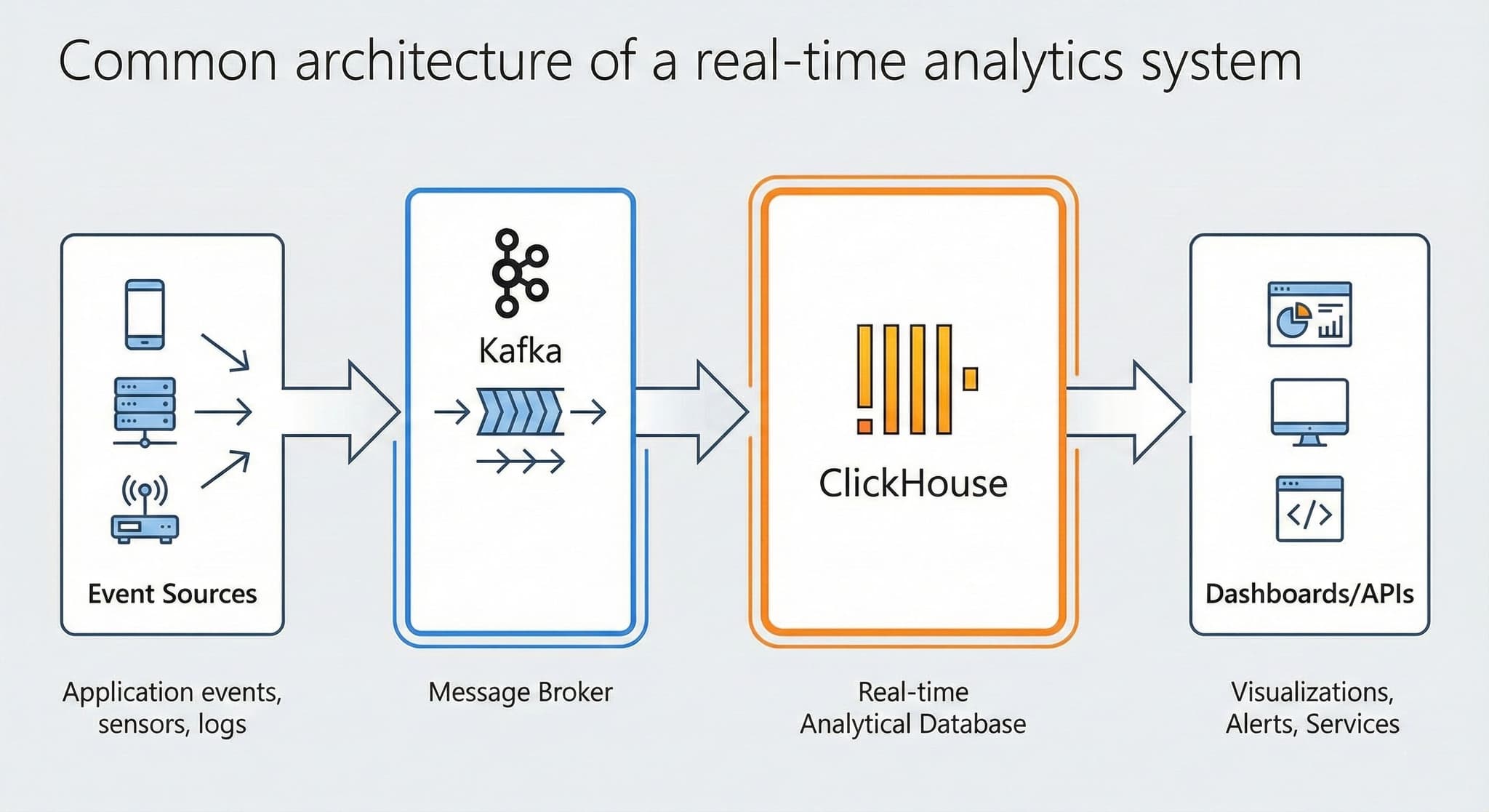
Architectural patterns: Lambda vs Kappa
Two dominant patterns shape how teams design their real-time analytics architecture:
-
Lambda architecture — maintains parallel batch and streaming pipelines that merge at query time. The batch layer reprocesses historical data for accuracy; the speed layer handles fresh events for low latency. The trade-off is operational complexity — two codebases doing similar work.
-
Kappa architecture — eliminates the batch layer entirely. All data, historical and real-time, flows through a single streaming pipeline. Reprocessing is handled by replaying the event log. This is simpler to operate but requires a stream-processing layer (or database) capable of handling both backfills and live ingestion.
ClickHouse's ability to ingest millions of events per second while simultaneously running analytical queries on petabytes of historical data means many teams adopt a Kappa-style architecture with ClickHouse as the single analytical store.
How to implement real-time analytics
Moving from batch to real-time analytics doesn't require replacing your entire stack at once. Most teams start with a single high-value use case and expand from there.
Step 1 — Pick one use case with clear latency requirements
Choose a workflow where stale data has a measurable cost: fraud detection where every second of delay means higher losses, an operational dashboard where engineers need sub-minute visibility, or a user-facing feature like live order tracking. Defining the latency requirement (sub-second? under 5 seconds?) constrains your architecture choices.
Step 2 — Instrument event streaming
Route the relevant events to a message broker (Apache Kafka, Redpanda, Amazon Kinesis). If events already land in a data lake or warehouse via batch ETL, add a parallel streaming path rather than ripping out the existing pipeline.
Step 3 — Choose a real-time analytical database
The database is the engine of the system. Evaluate on three axes: ingestion throughput (can it keep up with your event rate?), query latency (sub-second at your data volume?), and concurrency (how many users or services will query simultaneously?). See the section below on choosing a database for a detailed breakdown.
Step 4 — Build the query and presentation layer
Start with internal dashboards (Grafana, Superset) or a simple API endpoint. Validate that end-to-end latency meets requirements before investing in polished UIs. Once the pipeline is proven, extend to customer-facing features.
Step 5 — Iterate: add use cases, refine schemas, optimise queries
Real-time analytics implementations grow incrementally. Each new use case reuses the same streaming infrastructure and database — the marginal cost of the second use case is far lower than the first.
What is a real-time analytics database?
At the heart of any real-time analytics system is a database that ingests data quickly and serves low-latency queries at scale. These databases are a subset of Online Analytics Processing (OLAP) databases but have some notable differences.
Traditional OLAP databases were designed for batch analytics, which we learned about earlier. They were used for internal-facing use cases where having data refreshed every day or, at best, every hour was sufficient. This approach doesn’t work for user-facing applications with expected sub-second query response time.
Real-time databases must ingest hundreds of thousands or millions of records per second and immediately make this data available to queries, providing users with access to fresh data.
Choosing a database for real-time analytics
The database is the engine of any real-time analytics system. Traditional OLTP systems or batch-oriented data warehouses often struggle to meet the unique demands of real-time workloads. When selecting a database, you must evaluate its performance across several key vectors:
Ingestion speed
It can comfortably ingest hundreds of thousands and even millions of records per second. Cloudflare was ingesting 6 million records per second as far back as 2018. It can also ingest data from an extensive range of sources. ClickPipes provides enterprise-grade support for ingesting data from Confluent Cloud, Amazo S3, Azure EventHubs, and more. In addition, ClickHouse also has integrations with Apache Iceberg, MongoDB, MySQL, AirByte, and more.
Query latency
Query performance is a top priority during the development of ClickHouse. ClickHouse Cloud customers typically see second or sub-second latency for their queries, even with high data volumes. This is achieved through the way data is stored, how it’s compressed, and the use of data structures to ensure only relevant data is processed.
ClickHouse also uses vectorized query execution and parallelizes query execution across cores and servers. Users can also use materialized views to reduce the number of rows that need to be scanned when query latency is at a premium.
Concurrency
ClickHouse is designed to handle high concurrency workloads. It is frequently used in applications where organizations want to provide real-time analytics functionality to their users. It's also used in real-time dashboards, where there are fewer users, but each dashboard refresh spawns multiple queries.
### How ClickHouse excels as a real-time database
ClickHouse Cloud is a real-time data analytics platform. It offers a fully managed, cloud-based version of ClickHouse and also comes with ClickPipes, an integration engine that simplifies continuous data ingestion from various sources, including Amazon S3 and Apache Kafka.
You can see the architecture of ClickHouse Cloud in the following diagram:
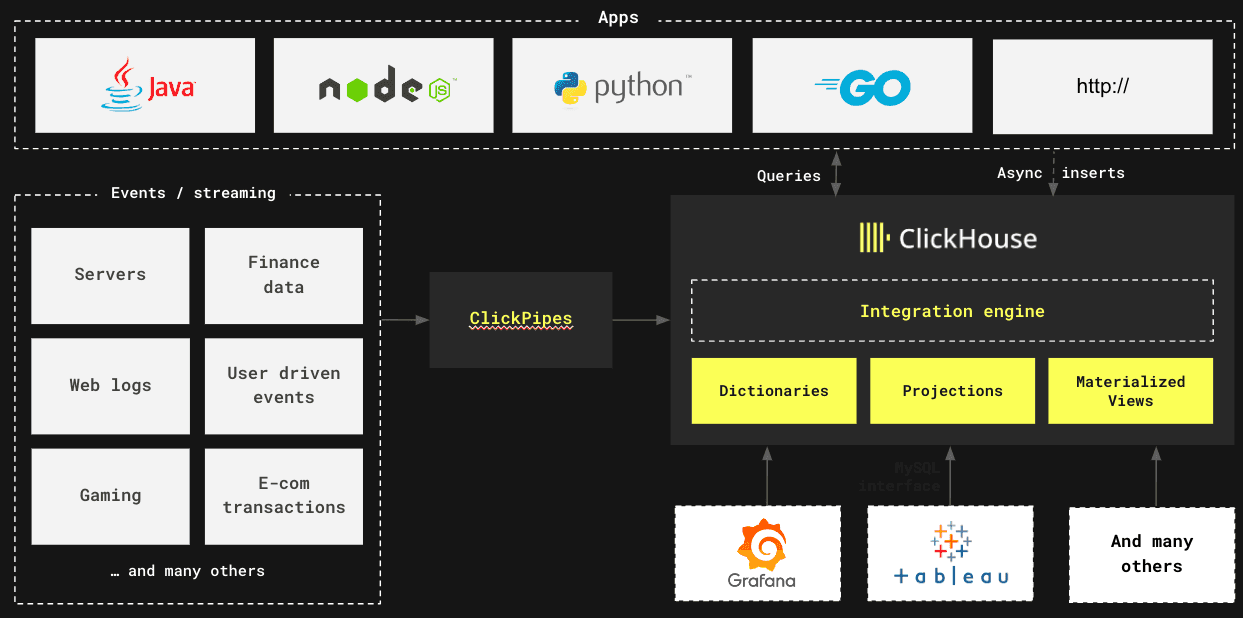
ClickHouse has the characteristics needed in a real-time analytics system, described earlier in this article - ingestion speed, query latency, and concurrency.
Building your first real-time analytics application
Hopefully, you’re excited to add real-time analytics functionality to your application. Let’s have a look at how to do that.
The first step is to navigate to clickhouse.cloud and create an account for your 30-day free trial. Once you’ve done that, create a service in the cloud and region of your choice. Initializing the service will take a few minutes, but then we’re ready to import some data.
You can also watch the following video to see the steps described above:
- Ingest data with ClickPipes.
- Write queries using the ClickHouse Cloud SQL console.
- Create query endpoints based on those queries.
Let’s go through each of these steps in a bit more detail.
Ingest data with ClickPipes
ClickPipes is an integration engine that makes ingesting massive volumes of data from diverse sources as simple as clicking a few buttons. It supports a variety of sources, both for streaming and static data.
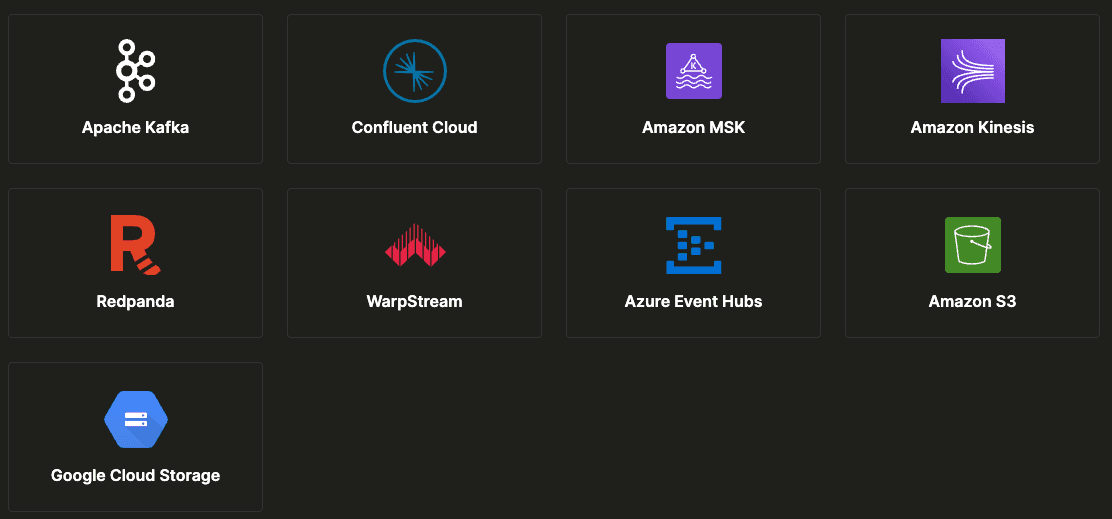
You’ll likely want to use it to ingest data from Confluent Cloud or one of the other streaming data platforms. You’ll have to populate your credentials and select the topic you want to ingest. ClickPipes will then infer a table schema by sampling some of the messages in the chosen topic before creating a table and ingesting the data into it.
Write queries in the SQL console
Once the data is ingested, you can explore it using the SQL console. Clicking on a table will show its contents, which you can view and filter.
You can also write queries manually, and the SQL console provides a rich UI for editing queries and even has AI assistance if your SQL is a bit rusty. You can also create visualizations to understand query results better.
Create query endpoints
Once you’re happy with your query, you can save it and share it with other users in your organization. You can also create an API endpoint for the query. Query API endpoints create an API endpoint directly from any saved SQL query in the ClickHouse Cloud console. You can then access API endpoints via HTTP to execute your saved queries without connecting to your ClickHouse Cloud service via a native driver.
You can read more about query endpoints in the blog post Adding Analytics to an Application in under 10 minutes with ClickHouse Cloud Query Endpoints
Frequently asked questions
Common examples include fraud detection in financial transactions, real-time bidding in online advertising, live monitoring of application performance (observability), personalized recommendations on e-commerce sites, and dynamic pricing for ride-sharing services.
A real-time analytics system must have three key characteristics: high ingestion speed to handle streaming data, low query latency (sub-second) to provide instant insights, and high concurrency to support many simultaneous users, which is common in user-facing applications.
Yes, SQL is widely used for real-time analytics. Modern real-time analytical databases like ClickHouse use a familiar SQL interface, allowing developers to write complex queries on streaming data to extract insights without learning a new language.
Real-time analytics works by continuously ingesting data from event streams (like Kafka) into a specialized database. As data arrives, it's immediately available for querying. The system is designed to execute complex analytical queries on this fresh data in milliseconds, delivering insights instantly.
Real-time analytics means that the delay between an event happening and an analyst or application being able to query it is measured in milliseconds to low seconds — not minutes or hours. In practice this requires three things working together: a streaming data source, a database that ingests and indexes data on arrival, and a query engine fast enough to return results before the data goes stale.
The most important capabilities are ingestion speed (hundreds of thousands to millions of events per second), query latency (sub-second for common analytical patterns), and concurrency (supporting many simultaneous users without degradation). Beyond raw performance, look for broad connector support (Kafka, S3, Kinesis), a standard SQL interface to reduce the learning curve, and a managed deployment option to keep operational overhead low. ClickHouse Cloud meets all of these requirements out of the box.


