 50.5k
50.5k
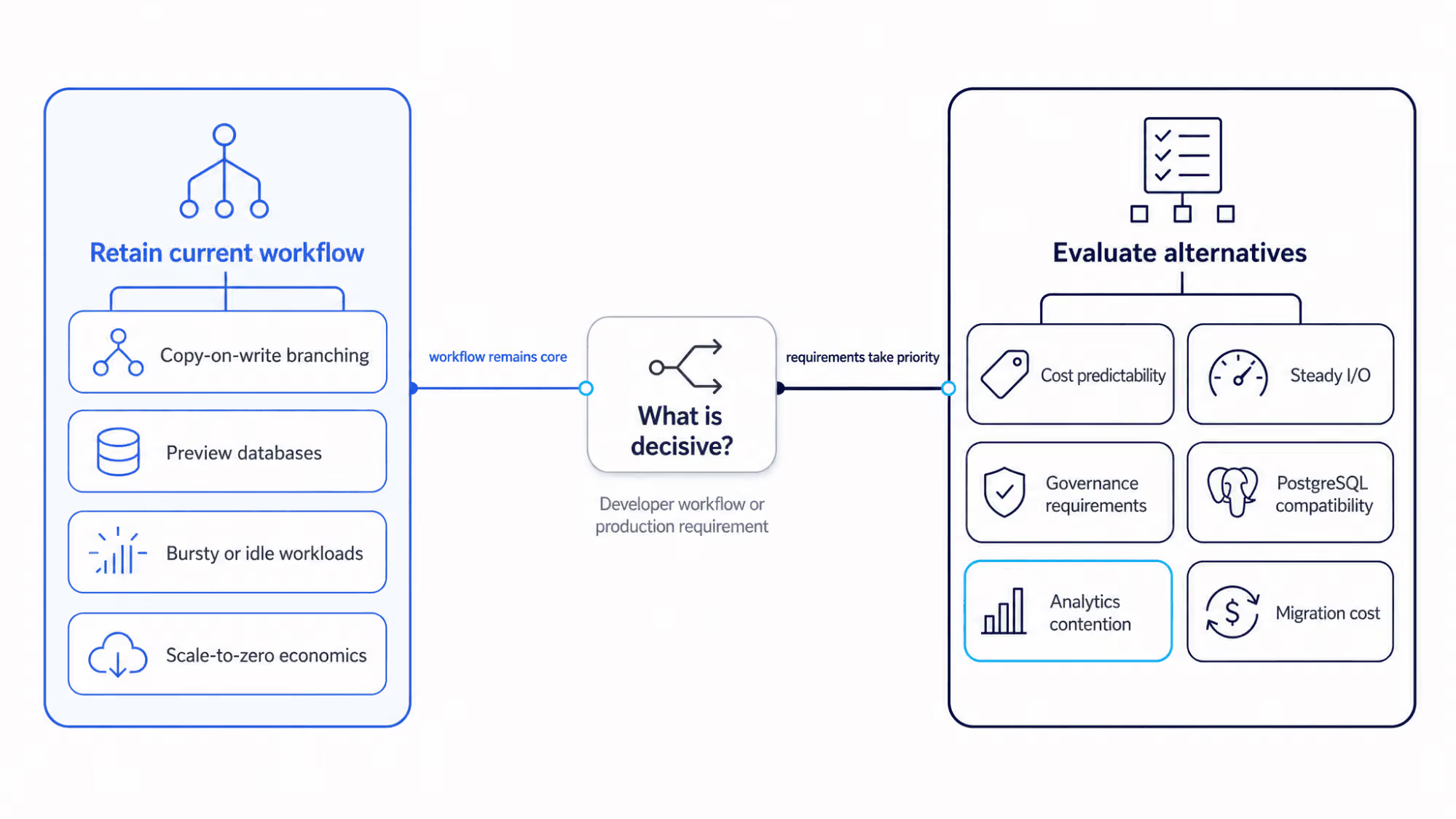
Neon is a strong fit when branching, preview environments, and scale-to-zero are central to the development workflow. The decision to leave usually starts when production requirements shift toward sustained OLTP, cloud-native controls, extension support, time-series specialization, or dedicated analytics.
This guide compares eight managed Postgres alternatives by those decision points, focusing on explicit workload and operating requirements rather than a universal ranking.
Key takeaways for choosing a Neon alternative
- Stay on Neon when branching, preview environments, or idle suspension are decisive for a smaller-scale or latency-tolerant development workflow.
- Consider ClickHouse Managed Postgres for sustained, I/O-heavy OLTP when a two-synchronous-standby topology meets the workload's durability and throughput requirements. Add ClickHouse Cloud separately when analytics needs dedicated compute.
- Consider RDS or Aurora when AWS-native IAM, networking, procurement, required regions, or an established AWS operating model is the deciding factor.
- Consider Crunchy Bridge when a required PostgreSQL extension or setting is unavailable elsewhere, and Timescale when Postgres-native time-series handling is the deciding requirement.
- Consider Aiven or DigitalOcean when vendor consolidation or a smaller packaged operational surface matters more than Neon's serverless workflow.
Deciding whether to stay on Neon
Conditions that favor Neon's model
- Development, testing, CI/CD, or preview environments rely heavily on copy-on-write branching.
- Workloads are bursty or idle enough that scale-to-zero mechanics materially reduce infrastructure costs.
- Rapid database provisioning and serverless developer workflows take precedence over explicit infrastructure configuration.
- Neon's separated compute and storage architecture meets the workload's measured latency and throughput targets.
Conditions that justify switching from Neon
- Cost predictability changes the decision: Always-on traffic reduces the savings from Neon's scale-to-zero, but Neon still lets teams disable scale-to-zero and cap autoscaling. Compare the complete monthly cost at the workload's expected minimum, maximum, and active hours.
- I/O profiles change: For disk-bound transactional workloads, compare each provider's documented storage path and the workload's measured IOPS and latency. Local NVMe can avoid the network round trip to network-attached storage, but attached storage does not by itself guarantee microsecond-level latency.
- Governance requirements tighten: The environment requires a specific HA topology, standby model, private-networking option, or compliance control that you have verified the current Neon plan, region, or operating model does not satisfy.
- PostgreSQL compatibility deepens: The application requires specific extensions, database parameters, replication behavior, or administrative operations better supported elsewhere.
- Analytics contention appears: Reporting, telemetry, or scan-heavy queries begin affecting OLTP latency. This forces a choice between overprovisioning the primary database and offloading analytics.
How to evaluate Neon alternatives
Start with the requirement that is driving the switch, then compare each provider against the Neon capability being replaced, the capability being lost, the operational model, and the migration work required. This keeps the evaluation tied to a specific workload or operating need rather than a generic feature checklist.
| Criterion | Question to answer before switching | Why it matters |
|---|---|---|
| Workload fit | Is the workload bursty, steady, I/O-heavy, extension-heavy, time-series, analytics-heavy, or AI-agent-driven? | Determines whether serverless economics provide an advantage. |
| Neon capability replaced | What does the new provider do better for this workload? | Prevents migrating without addressing a specific architectural bottleneck. |
| Neon capability lost | Are you willing to lose or replace branch-based development and scale-to-zero automation? | Identifies the Neon workflows that switching would remove or require the team to replace. |
| Operational requirement | Do you need documented HA topologies, PITR, private networking, compliance, or IAM controls? | Turns vendor choice into an operating-model decision. |
| Migration cost | What breaks in schema, extensions, replication, pooling, CI/CD, or rollback paths? | Avoids underestimating the true operational cost of leaving the current platform. |
8 Neon alternatives compared at a glance
| Alternative | When to consider | Main gain over Neon | Primary switching requirement | Main tradeoff |
|---|---|---|---|---|
| ClickHouse Managed Postgres | Sustained, I/O-heavy OLTP | Local NVMe-backed managed Postgres; optional separate analytics path through ClickHouse Cloud | Disk-bound OLTP where a two-synchronous-standby topology meets durability and throughput requirements | No Neon-style branching or compute scale-to-zero |
| Amazon RDS for PostgreSQL | AWS-native operations | AWS-native IAM, networking, Multi-AZ, and operational controls | AWS-native operations, procurement, required regions, or an established AWS operating model | No Neon-style branching or compute scale-to-zero |
| Amazon Aurora PostgreSQL | AWS-native teams evaluating Aurora's cluster architecture | Distributed storage, replica scaling, and managed failover | AWS-native operating requirements, with Aurora's storage, replica, failover, and Serverless v2 model fitting the workload | Different PostgreSQL storage and operating model; no Neon-style branching |
| Google AlloyDB | GCP-native teams evaluating AlloyDB-specific capabilities | Read pools and optional columnar acceleration | AlloyDB-specific capabilities such as read pools, regional HA, or columnar acceleration are relevant to the workload | Provisioned compute model and no Neon-style branching or scale-to-zero |
| Crunchy Bridge | Required PostgreSQL extensions or settings | Broad curated extension support and PostgreSQL flexibility | A required PostgreSQL extension or setting is unavailable in ClickHouse Managed Postgres | No Neon-style branching or scale-to-zero |
| Timescale | Postgres-native time-series workloads | Hypertables, compression, retention policies, and continuous aggregates | Postgres-native time-series handling is decisive and the workload fits Timescale's current single-writer scale boundary | Requires time-series-specific schema and workload design |
| Aiven for PostgreSQL | Multi-service vendor consolidation | PostgreSQL and several managed open-source services under one provider | One-provider management is decisive and cross-service responsibilities are accounted for | Integration, networking, access control, recovery, and combined cost remain separate design concerns |
| DigitalOcean Managed PostgreSQL | Packaged plans and a smaller operational surface | Packaged managed Postgres with standby and read-only nodes | Packaged plans and a smaller operational surface are decisive | No Neon-style branching or compute scale-to-zero |
ClickHouse Managed Postgres: I/O-heavy OLTP
When to consider ClickHouse Managed Postgres
- Sustained, disk-bound, or I/O-heavy transactional workloads requiring managed PostgreSQL and local NVMe storage.
- Teams requiring a configured CDC path through ClickPipes into a separate ClickHouse Cloud service, without running analytics on the OLTP primary.
Reasons to switch from Neon to ClickHouse Managed Postgres
- Replaces this Neon capability: Replaces serverless Postgres convenience with managed Postgres on local NVMe, explicit high availability topology options, read replicas, and operational controls.
- Gives up this Neon capability: Branching and scale-to-zero developer workflows.
- Switch when this requirement matters more: The production workload is steady, I/O-heavy, or analytics-adjacent enough that storage locality and a separate analytics path matter more than serverless workflows. Under a two-synchronous-standby production topology, local NVMe remains on the data-read path while each commit waits for acknowledgment from at least one standby. Validate the workload benefit and price separate ClickHouse Cloud analytics capacity.
Shipsidekick, socialpruf., and Infinitas Learning migrated from Neon to ClickHouse Managed Postgres for their production Postgres workloads. Their migrations addressed connection stability, infrastructure and network-transfer costs, and performance predictability as workloads grew. Infinitas Learning runs the same schema with p99 Postgres query latency in the single-digit millisecond range instead of seconds. See Neon migration experiences from Shipsidekick, socialpruf., and Infinitas Learning.
When to add ClickHouse Cloud for analytics
Keep analytics in Postgres while reporting workloads remain moderate and continue meeting latency, concurrency, and cost requirements. Consider dedicated analytical compute when scan-heavy queries, dashboards, telemetry, or high-cardinality aggregations create sustained CPU or I/O contention, increase replica lag, or force the transactional database to be provisioned for analytical peaks.
For the ClickHouse path, keep ClickHouse Managed Postgres as the transactional system of record and replicate selected tables through configured ClickPipes CDC into a separate ClickHouse Cloud service. The analytical copy is eventually consistent with second-level freshness.
For a deeper framework covering PostgreSQL-native tuning, measurable analytical breakpoints, workload separation, and incremental CDC adoption, see ClickHouse vs. PostgreSQL for analytics.
Automation and control surfaces for ClickHouse Managed Postgres
The OpenAPI, Terraform provider, clickhousectl, ClickHouse Agents, ClickPipes, and pg_clickhouse serve different purposes and operate distinctly. The Terraform resource supports provisioning, resizing, high availability configuration, password resets, read replicas, and point-in-time recovery for ClickHouse Managed Postgres. It does not currently cover private endpoint creation, network allowlist management, backup and maintenance settings, or some operational commands; use the OpenAPI or another documented control surface only where that operation is supported.
Amazon RDS for PostgreSQL: AWS-native operations
When to consider Amazon RDS for PostgreSQL
- AWS deployments where VPC integration, IAM database authentication, procurement, required regions, or an established AWS operating model are decisive.
Reasons to switch from Neon to Amazon RDS for PostgreSQL
- Replaces this Neon capability: Replaces serverless elasticity with traditional instance-based managed Postgres, provisioned storage options, Multi-AZ deployments, read replicas, and AWS operational tooling.
- Gives up this Neon capability: Branching and scale-to-zero workflows.
- Switch when this requirement matters more: AWS-native IAM, networking, procurement, required regions, or an established AWS operating model.
Amazon Aurora PostgreSQL: AWS-native cluster architecture
When to consider Amazon Aurora PostgreSQL
- AWS deployments requiring PostgreSQL compatibility, high read scaling, managed cluster failover, and a distributed storage architecture.
Reasons to switch from Neon to Amazon Aurora PostgreSQL
- Replaces this Neon capability: Replaces developer-centric serverless Postgres with AWS-native cluster architecture, Aurora Replicas, automatic failover, and distributed storage across multiple Availability Zones.
- Gives up this Neon capability: Neon's copy-on-write development workflow. Aurora Serverless v2 supports auto-pausing to 0 ACUs for eligible clusters, but open connections, RDS Proxy usage, logical replication, provisioned instances, and minimum-capacity configurations can prevent pausing. Resuming a paused cluster can take 30 seconds or longer.
- Switch when this requirement matters more: Choose Aurora when AWS-native IAM, networking, procurement, a required region, or an established AWS operating model is decisive. Within AWS, evaluate whether Aurora's distributed storage, replica scaling, failover model, and Serverless v2 behavior fit the workload.
Google AlloyDB for PostgreSQL: GCP-native capabilities
When to consider Google AlloyDB for PostgreSQL
- GCP-native deployments requiring a PostgreSQL-compatible managed database with Google Cloud integration, read pools, backup and recovery controls, and optional columnar acceleration.
Reasons to switch from Neon to Google AlloyDB for PostgreSQL
- Replaces this Neon capability: Replaces the serverless workflow with Google-managed Postgres-compatible infrastructure, read pool instances, regional high availability options, and GCP-native control planes.
- Gives up this Neon capability: Branching and scale-to-zero capability.
- Evaluate this requirement: Compare AlloyDB's read pools, regional high availability, columnar engine, IAM, networking, and pricing when the workload is GCP-native; do not infer a default provider choice from cloud alignment alone.
Crunchy Bridge: extension-heavy Postgres
When to consider Crunchy Bridge
- PostgreSQL deployments that require an extension or setting unavailable in ClickHouse Managed Postgres.
Reasons to switch from Neon to Crunchy Bridge
- Replaces this Neon capability: Replaces serverless abstraction with a Postgres-specialist managed service providing broad curated extension support, high availability options, and deployment flexibility across major cloud providers.
- Gives up this Neon capability: Branching and scale-to-zero economics.
- Switch when this requirement matters more: The application requires a PostgreSQL extension or setting that ClickHouse Managed Postgres does not currently provide.
Timescale: Postgres-native time series
When to consider Timescale
- Time-series, IoT, metrics, observability, or event workloads that require Postgres-native hypertables and fit Timescale's current single-writer scale boundary.
Reasons to switch from Neon to Timescale
- Replaces this Neon capability: Replaces general-purpose serverless Postgres with time-series-specific schema primitives, hypertables, compression, retention policies, and continuous aggregates.
- Gives up this Neon capability: Branching and scale-to-zero capabilities.
- Switch when this requirement matters more: Postgres-native time-series handling is decisive, and the workload fits Timescale's current single-writer scale boundary.
Aiven for PostgreSQL: multi-service consolidation
When to consider Aiven for PostgreSQL
- Teams that want PostgreSQL and several managed open-source data services from one provider.
Reasons to switch from Neon to Aiven for PostgreSQL
- Replaces this Neon capability: Replaces the serverless abstraction with multi-cloud managed Postgres, consistent service operations, distinct high availability plans, read replicas, private networking, Terraform provider coverage, and extensive compliance documentation.
- Gives up this Neon capability: Branching and scale-to-zero workflows.
- Switch when this requirement matters more: One-provider management for PostgreSQL plus other managed open-source services is decisive, and the team has accounted for cross-service integration, networking, access control, recovery, and combined cost.
DigitalOcean Managed PostgreSQL: packaged operations
When to consider DigitalOcean Managed PostgreSQL
- Teams for whom packaged plans and a smaller operational surface are decisive.
Reasons to switch from Neon to DigitalOcean Managed PostgreSQL
- Replaces this Neon capability: Replaces serverless usage-based operations with simplified managed database clusters, read-only nodes, standby nodes, automated backups, and DigitalOcean ecosystem integration.
- Gives up this Neon capability: Branching and compute scale-to-zero.
- Switch when this requirement matters more: Packaged plans and a smaller operational surface matter more than Neon-style branching and scale-to-zero workflows.
PostgreSQL compatibility checks before switching from Neon
PostgreSQL compatibility can differ at the managed-service boundaries even when the application schema is portable. Validate the exact target version, extensions, replication behavior, privileges, parameters, pooling, and recovery model before migrating.
| Compatibility area | What to verify before migration |
|---|---|
| PostgreSQL versions | Confirm the exact major version runs on the target and evaluate upgrade and downtime behavior. |
| Extensions | Verify required extensions such as pgvector, PostGIS, TimescaleDB, or custom dependencies. For AI-agent workloads using vector retrieval, confirm the required index type, build time, memory requirements, filtering behavior, and maintenance overhead for the target dataset. |
| Logical replication | For CDC migrations, verify that the source publisher's HA design preserves logical slots across promotion. Confirm slot readiness before failover, size WAL retention, and document the subscriber or migration tool's recovery procedure. |
| Connection pooling | Map Neon pooled and direct endpoints to PgBouncer, RDS Proxy, or provider-native pooling behavior. For bursty agent workloads, test fan-out, maximum connections, cold-start or resume behavior, and whether always-on capacity is required. |
| Managed-service privileges | Confirm administrator role limits, extension creation permissions, replication permissions, and parameter access. |
| Parameters and flags | Verify access to shared_preload_libraries, WAL settings, autovacuum, work_mem, max_connections, and extension-specific parameters. |
| Backup, PITR, and upgrades | Confirm the PITR window, restore-to-new-instance behavior, backup retention duration, major-version upgrade processes, and rollback limits. |
HA, recovery, security, and governance considerations
Production fit depends on more than PostgreSQL compatibility. Compare the exact HA topology, recovery model, networking and access controls, and compliance requirements for the plan and region under consideration. For AI-agent workloads, include least-privilege credentials, short-lived secrets, row-level security, tenant isolation, and auditability in the same evaluation.
| Provider | HA and failover | Backups and PITR | Private networking and IAM | Compliance and security posture |
|---|---|---|---|---|
| ClickHouse Managed Postgres | Zero standby, one asynchronous standby, or two synchronous quorum standbys where available | Supported; verify tier-specific backup retention and restore behavior | Supported; verify eligible regions and tiers | Verify applicable security and compliance controls |
| Amazon RDS for PostgreSQL | Single-AZ or Multi-AZ with automated failover | Automated backups and PITR | VPC, IAM database authentication, KMS | AWS compliance programs apply where RDS is in scope |
| Amazon Aurora PostgreSQL | Cluster failover to Aurora Replicas | Continuous backup and PITR | VPC, IAM database authentication, KMS | AWS compliance programs apply where Aurora is in scope |
| Google AlloyDB | Regional HA with standby and failover options | Backups and PITR | Google Cloud networking, IAM, CMEK | Google Cloud compliance programs apply |
| Crunchy Bridge | HA and failover options | Backup and PITR supported; verify retention policies | Private networking supported; verify cloud and region availability | Verify current SOC 2, HIPAA and BAA coverage, and data residency requirements |
| Timescale | HA varies by service plan and region | Backup retention varies by service plan | Private networking supported; verify tier availability | Verify applicable Timescale compliance certifications and security controls |
| Aiven for PostgreSQL | HA plans use standby nodes and automatic failover | Backups and PITR | Private networking, VPC peering, Terraform support, and security controls | Verify applicable Aiven compliance certifications and security controls |
| DigitalOcean Managed PostgreSQL | Standby nodes support automatic failover | Backup and restore; verify PITR details | VPC support; verify team permissions, database roles, API access controls, and any required provider-specific IAM capabilities | Verify applicable DigitalOcean compliance certifications and security controls |
Pricing models and cost drivers for Neon alternatives
Pricing models are not directly comparable from entry prices alone. Compare the complete production topology for the expected workload, including compute, storage, HA, replicas, I/O, backups, network transfer, and any separate analytical capacity.
| Provider | Base pricing shape | Main cost drivers to verify |
|---|---|---|
| Neon | Serverless compute and storage usage with plan limits | Compute usage, storage capacity, history and backup limits, plan limits, and network egress |
| ClickHouse Managed Postgres | VM and tier-based usage | Selected VM and tier, storage dimensions, HA topology, read replicas, and analytics capacity if adding ClickHouse Cloud |
| Amazon RDS for PostgreSQL | Instance-hours | Instance class, storage, provisioned IOPS, Multi-AZ deployments, replicas, backups, and data transfer |
| Amazon Aurora PostgreSQL | Instance-hours or Aurora Serverless v2 capacity | Compute, storage, I/O requests, replicas, backup storage, data transfer, I/O-Optimized mode, Serverless v2 minimum capacity, and auto-pause eligibility |
| Google AlloyDB | Provisioned compute plus storage | vCPU and memory allocation, storage, backups, read pools, and networking |
| Crunchy Bridge | Instance-based by cluster size | CPU and memory, storage capacity, HA configuration, I/O options, and backup/PITR scope |
| Timescale | Service-plan or usage-based | Compute, storage, compression tiering, HA, retention limits, and replicas |
| Aiven for PostgreSQL | Plan-based by cloud, region, and node size | Cloud provider, region, node size, storage limit, HA nodes, replicas, backups, and networking |
| DigitalOcean Managed PostgreSQL | Node-based monthly pricing | Node size, storage, standby nodes, read-only nodes, backups, and bandwidth |
How to migrate from Neon to another managed Postgres provider
Moving the PostgreSQL data is only part of leaving Neon. The migration also has to replace Neon-specific dependencies such as database branches, preview-environment provisioning, pooled and direct endpoints, and scale-to-zero or autoscaling assumptions. Plan the data and workflow migrations together.
Step 1: Inventory Neon-specific and PostgreSQL dependencies
Identify the production database and every Neon branch used for development, CI/CD, preview environments, testing, debugging, or recovery. Inventory pooled and direct connection endpoints, roles, grants, row-level security policies, extensions, custom types, collations, publications, replication slots, scheduled jobs, connection strings, database parameters, and automation that creates or removes branches. Document any autoscaling or idle-suspension assumptions that application and CI workflows depend on.
Step 2: Decide what Neon state needs to move
Treat the production database separately from disposable development branches. Preview, CI, and test branches can usually be recreated on the target rather than migrated as production data. Identify any long-lived Neon branches whose data must be preserved and decide whether to migrate, archive, or retire them.
For the production database, choose the data-movement method based primarily on database size and acceptable downtime:
- Small databases with acceptable downtime: Use
pg_dumpandpg_restore. - Larger databases requiring lower downtime: Use an initial load plus logical replication or CDC to keep the target synchronized until cutover.
The data-movement pattern is similar across managed PostgreSQL providers. The main differences are target compatibility, extensions and parameters, connection pooling, networking, HA configuration, and the replacement for Neon-specific workflows. Validate those requirements before beginning the migration.
For ClickHouse Managed Postgres, ClickPipes handles schema migration, the initial load, and CDC. Shipsidekick, socialpruf., and Infinitas Learning used ClickPipes for their published Neon migrations, with reported data-migration times ranging from a few hours to under 16 hours. See their migration experiences.
Step 3: Prepare the target and replace Neon runtime assumptions
Create the target roles, schemas, extensions, parameters, connection limits, backup policies, private networking, HA topology, and monitoring. Map Neon's pooled and direct endpoints to the target provider's connection and pooling model. Replace scale-to-zero and autoscaling assumptions with the target's capacity model, and replace branch-based preview or CI workflows with ephemeral databases, managed instances, infrastructure-as-code deployments, or containerized Postgres environments. Verify the APIs, CLIs, infrastructure-as-code, and Model Context Protocol surfaces required to replace provisioning, credential, scaling, migration, and restore automation.
Step 4: Synchronize, validate, and cut over from Neon
Keep the Neon source available throughout the initial copy and replication catch-up. Freeze or coordinate DDL operations during replication. Validate table counts, primary-key ranges, recent updated_at windows, checksum samples, foreign keys, permissions, extensions, and application smoke tests.
Before cutover, sync sequences with setval(), pause writes, drain replication lag, update connection strings, secrets, and any DNS dependencies, then resume traffic on the target. If the application previously used both Neon pooled and direct endpoints, validate the corresponding target connection paths before completing the cutover.
Step 5: Validate replacement workflows and define rollback
Validate the replacement for every Neon branch-based development, preview, test, and recovery workflow before removing the original automation.
Define rollback triggers before cutover, including unacceptable error rates, latency regressions, failed scheduled jobs, data mismatches, or permission gaps. Decide whether rollback only needs to restore application traffic or also preserve writes made after cutover. If post-cutover writes must return to Neon, retaining the original Neon database alone is not sufficient; the rollback design must include a way to preserve or replicate those writes.
Keep the original Neon environment available until the target database and replacement workflows have passed the agreed validation period, then retire unused Neon branches, computes, credentials, and automation.
Conclusion: Which Neon alternative should you choose?
The right Neon alternative is the provider that solves a requirement Neon no longer optimizes for without creating a larger tradeoff elsewhere. Keep Neon when branching, preview environments, and idle suspension remain decisive. Evaluate alternatives when sustained OLTP, cloud-native operations, extension requirements, time-series specialization, or analytical workload separation becomes more important.
From the shortlist, validate the exact PostgreSQL version, extensions, HA topology, networking, recovery model, full production cost, and replacement for Neon-specific workflows before migrating.
For sustained, I/O-heavy OLTP, try ClickHouse Managed Postgres with a representative workload and validate latency, throughput, durability, and operational fit against the target production configuration.
Frequently asked questions about Neon alternatives
Is ClickHouse a direct alternative to Neon?
The ClickHouse analytical database does not replace transactional Postgres. ClickHouse Managed Postgres is the direct managed PostgreSQL alternative available on ClickHouse Cloud. You can add ClickHouse service separately for analytics through ClickPipes CDC.
What is the best Neon alternative for predictable pricing?
No provider is predictably cheapest for every workload. Compare the complete topology: compute, storage, standby and read-replica nodes, backups, I/O requests or provisioned IOPS, support, and network transfer. DigitalOcean uses packaged node pricing, RDS exposes instance and storage choices, and Aiven pricing varies by plan, cloud, and region.
When should I stay on Neon?
Stay on Neon when copy-on-write branching, preview databases, CI/CD workflows, and scale-to-zero economics are decisive for a smaller-scale or latency-tolerant development workflow.
When should I choose ClickHouse Managed Postgres over Amazon RDS?
Choose ClickHouse Managed Postgres when sustained, disk-bound OLTP is decisive and a two-synchronous-standby topology meets the workload's durability and throughput requirements. Add a separate ClickHouse Cloud service with configured ClickPipes CDC only when measured analytical requirements justify seconds-level, eventually consistent replication. Choose RDS when AWS-native IAM, networking, procurement, required regions, or an established AWS operating model is decisive.
Should I choose Amazon RDS or Amazon Aurora PostgreSQL as a Neon alternative?
Both fit the same hyperscaler decision trigger. Choose an AWS-managed option when AWS-native IAM, networking, procurement, required regions, or an established AWS operating model is decisive. Within AWS, compare RDS's instance-based managed Postgres model with Aurora's distributed storage, replica scaling, failover model, Serverless v2 behavior, PostgreSQL compatibility, and complete workload cost.
Is Aurora Serverless v2 a replacement for Neon scale-to-zero?
Not exactly. Aurora Serverless v2 can auto-pause for eligible configurations, but open connections, proxies, minimum capacity settings, and resume latency differentiate it from Neon's developer-oriented scale-to-zero workflow.
How do I replace Neon branching after migration?
Use infrastructure-as-code to provision ephemeral Postgres environments, containerize Postgres for local and CI testing, or script temporary databases on the new provider.
When should I move analytics off Neon?
Move analytics off Neon when dashboards, telemetry, event analytics, or scan-heavy queries cause OLTP latency spikes, I/O contention, or force overprovisioning of the transactional database.
How should I evaluate extension support when leaving Neon?
Verify exact extension availability, supported versions, parameter requirements, managed-service privileges, and compatibility with the target PostgreSQL version before migration. Choose Crunchy Bridge when the application requires a PostgreSQL extension or setting unavailable in ClickHouse Managed Postgres.
How hard is it to migrate from Neon to another managed Postgres provider?
The data movement may use standard PostgreSQL tools, but the total migration also depends on replacing Neon-specific branching, connection, autoscaling, and preview-environment workflows. Lower-downtime migrations typically require logical replication, validation, cutover planning, and a rollback design that accounts for writes after cutover.


