50.3k
50.3k
Welcome to the April edition of What's New in ClickStack.
April was a release focused on tightening the core experience across querying, alerting, and dashboards.
SQL-powered alerts landed this month, rounding out the SQL-native observability workflow we started building last month. You can now move from writing queries and building dashboards directly into alerting, without switching query languages or maintaining separate rule pipelines.
Under the hood, we also redesigned the default logs schema around ClickHouse's text index. Combined with a follow-up optimization for map attribute filtering, this delivers up to Nx faster performance in our benchmarks for common search and filtering workloads.
Autocomplete also got a major overhaul. Metadata discovery now runs through materialized-view rollups behind the scenes, making suggestions feel substantially faster and more responsive, especially on larger datasets.
Heatmaps are now a first-class chart type available anywhere in dashboards, instead of being limited to Event Deltas. This makes it much easier to visualize latency distributions, density, and outliers directly alongside the rest of your operational views.
Alongside the larger changes, April also included a long list of quality-of-life improvements across alerting, table layouts, pie charts, and per-series number formatting.
Open House
If you're attending Open House, we'll also have a dedicated observability track this year with talks from several ClickStack developers and contributors, alongside customer sessions from teams covering how they're running observability workloads on ClickHouse in production.
If you can't make it live, all sessions will be recorded and published afterward.
Contributing
As always, thank you to our open source contributors and users whose feedback continues to shape ClickStack.
If code contributions are not your thing, we welcome documentation improvements, ideas, feature suggestions, bug reports, and general feedback via the repository. Every contribution, big or small, helps make the stack better for the entire community.
Get started today
Interested in seeing how ClickHouse works on your observability data? Get started with Managed ClickStack in ClickHouse Cloud in minutes and receive $300 in free credits.
Sign upAlerts on raw SQL charts
SQL alerting introduces a first-class way to express observability logic that doesn't fit inside a query builder. Users can now build charts and alerts directly from arbitrary ClickHouse SQL queries, unlocking more advanced analysis directly inside the ClickStack UI.
Static thresholding works fine until teams start doing anything even slightly statistical. Rolling baselines, percentile drift, grouped anomaly checks, or historical comparisons all become awkward once the alert itself is constrained by a UI model. In practice, many users ended up pushing advanced alerting logic into external systems or custom pipelines despite already storing the data in ClickHouse.
SQL alerting builds directly on the SQL charting support introduced last month. Once arbitrary SQL could be expressed in dashboards and visualizations, extending this into alerting became a natural next step.
SQL queries for alerts can be used to compute rolling baselines over previous intervals, calculate standard deviation bands, and compare current behavior against historical trends. Beyond this, queries can encapsulate even more complex conditions. For example, queries can emit 1 only when something becomes anomalous. The alert itself then becomes extremely simple: trigger when the query returns 1, with the query capturing the conditions.
ClickHouse window functions make these kinds of workflows straightforward to express. For example, this query builds a rolling statistical baseline for error volume and returns 1 whenever the current interval deviates significantly from recent historical behavior.
WITH buckets AS (
SELECT
$__timeInterval(Timestamp) AS ts,
count() AS bucket_count
FROM $__sourceTable
WHERE Timestamp >= fromUnixTimestamp64Milli({startDateMilliseconds:Int64})
- toIntervalSecond($__interval_s * 30)
AND Timestamp < fromUnixTimestamp64Milli({endDateMilliseconds:Int64})
AND SeverityText = 'error'
AND $__filters
GROUP BY ts
ORDER BY ts
WITH FILL STEP toIntervalSecond($__interval_s)
),
baselines AS (
SELECT
ts,
bucket_count,
avg(bucket_count) OVER (
ORDER BY ts ROWS BETWEEN 30 PRECEDING AND 1 PRECEDING
) AS rolling_avg,
stddevPop(bucket_count) OVER (
ORDER BY ts ROWS BETWEEN 30 PRECEDING AND 1 PRECEDING
) AS rolling_stddev
FROM buckets
)
SELECT
ts,
if(bucket_count > rolling_avg + 2 * rolling_stddev, 1, 0) AS anomaly
FROM baselines
WHERE rolling_avg IS NOT NULL
AND ts >= fromUnixTimestamp64Milli({startDateMilliseconds:Int64})
ORDER BY ts ASC;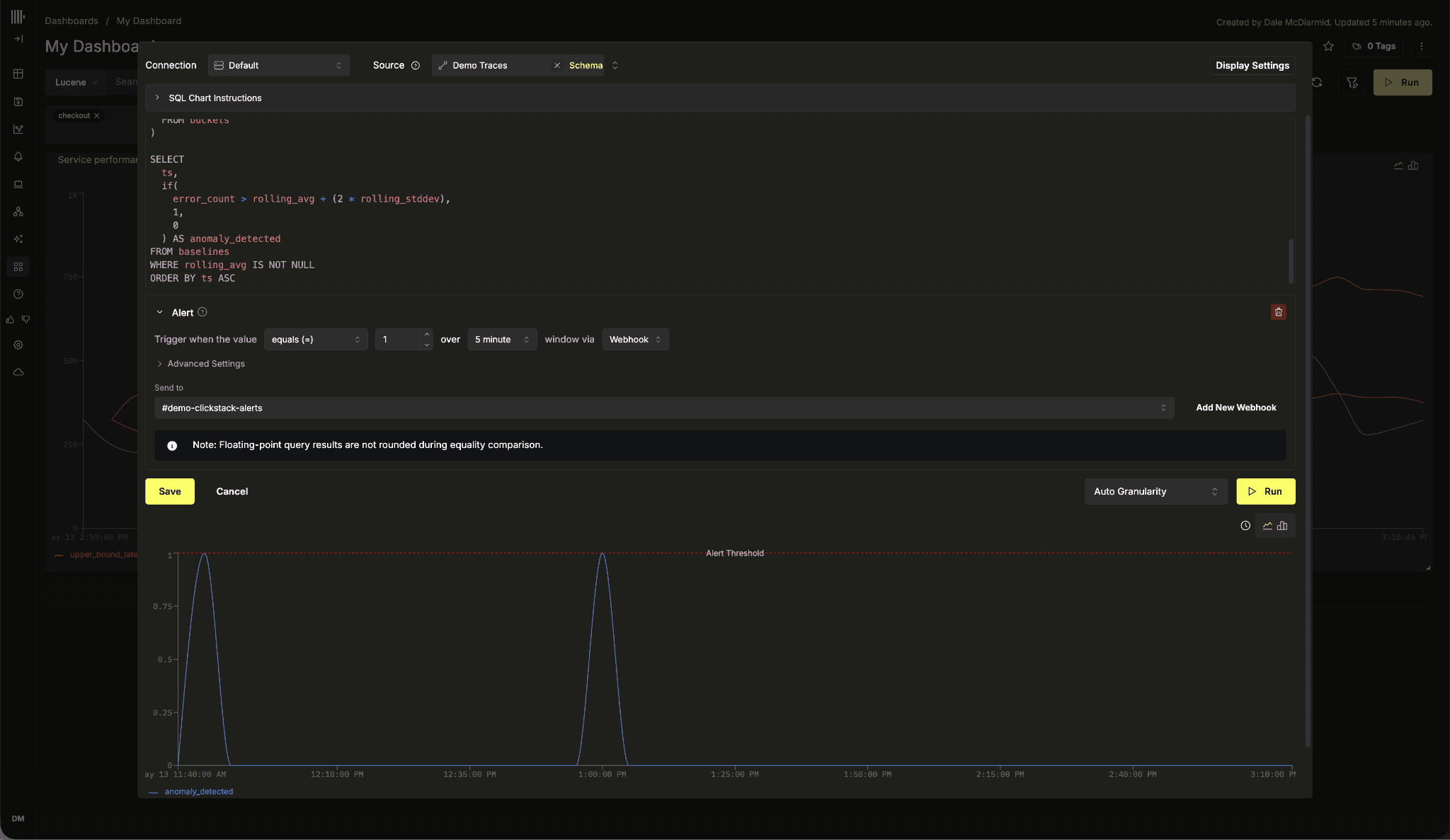
Alerts also support the same $__filters, $__sourceTable, and {intervalSeconds:Int64} macros already used by SQL visualizations, including Grafana-compatible interval handling. This means alert queries automatically inherit the dashboard and source filter context without additional wiring.
For a deeper walkthrough of rolling baselines, anomaly detection patterns, and supported macros, see the dedicated SQL Charting and Alerting post. Full macro and parameter documentation is also available in the alerts documentation.
A new default logs schema
After benchmarking and profiling common observability workloads, we redesigned the default otel_logs schema used by ClickStack.
We originally started this work while profiling a handful of recurring query patterns that kept showing up in benchmarks and production traces. After a while, it became clear the issue was no longer isolated to settings tuning. The default schema itself needed another pass, particularly around indexing strategy and ordering layout.
We'll be covering the benchmarking process, tooling, and methodology in more detail separately, including some of the internal benchmarking utilities we may eventually open source. We'll also be discussing the work at Open House for users interested in the deeper storage and indexing details behind the changes.
The new schema:
CREATE TABLE IF NOT EXISTS otel_logs
(
`Timestamp` DateTime64(9) CODEC(Delta(8), ZSTD(1)),
`TraceId` String CODEC(ZSTD(1)),
`SpanId` String CODEC(ZSTD(1)),
`TraceFlags` UInt8,
`SeverityText` LowCardinality(String) CODEC(ZSTD(1)),
`SeverityNumber` UInt8,
`ServiceName` LowCardinality(String) CODEC(ZSTD(1)),
`Body` String CODEC(ZSTD(1)),
`ResourceSchemaUrl` LowCardinality(String) CODEC(ZSTD(1)),
`ResourceAttributes` Map(LowCardinality(String), String) CODEC(ZSTD(1)),
`ScopeSchemaUrl` LowCardinality(String) CODEC(ZSTD(1)),
`ScopeName` String CODEC(ZSTD(1)),
`ScopeVersion` LowCardinality(String) CODEC(ZSTD(1)),
`ScopeAttributes` Map(LowCardinality(String), String) CODEC(ZSTD(1)),
`LogAttributes` Map(LowCardinality(String), String) CODEC(ZSTD(1)),
`EventName` String CODEC(ZSTD(1)),
`__hdx_materialized_k8s.cluster.name` LowCardinality(String) MATERIALIZED
ResourceAttributes['k8s.cluster.name'] CODEC(ZSTD(1)),
-- ... seven more __hdx_materialized_* columns omitted for brevity
INDEX idx_trace_id TraceId TYPE text(tokenizer = 'array'),
INDEX idx_res_attr_key mapKeys(ResourceAttributes) TYPE text(tokenizer = 'array'),
INDEX idx_res_attr_value mapValues(ResourceAttributes) TYPE text(tokenizer = 'array'),
INDEX idx_scope_attr_key mapKeys(ScopeAttributes) TYPE text(tokenizer = 'array'),
INDEX idx_scope_attr_value mapValues(ScopeAttributes) TYPE text(tokenizer = 'array'),
INDEX idx_log_attr_key mapKeys(LogAttributes) TYPE text(tokenizer = 'array'),
INDEX idx_log_attr_value mapValues(LogAttributes) TYPE text(tokenizer = 'array'),
INDEX idx_lower_body lower(Body) TYPE text(tokenizer = 'splitByNonAlpha')
)
ENGINE = MergeTree
PARTITION BY toDate(Timestamp)
ORDER BY (toStartOfFiveMinutes(Timestamp), ServiceName, Timestamp)
TTL toDateTime(Timestamp) + INTERVAL 14 DAYS
SETTINGS index_granularity = 8192, ttl_only_drop_parts = 1,
enable_block_number_column = 1, enable_block_offset_column = 1;The primary key is now (toStartOfFiveMinutes(Timestamp), ServiceName, Timestamp). The previous schema carried both Timestamp and a secondary TimestampTime DateTime DEFAULT toDateTime(Timestamp) column, with the latter used in the ordering key to improve pruning at second-level granularity.
With the new five-minute bucket layout, that extra column is no longer necessary and has been removed entirely. The coarser leading bucket keeps adjacent log rows physically grouped for common time-range queries while still allowing efficient pruning during scans.
The skip indices strategy has changed significantly as well. Previous schemas relied primarily on bloom_filter indexes over attribute maps alongside a tokenbf_v1 index on the Body column. The new schema instead adopts ClickHouse's Full-text index across both keys and values for ResourceAttributes, ScopeAttributes, and LogAttributes, while a dedicated text index using the splitByNonAlpha tokenizer now covers lower(Body).
In our benchmarks, the text index consistently outperformed the previous bloom-filter approach for search-oriented workloads while adding minimal ingest overhead. These new indexes also enable the attribute-search optimizations covered in the following section.
For users running ClickHouse versions prior to 26.2, where full-text search indexes became generally available, ClickStack automatically falls back to a compatibility schema variant using
bloom_filterandtokenbf_v1indexes while preserving UI compatibility and the same query semantics.
Across all of our sample queries, the new schema improves performance by over 70%.
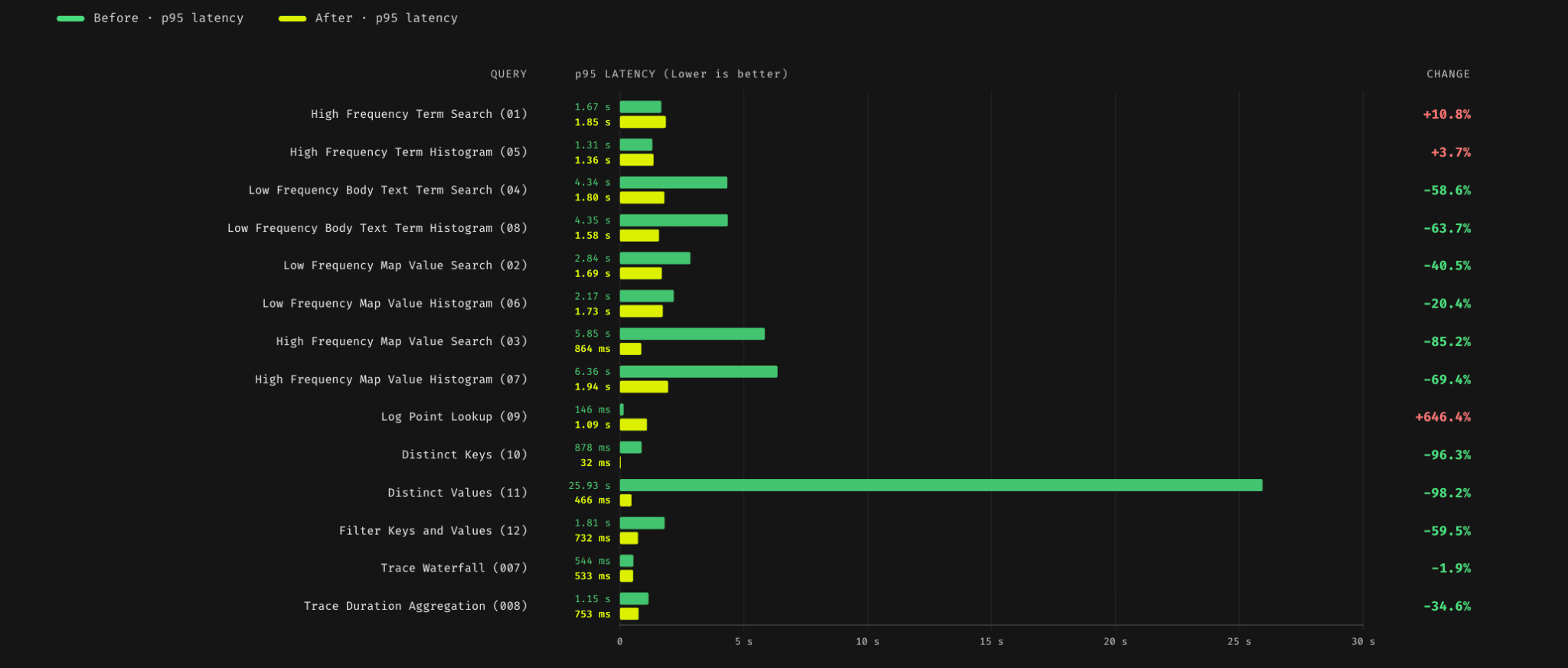
Most of the query performance improvements occurred exactly where we expected them: text search, attribute filtering, and mixed search-and-filter workloads. Insert overhead remained broadly comparable to the previous schema, which was our primary concern going into the benchmarks.
Users looking to adopt the new schema should follow our existing guide for modifying primary keys, as the same migration process applies here.
Direct-read optimization for OpenTelemetry attribute maps
A very common observability query pattern is filtering logs by attributes such as http.status_code = 500 or k8s.namespace.name = payments.
In the default OpenTelemetry schema for ClickStack, these attributes live inside map columns such as LogAttributes, ResourceAttributes, and ScopeAttributes. Filters on these columns become queries like:
LogAttributes['http.status_code'] = '500'or
ResourceAttributes['k8s.namespace.name'] = 'payments'This flexible schema design is one of the reasons OpenTelemetry works well across heterogeneous workloads, but it also creates a challenge for query execution. ClickHouse needs an efficient way to determine which granules may contain a given attribute key or value before reading and unpacking the underlying map data itself.
Earlier versions of the schema relied mostly on a bloom filter over map keys and values. This helped avoid unnecessary reads, but search-heavy attribute queries still meant more I/O and slower queries.
The new schema enables a new attribute-search path based on ClickHouse's text index. When enabled, values inside ResourceAttributes, ScopeAttributes, and LogAttributes are indexed using text(tokenizer = 'array'). This performs significantly better in our benchmarks for search-heavy attribute filtering workloads.
One complication here is that the query shape does not directly match the indexed expression. The index is built over mapValues(LogAttributes), while the filter itself is expressed as a keyed map lookup. That still gives ClickHouse useful pruning information, but not enough to fully resolve the predicate from the index alone.
To avoid that mismatch, we added an alternate indexed representation for attribute maps. Each map is flattened into an array of key=value strings with a corresponding text(tokenizer = 'array') index.
LogAttributes['http.status_code'] = '500'can be rewritten as:
has(LogAttributeItems, 'http.status_code=500')This shape aligns exactly with the array tokenizer, allowing ClickHouse to evaluate the predicate from the index without unpacking the original map column. In our internal benchmarks, attribute filters that hit this path ran between 1.4 and 10 times faster than the equivalent map-subscript query.
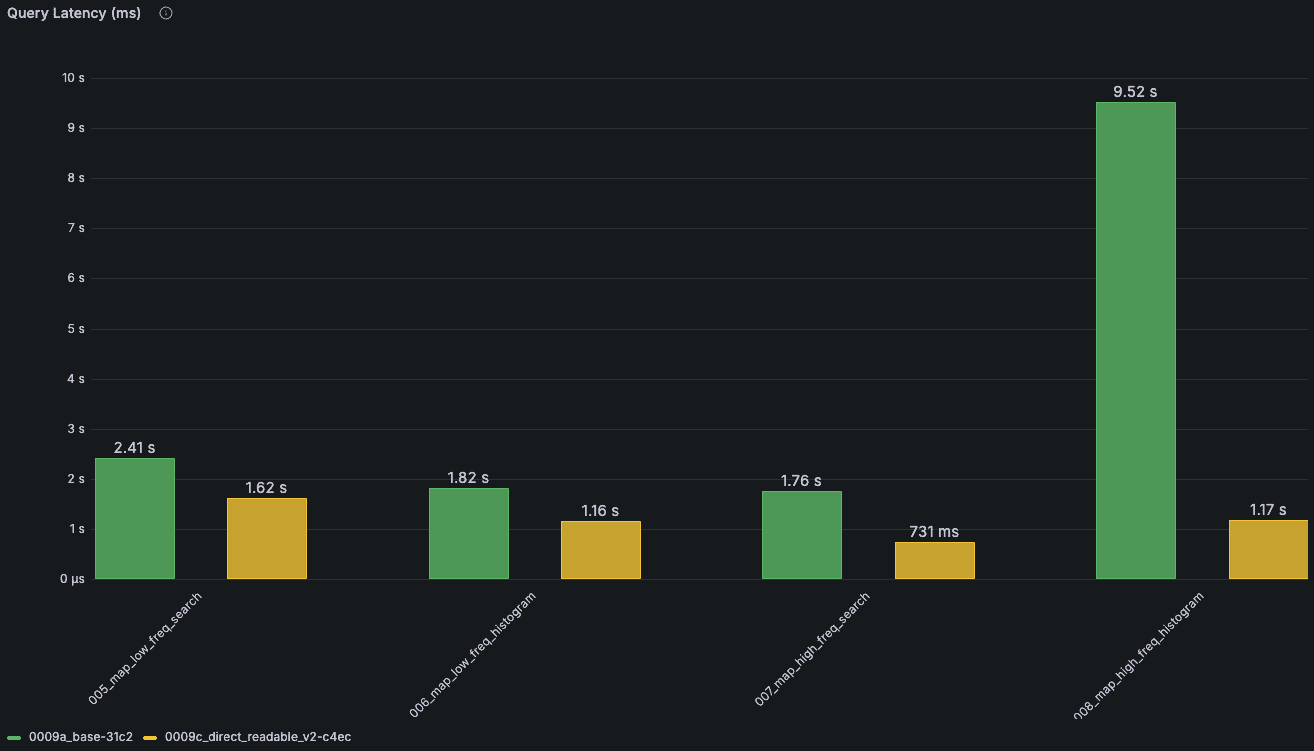
The green bar represents the performance of queries related to autocomplete for the previous implementation. The yellow bar represents the equivalent performance for the direct-read optimization.
ClickStack now detects when a source has a compatible companion column for one of its OTel attribute maps and automatically rewrites matching attribute predicates. Users do not need to change their queries, and attributes still appear in the search bar as before.
For now, this optimization is opt-in rather than part of the default schema. The companion column currently needs to be declared as MATERIALIZED for the direct-read path to engage, which adds storage overhead. A ClickHouse fix allowing ALIAS columns to work the same way has already been merged and backported as far as 26.2. Once that ships, we expect to enable this feature by default without adding storage cost.
Users who want to enable the materialized path today can do so with a pair of ALTER statements per attribute map. The example below shows ResourceAttributes; the same pattern applies to ScopeAttributes and LogAttributes.
ALTER TABLE otel_logs
ADD COLUMN ResourceAttributeItems Array(String)
MATERIALIZED arrayMap(
(arr) -> concat(arr.1, '=', arr.2),
CAST(ResourceAttributes, 'Array(Tuple(String, String))')
)
CODEC(ZSTD(1));
ALTER TABLE otel_logs
ADD INDEX idx_res_attr_items ResourceAttributeItems
TYPE text(tokenizer = 'array');Once the column and index exist, a Lucene query such as ResourceAttributes.k8s.namespace.name:"payments" is automatically translated by ClickStack into a has(ResourceAttributeItems, 'k8s.namespace.name=payments') predicate against the indexed companion column, rather than a map lookup against ResourceAttributes itself.
Faster and richer autocomplete
Previously, autocomplete queried the live otel_logs and otel_traces tables directly to discover attribute keys and values. That approach was simple, but it scaled poorly once datasets became large enough that suggestion lookups started competing with normal query workloads.
The new implementation moves autocomplete to materialized view rollups created alongside the primary OTel tables. Rather than scanning live observability data for suggestions, ClickStack now maintains compact metadata tables specifically for autocomplete lookups.
Each source table gets two materialized views — {table}_kv_rollup_15m stores key/value frequencies in fifteen-minute buckets, while {table}_key_rollup_15m stores aggregated key-level counts derived from the same data. The UI uses these tables directly for autocomplete suggestions and ranking.
Sources now expose a metadataMaterializedViews configuration describing the rollup tables and bucket interval.
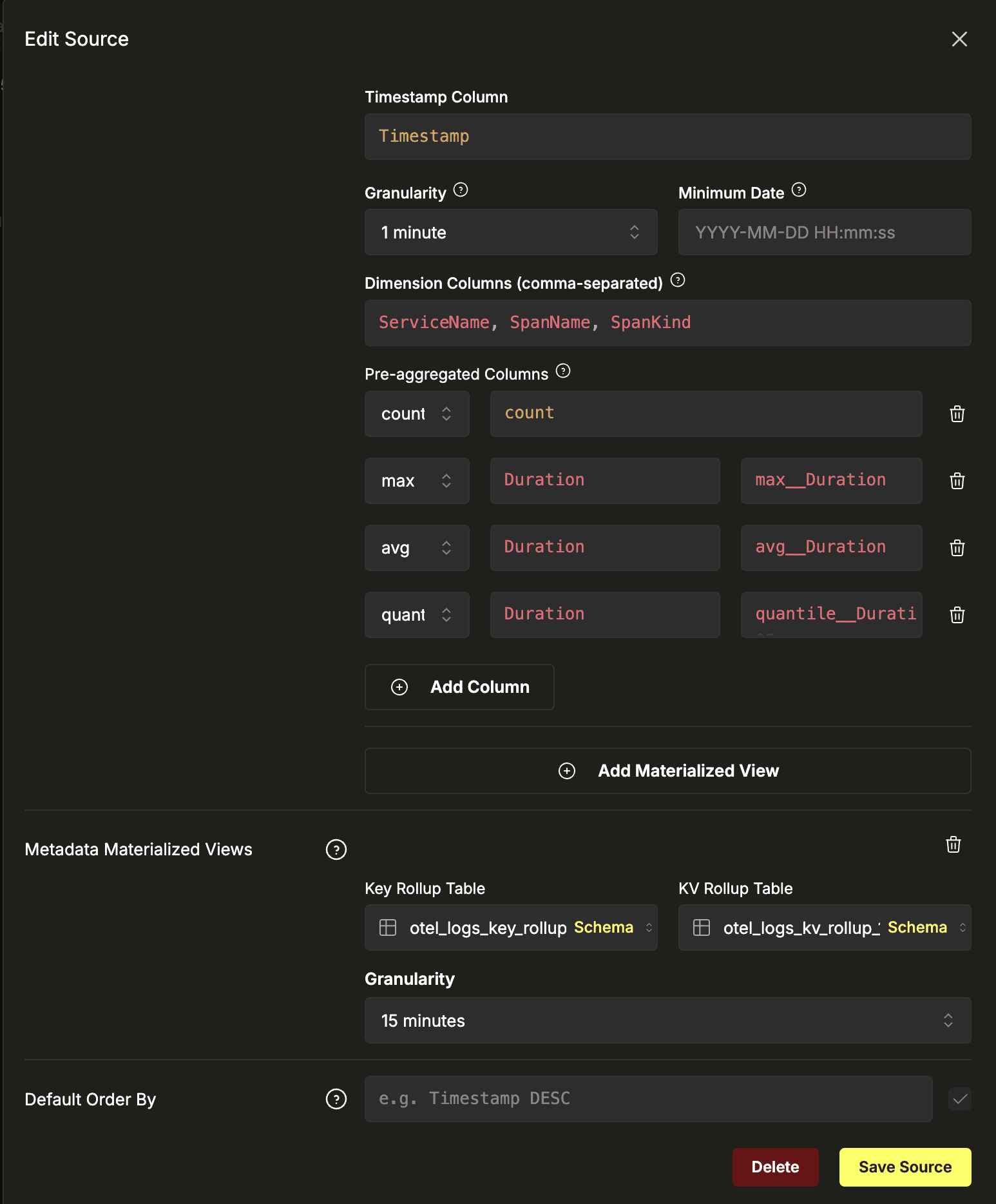
During source discovery, ClickStack automatically checks for compatible rollups and wires them into autocomplete if available. The default Docker, Helm, and embedded deployments already create these views automatically.
The rollup combines all three OTel attribute maps alongside a handful of commonly queried native columns:
CREATE MATERIALIZED VIEW IF NOT EXISTS otel_logs_attr_kv_rollup_15m_mv
TO otel_logs_kv_rollup_15m
AS WITH elements AS (
SELECT 'ResourceAttributes' AS ColumnIdentifier,
toStartOfFifteenMinutes(Timestamp) AS Timestamp,
replaceRegexpAll(entry.1, '\[\d+\]', '[*]') AS Key,
CAST(entry.2 AS String) AS Value
FROM otel_logs ARRAY JOIN ResourceAttributes AS entry
UNION ALL
SELECT 'LogAttributes' AS ColumnIdentifier, ...
FROM otel_logs ARRAY JOIN LogAttributes AS entry
UNION ALL
SELECT 'ScopeAttributes' AS ColumnIdentifier, ...
FROM otel_logs ARRAY JOIN ScopeAttributes AS entry
UNION ALL
SELECT 'NativeColumn' AS ColumnIdentifier,
toStartOfFifteenMinutes(Timestamp) AS Timestamp,
'SeverityText' AS Key,
CAST(SeverityText AS String) AS Value
FROM otel_logs
-- similar UNION ALL branches for ServiceName, ScopeName, etc.
)
SELECT Timestamp, ColumnIdentifier, Key, Value, count() AS count
FROM elements
GROUP BY Timestamp, ColumnIdentifier, Key, Value;These rollups mean autocomplete latency drops substantially on larger datasets. As an added bonus, suggestions are now frequency-ranked, which generally produces better defaults in the dropdown.
Heatmaps as a first-class chart type
Last month, we shipped several improvements to Event Deltas, including always-on baseline distributions, proportional comparison scoring, filter and exclude actions from attribute comparison bars, and deterministic heatmap sampling. One limitation remained, though: the heatmap renderer was available only within the Event Deltas search workflow. If users wanted to visualize latency distributions elsewhere in the product, there was no way to reuse them.
In April, we moved the heatmap renderer into the shared charting system used by dashboards and the chart editor, allowing heatmaps to be available everywhere charts can be created.
From the chart editor, users select the Heatmap tab, define a WHERE clause and value expression, and the same distribution view previously limited to Event Deltas can now be added directly to dashboards.
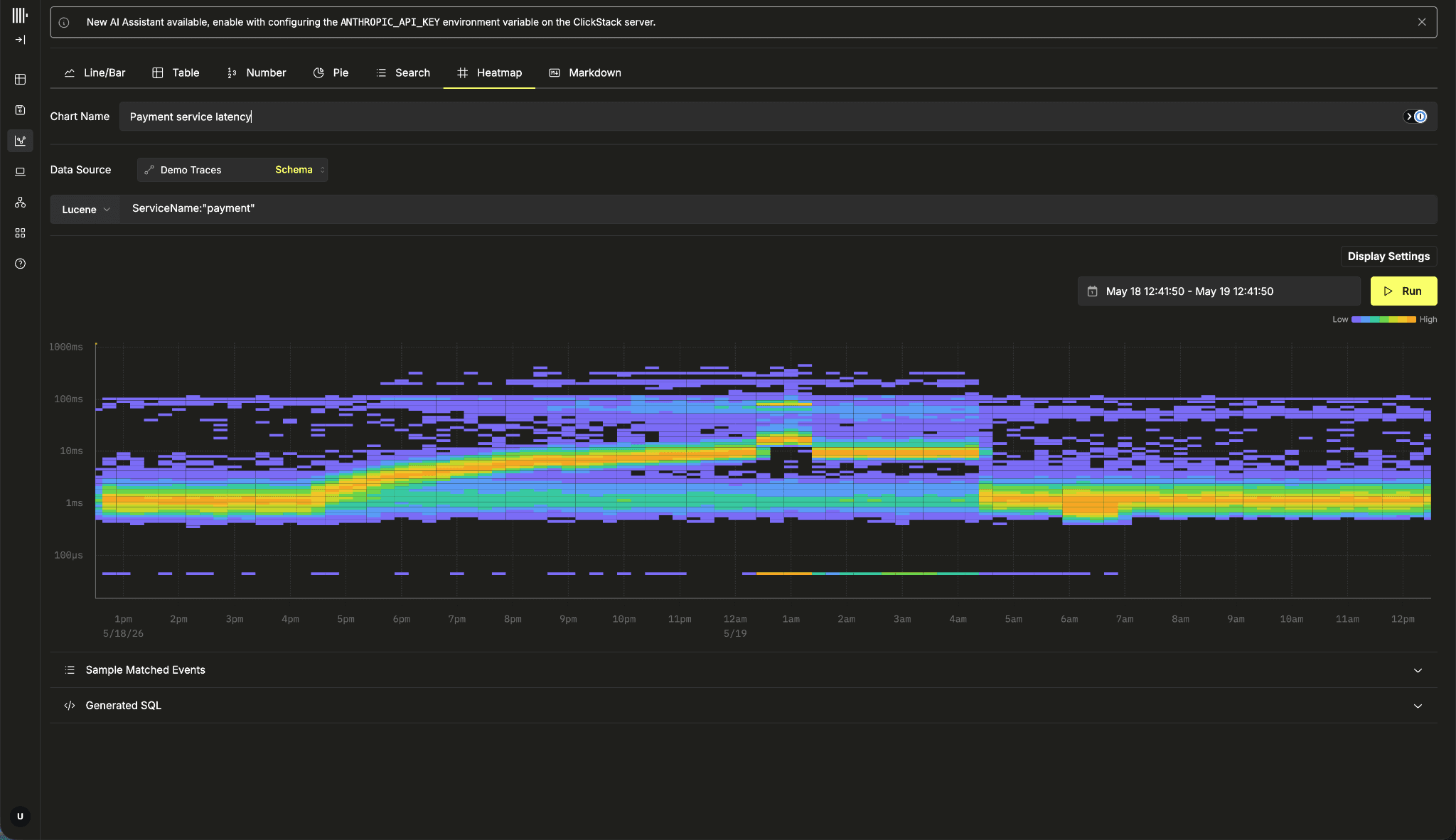
For Trace sources, ClickStack automatically initializes the chart with a duration expression and count() aggregation. The Y-axis also switches into duration formatting automatically, so labels render as milliseconds, seconds, or minutes instead of raw numeric values.
To try this yourself, head to our demo environment and add a heatmap tile to a dashboard against the OpenTelemetry demo dataset.
Alerting improvements
Beyond SQL alerting, April also included several smaller alerting improvements requested by users. These changes are fairly incremental, but together they make the alerting workflow noticeably more flexible and less constrained by the editor itself.
More threshold types
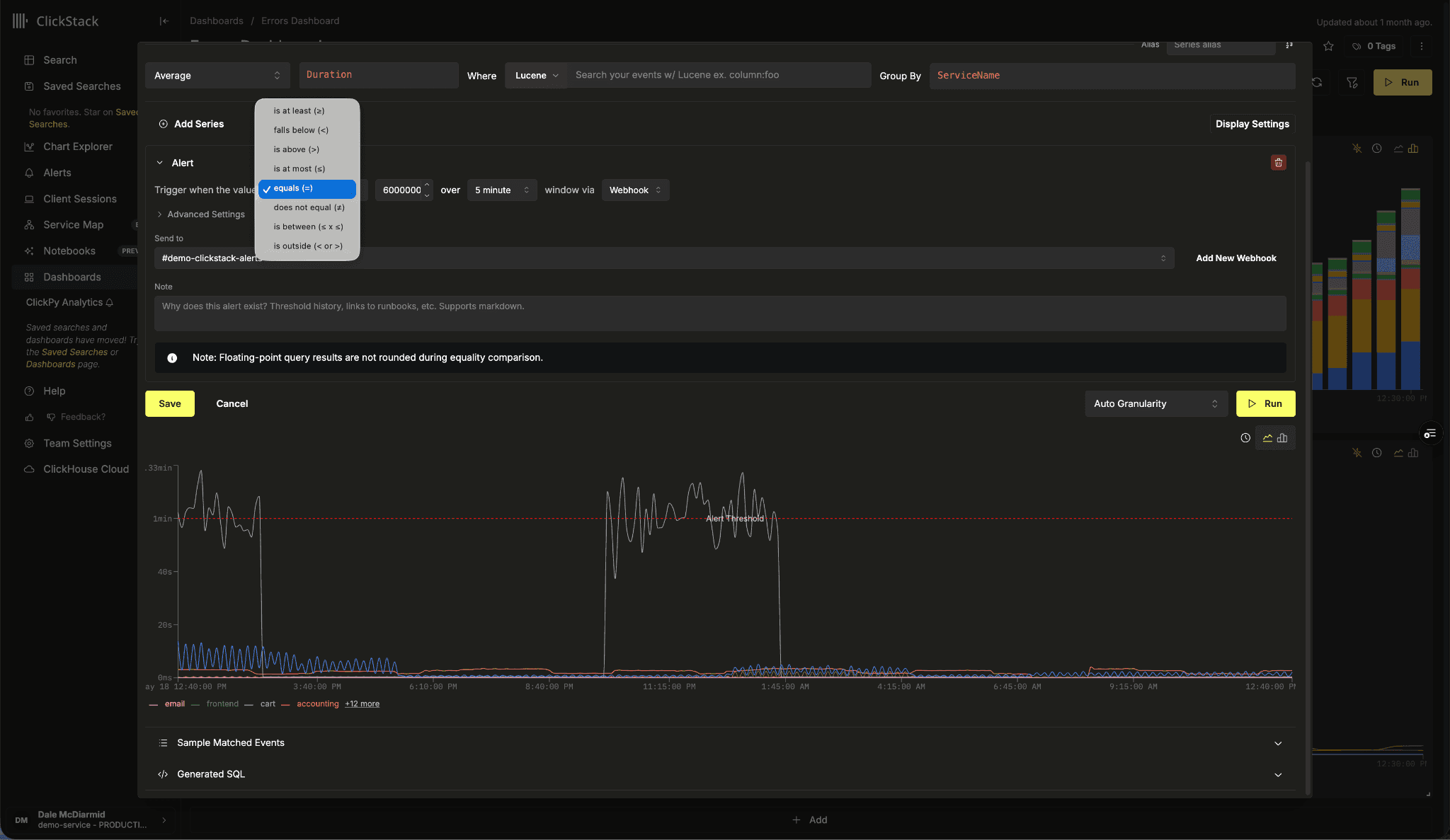
The threshold selector now supports the full set of comparison operators: >, ≥, <, ≤, =, ≠, alongside BETWEEN and NOT BETWEEN for range-based checks.
Equality and range operators also make a few common patterns easier to express directly, including heartbeat monitoring, fixed-capacity checks, and alerts that operate within an expected upper and lower bound.
Notification rendering was updated alongside the operator changes. Alert messages now describe the evaluated condition directly, rather than resorting to generic comparison wording. For example, a notification now reads "3 errors found, which equals the threshold of 3 errors" rather than the older "3 found, expected not equal to 3".
Alert history and acknowledge in the editor
The alert editor now includes the same history and acknowledge/silence controls that previously only existed on the dedicated alerts page. Users can see when an alert last fired, inspect the value that triggered it, and silence or acknowledge the alert directly from the editor without switching views.
Alert execution errors in the UI
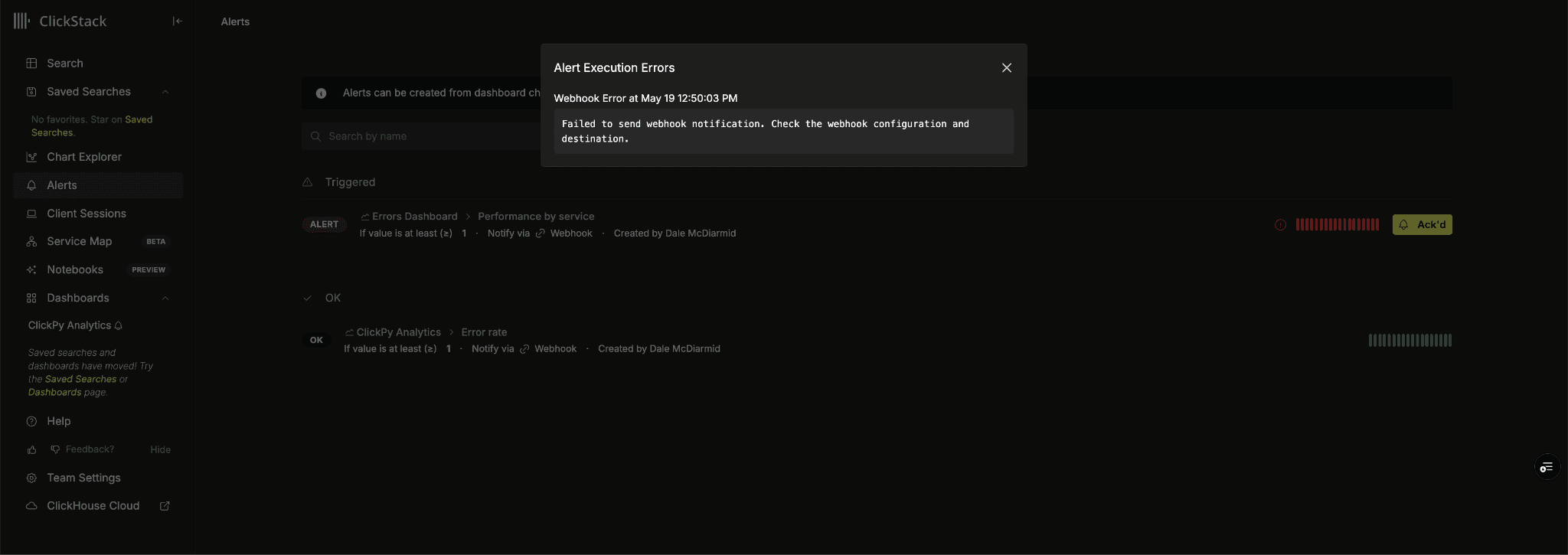
Previously, if an alert query failed to compile or a webhook returned a non-2xx response, the alert would simply stop producing history entries. In many cases, there was no obvious indication in the UI that execution had failed at all.
The latest execution error is now persisted and surfaced in the alerts UI with an error indicator and expandable message details. This makes it possible to distinguish between an alert that simply has not fired recently and one that is actively failing to execute.
Smaller things
A few smaller changes also landed this month that are less visible individually, but remove a surprising amount of friction from day-to-day use.
Pie chart legend
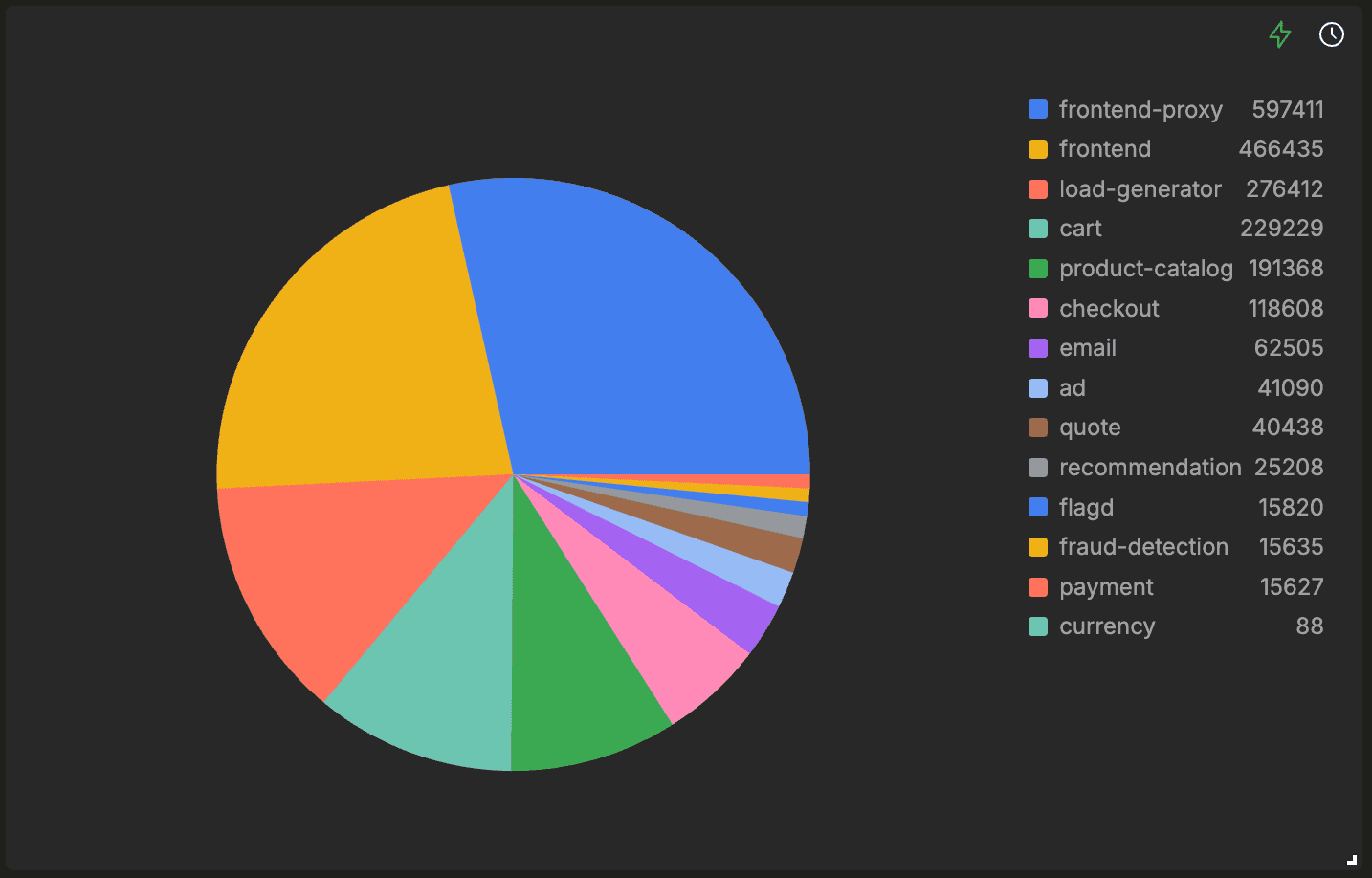
Pie charts now include a scrollable legend showing the slice color, label, and value for each segment. The legend is capped at 40% of the chart width to avoid overwhelming the chart, and it automatically scrolls once the number of slices exceeds the available space. Slice values also respect the chart's configured number formatting rules.
Per-series number formats
Number formatting was previously configured at the chart level, meaning that every series in a line, bar, or table chart used the same units and suffixes. Series can now define their own numberFormat independently, while the chart-level format remains as a fallback.
The change also carries through to the external dashboards API, so dashboards created or updated programmatically support the same per-series formatting behavior.
Group-by columns on the left of tables
Table charts now support a display option that moves group-by columns to the left of the table, rather than rendering all series columns first. This is mainly useful for wider tables where grouping keys would otherwise end up pushed far off-screen behind a large number of metric columns.
The default layout remains unchanged, but users can now flip the ordering within each table to make the data easier to scan.