50.5k
50.5k

Introduction
Today, we’re introducing SQL-based visualizations and SQL-based alerting in ClickStack. Users can now build charts and alerts using arbitrary ClickHouse SQL queries, unlocking far more advanced analysis directly inside the ClickStack UI. SQL-based visualizations enable users to move beyond predefined query builders and fully leverage ClickHouse SQL for dashboards and exploratory analysis. SQL-based alerting extends this further, allowing anything expressible in SQL to serve as an alert condition, from rolling averages and anomaly detection to grouped statistical checks and custom operational logic. In this post, we’ll explore why we built these capabilities, how they change the observability workflow, and walk through some examples that demonstrate where SQL-driven analysis and alerting become especially powerful.
The first step: SQL-powered charting
The journey to SQL-based charts and alerts started with a simple observation: while query builders are excellent for common workflows, advanced users almost always outgrow them.
As observability use cases mature, teams want to compute rolling baselines, build statistical anomaly detection, correlate events, calculate SLOs, and express logic that doesn’t cleanly map to predefined UI controls. While query builders are useful for getting started, they inevitably trade flexibility for simplicity.
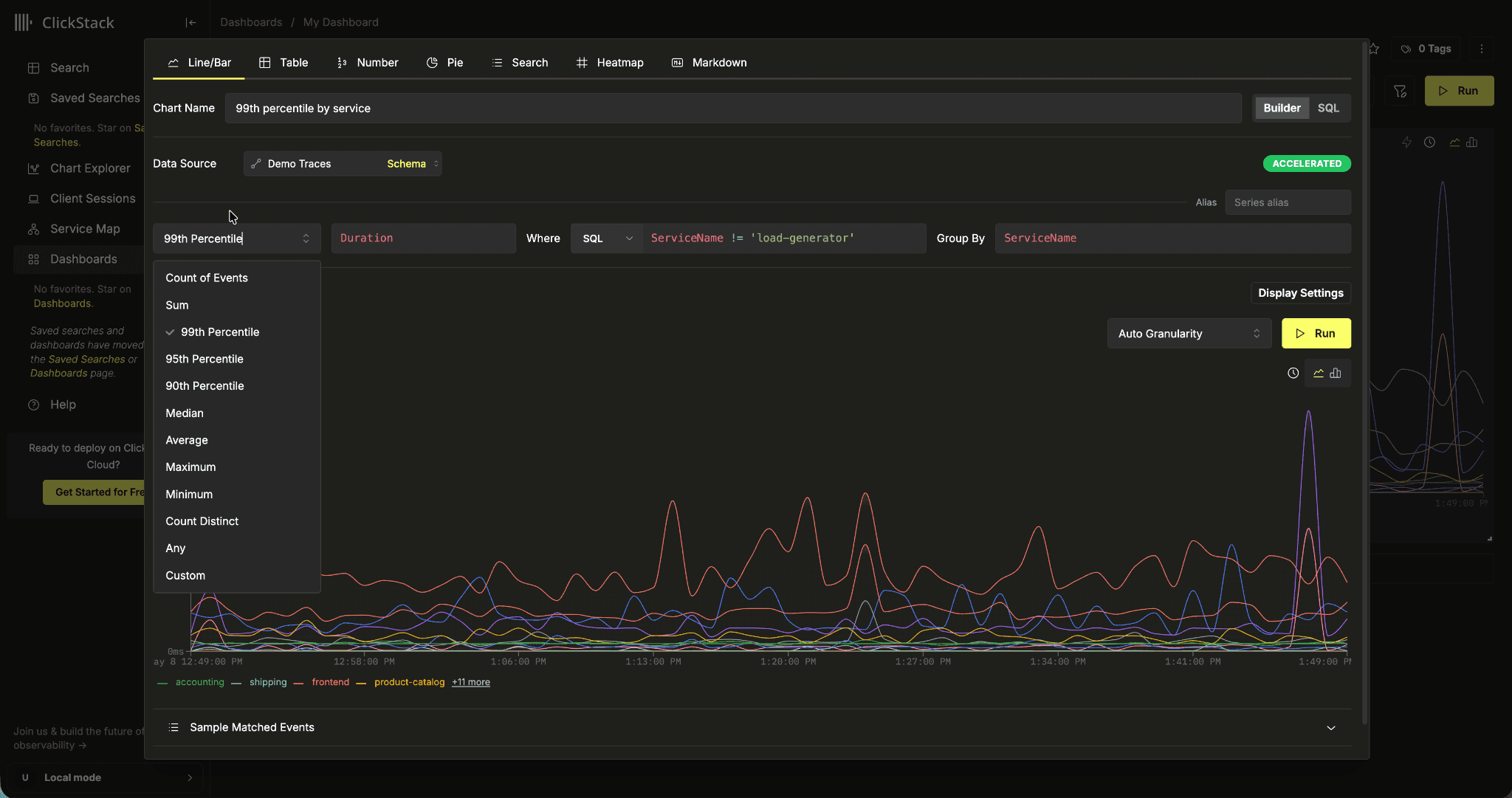
Query builders are inherently limited and only ever cover a subset of user query requirements
Because ClickStack is built on ClickHouse, supporting raw SQL felt like a natural extension of the platform rather than a bolt-on feature. SQL charts allow users to leverage the same expressive analytical capabilities that make ClickHouse so powerful while still integrating directly into dashboards, filters, and visualizations.
While SQL-based visualizations can be used for simple charts, their real value lies in helping users move beyond straightforward aggregations and apply richer analytical logic directly within their observability workflows.
Get started today
Interested in seeing how ClickStack works for your observability data? Get started with ClickStack in ClickHouse Cloud in minutes and receive $300 in free credits.
Sign upExample - Detecting anomalies with rolling baselines
One of the most common requests from advanced observability teams is the ability to visualize anomalies relative to recent system behavior rather than static thresholds. For example, a checkout endpoint taking 800ms may be normal during peak traffic, but highly abnormal for a lightweight internal service.
With SQL-based charting, users can build rolling averages and standard deviation baselines directly into their queries using ClickHouse window functions. Instead of visualizing only raw latency, charts can show when latency deviates from its expected range over time for a service.
WITH buckets AS (
SELECT
toStartOfInterval(
Timestamp,
INTERVAL {intervalSeconds:Int64} second
) AS ts,
ServiceName,
quantile(0.95)(Duration) / 1000000 AS p95_latency_ms
FROM $__sourceTable
WHERE Timestamp >= fromUnixTimestamp64Milli({startDateMilliseconds:Int64})
AND Timestamp < fromUnixTimestamp64Milli({endDateMilliseconds:Int64})
AND SpanKind = 'Server'
AND $__filters
GROUP BY
ts,
ServiceName
),
baselines AS (
SELECT
ts,
ServiceName,
p95_latency_ms,
avg(p95_latency_ms) OVER (
PARTITION BY ServiceName
ORDER BY ts
ROWS BETWEEN 12 PRECEDING AND 1 PRECEDING
) AS rolling_avg_latency_ms,
stddevPop(p95_latency_ms) OVER (
PARTITION BY ServiceName
ORDER BY ts
ROWS BETWEEN 12 PRECEDING AND 1 PRECEDING
) AS rolling_stddev_latency_ms
FROM buckets
)
SELECT
ts, -- Timestamp column
ServiceName, -- Group name column
p95_latency_ms, -- Series value column
rolling_avg_latency_ms, -- Series value column
rolling_avg_latency_ms
+ 3 * rolling_stddev_latency_ms
AS upper_bound_latency_ms -- Series value column
FROM baselines
WHERE rolling_avg_latency_ms IS NOT NULL
ORDER BY ts ASCThis produces a time-series chart where ts is used as the timestamp column, ServiceName is treated as the group column, and each numeric column is plotted as a separate series. The chart shows current p95 latency, the rolling average, and an upper statistical boundary for each service.
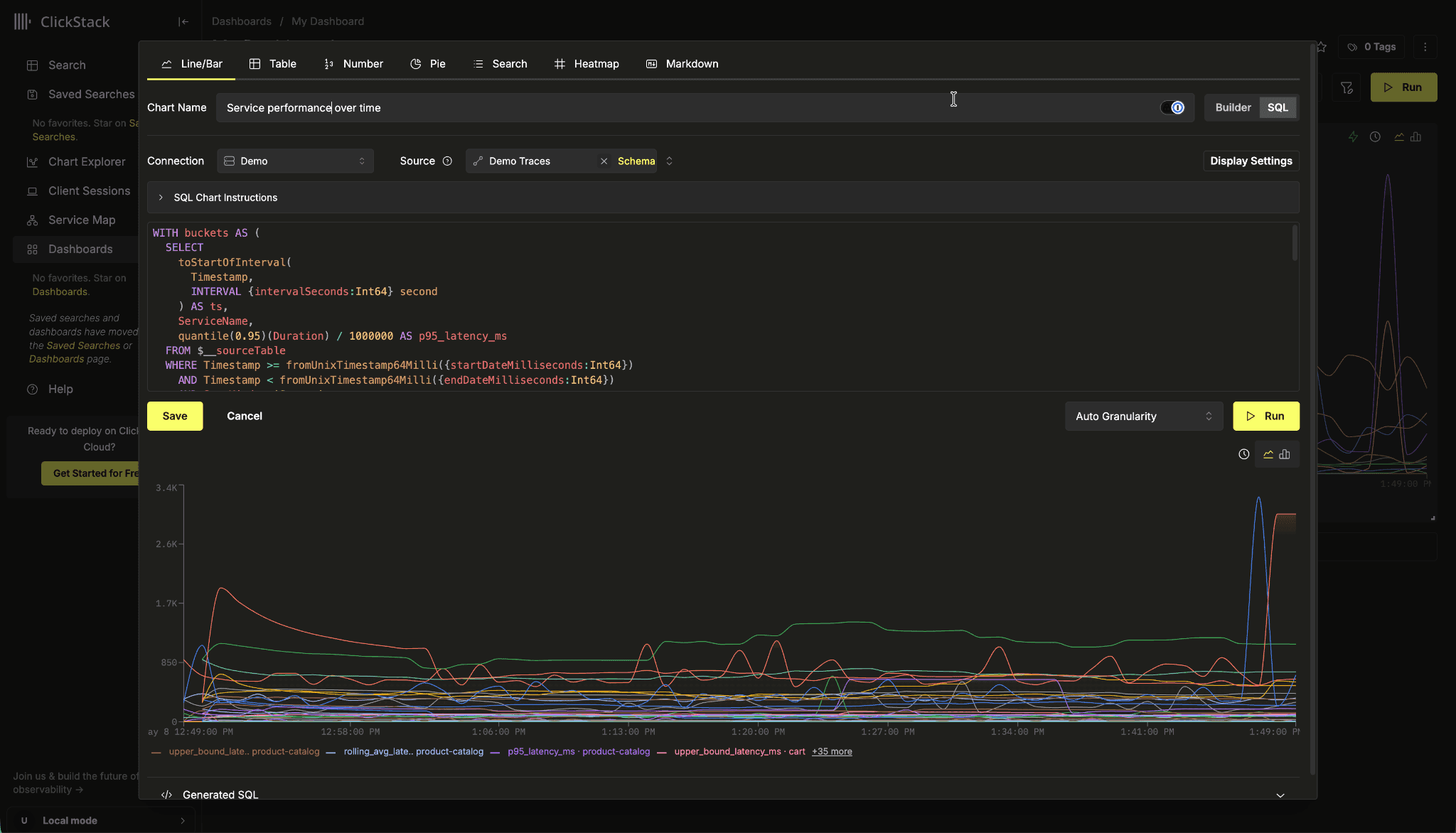
This allows teams to see whether latency is moving outside its recent baseline, rather than relying on a fixed threshold that may be too sensitive for one workload and too permissive for another. This type of analysis is extremely difficult to express in traditional query builders because it requires window functions, historical baselines, percentile calculations, grouped time-series logic, and multi-stage query composition. With raw SQL, these workflows become straightforward.
Some astute readers may have noticed that the previous SQL query includes macros for the query time range, dashboard filters, and source table selection. Users coming from Grafana may also find these macros very familiar…
Allowing dynamic SQL charts
While static SQL queries are useful, observability dashboards still need to remain dynamic and interactive. Charts need to automatically respond to dashboard time ranges, intervals, and filters, without users having to manually rewrite queries every time the dashboard changes.
This is where query parameters and macros become critical.
Query parameters expose dashboard state directly to the SQL query. These include values such as the dashboard start time, end time, and interval size. They use ClickHouse parameter syntax such as {startDateMilliseconds:Int64} and {intervalSeconds:Int64} and allow queries to dynamically adapt to the active dashboard context.
Macros build on top of these parameters and provide shorthand expressions for common observability workflows. For example, macros such as $__filters and $__sourceTable automatically inject dashboard filters and source table references directly into the query. Time-filtering and bucketing macros further simplify the creation of dynamic time-series visualizations.
One of our goals when building SQL-based visualizations was to make the experience feel immediately familiar to existing Grafana and ClickHouse users. As a result, many of the supported macros intentionally mirror the conventions used by the ClickHouse Grafana plugin. In many cases, users can bring existing SQL queries directly from Grafana into ClickStack and have them work with minimal or no modification.
This compatibility is an important design philosophy for us. Teams already invest significant time building operational queries, dashboards, and alerting logic, and we wanted SQL-based visualizations to integrate naturally into existing workflows rather than forcing users to rewrite everything from scratch.
These macros also ensure that SQL charts remain fully interactive inside dashboards. When a user changes the dashboard time range, applies a filter, or switches the underlying source, the SQL query automatically adapts to reflect the new context.
Considering the previous visualization and query, if we apply a dashboard time range and service-level filter, the macros automatically inject the corresponding SQL conditions into the query execution while preserving the visualization logic.
For users interested in the full list of supported macros and query parameters, see the SQL-based visualizations documentation: SQL-based visualizations documentation.
Charting query results
While SQL-based visualizations provide full flexibility over query logic, ClickStack still needs to understand how returned query columns should map onto visualization elements. This mapping depends on both the visualization type and the data types returned by the query itself. For example, for Line and Stacked Bar charts, the first Date or DateTime column is interpreted as the timestamp axis, with numeric columns plotted as series values, and String, Map, and Array columns are treated as grouping dimensions, allowing separate lines or bars to be rendered per group.
Other visualization types, such as Pie, Number, and Table charts, use slightly different mapping rules. For a complete breakdown of how query results are interpreted across visualization types, see the documentation section on how query results are plotted.
The next step: SQL-powered alerting
While SQL-powered charting dramatically expands what users can visualize, SQL-powered alerting is where the real operational impact emerges.
Last year, we introduced native alerting support in ClickStack with integrations for platforms such as PagerDuty and Incident.io, allowing teams to build alerts directly from searches and charts. This made it easy to define threshold-based alerts over logs, traces, and metrics directly inside ClickStack.
But ultimately, alerting is only ever as expressive as the query capabilities beneath it.
Traditional threshold alerts work well for straightforward conditions, but observability teams increasingly want to alert on more advanced operational patterns. They want to detect anomalies relative to rolling baselines, identify sudden changes in behavior, correlate multiple signals together, or build alerts based on statistical analysis rather than fixed values.
Historically, this often forced teams to maintain separate tooling, such as Grafana, solely for advanced alerting workflows, even though ClickHouse was already their primary observability datastore.
SQL-based alerting is the natural evolution of SQL-powered charting. Once users can express arbitrary analytical logic in SQL visualizations, they can apply that same power directly to alerting.
While SQL alerts can still be used for richer threshold-based conditions, such as alerting on rolling averages or dynamically calculated baselines, the real power comes from moving the complexity into the query itself rather than the threshold configuration.
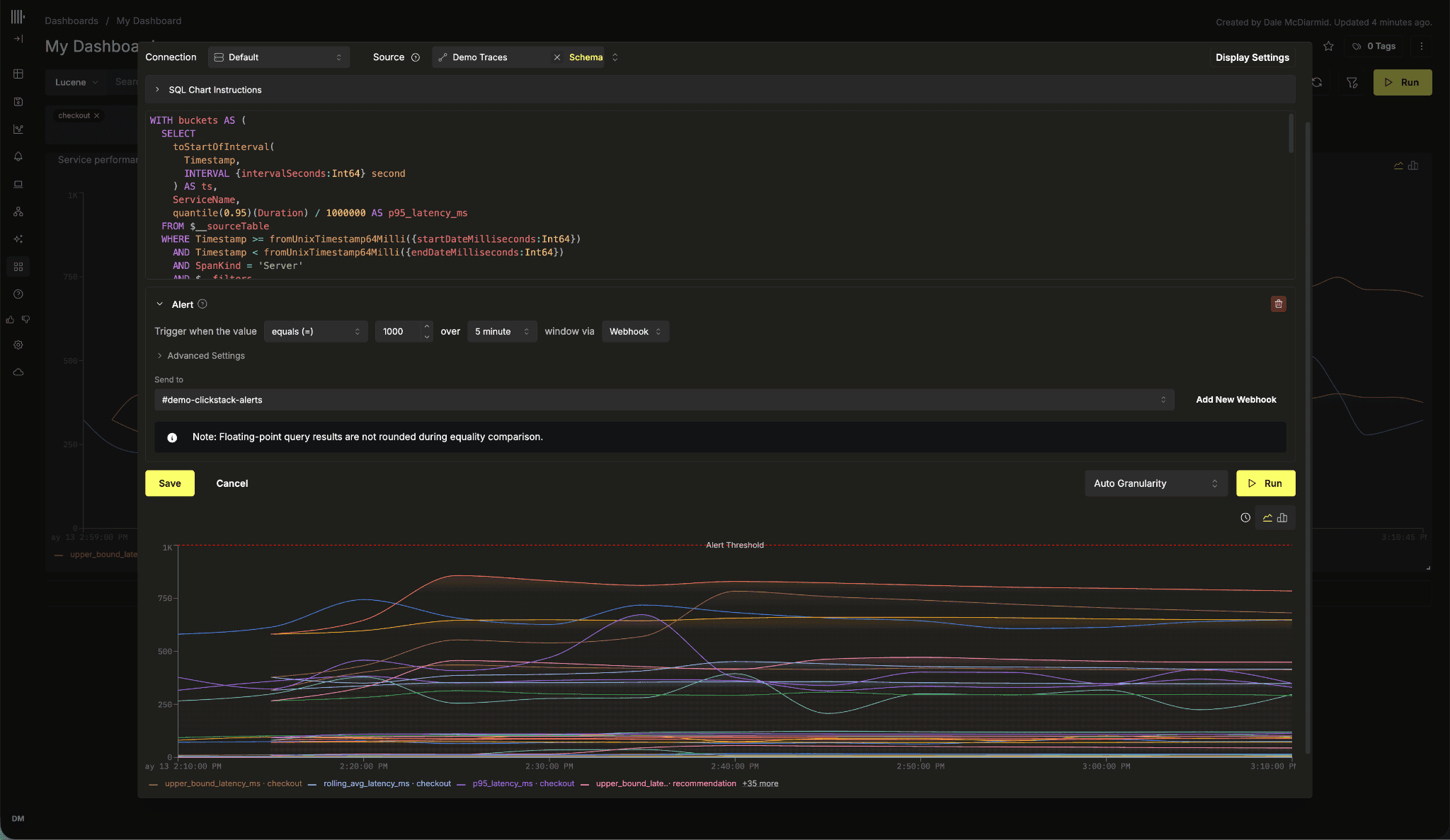
Instead of returning a raw metric and comparing it against a static threshold, SQL queries can encapsulate the entire alerting decision. A query can look back over previous time windows, calculate statistical boundaries, compare historical behavior, and ultimately return a binary result such as 1 or 0, indicating whether an alert condition should fire.
This fundamentally changes how alerting logic can be expressed. Rather than configuring increasingly complex threshold rules, users can leverage the full analytical power of ClickHouse directly inside the query itself.
Example: anomaly detection with lagging averages
For example, consider detecting sudden spikes in error volume relative to historical behavior. Rather than alerting when error counts exceed a fixed threshold, we can instead calculate a rolling average and standard deviation over previous intervals, then determine whether the current bucket deviates significantly from its recent baseline.
WITH buckets AS (
SELECT
toStartOfInterval(
Timestamp,
INTERVAL {intervalSeconds:Int64} second
) AS ts,
countIf(StatusCode = 'Error') AS error_count
FROM $__sourceTable
WHERE Timestamp >= fromUnixTimestamp64Milli({startDateMilliseconds:Int64})
- toIntervalSecond({intervalSeconds:Int64} * 30)
AND Timestamp < fromUnixTimestamp64Milli({endDateMilliseconds:Int64})
AND SpanKind = 'Server'
AND $__filters
GROUP BY ts
ORDER BY ts
),
baselines AS (
SELECT
ts,
error_count,
avg(error_count) OVER (
ORDER BY ts
ROWS BETWEEN 30 PRECEDING AND 1 PRECEDING
) AS rolling_avg,
stddevPop(error_count) OVER (
ORDER BY ts
ROWS BETWEEN 30 PRECEDING AND 1 PRECEDING
) AS rolling_stddev
FROM buckets
)
SELECT
ts,
if(
error_count > rolling_avg + (2 * rolling_stddev),
1,
0
) AS anomaly_detected
FROM baselines
WHERE rolling_avg IS NOT NULL
ORDER BY ts ASCThis query first buckets failed requests into time intervals and calculates the total error count for each interval. It then computes a rolling average and standard deviation across the previous 30 intervals using ClickHouse window functions. Finally, the query compares the current error count against this rolling baseline and returns 1 when the current interval exceeds the rolling average by more than two standard deviations; otherwise returning 0.
Here, the SQL query itself fully encapsulates the alerting logic. Rather than visualizing raw error counts and configuring a fixed threshold externally, the query determines whether the current interval represents a statistically significant anomaly relative to recent history.
The alert configuration itself then becomes extremely simple. If the query returns 1, the alert fires.
This approach unlocks a dramatically wider range of alerting strategies because the complexity lives inside SQL rather than inside a constrained alert configuration model.
Alerting on query results
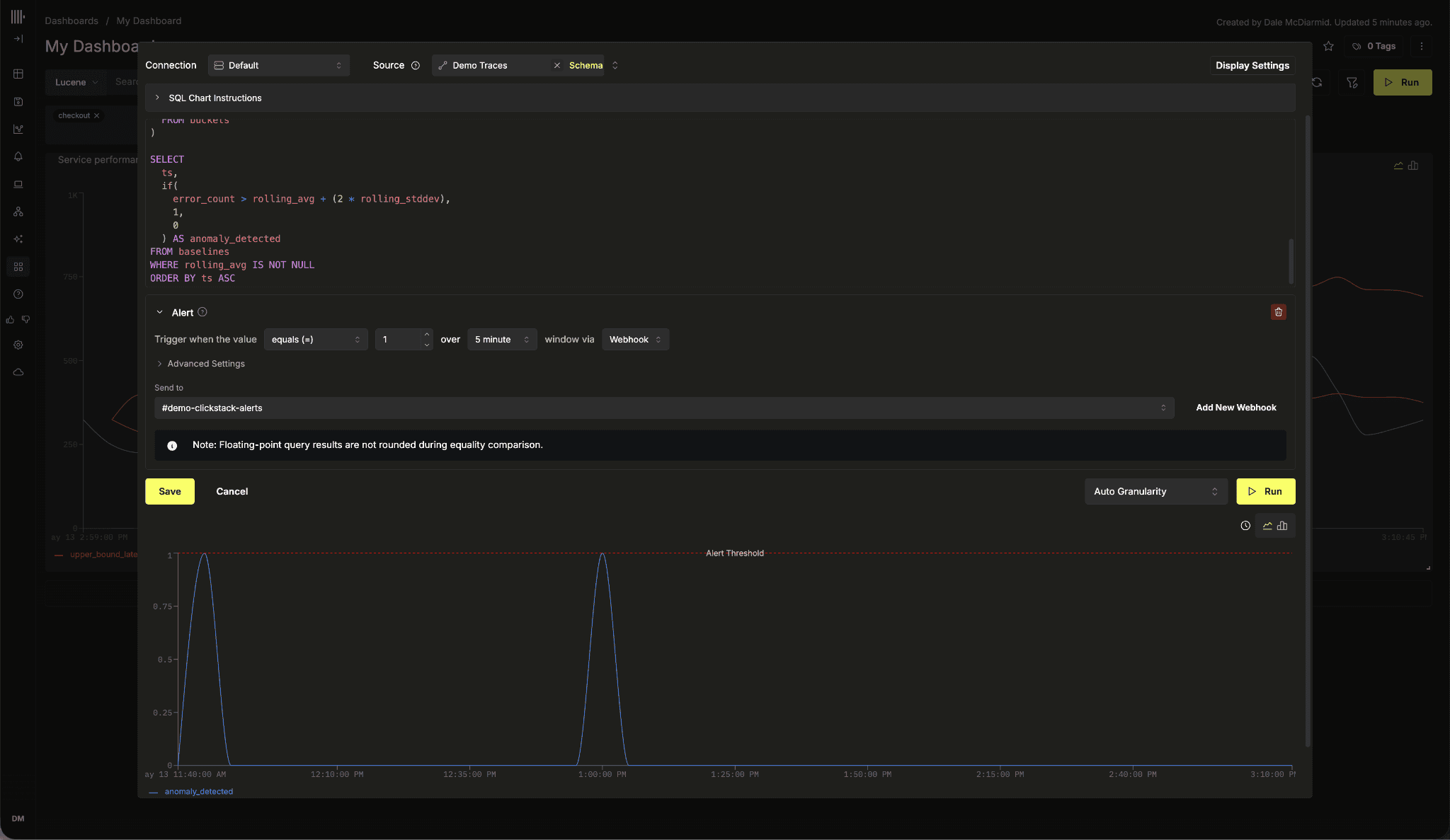
SQL-based alerts work by inspecting the results returned from a SQL query and determining which values should be evaluated against the configured threshold. For time-series visualizations such as Line and Stacked Bar charts, ClickStack identifies the returned timestamp column as the evaluation bucket and independently evaluates the final numeric column returned by the query for each interval. Any non-numeric columns are treated as grouping dimensions, allowing alerts to trigger independently per service, environment, or other grouping key. See our documentation for the full rules on when alerts will fire.
Just like SQL-based visualizations, SQL alert queries fully support query parameters and macros. This ensures alerts remain dynamic and automatically adapt to dashboard time ranges, evaluation intervals, and filters. In most cases, queries should include both interval macros and time-range filters so that alert evaluations remain scoped to the configured execution window rather than scanning the entire dataset during every alert run.
Conclusion
SQL-based alerting is the natural evolution of SQL-powered charting. Once users can express arbitrary analytical logic inside visualizations, extending those same capabilities into alerting becomes the obvious next step.
Subscribe to our observability newsletter
Stay informed on ClickStack feature releases, the product roadmap, and observability-related ClickHouse news.