50.6k
50.6k
We've been gratified by the community reception of pg_clickhouse, the extension to query ClickHouse databases from Postgres. Recent uptake generated a ton of feedback, which we've been diligently addressing in the last few releases. These changes follow our constant mantra for pg_clickhouse: pushdown, pushdown, pushdown! Let's take a quick tour.
Setup
If you'd like to follow along, the following examples use this ClickHouse table:
CREATE TABLE events (
id UInt32,
event String,
tags Array(String),
at DateTime64,
props JSON
) ENGINE = MergeTree ORDER BY (event, id);
INSERT INTO events VALUES
(
1, 'order', ['a', 'b', 'c'], '2025-12-28 10:42:35.342',
'{"cid": "C100", "address": {"city": "Paris, France", "code": "75001"}}'
),
(
2, 'order', ['d', 'e', 'f'], '2026-02-22 05:26:26.982',
'{"cid": "C200", "address": {"city": "London, UK", "code": "SW1A"}}'
),
(
3, 'return', ['😀', '⚽️'], now64() - 86400 * 2,
'{"cid": "C200", "address": {"city": "Manchester, UK", "code": "M2 1AB"}}'
),
(
4, 'order', ['x', 'y', 'z'], now64() - 86400,
'{"cid": "C300", "address": {"city": "New York, USA", "code": "10030"}}'
),
(
5, 'deliver', [], now64(),
'{"cid": "C500", "address": {"city": "Portland, USA", "code": "97212"}}'
)
;And this pg_clickhouse foreign table configuration in Postgres:
CREATE SERVER ch FOREIGN DATA WRAPPER clickhouse_fdw OPTIONS(driver 'http');
CREATE USER MAPPING FOR CURRENT_USER SERVER ch;
CREATE EXTENSION pg_clickhouse;
CREATE SCHEMA customer;
IMPORT FOREIGN SCHEMA "default" FROM SERVER ch INTO customer;JSONB accessors
For Postgres JSONB columns mapped to the ClickHouse JSON type,1
pg_clickhouse v0.1.10 added JSONB accessor operator and function pushdown outside SELECT clauses (generally in WHERE, ORDER BY, and HAVING clauses). It does so by converting JSON property accessors
to the ClickHouse sub-column syntax.
See, example, the Remote SQL output from this verbose EXPLAIN using ->>
to compare a JSON object value to a string:
EXPLAIN (VERBOSE, COSTS OFF)
SELECT id, event, props
FROM customer.events
WHERE props ->> 'cid' = 'C200';QUERY PLAN
------------------------------------------------------------------------------------------
Foreign Scan on customer.events
Output: id, event, props
Remote SQL: SELECT id, event, props FROM "default".events WHERE ((props.cid = 'C200'))
(3 rows)This allows ClickHouse to filter "C100" directly. The output is just what you'd expect:
SELECT id, event, props
FROM customer.events
WHERE props ->> 'cid' = 'C200';id | event | props
----+--------+--------------------------------------------------------------------------
2 | order | {"cid": "C200", "address": {"city": "London, UK", "code": "SW1A"}}
3 | return | {"cid": "C200", "address": {"city": "Manchester, UK", "code": "M2 1AB"}}
(2 rows)For the -> operator, which returns a JSONB value, pg_clickhouse has
ClickHouse convert the value returned by the sub-column syntax to JSON in
order to compare values as Postgres does:
EXPLAIN (VERBOSE, COSTS OFF)
SELECT id, event, props
FROM customer.events
WHERE props -> 'cid' = '"C300"'::jsonb;QUERY PLAN
----------------------------------------------------------------------------------------------------------
Foreign Scan on customer.events
Output: id, event, props
Remote SQL: SELECT id, event, props FROM "default".events WHERE ((toJSONString(props.cid) = '"C300"'))
(3 rows)Executing the query returns the expected result:
SELECT id, event, props
FROM customer.events
WHERE props -> 'cid' = '"C300"'::jsonb;id | event | props
----+-------+------------------------------------------------------------------------
4 | order | {"cid": "C300", "address": {"city": "New York, USA", "code": "10030"}}
(1 row)The same pattern applies to the JSONB functions jsonb_extract_path() and
jsonb_extract_path_text() functions, which also allowing multiple paths to
get to nested values, as visible in the Remote SQL for this plan:
EXPLAIN (VERBOSE, COSTS OFF)
SELECT id, event, props FROM customer.events
WHERE jsonb_extract_path_text(props, 'address', 'city') = 'Paris, France';QUERY PLAN
------------------------------------------------------------------------------------------------------------
Foreign Scan on customer.events
Output: id, event, props
Remote SQL: SELECT id, event, props FROM "default".events WHERE ((props.address.city = 'Paris, France'))
(3 rows)Of course execution returns the expected results:
SELECT id, event, props
FROM customer.events
WHERE jsonb_extract_path_text(props, 'address', 'city') = 'Paris, France';id | event | props
----+-------+------------------------------------------------------------------------
1 | order | {"cid": "C100", "address": {"city": "Paris, France", "code": "75001"}}
(1 row)And the same goes for pushing down comparisons to JSON values using
jsonb_extract_path():
EXPLAIN (VERBOSE, COSTS OFF)
SELECT id, event, props
FROM customer.events
WHERE jsonb_extract_path(props, 'address', 'city') = '"New York, USA"';QUERY PLAN
----------------------------------------------------------------------------------------------------------------------------
Foreign Scan on customer.events
Output: id, event, props
Remote SQL: SELECT id, event, props FROM "default".events WHERE ((toJSONString(props.address.city) = '"New York, USA"'))
(3 rows)SELECT id, event, props
FROM customer.events
WHERE jsonb_extract_path(props, 'address', 'city') = '"New York, USA"';id | event | props
----+-------+------------------------------------------------------------------------
4 | order | {"cid": "C300", "address": {"city": "New York, USA", "code": "10030"}}
(1 row)SQL value functions
One of our customers switched queries from Postgres to pg_clickhouse tables
and ran into failures using certain date and time functions, like
CURRENT_DATE and CURRENT_TIMESTAMP. pg_clickhouse did not push down those
functions, which caused issues used in combination with functions like
date_part() and date_trunc(), which do.
pg_clickhouse v0.2.0 improved the pushdown of all of the "current"-type date and time functions, such that they all push down and produce values more correctly relative to the local Postgres configuration than before.
For example, to look at records from before CURRENT_DATE, pg_clickhouse
produces this plan:
EXPLAIN (VERBOSE, COSTS OFF)
SELECT id FROM customer.events WHERE AT < CURRENT_DATE;QUERY PLAN
----------------------------------------------------------------------------------------------
Foreign Scan on customer.events
Output: id
Remote SQL: SELECT id FROM "default".events WHERE ((at < toDate(now('America/New_York'))))
(3 rows)It uses the time zone currently set in the Postgres session to ensure the date
is relative to the expected time zone. It does the same for
CURRENT_TIMESTAMP, also specifying precision 6, the default precision for
Postgres timestamps:
EXPLAIN (VERBOSE, COSTS OFF)
SELECT id
FROM customer.events
WHERE AT < CURRENT_TIMESTAMP;QUERY PLAN
-------------------------------------------------------------------------------------------
Foreign Scan on customer.events
Output: id
Remote SQL: SELECT id FROM "default".events WHERE ((at < now64(6, 'America/New_York')))
(3 rows)Naturally passes an explicit precision:
EXPLAIN (VERBOSE, COSTS OFF)
SELECT id
FROM customer.events
WHERE AT < CURRENT_TIMESTAMP(3);QUERY PLAN
-------------------------------------------------------------------------------------------
Foreign Scan on customer.events
Output: id
Remote SQL: SELECT id FROM "default".events WHERE ((at < now64(3, 'America/New_York')))
(3 rows)In addition to these SQL-standard current date and time keywords, we've added
pushdown for the Postgres-specific timestamps functions clock_timestamp(),
statement_timestamp(), and transaction_timestamp(), which all push down to
the closest ClickHouse equivalent, nowInBlock64:
EXPLAIN (VERBOSE, COSTS OFF)
SELECT id
FROM customer.events
WHERE AT < clock_timestamp();QUERY PLAN
--------------------------------------------------------------------------------------------------
Foreign Scan on customer.events
Output: id
Remote SQL: SELECT id FROM "default".events WHERE ((at < nowInBlock64(6, 'America/New_York')))
(3 rows)These functions work properly with other pushdown functions like date_part:
EXPLAIN (VERBOSE, COSTS OFF)
SELECT id, at FROM customer.events
WHERE date_part('year', at) < date_part('year', CURRENT_DATE);QUERY PLAN
----------------------------------------------------------------------------------------------------------------------------------------------
Foreign Scan on customer.events
Output: id, at
Remote SQL: SELECT id, at FROM "default".events WHERE ((toYear(at) < toYear(cast(toDate(now('America/New_York')), 'Nullable(DateTime)'))))
(3 rows)SELECT id, at
FROM customer.events
WHERE date_part('year', at) < date_part('year', CURRENT_DATE);id | at
----+----------------------------
1 | 2025-12-28 05:42:35.342-05
(1 row)As well as date_trunc — even with some interval date math thrown in:
EXPLAIN (VERBOSE, COSTS OFF)
SELECT id, at
FROM customer.events
WHERE date_trunc('day', at) >= date_trunc('day', CURRENT_DATE) - INTERVAL '1 day';QUERY PLAN
-----------------------------------------------------------------------------------------------------------------------------------------
Foreign Scan on customer.events
Output: id, at
Remote SQL: SELECT id, at FROM "default".events WHERE ((toStartOfDay(at) >= (toStartOfDay(toDate(now('America/New_York'))) - 86400)))
(3 rows)SELECT id, at
FROM customer.events
WHERE date_trunc('day', at) >= date_trunc('day', CURRENT_DATE) - INTERVAL '1 day';id | at
----+----------------------------
5 | 2026-04-17 17:29:47.046-04
4 | 2026-04-16 17:29:47.046-04
(2 rows)Array functions
Following the http driver array parsing improvements in v0.1.4,
pg_clickhouse v0.2.0 added pushdown support for a slew of array functions.
For example, array_cat maps to arrayConcat:
EXPLAIN (VERBOSE, COSTS OFF)
SELECT id, tags FROM customer.events WHERE array_cat(tags, ARRAY['🥏']) = ARRAY['😀','⚽️','🥏'];QUERY PLAN
------------------------------------------------------------------------------------------------------------
Foreign Scan on customer.events
Output: id, tags
Remote SQL: SELECT id, tags FROM "default".events WHERE ((arrayConcat(tags, ['🥏']) = ['😀','⚽️','🥏']))
(3 rows)SELECT id, tags
FROM customer.events
WHERE array_cat(tags, ARRAY['🥏']) = ARRAY['😀','⚽️','🥏'];id | tags
----+---------
3 | {😀,⚽️}
(1 row)array_to_string maps to arrayStringConcat:
EXPLAIN (VERBOSE, COSTS OFF)
SELECT id, tags
FROM customer.events
WHERE array_to_string(tags, '|') = 'a|b|c';QUERY PLAN
------------------------------------------------------------------------------------------------------
Foreign Scan on customer.events
Output: id, tags
Remote SQL: SELECT id, tags FROM "default".events WHERE ((arrayStringConcat(tags, '|') = 'a|b|c'))
(3 rows)SELECT id, tags
FROM customer.events
WHERE array_to_string(tags, '|') = 'a|b|c';id | tags
----+---------
1 | {a,b,c}
(1 row)And string_to_array maps to splitByString, here used in combination with
the aforementioned JSONB accessors:
EXPLAIN (VERBOSE, COSTS OFF)
SELECT id, event, jsonb_extract_path_text(props, 'address', 'code')
FROM customer.events
WHERE string_to_array(jsonb_extract_path_text(props, 'address', 'city'), ', ') = ARRAY['Portland', 'USA'];QUERY PLAN
----------------------------------------------------------------------------------------------------------------------------------------------
Foreign Scan on customer.events
Output: id, event, tags, at, props
Remote SQL: SELECT id, event, tags, at, props FROM "default".events WHERE ((splitByString(', ', props.address.city) = ['Portland','USA']))
(3 rows)SELECT id, event, jsonb_extract_path_text(props, 'address', 'code')
FROM customer.events
WHERE string_to_array(jsonb_extract_path_text(props, 'address', 'city'), ', ') = ARRAY['Portland', 'USA'];id | event | jsonb_extract_path_text
----+---------+-------------------------
5 | deliver | 97212
(1 row)We mapped so many more! See the full list for the range of possibilities.
HTTP result set streaming
Of course, we don't solely focus on pushdown; sometimes we need to address push back, as it were.
By default, when a Postgres foreign data wrapper executes a foreign query, it collects all of the results in memory before returning them to the caller. This works great for small result sets such as those returned by typical ClickHouse aggregate queries. But sometimes an app needs to process a substantial amount of the data itself, which can lead to memory pressure issues as Postgres pulls an entire data set into memory. Beware the OOM Killer!
In pg_clickhouse v0.1.10, we added query result streaming to the http
driver, which buffers a limited batch of results in memory (ca. 50MB by
default) and returns them before reusing the memory for the next batch. To see
it in action, we loaded the NYC taxi data set into ClickHouse, then spun up
a pre-streaming pg_clickhouse v0.6.1 OCI image and imported the
trips_small table into the nyc_taxi schema using the http driver:
docker run --name pg_clickhouse -p 6432:5432 -e POSTGRES_HOST_AUTH_METHOD=trust -d ghcr.io/clickhouse/pg_clickhouse:18docker exec -it pg_clickhouse bash -c 'apt-get update && apt-get install ca-certificates'psql -U postgres -h localhost -p 6432 <<EOF
CREATE EXTENSION pg_clickhouse;
CREATE SERVER my_ch FOREIGN DATA WRAPPER clickhouse_fdw OPTIONS(
driver 'http', host 'abcdefghij.us-east-1.aws.clickhouse.cloud', port '8443'
);
CREATE USER MAPPING FOR CURRENT_USER SERVER my_ch OPTIONS(user 'default', password 'xxxxxxxxxxxxx');
CREATE SCHEMA nyc_taxi;
IMPORT FOREIGN SCHEMA nyc_taxi FROM SERVER my_ch INTO nyc_taxi;
EOFWe started a process to continually measure the memory consumption of the OCI container:2
while true; do
docker stats --no-stream --format "{{.MemUsage}}" pg_clickhouse | \
cut -d '/' -f 1 | xargs printf "%s %s\n" "$(date +%T)" | sed -e 's/MiB//g'
doneFinally, we ran the query:
psql -U postgres -h localhost -p 6432 -c 'SELECT * FROM nyc_taxi.trips_small' > /dev/nullThen we repeated the steps with the streaming-enabled pg_clickhouse v0.2.0 OCI image and compared the results. This graph nicely summarizes the difference:
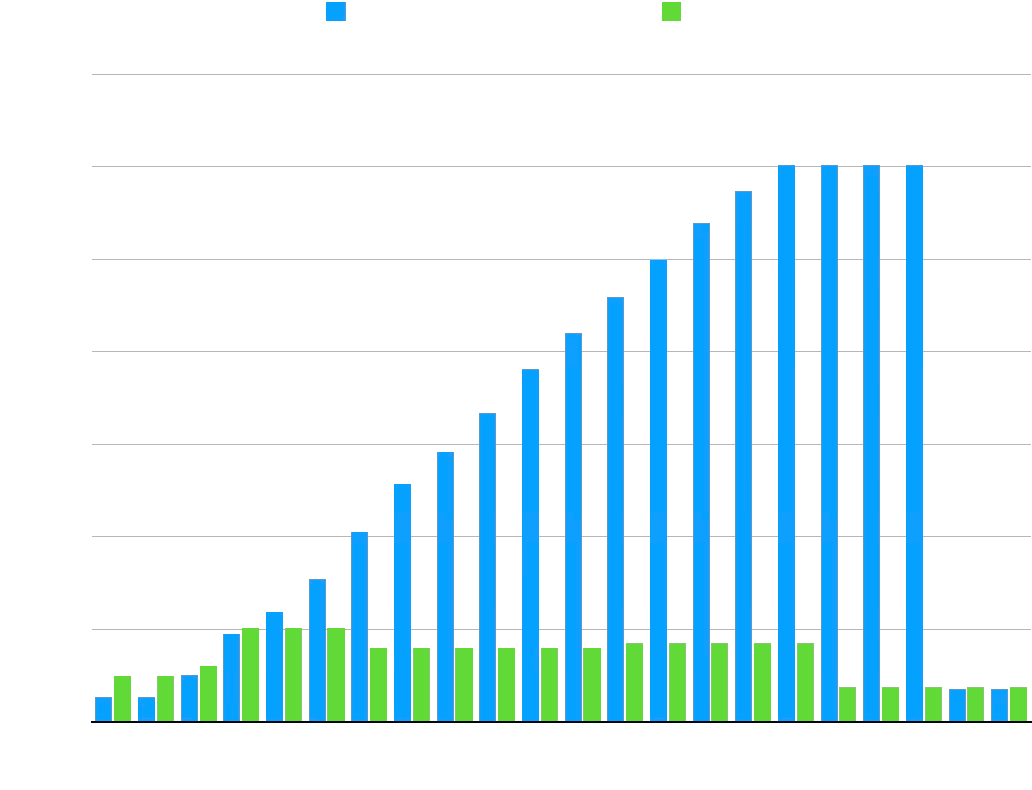
The data, massaged for the timings to line up, makes the case as well:
| Seconds | v0.1.10 | v0.2.0 |
|---|---|---|
| 0 | 26.65 | 49.7 |
| 2 | 26.63 | 49.6 |
| 4 | 50.8 | 60.5 |
| 6 | 95.6 | 101.4 |
| 8 | 118.7 | 101.4 |
| 10 | 155.0 | 101.4 |
| 12 | 205.2 | 79.9 |
| 14 | 257.2 | 79.9 |
| 16 | 292.1 | 79.9 |
| 18 | 333.6 | 79.9 |
| 20 | 381.6 | 79.9 |
| 22 | 420.4 | 79.9 |
| 24 | 459.1 | 85.5 |
| 26 | 499.6 | 85.5 |
| 28 | 538.6 | 85.5 |
| 30 | 573.8 | 85.5 |
| 32 | 601.8 | 85.5 |
| 34 | 601.8 | 37.7 |
| 36 | 601.8 | 37.7 |
| 38 | 601.8 | 37.7 |
| 40 | 35.78 | 37.7 |
| 42 | 35.78 | 37.7 |
While v0.6.0 spikes up to over 600MiB of memory consumption, v0.2.0, with streaming enabled, never exceeds 86 MiB. It's a little faster, too! Of course the bigger the result set the greater the memory savings. We plan to introduce streaming in the binary driver in a future release, as well.
What's next
We've got more in the works. Watch this space for more news about window function pushdown and regular expression compatibility. Until then, join us at PGConf.dev to hear about what we learned Building a Foreign Data Wrapper.
Footnotes
-
Supported by the http driver only for now. ↩
-
As Postgres core hacker Andres Freund explains, this type of brute force memory measurement produces inaccurate results, generally showing Postgres using far more memory that it does, in absolute terms. We deem it acceptable here, however, for a relative comparison. ↩
Try Postgres managed by ClickHouse
ClickHouse + Postgres has become the unified data stack for applications that scale. With Managed Postgres now available in ClickHouse Cloud, this stack is a day-1 decision.
Get access