50.6k
50.6k
I started at ClickHouse in December, and I want to tell you about one of my favorite coworkers.
They know what was discussed in Slack. They know which dbt model to query for warehouse adoption. They don’t judge me for asking basic questions like “what’s the difference between control plane and data plane?”
Honestly, they’ll even Google things for me when I’m too lazy.
But they are not perfect.
Sometimes, if they don’t have full context, they will confidently tell me something completely wrong. They have a habit of confusing correlation with causation. Sometimes, they run very expensive queries unnecessarily.
Their name is DWAINE (Data Warehouse AI Natural Expert) and they’re one of our internal AI agents.
Join the webinar
Join our data warehousing webinar series starting on February 25th on how to transform and serve up your data for data warehousing.
Register hereHow AI has changed the interface of business analytics
You probably know a DWAINE too. When an AI agent goes off the rails, it’s not always because the model is dumb.
It could be because:
- It queried raw data rather than curated data.
- It finds five definitions of “revenue.”
- It scanned 3TB because it can.
- It’s competing against other processes for resources and timed out.
Conversational and agentic analytics have changed the warehouse contract. Stakeholders are skipping dashboards and asking chatbots directly: “What was net revenue in EMEA last quarter?”
If your warehouse wasn’t designed for these new experiences, your AI Agent will show the consequences.
Data Warehouses now power agents
What’s interesting is that many of the core tenets of data warehousing haven’t changed. What has changed is why they matter.
For dashboarding, stakeholders see answers to existing questions through dashboards that have been curated by a human. Someone who understands the context of the business, and has been setting up your dashboards for years.
With AI agents, stakeholders get free rein to choose their own questions, and the warehouse answers directly. Poor warehouse design now can result in confident misinformation given to stakeholders who assume it is trustworthy.
If your warehouse is going to power conversational analytics, you need to keep the core tenets:
-
Isolate workloads by compute resources, not by duplicating data. AI queries, dashboards, ingestion, and transformations should not fight over the same machines.
-
Expose only curated data marts to AI. The model should see stable, canonical definitions. Do not expose raw tables and competing metric logic.
-
Enforce guardrails early and at multiple levels. Role-level permissions, resource limits, and schema discipline prevent PII leaks and runaway queries.
-
Optimize for both low latency and accuracy. No one wants to watch an LLM “think.” And no one wants it to be confidently wrong.
I’m going to give a high-level overview of how you could set up ClickHouse with these guidelines in mind.
Understanding the architecture
Open source ClickHouse runs as a single system where storage and compute are tightly coupled. The same machines store your data and run your queries. In ClickHouse Cloud, those responsibilities are separate:
- Storage lives in object storage.
- Compute runs on dedicated CPU and memory clusters, called services.
Even though storage and compute are separated under the hood, it still feels like you’re working with one database.
ClickHouse Cloud goes a step further still. Instead of having just one compute cluster, you can create multiple services that all access the same shared storage. This allows you to dedicate resources to specific workloads without having to duplicate data. A group of services is a warehouse.
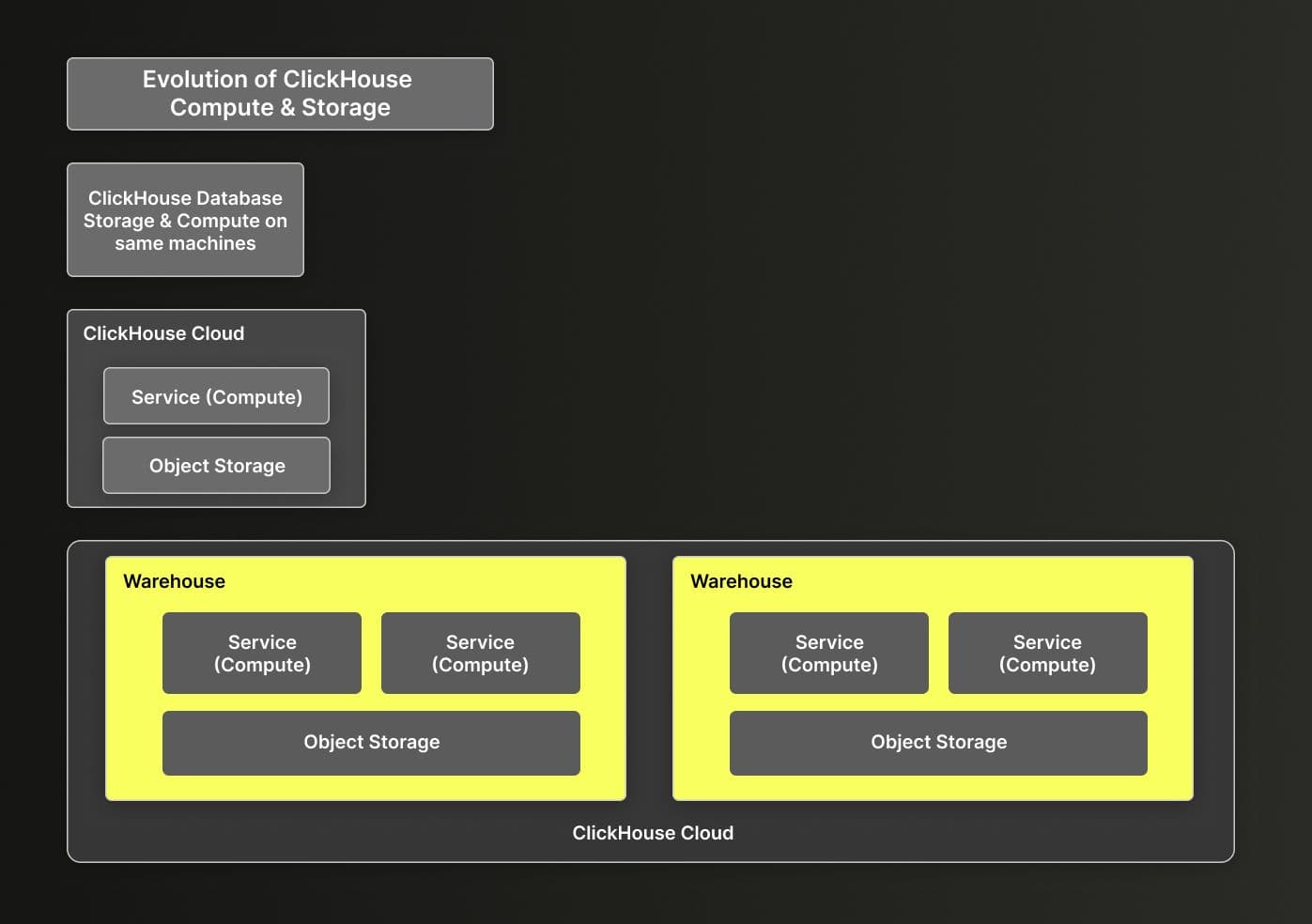
In Data Warehousing, it’s important to have separate services for different workloads to ensure you have the right-sized machines for each workload, controlling both cost and performance. For instance, dashboards and ad hoc queries will likely need smaller compute resources than cleaning up a dataset where you’re iterating over massive data volumes.
For sensitive data, such as PII or separate customer datasets, you may want to use multiple warehouses to isolate it. You can still access that data from another warehouse via the remote function. But when starting out - we recommend keeping it simple, start out with one warehouse.
The ClickHouse Cloud warehouse design also supports two different types of services: read/write and read-only. While both can read the data, only a read/write service can write to ClickHouse. A read-only service can still export data externally through a table function but can’t change data in ClickHouse. One special concept in warehouses is the primary (also called parent) service. This is the first service you create for the warehouse and will define some key default settings, such as the release channel (how quickly you will be upgraded to ClickHouse versions) and region (all services in a warehouse share the same region), for all subsequent services.
Set up your Warehouse & Services
To start out, create four services. You can create them either in the UI or via the API.
- Ingestion Service (Read/Write): For running ingestion pipelines via ClickPipes or self-managed.
- Transformation Service (Read/Write): For transformation workloads and pipelines
- LLM Service (Read Only): For dashboarding and LLMs
- Development Service (Read/Write): For developers to develop and sandbox with.
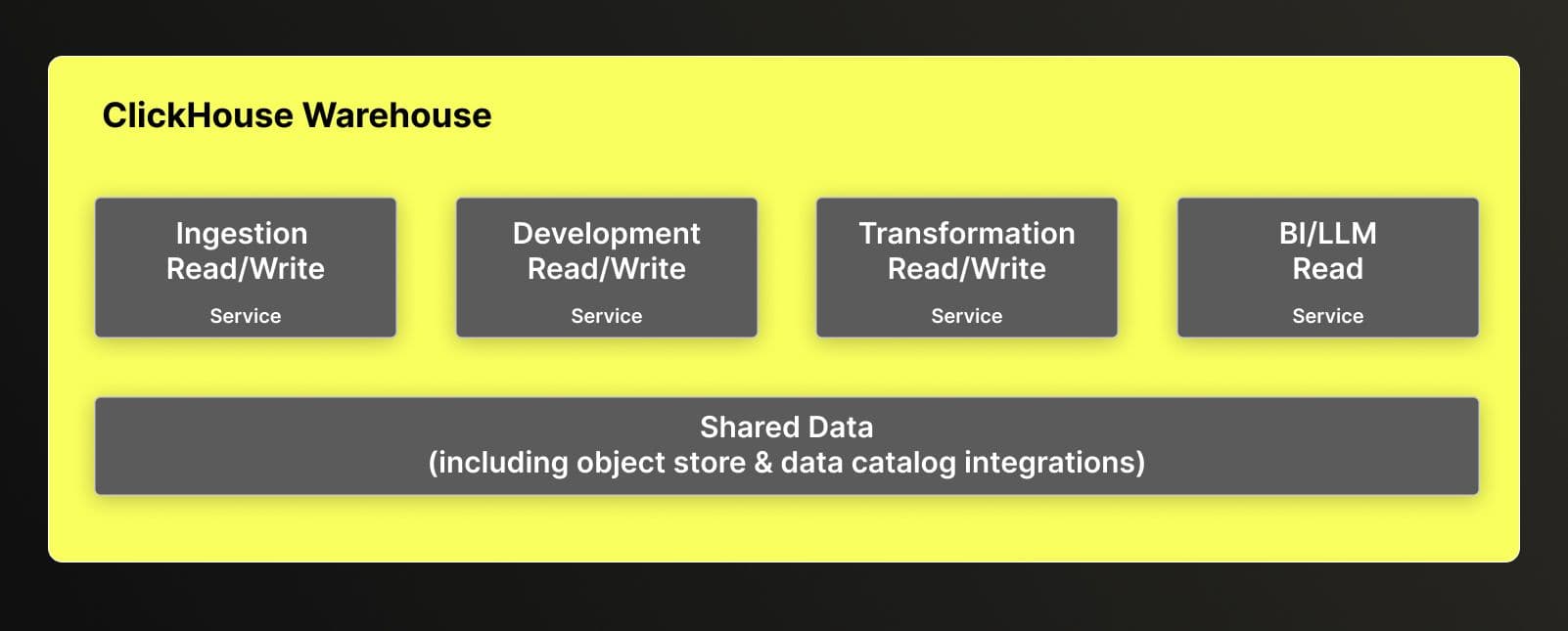
When creating the services, we recommend setting these settings:
- Auto-idling (on all services, including Primary)
- Auto-scaling
- Backups (for production Services)
- Turn on Gen AI for access to the latest AI features
Logical schema design
Now that you have your warehouse, you will want to organize your data for ease of discovery for both humans and machines.
Structure your data into separate databases. ClickHouse supports a two-part namespace: <database_name>.<object_name>.
Pick a structure that makes discovery easier based on how your team(s) communicate. A common model is using dimensional or medallion architecture. As an example to guide us through this blog, we will use lightweight dimensional modeling.
- Raw (Ingestion layer)
- Staging (Cleaned and standardized)
- Marts (Curated, aggregated, AI-ready)
create database raw;
create database staging;
create database marts;For development, you can either create a sandbox database for developers to share or a database per developer. Shared is great for collaboration, especially if you’re iterating together over the same objects, while developer-specific allows isolation and prevents surprises. For this blog, we will follow through with a developer-specific database for sandboxing.
create database dev_sandbox_achen;Access control
Since all the databases you just created are accessible to all the services you created, you’ll need to set up access controls to implement guardrails.
Create roles and grant access
Create roles to group together different permissions, such as table access. We recommend starting out with at least:
- Developer (able to read from Raw and create/modify in Staging & Marts databases)
- LLM (able to query only the Marts database tables and views)
- (optional) Service_Role (similar to Developer, for automated processes like orchestration)
Here is some sample SQL to get you started:
/* Developer Role Creation & Permissioning */
create role if not exists developer_role;
grant select on raw.* to developer_role;
grant select, insert, alter, create, drop on staging.* to developer_role;
grant select, insert, alter, create, drop on marts.* to developer_role;
grant create temporary table on *.* to developer_role;
/* LLM Role Creation & Permissioning */
create role if not exists llm_role;
grant select on marts.* to llm_role;Create Users
Now that you have the roles, you can create users for the databases. Please note that user management for the ClickHouse Cloud console is separate to user management within the database itself.
/* Developer User Creation & Permissioning */
create user if not exists amy
identified with sha256_password by 'Strong_dev_password___1';
grant developer_role to amy;
alter user amy default role developer_role;
grant select, insert, alter, create, drop on dev_sandbox_achen.* to amy;
/* LLM User Creation & Permissioning */
create user if not exists dwaine_service_user
identified with sha256_password by 'Strong_llm_password__2';
grant llm_role to dwaine_service_user;
alter user dwaine_service_user default role llm_role;Define resource allocation
Now, you don’t want your LLM to run wild with a query that is incorrect or taking more resources than desired. To prevent this, apply resource allocations on the role you are giving to your LLM user as guardrails.
/* Introduces some resource limitations to LLM */
alter role llm_role
settings
readonly = 1, /*no mutations*/
max_execution_time = 30, /*kill long running queries */
max_memory_usage = 2000000000, /* limits high memory consumption*/
max_rows_to_read = 100000000, /* limit full scans */
max_bytes_to_read = 5000000000, /* prevents giant table scans*/
max_threads = 4; /* manages CPU explosion */There’s a variety of settings you can implement in order to set boundaries on the user, role, session, and query level.
Now that we have the infrastructure up and ready to start, you can jump into the more standard ETL process of ingestion and transformation.
Ingest data
There are a variety of ways you can pull data into ClickHouse. The most popular ways are:
- ClickPipes: managed continuous ingestion
- Table Functions: With 80+ table functions like
s3()orpostgresql(), you can access many data sources for either batch or stream ingestion. With just one SQL statement, you can query directly from external sources (no need to create an external table, set up separate permissions to object store, etc). - Data Catalog integrations: If you’re on ClickHouse version 25.10+, you can connect to your open table format data catalog. You can configure it via the UI (via Data Sources) or via SQL. This will give you access to your external iceberg/delta tables just as you would a regular ClickHouse database.
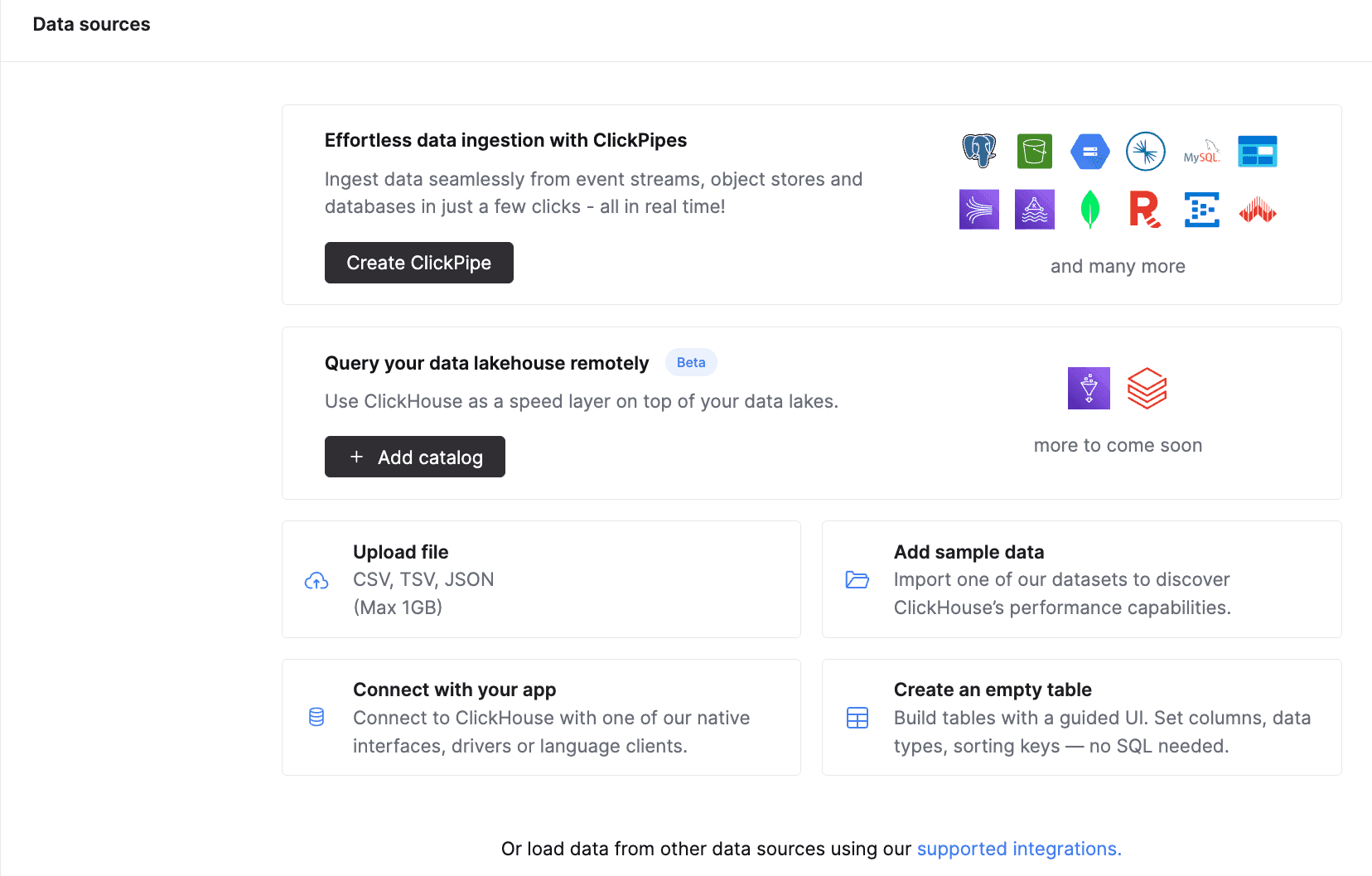
Everything can be set up via the ClickHouse Cloud console or by orchestrating the SQL externally (for table functions). Ingest that data into the Raw database so it’s ready for processing.
Designing the transformation and consumption layers
After you have ingested your data into the raw database, staging and marts is where the fun begins. This is where you will transform your data and create the serving layer, consumable for the AI Agent. This often means:
Staging (Transformation)
- Deduplicate
- Normalize types
- Enforce ordering and define primary keys
- Use incremental materialized views to process new data as it lands and build real-time pipelines.
Marts (Consumption):
- Curate canonical metrics
- Pre-aggregate expensive joins
- Remove ambiguity
- Flatten schemas
- Use Refreshable materialized views for recomputing the full result and guarantee consistency for AI
Now there is, of course, much more we can dig into this topic here, including optimizing your queries and how to provide context to your AI Agent about your specific business logic with Skills and documentation. But to keep this short and sweet, look out for a follow-up.
Join the webinar
Join our data warehousing webinar series starting on February 25th on how to transform and serve up your data for data warehousing.
Register hereFinally: Invite the AI in
After setting up your services, defining roles, enforcing guardrails, and building clean staging and marts layers, it’s time to let the AI agent in.
Connect your agent via the Agentic Data Stack, MCP, or your own client, and use your read-only LLM credentials.
Now your stakeholders can start to ask questions like:
- “Who were our 50 most active users this quarter?”
- “Show me retention curves for paid vs organic over the last six months.
- “Why did revenue dip last week?”
Remember, an AI-ready warehouse isn’t just about chucking a chatbot on top of your warehouse. It’s about meeting the requirements of conversational analytics with the core tenets of data warehousing.