50.5k
50.5k
ClickPy, a free analytical Python download statistics platform, recently crossed an impressive milestone: the main dataset now contains more than 2 trillion rows. Each row in this dataset represents a single Python package download, and the historical data traces back to 2011.
SELECT count() FROM pypi.pypi

┌───────count()─┐
│ 2214017475506 │ -- 2.21 trillion
└───────────────┘ClickHouse is the analytical database powering ClickPy, making it possible for Python enthusiasts to check their favorite Python package popularity or understand new trends in the Python ecosystem.
Reaching this scale with minimal ongoing maintenance highlights why ClickHouse works well as a long-term store for high-volume analytical data. Hitting the 2 trillion row mark gave us a reason to review the ingestion pipeline and make it more robust.
Evolving a data ingestion pipeline at this scale is not a trivial task. The system needs to remain available, ingestion must continue uninterrupted, and changes have to be introduced carefully. As part of this work, we also looked closer at the historical data, which led us to uncover some discrepancies.
The rest of this post explains how we redesigned the ingestion pipeline and, later on, how we fixed historical data while keeping ClickPy running throughout the process.
Replacing the legacy ingestion pipeline
The initial pipeline was built at a time when ClickPipes did not exist yet, therefore it required quite a bit of scripting. We described the original ingestion pipeline in this blog post.
Pypi download statistics are publicly available on a BigQuery table, and we have an automated BigQuery job that exports daily data to a Google Cloud Storage bucket. Finally, a custom script runs every day a ClickHouse insert statement to ingest data directly from the GCS bucket to ClickPy's main table, pypi.
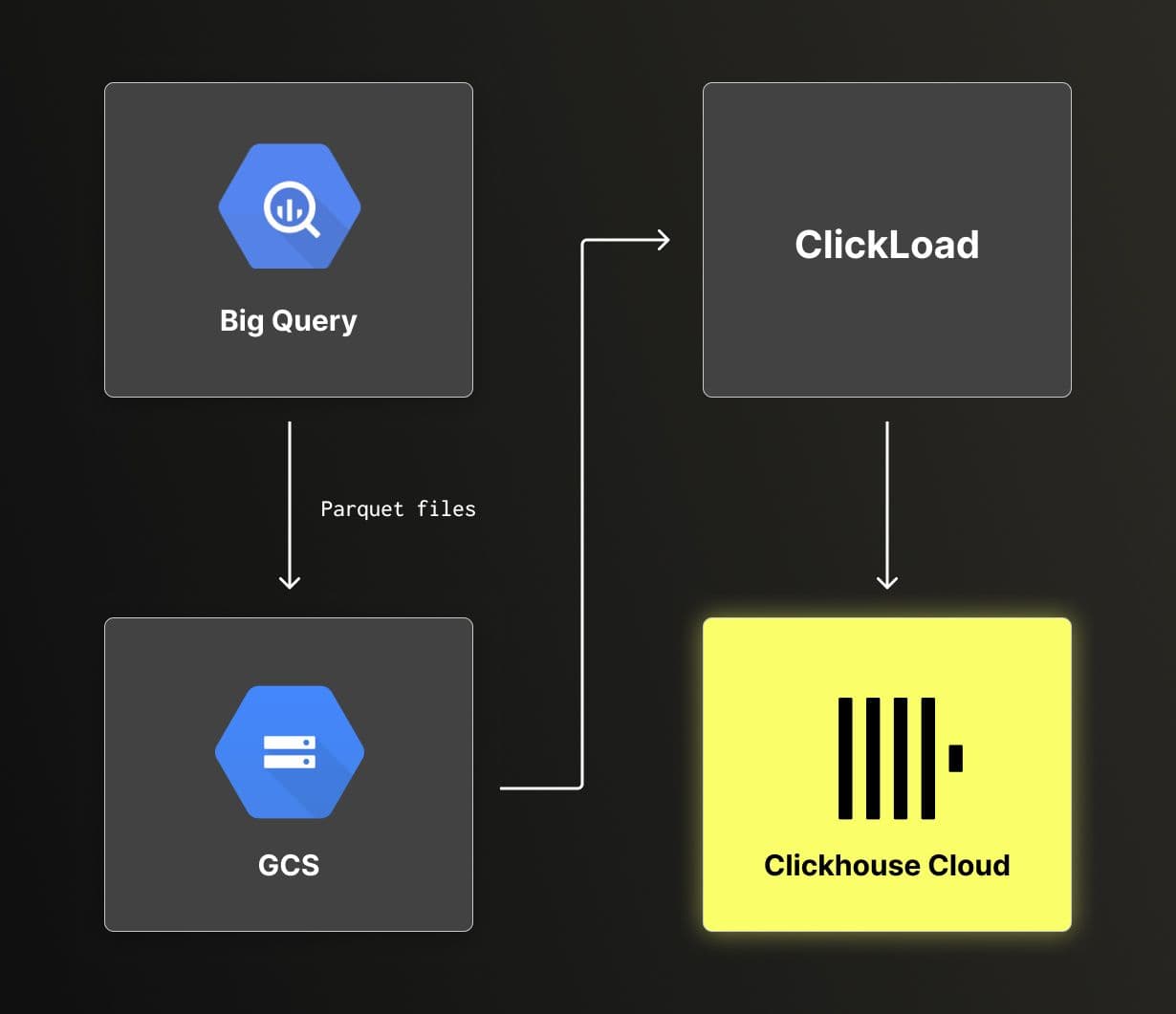
This approach worked, but at this scale, it left room for improvement. The main opportunity was to replace the custom ingestion script, shown as ClickLoad in the diagram, with ClickPipes.
Moving to ClickPipes removes several operational constraints introduced by a cron-based script:
- Retries, backoff, and failure handling are built in instead of being hand-rolled
- Pipeline state and progress are visible, which makes it easier to detect stalled or partial ingestions
- Delegate ingestion pipeline maintenance to the ClickHouse team
- Changes to ingestion logic require fewer moving parts and less custom code
With ClickPipes in place, ingestion becomes a first-class part of the system rather than a separate process that needs to be monitored and maintained alongside it.
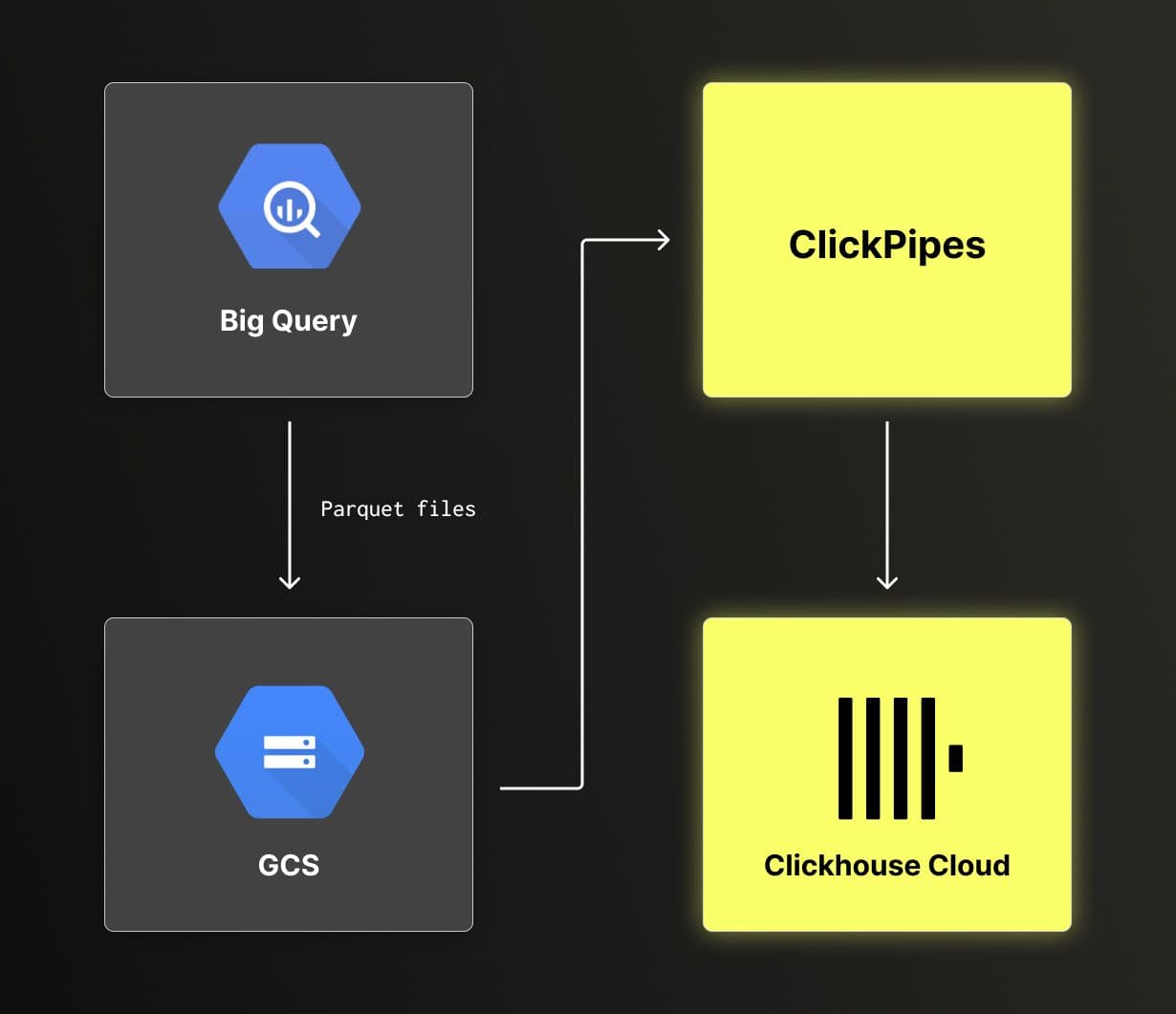
The challenge of replacing the custom script with ClickPipes is the scale at which we're operating. We can't afford to corrupt the data. The main table pypi contains more than 2 trillion rows, and we also have several materialized views built from the pypi table, which makes re-ingesting the data from scratch not an option.
Hot swap with ClickPipes at scale
We adopted a staged approach to replace the custom ingestion script with ClickPipes while keeping risk low.
The first step was to isolate the new pipeline from production. We cloned all table schemas and materialized views from the pypi database into a separate database called pypi_clickpipes. This allowed us to validate ingestion, transformations, and aggregations without affecting existing queries or dashboards.
-- Create the database
CREATE DATABASE pypi_clickpipes;

-- Clone the table schemas
CREATE TABLE pypi_clickpipes.pypi AS pypi.pypi;
CREATE TABLE pypi_clickpipes.pypi_downloads AS pypi.pypi_downloads;
CREATE TABLE pypi_clickpipes.pypi_downloads_by_version AS pypi.pypi_downloads_by_version;
CREATE TABLE pypi_clickpipes.pypi_downloads_max_min AS pypi.pypi_downloads_max_min;
CREATE TABLE pypi_clickpipes.pypi_downloads_per_day AS pypi.pypi_downloads_per_day;
CREATE TABLE pypi_clickpipes.pypi_downloads_per_day_by_installer AS pypi.pypi_downloads_per_day_by_installer;
CREATE TABLE pypi_clickpipes.pypi_downloads_per_day_by_version AS pypi.pypi_downloads_per_day_by_version;
CREATE TABLE pypi_clickpipes.pypi_downloads_per_day_by_version_by_country AS pypi.pypi_downloads_per_day_by_version_by_country;
CREATE TABLE pypi_clickpipes.pypi_downloads_per_day_by_version_by_file_type AS pypi.pypi_downloads_per_day_by_version_by_file_type;
CREATE TABLE pypi_clickpipes.pypi_downloads_per_day_by_version_by_installer_by_type AS pypi.pypi_downloads_per_day_by_version_by_installer_by_type;
CREATE TABLE pypi_clickpipes.pypi_downloads_per_day_by_version_by_installer_by_type_by_country AS pypi.pypi_downloads_per_day_by_version_by_installer_by_type_by_country;
CREATE TABLE pypi_clickpipes.pypi_downloads_per_day_by_version_by_python AS pypi.pypi_downloads_per_day_by_version_by_python;
CREATE TABLE pypi_clickpipes.pypi_downloads_per_day_by_version_by_python_by_country AS pypi.pypi_downloads_per_day_by_version_by_python_by_country;
CREATE TABLE pypi_clickpipes.pypi_downloads_per_day_by_version_by_system AS pypi.pypi_downloads_per_day_by_version_by_system;
CREATE TABLE pypi_clickpipes.pypi_downloads_per_day_by_version_by_system_by_country;
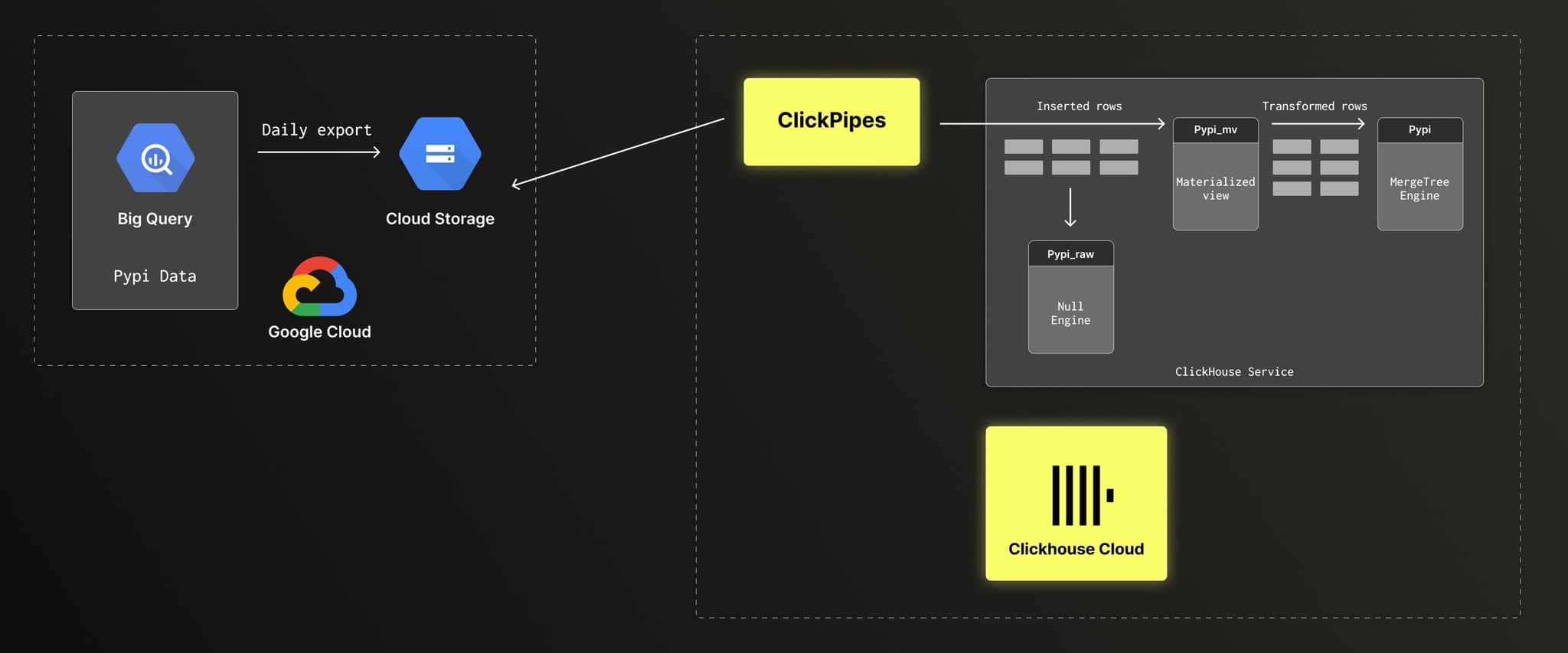
CREATE TABLE pypi_clickpipes.pypi_downloads_per_month AS pypi.pypi_downloads_per_day_by_version_by_system_by_country;With the clone table in place, we configured ClickPipes to ingest data from GCS to a new target table pypi_raw. ClickPipes automatically creates the table and infer the schema at the first ingestion. This table acts as a transient staging layer.
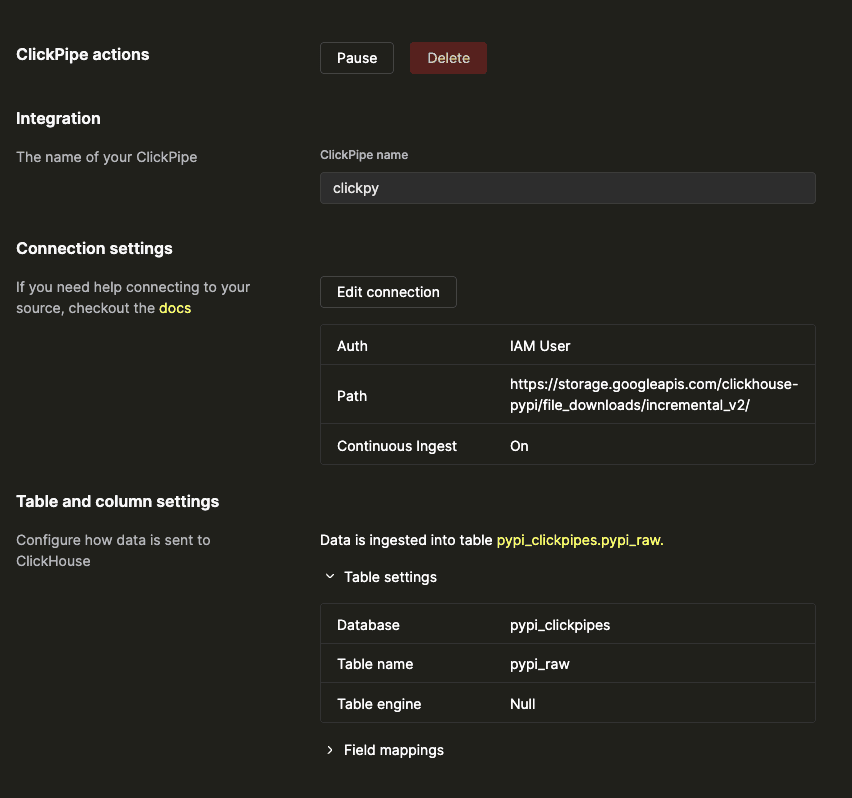
In the configuration, we intentionally use the Null engine for the target table. We do not need to persist raw rows in ClickHouse. Instead, a materialized view performs the transformation and writes directly to the pypi table, which contains the main dataset.
A new materialized view encapsulates all transformation logic that previously lived in the custom script: field normalization, type conversions, and schema alignment. Moving this logic into ClickHouse makes it easier to reason about and evolve over time.
CREATE MATERIALIZED VIEW pypi_clickpipes.pypi_mv TO pypi.pypi
(
    `date` Date,
    `country_code` LowCardinality(String),
    `project` String,
    `type` LowCardinality(String),
    `installer` LowCardinality(String),
    `python_minor` LowCardinality(String),
    `system` LowCardinality(String),
    `version` String,
    `ci` Enum8('false' = 0, 'true' = 1, 'unknown' = 2),
    `filename` String,
    `libc` Tuple(
        lib LowCardinality(String),
        version LowCardinality(String))
)
AS SELECT
    toDate(timestamp) AS date,
    ifNull(country_code, '') AS country_code,
    ifNull(project, '') AS project,
    ifNull(tupleElement(file, 'type'), '') AS type,
    ifNull(tupleElement(installer, 'name'), '') AS installer,
    arrayStringConcat(arraySlice(splitByChar('.', ifNull(python, '')), 1, 2), '.') AS python_minor,
    ifNull(tupleElement(system, 'name'), '') AS system,
    ifNull(tupleElement(file, 'version'), '') AS version,
    CAST(ifNull(ci, 0), 'Enum8(\'false\' = 0, \'true\' = 1, \'unknown\' = 2)') AS ci,
    ifNull(tupleElement(file, 'filename'), '') AS filename,
    tuple(ifNull(tupleElement(tupleElement(distro, 'libc'), 'lib'), ''), ifNull(tupleElement(tupleElement(distro, 'libc'), 'version'), '')) AS libc
FROM pypi_clickpipes.pypi_rawBelow is a high-level view of the data flow from BigQuery to ClickHouse using ClickPipes.
While reworking the ingestion pipeline, we also took the opportunity to extend the dataset with new fields to address recent community feature requests [1,2].
Once the staging table and materialized view were in place, configuring ClickPipes was straightforward. ClickPipes supports continuous ingestion and keeps track of which files have already been processed, but it does not support starting ingestion from an arbitrary point in time. To avoid re-ingesting the full historical dataset, we updated the BigQuery export job to write new data to a fresh GCS bucket. ClickPipes was then configured to read from this new location, allowing the new pipeline to start from the migration point.
We let the new ingestion pipeline run in parallel for several days and compared daily row counts between the production database pypi and the staging database pypi_clickpipes. Once the data matched, switching over was simple. We disabled the cron job that ran the custom script and updated the materialized view to write directly to pypi.pypi.
After the switch, we removed the cloned tables from the pypi_clickpipes database and kept only pypi_raw, pypi_mv, and the tables created and managed by ClickPipes. This results in a clean separation of concerns: the pypi database continues to serve ClickPy, while pypi_clickpipes is dedicated to ingestion and transformation logic.
Discovering historical ingestion gaps
While validating the new ingestion pipeline, we noticed discrepancies between BigQuery (the source of data) and ClickHouse. When comparing daily row counts, some historical dates in ClickHouse were missing data.
At this scale, issues like this are easy to miss. Queries continue to work, and dashboards still render, but the results are quietly incorrect. Once identified, the challenge was to correct the data without rebuilding the full dataset or interrupting ongoing ingestion.
Fix the past
The most direct way to fix the past data is to delete the affected days and re-ingest them from the source. However, column-oriented databases are optimized for fast inserts and analytical queries, not for modifying existing data. ClickHouse is no exception. That said, ClickHouse recently introduced lightweight delete and update operations, which made it possible to safely delete large ranges of data even on a multi-trillion-row table.
To fix a single day of data, we followed this sequence:
- Delete the affected day from all tables that aggregate data by day.
- Delete the affected day from the main pypi table.
- Temporarily drop materialized views that do not aggregate by day.
- Re-ingest the source data for the affected day into the pypi table.
- Recreate the materialized views that do not aggregate by day.
- Rebuild the tables populated by those materialized views.
The distinction between daily and non-daily aggregations is important. For tables that group data by day, such as pypi_downloads_per_day, we can delete a specific date and rely on materialized views to repopulate it during re-ingestion.
For tables that do not group by day, such as monthly aggregates, it is not possible to isolate rows belonging to a single day. In those cases, materialized views must be dropped before re-ingestion to avoid duplicate data, then recreated and rebuilt once the backfill is complete.
The full script used for this process is available here.
Where this leaves ClickPy
ClickPy reaching 2 trillion rows is more than a numerical milestone. It reflects both the growing activity of the Python ecosystem and the ability of ClickHouse to support analytical workloads at this scale. We offer ClickPy as a free open source service because we enjoy building applications on top of large datasets, want to support the open source community, and, thanks to ClickHouse, can operate it cost-efficiently even at multi-trillion-row scale.
The work described in this post, migrating the ingestion pipeline to ClickPipes and correcting historical data, is part of our ongoing effort to keep the platform healthy and relevant as it grows. Community engagement plays an important role in shaping ClickPy, and we encourage feature requests and issue reports as they directly drive improvements. A recent example is support for exporting charts through Metabase.
With these changes in place, ClickPy is more accurate, easier to operate, and ready for continued growth.