50.6k
50.6k

TL;DR
We benchmarked Snowflake, Databricks, ClickHouse Cloud, BigQuery, and Redshift across 1B, 10B, and 100B rows, applying each vendor’s real compute billing rules.
For analytical workloads at scale, ClickHouse Cloud delivers an order-of-magnitude better value than any other system.
How to compare cloud warehouse cost-performance
You have a dataset and a set of analytical queries. You have several cloud data warehouses you could run them on. And the question is straightforward:
Where do you get the most performance per dollar for analytical workloads?
Price lists don’t answer that.
They can’t. Different vendors meter compute differently, price capacity differently, and define “compute resources” differently, which makes their numbers incomparable at face value.
So we ran the same production-derived analytical workload across all five major cloud data warehouses:
- Snowflake
- Databricks
- ClickHouse Cloud
- BigQuery
- Redshift
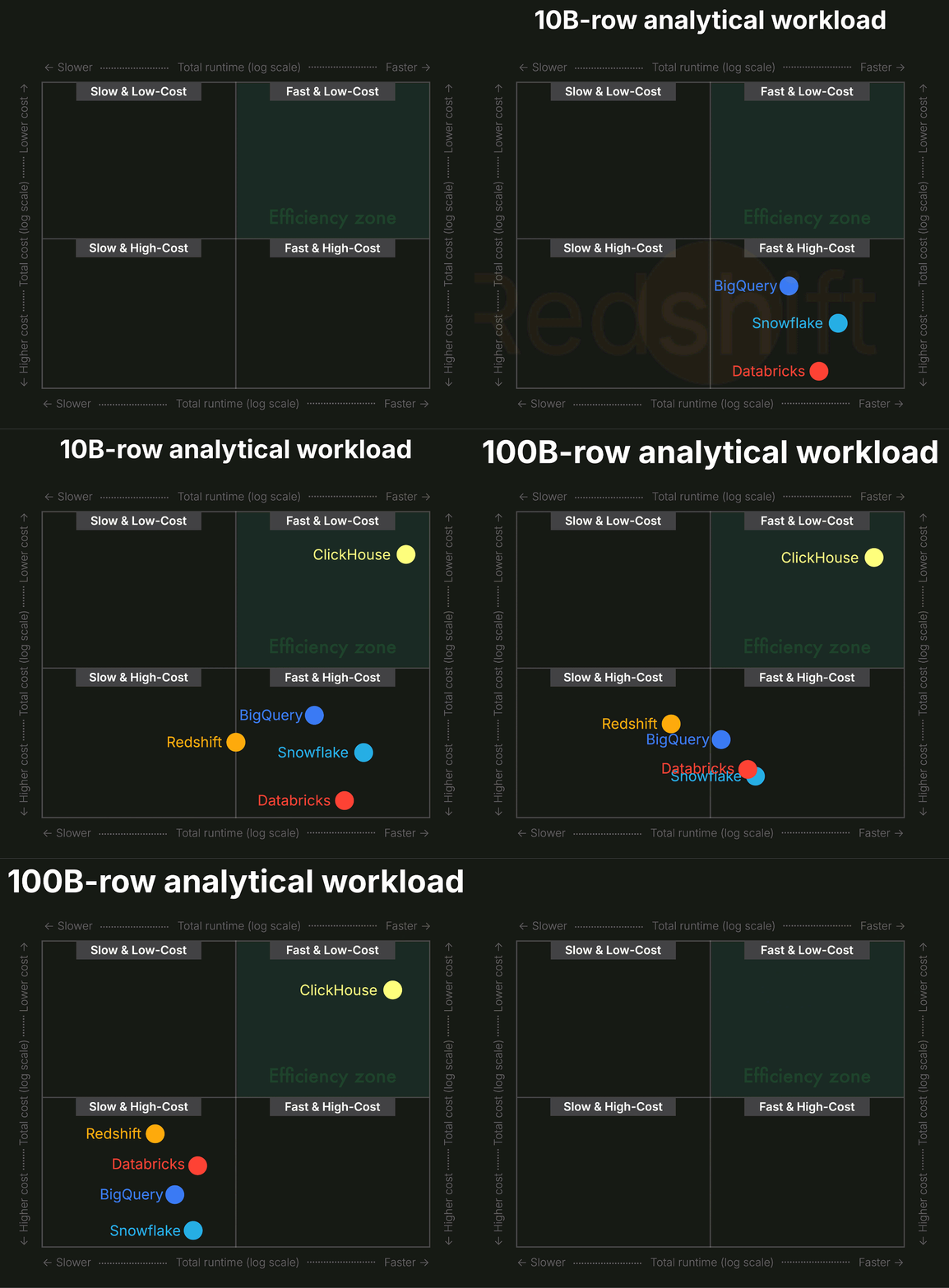
And we ran it at three scales — 1B, 10B, and 100B rows — to see how cost and performance evolve as data grows.
If you want the short version, here’s the spoiler: Cost-performance doesn’t scale linearly across systems.
ClickHouse Cloud delivers an order-of-magnitude better value than any other system.
If you want the details, the charts, and the methodology, read on.
Reproducible pipeline:
All results in this post are generated using CostBench, our open and fully reproducible benchmarking pipeline. CostBench applies each system’s real compute billing model to the raw runtimes so the cost comparisons are accurate and verifiable.
Storage isn’t the focus:
CostBench also calculates storage costs for every system, but we don’t highlight them here because storage pricing is simple, similar across vendors, and negligible compared to compute for analytical workloads.
The hidden storage win:
That said, if you look at the raw numbers in the result JSONs we link from the charts, ClickHouse Cloud quietly beats every other system on storage size and storage cost, often by orders of magnitude, but that’s outside the scope of this comparison.
Interactive benchmark explorer
Static charts are great for storytelling, but they only scratch the surface of the full dataset.
So we built something new: a fully interactive benchmark explorer, embedded right here in the blog.
You can mix and match vendors, tiers, cluster sizes, and dataset scales; switch between runtime, cost, and cost-performance ranking; and explore the complete results behind this study.
If you want to understand how we produced these numbers, everything is documented in the Appendix at the end of the post.
Let’s look at how the systems perform at each scale, starting with 1B rows.
(As discussed in the Appendix, we use the standard 43-query ClickBench analytical workload to evaluate each system.)
1B rows: the baseline
We include the 1B scale only as a baseline, but the more realistic stress points for modern data platforms are 10B, 100B, and above.
Today’s analytical workloads routinely operate in the tens of billions, hundreds of billions, and even trillions of rows. Tesla ingested over one quadrillion rows into ClickHouse for a stress test, and ClickPy, our Python client telemetry dataset, has already surpassed two trillion rows.
The scatter plot below shows, for each of the five systems, the total runtime (horizontal axis) and total compute cost (vertical axis) for a 1-billion-row ClickBench run.
(We simply hide the tick labels for clarity; the point positions remain fully accurate. The interactive benchmark explorer above shows the full numeric axes.)
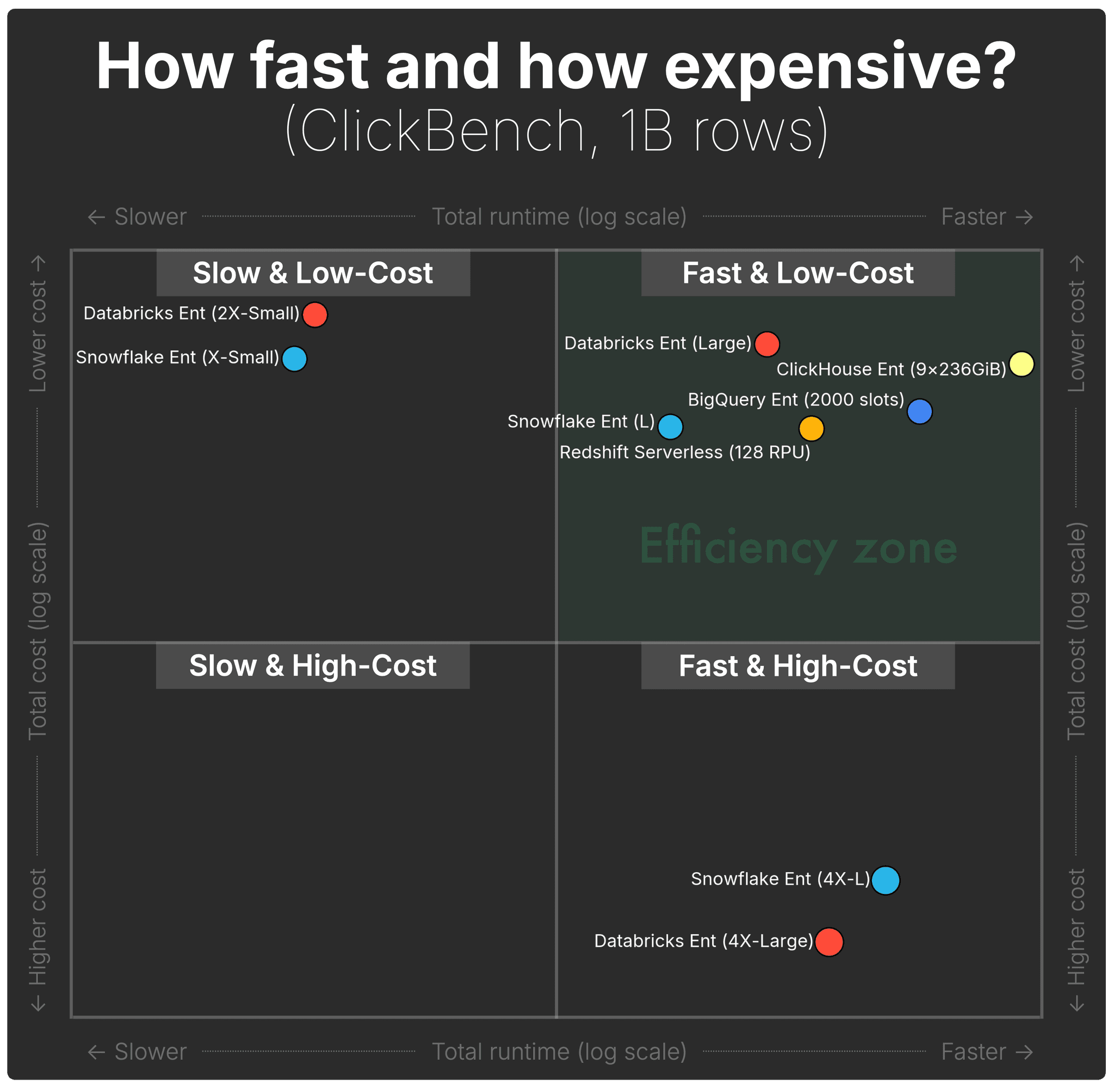 (Shown configurations represent the full spectrum for each engine; details in Appendix.)
At 1B rows, the chart reveals 3 clear quadrants of behavior.
| Category | System / Tier | Runtime | Cost |
|---|---|---|---|
| A large group falls into the ideal quadrant — fast enough and reasonably priced — but with very different value-per-dollar profiles. | |||
Fast & Low-Cost | ClickHouse Cloud (9 nodes) | ~23 s | ~$0.67 |
Fast & Low-Cost | BigQuery Enterprise (capacity) | ~38 s | ~$0.80 |
Fast & Low-Cost | Redshift Serverless (128 RPU) | ~64 s | ~$0.85 |
Fast & Low-Cost | Databricks (Large) | ~80 s | ~$0.62 |
Fast & Low-Cost | Snowflake (Large) | ~127 s | ~$0.85 |
| These two deliver ok speed, but at a steep price. | |||
Fast & High-Cost | Snowflake (4X-Large) | ~45 s | ~$4.8 |
Fast & High-Cost | Databricks (4X-Large) | ~59 s | ~$6.1 |
| BigQuery On-Demand is fast, but its per-TiB scanned pricing pushes it completely out of the main plot. | |||
Fast & High-Cost (off-chart) | BigQuery On-Demand | ~38 s | ~$16.9 |
| These tiers are inexpensive, but extremely slow. | |||
Slow & Low-Cost | Databricks (2X-Small) | ~712 s | ~$0.55 |
Slow & Low-Cost | Snowflake (X-Small) | ~785 s | ~$0.65 |
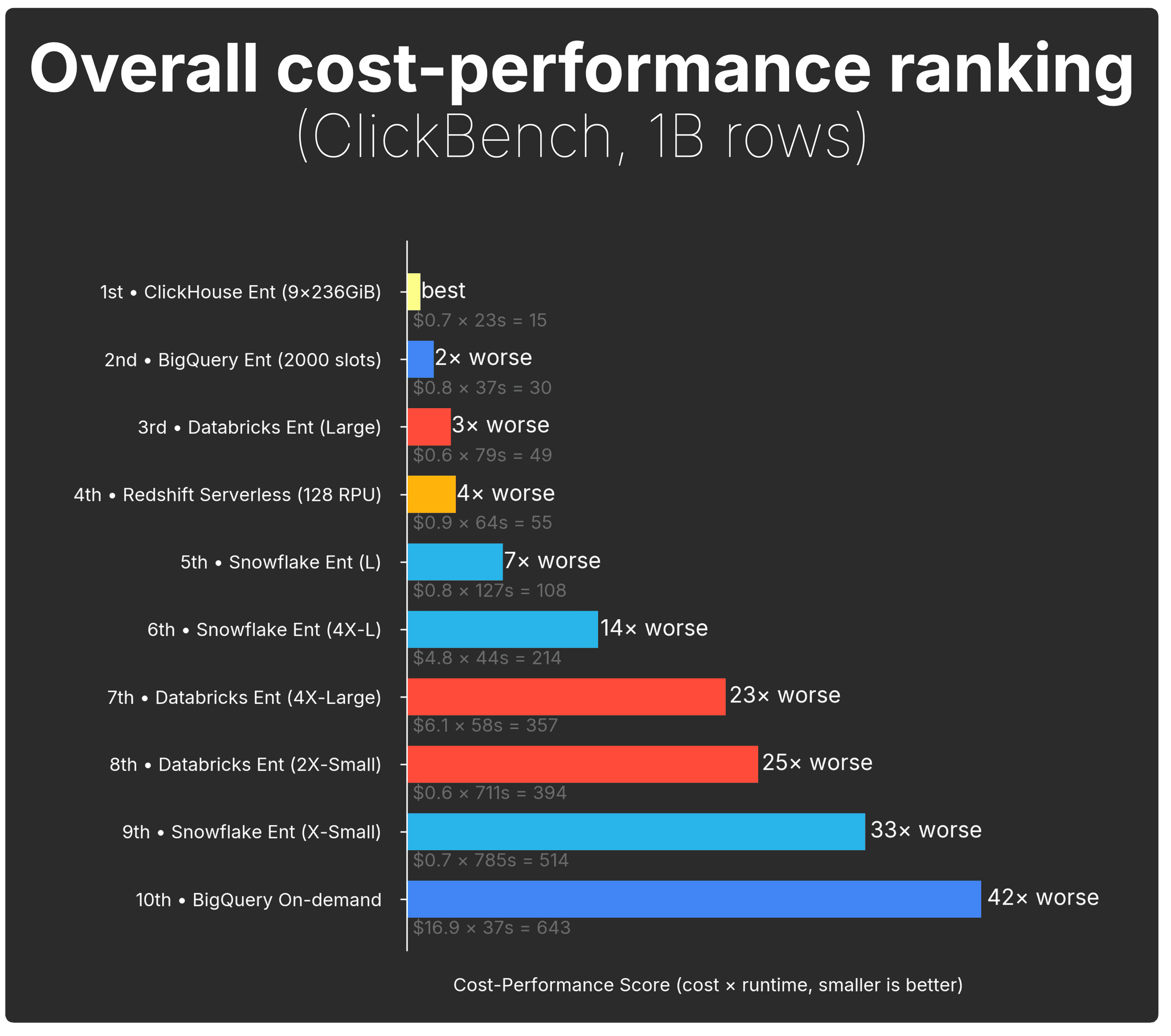
To compare cost-efficiency directly, the chart below collapses runtime and cost into a single cost-performance score (definition in methodology):
The picture becomes unambiguous:
-
ClickHouse Cloud delivers the strongest overall cost-performance; it has the lowest runtime × cost value, and everything else is compared against it.
-
BigQuery (capacity mode) comes next, at roughly 2× worse than ClickHouse for this dataset size.
-
Most other configurations fall off quickly as their runtime × cost climbs: from 3–4× worse up to double-digit multiples for the larger Snowflake and Databricks tiers.
The real story begins when the data grows.
1B rows is still small by modern standards, and the economics change rapidly as we scale to 10B and 100B rows, where most systems start drifting sharply out of the "Fast & Low-Cost" zone.
Get started today
Interested in seeing how ClickHouse works on your data? Get started with ClickHouse Cloud in minutes and receive $300 in free credits.
Sign up10B rows: cracks start to show
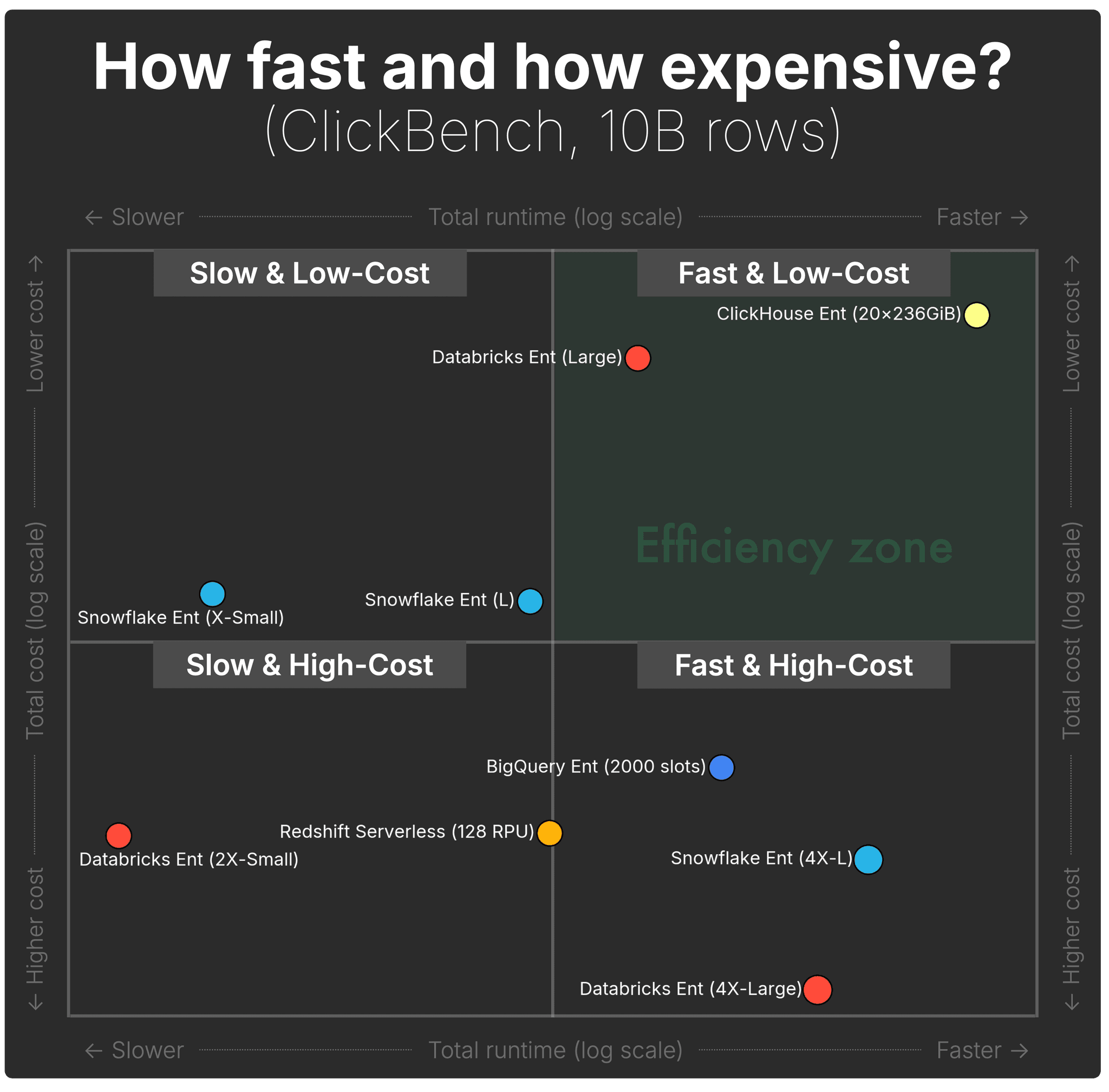
The scatter plot below shows, for each of the five systems, the total runtime (horizontal axis) and total compute cost (vertical axis) for a 10-billion-row ClickBench run.
(As noted earlier, we hide the tick labels for visual clarity, the point positions still reflect the real underlying values. The interactive benchmark explorer above includes full numeric axes.)
 (Shown configurations represent the full spectrum for each engine; details in Appendix.)
At 10B rows, the first real separation appears. Systems begin drifting out of the "Fast & Low-Cost" quadrant as runtimes stretch and costs rise.
| Category | System / Tier | Runtime | Cost |
|---|---|---|---|
| These are the only two systems still in the ideal quadrant at 10B rows, but with very different speed profiles. | |||
Fast & Low-Cost | ClickHouse Cloud (20 nodes) | ~67 s | ~$4.27 |
Fast & Low-Cost | Databricks (Large) | ~604 s | ~$4.70 |
| These systems are still reasonably fast, but prices jump sharply as data grows. | |||
Fast & High-Cost | Snowflake (4X-Large) | ~135 s | ~$14.41 |
Fast & High-Cost | Databricks (4X-Large) | ~188 s | ~$19.28 |
Fast & High-Cost | BigQuery Enterprise (capacity) | ~350 s | ~$11.73 |
| BigQuery On-Demand runs reasonably fast, but the on-demand billing model pushes its costs high, far outside the scatter plot’s axis range. | |||
Fast & High-Cost (off-chart) | BigQuery On-Demand | ~350 s | ~$169 |
| Costs stay low, but runtimes drift into multi-minute or multi-hour territory. | |||
Slow & Low-Cost | Snowflake (Large) | ~1,213 s | ~$8.09 |
Slow & Low-Cost | Snowflake (X-Small) | ~9,547 s (2.6 hours) | ~$7.96 |
| These two are both slower and more expensive than far faster alternatives. | |||
Slow & High-Cost | Redshift Serverless (128 RPU) | ~1,068 s | ~$13.58 |
Slow & High-Cost | Databricks (2X-Small) | ~17,558 s (4.9 hours) | ~$13.66 |
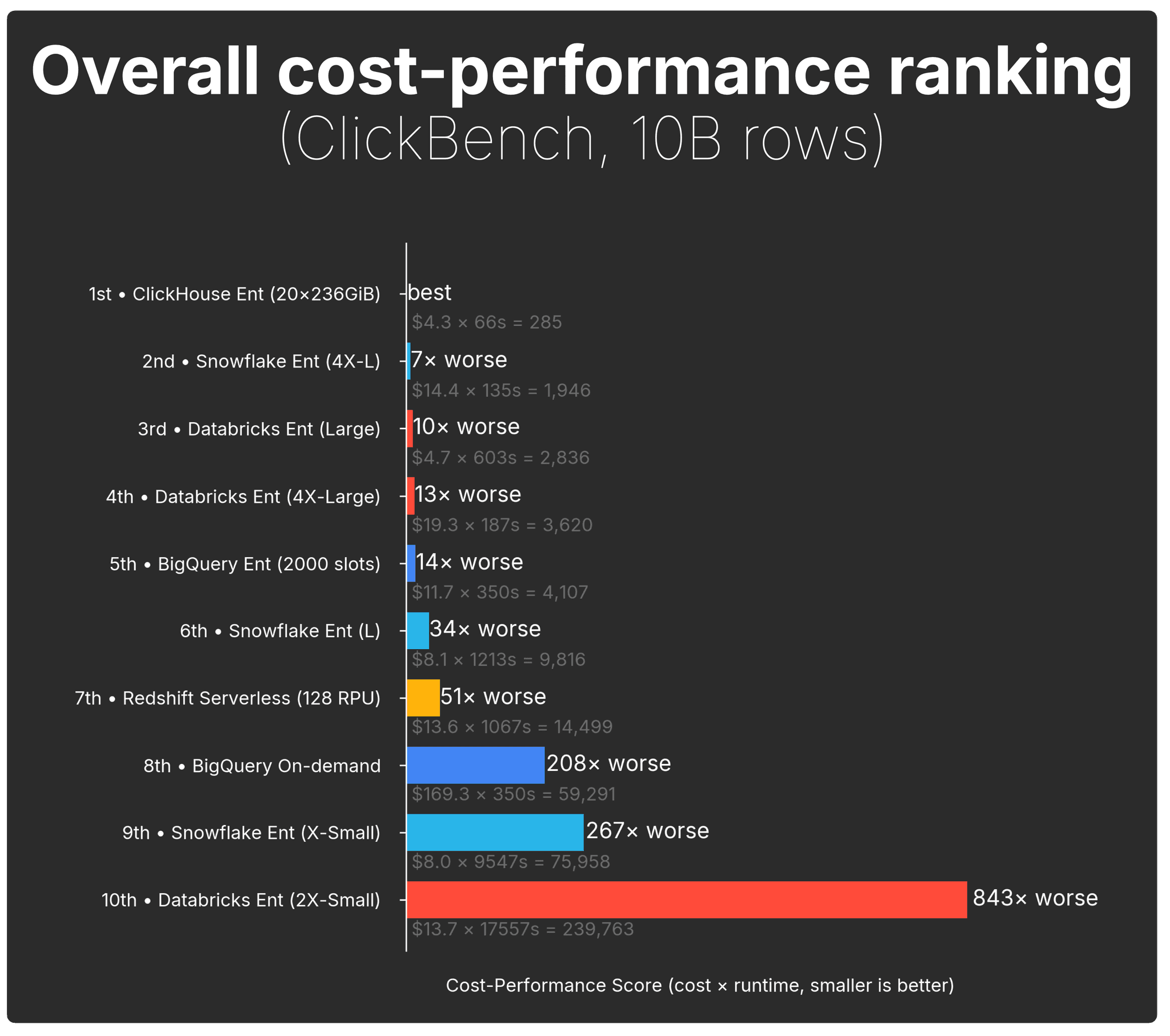
When we look at the cost-performance score, the separation becomes unmistakable:
The gap widens at 10 B rows:
-
ClickHouse Cloud remains the clear leader, keeping the top cost-performance spot by a wide margin.
-
The next-best systems are already far behind, landing 7×–13× worse than ClickHouse (Snowflake 4X-L, Databricks Large, Databricks 4X-Large).
-
BigQuery Enterprise falls even further, around 14× worse.
-
After that, everything collapses into the long tail, tens to hundreds of times worse, including Redshift Serverless (128 RPU), Snowflake L, BigQuery On-Demand, Snowflake X-Small, and Databricks 2X-Small.
At 10 B rows, the economics diverge sharply: ClickHouse Cloud delivers an order-of-magnitude better value than any other system.
100B rows: the real stress test
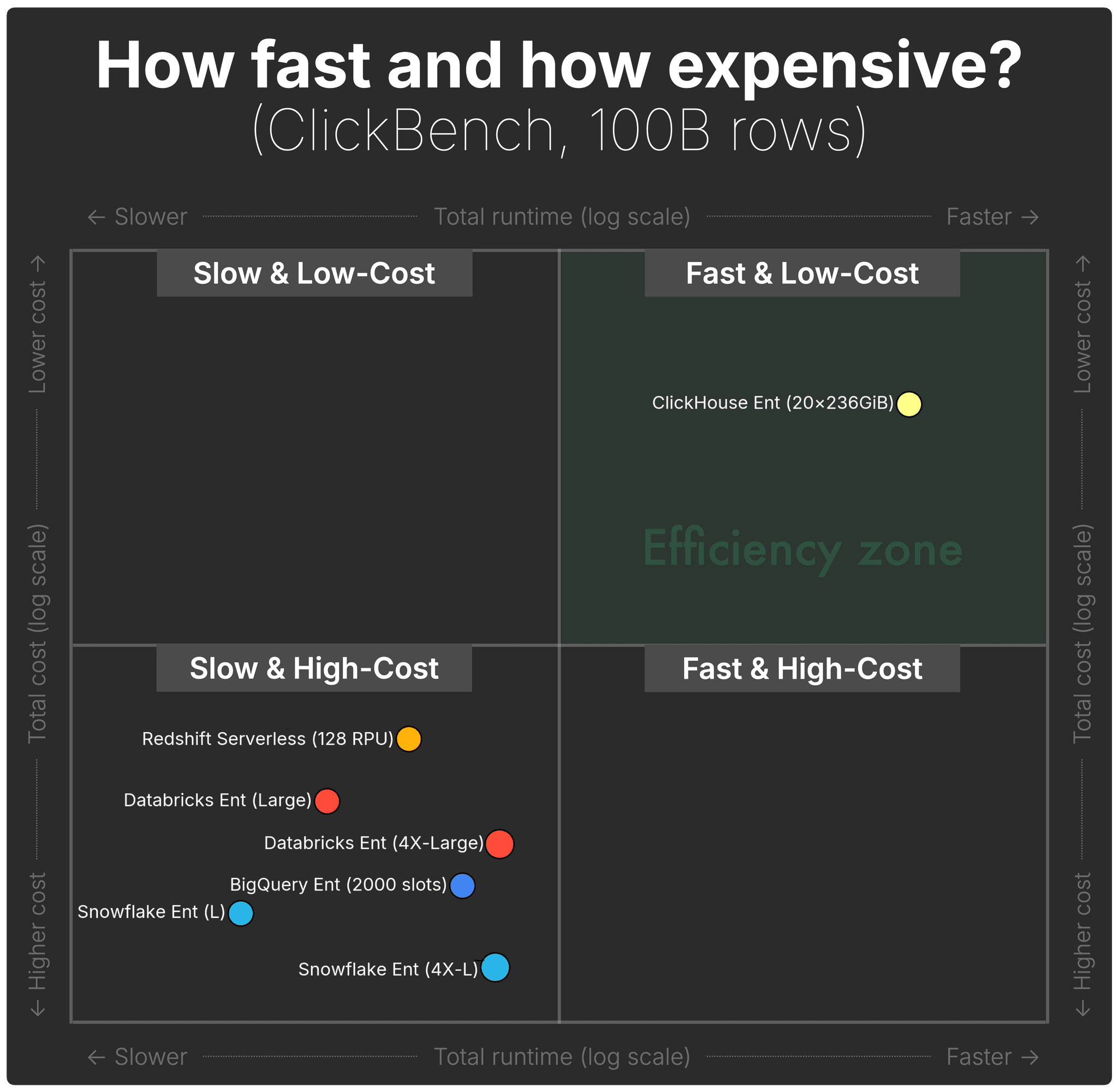
The scatter plot below shows, for each of the five systems, the total runtime (horizontal axis) and total compute cost (vertical axis) for a 100-billion-row ClickBench run.
(As noted earlier, we hide the tick labels for visual clarity, the point positions still reflect the real underlying values. The interactive benchmark explorer above includes full numeric axes.)
 (Shown configurations represent the full spectrum for each engine; details in Appendix. Because both axes are log scale, the vertical and horizontal jumps are even larger than they appear.)
At 100B rows, the separation becomes dramatic. ClickHouse Cloud is the only system that remains firm in the "Fast & Low-Cost" region, even at this scale.
Every other engine is now firmly pushed into "Slow & High-Cost", with runtimes in the multi-minute to multi-hour range and costs climbing an order of magnitude higher.
| Category | System / Tier | Runtime | Cost |
|---|---|---|---|
| ClickHouse Cloud is the only system that remains fast and low-cost at 100B rows; the sole system in the efficiency zone. | |||
Fast & Low-Cost | ClickHouse Cloud (20 nodes) | ~275 s | ~$17.62 |
| Every other system lands in the Slow & High-Cost quadrant at 100B rows, slower and significantly more expensive than ClickHouse. | |||
Slow & High-Cost | Databricks (4X-Large) | ~1,049 s | ~$107.69 |
Slow & High-Cost | Snowflake (4X-Large) | ~1,212 s | ~$129.26 |
Slow & High-Cost | BigQuery Enterprise (capacity) | ~3,870 s | ~$126.52 |
Slow & High-Cost (off-chart) | BigQuery On-Demand | ~3,870 s | ~$1,692.84 |
Slow & High-Cost | Redshift Serverless (128 RPU) | ~5,016 s | ~$55.06 |
Slow & High-Cost | Databricks (Large) | ~11,821 s | ~$91.94 |
Slow & High-Cost | Snowflake (Large) | ~21,119 s | ~$140.80 |
(Smallest warehouse sizes for Snowflake and Databricks are not shown here; they would run for multiple days at 100B rows, far outside the range of this comparison.)
And the cost-performance score view makes the gap impossible to miss:
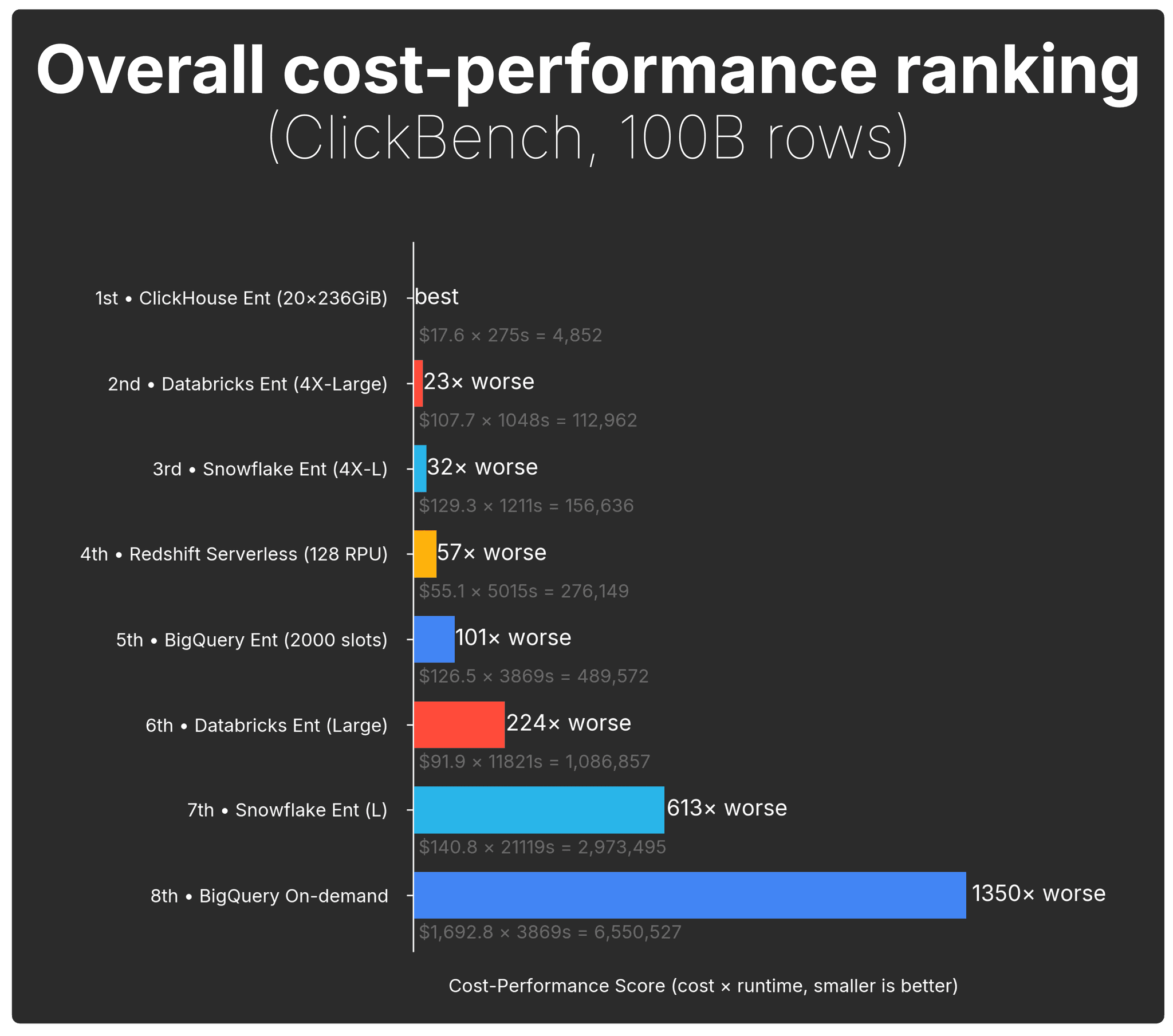
At 100 B rows, cost-performance spreads increase significantly:
-
ClickHouse Cloud remains the clear leader (best overall cost-performance).
-
The next-best system, Databricks (4X-Large), falls all the way to 23× worse.
-
Snowflake (4X-L) follows at 32× worse.
-
BigQuery Enterprise, Redshift Serverless (128 RPU), Databricks (Large), and Snowflake (L) land in the hundreds× worse range.
-
BigQuery On-Demand collapses to the bottom of the chart at 1,350× worse.
We stopped at 100 billion rows not because ClickHouse Cloud reached a limit , it didn’t, but because pushing the same benchmark to 1 trillion rows and above would have been prohibitively expensive or multi-day runtime events for most of the other systems.
At 100B, several warehouses already incur $100–$1,700 compute bills for a single ClickBench run, and smaller tiers would run for days.
Who gives you the best cost-performance?
We began with a simple question. Now we can answer it with data:
Where do you get the most performance per dollar for analytical workloads?
As we push to larger scales — 10B and then 100B rows — the trend becomes unmistakable: every major cloud data warehouse drifts toward “Slow & High-Cost.”
Except one.
Across all scales, including the 100B-row stress test, ClickHouse Cloud is the only system that stays anchored in "Fast & Low-Cost", while every other system becomes slower, costlier, or both.
For analytical workloads at scale, ClickHouse Cloud delivers an order-of-magnitude better value than any other system.
And here’s the kicker: Snowflake and Databricks were already at their hard limits, the largest warehouse sizes they offer.
ClickHouse Cloud has no such ceiling.
We stopped at 20 compute nodes not because ClickHouse Cloud hit a limit, but because the conclusion was already decisive.
If you’d like to see exactly how we ran the benchmark, the full methodology is included in the Appendix below.
Appendix: Benchmark methodology
This section provides the full details of how we ran the benchmark and normalized pricing across all five systems.
The benchmark setup
We based this analysis on ClickBench, which uses a production-derived, anonymized dataset and 43 realistic analytical queries (clickstream, logs, dashboards, etc.) rather than synthetic data.
But the standard dataset is ~100 M rows, tiny by current standards. Today’s datasets are frequently in billions, trillions, even quadrillions. Tesla ingested over one quadrillion rows into ClickHouse for a load test, and ClickPy, our Python client telemetry dataset, has already surpassed two trillion rows.
To understand how cost and performance evolve as data grows, we extended ClickBench to 1B, 10B, and 100B rows and reran the full 43-query benchmark at all three scales.
To keep results fair and reproducible, we followed the standard ClickBench rules: no tuning, no engine-specific optimizations, and no changes to min/max compute settings. This ensures that all results reflect how each system behaves out of the box, without hand-tuning or workload-specific tricks (e.g., precalculating aggregations with materialized views).
To make results comparable across systems with incompatible billing models, we used the CostBench framework from the companion post. It takes the raw per-query runtimes, applies each vendor’s actual compute pricing model, and produces a unified dataset containing runtime, and compute cost for every query on every system, plus storage cost, and system metadata.
What configurations we compare
While the interactive benchmark explorer lets you compare all tiers and cluster sizes, for this post, we keep the comparison simple and consistent:
-
Snowflake and Databricks: we include three warehouse sizes each, the smallest, a mid-range size, and the largest Enterprise-tier size, to cover their full practical spectrum. (For more Snowflake-specific details, including Gen 2 warehouses, QAS, and new warehouse sizes, see the note below.)
-
ClickHouse Cloud: ClickHouse Cloud has no fixed warehouse shapes, so “small / medium / large” tiers don’t exist. Instead, we use one fixed ClickHouse Cloud Enterprise-tier configuration per dataset size.
-
BigQuery: BigQuery appears twice in the charts because it is a fully serverless system with no concept of cluster sizes, but it offers two billing models. We run the workload once (with a base capacity of 2000 slots), then price the same runtimes using both Enterprise (used slot capacity-based) pricing and On-demand (per scanned TiB) pricing.
-
Redshift Serverless: Redshift Serverless appears once, because it likewise has no warehouse sizes or tiers. We use the default 128-RPU base configuration.
All pricing is taken for the same cloud provider and region (AWS us-east) where applicable; BigQuery is the exception and uses GCP us-east.
Where vendors offer multiple pricing tiers (e.g., Enterprise vs. Standard/Basic), we use the Enterprise tier for consistency, but the relative cost-performance differences remain broadly the same across tiers. You can verify this by exploring the alternative tiers in the interactive benchmark explorer.
This keeps the comparison fair, interpretable, and consistent across 1B, 10B, and 100B rows.
A note on Snowflake Gen2, QAS, new warehouse sizes, and Interactive Warehouses
For this benchmark, we used Snowflake’s standard Gen 1 warehouses, which remain the default configuration in most regions today.
Gen 2 warehouses consume 25–35% more credits/hour for the same t-shirt size, and their availability varies by cloud/region, so focusing on Gen 1 keeps the comparison consistent across environments.
We also did not enable Snowflake’s Query Acceleration Service (QAS).
QAS adds serverless burst compute on top of the warehouse, which can accelerate spiky or scan-heavy query fragments, but because it introduces an additional billing dimension, we keep it out of this study to maintain a clean, baseline comparison.
Snowflake has also introduced warehouse sizes larger than 4X-Large - specifically 5X-Large and 6X-Large. These launched in early 2024 and have since expanded across clouds, but 4X-Large remains the most widely used upper tier, so we chose it as the maximum size here.
Snowflake’s Interactive warehouses (preview) are optimized for low-latency, high-concurrency workloads. They are priced lower per hour than standard warehouses (e.g., 0.6 vs 1 credit/hour at XS), but they enforce a 5-second timeout for SELECT queries and carry a 1-hour minimum billing period, with each resume triggering a full minimum charge.
Snowflake offers many mutually interacting performance variables — Gen 1 vs Gen 2, QAS, 5XL/6XL tiers, Interactive Warehouses. We intentionally avoided mixing these into the initial benchmark to keep the comparison clean. A Snowflake-specific follow-up piece will explore these configurations in depth.
A note on hot vs cold runtimes
In line with ClickBench, we report hot runtimes, defined as the best of three runs, and we disabled query result caches everywhere they exist. Cold-start benchmarking isn’t included: cloud warehouses expose very different data caching behaviors, and most don’t allow resetting OS-level page cache or restarting compute on demand. Because cold conditions can’t be standardized, they would produce neither fair nor reproducible results.
A note on native storage formats
Each system in this benchmark is evaluated using its query engine’s native storage format, for example, MergeTree in ClickHouse Cloud, Delta Lake on Databricks, Snowflake’s proprietary micro-partition format, and BigQuery’s Capacitor columnar storage. This ensures we measure each engine under the conditions it is designed and optimized for.
As a side note, several systems, including Snowflake and ClickHouse Cloud, can also query open table formats such as Delta Lake, Apache Iceberg, or Apache Hudi directly. However, this study focuses strictly on native performance and cost. A separate benchmark comparing these engines over open table formats is planned. Stay tuned.
A note on metering granularity
To keep the comparison consistent across all five systems, we make one simplification:
We treat all systems as if they billed compute with perfect per-second granularity.
In reality, as detailed in the companion post:
-
Snowflake, Databricks, and ClickHouse Cloud only stop billing after an idle timeout, and each has a 1-minute minimum charge when a warehouse/service is running.
-
BigQuery and Redshift Serverless meter usage per second, but still apply minimum charge windows (e.g., BigQuery’s 1-minute minimum for slot consumption; Redshift Serverless’s 1-minute minimum for RPU usage).
A note on scope and feature differences
This analysis looks at a single question:
What does it cost to run an analytical workload as data scales?
To keep the comparison clean, we intentionally focus only on compute cost for the 43-query benchmark. We do not attempt to compare broader platform features (governance, ecosystem integrations, workload management, lakehouse capabilities, ML tooling, etc.), even though those can indirectly influence how vendors price compute.
How we measure “Overall cost-performance ranking”
To compare systems with completely different billing models, we use one simple, scale-independent metric:
Cost-performance score = runtime × cost
(smaller is better)
This metric captures the intuition behind a cost-performance ranking:
- Fast systems score better
- Low-cost systems score better
- Slow or High-cost systems balloon immediately
- Cost and runtime compound; inefficiencies multiply each other
It directly answers the question we care about:
How expensive is it for this system to complete the workload?
We normalize all results so the best system becomes the baseline (1×), and every other system is shown as N× worse, making the ranking easy to compare at a glance.
How to read the scatter plot charts
Two quick notes on how to read the “total runtime vs total compute cost” scatter plots we are using in the sections above:
-
Both axes use a logarithmic scale. The differences between systems span orders of magnitude at larger data volumes, so a log–log view keeps everything readable.
-
To make the plots easier to interpret at a glance, we overlaid four quadrants (“Fast & Low-Cost”, “Fast & High-Cost”, etc.). These quadrants are purely visual. They are not based on medians or any statistical cut-point. just a simple way to orient the reader.
What’s interesting is how systems move between quadrants as the dataset grows.
Get started with ClickHouse Cloud today and receive $300 in credits. At the end of your 30-day trial, continue with a pay-as-you-go plan, or contact us to learn more about our volume-based discounts. Visit our pricing page for details.