50.4k
50.4k
Summary
I built a full AI App with Agentic Coding in a couple of days.
The key lesson: agentic coding works when your data platform handles the hard parts natively. Open source components, a consistent SQL interface, and AI-friendly tooling made the difference between fighting the stack and building on top of it.
As a Solutions Architect at ClickHouse, I wanted to build a demo that goes beyond slides and screenshots. Something that retail customers could immediately see themselves in: a full-stack retail analytics platform called ClickShop. The application combines real-time analytics (dashboards querying billions of rows in sub-second) with transactional workflows (order management, contract ingestion, customer updates), 18 specialized AI agents tailored to different business personas (CEO, Sales, Data Analyst), and a full observability stack covering both LLM tracing (prompt management, cost tracking, evaluation via Langfuse) and infrastructure monitoring (metrics, logs, distributed traces via ClickStack). The goal was to build something realistic enough to put in front of a client and say: this is what your production environment could look like. The catch? I'm not a frontend or backend developer, and I had a couple of days. This blog is a walkthrough of how I built it, what architecture decisions I made, and why the ClickHouse data stack made the whole thing possible.
Here is what the application looks like in practice: a CEO workspace with real-time KPIs, geographic revenue breakdown, and an AI agent that queries live ClickHouse data to answer business questions.
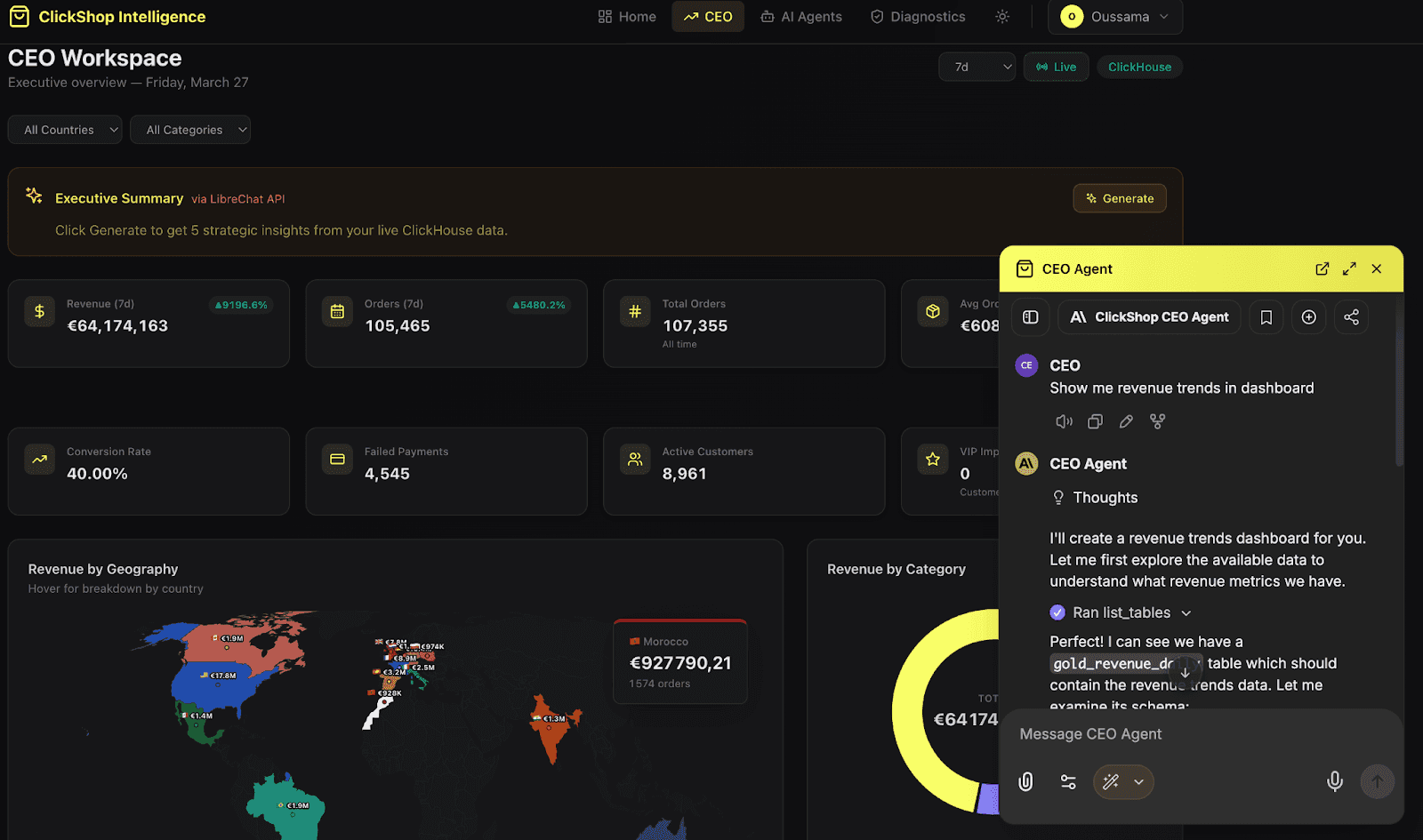
ClickShop Intelligence UI : Executive Dashboard and AI Agent Interface
The problem to solve
As a Solutions Architect, I spend most of my time helping customers design data architectures. I draw diagrams, review schemas, and explain query optimization. But when it comes to showing what ClickHouse can actually do in a real application context, slides only go so far. I wanted to build something that a retail customer could look at and immediately understand how the platform fits their stack. Not a toy demo, but a realistic application with the kind of complexity they deal with every day: analytics, transactions, AI, and monitoring.
The challenge is that building this kind of application normally involves a full team and several months. I had neither. So the question became: can one person, armed with an AI-powered IDE and the right platform, build something credible?
Here is what the architecture looks like:
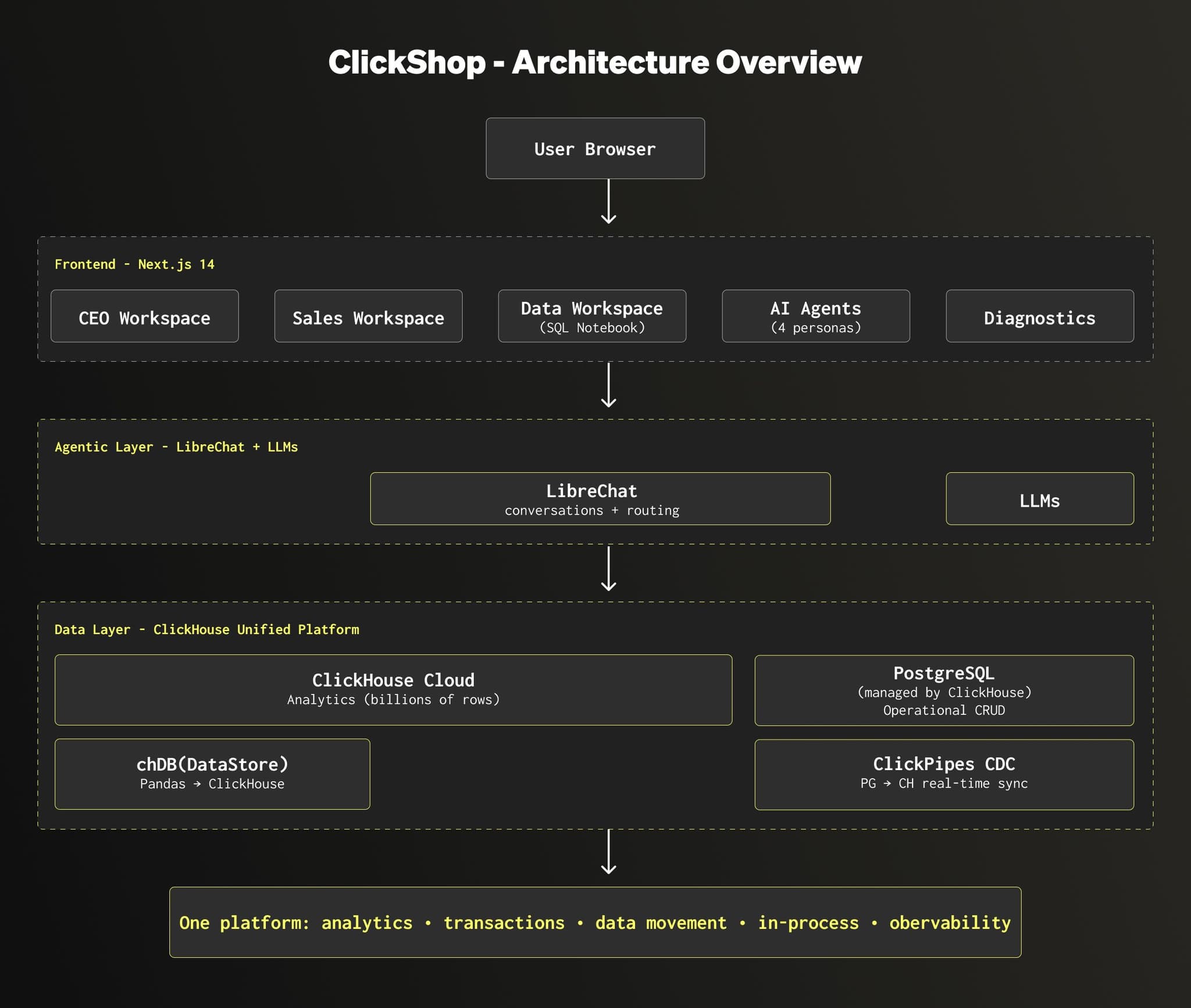
The application is built on three layers:
- The frontend (Next.js) provides a dedicated workspace per business persona. A CEO, a Sales manager, a Data Analyst, each get their own dashboards, their own data scope, and their own AI agent.
- The data layer combines ClickHouse and PostgreSQL. ClickHouse handles the analytical workload: querying billions of rows in sub-second for dashboards and reports. PostgreSQL handles the transactional side: order management, customer updates, contract ingestion. ClickPipes CDC syncs changes from PostgreSQL into ClickHouse in real time, so analytics always reflect the latest state. And for data scientists who prefer working in Python, chDB (an in-process ClickHouse engine) lets them run familiar Pandas workflows while the execution pushes down to ClickHouse under the hood.
- The agentic layer (LibreChat + LLMs) powers 18 specialized AI agents. LibreChat manages the conversations and routing, each agent gets its own system prompt, context, and data scope.The CEO agent explains why revenue dropped last week, the Sales agent identifies which products are trending, and the Data agent helps write and optimize SQL queries.
On top of this, the application has two distinct observability layers. This is an important distinction, because monitoring an AI application means watching two very different things:
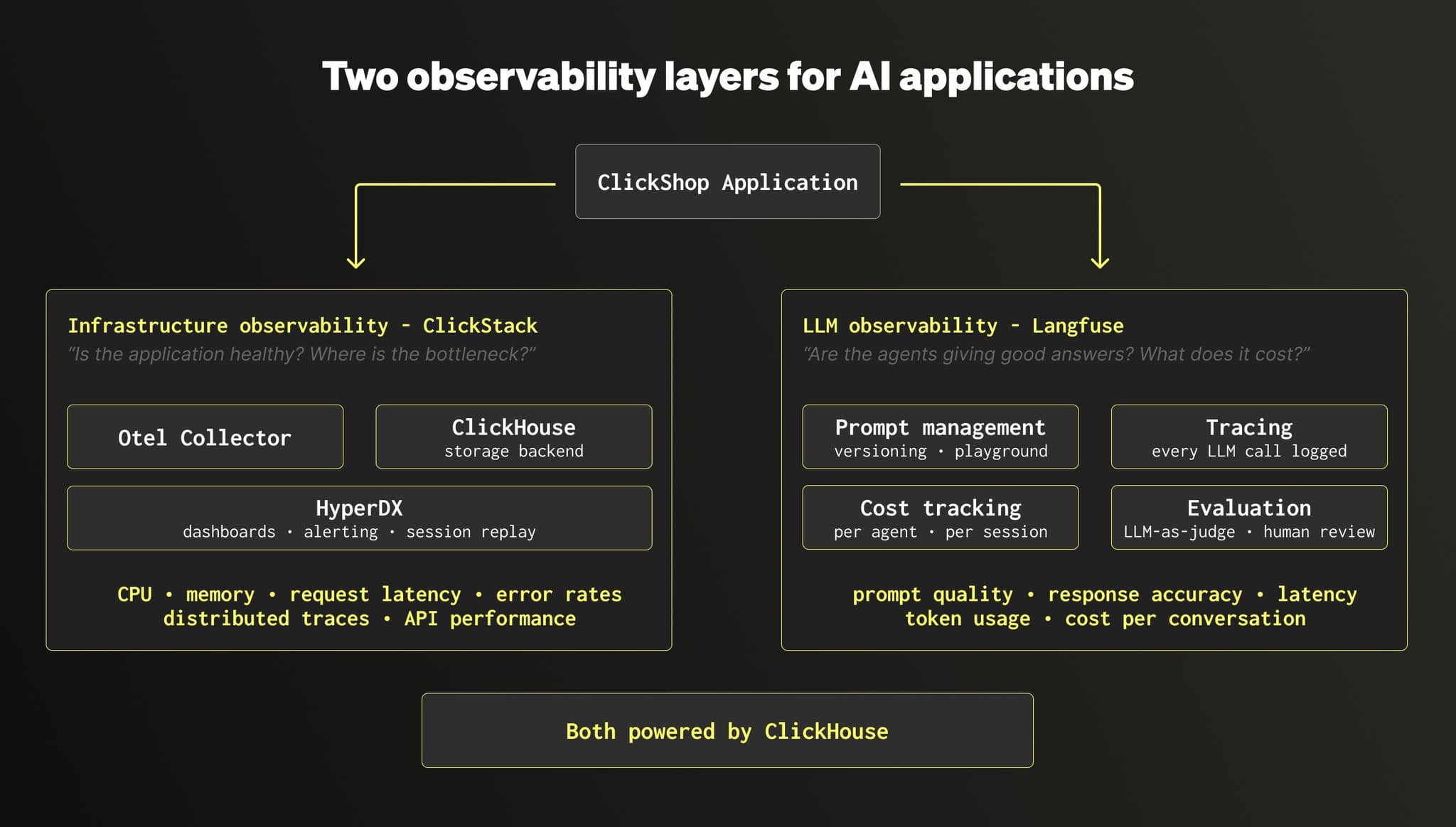
- Infrastructure observability (ClickStack): this is the classic application monitoring. Metrics (CPU, memory, request latency), logs, and distributed traces collected via OpenTelemetry. It answers the question: is the application healthy? Are API calls slow? Where is the bottleneck?
- LLM observability (Langfuse): this is specific to AI agents. It tracks every prompt sent to the LLM, every response received, the cost per call, the latency, and allows quality evaluation (automated scoring and human review). It answers a different question: are the agents giving good answers? Which prompts need tuning? How much does each conversation cost?
Both Langfuse and ClickStack run on ClickHouse. Combined with ClickHouse Cloud for analytics, PostgreSQL managed by ClickHouse for transactions, and ClickPipes for data movement, the entire stack runs on one platform.
Why agentic coding, and why now
AI-assisted coding has gone from a curiosity to a standard part of the workflow. As a Solutions Architect, I noticed that the tools had matured enough to do something I had been thinking about for a while: build a full demo application on my own, without depending on an engineering team.
The motivation was practical. When I meet retail customers, the conversation often goes the same way: they want to see how ClickHouse handles their use case, not just in a benchmark, but in something that looks like their actual environment. Dashboards with real data, agents that answer business questions, observability that shows what happens under the hood. Slides don't do that. A working application does.
So I decided to try. I picked up Cursor, an AI-powered IDE that generates code from natural language, and set myself a simple goal: build a retail analytics platform that I could use in customer meetings, with the full stack running on the ClickHouse data stack.
Cursor as an AI-powered IDE
The tool I used for this project is Cursor, an IDE that generates code from natural language prompts. In practice, the workflow looks like this: you describe what you need, Cursor writes the code, you review it, adjust if necessary, and move on to the next feature.
For this project, the loop was straightforward:
- I describe a feature in plain English (for example: "create a dashboard that shows revenue by country for the last 30 days, querying ClickHouse")
- Cursor generates the frontend component, the API route, and the SQL query
- I review the output, test it locally, and iterate if needed
- Once it works, I push to GitHub and Vercel deploys it automatically
One thing that helped considerably is that ClickHouse is open source and widely documented. The LLMs already know ClickHouse SQL, the MergeTree engine family, and so on. The same applies to the other open source components in the stack: PostgreSQL, LibreChat, Langfuse. Because these projects have large public codebases and documentation, the AI generates relevant code from the start, with less back and forth. This is a real advantage of building on open source: with proprietary, closed-source databases, the LLMs simply don't have access to the codebase or the internals, so they guess more and get it wrong more often.
Cursor marketplace and Skills
On top of that, Cursor has a marketplace where you can install skills built by the community. Skills are small knowledge packs that teach the AI the best practices of a specific tool. For this project, I installed the ClickHouse Best Practices skill and the Langfuse skill, both available directly in the marketplace. They guide the AI toward correct engine choices, proper schema design, and integration conventions, without me having to explain them in every prompt.
And here is a practical tip: at the end of any project, once you have spent hours iterating with Cursor and your architecture is solid, ask Cursor to turn the entire conversation into a skill. It captures all the decisions, patterns, and conventions you established, so the next time you start a similar project, you skip the learning curve entirely.
Get started today
Interested in seeing how ClickHouse works on your data? Get started with ClickHouse Cloud in minutes and receive $300 in free credits.
Sign upBuilding ClickShop, step by step
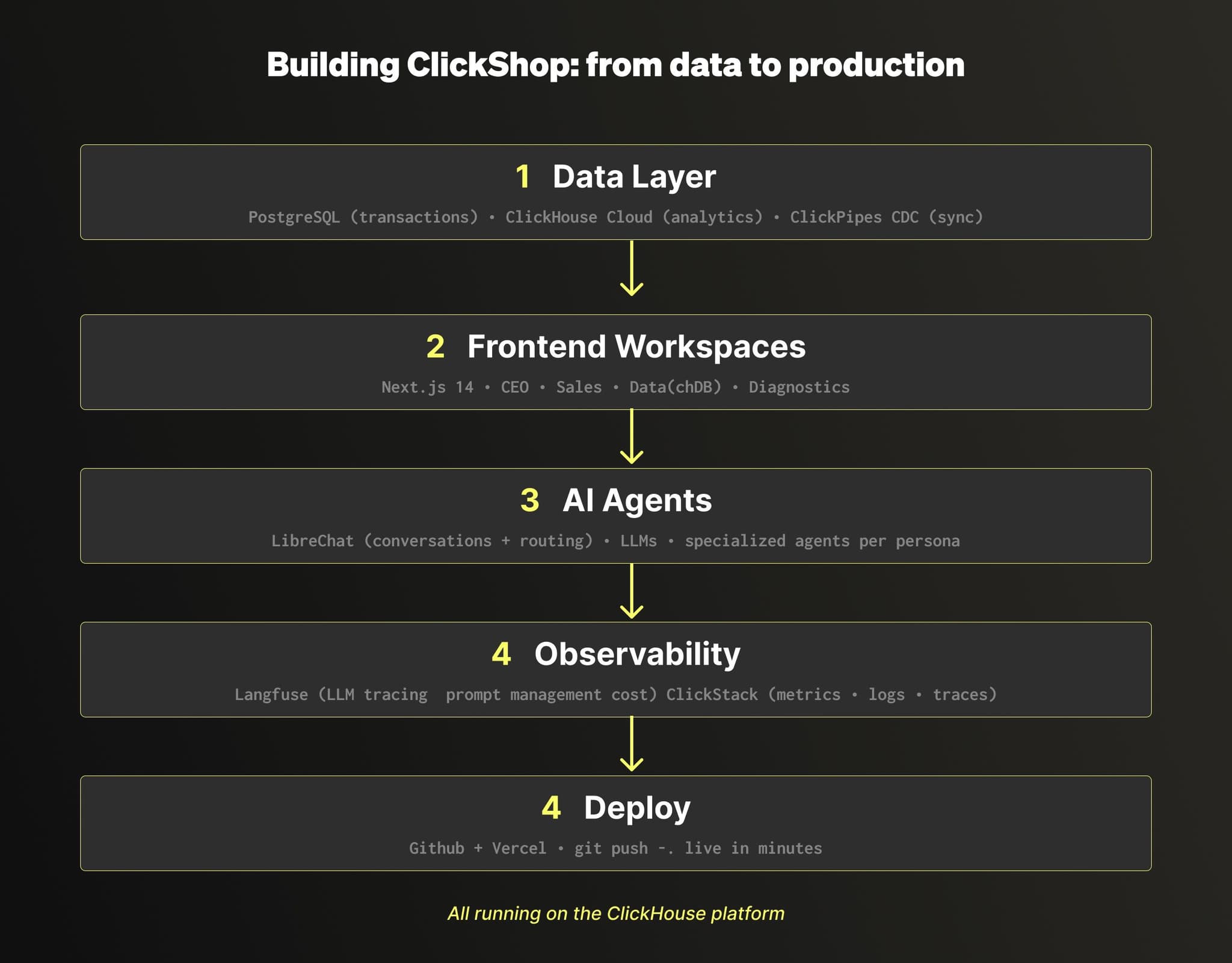
In this section, I want to walk through how the application came together, layer by layer. I am deliberately keeping this at a high level to make the overall approach easy to follow. Here, the goal is to give you the big picture.
Starting with the data layer
The first thing I built was the data foundation. The application needed two types of workloads: transactional (creating orders, updating customers, ingesting contracts) and analytical (dashboards querying billions of rows in sub-second). Instead of picking two separate vendors, I used the ClickHouse data stack: PostgreSQL managed by ClickHouse for the transactional side, and ClickHouse Cloud for the analytical side.
To keep everything in sync, I set up ClickPipes CDC, which mirrors the transactional data from PostgreSQL into ClickHouse in real time, with zero external pipelines to manage. On the ClickHouse side, the data follows a Medallion architecture: the mirrored transactional data lands in Bronze tables alongside raw event streams, Silver tables clean and deduplicate it using materialized views, and Gold tables pre-aggregate the results so they are ready to serve the dashboards in sub-second.
Building the frontend workspaces
Once the data was in place, I built the frontend in Next.js 14, deployed on Vercel. Each business persona gets their own workspace with dashboards and tools tailored to their role:
- The CEO workspace shows executive KPIs, a world map of revenue distribution, and trend analysis
- The Sales workspace focuses on pipeline management, transaction exploration, and contract ingestion from PDFs
- The Data workspace provides an interactive SQL notebook where you can query both ClickHouse and PostgreSQL side by side, plus chDB, an in-process ClickHouse engine that lets data scientists write familiar Pandas code while the execution pushes down to ClickHouse under the hood
- A Diagnostics page validates that all services are healthy and lets you generate test data
Each workspace also embeds its own AI agent, which brings us to the agentic layer.
Adding the AI agents
The AI agents are powered by LibreChat, an open source agentic platform included in the ClickHouse data stack. Each persona has specialized agents with their own system prompt, data scope, and context. The CEO agent focuses on high-level business metrics. The Sales agent understands pipeline and revenue. The Data agent helps write and optimize SQL queries.
On top of the conversations, Langfuse handles the LLM observability side: every prompt is versioned, every agent response is traced, costs are tracked per session, and quality can be evaluated through automated scoring or human review.
Closing the loop with observability
The last layer I added was infrastructure observability via ClickStack. The application exports metrics, logs, and distributed traces through an OpenTelemetry collector into ClickHouse. ClickStack provides the dashboards, alerting, and session replay on top. This means I can see exactly what happens when a user loads a dashboard or asks a question to an agent: which API was called, how long the ClickHouse query took, whether the response was cached.
Combined with the LLM observability from Langfuse, this gives the application two complementary monitoring layers: one for the infrastructure, one for the AI. Both run on ClickHouse.
The prompts that built ClickShop
Now that you have the big picture, here are some of the prompts I used to build each layer. I have simplified them here to keep this blog focused on the approach and the architecture. A follow-up post will go deeper with the full prompts, code samples, and implementation details.
The key insight is that good prompts read like instructions to a colleague, not like code. The more domain knowledge you put in, the better the output.
The data layer
"I need PostgreSQL for my operational data (customers, products, orders, payments) and ClickHouse for analytics (page views, cart events, checkout events, payment events, order events). Design the schemas to reflect a real e-commerce platform."
This is where domain knowledge matters. I specified the dual-database strategy upfront, and Cursor generated the right DDL for each engine. For ClickHouse, it applied proper ORDER BY keys, LowCardinality, and TTL policies. For PostgreSQL, it created the relational schema with foreign keys and indexes.
I also installed two MCP connectors from the Cursor marketplace: one for ClickHouse, one for PostgreSQL. MCP lets Cursor connect directly to each database instance, discover the schemas, and execute queries without me ever opening a database console. No clickhouse-client, no psql.
The frontend workspaces
"Build me a web application with a dark/light theme. I need separate workspaces for a CEO, a Sales Manager, and a Data Analyst. Add a landing page and a navigation bar."
This single prompt generated the project structure, the styling, the layout, and the navigation. From there, each workspace was built incrementally with its own dashboards, data scope, and embedded AI agent.
The AI agents
"Add LibreChat to the project. I want it embedded in each workspace for free conversation, and as an API to power specialized agents that each answer a specific question about my data."
LibreChat serves two roles: the iframe gives users a free-form chat experience, and the API powers dedicated agents for specific tasks (fraud detection, pipeline health, revenue analysis, query optimization). Each agent has its own system prompt and data scope.
Closing the loop with observability
"Instrument Langfuse for the LibreChat agents, it has native integration. For ClickStack, I want full observability on every component: traces, logs, metrics, and session replays for each service name across the entire stack, sent via OpenTelemetry."
On the LLM side, Langfuse has native integration with LibreChat: a few environment variables, no custom code. Every agent interaction is automatically traced with session context, prompt versions, cost tracking, and evaluation scores. On the infrastructure side, ClickStack collects distributed traces, metrics, structured logs, and session replays, all stored in ClickHouse, all queryable with SQL.
Deployment
"Push this project to GitHub and deploy it on Vercel. Make sure the environment variables are configured."
Cursor created the repository, pushed the code, and configured the Vercel deployment. Every subsequent git push triggers an automatic redeploy.
What the prompts don't show
Reading this blog, you might think agentic coding is a straight line from prompt to result. It is not. For every clean prompt I showed above, there were iterations where the AI misunderstood the intent, refactored things I did not ask it to touch, or generated code that worked locally but broke in production. You spend more time reviewing and correcting than you might expect. Agentic coding is fast, but it is not linear. The simplified prompts in this blog reflect what worked, not the full journey to get there. And every iteration has a cost. Each agent call, each prompt retry, each conversation consumes tokens. This is exactly where Langfuse becomes essential: it tracks the cost per agent, per session, per user, so you know where your budget goes and which prompts need optimizing.
Why the platform matters
If you take one thing away from this project, it is this: the platform you build on determines how simple or how complicated your architecture becomes.
Most data platforms were not designed to serve applications directly. They hit performance limits under concurrent access, struggle to handle mixed workloads (analytical and transactional at the same time), and force you to add caching layers or middleware just to keep response times acceptable. The more users and agents you add, the more the architecture bends under pressure. You end up building around the limitations of your database instead of building on top of it.
With the ClickHouse data stack, I did not have to deal with any of that. ClickHouse Cloud handles the analytical workload. PostgreSQL managed by ClickHouse handles transactions. ClickPipes syncs data between them natively, no external pipeline to set up. LibreChat provides the agentic layer. Langfuse provides LLM observability. ClickStack provides infrastructure monitoring. All of these components are open source, they all store their data in ClickHouse, and they all speak SQL. The architecture stays simple because the stack is consistent, and as I mentioned earlier, the fact that every component is open source means the AI already knows how to work with them. ClickHouse also invests heavily in making the stack agent-friendly: MCP connectors, IDE skills, and a full agentic data stack built on LibreChat and Langfuse.
This is what makes agentic coding realistic for building data-intensive applications. When your data platform handles the hard parts natively, and the AI understands that platform deeply, you spend your time on the product, not on plumbing. You iterate faster because there are fewer moving parts. And the result is an application that can actually go to production, because the foundation was designed for it.
Build on data, not on plumbing
ClickShop started as a demo for customer meetings. It turned into something more: a proof that one person, with the right data stack and an AI-powered IDE, can build a full-stack application that covers analytics, transactions, AI agents, and observability in a matter of days.
If you are a developer or a builder looking for a data platform to power your next project, I hope this gives you a concrete picture of what is possible. ClickHouse is not just a fast analytics engine. It is a complete data stack where you can run your transactions, move your data, monitor your infrastructure, trace your LLM calls, and query everything with SQL. That simplicity is what makes the difference.
Now it is your turn. Pick a use case, open your favorite AI coding tool (Cursor, Claude Code, Codex, or whichever you prefer), and start building your application on top of the ClickHouse data stack.
Get started with ClickHouse Cloud today and receive $300 in credits. At the end of your 30-day trial, continue with a pay-as-you-go plan, or contact us to learn more about our volume-based discounts. Visit our pricing page for details.