50.4k
50.4k
Welcome to the December edition of What’s New in ClickStack, the open-source observability stack built for ClickHouse. Each month, we showcase the latest ClickHouse capabilities and HyperDX UI improvements that help teams explore their data with greater speed, clarity, and confidence.
This release focuses on a single feature that deserves the spotlight: smarter use of Materialized Views throughout the HyperDX UI. While December included many usability refinements, this addition stands apart as a major step forward for performance and scale. Materialized Views can now be created in ClickHouse, linked to a source, and used automatically by the Query Layer to accelerate charts, searches, and dashboards for users at any scale.
New contributors
Building an open-source observability stack is a collaborative effort, and we are grateful for the continued energy from the community. Thank you to all new contributors this month. Your work helps move ClickStack forward for everyone.
sgarfinkel alok87 daniellockyer PzaThief
Materialized Views arrive in ClickStack
TLDR; ClickStack now accelerates visualizations by using ClickHouse Materialized Views, with an intelligent layer that selects the most efficient view automatically for each query issued by the HyperDX UI.
Historically, ClickStack allowed users to materialize a chart. This created a Materialized View behind the scenes, and future queries for that chart would run against the view. In practice, the feature had limited adoption because any applied filter forced the query back to the base table. For most workloads, this meant the performance gain was inconsistent.
Users can now create Materialized Views directly in ClickHouse and register them with a source inside HyperDX. Once a view is attributed to a source, HyperDX understands the views grouping interval, its available dimensions, and the aggregation metrics it exposes. All views must group data by a time interval such as one minute. Column groupings and metrics are inferred automatically when the view is marked as usable in the source.
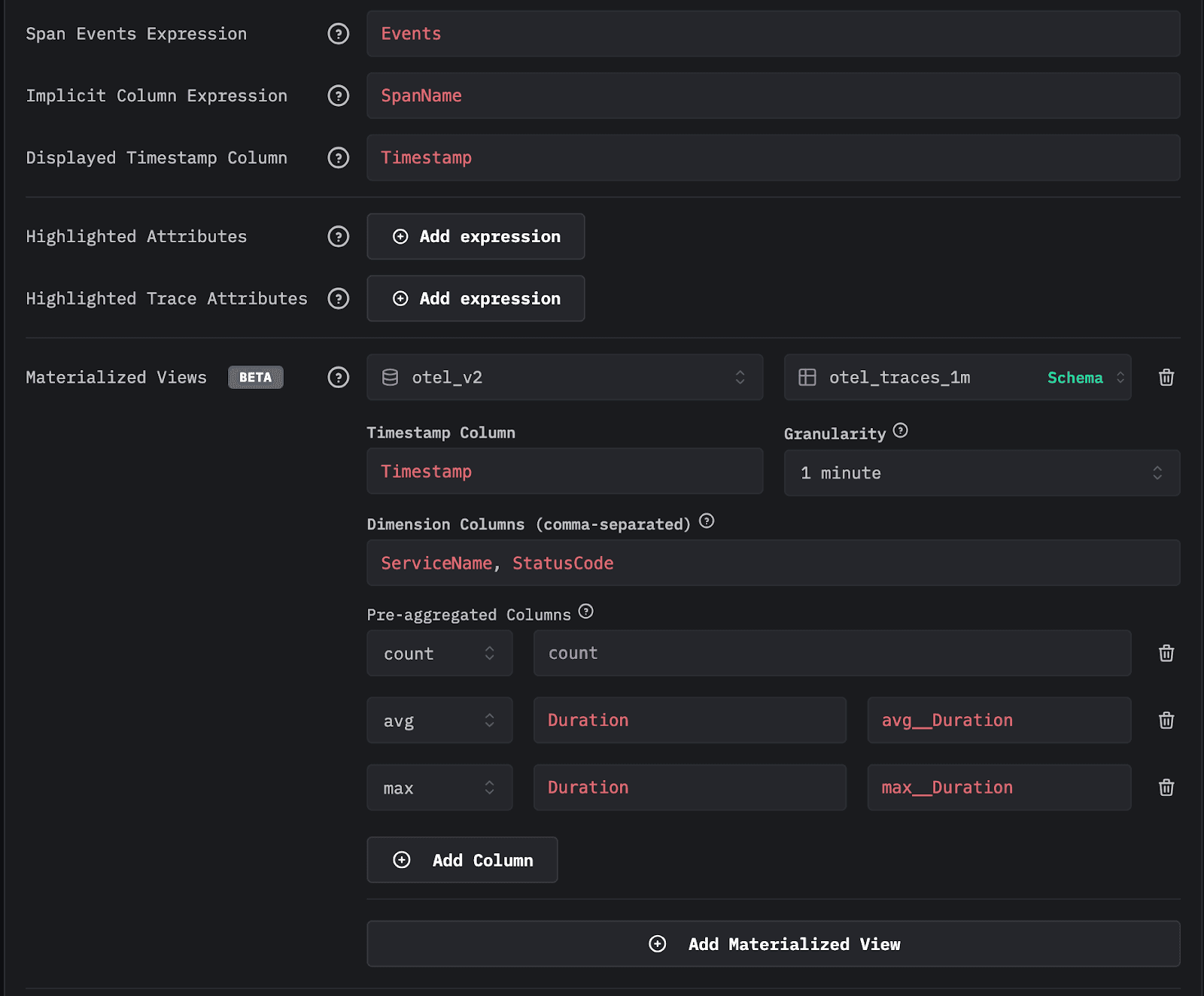
After an administrator assigns a view to a source, the view becomes available throughout the HyperDX application whenever it can accelerate a query. Multiple views can be attached to a single source, requiring only a small ingestion cost to maintain these Incremental Materialized Views. The application selects views intelligently at query time, giving large deployments a significant query-time performance boost.
Get started with ClickStack
Getting started with the ClickHouse-powered open source observability stack built for OpenTelemetry at scale.
Get StartedThis feature is currently in Beta. There are a few improvements we’d like to consider before making this feature GA, as well as considering feedback from the community as it's adopted and used in real-world workloads.
If you're new to ClickStack and aren't aware of ClickHouse’s Incremental Materialized Views, we strongly recommend watching this short introductory video.
How ClickStack chooses the best view
A natural question is how the system chooses between the base table and multiple eligible views. To address this, ClickStack uses the EXPLAIN ESTIMATE clause in ClickHouse. When a query is issued, the system asks ClickHouse to estimate the number of granules and the volume of data that would be scanned for each candidate. The view that scans the fewest granules is selected. While this heuristic may not be perfect, it reliably reduces the amount of data scanned and delivers consistently fast responses across a wide range of workloads.
Views remain effective even when charts have filters or when searches include constraints. They can also power histograms, dashboard charts, and filtered visualizations as long as the required dimensions exist within the view.
A concrete example
Consider two Materialized Views created against our public OpenTelemetry demo data in sql.clickhouse.com for the traces source. The first otel_traces_1m groups by minute toStartOfMinute(Timestamp), ServiceName, and StatusCode, computing a count of rows as well as the metrics avg(Duration) and max(Duration). The second otel_traces_1m_v2 groups by toStartOfMinute(Timestamp), ServiceName, StatusCode, and SpanName, and computes the same metrics in addition to quantileTDigest(Duration). The latter is larger because it contains more grouping keys and therefore produces more rows.
-- Create our first view target table
CREATE TABLE otel_v2.otel_traces_1m
(
`Timestamp` DateTime,
`ServiceName` LowCardinality(String),
`StatusCode` LowCardinality(String),
`count` SimpleAggregateFunction(sum, UInt64),
`avg__Duration` AggregateFunction(avg, UInt64),
`max__Duration` SimpleAggregateFunction(max, Int64)
)
ENGINE = AggregatingMergeTree
ORDER BY (Timestamp, ServiceName, StatusCode)-- Create our first view query
CREATE MATERIALIZED VIEW otel_v2.otel_traces_1m_mv TO otel_v2.otel_traces_1m
AS SELECT
toStartOfMinute(Timestamp) AS Timestamp,
ServiceName,
StatusCode,
count() AS count,
avgState(Duration) AS avg__Duration,
maxSimpleState(Duration) AS max__Duration
FROM otel_v2.otel_traces
GROUP BY
Timestamp,
ServiceName,
StatusCode-- Create our second view target table
CREATE TABLE otel_v2.otel_traces_1m_v2
(
`Timestamp` DateTime,
`ServiceName` LowCardinality(String),
`SpanName` String,
`StatusCode` LowCardinality(String),
`count` SimpleAggregateFunction(sum, UInt64),
`avg__Duration` AggregateFunction(avg, UInt64),
`max__Duration` SimpleAggregateFunction(max, Int64),
`quantile__Duration` AggregateFunction(quantileTDigest(0.5), UInt64)
)
ENGINE = AggregatingMergeTree
ORDER BY (Timestamp, ServiceName, StatusCode, SpanName)-- Create our second view query
CREATE MATERIALIZED VIEW otel_v2.otel_traces_1m_mv_v2 TO otel_v2.otel_traces_1m_v2
AS SELECT
toStartOfMinute(Timestamp) AS Timestamp,
ServiceName,
SpanName,
StatusCode,
count() AS count,
avgState(Duration) AS avg__Duration,
maxSimpleState(Duration) AS max__Duration,
quantileTDigestState(0.5)(Duration) AS quantile__Duration
FROM otel_v2.otel_traces
GROUP BY
Timestamp,
ServiceName,
StatusCode,
SpanName-- Count the number of rows in otel_traces_1m_v2 ~ 200k (backfilled)
SELECT count()
FROM otel_v2.otel_traces_1m_v2If a user builds a visualization that shows average duration per service over time by hour, both views are technically valid. ClickStack issues an EXPLAIN ESTIMATE query to determine granule counts (and thus less data to scan). The smaller view that groups only by minute, ServiceName, and SeverityText is sufficient, so it is selected. As shown below, the smaller view provides faster performance for the SQL query used to compute the chart. Note how both queries are faster than querying the base table:
-- base table query
SELECT
toStartOfHour(Timestamp) AS hour,
ServiceName,
avg(Duration) AS avg__Duration
FROM otel_v2.otel_traces
GROUP BY
hour,
ServiceName
ORDER BY hour DESC-- Rows in first view table ~45k
EXPLAIN ESTIMATE
SELECT
toStartOfHour(Timestamp) AS hour,
ServiceName,
avgMerge(avg__Duration) AS avg__Duration
FROM otel_v2.otel_traces_1m
GROUP BY
hour,
ServiceName
ORDER BY hour DESC-- Rows in second view table ~200k
EXPLAIN ESTIMATE
SELECT
toStartOfHour(Timestamp) AS hour,
ServiceName,
avgMerge(avg__Duration) AS avg__Duration
FROM otel_v2.otel_traces_1m_v2
GROUP BY
hour,
ServiceName
ORDER BY hour DESC-- query against first view
SELECT
toStartOfHour(Timestamp) AS hour,
ServiceName,
avgMerge(avg__Duration) AS avg__Duration
FROM otel_v2.otel_traces_1m
GROUP BY
hour,
ServiceName
ORDER BY hour DESC
-- 748 rows in set. Elapsed: 0.087 sec. Processed 49.36 thousand rows, 1.43 MB (566.14 thousand rows/s., 16.42 MB/s.)
-- Peak memory usage: 9.37 MiB.-- query against second view
SELECT
toStartOfHour(Timestamp) AS hour,
ServiceName,
avgMerge(avg__Duration) AS avg__Duration
FROM otel_v2.otel_traces_1m_v2
GROUP BY
hour,
ServiceName
ORDER BY hour DESC
-- 748 rows in set. Elapsed: 0.062 sec. Processed 212.41 thousand rows, 6.16 MB (3.43 million rows/s., 99.46 MB/s.)
-- Peak memory usage: 36.10 MiBThe absolute timing differences here are small, 0.009 seconds for
otel_traces_1mversus 0.015 seconds forotel_traces_1m_v2, and at the scale shown, a few hundred million rows, even the base table query completes in around half a second. At petabyte scale and trillions of rows, however, these seemingly minor gaps compound and become materially significant.
When we actually configure this chart in ClickHouse, you’ll see an acceleration icon indicating the use of a Materialized View. Clicking this shows the view used as well as some useful information, such as the granularity and metrics available, as well as the views that were considered (and discounted).
On dashboards, you'll also see a small acceleration icon appear on the chart to indicate the use of a view.
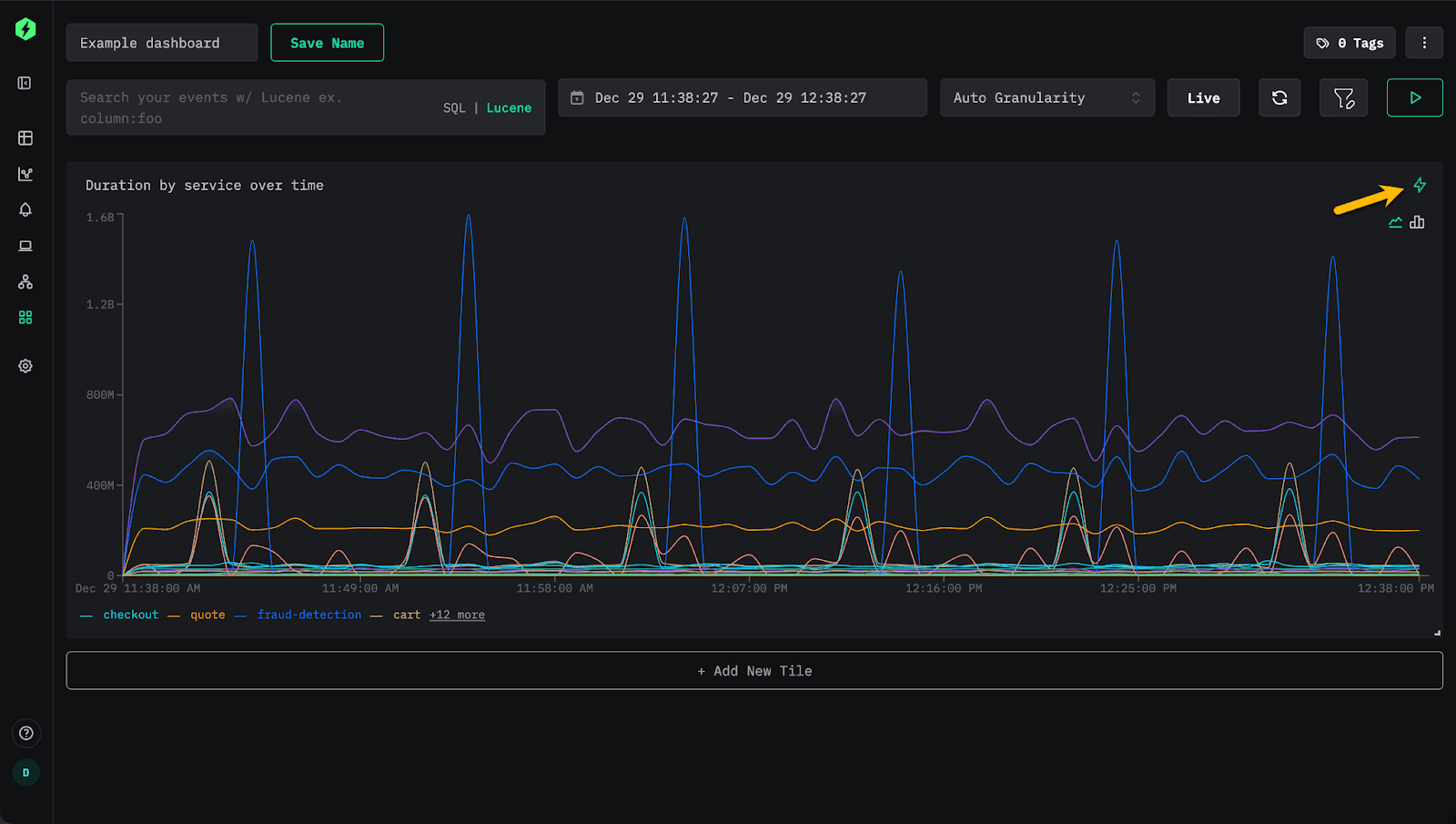
If the dashboard is filtered by StatusCode, the same view continues to be used. However, adding a filter on SpanName requires the additional dimension, so the second view becomes the required match. The system, however, switches seamlessly with no user intervention.
If the user adds a second metric to the chart (p99), the latter view will also be used. Currently, charts are rendered with a single query, so an accelerating view must satisfy all metrics. In the future, we may make this more intelligent, where specific metrics are handled by different views. Additionally, views are assessed for each query; there is currently no caching layer that determines which views are effective for which queries. For now, we recommend keeping view counts moderate (<10) while in Beta pending the addition of further intelligence and/or caching.
Note: Views are used across the entire HyperDX application where possible, with view assessment occurring at the query layer. For example, users can use the same capability to accelerate the histogram on the search view for common workflows.
Why this matters
This feature represents a major milestone for ClickStack. Users now have a flexible mechanism to build performance optimizations that match their workloads. Everything works in open source; users only need to create views and link them to their sources.
It's important to remember that Incremental Materialized Views in ClickHouse compute only the changes to the view as data arrives. This shifts computation to insert time. Since ClickHouse is highly optimized for ingestion, the incremental cost applied to each block is very low compared to the savings at query time. The result is lower operational cost with near real-time performance gains for every downstream chart, search, and workflow - even at petabyte scale.
This approach is very different from systems that recompute the entire view on each update or schedule periodic updates. For a deep dive into Materialized Views, how they work and how to create them we recommend this guide.
We are excited to build on this foundation throughout 2026. For example, in ClickHouse Cloud, we plan to extend this capability with an intelligence layer that creates views automatically based on user access patterns.
Conclusion
As we close out the year and ship our final release of December, we would like to thank all our users and contributors and wish you a happy and successful new year.
Acceleration with Materialized Views concludes the year, marking a significant step forward for ClickStack and introducing a new level of performance and configurability that enables users to optimize their own workflows. The feature is available today in open source, where teams can define and tune their own views to target the parts of their system that matter most to them.
While currently in beta, we will publish practical guidance in our documentation shortly to help teams get the most value from it. Looking ahead, in ClickStack and ClickHouse Cloud, we plan to automate the creation of many of these views based on how users actually work, further accelerating everyday experiences with no manual effort. Thank you for being part of the ClickStack community. Here's to an exciting year ahead.