50.3k
50.3k
TL;DR
CREATE TABLE staging CLONE AS prod;
→ creates an instant clone without copying a single byte.
It’s basically a Git fork for tables: identical at start, diverges on write (copy-on-write). Safe for destructive testing.
A safe way to experiment
You have a massive ClickHouse table in production.
Now you want to test destructive changes in staging: deletes, updates, schema tweaks, maybe even aggressive optimizations.
But you absolutely don’t want to risk touching the production data.
Wouldn’t it be nice if you could simply create an exact copy of that massive table instantly and repeatably, and then test any destructive change you want? Without touching the production data at all. And without copying a single byte.
In ClickHouse, you can.
This is one of those features that feels like magic. But it’s actually a very clean consequence of how ClickHouse stores data.
And although this feature is documented in the ClickHouse documentation, it’s still surprisingly underused in practice.
In ClickHouse Cloud, this pattern extends even further.
Clone the production table and run tests on a separate service with isolated compute resources.
In this post, we’ll take a closer look at how table cloning works under the hood, and why immutable data parts make it possible.
Prefer a quick walkthrough?
Mark recorded a short explanation of table cloning:
Reminder: the immutable data part model
Every insert into a ClickHouse table produces a new, self-contained, immutable data part on disk.
To sketch this, we use the following orders table tracking the total revenue per customer:
CREATE TABLE orders
(
order_id UInt32,
customer String,
total UInt32
)
ENGINE = MergeTree
ORDER BY order_id;For this insert into the orders table:
INSERT INTO orders VALUES
(1001, 'Liam', 31000),
(1002, 'Ben', 7500),
(1003, 'Anna', 12000);ClickHouse creates a new part on disk:

Under the hood, this part is a directory on disk that contains compressed column files, one per column in the table: order_id, customer, and total. Rows inside a part are physically sorted by the table’s sorting key, in this case, order_id.
Data parts are fully self-contained. They include all metadata required to interpret their contents, without relying on a central catalog. Not shown in the diagram above, but parts contain additional metadata files, such as the sparse primary index, secondary data skipping indexes, column statistics, checksums, min-max indexes (if partitioning is used), and more.
As new data arrives, ClickHouse never modifies existing parts in place. It always writes new parts.
In the background, parts are merged into larger parts to control part counts and consolidate data, but even merges produce entirely new parts.
(This design also enables ClickHouse to achieve very high insert throughput: data can be written as independent parts without global synchronization, and consolidated later during background merges.)
Similarly, deleting rows…
DELETE FROM orders WHERE order_id = 1001;…or updating rows…
UPDATE orders
SET total = 3600
WHERE order_id = 36043;…is implemented by identifying the part containing the affected rows, writing a new part (or part fragment) with the changes applied, and then eventually removing the old part.
This strict immutability is the architectural property that makes instant, zero-copy table cloning possible.
From immutable parts to instant clones
When you execute…
CREATE TABLE staging CLONE AS production;…ClickHouse does not copy the production table’s data.
No data is copied
Because data parts are immutable and never modified in place, their content can be safely shared.
Instead of copying data, ClickHouse creates a corresponding part directory for the cloned table for each existing part of the source table. If the source table has 142 parts, the clone will also have 142 parts.
The files inside the cloned table’s part directories are hard-linked to the corresponding files in the source table’s part directories (via POSIX hard links on local filesystems or via metadata indirection on object storage such as S3).
This applies to all files inside the part directory, including column data files as well as metadata files such as the sparse primary index, secondary data skipping indexes, column statistics, checksums, and min-max indexes.
For clarity, the discussion below focuses on column files to explain the mechanics. In reality, the same hard-linking behavior applies to every file inside the part directory.
The clone behaves exactly like the source
At the moment of cloning, the new table has exactly the same number of data parts and the same column files and indexes per data part as the source table.
The clone, therefore, behaves exactly like the original: queries, mutations, background merges, and storage layout all work in the same way. There is no “lightweight” or degraded mode. The clone is a full-fledged table from the very beginning.
If you’re familiar with Git, this is essentially a fork: the cloned table starts identical to the original and diverges only when you modify it.
Safe sharing through immutability
Sharing column files between the production table and the cloned table is safe because any modification (inserts, deletes, or updates) always produces new data parts containing new column files.
If you modify the cloned table:
ClickHouse writes new parts for the clone only. The original production table continues referencing the unchanged parts.
Conversely, if the production table is modified:
It also produces new parts containing new column files, while the previously referenced column files remain in place as long as data parts of the cloned table still reference them (as explained below, column files are only removed when no table references them anymore).
Copy-on-write and storage efficiency
As a consequence, as long as neither table modifies the shared data, the clone consumes virtually no additional disk space for the data itself. The referenced corresponding data part directories of both tables simply share the same underlying column files.
Only when data of one of the tables is modified are new parts written, and even then, only for the affected data.
Part-level copy-on-write
Even in a petabyte-scale table, updating a single row rewrites only the data part that contains it, not the entire dataset. All other parts remain shared and untouched.
This is a fundamental property of the storage design: modifications are isolated at the part level, not the table level.
Note that this part-level copy-on-write is not something special that only the clone does. It is the fundamental mechanism used for all data modifications in ClickHouse, including for the source table itself.
As explained earlier, data modifications are implemented by identifying the part containing the affected rows, writing a new part with the changes applied, and eventually removing the old part.
This is part-level copy-on-write. Cloning doesn’t introduce a new write path. It reuses the exact same storage mechanics that power all data modifications.
The source table is no longer special
Because parts are shared independently, the source table is no longer special after cloning. it is simply another table referencing the same column files. You can drop the source table, and the column files will remain on disk as long as the data parts of the cloned table still reference them. Underlying column files are only removed once no table (and no running query) references them anymore.
Instant cloning, independent of table size
The cloning time is effectively independent of table size.
Whether the source table contains millions of rows or trillions, even petabytes of data, cloning is near-instantaneous.
Technically, cloning time is proportional to the number of data parts (not the number of rows or bytes), since ClickHouse only creates corresponding part directories and hard links to existing files. Because these are lightweight filesystem operations, cloning remains extremely fast in practice, even for very large tables.
To see how this works in practice, let’s walk through it visually.
Copy-on-write in action (visual walkthrough)
The diagrams below illustrate the part-level copy-on-write behavior described above.
The first diagram sketches how the column files inside the data parts of a cloned table are hard-linked to the column files of the source table data parts.
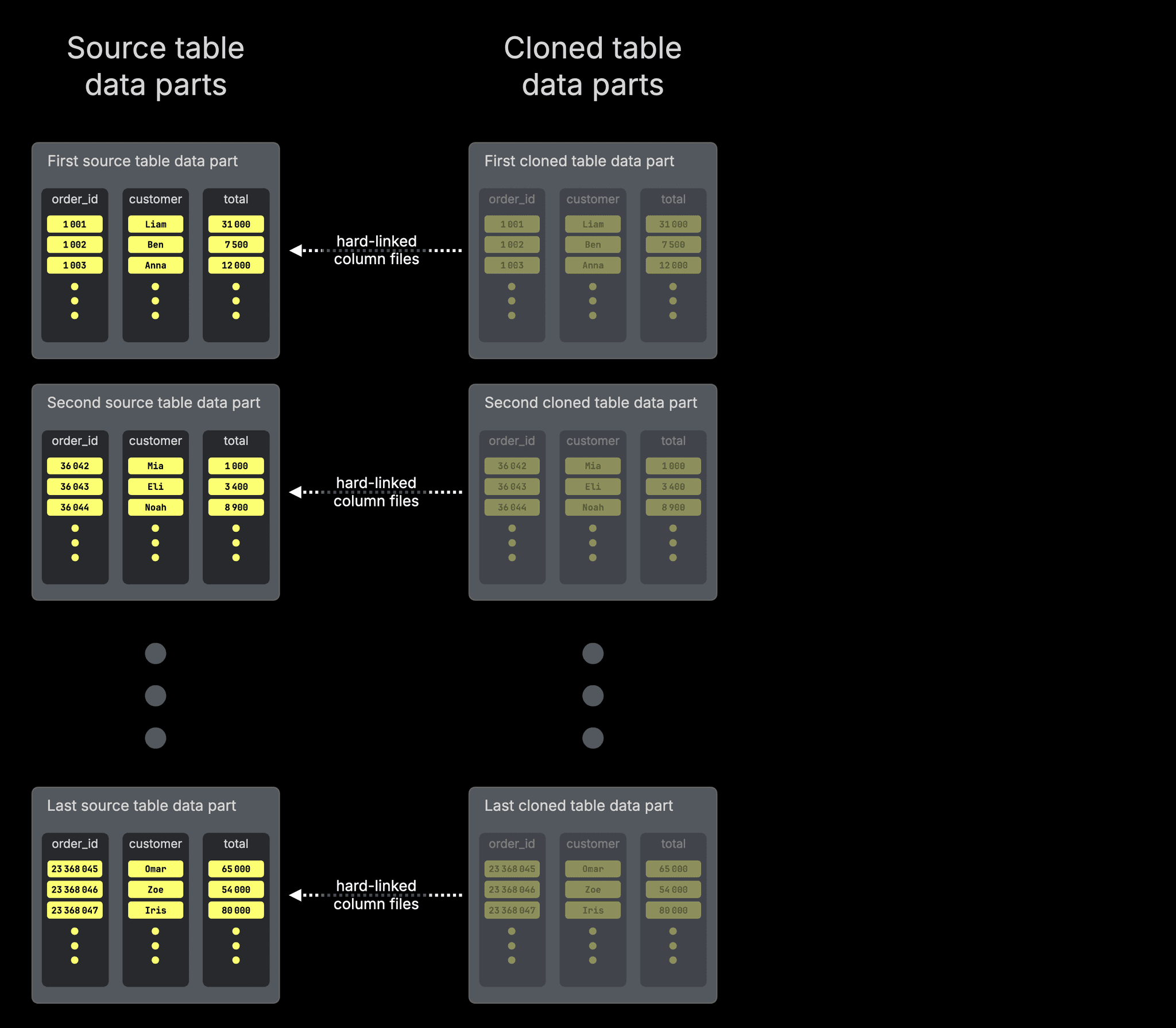
For simplicity, the diagram highlights only the column files. In reality, a data part also contains metadata files such as the sparse primary index, secondary data skipping indexes, column statistics, checksums, and min-max indexes. The entire set of files inside the part directory is hard-linked.
And when the cloned table is updated…
UPDATE cloned_orders
SET total = 3600
WHERE order_id = 36043;…a copy-on-write operation occurs:
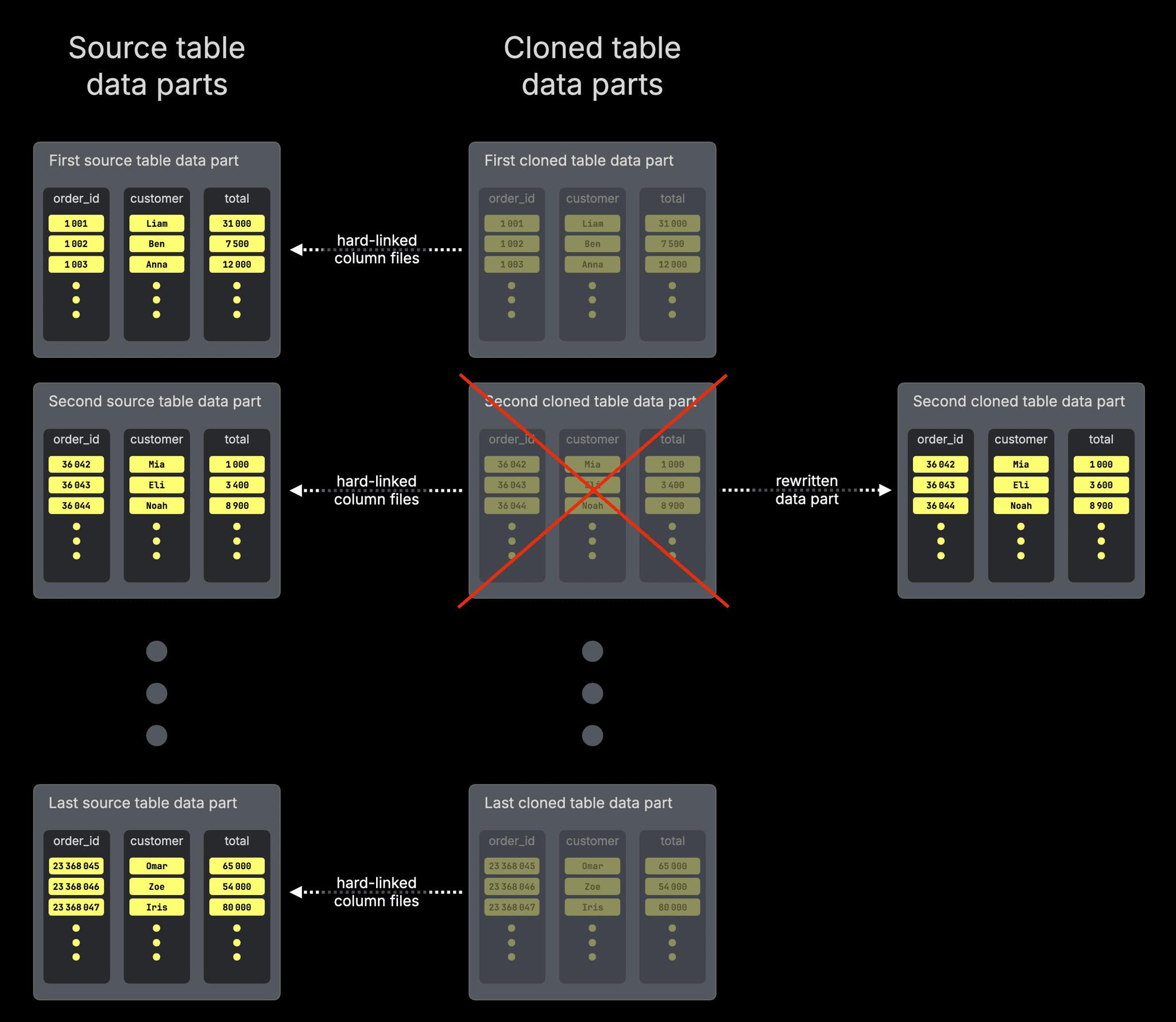
As explained earlier, this rewrite happens at the part level: only the data part containing the affected row is replaced. All other parts remain shared and untouched.
The affected data part in the cloned table is rewritten as a new physical part containing the updated rows. The cloned table now references this newly written part directory instead of its previous directory, whose column files were hard-linked to the source.
The cloned table’s original part directory, containing hard links to the source part’s column files, is removed (because it is replaced with the newly written part).
The original production table continues to reference its unchanged part directory.
Since the original table still references its unchanged part directory (whose column files were hard-linked from the clone’s previous part directory), the underlying files remain on disk.
Column files are only removed once no table depends on them anymore.
This is the core mechanism behind table cloning in ClickHouse.
Immutability makes sharing safe. Part-level copy-on-write guarantees isolation without rewriting entire tables.
Now that we’ve seen how it works under the hood, let’s step back and look at what this enables in practice.
Putting it all together
Table cloning in ClickHouse is a surprisingly powerful and practical feature.
Whenever you need an exact copy of a table
- for staging environments
- schema or index experiments
- backfills
- migrations
- testing destructive changes
You can create it instantly, without risking production data.
The clone starts as an exact copy. It evolves independently. And as long as no data is modified, it consumes virtually no additional storage.
Cloning feels like magic.
It’s a natural consequence of how ClickHouse stores data: immutable parts that can be safely shared, combined with part-level copy-on-write semantics.
Because parts are never modified in place, they can be reused. Because modifications always create new parts, isolation is guaranteed.
The result is a feature that is simple, safe, storage-efficient, and effectively independent of table size.
And in ClickHouse Cloud, cloned tables can optionally be queried from isolated compute services, so both your production data and compute remain untouched.
Ready to get cloning?
Interested in seeing how ClickHouse works on your data? Get started with ClickHouse Cloud in minutes and receive $300 in free credits.
Sign up