50.3k
50.3k
Another month goes by, which means it’s time for another release, and it's a special one with it being the 10-year anniversary of ClickHouse being open-source.
The ClickHouse 26.6 release is a record-breaking release, containing 56 new features 🌞 79 performance optimizations 🏖️ 366 bug fixes 🍦
This release introduces hypothetical skip indexes, cascading refreshable materialized views, experimental support for continuous queries, and more!
New contributors
A special welcome to all the new contributors in 26.6! The growth of ClickHouse's community is humbling, and we are always grateful for the contributions that have made ClickHouse so popular.
Below are the names of the new contributors:
Aditya Chopra, Alasdair Brown, Almaz Kunpeissov, Andriy Yakovlev, Antonio Filipovic, Asya Shneerson, Avenir Voronov, Dmitriy Borisenko, Elian Gidoni, Hanzi Jiang, Harikrishnan Prabakaran, Joe Smith, Joey Yu, Le Zhang, Lefteris Gilmaz, Maksim Dergousov, Maksim Moisiuk, Mathuranath Metivier, Minh Vu, Mohamed Abdelhalim, Mohamed Hussain, MunMunMiao, Patrick Pichler, Ramarajusairajesh, Rory Shanks, SKULLFIRE07, Saarthak Gupta, Sacheendra Talluri, Sergey Kuznetsov, Thomas Cabral, Valerii Mordovskii, Valerii Petrov, Varoon Pazhyanur, Venkata Vineel, Vinayak Joshi, Walt Ribeiro, Youssef Kadry, abdelhalim, abduldjafar, alexbakharew, andyzzhao, bernardlim, daxzel, harikrishnan94, leonard9893, linjiayu, mzitnik, ofeliacode, siwakorn.r, sugaf1204, thewisenerd, uber, uwezkhan, valerypetrov, yousefQadry, zhiqiang-hhhh
Hint: if you’re curious how we generate this list… here.
You can also view the slides from the presentation.
Hypothetical skip indexes
Contributed by Yarik Briukhovetskyi
Starting from ClickHouse 26.6, it’s possible to ask "what if I had this skip index?" without having to build it.
Hypothetical indexes live only in the current session and are invisible to other sessions and discarded when the session ends.
We tried them out on the UK properties dataset, having duplicated the partitions a few times so that we had more rows to work with:
ALTER TABLE uk_price_paid
ATTACH PARTITION ID 'all'
FROM uk_price_paid;We have almost 500 million rows:
SELECT count() FROM uk_price_paid;┌───count()─┐
│ 487239408 │ -- 487.24 million
└───────────┘
1 row in set. Elapsed: 0.006 sec.We run the following query to find the districts in London with the most sales:
SELECT district, count(), round(avg(price)) AS avgPrice
FROM uk_price_paid
WHERE town = 'LONDON'
GROUP BY ALL
ORDER BY count() DESC
LIMIT 10;┌─district────────────┬─count()─┬─avgPrice─┐
│ WANDSWORTH │ 3258048 │ 496367 │
│ LAMBETH │ 2354352 │ 402424 │
│ CITY OF WESTMINSTER │ 2164304 │ 1215976 │ -- 1.22 million
│ TOWER HAMLETS │ 2098864 │ 473783 │
│ LEWISHAM │ 2022208 │ 291688 │
│ SOUTHWARK │ 1998816 │ 462604 │
│ BARNET │ 1942384 │ 449124 │
│ GREENWICH │ 1874464 │ 316369 │
│ WALTHAM FOREST │ 1813360 │ 270709 │
│ NEWHAM │ 1706352 │ 284768 │
└─────────────────────┴─────────┴──────────┘
10 rows in set. Elapsed: 0.317 sec. Processed 487.24 million rows, 1.20 GB (1.54 billion rows/s., 3.80 GB/s.)
Peak memory usage: 894.97 KiB.We can probably improve the performance of this query by adding a set skip index on the town column.
A set skip index would store the unique values for that column for the provided number of granules. At query time, ClickHouse could refer to this skip-index set to determine whether it needs to scan a particular granule/granules.
Before 26.6, we’d need to create that skip index and test it out, but now we can create a hypothetical index instead. And, in fact, we’re going to create two hypothetical indexes so that we can see the difference between creating a skip index per granule compared to one for every 128 granules:
CREATE HYPOTHETICAL INDEX town_set_10_granularity_1
ON uk_price_paid (town)
TYPE set(10)
GRANULARITY 1;
CREATE HYPOTHETICAL INDEX town_set_10_granularity_128
ON uk_price_paid (town)
TYPE set(10)
GRANULARITY 128;Once we’ve done that, we can prefix our district query with EXPLAIN WHATIF:
EXPLAIN WHATIF
SELECT district, count(), round(avg(price)) AS avgPrice
FROM uk_price_paid
WHERE town = 'LONDON'
GROUP BY ALL
ORDER BY count() DESC
LIMIT 10;When we run that query, ClickHouse will read table data to build the candidate index in memory, and scan counts against the session's read limits and quotas. The output of running the query is shown below:
┌─explain───────────────────────────────────────────────┐
│ Baseline (after PK + partition + existing indexes): │
│ table: default.uk_price_paid │
│ parts: 3 │
│ marks: 59479 │
│ est_bytes: 831.90 MiB │
│ │
│ With town_set_10_granularity_128 (set, hypothetical): │
│ status: applicable │
│ marks: 13702 │
│ est_bytes: 191.64 MiB │
│ skip_ratio: 77.0% │
│ │
│ Estimation: │
│ source: empirical │
│ empirical_status: ok │
│ sampled_parts: 3 / 3 │
│ sampled_marks: 59479 / 118964 │
│ elapsed_us: 3826267 │
│ │
│ With town_set_10_granularity_1 (set, hypothetical): │
│ status: applicable │
│ marks: 4663 │
│ est_bytes: 65.22 MiB │
│ skip_ratio: 92.2% │
│ │
│ Estimation: │
│ source: empirical │
│ empirical_status: ok │
│ sampled_parts: 3 / 3 │
│ sampled_marks: 59479 / 118964 │
│ elapsed_us: 4283731 │
│ │
└───────────────────────────────────────────────────────┘
32 rows in set. Elapsed: 8.115 sec. Processed 974.48 million rows, 1.95 GB (120.08 million rows/s., 240.11 MB/s.)
Peak memory usage: 269.35 KiB.If we look at row 12, we can see that the index for 128 granules will skip 77% of granules for this query, whereas on row 25, the index per granule would instead skip 92% of granules.
This gives us some useful information before deciding whether to create a skip index and what settings to use.
Cascading refreshable materialized views
Contributed by Michael Kolupaev
ClickHouse 26.6 introduces an overhaul of how dependencies work for refreshable materialized views.
Before this release, it was possible to create dependencies between refreshable materialized views, but the dependent views still ran on their own independent timers. This meant that latency could build up between stages if the schedules drifted, and views could skip or lag by a full refresh cycle.
Let’s have a look at how to set things up with the following set of tables that represent IMDB data:
CREATE TABLE actor_summary
(
`id` UInt32,
`name` String,
`movies` UInt16,
`avg_rank` Float32,
`genres` UInt16,
`directors` UInt16,
`updated_at` DateTime
)
ENGINE = MergeTree
ORDER BY movies;CREATE TABLE actor_rank
(
`id` UInt32,
`name` String,
`movies` UInt16,
`avg_rank` Float32,
`genres` UInt16,
`directors` UInt16,
`updated_at` DateTime
)
ENGINE = MergeTree
ORDER BY movies;CREATE TABLE actor_rank_over_time
(
`id` UInt32,
`name` String,
`avg_rank` Float32,
`as_of` DateTime
)
ENGINE = MergeTree
ORDER BY as_of;We previously populated these tables like this:
CREATE MATERIALIZED VIEW actor_summary_mv
REFRESH EVERY 2 MINUTES TO actor_summary AS
...CREATE MATERIALIZED VIEW actor_rank_mv
REFRESH EVERY 1 MINUTE DEPENDS ON actor_summary_mv
TO imdb.actor_rank AS
SELECT *
FROM actor_summary
WHERE movies > 10
ORDER BY avg_rank DESC
LIMIT 5;CREATE MATERIALIZED VIEW actor_rank_over_time_mv
REFRESH EVERY 1 MINUTE DEPENDS ON actor_rank_mv
APPEND
TO imdb.actor_rank_over_time AS
SELECT id, name, avg_rank, now() AS as_of
FROM actor_rank
ORDER BY avg_rank DESC
LIMIT 1;Now, only actor_summary_mv has a timer, but we don’t need to specify one for actor_rank_mv or actor_rank_over_time_mv. So, we end up with the following:
CREATE MATERIALIZED VIEW actor_summary_mv
REFRESH EVERY 2 MINUTES TO actor_summary AS
...CREATE MATERIALIZED VIEW actor_rank_mv
REFRESH DEPENDS ON actor_summary_mv
TO imdb.actor_rank AS
SELECT *
FROM actor_summary
WHERE movies > 10
ORDER BY avg_rank DESC
LIMIT 5;CREATE MATERIALIZED VIEW actor_rank_over_time_mv
REFRESH DEPENDS ON actor_rank_mv
APPEND
TO actor_rank_over_time AS
SELECT id, name, avg_rank, now() AS as_of
FROM imdb.actor_rank
ORDER BY avg_rank DESC
LIMIT 1;ALTER TABLE … ADD ENUM VALUES
Contributed by Ilya Golshtein
We can write the following query to find the enum columns in our uk_price_paid table:
SELECT name, type
FROM system.columns
WHERE table = 'uk_price_paid'
AND database = 'default'
AND type LIKE 'Enum%'
FORMAT Vertical;Row 1:
──────
name: type
type: Enum8('other' = 0, 'terraced' = 1, 'semi-detached' = 2, 'detached' = 3, 'flat' = 4)
Row 2:
──────
name: duration
type: Enum8('unknown' = 0, 'freehold' = 1, 'leasehold' = 2)Prior to ClickHouse 26.6, if we wanted to add a new enum value, we’d need to also provide the existing values when doing so:
ALTER TABLE uk_price_paid
MODIFY COLUMN type Enum8(
'other' = 0,
'terraced' = 1,
'semi-detached' = 2,
'detached' = 3,
'flat' = 4,
'royal' = 5
);It’s now possible to append a new value using the ADD ENUM VALUES syntax:
ALTER TABLE uk_price_paid
MODIFY COLUMN type
ADD ENUM VALUES('royal' = 5);And if we re-run the query to show our enum columns:
Row 1:
──────
name: type
type: Enum8('other' = 0, 'terraced' = 1, 'semi-detached' = 2, 'detached' = 3, 'flat' = 4, 'royal' = 5)
Row 2:
──────
name: duration
type: Enum8('unknown' = 0, 'freehold' = 1, 'leasehold' = 2)
2 rows in set. Elapsed: 0.006 sec.help in the CLI
Contributed by Alexey Milovidov
If you’re in the ClickHouse zone and need to look up some documentation, there’s no need to move out of the CLI to search the docs or ask your AI agent for the answer. Instead, you can type help followed by the topic, and you’ll get back in-line documentation.
help Geometry;GEOMETRY (Data Type)
─────────────────────────────────────────────────────────────────────────────────────────
Alias of Geometry.
Geometry (Data Type)
─────────────────────────────────────────────────────────────────────────────────────────
Geometry is a Variant type that can hold any of the geometric data types: Point,
LineString, MultiLineString, Polygon, MultiPolygon, or Ring.
Syntax
Geometry
Related: PointThis is backed by the new system.documentation table, which you can also query directly:
SELECT type, count()
FROM system.documentation
GROUP BY type
ORDER by count() DESC
LIMIT 10;┌─type───────────────┬─count()─┐
│ Function │ 1593 │
│ Setting │ 1549 │
│ Server Setting │ 412 │
│ MergeTree Setting │ 316 │
│ Aggregate Function │ 197 │
│ Data Type │ 140 │
│ Format │ 109 │
│ Table Engine │ 79 │
│ Table Function │ 66 │
│ Dictionary Layout │ 19 │
└────────────────────┴─────────┘
10 rows in set. Elapsed: 0.019 sec. Processed 4.54 thousand rows, 4.36 MB (240.42 thousand rows/s., 230.69 MB/s.)
Peak memory usage: 6.18 MiB.Transform clickhouse-local to a server
Contributed by Alexey Milovidov
clickhouse-local is our go-to tool for doing any ad hoc data analysis, but sometimes you want to hook up your ClickHouse instance to external tools, which wasn’t straightforward.
As of 26.6, you can now have clickhouse-local listen for connections on the fly:
SYSTEM START LISTEN TCP;
SYSTEM START LISTEN HTTP;You can then connect to it as you’re running ClickHouse Server using ClickHouse Client:
./clickhouse client -mnClickHouse client version 26.7.1.22 (official build).
Connecting to localhost:9000 as user default.
Connected to ClickHouse server version 26.7.1.SHOW TABLES;┌─name──────────┐
│ uk_price_paid │
└───────────────┘
1 row in set. Elapsed: 0.002 sec.We can also navigate to http://localhost:8123 for the Web UI. From here, we could click on Schema visualizer to see a new UI that draws the dependency graph of your database. It includes tables, materialized views, and dictionaries. Ours isn't particularly interesting as we only have one table:
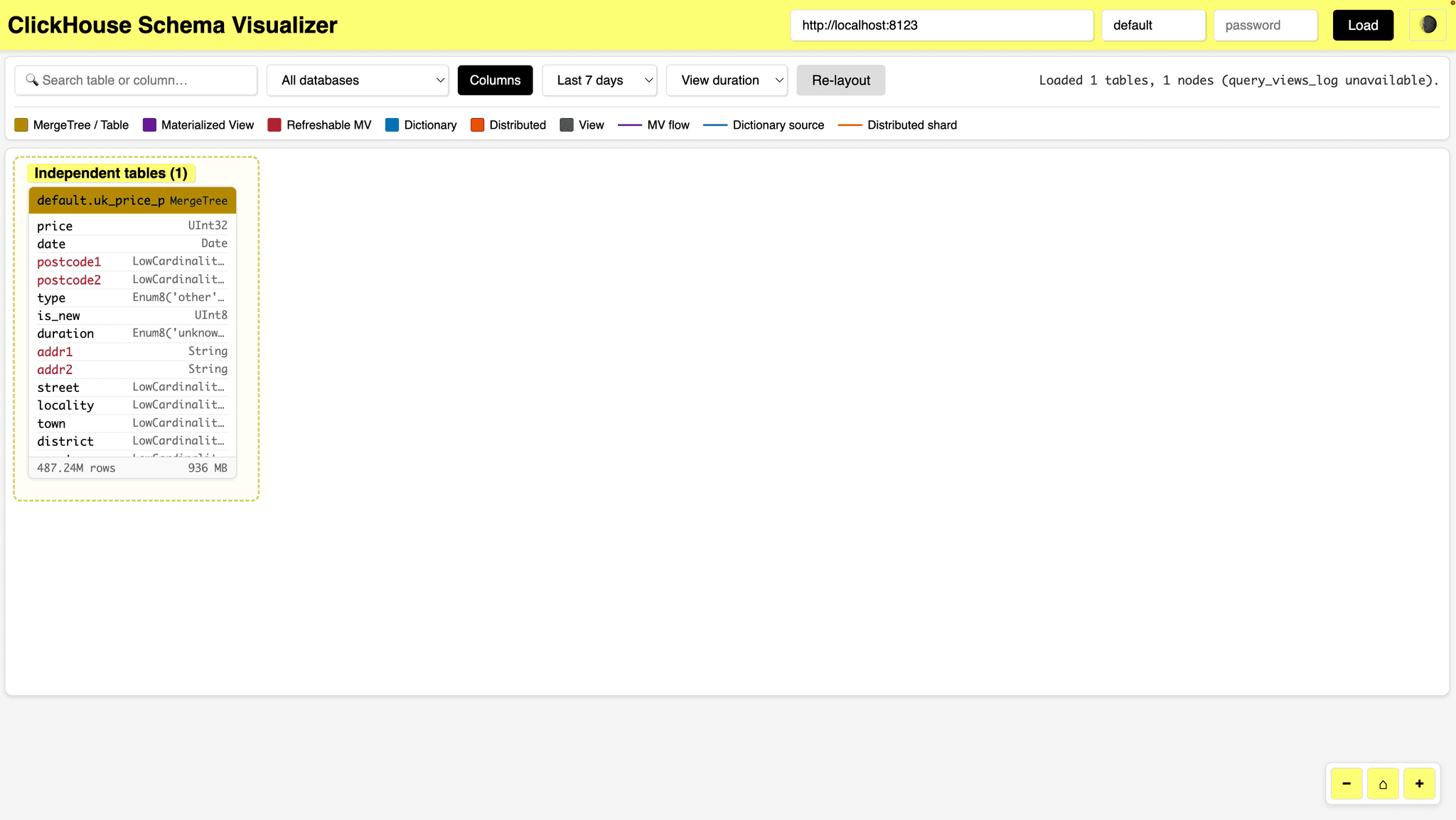
Hopefully, yours looks prettier!
And once you’re done, it’s easy enough to stop listening on those ports:
SYSTEM STOP LISTEN TCP;
SYSTEM STOP LISTEN HTTP;Lighter, faster query startup
Contributed by Raúl Marín, Dmitry Novik, Max Justus Spransy, Azat Khuzhin
There are a series of improvements in 26.6 that significantly reduce per-query overhead for simple queries.
Deeply nested queries, in particular, are now analyzed more efficiently. Let’s run the following (unnecessarily complex) query:
SELECT * FROM (SELECT * FROM (SELECT * FROM (SELECT * FROM (
SELECT * FROM (SELECT * FROM (SELECT * FROM (SELECT * FROM (
SELECT * FROM (SELECT * FROM (SELECT * FROM (SELECT * FROM (
SELECT * FROM (SELECT * FROM (SELECT * FROM (SELECT * FROM (
SELECT * FROM (SELECT * FROM (SELECT * FROM (
SELECT * FROM uk_price_paid LIMIT 10
)))))))))))))))))));Against 26.5:
10 rows in set. Elapsed: 0.098 sec.
10 rows in set. Elapsed: 0.102 sec.
10 rows in set. Elapsed: 0.100 sec.And against 26.6:
10 rows in set. Elapsed: 0.030 sec.
10 rows in set. Elapsed: 0.036 sec.
10 rows in set. Elapsed: 0.050 sec.The best time on 26.6 was 30 milliseconds, compared to the best of 98 milliseconds on 26.5, a roughly 3 times improvement.
Continuous queries
Contributed by Mikhail Artemenko
We also have the introduction of streaming queries in experimental mode. You can now write a query that never ends by appending STREAM. The query will keep emitting new rows as they are inserted.
To enable this feature, you can use the following setting:
SET enable_streaming_queries = 1;And then, we could write the following query that blocks and keep streaming new rows:
SELECT id, msg
FROM live_events STREAM;As new rows are added to live_events, they would be returned by the above query.
This feature can also be used in a more advanced mode with cursors:
SELECT _block_number AS bn, _block_offset AS bo, id, msg
FROM events STREAM
CURSOR {'all': {'block_number': 2, 'block_offset': 0}};PNG output format
Contributed by Maksim Dergousov
26.6 introduces the PNG output format, which makes it possible to render query results as an image. It's one row per pixel (r, g, b or v), with implicit or explicitly defined pixel coordinates (x, y). For example:
WITH number DIV 1024 AS y, number MOD 1024 AS x,
L2Norm((x - 512, y - 512)) / 512 AS radius, 60 AS stripe_size,
round((atan2(x - 512, y - 512) / pi() * 180 + exp(radius) * 90)
/ stripe_size) * stripe_size AS alpha,
radius <= 1 ? abs(1 - (radius - 0.5) * (radius - 0.5) * 4) : 0 AS a,
colorOKLCHToSRGB((0.7, 0.15, alpha)) AS rgb
SELECT rgb.1::UInt8 AS r, rgb.2::UInt8 AS g, rgb.3::UInt8 AS b, a
FROM numbers(1048576) FORMAT PNG
Off the back of this functionality, Alexey has created RayTracer, a path tracer written entirely as ClickHouse SQL queries, rendering straight to PNG.
Geospatial improvements
Contributed by Mark Needham, Alexey Milovidov, Saarthak Gupta
As of ClickHouse 26.6, you can read a GeoJSON feature collection and it will generate one row per feature:
SELECT id, properties.name, toTypeName(geometry)
FROM file('places.geojson', GeoJSON);| id | properties.name | geometry |
|---|---|---|
| 1 | London | Geometry (Point) |
| 2 | square | Geometry (Polygon) |
Point, LineString, MultiLineString, Polygon, and MultiPolygon are all supported natively.
You can also serve map tiles straight out of ClickHouse with the new MVT functions.
Project lon/lat into a tile's pixel space:
SELECT MVTEncodeGeom((13.37, 52.52)::Point, 10, 550, 335);┌─MVTEncodeGeo⋯, 550, 335)─┐
│ (124,3384) │
└──────────────────────────┘Aggregate a group's geometries into one binary tile:
SELECT MVTEncode(geom_in_tile_space) FROM ...;Tile bounding box for the WHERE clause:
SELECT MVTBoundingBox(12, 1205, 2557);┌─MVTBoundingBox(12, 1205, 2557)───┐
│ { ↴│
│↳ "min_lon": -74.091796875, ↴│
│↳ "min_lat": -40.84706035607121,↴│
│↳ "max_lon": -74.00390625, ↴│
│↳ "max_lat": -40.78054143186031 ↴│
│↳} │
└──────────────────────────────────┘Point, line and polygon geometry are the supported types.
aiEmbed
Contributed by George Larionov
26.6 adds aiEmbed to the collection of experimental AI functions available in ClickHouse.
Let's have a look at how to use this locally using Ollama. We'll first configure a named collection that points to Ollama's embedding API endpoint, using the qwen3-embedding model:
CREATE NAMED COLLECTION ollama_credentials AS
provider = 'openai',
endpoint = 'http://localhost:11434/v1/embeddings',
model = 'qwen3-embedding',
api_key = 'ollama';We can then configure AI functions and our credentials:
SET allow_experimental_ai_functions = 1;
SET ai_function_credentials = 'ollama_credentials';And we can then call the aiEmbed function:
SELECT arraySlice(aiEmbed('Hello world'), 1, 10)
FORMAT Vertical;Row 1:
──────
arraySlice(a⋯d'), 1, 10): [0.02529167,0.017939178,-0.017299227,-0.021381723,0.017130155,-0.025205782,-0.028271621,0.011541649,-0.02053676,0.021490935]
1 row in set. Elapsed: 0.192 sec.Quantization functions
Contributed by Alexey Milovidov
The 26.6 release also adds a scalar codec that compresses embedding components to 8 bits and below:
SELECT quantizeBFloat16ToInt8(1.5::BFloat16);┌─quantizeBFlo⋯BFloat16'))─┐
│ 107 │
└──────────────────────────┘WITH quantizeBFloat16ToInt8(1.5::BFloat16) AS quantized
SELECT dequantizeInt8ToBFloat16(quantized);┌─dequantizeIn⋯(quantized)─┐
│ 1.5 │
└──────────────────────────┘We could use this function to shrink vector indexes 4x (or more) for cheaper similarity search.
Memory reservations for workloads
Contributed by Sergei Trifonov
The workload scheduler, which already manages CPU, I/O and concurrency, now manages memory as well as of ClickHouse 26.6.
We start by creating a resource:
CREATE RESOURCE memory (MEMORY RESERVATION);And then, we can define various workloads:
CREATE WORKLOAD all;
CREATE WORKLOAD prod IN all SETTINGS max_memory = '100G';
CREATE WORKLOAD reports IN all SETTINGS max_memory = '20G';
CREATE WORKLOAD vasya IN reports SETTINGS weight = 1;
CREATE WORKLOAD petya IN reports SETTINGS weight = 2;When we write a query, we can route it to a workload like this:
SELECT …
SETTINGS workload = 'prod';Get started today
Interested in seeing how ClickHouse works on your data? Get started with ClickHouse Cloud in minutes and receive $300 in free credits.
Sign up