50.5k
50.5k
Summary
Canva uses ClickHouse to power real-time observability at massive scale, processing nearly 3 million spans and 3 million logs every second. By redesigning ingestion and storage, the team achieved a 14x compression ratio and reduced infrastructure costs by around 70%. Query optimizations and schema improvements helped cut P90 trace search times from 30 seconds to 2.5 seconds—a 10x performance gain.
When 240 million monthly active users are creating, designing, and publishing, the logs add up quickly—at Canva’s scale, nearly 3 million spans and 3 million logs every second.
“That number is growing rapidly,” says Canva software engineer Zjan Carlo Turla. “It’s doubling year over year—and the demands on our infrastructure are growing along with it.”
Keeping up with that pace meant rethinking how the team handles observability, from ingestion and storage to search performance. As Zjan puts it, “We needed to rethink our approach to ops infrastructure, and we needed to build something that could scale with demand.”
At our Open House Roadshow in Sydney, Zjan shared how the team achieved 10x faster performance and 70% cheaper costs—what he calls “Canva’s migration journey, from schema design to ingestion to building really delightful experiences on top of ClickHouse.”
Smarter ingestion, 70% cost savings
The journey began with moving tracing workloads to ClickHouse. Step one, Zjan explains, was getting the infrastructure right. “We decided to keep it really simple,” he says.
Canva’s production cluster follows a standard ClickHouse layout—five shards and three replicas distributed across availability zones, with each node running roughly 60 vCPUs and 400 GB of RAM. The team manages everything directly, using Argo CD for deployment and Jsonnet to template both Kubernetes manifests and ClickHouse configurations. Scaling up or out happens through those templates. Storage is equally streamlined: a single tier of EBS GP3 SSDs, with multiple disks attached to each node (via JBOD).
That setup gave them a solid foundation, but as Zjan says, “Just deploying it isn’t enough. Getting things to work with a much smaller infrastructure requires quite a bit of work.”
Much of that work focused on optimizing ingestion. Traces start in OpenTelemetry agents running inside Canva’s applications, flow through daemon-set collectors, then into centralized collectors before hitting ClickHouse. Early on, the team used distributed tables and async inserts so ClickHouse could handle batching and distributing automatically. “It gave us decent performance,” Zjan says, “but we needed more.”
The breakthrough came from shifting that batching upstream. Canva’s collectors were already designed to buffer a “significant amount of trace data in memory,” so the team used that to their advantage, bundling roughly 200,000 spans (about 160 MiB) per batch and writing directly into local tables instead of distributed ones. “Moving the batching into the collectors meant we were doing fewer and larger inserts into ClickHouse, and freed up ClickHouse from having to do all that batching and distributing,” Zjan says.
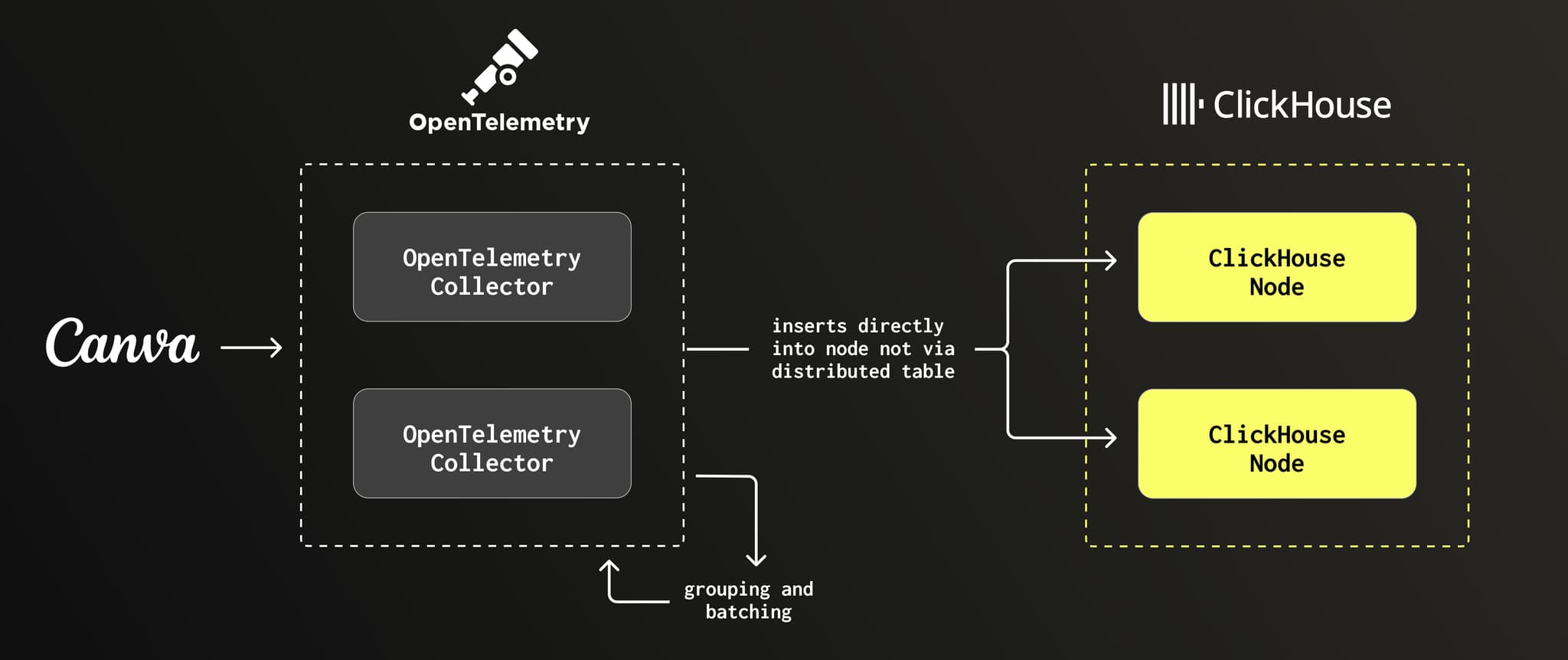
Collectors batch and group OpenTelemetry traces, inserting them directly into ClickHouse nodes.
That change, combined with what he calls ClickHouse’s “amazing out-of-the-box performance” and “really amazing compression,” helped the team achieve a 14x compression ratio for span data and cut storage costs by roughly 70%. As Zjan puts it, “We were able to get the ingest performance we needed to really move our production workloads.”
“Best of all,” he adds, “it gave us the headroom we needed to improve query performance.”
Get started today
Interested in seeing how ClickHouse works on your data? Get started with ClickHouse Cloud in minutes and receive $300 in free credits.
Sign upOptimizing search: 30s → 2.5s
With ingestion stable and storage way down, the team turned to its next challenge: making searches faster. “Migrating to a much smaller infrastructure was already a big win,” Zjan says. “But we needed to pass on some of that improvement to our users.”
Canva’s engineers rely heavily on Jaeger, and their most common searches—filtering by service name, span name, or trace ID—need to return in seconds, not tens of seconds. The team knew exactly where to start. “Getting good performance out of tracing with ClickHouse really starts with schema design,” Zjan says.
Their schema centers on standard trace context attributes, plus a small set of span and resource fields queried most often. The trickiest part, Zjan says, was supporting schemaless attributes that vary across services. The solution: store them as pairs of arrays—one for keys, one for values. “This allows us to store any number of arbitrary attribute names for a given type,” he says. ClickHouse functions like mapFromArrays make it easy to reconstruct them at query time.
From there, the team optimized for how engineers actually search. Because Jaeger shows service name, span name, and timestamp as primary filters, Canva used those same fields as the sorting key in ClickHouse. “You reduce the number of parts you have to scan, leading to much faster queries,” Zjan explains.
They also partitioned traces by day and set a 14-day TTL. “It lets us cycle data on a per-day chunk,” Zjan says, “and prevents the data parts from getting way too big.”
But some searches—like trace ID lookups—skip those primary filters entirely. For those, Canva built a materialized-view lookup table keyed by trace ID, storing the relevant service and span names. “Searching the trace ID gives you the primary keys for the parts you really want to hit,” Zjan says. “This lookup table, combined with the previous schema design work, made our search really, really fast.”
To squeeze out even more speed, the team added client-side optimizations like a sliding search window with a backoff mechanism that expands the time range only as needed, instead of scanning everything at once. As Zjan puts it, “At least for traces, we don’t need to show all the results during that time period.”
Put it all together, and the results speak for themselves: P90 trace searches dropped from around 30 seconds to 2.5 seconds—what Zjan calls a “nice 10x multiple in terms of performance improvement.”
Making logs fast, flexible, and familiar
With traces running faster and cheaper than ever, ClickHouse had already shown it could handle observability at massive scale. “That really gave us the confidence to go ahead with migrating our logging infrastructure,” Zjan says.
Logs, of course, brought their own challenges. Canva’s logging pipeline relies on Kinesis Data Streams and AWS Lambdas to move data into ClickHouse. But unlike the trace collectors, Lambdas couldn’t buffer large batches in memory. The team solved that with ClickHouse’s async inserts, letting the database handle the batching instead. As Zjan notes, “We did a ton of experiments tuning these async insert parameters per table to get something that performs really, really well.” With the right tuning, they were able to reliably ingest 100% of logs on just two ClickHouse nodes, ensuring ingest availability even at a reduced operating capacity.
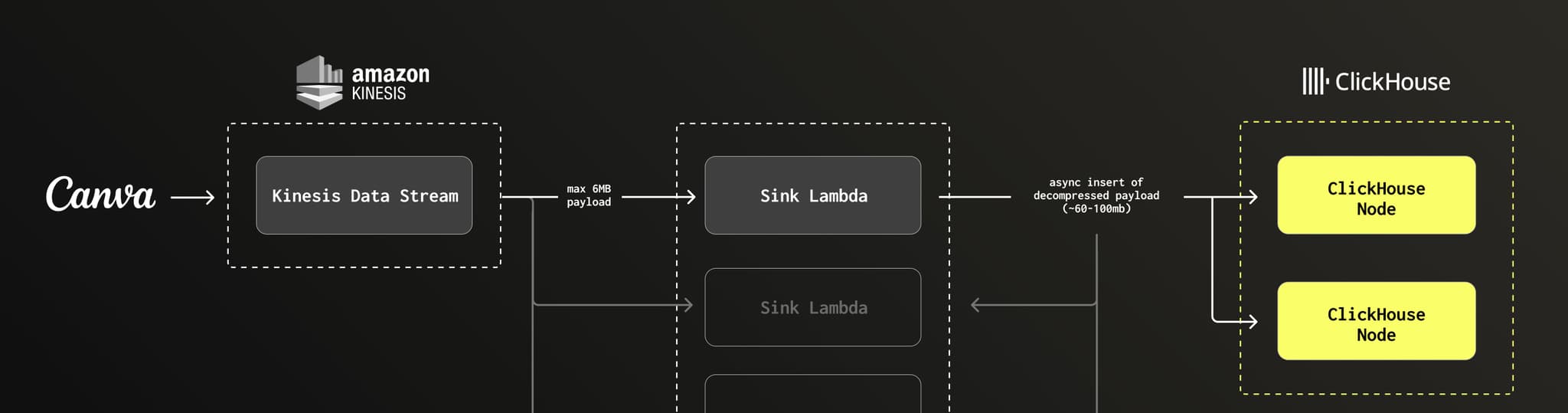
Kinesis sends small log batches to Lambdas, which async-insert larger payloads into ClickHouse.
The bigger hurdle was search. “For logging, the bulk of the work was in delivering a good logging experience for users,” Zjan says. “To make that happen, we really needed to make free text search work with ClickHouse.”
Coming from OpenSearch, engineers were used to typing anything into a search box and getting instant results. To replicate that experience, the team flattened each log object—body, resource, metadata—into a single string and applied ngram Bloom filters. That enabled fast substring search across every field, something that wasn’t possible with ClickHouse’s standard indexing.
That left one more hurdle: developer experience. Their schemaless approach—pairs of arrays for keys and values—was powerful, but not exactly ergonomic. “It works great,” Zjan says, “but it’s a bear to work with as a developer and user.”
So Canva built a query gateway that translates a custom DSL into ClickHouse queries, providing Kibana-like querying functionality. On top of that, they created a fully custom logging platform with a query builder, code search, and autocomplete. The end result is an experience that feels familiar to engineers while running on a leaner, faster stack.
“Doing more and storing more with less”
Before rolling out to full production, the team made a few final tweaks to harden the system. They partitioned nodes into read/write and write-only replicas for cleaner isolation, added hourly and daily S3 backups, and set up recovery jobs that restore data to separate tables so ingestion doesn't get blocked. They also benchmarked the cluster on ARM-based Graviton processors, seeing 1.7x better performance on Graviton3 and more than 2x on Graviton4.
Those last touches helped cement a production system that’s not only fast, but battle-tested. Today, Canva’s traces and logs run side by side on ClickHouse, powering observability across the company with a fraction of the resources their old system required.
For Zjan and the team, the impact goes well beyond cost savings or query speed. They’ve built an observability platform that developers actually enjoy using—one that makes troubleshooting faster, insights easier, and scaling simpler. Zjan highlights the “amazing support team from ClickHouse,” calling them “really instrumental in getting this to production.”
As Zjan puts it, “We’re doing more and storing more with less.” For a company built around empowering creativity, that kind of clarity and efficiency makes a real difference.
Get started today
Interested in seeing how ClickHouse works on your data? Get started with ClickHouse Cloud in minutes and receive $300 in free credits.
Sign up