 50.8k
50.8k
Backup validation, failover testing, upgrades, capacity changes, and incident response all compete for engineering attention. As PostgreSQL becomes more critical, a delayed failover or a failed restore turns that operational burden into business risk.
PostgreSQL can remain self-hosted or move to a cloud-managed service. With self-hosting, a database management platform deployed in your environment can automate selected operations while PostgreSQL and its infrastructure remain under your team's control. The right approach depends on where PostgreSQL can run, which controls your team must retain, and which operational tasks it can automate or transfer.
TL;DR
- Switch to cloud-managed PostgreSQL when the work and risk associated with backups, failover, patching, scaling, and recovery outweigh the value of direct infrastructure control.
- Stay self-hosted when you need strict infrastructure control, required extensions or specialized topologies that eligible cloud-managed services do not support, or mandatory on-premises or air-gapped deployment.
- Add a database management platform to self-hosted PostgreSQL when the database must stay inside your environment but your team wants to automate backups, monitoring, upgrades, and failover workflows.
- Before choosing, compare the fully loaded PostgreSQL cost, retained responsibilities, migration readiness, and whether analytical workloads need a separate system.
Determine which PostgreSQL deployment models meet your constraints
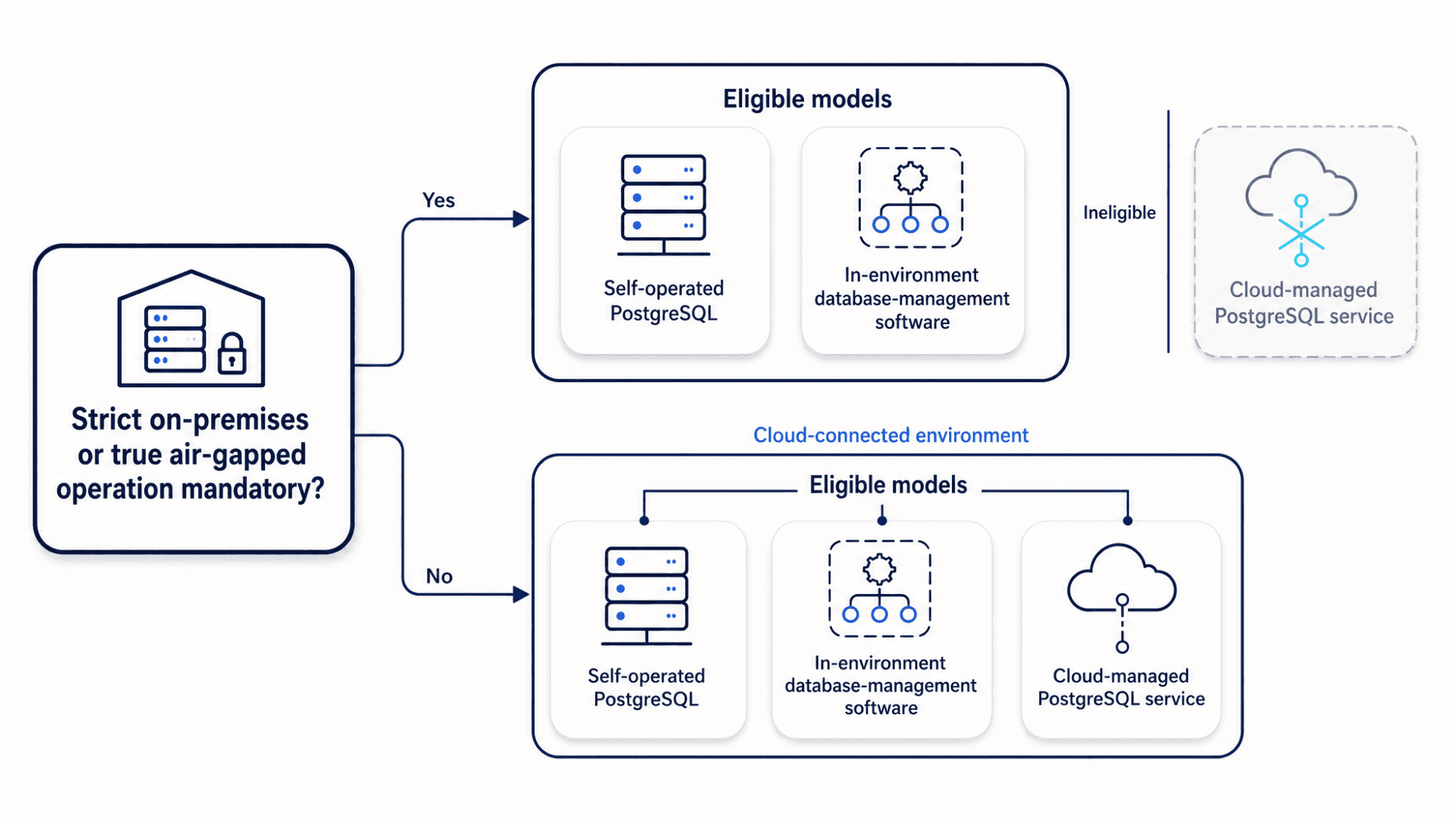
Start with your deployment constraints. Identify geographic restrictions on public cloud deployment, including data sovereignty requirements. Eliminate models that conflict with on-premises mandates or strict connectivity rules before comparing prices.
A true air gap means the system has no network connection to external systems or provider services. This differs from private networking, which restricts the connection rather than removing it. The air-gap requirement rules out cloud-managed PostgreSQL services.
Private-connectivity options for cloud-managed services include VPC peering, AWS PrivateLink, Google Private Service Connect, private endpoints, VPNs, and AWS Direct Connect. These options provide a private network path to supported services. IP allowlists restrict access to a public endpoint but do not make that path private. Neither arrangement creates an air gap because traffic still flows between your environment and the provider service.
If PostgreSQL must remain air-gapped or on-premises, keep it self-hosted. A database management platform deployed in the same environment can automate supported tasks such as monitoring, backups, upgrades, failover orchestration, and policy enforcement while your team retains responsibility for PostgreSQL and the infrastructure.
For each eligible model, identify where the data plane, control plane, backups, and telemetry reside. Check how support personnel access the system.
Confirm whether failover, restore, credential recovery, certificate rotation, upgrades, and backup retrieval must work without internet access, a cross-region dependency, or vendor intervention.
Once you have eliminated ineligible models, compare their fully loaded cost, operational risk, and the responsibilities your team retains.
Compare self-hosted and cloud-managed PostgreSQL on total cost and risk
Comparing a self-hosted virtual machine bill with a cloud-managed PostgreSQL invoice gives an incomplete picture. Self-hosting also incurs costs for engineering labor, incident response, backup validation, failover testing, patching, monitoring, tuning, and the operational risk of running it all yourself.
Cloud-managed services transfer infrastructure provisioning and routine platform operations to the provider. You own your data, access policies, workload design, and recovery validation.
Map the exact responsibility boundary for each provider, service tier, and topology.
| Area | Self-hosted PostgreSQL | Cloud-managed PostgreSQL |
|---|---|---|
| Infrastructure provisioning | Your team | Provider |
| OS patches and routine maintenance | Your team | Provider |
| Backups, WAL archiving, PITR mechanics | Your team | The provider operates backup and WAL-archiving mechanisms. The customer chooses the exposed retention and recovery settings and validates restores. |
| Replication and failover mechanics | Your team | The provider operates replication and failover when HA is supported and enabled. The customer selects the exposed topology options and validates application recovery. |
| Schema design and migrations | Your team | Your team |
| Query optimization and indexing | Your team | Your team |
| Access policies and connection behavior | Your team | Your team configures access and connection behavior within the service controls; the provider secures the underlying platform. |
| Capacity planning and workload design | Your team | Your team designs the workload and configures the service's available compute, storage, replica, and scaling options. |
With a cloud-managed service, your team owns database and application engineering. Managed operations do not fix poor schema design, missing indexes, inefficient queries, excessive connections, bad transaction patterns, or application-level misuse.
Model self-hosted PostgreSQL costs across compute, storage volumes, backup storage, cross-availability-zone data transfer, monitoring, peak-load capacity, engineering time, on-call work, incident response, restore drills, and downtime risk.
Model cloud-managed costs across compute and memory tiers, storage, provisioned IOPS, backup retention, point-in-time recovery, read replicas, network bandwidth, support, egress, and migration. Confirm which items the provider includes and which it meters separately for the selected tier, region, and topology.
For a self-hosted deployment that uses a database management platform, include the platform's licensing or subscription fees, infrastructure, implementation, internal operations, and support. Compare those costs with the manual database work it reduces.
Fully loaded PostgreSQL cost over a defined evaluation period = Infrastructure + Staffing + Backups and monitoring + Expected downtime loss + Compliance overhead + Migration cost + Exit cost
Normalize recurring and one-time costs to the same evaluation period. For each outage scenario, estimate expected downtime loss from its probability or expected frequency, likely duration, and financial impact per unit of downtime.
Staffing costs should reflect fully loaded engineering compensation and the time senior engineers spend managing PostgreSQL upgrades instead of building product features.
Add the compute, storage, data movement, and ongoing operational costs of a separate analytics system. For a managed deployment, add any service and connector charges.
Choose cloud-managed PostgreSQL when operational risk and engineering time cost more than the cloud-managed service premium.
Stay self-hosted when environmental control, database specialization, or regulatory requirements outweigh the benefits of infrastructure automation.
Choose a PostgreSQL operating approach
Choose the deployment model first. If PostgreSQL remains self-hosted, decide whether your team will assemble and maintain the operational tooling or use a database management platform. A database management platform provides supported workflows for provisioning, backups, monitoring, upgrades, failover, policy enforcement, and fleet management while your team retains responsibility for PostgreSQL and the infrastructure.
Conditions that favor self-hosted PostgreSQL
- Your required extensions, background workers, replication topologies, or superuser-level access are not supported by the cloud-managed providers you are considering.
- Your team already has dedicated PostgreSQL expertise and tested processes for upgrades, failover, backup validation, tuning, and incident response.
- Your compliance requirements prohibit a third-party control plane from managing database compute or storage.
- Your workload requires operating system tuning, custom hardware, filesystem choices, or direct infrastructure control.
Conditions that favor a database management platform for self-hosted PostgreSQL
- PostgreSQL must remain on-premises, in a sovereign environment, in a private cloud, or in an air-gapped deployment, and your team wants a platform to automate backups, monitoring, upgrades, high-availability orchestration, policy enforcement, and fleet management.
- Your team can operate the underlying infrastructure but wants to reduce manual database administration.
Conditions that favor cloud-managed PostgreSQL
- On-call load, failed restore drills, delayed patching, or fragile failover processes consume too much engineering time.
- Scaling storage, compute, or replicas delays delivery because it requires cross-team coordination.
- Your shortlisted service provides the encryption, private connectivity, backup retention, point-in-time recovery, observability, and support your application requires.
- Your application runs in a supported cloud environment or has a secure network path to one.
Compare the three PostgreSQL operating approaches
| Dimension | Self-hosted PostgreSQL operated directly by your team | Self-hosted PostgreSQL with a database management platform | Cloud-managed PostgreSQL service |
|---|---|---|---|
| Deployment location | Your infrastructure | Your infrastructure; the management platform also runs inside your environment | Provider-operated cloud environment |
| Control | Your team controls the operating system and PostgreSQL configuration and selects infrastructure resources, subject to the hosting platform's limits. | Your team controls PostgreSQL and the infrastructure; the management platform automates supported database operations. | The provider controls the infrastructure; your team controls the exposed database and service settings. |
| Maintenance responsibility | Your team operates PostgreSQL and maintains the operational tooling and infrastructure. | Your team operates PostgreSQL and the infrastructure; the management platform provides supported maintenance workflows. | The provider operates the infrastructure and performs routine platform maintenance; your team owns schema, query, connection, access, and workload design. |
| HA/failover setup | Your team designs, operates, and tests HA and failover. | Your team configures and validates HA and failover through the platform's supported workflows. | The provider operates replication and failover when HA is supported and enabled. Your team selects the exposed topology options and validates application recovery. |
| Backups and PITR | Your team builds, configures, and tests backups and PITR. | Your team configures and validates backups and PITR through the platform's supported workflows. | The provider operates backup and WAL-archiving mechanisms. Your team chooses the exposed retention and recovery settings and validates restores. |
| Upgrades and patching | Your team performs PostgreSQL upgrades and infrastructure patching. | Your team runs PostgreSQL upgrades through the platform's supported workflows and patches the infrastructure. | The provider patches the platform and defines the PostgreSQL upgrade process; your team configures any available timing and version options. |
| Best fit | Teams requiring direct control that already have dedicated PostgreSQL expertise and tested operational tooling | Teams that must keep PostgreSQL in their own environment and want standardized operational automation | Teams that can use a provider-operated cloud environment and want the provider to handle infrastructure operations |
| Main tradeoff | Higher operational burden | Platform cost, implementation work, and continued infrastructure responsibility | Provider dependency and service limits |
Decide when to move PostgreSQL analytics to ClickHouse
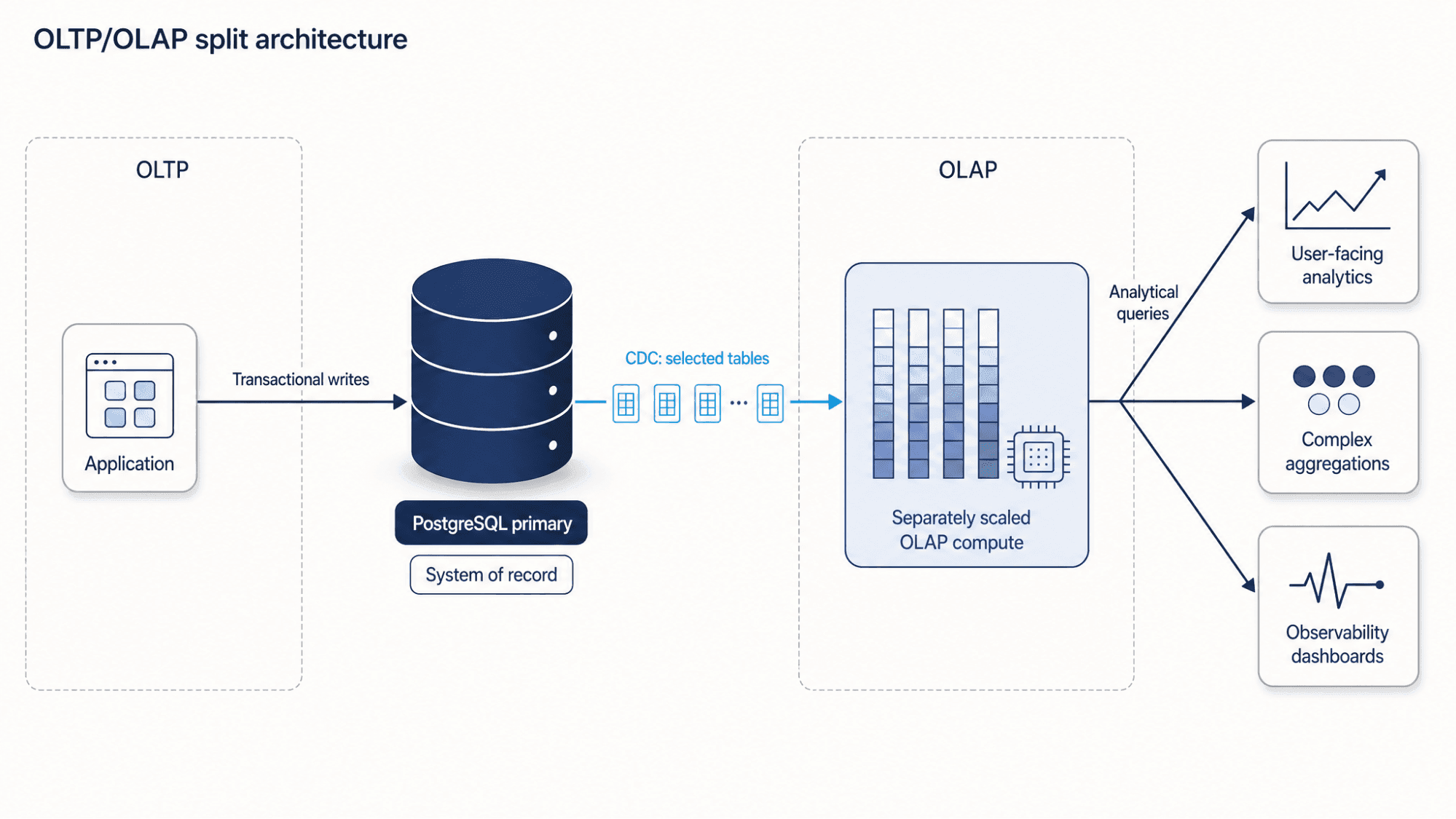
PostgreSQL handles transactional and moderate analytical workloads. Move PostgreSQL analytics to ClickHouse when large scans, high-cardinality aggregations, or high-concurrency dashboards cause transactional workloads to miss their SLOs.
Keep PostgreSQL as the transactional system of record and maintain an asynchronously updated copy of selected data in ClickHouse. Transactional reads and writes remain in PostgreSQL, while dashboards, large scans, and complex aggregations run on independently scaled ClickHouse compute. Because the copy is eventually consistent, queries that require the latest committed state continue reading from PostgreSQL.
For self-managed ClickHouse, teams can operate an open-source CDC tool such as PeerDB. ClickPipes is the managed integration service for ClickHouse Cloud. Its Postgres CDC connector replicates selected tables from supported PostgreSQL sources into a selected ClickHouse Cloud service. Both paths use source PostgreSQL resources for logical decoding, WAL retention, and network transfer, plus initial snapshots or resyncs when needed.
For teams that want a fully managed path through this architecture, ClickHouse Managed Postgres provides managed PostgreSQL for OLTP, ClickPipes provides managed CDC, and a separately provisioned ClickHouse Cloud service provides OLAP. Together, these services form a unified data stack for PostgreSQL transactions and ClickHouse analytics, managed through the ClickHouse Cloud experience.
Compare cloud-managed PostgreSQL provider categories
Evaluating cloud-managed providers requires matching their architecture to your performance and recovery needs.
Provider categories overlap because many services combine hyperscaler integrations, elastic scaling, developer tooling, specialist support, or analytics integrations.
| Provider category | Typical strengths | Tradeoffs to evaluate | Best-fit buyer |
|---|---|---|---|
| Hyperscaler services | Cloud integrations, regions, IAM, private connectivity | Pricing complexity and dependence on provider-specific IAM, networking, and replication features | Teams standardized on AWS, GCP, or Azure, or requiring provider-native IAM, networking, or a specific region |
| Serverless Postgres platforms | Capacity elasticity and fast provisioning; some providers add branching or idle suspension | Connection semantics, resume behavior, scaling boundaries, and extension support vary by provider | Teams whose workload fits the selected provider's elasticity and connection model |
| Developer platforms | App hosting plus Postgres-adjacent services | Operational depth, HA/DR controls, export path | Product teams prioritizing velocity |
| Specialist Postgres vendors | PostgreSQL expertise, support, migrations, and compliance focus | Ecosystem breadth, region availability, pricing | Teams needing a required extension or PostgreSQL setting, or specialist migration and operational support |
| Integrated data stacks | Path from OLTP Postgres to analytics systems | Extra architecture and replication design | Teams needing independently scalable OLTP and OLAP and willing to operate an asynchronously replicated analytical copy |
ClickHouse Managed Postgres runs PostgreSQL on compute-colocated local NVMe. Configure pg_clickhouse when applications need to query a reachable ClickHouse deployment through PostgreSQL foreign tables.
Choose ClickHouse Managed Postgres for workloads in a supported cloud region that need cloud-managed PostgreSQL and prioritize compute-colocated local NVMe. Verify supported regions, versions, extensions, quotas, HA mode, backup retention, and current pricing before selecting it.
Engine, version, and extension support
- Supported major and minor PostgreSQL versions.
- The upgrade process, whether that's automated, customer-triggered, scheduled, in-place, blue/green, or downtime-required.
- Support for required extensions such as pgvector, PostGIS, pg_cron, h3, and pg_stat_statements.
- Superuser restrictions, managed roles, unsupported extensions, and portability risks.
Performance, storage, and connection behavior
- Storage architecture, including network-attached storage, local SSD/NVMe, or tier-specific options.
- Local NVMe may reduce storage latency for disk-bound workloads. Compare end-to-end workload results and durability architecture, not just raw media latency. Results depend on workload shape, caching, IOPS, instance sizing, and provider limits.
- Connection limits, pooling support, PgBouncer compatibility, read replicas, workload isolation, and scaling limits.
High availability, durability, backups, and disaster recovery
- Publicly documented high-availability architecture, standby and read replica models, failover processes, recovery point objectives, and recovery time objectives.
- Backup frequency, retention windows, point-in-time recovery support, WAL archiving, and restore testing processes.
- For services that use PostgreSQL streaming replication, asynchronous standbys avoid waiting for standby acknowledgment but may be missing recently acknowledged commits after failover. Synchronous standbys reduce that loss window but add acknowledgment latency and can block commits while the required standby acknowledgments are unavailable. Services that use shared or distributed storage can have different durability and failover semantics. Compare each provider's documented recovery point objective (RPO) and recovery time objective (RTO).
- System behavior during a node failure, availability-zone failure, regional outage, control-plane outage, or customer-initiated restore.
Security, networking, governance, and observability
- TLS-encrypted connections, encryption at rest, private connectivity, VPC peering, private endpoints, IP allowlists, IAM integration, audit logs, and data residency.
- Metrics, slow query logs, log export, query insights, tracing integrations, alerting, and incident communication.
- Service-level agreements, support tiers, escalation paths, and compliance documentation.
Migration, exit, and analytics path
- Migration tooling, compatibility checks, import and export workflows, and logical replication or change data capture support.
- Exit paths, including logical dumps, physical backups, outbound replication, role and permission portability, extension portability, and egress costs.
- Analytics paths. If transactional data will power dashboards, check whether the provider offers a documented CDC path into an analytical system such as ClickHouse. Confirm whether that path supports self-managed ClickHouse, ClickHouse Cloud, or both. If the path uses ClickPipes, confirm that the PostgreSQL source is supported and that the destination is a ClickHouse Cloud service.
Questions to ask cloud-managed PostgreSQL providers
- What are the connection limits by tier?
- Which extensions and versions are supported?
- How are maintenance windows and major upgrades handled?
- What is the documented RPO/RTO?
- How often does the provider test its restore process?
- What lag metrics, typical values, and documented bounds apply separately to HA standbys, read replicas, and CDC pipelines during steady state, backlog, and failover?
- How can the data be exported or replicated to another system?
- Which operational tasks remain the customer's responsibility?
Build a cloud-managed PostgreSQL migration checklist
Treating a migration as a connection-string swap leaves compatibility, data movement, validation, and rollback risks unaddressed.
- Check compatibility. Inventory your PostgreSQL version, extensions, collations, roles, grants, configuration parameters, custom types, triggers, stored procedures, indexes, sequences, and superuser-dependent behavior.
- Choose a load strategy. Select a supported method:
pg_dumpandpg_restore, provider-native tooling, or physical migration.pg_dumpexports one database and does not include cluster-wide roles or tablespace definitions, so recreate supported global objects through the provider's workflow or usepg_dumpall --globals-onlywhen the destination permits it. For large databases, test dump and restore throughput and parallelism, then runANALYZEafter restore. Assess whether the chosen workflow also requiresVACUUM. - Plan CDC and cutover. For low-downtime migrations, verify the selected replication path's prerequisites and failure behavior. For PostgreSQL-native logical replication, check
wal_level = logical, replication-slot and WAL-sender capacity, publication and subscription setup, compatible subscriber schemas, a usable replica identity for every table that publishesUPDATEorDELETE, retained-WAL limits and alerts, and apply-lag monitoring. Confirm how the migration path preserves or recreates its logical slot after source failover. PostgreSQL-native failover slots require PostgreSQL 17 or later and additional standby configuration. PostgreSQL-native logical replication does not replicate DDL, sequence state, or objects stored through PostgreSQL's large-object facility. Deploy compatible schema separately, synchronize sequence values after source writes are quiesced, handle large objects outside the replication stream, and define the maximum acceptable apply lag before cutover. - Validate the migration. Confirm row counts, sampled data consistency, sequences, indexes, constraints, permissions, application workflows, performance baselines, backups, point-in-time recovery, monitoring, and alerting. Verify that background jobs and reporting queries execute within expected latency thresholds.
- Define the rollback path. Keep the self-hosted primary intact until the cloud-managed environment is verified. Define rollback triggers, steps for reverting the connection string, a process for handling data divergence, and the exact point after which rollback is no longer safe without reverse replication.
Document the execution, staging tests, and rollback procedures in a dedicated migration runbook, including steps performed by automated tools.
Choose based on deployment constraints, cost, and operational risk
Moving from self-hosted to cloud-managed PostgreSQL transfers underlying infrastructure provisioning and routine platform maintenance to the provider. Your team configures the exposed database and recovery settings and owns data, access policies, workload design, application behavior, and recovery validation.
Before choosing, review your deployment constraints, total cost of ownership, high-availability requirements, and migration readiness. Determine whether analytical queries also need a separate OLAP system.
If cloud-managed PostgreSQL fits your requirements, try ClickHouse Managed Postgres.
FAQ
When should you switch from self-hosted PostgreSQL to a cloud-managed service?
Switch when backups, failover, patching, upgrades, scaling, recovery testing, or on-call incidents consume too much engineering time or create unacceptable operational risk.
When should you keep PostgreSQL self-hosted?
Keep PostgreSQL self-hosted when you need strict infrastructure control, required extensions that the eligible cloud-managed services do not support, custom replication topologies, superuser access, specialized hardware, or mandatory on-premises or air-gapped deployment.
How can PostgreSQL be managed in an air-gapped environment?
Keep PostgreSQL self-hosted inside the air-gapped environment. Any database management platform must also run inside that environment. Its installation, licensing, upgrades, monitoring, backup, failover, and recovery workflows must not require external connectivity.
Is cloud-managed PostgreSQL cheaper than self-hosting?
Not always. Compare the cloud-managed service bill with the full cost of self-hosting: infrastructure, staffing, monitoring, backup validation, incident response, downtime risk, compliance overhead, and migration and exit costs.
What responsibilities remain after moving to cloud-managed PostgreSQL?
Your team owns schema design, indexing, query optimization, application connection behavior, access policies, workload design, migration planning, and recovery validation.
What should you check before migrating to cloud-managed PostgreSQL?
Check version compatibility, required extensions, roles, grants, configuration parameters, migration tooling, logical replication support, backup and restore behavior, performance baselines, rollback plans, and cutover readiness.
When should PostgreSQL analytics be moved to ClickHouse?
Move analytics to ClickHouse when reporting queries, dashboards, scans, or aggregations create CPU, cache, I/O, or latency contention that harms PostgreSQL transactional workloads.


