 50.7k
50.7k
Crunchy Bridge, Crunchy Data's managed PostgreSQL service, is a strong fit for teams that value close-to-upstream PostgreSQL compatibility, extension flexibility, and parameter control. An alternative becomes worth evaluating when a measured workload or operating requirement changes the decision, such as sustained I/O pressure, analytical contention on transactional workloads, database branching needs, or deeper alignment with a hyperscaler.
This guide compares eight Crunchy Bridge alternatives for managed PostgreSQL across storage architecture, HA and durability, analytics, operating model, compatibility, cost, and migration risk. The goal is to identify which providers deserve a shortlist based on the requirement driving the switch.
TL;DR
-
Stay with Crunchy Bridge when close-to-upstream PostgreSQL compatibility, extension flexibility, or parameter control remains the deciding requirement.
-
Shortlist ClickHouse Managed Postgres for verified I/O-bound OLTP where local NVMe is material. When analytical isolation is required, provision a separate ClickHouse service in the same ClickHouse Cloud platform and connect it with ClickPipes.
-
Shortlist Amazon RDS, Amazon Aurora, Google AlloyDB, or Azure Flexible Server when the operating model of AWS, GCP, or Azure is a primary buying requirement. AlloyDB also provides in-service columnar acceleration for supported analytical queries, while Aurora provides a distributed-storage architecture within AWS.
-
Shortlist Neon when branching, preview environments, or idle suspension are decisive for smaller-scale or latency-tolerant development workflows.
-
Shortlist Timescale when Postgres-native time-series modeling, compression, retention, and continuous aggregates are the primary requirements.
-
Shortlist Aiven when one provider for PostgreSQL and several managed open-source services is more important than tighter integration between those services.
Which Crunchy Bridge alternative fits your managed PostgreSQL workload?
| Provider | Best for | Sustained I/O / storage architecture | HA, durability, and read scaling | Analytics isolation | Operating model, IAM, regions, and workflow | Cost, compatibility, support, and migration risk |
|---|---|---|---|---|---|---|
| Crunchy Bridge | Stay when close-to-upstream PostgreSQL compatibility, extension flexibility, parameter control, or Crunchy Data Warehouse when those requirements are decisive | AWS deployments use gp3 primary storage | Managed HA, backups, recovery, and read-scaling options depend on the selected deployment | Crunchy Data Warehouse supports PostgreSQL-to-DuckDB execution for eligible queries and a separate PostgreSQL-to-Iceberg replication pattern | Multi-cloud managed PostgreSQL with a Postgres-focused operating model | Pricing varies by instance size, region, storage, and HA; HA doubles the cluster price on production plans. Broad extension and parameter flexibility can reduce migration pressure when the current deployment already fits. |
| ClickHouse Managed Postgres | Verified I/O-bound OLTP where local NVMe is material; use a separately provisioned ClickHouse service when separate analytical serving is required | Local NVMe physically colocated with compute | Evaluate production workloads with two synchronous standbys; distinguish no-standby benchmark configs from durability-sensitive production topologies | ClickPipes provides configured, eventually consistent initial load plus continuous incremental synchronization of selected PostgreSQL tables to a separately provisioned ClickHouse service; OLTP remains in ClickHouse Managed Postgres | ClickHouse Managed Postgres and provisioned ClickHouse services are managed through the same ClickHouse Cloud platform and control plane; check region availability | Metered VM and tier, plus separate ClickHouse compute and storage charges within ClickHouse Cloud; extension and parameter audit required; Postgres migration via ClickPipes, pg_dump and pg_restore, or native logical replication |
| Amazon RDS | AWS-native PostgreSQL when IAM, networking, procurement, required regions, or an established AWS operating model is decisive | AWS EBS block storage classes such as gp3/io2 with provisioned IOPS and throughput limits | Multi-AZ synchronous standby or Multi-AZ DB cluster; automated backups; point-in-time recovery; read replicas for read scaling | Read replicas for reporting traffic or logical replication to an external analytics target | AWS-native IAM, KMS, CloudWatch, VPC, procurement, and broad regional footprint | Instance, EBS, IOPS, backup, and replica billing; RDS extension restrictions; logical replication; cross-cloud egress risk |
| Amazon Aurora | AWS teams prioritizing distributed storage scaling, managed failover, read-replica scaling, or Serverless v2 | Distributed Aurora storage volume decoupled from compute | Multi-AZ shared storage replication; Aurora Replicas serve reads and failover; automated backups; point-in-time recovery | Aurora Replicas isolate row-oriented read traffic; eligible zero-ETL integrations can provide paths to Redshift or SageMaker Lakehouse; logical replication remains another external analytics option | AWS-native cluster model with provisioned or Serverless v2 compute, IAM, VPC, KMS, and AWS regions | Instance or ACU, storage, and I/O unless I/O-Optimized is used; Aurora compatibility and custom-storage migration considerations |
| Google AlloyDB | GCP-native PostgreSQL when in-service columnar acceleration, GCP operations, or Vertex AI integration is decisive | Google Cloud distributed storage architecture | Regional primary and standby with automatic failover; read pool instances; automated backups | AlloyDB columnar engine for supported analytical queries plus read pools for read isolation | GCP-native IAM, VPC, Cloud Monitoring, regional placement, and Vertex AI integrations | vCPU, RAM, storage, backup, and read pool costs; extension and flag compatibility checks; tune columnar engine |
| Azure Flexible Server | Azure-native PostgreSQL when VNet integration, Entra ID, procurement, compliance, or an established Azure operating model is decisive | Azure storage and IOPS tiers | Same-zone or zone-redundant synchronous standby; automated backups; async read replicas | Read replicas for row-oriented reporting; Fabric Mirroring for selected tables into Microsoft Fabric; or logical replication to other external analytics systems. Do not assume a fixed mirroring freshness SLA. | Azure-native VNet, Entra ID, maintenance windows, stop/start controls, and Azure regional compliance coverage | Compute, storage, IOPS, backup, HA, and read-replica costs; extension restrictions; logical replication or pg_dump; VNet constraints |
| Neon | Smaller-scale or latency-tolerant development workflows where branching, preview environments, or idle suspension is decisive | Decoupled compute and storage with copy-on-write branching | Decoupled durable storage with branch restore; read replicas; plan-specific HA and failover behavior | Read replicas and isolated branches for testing isolation; external ETL for OLAP | Serverless compute and scale-to-zero behavior where supported by plan, copy-on-write branching, workflow APIs | Compute-hours, storage, branching limits; extension and session-behavior audit; validate sustained-load cost, cold-start behavior, and p95/p99 latency |
| Timescale | Postgres-native time-series workloads where hypertables, compression, retention, and continuous aggregates are decisive and the workload fits the single-writer model | Managed Postgres with hypertables and time-series compression | Plan-specific HA replicas, automated backups, and read replicas | Continuous aggregates, compression, retention, and tiering support recurring time-series analytics; read-query isolation depends on replica configuration | Instance-based managed service optimized for time-series modeling; check cloud and region support by plan | Compute, storage, HA, and replica costs; TimescaleDB model compatibility; hypertable conversion may be required for tables that need Timescale-specific features |
| Aiven for Postgres | Teams that want PostgreSQL and several managed open-source data services from one provider across supported clouds | Storage varies by selected cloud provider, plan, and region | Standby-node HA on eligible plans; automated backups; separate read replicas on eligible configurations | Service integrations or logical replication to Aiven for ClickHouse or Kafka pipelines | Multi-cloud control plane with API, Terraform, unified open-source services, and cloud region selection | Hourly plan by cloud and region; approved-extension and parameter audit; logical replication |
How to choose a Crunchy Bridge alternative: 5 criteria
Evaluate each provider across storage architecture, HA and durability, analytics isolation, operating model, and total migration risk. The deciding criteria should come from the workload or operational requirement driving the evaluation.
How storage architecture limits sustained I/O performance
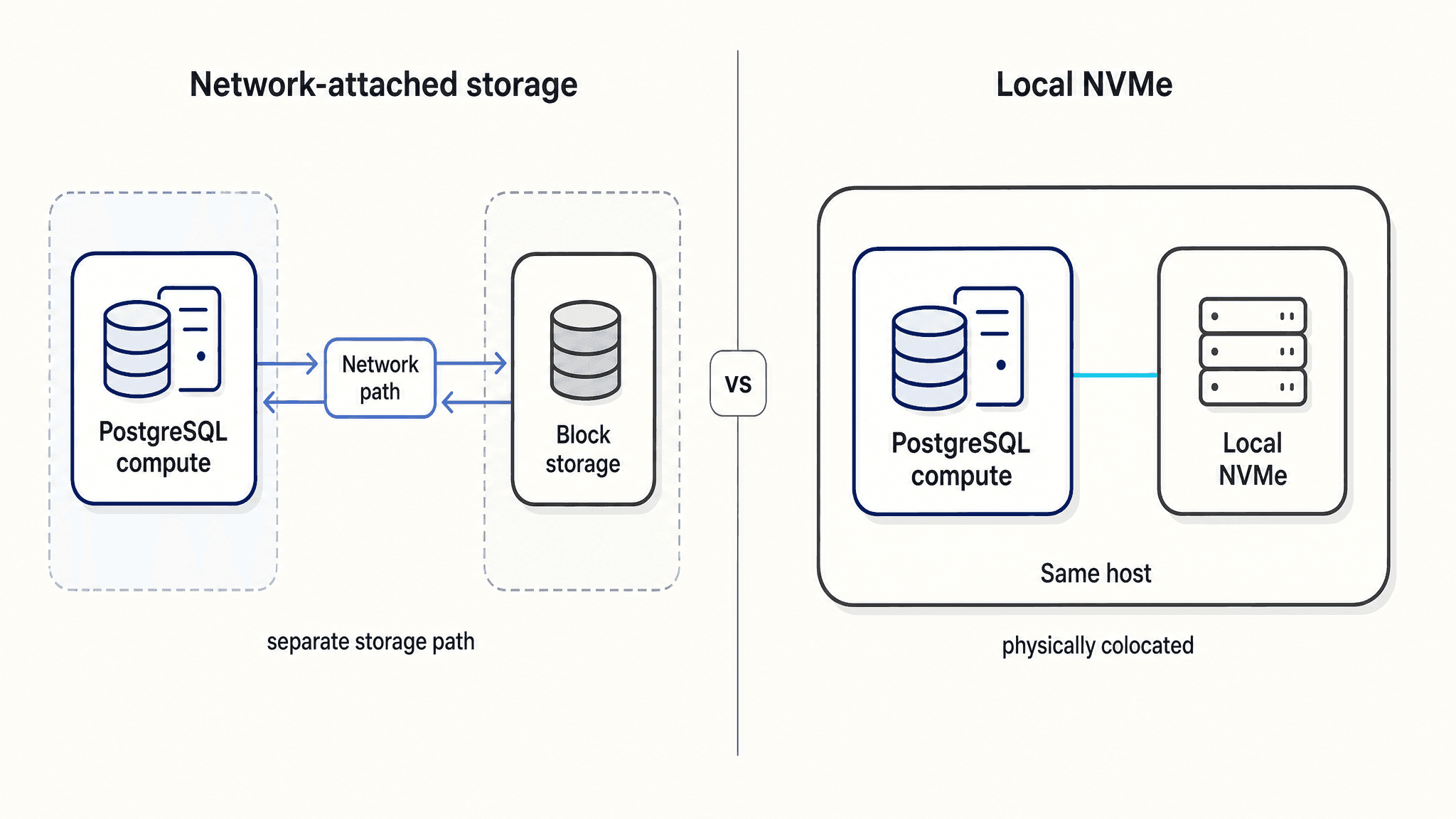
Managed Postgres services use fundamentally different storage architectures to persist data. Some rely on network-attached block storage, others use distributed storage clusters, and some use local NVMe physically colocated with compute.
Sustained, write-heavy OLTP workloads can hit IOPS, throughput, or latency ceilings in a network-storage path. Local NVMe physically colocated with compute provides an architectural mechanism for disk-bound workloads to bypass network storage round trips.
How HA, durability, and read-scaling topology affect production risk
Production safety requires analyzing each provider's mechanisms for automated failover, backups, point-in-time recovery, RPO/RTO posture, standby behavior, and read scaling.
Durability topologies differ. Some use synchronous standbys, others asynchronous replicas, distributed storage layers, or Multi-AZ storage replication. Distinguish failover standbys from read-serving replicas. Base production recommendations on production-safe topologies, avoiding benchmark-only or no-standby configuration assumptions.
Why mixed OLTP and analytical workloads create resource contention
Running heavy reporting scans alongside transactional operations on a single primary database can create CPU, memory, and cache contention. When index maintenance, vacuum behavior, or reporting work causes documented transaction or reporting targets to be missed, assess whether analytical isolation is warranted.
A conventional row-oriented PostgreSQL primary is not optimized for sustained OLAP scans. Teams can stay in the Crunchy ecosystem using Crunchy Data Warehouse, where PostgreSQL delegates eligible analytical work to a DuckDB vectorized execution path and supports Iceberg-backed tables.
Crunchy Data Warehouse also supports logical replication from another PostgreSQL source into managed Iceberg tables, so Crunchy supports both an in-engine analytical path and a separate-source replication pattern.
Teams can also use ClickHouse Managed Postgres for OLTP with a separately provisioned ClickHouse service for OLAP. This purpose-built separation keeps analytical queries from competing with the transactional primary for CPU, memory, and cache. ClickPipes provides configured, eventually consistent initial load plus continuous incremental synchronization of selected PostgreSQL tables into the ClickHouse service, while pg_clickhouse lets supported operations on configured ClickHouse foreign tables be queried through PostgreSQL. Both services are managed through the same ClickHouse Cloud platform and control plane. Teams prioritizing GCP-native, in-service columnar acceleration for supported analytical queries can evaluate Google AlloyDB.
How cloud operating models, regions, and branching workflows affect teams
Development requirements often dictate the managed database operating model. Traditional instance-based provisioning does not provide Neon's copy-on-write branch semantics by default; staging and preview environments often use snapshots, restores, or additional clusters. Neon's copy-on-write storage architecture creates logical database branches without copying the full dataset, while serverless compute can reduce idle compute via scale-to-zero behavior where supported by the selected plan.
Cloud-native requirements influence operating models through native IAM integration, private networking, observability stacks, Terraform maturity, procurement processes, and regional availability. These operating model factors are decisive for teams optimizing for platform engineering workflows and cloud standardization over bare-metal performance.
Why topology cost, compatibility, support, and migration risk decide whether switching is worth it
Total cost encompasses base compute, HA standby multipliers, storage, I/O requests, backups, read replicas, networking, support tiers, and temporary double-billing during migration.
Migration risk depends on extension compatibility, superuser restrictions, parameter availability, logical decoding support, and major PostgreSQL versions. Support can also affect migration risk, but compare it through concrete requirements such as coverage hours, escalation paths, response commitments, tuning assistance, and incident support.
Feasibility requires auditing logical replication support, schema translation handling, and cutover window tolerances.
When Crunchy Bridge still makes sense
-
Teams requiring a close-to-upstream PostgreSQL environment with an extensive, less-restrictive extension catalog and strong parameter flexibility.
-
Teams adopting Crunchy Data Warehouse for a Postgres-native analytical environment using Iceberg and DuckDB without leaving the Crunchy ecosystem.
-
Teams whose current I/O, HA, analytics, workflow, cost, or regional requirements are fully solved inside the existing Crunchy deployment.
8 Crunchy Bridge alternatives compared
The alternatives span different requirements. ClickHouse Managed Postgres addresses local NVMe-backed OLTP, with ClickPipes providing configured, eventually consistent synchronization of selected PostgreSQL tables to a separately provisioned ClickHouse service for analytics offload. Amazon RDS for PostgreSQL addresses AWS-native managed Postgres, while Amazon Aurora PostgreSQL addresses distributed storage scaling. Google AlloyDB for PostgreSQL covers GCP mixed workloads, and Azure Database for PostgreSQL Flexible Server covers Azure-native Postgres. Neon covers serverless branching, Timescale time-series workloads, and Aiven for PostgreSQL multi-cloud open-source infrastructure.
ClickHouse Managed Postgres as a local NVMe OLTP alternative to Crunchy Bridge
Best for
-
Sustained I/O-heavy OLTP applications currently bottlenecked by storage-path limits and evaluating local NVMe as a decisive architecture.
-
Engineering teams planning to isolate analytical workloads in a separately provisioned ClickHouse service using ClickPipes for configured, eventually consistent initial load plus continuous incremental synchronization.
-
Production durability-sensitive workloads only when evaluated with the recommended two-synchronous-standby topology.
Overview
ClickHouse Managed Postgres is a fully managed PostgreSQL service backed by local NVMe storage physically colocated with compute. Within ClickHouse Cloud, a separately provisioned ClickHouse service can handle OLAP while ClickHouse Managed Postgres handles OLTP, with an eventually consistent CDC path between them.
ClickHouse Managed Postgres vs. Crunchy Bridge: key differences
On AWS, Crunchy Bridge uses gp3 primary storage, while ClickHouse Managed Postgres uses local NVMe physically colocated with compute. Treat this as a storage-path difference, not a universal performance claim, and evaluate it under the selected zero-, one-, or two-standby durability topology.
Durability is configured explicitly through zero-standby, one-asynchronous-standby, and two-synchronous-standby options for workloads requiring stronger acknowledged-write durability.
High-availability standbys are reserved for failover and durability. Dedicated read replicas are required for read scaling.
For analytics offload, ClickPipes provides configured, eventually consistent initial load plus continuous incremental synchronization of selected PostgreSQL tables into a separately provisioned ClickHouse service. pg_clickhouse provides PostgreSQL query access to configured ClickHouse foreign tables for supported operations. ClickHouse Managed Postgres and the ClickHouse service remain managed through the same ClickHouse Cloud platform and control plane.
Separately, ClickHouse provides a ClickPipes-guided migration path from Crunchy Bridge into ClickHouse Managed Postgres, including schema export and import plus an initial load with CDC. PostgreSQL-native logical replication remains an alternative when teams want direct control.
Pros and cons
-
What you gain: Local NVMe architecture suited to disk-bound OLTP workloads. For analytical workloads, a separately provisioned ClickHouse service provides purpose-built OLAP compute isolated from the transactional primary, with ClickPipes providing managed, eventually consistent synchronization.
-
Architecture tradeoff: Analytics runs in a separately provisioned ClickHouse service rather than inside PostgreSQL. This keeps analytical CPU, memory, and cache usage isolated from the transactional primary while ClickHouse Cloud manages both services through the same platform and control plane.
-
Limits: Benchmark results apply only to the exact tested configuration. Single-node and asynchronous-standby benchmark configurations do not transfer to two-synchronous-standby production claims.
-
Compatibility check: Verify required extensions, custom parameters, major PostgreSQL versions, logical decoding settings, and unusual operational dependencies.
Pricing and migration
Billing uses a metered model based on VM configuration and tier. A separately provisioned ClickHouse service consumes its own compute and storage resources, while both services are managed through the same ClickHouse Cloud platform and appear on a consolidated bill.
Pricing factors include compute tier drivers, standby configuration cost impacts, storage charges, backup retention charges, and read replica charges. Migration options include the documented ClickPipes-guided workflow, standard PostgreSQL logical replication, and offline pg_dump and pg_restore; the appropriate path depends on source compatibility and downtime requirements.
Standard logical replication does not automatically handle all DDL, sequence synchronization, large objects, extension gaps, or major-version incompatibilities.
Amazon RDS for PostgreSQL as an AWS-native alternative to Crunchy Bridge
Best for
-
Enterprises fully standardized on AWS requiring native IAM integration, consolidated billing, strict AWS compliance boundaries, and broad AWS regional coverage.
-
Teams moving away from Crunchy Bridge because they require single-vendor procurement and AWS-native operations.
Overview
Amazon RDS for PostgreSQL is AWS's managed relational database service based on PostgreSQL.
Amazon RDS vs. Crunchy Bridge: key differences
Amazon RDS integrates natively with AWS KMS, IAM database authentication, CloudWatch, VPC networking, AWS PrivateLink patterns, regional availability, and AWS procurement.
RDS uses EBS block storage classes such as General Purpose and Provisioned IOPS volumes rather than local NVMe as the primary storage architecture. Multi-AZ DB instance deployments use a synchronous standby that does not serve reads. Multi-AZ DB clusters and read replicas can serve read traffic depending on configuration.
Pros and cons
-
What you gain: Native integration with AWS IAM, KMS, CloudWatch, VPC networking, consolidated billing, and coverage in the AWS regions the workload requires.
-
Compatibility tradeoff: Verify version, extension, and parameter availability against the current RDS PostgreSQL support matrix.
-
Limits: Storage throughput is bound by the selected EBS class and provisioned IOPS limits. Vertical scaling can require downtime.
-
Compatibility check: Audit RDS-supported extensions, parameter group availability, rds_superuser restrictions, major-version support, and any settings that required superuser access on Crunchy Bridge.
Pricing and migration
Amazon RDS uses a pay-as-you-go pricing model based on instance size, deployment topology, storage class, provisioned IOPS and throughput, backups, and read replicas. Include the selected Multi-AZ or Single-AZ topology in the total cost comparison.
Migration can use standard PostgreSQL logical replication. Network egress costs and replication lag can constrain migrations from existing cross-cloud Crunchy deployments.
Amazon Aurora PostgreSQL as an AWS storage-scaling alternative to Crunchy Bridge
Best for
-
Large-scale SaaS applications experiencing unpredictable data growth and requiring fast automated failover inside AWS.
-
Teams hitting maximum storage size or read-replica lag limits on traditional Postgres architectures.
-
AWS-first teams willing to trade closer upstream behavior for Aurora's distributed storage and cloud-native operating model.
Overview
Amazon Aurora PostgreSQL is a relational database built on a custom, distributed AWS storage engine that separates compute instances from the cluster volume.
Amazon Aurora vs. Crunchy Bridge: key differences
Storage automatically scales across a distributed Aurora storage volume independently of compute. Aurora stores multiple copies across three Availability Zones, uses Aurora Replicas for read scaling and failover, and supports automated backups.
The Serverless v2 compute option dynamically scales CPU and memory in place. Aurora provides deep integration with AWS-native IAM, VPC, CloudWatch, KMS, and regional footprints, simplifying operations for teams already standardized on AWS.
Eligible Aurora configurations can also use zero-ETL integrations with Amazon Redshift and SageMaker Lakehouse. Verify engine version, region, topology, and configuration eligibility before publication.
Pros and cons
-
What you gain: Automatic storage scaling, low-lag read replicas, and AWS-managed failover mechanisms.
-
What you give up: Aurora PostgreSQL-Compatible Edition uses a different storage engine and does not reproduce every community PostgreSQL feature or extension. Its physical storage and operational model are AWS-specific, while Crunchy Bridge supports deployment across multiple public clouds.
-
Limits: Evaluate Standard and I/O-Optimized pricing against the measured I/O profile and complete production topology.
-
Compatibility check: Audit Aurora PostgreSQL-supported extensions, extension versions, parameters, unsupported PostgreSQL features, major-version lag, logical replication settings, and differences caused by Aurora's custom storage layer.
Pricing and migration
Aurora billing is driven by provisioned instances or Serverless v2 ACUs, storage, backups, replicas, and either per-request I/O or I/O-Optimized pricing depending on configuration. Standard pricing charges for I/O operations, whereas I/O-Optimized folds I/O costs into instance and storage rates.
Migration can use standard PostgreSQL logical replication or dump-and-restore methods, subject to Aurora version, extension, parameter, and logical-replication compatibility. Aurora's custom storage layer is an architectural difference, not by itself a reason to characterize exit as difficult.
Google AlloyDB for PostgreSQL as a GCP mixed-workload alternative to Crunchy Bridge
Best for
-
GCP-based teams with mixed transactional and analytical workloads that want to accelerate supported reporting queries without spinning up a separate data warehouse.
-
Teams already committed to Google Cloud IAM, VPC, Cloud Monitoring, Vertex AI, and GCP procurement.
-
Teams choosing GCP-native in-service columnar acceleration rather than staying in the Crunchy ecosystem with Crunchy Data Warehouse.
Overview
Google AlloyDB for PostgreSQL is Google Cloud's fully managed, PostgreSQL-compatible database featuring an intelligent, columnar engine.
Google AlloyDB vs. Crunchy Bridge: key differences
AlloyDB employs an automated, in-memory columnar accelerator that populates based on query analysis. AlloyDB uses Google Cloud's distributed storage architecture rather than standard single-node block storage.
Regional clusters use a primary and standby across zones with automatic failover, automated backups, and read pool instances for read scaling. The service integrates directly with Vertex AI for machine learning model endpoints and Google Cloud operations tooling.
Pros and cons
-
What you gain: Columnar acceleration for supported analytical queries and deep GCP AI integration.
-
What you give up: AlloyDB's managed IAM, networking, monitoring, regional deployment, and storage operations are tied to Google Cloud, while Crunchy Bridge can deploy across supported public clouds.
-
Limits: The analytical accelerator is memory-bound. Analytics beyond configured columnar capacity may fall back to row-based execution.
-
Compatibility check: Audit AlloyDB-supported extensions, flags and parameters, PostgreSQL compatibility limits, major-version support, logical replication behavior, and columnar engine eligibility for critical reporting queries.
Pricing and migration
Pricing is based on vCPU and memory allocation, storage consumed, backups, and read pool nodes. Columnar workloads may require memory-heavy instance shapes to fully use the acceleration capabilities.
Migration requires validating extensions, flags, logical replication, permissions, and application compatibility. After cutover, size and validate the columnar engine separately for reporting queries that are eligible to use it.
Azure Database for PostgreSQL Flexible Server as an Azure-native alternative to Crunchy Bridge
Best for
-
Enterprise teams fully committed to the Microsoft Azure ecosystem seeking deep VNet integration, Microsoft Entra ID alignment, and Azure regional compliance coverage.
-
Teams moving off Crunchy Bridge on Azure to consolidate enterprise agreements and Microsoft support contracts.
Overview
Azure Database for PostgreSQL Flexible Server is Microsoft's managed PostgreSQL service, offering custom maintenance windows and high availability on Azure.
Azure Database for PostgreSQL vs. Crunchy Bridge: key differences
Azure Flexible Server offers deep integration with Microsoft Entra ID for identity management, Azure Monitor, private networking, and Azure enterprise agreements.
Azure Flexible Server uses Azure storage and IOPS tiers rather than local NVMe as the primary storage architecture. The service supports same-zone or zone-redundant HA using a synchronous standby, automated backups, point-in-time recovery, and separate read replicas for read scaling. The service also offers Burstable compute tiers and stop/start controls for cost-sensitive environments.
For analytical offload, Azure Database for PostgreSQL also supports Fabric Mirroring for selected tables into Microsoft Fabric. Treat it as a separate downstream analytical path; Microsoft does not publish a fixed end-to-end freshness SLA.
Pros and cons
-
What you gain: Stop/start capabilities for non-production environments, alongside alignment with Azure-native identity, networking, procurement, and compliance requirements.
-
What you give up: Crunchy Bridge's extension and parameter flexibility. Verify the exact Azure support plan, extension list, and server-parameter coverage required by the workload.
-
Limits: Storage, IOPS, and throughput limits depend on the selected storage and compute configuration; storage tiers and IOPS are adjustable within supported ranges.
-
Compatibility check: Audit Azure-supported extensions, configurable server parameters, major-version availability, logical replication settings, Entra authentication implications, and any Crunchy-side settings requiring superuser access.
Pricing and migration
Billing includes the selected compute tier, storage size, backup retention, HA topology, provisioned IOPS, and read replicas. High availability adds a second compute instance, so compare the complete topology rather than assuming a predictable total.
Migration can use standard logical replication or pg_dump and pg_restore. Strict VNet peering and firewall requirements can complicate cross-cloud migration networks.
Neon as a serverless branching alternative to Crunchy Bridge
Best for
-
Developer-heavy teams optimizing for CI/CD velocity, requiring isolated database preview environments for every pull request.
-
Development and preview workloads with variable or idle usage that may benefit from serverless compute and scale-to-zero behavior where supported by the selected Neon plan.
-
Teams willing to prioritize serverless developer workflows over traditional provisioned-Postgres operational semantics.
Overview
Neon is a serverless, open-source Postgres platform that separates compute and storage to enable database branching. It combines database state with development workflows through branches and APIs.
Neon vs. Crunchy Bridge: key differences
Neon uses a copy-on-write storage architecture that allows database branching without full physical duplication. Serverless compute and scale-to-zero behavior are available where supported by the selected Neon plan.
Neon provides point-in-time recovery, branch restore, and read replicas. The operating model focuses on developer workflow APIs rather than traditional DBA tooling.
Pros and cons
-
What you gain: Copy-on-write database branching for testing and staging environments. Serverless compute and scale-to-zero behavior where supported by the selected Neon plan.
-
Architecture tradeoff: Neon separates compute and storage. Fixed-size compute and scale-to-zero are configurable, and changing a fixed compute size restarts the endpoint. Validate the selected plan and compute settings against always-on latency requirements.
-
Limits: Teams must validate cold-start behavior, autoscaling behavior, and p95/p99 latency under their specific workload.
-
Compatibility check: Audit Neon-supported extensions, PostgreSQL versions, logical replication features, connection pooling behavior, branch limits, and any session- or superuser-dependent application assumptions.
Pricing and migration
Neon bills based on active compute time, data storage, data written, data transferred, branch and project limits, and plan features. Compute is often measured in compute-hours or compute units.
Migration can use PostgreSQL logical replication or dump-and-restore methods. Evaluating sustained-load cost, cold-start behavior, autoscaling, and connection pooling behavior is critical before using Neon as a heavy-I/O production replacement.
Timescale as a time-series PostgreSQL alternative to Crunchy Bridge
Best for
-
IoT platforms, financial tick data, and observability pipelines with moderate-scale time-series workloads that fit Timescale's single-writer model.
-
Teams currently stretching Crunchy Bridge using manual partitions, seeking automated time-series data management.
-
Teams whose decisive requirement is time-series modeling, compression, retention, and rollups rather than general-purpose upstream Postgres flexibility.
Overview
Timescale is a managed PostgreSQL service optimized for time-series and event data via the TimescaleDB extension. It positions itself as a database that scales Postgres for time-series workloads without forcing engineering teams to rewrite applications to a specialized NoSQL engine.
Timescale vs. Crunchy Bridge: key differences
Timescale hypertables automatically partition time-series data into chunks. Timescale's Hypercore storage can convert older chunks to a columnar format for compression and analytical scans.
The database includes continuous aggregates to pre-compute historical rollups automatically. Timescale provides plan-specific high availability with replicas, automated backups, and read replicas.
Pros and cons
-
What you gain: Postgres-native time-series features including hypertables, retention policies, compression, continuous aggregates, and tiering.
-
What you give up: Crunchy Bridge's closer-to-upstream operating model and extension or setting flexibility. Applications must validate how existing relational tables, updates, constraints, and extensions behave before converting selected time-series tables to hypertables.
-
Limits: Timescale is not a general-purpose OLAP warehouse. Validate broad relational analytics, joins, ad hoc scans, and non-time-series workloads before treating Timescale as an analytics replacement.
-
Compatibility check: Audit TimescaleDB extension version requirements, supported PostgreSQL versions, unsupported Crunchy extensions and settings, hypertable conversion needs, and parameter availability.
Pricing and migration
Pricing varies by compute size, storage used, HA configuration, backups, and time-series storage tiering features. Include HA and replica configuration in the total cost comparison.
Migration complexity depends on data volume, downtime tolerance, and whether existing tables must be converted to hypertables. Timescale supports dump and restore, live migration, and dual-write with backfill; teams can convert only the time-series tables that need hypertable features.
Aiven for PostgreSQL as a multi-cloud alternative to Crunchy Bridge
Best for
-
Platform engineering teams that want to manage Postgres, Kafka, Redis, ClickHouse, and other data services under a single, unified control plane.
-
Teams seeking PostgreSQL and several managed open-source data services from one provider across supported clouds, and prepared to own cross-service integration, networking, access control, recovery design, and combined cost.
-
Teams prioritizing Terraform, API-driven operations, and multi-cloud regional placement over bespoke Postgres tuning.
Overview
Aiven for PostgreSQL is a fully managed open-source data platform providing PostgreSQL alongside other managed open-source engines.
Aiven for PostgreSQL vs. Crunchy Bridge: key differences
Aiven offers deployment on major cloud providers with a unified API and Terraform provider, treating Postgres as one component of a broader data pipeline. Aiven offers services such as Aiven for Apache Kafka and Aiven for ClickHouse under the same provider and control plane. Treat that as a vendor-consolidation and operational benefit, not as proof of a single integrated data system.
Eligible Aiven plans provide standby nodes for high availability, automated backups, and separate read replicas. Aiven limits PostgreSQL extensions to a pre-approved list. Its hosted services use open-source-licensed technologies, so teams must verify every required extension.
Pros and cons
-
What you gain: A Terraform provider and a single vendor relationship for PostgreSQL and other supported open-source data services across multiple cloud providers.
-
Compatibility tradeoff: If the workload depends on a Crunchy-specific extension, parameter, or support requirement, verify that Aiven provides it before moving.
-
Limits: Aiven for PostgreSQL uses storage determined by the selected cloud provider, plan, and region rather than a product-wide local-NVMe physical-colocation architecture.
-
Compatibility check: Audit Aiven's approved extension list, configurable parameters, major-version support, logical replication behavior, cloud-specific limits, and any Crunchy-specific extensions.
Pricing and migration
Aiven uses fixed hourly pricing that varies by selected plan, cloud, region, storage, HA configuration, backup retention, and read replicas. Moving from Hobbyist to Business or Premium plans dictates HA node cost treatment and network features.
Migration can use PostgreSQL logical replication. Any niche extensions used on Crunchy Bridge must be carefully audited against Aiven's approved extension list.
How to migrate off Crunchy Bridge with PostgreSQL logical replication and analytics CDC
Pre-migration diagnostics: what to measure on Crunchy Bridge
Measure sustained IOPS, storage throughput, write latency, WAL generation rate, CPU usage during reporting scans, cache hit ratio, lock waits, replication lag, backup posture, and read-replica usage before finalizing target sizing.
Audit all active extensions by querying SELECT extname FROM pg_extension;. Validate collations, custom types, publications, subscriptions, logical decoding settings, major PostgreSQL version, provider-specific parameter changes, superuser-dependent tasks, and unsupported target settings.
Export schema definitions using pg_dump -s and export globals separately using pg_dumpall --globals-only. Use custom-format dumps (pg_dump -Fc) for comprehensive offline restore testing.
Map unsupported DDL, ownership, privileges, extensions, large objects, sequences, replication identity requirements, parameter differences, and role authentication changes before beginning a low-downtime migration.
Logical replication and analytics CDC constraints when leaving Crunchy Bridge
Standard low-downtime Postgres-to-Postgres migrations rely on PostgreSQL logical replication, which continually consumes source CPU and retains WAL files until the subscriber acknowledges changes.
For migrations targeting ClickHouse Managed Postgres, ClickHouse provides a ClickPipes-guided migration path for Crunchy Bridge sources; pg_dump and pg_restore remain alternatives. For analytics offload, configure a separate ClickPipe that performs an eventually consistent initial load plus continuous incremental synchronization of selected PostgreSQL tables into a separately provisioned ClickHouse service in ClickHouse Cloud.
Logical replication does not automatically replicate all schema changes, sequence state, large objects, replication slots through failover, or every extension-dependent behavior. If relying on failover-enabled logical replication slots, verify PostgreSQL version support and Crunchy standby configuration before assuming slots survive HA events.
Validate target-provider extension availability, parameter flags, networking models, regional placement, and support escalation paths before creating the final migration runbook.
Migration risk mitigation checklist
-
Run parallel systems: For Postgres-to-Postgres moves, run logical replication or the selected managed migration tooling until replication lag approaches zero. For analytics offload, run the selected CDC workflow separately and validate only its replicated analytical tables.
-
Validate consistency: Compare row counts, sampled hashes, sequence values, critical indexes, query plans, application read/write paths, and replica lag against the Crunchy Bridge baseline.
-
Monitor source health: Closely watch Crunchy Bridge WAL disk usage, replication slot lag, CPU, memory, autovacuum behavior, and backup completion during the initial snapshot phase.
-
Cut over safely: Lower DNS TTLs when the application endpoint is DNS-based, pause writes using a short write-freeze window, wait for the target to catch up, stop or detach the migration stream as required by the selected tool, re-point connection pools, verify TLS connection requirements, and keep the source available for rollback.
-
Watch out for: Downstream breakages, extension incompatibilities, parameter mismatches, temporary double-billing for source and target HA topologies, cross-cloud egress costs, and adoption dips after operational tooling changes.
Conclusion
The strongest migration case starts with evidence from the current workload. A storage bottleneck, reporting contention, unsupported operational requirement, or platform constraint should be measurable before it becomes a reason to switch providers.
Use those measurements to define the acceptance criteria for the shortlist. Test the intended production HA topology, validate extensions and settings, model the full cost of compute, storage, replicas, backups, and analytics, and rehearse the migration path before cutover. If the target does not materially improve the requirement that triggered the evaluation, staying on Crunchy Bridge may still be the better decision.
Ready to test it against your workload? Try ClickHouse Managed Postgres.
FAQ
What is the best Crunchy Bridge alternative?
No single best alternative exists. Stay with Crunchy Bridge for close-to-upstream Postgres compatibility, extension flexibility or required parameter settings are decisive. Choose an alternative only when a specific I/O, analytics, cloud-native, branching, time-series, or multi-cloud requirement justifies switching.
Is Crunchy Bridge still available after Snowflake acquired Crunchy Data?
Yes. Crunchy Bridge remains available after Snowflake acquired Crunchy Data in June 2025. Crunchy Bridge continues to offer sign-up, pricing, product documentation, and current product updates. Evaluate alternatives based on workload and operating requirements rather than assuming the product has been discontinued.
When should I choose ClickHouse Managed Postgres over Crunchy Bridge?
Choose ClickHouse Managed Postgres when your OLTP workload is verified as I/O-bound and can benefit from local NVMe storage, and when its production standby topology meets your durability requirements.
Can ClickPipes migrate Crunchy Bridge to ClickHouse Managed Postgres?
Yes. ClickHouse provides a ClickPipes-guided migration path from Crunchy Bridge into ClickHouse Managed Postgres, including schema transfer plus initial load with CDC. Native logical replication and pg_dump with pg_restore remain alternatives. A separate ClickPipes workflow synchronizes selected PostgreSQL tables into a separately provisioned ClickHouse service in ClickHouse Cloud for analytics.
Which Crunchy Bridge alternative is best for AWS teams?
Choose Amazon RDS when AWS-native IAM, networking, procurement, a required region, or an established AWS operating model is decisive. Choose Amazon Aurora when its distributed storage, Aurora Replica read-scaling and failover model, or Serverless v2 operating model is decisive and the application accepts Aurora's PostgreSQL-compatibility boundaries.
Which Crunchy Bridge alternative is best for developer branching?
Choose Neon when copy-on-write database branches and plan-supported serverless workflows are decisive for a smaller-scale or latency-tolerant development workflow.
What should I check before migrating off Crunchy Bridge?
Audit extensions, parameters, PostgreSQL versions, logical replication support, superuser-dependent operations, HA topology, storage performance, migration downtime, and total cost including replicas, backups, I/O, egress, and temporary double billing.


