50.5k
50.5k
Today, we're excited to announce the private preview of ClickHouse On-Demand Compute, a new infrastructure capability of ClickHouse Cloud that lets your service execute queries on a shared pool of ClickHouse workers, outside your own cluster's compute.
Have you ever wanted to run a compute-intensive ad hoc query without disrupting your production workload, add compute without waiting for autoscaling to kick in, or query your data lake as you would with Athena? With On-Demand Compute, you can now simply tell your query how many ClickHouse workers to use, and ClickHouse Cloud will take care of the rest.
But that’s not everything. On-Demand Compute is also powered by two major ClickHouse features:
- A new distributed query execution framework that uses ClickHouse multistage query execution, allowing complex queries to run across multiple nodes.
- A new cost-based optimizer (CBO) that evaluates different execution plans and chooses a more efficient way to run your queries.
You can sign up for the private preview waitlist.
Join the ClickHouse On-Demand Compute waitlist
Sign up for private preview access to ClickHouse On-Demand Compute.
Why did we build this?
When we built ClickHouse Cloud, one of our main goals was to give users the power of ClickHouse on top of cost-efficient, scalable storage. SharedMergeTree gave us native separation of compute and storage, allowing services to scale them independently.
We then added autoscaling so compute could grow and shrink with demand. But metric-based autoscaling is reactive: the service first needs to observe demand before it scales. For most workloads, that’s exactly what you want. But what about a compute-intensive query that you already know will need more resources? Why wait for autoscaling when you could request that compute from the start?
That is easier said than done. Additional compute normally needs to be provisioned and brought online before a query can use it. This leaves you with three imperfect options: overprovision for peak demand, wait for autoscaling, or let heavy queries compete with critical workloads.
That’s what motivated us to build ClickHouse On-Demand Compute. Instead of scaling the entire service, you scale the query itself. An eligible query can request additional workers from a ClickHouse-managed pool, reducing resource competition on the primary service without permanently increasing its size.
This makes On-Demand Compute useful for several workload patterns:
- Ad hoc queries. Run exploratory or one-off queries on additional workers.
- Workload offloading. Move selected read workloads to additional workers, reducing competition with critical workloads.
- Data lake workloads. Run eligible queries over supported Apache Iceberg and Delta Lake data on additional workers.
How does it work?
Using On-Demand Compute is as simple as adding a couple of settings to your query:
SELECT
l_returnflag,
l_linestatus,
sum(l_quantity) AS sum_qty,
avg(l_extendedprice) AS avg_price
FROM lineitem
GROUP BY l_returnflag, l_linestatus
SETTINGS
make_distributed_plan = 1,
distributed_plan_workers_num = 3,
enable_parallel_replicas = 0;On-Demand Compute works with:
- SharedMergeTree
- Iceberg
- Delta
Workers and leases
When the query above runs, On-Demand Compute requests three workers from the pool. Each worker is leased for a minimum of 60 seconds, and the lease renews automatically if the query runs longer.
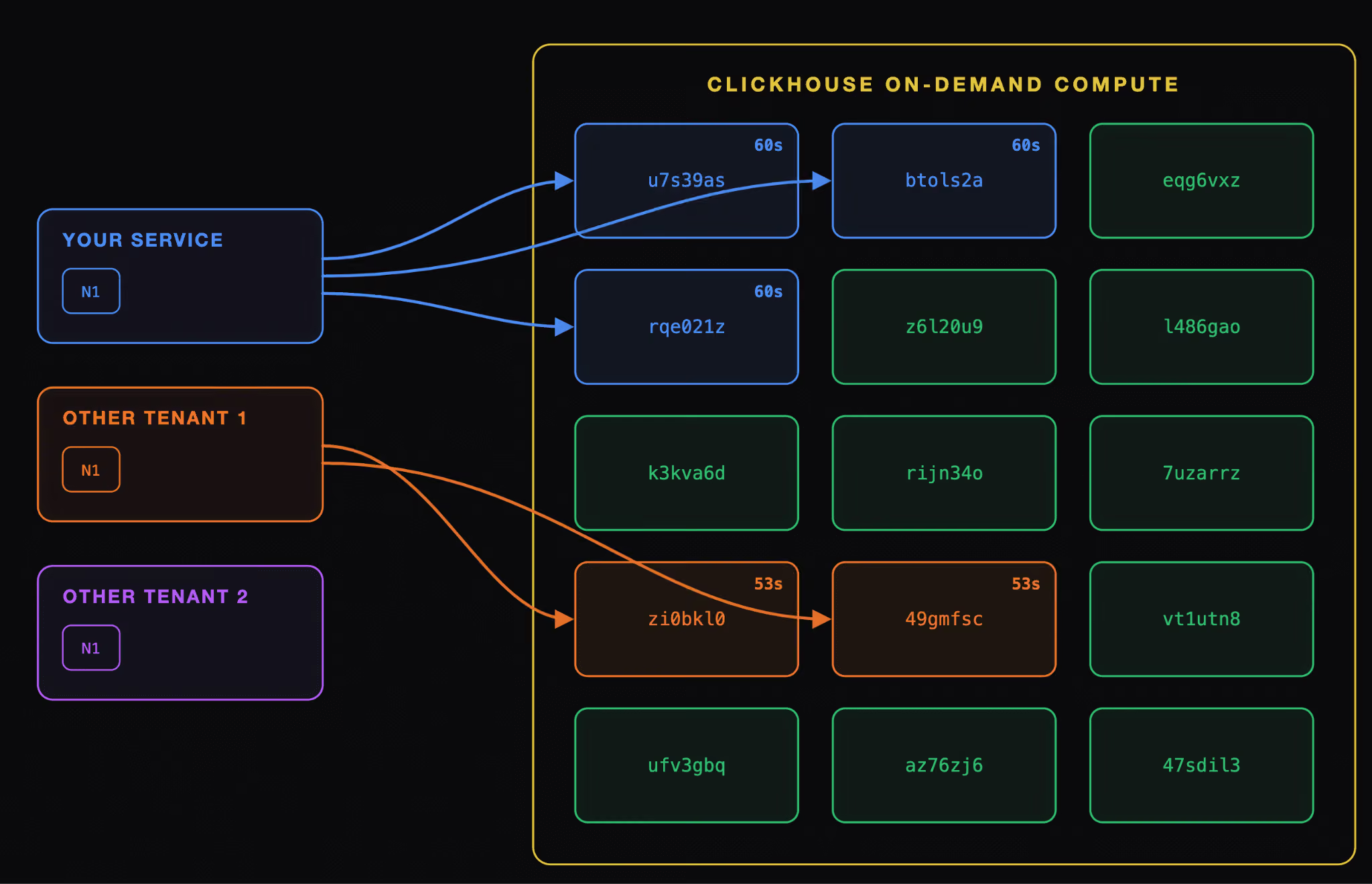
Once the query completes, the workers remain leased but inactive.
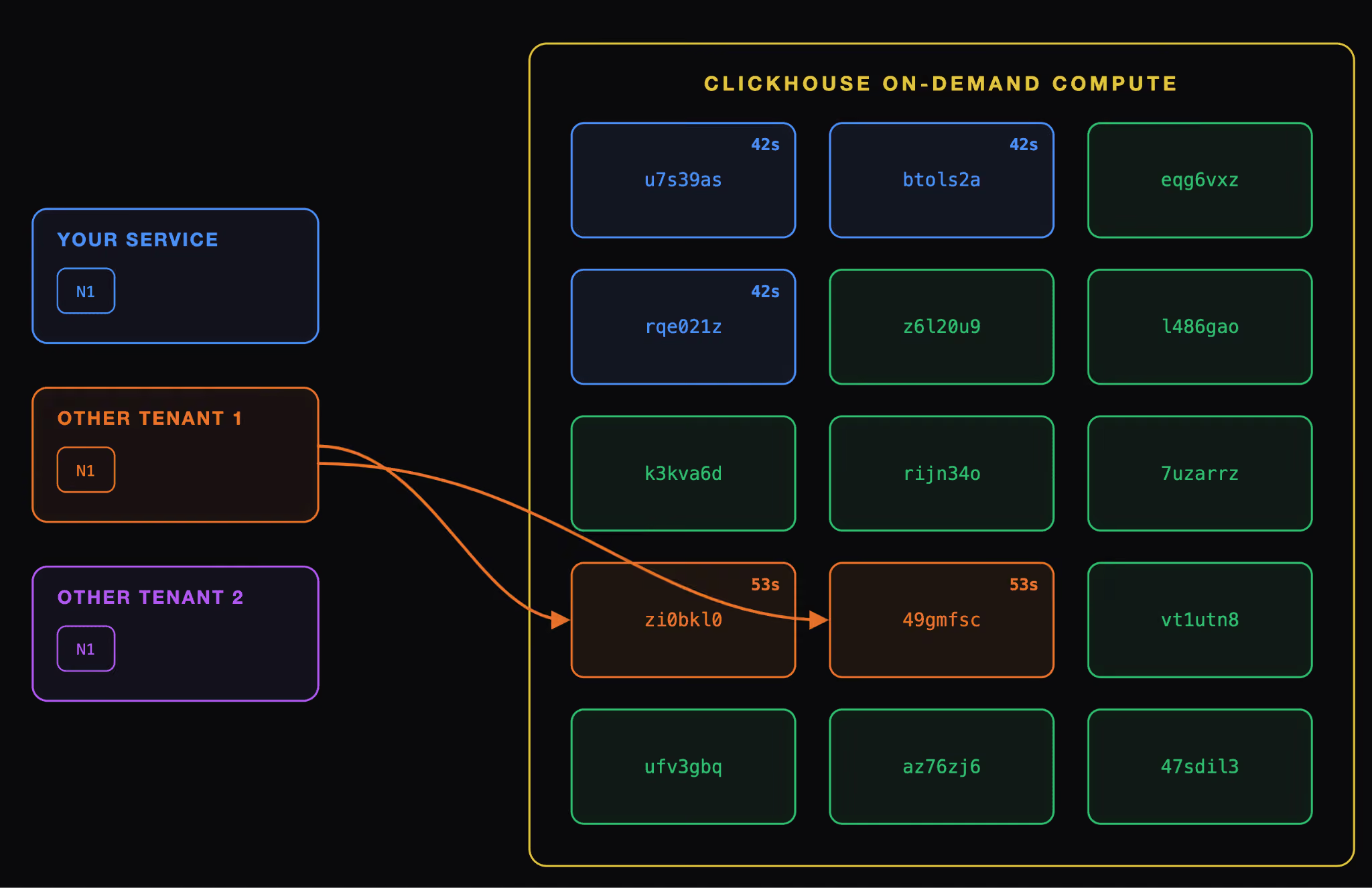
This is where things get interesting: if you send a new query while the lease is still active, those workers are reused immediately, with no cold start and no discovery delay. When the lease expires, the workers are released back and terminated. This makes ClickHouse even faster, since the next query can start right away instead of waiting for new workers to come online.
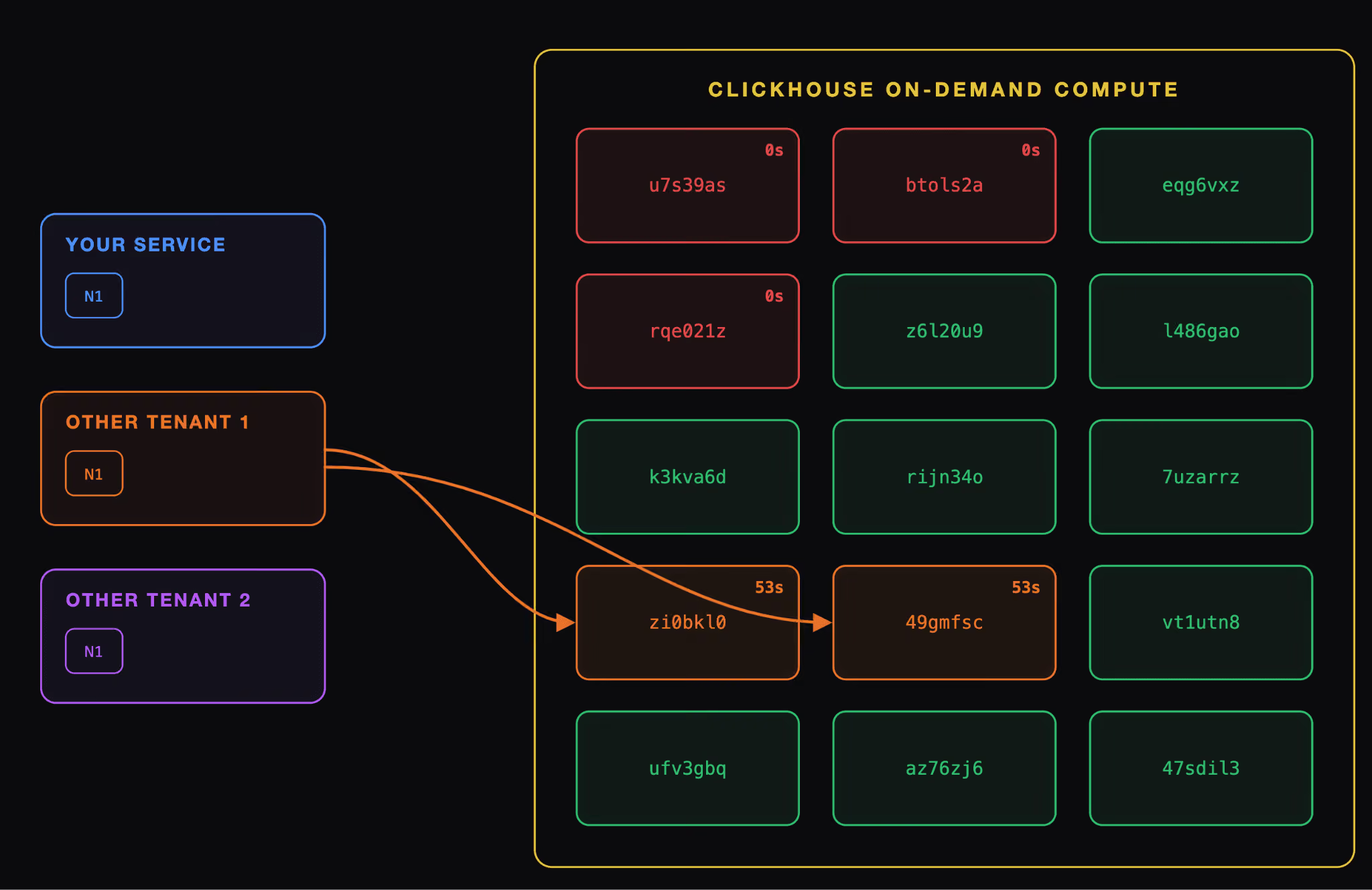
One important behavior to keep in mind is that concurrent queries share workers rather than receiving separate worker sets. For example, if two concurrent queries each request three workers, they will share the same three workers. If a third concurrent query requests five workers, it will use those three workers plus two additional ones. This means the pool grows to match the largest worker request rather than adding each query’s request together.
What if the worker pool runs low?
During the private preview, you may occasionally request more workers than the pool can provide while we fine-tune its autoscaling. If that happens, your query will still run using the workers currently available. For example, if you request five workers but only three are available, the query will run on those three.
On-Demand Compute in action
Setup
Let's see how On-Demand Compute can be used to power your workload.
In this scenario, we will be using SharedMergeTree as storage and the TPC-H SF10 dataset.
We will be using two clusters with the following configurations:
The On-Demand Compute cluster:
- 1 node
- Static size of 32 GB/8 CPUs
- Can use up to 15 workers (32 GB/8 CPUs)
The autoscaling cluster:
- 5 nodes
- Minimum node size of 32 GB/8 CPUs
- Maximum node size of 64 GB/16 CPUs
The experiment is fairly simple: we will run the benchmark multiple times on each cluster at different concurrency levels. For the On-Demand Compute cluster, we will increase the worker count as query concurrency rises:
| Iteration | Query concurrency (both clusters) | On-Demand Compute workers |
|---|---|---|
| 1 | 1 | 5 |
| 2 | 3 | 5 |
| 3 | 5 | 10 |
| 4 | 10 | 10 |
| 5 | 20 | 10 |
| 6 | 25 | 15 |
This will test the ability of ClickHouse to use more compute than expected.
Results
CPU usage
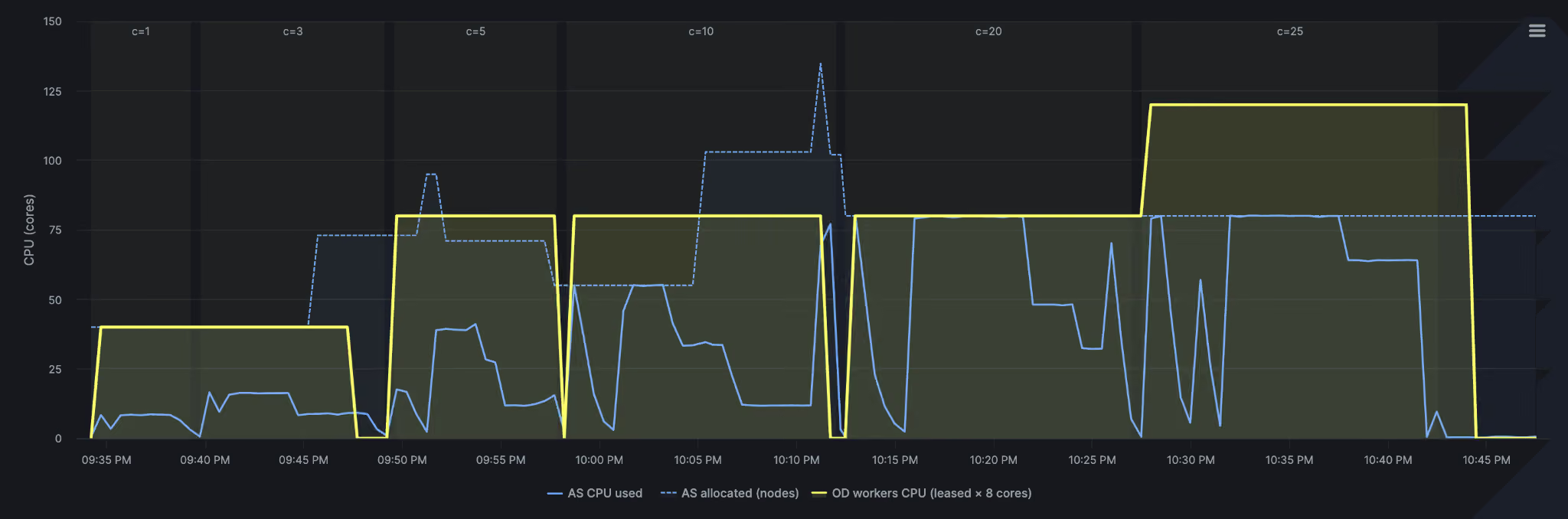
Let’s first look at the CPU usage of the two clusters. The first chart below compares CPU usage between On-Demand Compute and the stateful autoscaling cluster. At concurrency levels of 1 and 3, both use roughly the same amount of CPU.
Near the end of the second iteration, the autoscaling cluster begins to scale up. It uses a “make-before-break” approach, bringing new capacity online before removing the old capacity. This explains the sharp increase before usage settles at around 80 CPU cores.
Compared with the autoscaling cluster, On-Demand Compute (yellow) shows different behavior. The dips occur because ClickHouse workers are allocated for the duration of their lease. When a lease expires during a pause between runs, those workers are released, reducing CPU usage while the workload is idle. This means you use compute (on demand!) when your queries need it, rather than keeping extra capacity running between bursts.
Autoscaling also takes time. Several hours after the benchmark finished, the autoscaler was still recommending 80 CPU cores, even though the burst had ended. The cluster scales up quickly, but it holds on to that additional capacity for longer.
Query performance
The second chart compares benchmark performance. On-Demand Compute was faster for this particular workload.
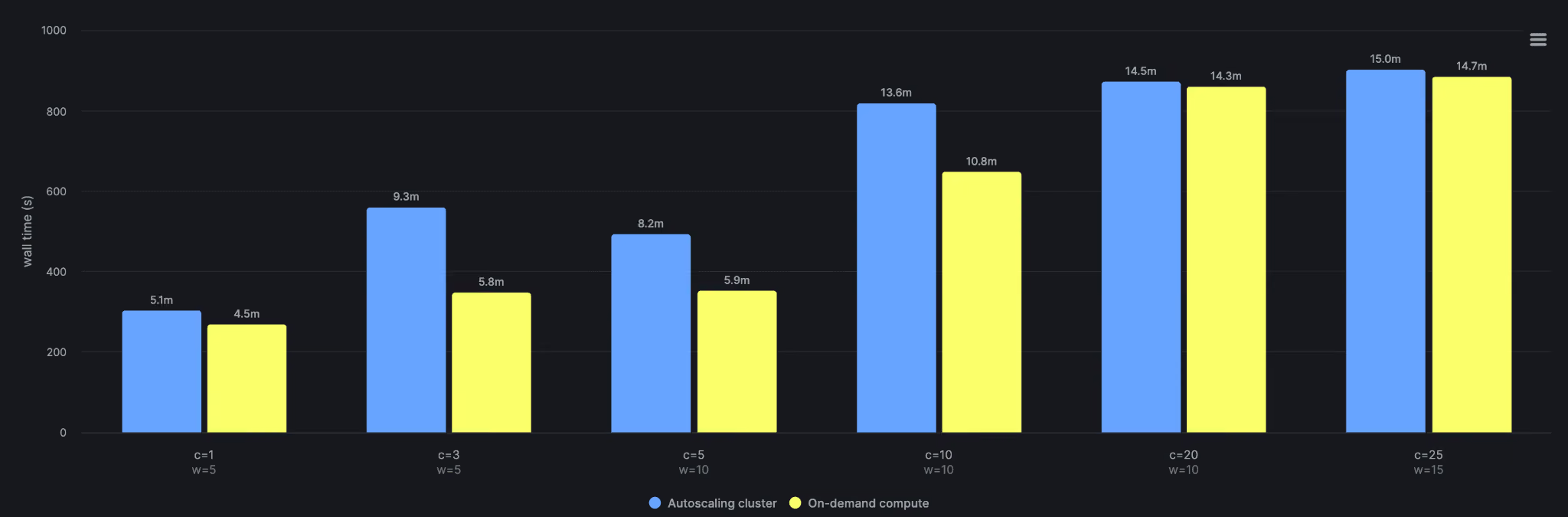
The new distributed query plan and cost-based optimizer (CBO) account for much of the difference. Neither is enabled on the stateful cluster yet. Together, they choose a more efficient execution plan and distribute the work across the available workers.
As concurrency increases, the performance advantage of the new distributed query execution framework narrows. At 25 concurrent queries, with 15 workers, it delivers performance similar to the stateful cluster’s single-node execution while using 50% less compute.
It’s also important to note that these results vary from benchmark to benchmark. Typically, complex JOINs, GROUP BY, and ORDER BY queries will perform better with the new distributed plan, but short-running queries that mainly perform simple reads and analytics will likely perform better on the stateful cluster.
What’s next?
This is the first release of On-Demand Compute. We know that the first iteration of the feature is limited in scope, but we wanted to put it in your hands as soon as possible so you can experiment, start building with it, and give us feedback on what we should improve or prioritize!
Register now for the private preview, and we will start rolling out the feature after our webinar on September 24, 2026: register here. If you want to learn more about the feature, check out the documentation: On-Demand Compute documentation.