50.5k
50.5k
We're excited to announce a new integration between ClickHouse and Google's Lakehouse Runtime Catalog, enabling direct querying of Google Cloud Lakehouse Iceberg tables in ClickHouse via Apache Iceberg REST Catalog.
This integration debuts as a beta feature in ClickHouse 26.2 and will be available shortly after in ClickHouse Cloud.
Why Iceberg REST Catalog?
A common challenge for data teams is making all their data accessible regardless of where it lives. Discovery, governance, and access control need to work across data lakes, warehouses, and operational stores.
Lakehouse Runtime Catalog solves this by providing a centralized catalog for Apache Iceberg tables in Google Cloud. That enables interoperability with any Iceberg-compatible engine: BigQuery, Apache Spark, Trino, and now ClickHouse.
By connecting to the REST Catalog, ClickHouse can discover and query Google Cloud Lakehouse Iceberg tables stored in Cloud Storage with no data movement, no proprietary connectors, and no metadata syncing required. Data engineers can write Google Cloud Lakehouse Iceberg tables with Spark or BigQuery, and analysts can immediately query that same data with ClickHouse for fast, complex analytics. Data can also be loaded into ClickHouse's native format in a single query using this integration!
How does the integration work?
To use this integration, you need two things:
- A ClickHouse instance (ClickHouse and ClickHouse local supported)
- A Google Cloud project with Lakehouse Runtime Catalog enabled
Lakehouse Runtime Catalog tracks the Iceberg metadata for Iceberg tables and exposes it via the Iceberg REST Catalog API at https://biglake.googleapis.com/iceberg/v1/restcatalog. ClickHouse connects to this endpoint to discover and query the underlying tables directly.
For authentication, ClickHouse integrates with Google's Application Default Credentials (ADC) mechanism.
Getting started
Deploy ClickHouse on Google Cloud or use ClickHouse local, ensuring you're on version 26.2 or later. Once your instance is ready, follow the steps below to connect to the Lakehouse Runtime Catalog. Read more in the ClickHouse documentation for Lakehouse Runtime Catalog.
Authentication with Google Application default credentials
ClickHouse supports Google ADC natively, giving you two options to authenticate with the Lakehouse Runtime Catalog.
Option 1: Point to your ADC credentials file
If you already have Application Default Credentials configured on your machine (e.g. via gcloud auth application-default login), you can simply point ClickHouse to the JSON credentials file. This is the easiest approach for local development and testing:
SET allow_database_iceberg = 1;
CREATE DATABASE Lakehouse_catalog
ENGINE = DataLakeCatalog('https://biglake.googleapis.com/iceberg/v1/restcatalog')
SETTINGS
catalog_type = 'biglake',
google_adc_credentials_file = '/path/to/application_default_credentials.json',
warehouse = 'gs://<bucket_name>/<optional-prefix>';ClickHouse reads the client_id, client_secret, refresh_token, and quota_project_id directly from the JSON file, so you don't need to specify them individually.
Option 2: Provide credentials inline
For production deployments or environments where a credentials file isn't available, you can provide the OAuth credentials directly in the query settings:
SET allow_database_iceberg = 1;
CREATE DATABASE Lakehouse_catalog
ENGINE = DataLakeCatalog('https://biglake.googleapis.com/iceberg/v1/restcatalog')
SETTINGS
catalog_type = 'biglake',
google_adc_client_id = '<client-id>',
google_adc_client_secret = '<client-secret>',
google_adc_refresh_token = '<refresh-token>',
google_adc_quota_project_id = '<gcp-project-id>',
warehouse = 'gs://<bucket_name>/<optional-prefix>';Both approaches use the same underlying OAuth flow to authenticate with the Iceberg REST Catalog endpoint and authorize access to the data in Cloud Storage.
Querying Google Lakehouse Iceberg tables from ClickHouse
Once you've created a connection using either of the authentication methods above, querying your Google Lakehouse Iceberg tables is straightforward.
Listing available tables
List all tables available in the catalog:
SHOW TABLES FROM Lakehouse_catalog;┌─name─────────────────────────┐
│ public_data.nyc_taxicab │
│ public_data.nyc_taxicab_2021 │
└──────────────────────────────┘Querying tables
Query any Google Cloud Lakehouse Iceberg table directly:
SELECT count(*)
FROM Lakehouse_catalog.`public_data.nyc_taxicab`
WHERE vendor_id = 1;You can also inspect the full schema:
SHOW CREATE TABLE Lakehouse_catalog.`public_data.nyc_taxicab`;Backticks are required around table names because ClickHouse doesn't support more than one namespace level.
Loading data into ClickHouse for faster queries
For use cases that require repeated, low-latency queries, you can load data from Google Cloud Lakehouse Iceberg tables into a ClickHouse table:
CREATE TABLE local_taxi_data
(
`vendor_id` Int64,
`pickup_datetime` DateTime64(6),
`dropoff_datetime` DateTime64(6),
`passenger_count` Int64,
`trip_distance` Float64,
`total_amount` Float64,
`pickup_location_id` Int64,
`dropoff_location_id` Int64
)
ENGINE = MergeTree
ORDER BY (pickup_datetime, vendor_id);
INSERT INTO local_taxi_data
SELECT
vendor_id, pickup_datetime, dropoff_datetime,
passenger_count, trip_distance, total_amount,
pickup_location_id, dropoff_location_id
FROM lakehouse_catalog.`public_data.nyc_taxicab`;You can now query the local_taxi_data directly in ClickHouse native format for low query latency.
What's next
This release is just the first step toward deeper integration with Google Cloud's data ecosystem.
We're already working on several enhancements for upcoming releases, including:
- Write support: Adding support for writing data back to Google Cloud Lakehouse Iceberg tables from ClickHouse.
- Enhanced cloud integration: Introducing a new user interface in ClickHouse Cloud to easily create connections to the Lakehouse Runtime Catalog and query your data directly from the UI.
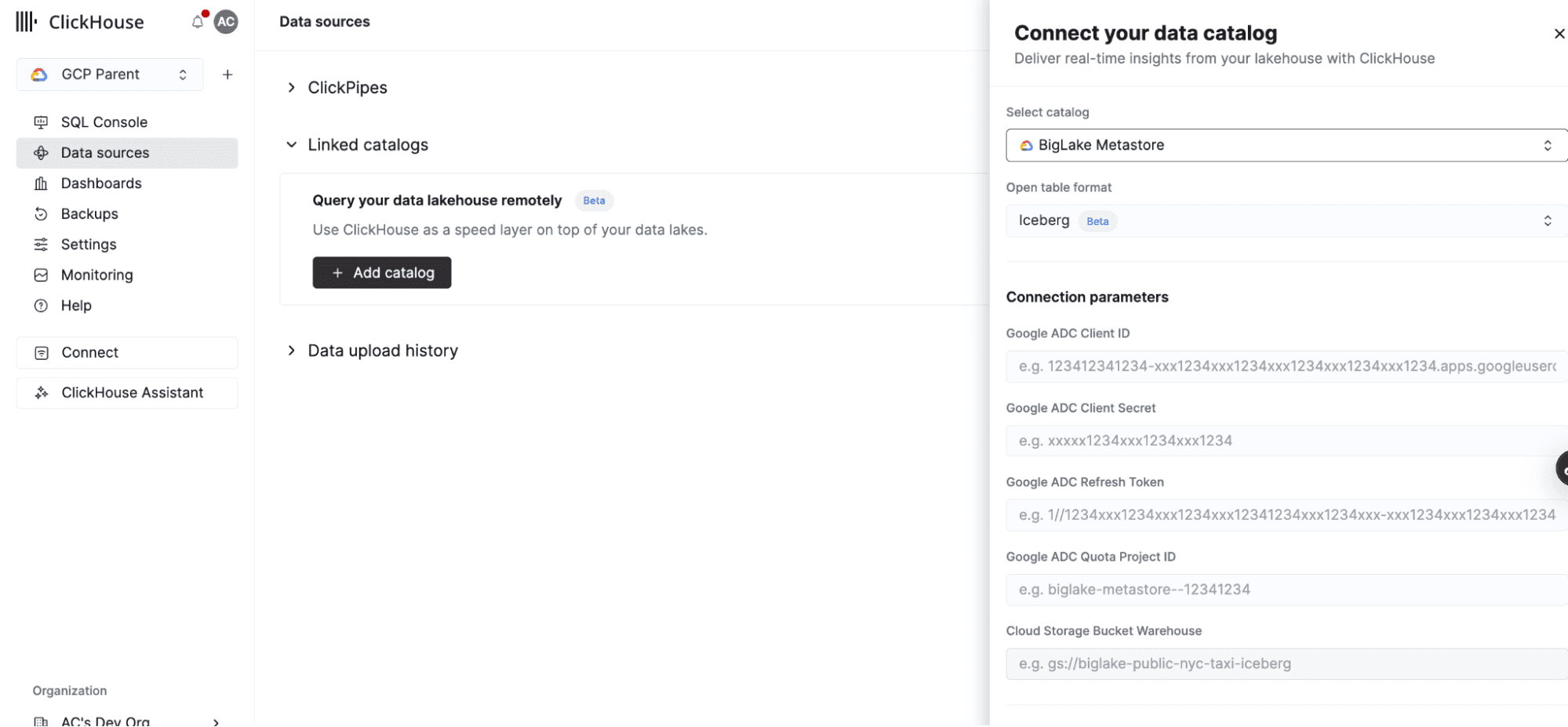
With ClickHouse and the Lakehouse Runtime Catalog, you can run fast analytics on all of your Google Cloud Lakehouse Iceberg tables in Google Cloud, without moving data, without duplicating it, and without giving up the tools your teams already use.
Get started today
Deploy ClickHouse on Google Cloud or use ClickHouse local once your instance is ready, follow the steps below to connect to the Lakehouse Runtime Catalog. Read more in the ClickHouse documentation for Lakehouse Runtime Catalog.
Get started today
Interested in seeing how ClickHouse works on your data? Get started with ClickHouse Cloud in minutes and receive $300 in free credits.
Sign up