50.5k
50.5k

TL;DR
ClickHouse is now available on Docker Hardened Images: stripped-down, security-hardened builds of the ClickHouse stack, including the server image, ClickHouse Keeper, the Kubernetes Operator and its Helm chart, and the metrics exporter, all built to pass enterprise security scans by shipping only what each component needs to run. Everything about how ClickHouse runs stays the same, only the packaging around it changes.
Deploying ClickHouse anywhere
For millions of developers, the fastest way to try ClickHouse is a single command:
docker run -d --name my-clickhouse-server \
--ulimit nofile=262144:262144 \
clickhouse/clickhouse-serverWith that you have a running columnar database that can aggregate billions of rows in real time. That low barrier to entry is deliberate and the adoption of the clickhouse/clickhouse-server image has passed 100M+ pulls on Docker Hub.
For a large part of our community, that first docker run is their entry point to ClickHouse, and getting started is the easy part. The friction shows up later. Once you move past experimentation and small workloads, the command that runs on your laptop has to run at enterprise scale: inside a pipeline, behind a security team, with a vulnerability scanner monitoring everything.
This post covers why the standard ClickHouse Docker image gets flagged in those scans (the findings come from unused packages in the Ubuntu base, not from ClickHouse), and how the Docker Hardened Image passes them while running exactly the same database.
From first query to production
Every container image is really two components stacked together: the application you want, and a base operating system layer it runs on. At the time of writing, the standard ClickHouse image is built on Ubuntu 22.04. That base brings convenience, a familiar environment, a shell, debugging tools, but it also brings dozens of packages ClickHouse never uses: Perl, wget, apt itself, and a long tail of transitive dependencies that exist only because Ubuntu ships them by default.
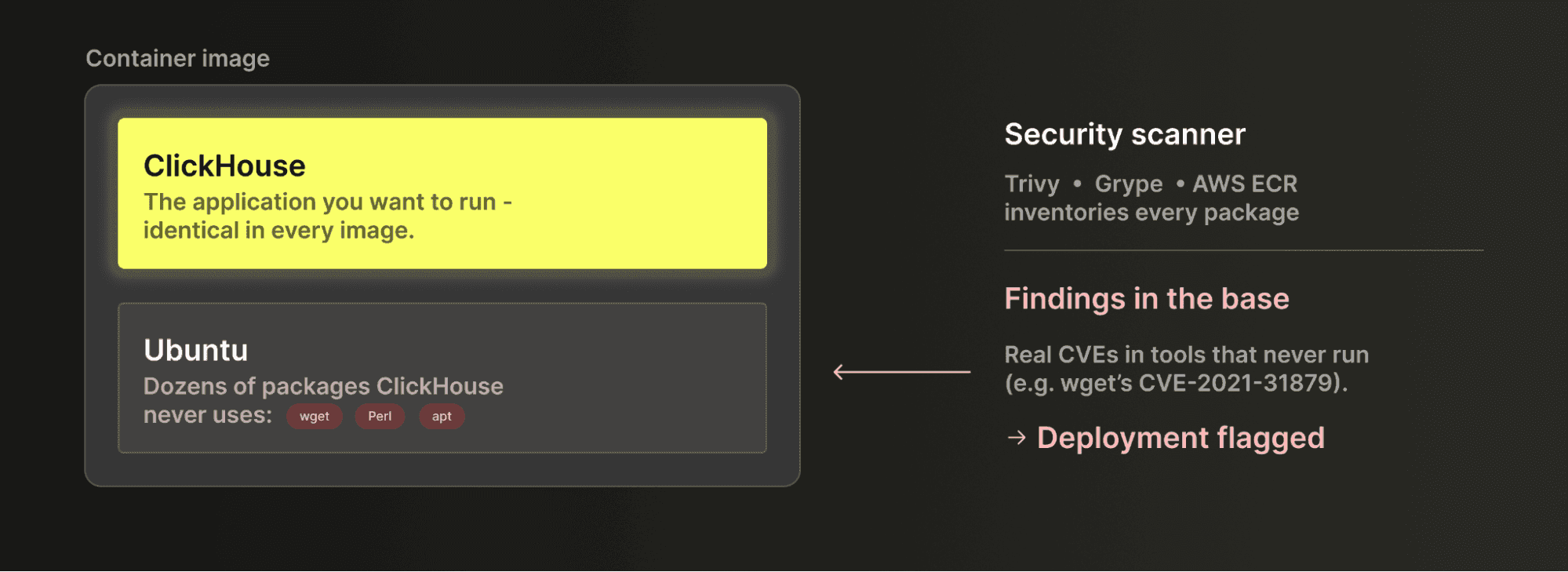 CVEs live in the base image, not in ClickHouse.
This matters a lot in an enterprise pipeline, because security scanners such as Trivy, Grype, and the built-in AWS ECR scanner inventory every package in the image, whether the application loads it or not. Some of those Ubuntu packages carry known CVEs with no upstream fix. For example, wget has shipped with CVE-2021-31879 unpatched since 2021. The scanner reports the findings, the security team blocks the deployment, and they are right to do so: the vulnerabilities are real, even if the vulnerable tools never run.
The result is a frustrating loop that many teams will recognize. The database works, but the deployment is blocked anyway. Days go into investigating findings and writing risk exceptions for packages ClickHouse never touches, and the exceptions often get rejected regardless.
A smooth developer experience in enterprise workloads
In April 2026, Docker added clickhouse-server to its Hardened Images catalog. Docker Hardened Images (DHI) start from a different question: what does ClickHouse actually need to run?
The DHI clickhouse-server image ships a minimal base with no package manager and no network tools like wget or curl, runs as a non-root user out of the box, and carries SLSA Level 3 provenance, cryptographic proof of what went into the build. Docker's security team maintains it and actively patches CVEs. Rather than patching the wget vulnerability, DHI removes wget entirely.


The difference shows up in the scan results. Docker's own Scout comparison found the standard image carrying 8 medium and 11 low severity findings across 111 packages. The DHI image carried 0 medium and 14 low, with every remaining finding in core libraries like glibc and openssl where no fix exists on any distribution. The findings that block deployments, the ones in unnecessary utilities, are gone because the utilities are gone.
From ClickHouse's perspective, nothing changes. Your volume mounts and config files carry over untouched. Moving to the hardened image takes one changed line:
# standard image
docker run -d --ulimit nofile=262144:262144 \
clickhouse/clickhouse-server
# hardened image
docker run -d --ulimit nofile=262144:262144 \
-e CLICKHOUSE_PASSWORD=mysecretpassword \
dhi.io/clickhouse-server:26.2-debian13Note: CLICKHOUSE_PASSWORD is what makes ClickHouse reachable over the network. Without it, the default user is restricted to localhost.
With major security improvements come minor inconveniences: DHI images live in a separate registry, so you mirror the image to your organization's Docker Hub namespace once and authenticate to dhi.io.
For the full walkthrough, including Kubernetes configuration, the metrics exporter, debugging without the usual tools, and a migration checklist, read Docker's companion post: From Security Blocked to Prod Ready: ClickHouse on Docker Hardened Images.
Developer experience and security are not a tradeoff
At first this looks like a tradeoff: keep the shell, package manager, and network tools and the container is easy to debug but harder to secure, while stripping them out gives you the reverse. But that tension only exists if it all has to happen in one image, and it doesn't. For local development and debugging, Docker Hardened Images (DHI) ships a dev variant with the extra tooling, and docker debug attaches a full toolset to the hardened image temporarily without rebuilding it. Because you harden what ships to production rather than what runs on your laptop, you keep your debugging tools in development and the smaller attack surface in production.
The payoff is a shorter conversation with your security team. Instead of spending days arguing that each flagged CVE sits in a package ClickHouse never loads, you deploy an image where those packages don't exist, with build provenance to back it up. Nothing about the database itself changes. The speed, scale, and cost efficiency that made you choose ClickHouse all carry over, and what gets simpler is the security approval.
Docker Hardened Images (DHI) are a hardened build of the open-source clickhouse-server image, for teams that self-manage ClickHouse and secure the container themselves. If you run on Kubernetes, the ClickHouse Kubernetes Operator automates deployment and management, and it ships as a hardened image and Helm chart in the DHI catalog too, alongside ClickHouse Keeper and the metrics exporter.
If you'd rather not run your own infrastructure, ClickHouse also offers managed and self-deployed options: ClickHouse Cloud runs everything for you, Bring Your Own Cloud puts that managed service inside your own cloud account, and ClickHouse Private and ClickHouse Government are self-deployed builds with FIPS 140-3 and further hardening for the strictest compliance environments. Whichever you pick, it's ClickHouse underneath. What differs is how much of the operational work you keep and how much you hand off.
Try it out yourself
Whether you are typing your first docker run or shipping into a locked-down enterprise pipeline, there is a ClickHouse image that fits.
Find clickhouse-server in the Docker Hardened Images catalog, and read Docker's full guide for setup details. You can reproduce the scan comparison yourself in two minutes:
docker scout quickview clickhouse/clickhouse-server:latest
docker scout quickview dhi.io/clickhouse-server:26.2-debian13And if you'd rather skip image decisions entirely, ClickHouse Cloud runs everything for you.
Get started today
Interested in seeing how ClickHouse works on your data? Get started with ClickHouse Cloud in minutes and receive $300 in free credits.
Sign up