50.5k
50.5k

TL;DR
Price lists don’t tell you real costs.
Compute models do.
This post explains how all five major cloud data warehouses actually turn your queries into dollars, so you can compare them on equal footing.
If you build, optimize, or pay for analytical workloads, this gives you the lens you need to understand true compute costs.
Prefer a visual walkthrough?
This post started as a whiteboard-style walkthrough of how the major cloud data warehouses actually turn queries into compute costs.
If you’d rather watch the explanation, the video below covers the same mental model and examples.
(The video follows the same structure as this post, so you can switch between reading and watching at any point.)
Why compute billing is so confusing
You have a dataset and a set of analytical queries. You have more cloud data warehouse options than ever. And before you can answer the obvious question:
Which one gives you the best performance per dollar?
You need to understand something much simpler:
How do these systems actually bill you for compute?
That should be straightforward. Every vendor has a public price list. But in practice, price lists are almost meaningless because:
-
Each platform measures compute differently (“credits”, “DBUs”, “compute units”, “slot-seconds”, “RPUs”, …)
-
These units map to fundamentally different execution models
-
Query runtimes scale differently as data grows
-
And the same query can burn radically different amounts of compute depending on the query engine
So even with all price lists in front of you, you still can’t answer “which one is cheaper?” Not without understanding what their billing units really mean.
This post is step 1 in that journey:
A clear, no-nonsense explanation of how all five major cloud data warehouses allocate, scale, and bill compute.
When you’re done, you’ll understand how CPU cycles become dollars in:
-
Snowflake
-
Databricks (SQL Serverless)
-
ClickHouse Cloud
-
Google BigQuery
-
Amazon Redshift Serverless
What about storage costs?
This post focuses entirely on compute costs, because that’s where the real differences between systems lie. Storage costs, by comparison, are much simpler and, crucially, often negligible relative to compute, since most systems store data in low-cost cloud object storage with very similar pricing. That said, our CostBench framework (see next section) does fully calculate storage costs for every system. We simply don’t highlight them here because they don’t materially affect the comparison.
Before we dive in: How we calculate costs with CostBench
This post is the foundation for a broader cost-comparison analysis we built on top of ClickBench.
If you’re here only to understand how each system’s compute model and billing work, you can skip this section and the small How CostBench computes … costs subsections at the end of each system. Those parts are only relevant if you want to see how we translate benchmark results into real dollar costs for the companion cost-comparison analysis.
To make benchmark results comparable across systems with radically different billing models, we built a framework for attaching real price tags to ClickBench (or any benchmark, really). We call it CostBench.
Everything in this study is fully reproducible; the CostBench repository includes all scripts, pricing models, and generated datasets we used.
At a high level, CostBench does three things:
- Takes existing raw ClickBench runtimes
- Looks up the system’s compute pricing model
- Produces an enriched JSON file that contains, for every query:
- runtime
- compute cost
(Additionally, CostBench also calculates storage costs.)
Each system’s section later in this post contains a small How CostBench computes … costs subsection at the end that shows how exactly we applied CostBench to each system (e.g., which benchmark file we used, what pricing data we mapped in, etc.).
This allows us to perform a clean comparison of the costs-per-benchmark across Snowflake, Databricks, ClickHouse Cloud, BigQuery, and Redshift Serverless.
With that foundation in place, let’s walk through how each system actually allocates and bills compute.
Snowflake
(Values shown are for standard Gen 1 warehouses.)
- Credits per hour (Snowflake’s compute billing unit)
- X-Small → 1 credit / hour
- Small → 2 credits / hour
- Medium → 4 credits / hour
- Standard: $2.00 / credit / hour
- Enterprise: $3.00 / credit / hour
- Business Critical: $4.00 / credit / hour
Compute model: provisioned warehouses
Snowflake is the canonical example of a provisioned-cluster compute model: you choose a warehouse size and pay for its uptime, not per individual query.
Under the hood, Snowflake’s warehouses are fixed-size clusters that run Snowflake’s query engine (engine paper: The Snowflake Elastic Data Warehouse).
Each warehouse has a t-shirt size (XS, S, M, …), and that size determines both:
- How many compute nodes you get (shown in the diagram below)
- How many “credits” are consumed per hour
For example:
- XS → 1 node → 1 credit/hour
- S → 2 nodes → 2 credits/hour
- M → 4 nodes → 4 credits/hour
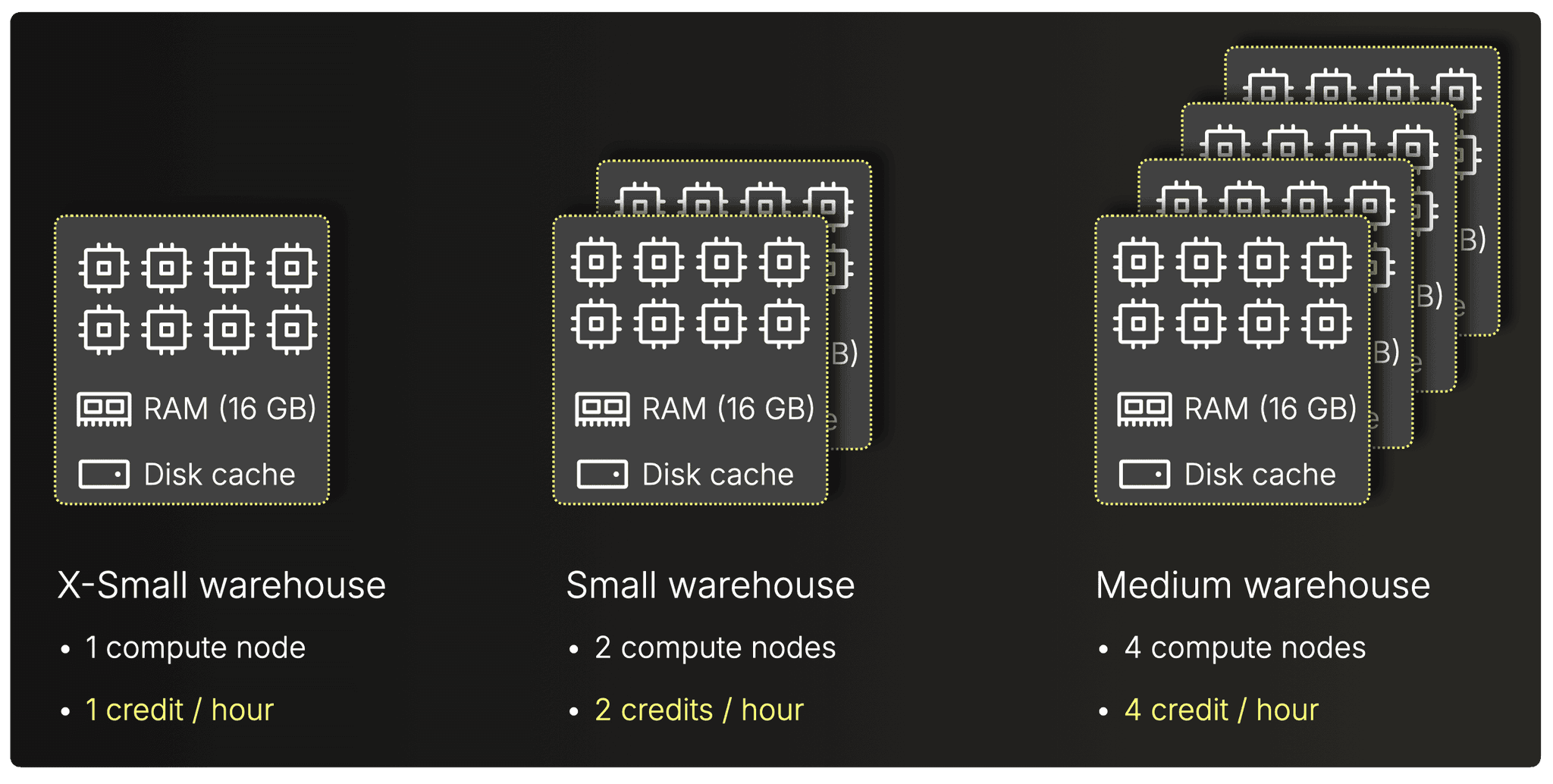 (Note: Snowflake does not publish hardware specs, but it is widely understood that each node roughly corresponds to 8 vCPUs, 16 GiB RAM, and ~200 GB local disk cache.)
Note on Snowflake warehouse generations and Interactive warehouses:
All examples in this guide use Snowflake’s standard (Gen 1) warehouses, which remain the default unless users explicitly select Gen2.
Snowflake’s newer Gen 2 warehouses run on updated hardware and consume 25–35% more credits per hour than Gen 1 for the same size.
Snowflake’s Interactive warehouses (in preview as of November 2025) are optimized for low-latency, high-concurrency workloads. They are priced lower per hour than standard warehouses (e.g., 0.6 vs 1 credit/hour at XS), but they enforce a 5-second timeout for SELECT queries and carry a 1-hour minimum billing period, with each resume triggering a full minimum charge.
Scaling: vertical vs. multi-cluster
Snowflake scales in two ways, and each form of scaling affects your bill:
-
Vertical scaling (manual resize)
-
You manually choose a bigger warehouse size (e.g., S → M → L)
-
More nodes → more parallelism → faster queries…but also more credits/hour, billed linearly.
-
-
Horizontal scaling (multi-cluster, automatic)
- Snowflake can automatically add more clusters of the same size when concurrency spikes.
- These extra clusters do not speed up single queries; they only provide additional capacity for incoming queries, thereby preventing queries from queuing up.
- Snowflake’s Standard/Economy policies control when extra clusters start/stop.
- Each active extra cluster bills its own credits/hour, identical to the primary cluster.
Query Acceleration Service (QAS)
Snowflake offers an optional enterprise-level feature called Query Acceleration Service (QAS).
When enabled, Snowflake will automatically use additional serverless compute resources to accelerate “spiky” or scan-heavy parts of a query.
Note that this introduces an additional billing dimension.
Compute pricing
(Official pricing, November 2025 → https://www.snowflake.com/en/pricing-options)
Pricing depends on Edition (Standard, Enterprise, Business Critical) and Cloud/Region, e.g. in AWS, US-East:
- Standard → $2.00 per credit/hour
- Enterprise → $3.00 per credit/hour
- Business Critical → $4.00 per credit/hour
Metering granularity
(Metering behavior, November 2025 → Snowflake docs: How credits are charged)
Snowflake bills per second, with a 1-minute minimum each time a warehouse is running.
Warehouses support AUTO-SUSPEND and AUTO-RESUME, so you can automatically shut them down after a period of inactivity and restart when a query arrives. You are billed while the warehouse is running, regardless of actual CPU usage.
Warehouse AUTO-RESUME is generally very fast (e.g. 1 or 2 seconds); depending on the size of the warehouse and the availability of compute resources to provision, it can take longer.
Interactive warehouses meter per second but enforce a 1-hour minimum, and every resume starts a new minimum billing window.
How CostBench computes Snowflake costs
Click to see the pricing logic
To translate Snowflake’s ClickBench runtimes into dollars, we applied our “CostBench” pipeline, which joins existing raw benchmark timings, warehouse configuration, and Snowflake’s pricing tables into one unified cost dataset.
Snowflake’s ClickBench results (e.g., 4xl.json) contain runtimes measured on a fixed warehouse size, in this case a 4X-Large (128 credits/hour) warehouse.
Separately, we encoded Snowflake’s official pricing data (warehouse T-shirt sizes, credits/hour, and per-credit dollar prices across editions and regions) into standard_warehouse.json.
A script (enrich.sh) merges these inputs:
- identifies the warehouse size used in the benchmark (e.g., 4X-Large)
- multiplies each query’s runtime by credits/hour × price per credit
- attaches Snowflake storage pricing
- outputs a fully enriched file (4xl_enriched.json) containing:
- per-query runtime
- per-query compute cost
- total monthly storage cost
This enriched dataset is what we use later in the high-level comparison post where we evaluate cost-per-benchmark across the five systems.
Databricks uses a similar provisioned-cluster model, but replaces Snowflake’s credits with DBUs.
Databricks (SQL Serverless)
- DBUs per hour (DBU = Databricks Unit, Databricks’ abstract compute billing unit)
- 2X-Small → 4 DBUs / hour
- Small → 12 DBUs / hour
- Medium → 24 DBUs / hour
- Premium: $0.70 / DBU / hour
- Enterprise: $0.70 / DBU / hour
Compute model: fixed-shape warehouses
Like Snowflake, Databricks SQL Serverless uses a provisioned-cluster model: you pick a warehouse size, and Databricks brings up a fixed-shape cluster (engine paper: Photon: A Fast Query Engine for Lakehouse Systems) that runs until you shut it down or it auto-stops when idle.
Each warehouse size (2X-Small, Small, Medium, …) corresponds to a fixed cluster with:
- One driver node
- Multiple executor nodes (the main cost driver)
Your chosen cluster size determines:
- How many executors you get
- How many DBUs per hour the cluster burns (DBU = Databricks Unit, Databricks’ abstract compute billing unit)
Examples:
- 2X-Small → ~1 executor → 4 DBUs/hour
- Small → ~3 executors → 12 DBUs/hour
- Medium → ~6 executors → 24 DBUs/hour
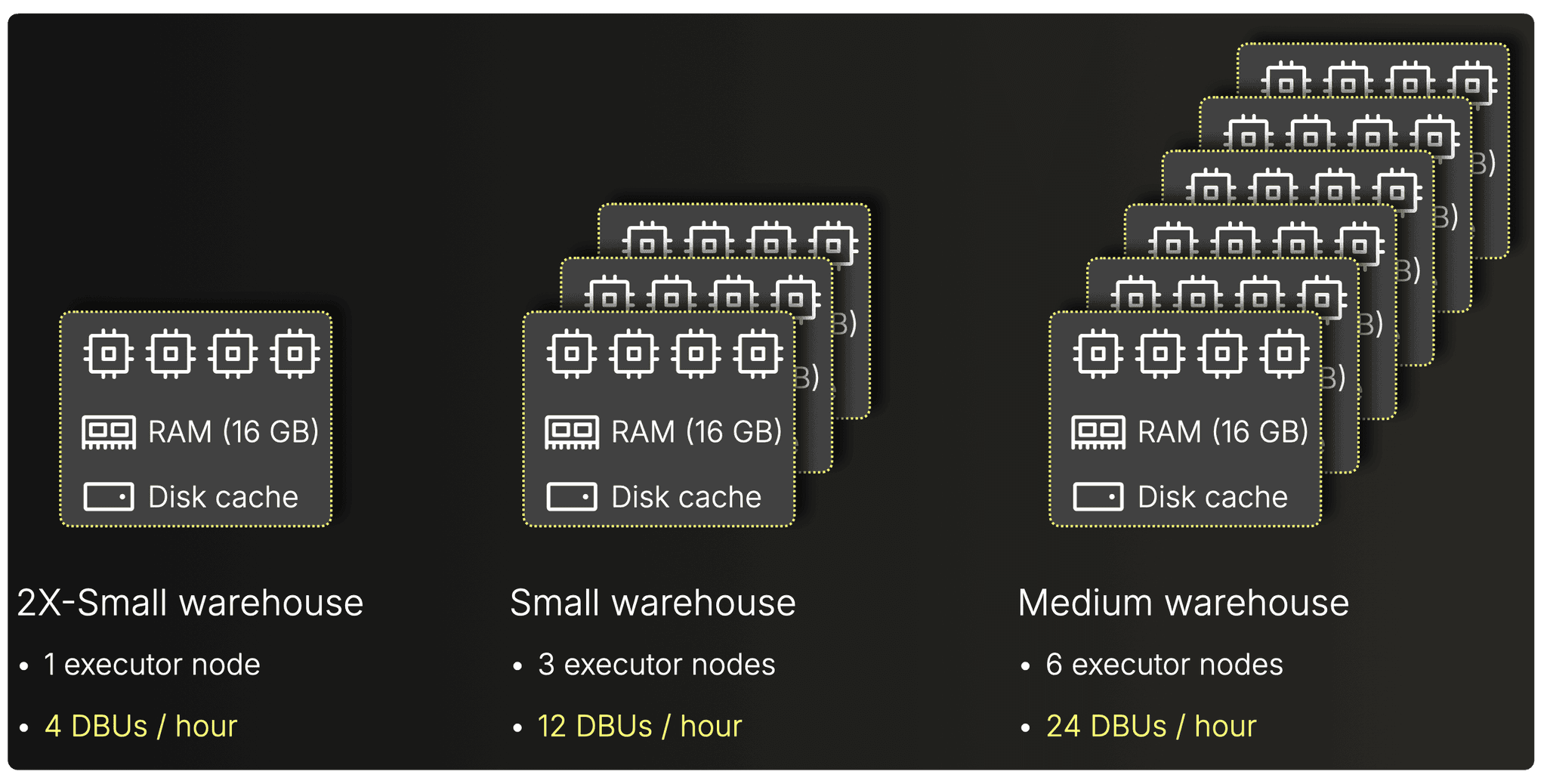 (Note that Databricks abstracts the exact hardware and node counts, so the diagram is illustrative, not literal. For clarity, we omit driver nodes.)
Larger sizes mean more executors → more parallelism → faster queries.
But billing is strictly linear with DBUs/hour, regardless of how much CPU your queries actually consume internally.
Scaling: vertical vs multi-cluster
Databricks warehouses scale in two ways, and each directly affects your cost:
1. Vertical scaling (manual resize)
- You explicitly choose a bigger warehouse size (2X-Small → Small → Medium).
- Larger sizes have more executors and burn proportionally more DBUs/hour.
- This makes individual queries faster, but increases hourly burn.
2. Horizontal scaling (multi-cluster, automatic)
- In the UI you set Min / Max clusters for a given size.
- When concurrency increases, Databricks automatically launches additional clusters of the same size to handle queued queries.
- These extra clusters do not speed up single queries; they only provide additional capacity for incoming queries, thereby preventing queries from queuing up.
- Each extra cluster bills its own DBUs/hour while it is active.
Example: running 3 × “Small” clusters means 3 × 12 DBUs/hour.
Compute pricing
(Official pricing, November 2025 → https://www.databricks.com/product/pricing/databricks-sql)
Finally, DBU → USD conversion depends on:
- Edition / tier (Standard, Premium, Enterprise)
- Cloud & region (AWS, Azure, GCP)
Typical AWS (US-East) pricing:
- Premium → ~$0.70 / DBU/hour
- Enterprise → ~$0.70 / DBU/hour
(Note: Premium and Enterprise DBU prices are identical as of November 2025. This is not a typo.)
Metering granularity
(Metering behavior, November 2025 → Databrick docs: How does Databricks pricing work?)
Databricks bills DBUs with per-second granularity while the warehouse is active.
SQL Warehouses have an auto-stop idle timeout, so you can automatically shut them down after a configured period of inactivity.
Warehouses automatically start again (“auto-start”) when a new query arrives.
Billing continues until the warehouse fully stops, regardless of CPU utilization.
Warehouses have a rapid startup time (typically between 2 and 6 seconds).
How CostBench computes Databricks costs
Click to see the pricing logic
To convert Databricks’ ClickBench runtimes into dollars, we ran the same CostBench pipeline used for Snowflake, this time joining the raw benchmark timings with Databricks’ warehouse-size → DBUs/hour mapping and DBU → dollar pricing.
For example, a Databricks ClickBench file (clickbench_4X-Large.json) contains runtimes measured on a fixed SQL warehouse size, here a 4X-Large warehouse (528 DBUs/hour).
Separately, we encoded Databricks’ official pricing tables (cluster sizes, DBUs/hour, and DBU prices per cloud/region/tier) into sql_serverless_compute.json.
The enrichment script (enrich.sh) merges these inputs and:
- detects the warehouse size used in the benchmark (4X-Large)
- multiplies each query’s runtime by DBUs/hour × DBU price
- attaches Databricks storage pricing
- writes out an enriched file (clickbench_4X-Large_enriched.json) containing
- per-query runtime
- per-query compute cost
- total storage cost
This enriched dataset feeds into the high-level comparison post where we evaluate the true cost-per-benchmark across all five systems.
ClickHouse Cloud also uses provisioned compute, but with fully flexible node sizes and a normalized billing unit.
ClickHouse Cloud
- Compute units per hour (1 compute unit = 8 GiB RAM + 2 vCPU)
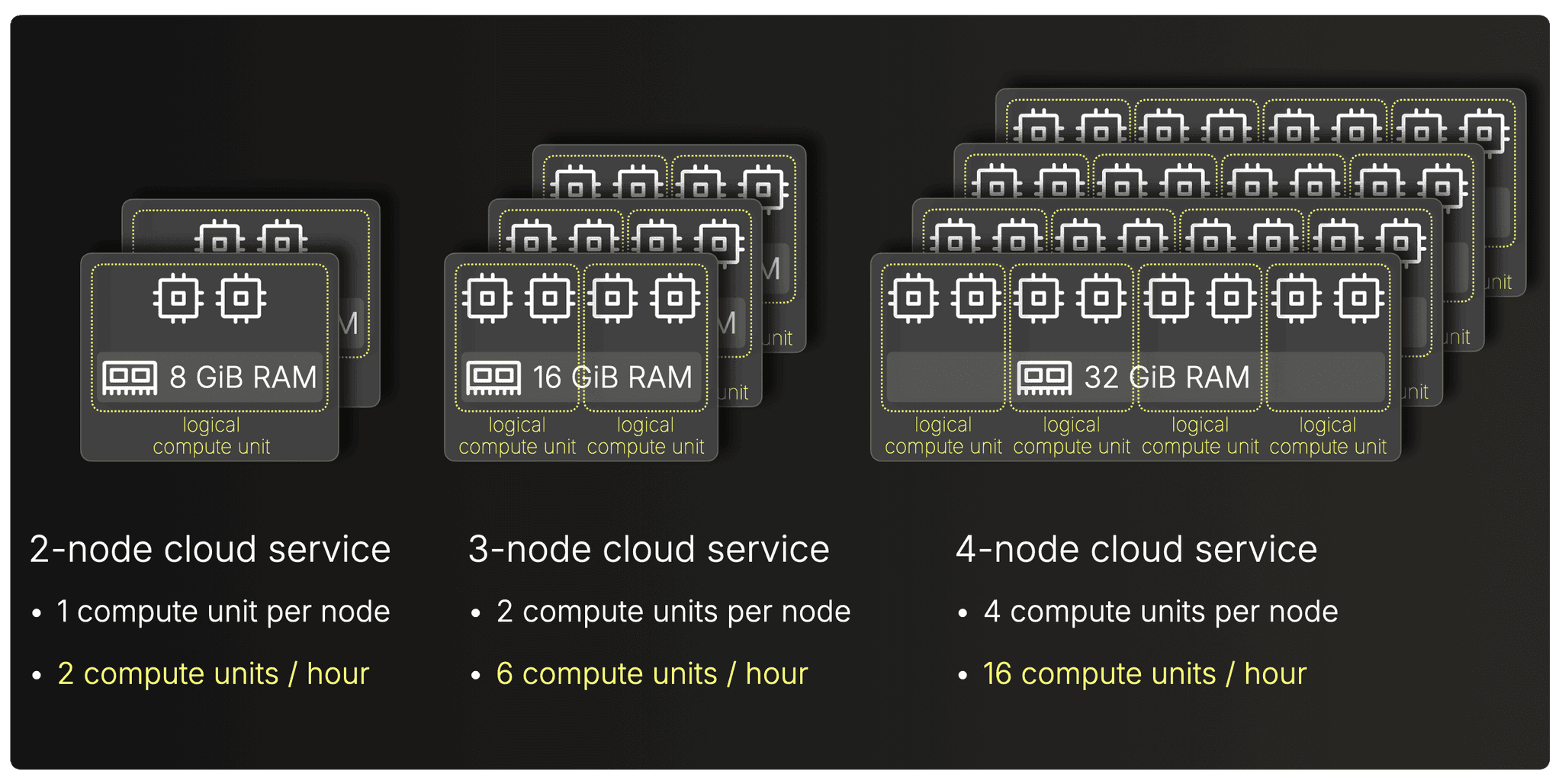
- 2-node service (8 GiB RAM / node) → 2 compute units / hour
- 3-node service (16 GiB RAM / node) → 6 compute units / hour
- 4-node service (32 GiB RAM / node) → 16 compute units / hour
- Basic: $0.22 / unit / hour
- Scale: $0.30 / unit / hour
- Enterprise: $0.39 / unit / hour
Compute model: flexible services, compute units
ClickHouse Cloud is a provisioned-compute service built on the ClickHouse engine (engine paper: ClickHouse - Lightning Fast Analytics for Everyone), but with fully flexible node sizing instead of fixed warehouse shapes.
A service has two independent dimensions:
1. Number of compute nodes (horizontal dimension)
-
You choose any number of nodes for a service—1, 2, 3… or dozens, or hundreds.
-
This controls both inter-query scaling (how many queries can run concurrently) and intra-query scaling (how much parallel CPU+RAM a single query can use across nodes).
2. Size of each compute node (vertical dimension)
- Each compute node can be provisioned with a wide range of RAM/vCPU configurations.
- Examples include 8 GiB/2 vCPU, 16 GiB/4 vCPU, 32 GiB/8 vCPU, all the way to 356 GiB/89 vCPU, and many intermediate sizes.
To bill such flexible service sizes uniformly, ClickHouse uses a normalized compute unit:
1 compute unit = 8 GiB RAM + 2 vCPU
All possible DRAM/vCPU node configurations are multiples of this.
ClickHouse Cloud calculates the total compute units for a service as:
Total compute units = (# of nodes) × (compute units per node)
A service consumes exactly its total number of compute units per hour while it is running.
The diagram below shows typical examples:
-
2-node service with 8 GiB RAM + 2 vCPU per node
→ 1 compute unit per node
→ 2 compute units/hour -
3-node service with 16 GiB RAM + 4 vCPU per node
→ 2 compute units per node
→ 6 compute units/hour -
4-node service with 32 GiB RAM + 8 vCPU per node
→ 4 compute units per node
→ 16 compute units/hour
This is different from Snowflake and Databricks: node sizes aren’t tied to fixed t-shirt sizes.
Scaling: auto-vertical + manual horizontal
ClickHouse Cloud scales in two ways, and both directly affect how many compute units/hour a service consumes.
1. Vertical scaling (change size of all nodes, automatically)
In ClickHouse Cloud, node size (RAM + vCPUs) can scale automatically up and down based on CPU and memory pressure, within a configurable min/max range.
This contrasts with systems like Snowflake and Databricks, where vertical scaling is always manual, and you must explicitly choose a larger or smaller warehouse/cluster.
2. Horizontal scaling (add or remove nodes, manually)
Unlike Snowflake or Databricks, where clusters have a hard upper compute size limit and additional clusters only improve inter-query concurrency and a single query always runs on one cluster, ClickHouse Cloud’s horizontal scaling is effectively unbounded. Adding more nodes increases:
- inter-query scaling: more queries can run at the same time, and
- intra-query scaling: a single query can use CPU cores and RAM across all nodes in the service (via distributed execution).
This means horizontal scaling in ClickHouse accelerates both throughput and individual query performance. Scaling the number of nodes is currently manual, but automatic horizontal scaling is in active development.
(ClickHouse Cloud also supports Warehouses, a form of compute-compute separation, that lets you isolate compute for different workloads while still sharing the same data.)
Compute pricing
(Official pricing, November 2025 → https://clickhouse.com/pricing)
Pricing depends on the tier (Basic, Scale, Enterprise) and cloud/region, with typical AWS US-East pricing around:
- Basic: ~$0.22 per compute unit/hour
- Scale: ~$0.30 per compute unit/hour
- Enterprise: ~$0.39 per compute unit/hour
Metering granularity
(Metering behavior, November 2025 → ClickHouse Cloud docs: How is compute metered?)
ClickHouse Cloud meters compute per minute in normalized compute units.
Services can be configured with an idle timeout, causing the compute layer to stop automatically after a period of inactivity. When a new query arrives, the service automatically resumes (“auto-start”) and begins consuming compute units again.
Billing continues while the service is active, even if no queries are running.
Services may take 20-30 seconds to resume after idling.
How CostBench computes ClickHouse Cloud costs
Click to see the pricing logic
As with Snowflake and Databricks, ClickHouse Cloud goes through the same CostBench pipeline. For compute we start from an existing ClickBench result file for a fixed service size, for example a 3-node, 64 GiB service captured in aws.3.64.json. Separately, we encode ClickHouse Cloud list prices per compute unit / hour and per TB-month of storage for each tier (Basic, Scale, Enterprise).
The CostBench script (enrich.sh) then:
- reads the service configuration (3 nodes × 2 compute units per node) and derives the total compute units / hour for the benchmarked service,
- multiplies each query’s runtime by that burn-rate and the tier’s $/unit/hour to get a per-query compute cost,
- adds a monthly storage cost based on the dataset size and the $/TB-month price,
- writes out an enriched JSON file (aws.3.64_enriched.json) that includes, for each tier:
- per-query runtimes,
- per-query compute costs,
- total monthly storage cost.
That enriched file is what we use later in the [companion post](https://clickhouse.com/blog/cloud-data-warehouses-cost-performance-comparison) when we compare ClickHouse Cloud’s cost-per-benchmark against the other systems.
BigQuery takes a completely different approach. No clusters to size at all.
BigQuery
- On-demand: Bytes scanned
- Capacity: Slot-hours (active slot time, slots = logical units of compute)
- Query scanning 2 TiB → 2 TiB billed
- Project using 500 slots for 1 hour → 500 slot-hours billed
- On-demand: $6.25 / TiB scanned
- Capacity (Standard): $0.04 / slot / hour
- Capacity (Enterprise): $0.06 / slot / hour
- Capacity (Enterprise Plus): $0.10 / slot / hour
Compute model: slots on serverless shared compute
The three systems we covered so far — Snowflake, Databricks, and ClickHouse Cloud — all follow the Provisioned Clusters model: you reserve a fixed amount of compute resources, and you pay for the time that provisioned compute is running.
BigQuery is completely different.
BigQuery uses a Serverless Shared Compute model: there are no warehouses or clusters to size, and queries run on a large shared, pre-provisioned compute fabric. You only pay for what each query actually consumes, not for the size or uptime of a cluster.
What follows is a concise breakdown of how BigQuery’s compute model works, how it scales, and how billing is derived from that model.
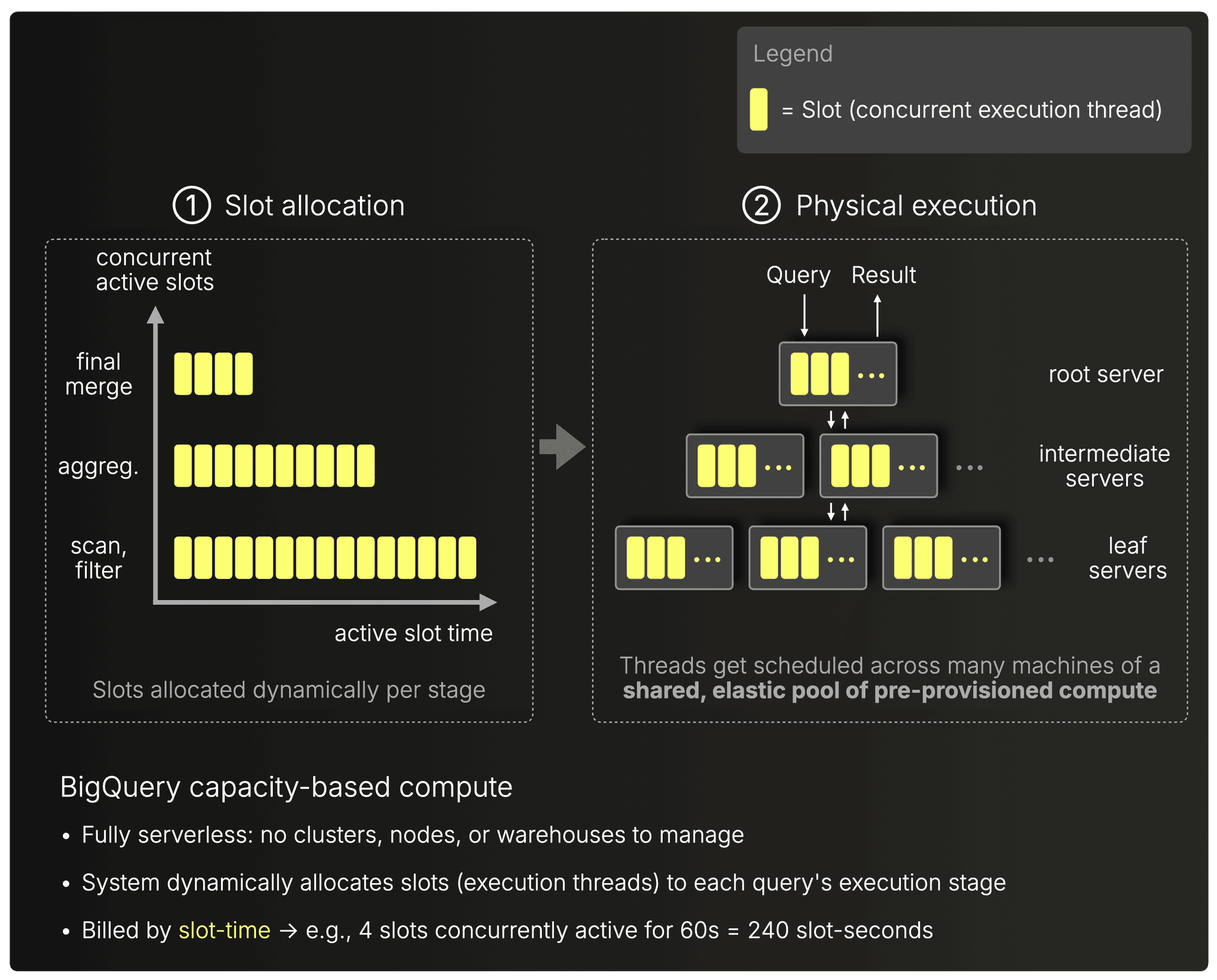
BigQuery executes each query using its engine, running on a shared pool of pre-provisioned compute (engine paper: Dremel: Interactive Analysis of Web-Scale Datasets). For each query, the engine:
① Allocates slots — logical units of compute that roughly correspond to concurrent execution threads.
② Schedules those slots across many machines in the shared serverless fabric.
The number of slots used is dynamic and depends on the query plan:
- Scan & filter stages can be highly parallel (many slots) if there are lots of partitions or column chunks to read.
- Aggregation stages often use fewer slots, shaped by grouping cardinality and data distribution.
- Final merge stages usually need only a handful of slots to combine partial results.
In other words, BigQuery tries to give each stage as much parallelism as it can actually use, and that slot allocation can change from stage to stage.
Users are billed by the amount of active slot-time a query consumes.
The diagram below shows how BigQuery allocates slots to each stage and schedules them across its serverless compute fabric:
Example
To make this concrete, imagine a query with a wall-clock runtime of 20 seconds, consisting of three sequential stages:
Stage 1 — Scan
- Duration: 12 seconds
- Slots used: 1,000
- Slot-time: 12 seconds × 1,000 slots = 12,000 slot-seconds
Stage 2 — Aggregation
- Duration: 6 seconds
- Slots used: 600
- Slot-time: 6 seconds × 600 slots = 3,600 slot-seconds
Stage 3 — Final merge
- Duration: 2 seconds
- Slots used: 4
- Slot-time: 2 seconds × 4 slots = 8 slot-seconds
Now sum up the slot-time:
- Total slot-seconds: 12,000 + 3,600 + 8 = 15,608 slot-seconds
- Wall-clock runtime: 20 seconds
- Billed compute: 15,608 slot-seconds
So even though the user only sees a 20-second query, BigQuery’s billing reflects the aggregate parallel work across all slots and stages.
Scaling: dynamic slot allocation
BigQuery automatically scales slot usage up or down based on how much parallelism each query stage can use.
Slot scaling limits
You buy a fixed reservation of slots for your workload. BigQuery will use exactly up to that many slots, never more. The only time this limit changes is when you resize the reservation.
Alternatively, with on-demand pricing (see below), you will have access to up to 2,000 concurrent slots, shared among all queries in a single project.
Compute pricing
(Official pricing, November 2025 → https://cloud.google.com/bigquery/pricing)
Slot prices depend on Edition (Standard / Enterprise / Enterprise Plus) and commitment model (on-demand vs. 1- or 3-year CUDs).
For on-demand, hourly billing in US-East (South Carolina):
- Standard Edition → $0.04 per slot-hour
- Enterprise Edition → $0.06 per slot-hour
- Enterprise Plus Edition → $0.10 per slot-hour
(Commitments reduce these to ~$0.032–0.09 per slot-hour depending on term and edition)
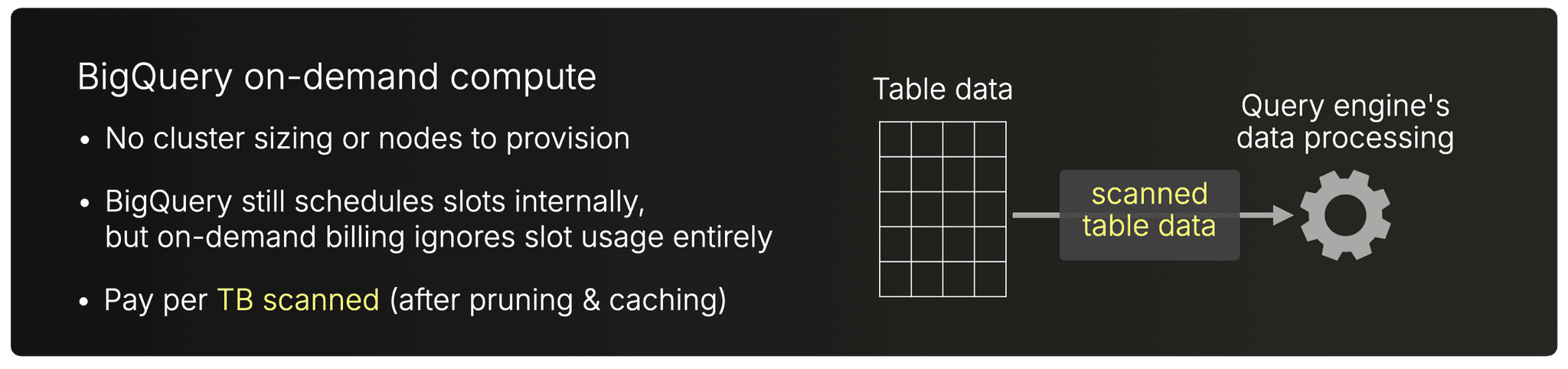
BigQuery also offers an alternative (and actually the default) pricing model: on-demand query pricing.
Instead of paying for slot-hours, you simply pay for the amount of data each query scans, regardless of how many slots the engine used internally.
For US-East (South Carolina):
- First 1 TiB/month per account is free
- After that: $6.25 per TiB scanned
Billing is per-query and purely based on logical bytes scanned (after pruning, filters, clustering, etc.). Slot allocation and scale-out are fully internal and do not affect the bill under on-demand pricing.
Metering granularity
Capacity-based (slots):
(Metering behavior, November 2025 → BigQuery docs: Capacity compute pricing details)
BigQuery bills slot usage per second, with a 1-minute minimum each time slot capacity is consumed.
On-demand (bytes scanned):
(Metering behavior, November 2025 → BigQuery docs: On-demand compute pricing details)
For on-demand queries, there is no time-based metering at all.
BigQuery charges purely per byte scanned, with the first 1 TiB per month free.
Because BigQuery allocates compute dynamically within a shared pool, there is no warehouse/service to idle or suspend. Idle timeout concepts do not apply.
Because compute is always available from the shared pool, there is effectively no startup delay: queries can be executed immediately at any time.
How CostBench computes BigQuery costs
Click to see the pricing logic
BigQuery required more work, because it supports two different billing models (capacity-based slots and on-demand bytes-scanned), and because the engine exposes both billed slot-seconds and billed bytes per query.
To make CostBench work for BigQuery, we extended the benchmark runner and added a dedicated enrichment step:
1. Extending the ClickBench runner to capture BigQuery billing metrics
We added a BigQuery-specific runner (run_bq_bench.sh) that wraps each query execution in the BigQuery CLI and extracts three things:
- Wall-clock runtime
- Billed slot-seconds (jobQueryStatistics.totalSlotMs)
- Billed bytes (jobQueryStatistics.totalBytesProcessed)
This required rerunning the entire ClickBench suite to ensure every query produced the necessary metadata.
2. Mapping BigQuery’s two pricing models
We created a pricing descriptor file, serverless.json, containing:
- Capacity-based compute pricing
(Standard / Enterprise / Enterprise Plus), with per-slot-second rates per region - On-demand compute pricing
- Storage pricing for both logical and physical storage
(active + long-term tiers)
This matches the structure we already used for the other engines.
3. Enriching the benchmark results with costs
A dedicated script (enrich.sh) takes:
- The raw benchmark results (result.json)
- The pricing metadata (serverless.json)
It then computes (and outputs into result_enriched.json):
- Capacity-mode costs
- On-demand costs
- Estimated monthly storage costs
Redshift Serverless takes a similar serverless approach, but with predictive ML-driven scaling.
Redshift Serverless
- RPU-hours (RPU = Redshift Processing Unit)
- Query using 4 RPUs for 60 s → 240 RPU-seconds billed
- Scaling spike to 24 RPUs → billed only for active RPU-seconds
- $0.36 / RPU / hour
Compute model: serverless RPUs
Redshift Serverless, like BigQuery, uses a Serverless Shared Compute model: there are no clusters to size, and queries run on a large pool of pre-provisioned compute managed entirely by AWS. Instead of warehouses or fixed cluster sizes, Redshift allocates compute in Redshift Processing Units (RPUs), bundles of CPU and memory, and automatically adjusts how many RPUs are used based on workload demand (engine paper: Amazon Redshift Re-Architected).
A unique aspect of Redshift Serverless is its ML-based predictive scaling (RAIS): Redshift analyzes query structure, expected scan sizes, concurrency, and historical patterns to pre-allocate compute before heavy queries are run. This allows scaling to happen proactively rather than reactively.
You are billed for RPU-time while compute is active.
The diagram below illustrates how RPUs scale within a workgroup’s configured range:
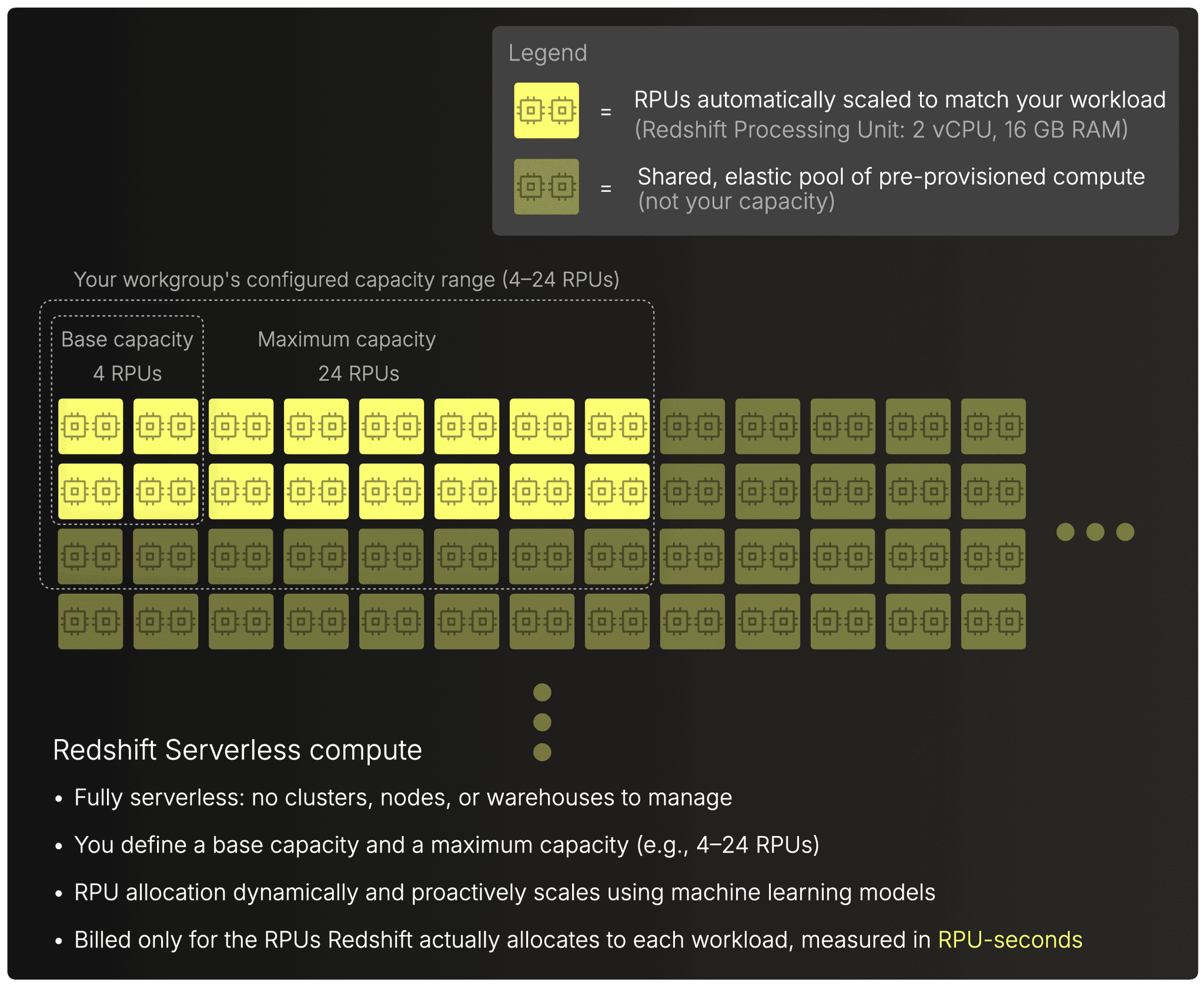 (Each RPU is equivalent to 16 GB memory and 2 vCPU)
Example
Suppose a query arrives and Redshift decides, based on its ML-based predictive model, to run it with 16 RPUs (as sketched in the diagram above).
If the query’s wall-clock runtime is 60 seconds, then the billed compute is simply:
16 RPUs × 60 seconds = 960 RPU-seconds
Scaling: ML-driven predictive allocation
Redshift Serverless automatically scales the compute assigned to your workgroup within a range you configure. The range has two bounds:
- Base capacity — the minimum number of RPUs always available to your workgroup (default 128 RPUs, configurable from 4 to 512 RPUs, or up to 1024 RPUs in select regions).
- Maximum capacity — the upper limit that Redshift is allowed to scale to under load.
Scaling is:
- Automatic (no clusters or nodes to resize)
- Predictive (ML models pre-allocate RPUs when heavy queries are likely)
- Constrained by your configured base and max limits to keep costs predictable
When load drops, Redshift scales down toward the base capacity, releasing unused RPUs. RPUs will drop to zero if you don't run queries in the Redshift serverless environment, and if this remains at zero for an extended period, a cold start will occur (see the Metering granularity section below).
How Redshift’s scaling differs from BigQuery’s
BigQuery scales threads dynamically during execution; Redshift scales the entire compute envelope upfront: Compared with BigQuery’s slot-based model, Redshift Serverless adjusts the entire query’s compute size (RPUs) upfront, whereas BigQuery redistributes many small execution threads (slots) across stages while the query runs.
Once Redshift selects the RPU level, the whole query runs on that fixed amount of compute.
Compute pricing
(Official pricing, November 2025 → https://aws.amazon.com/redshift/pricing/)
For US East (N. Virginia), the on-demand price is $0.375 per RPU-hour.
Metering granularity
(Metering behavior, November 2025 → AWS docs: Amazon Redshift Serverless compute pricing details)
Redshift Serverless bills RPU usage per second, with a 60-second minimum charge.
Redshift automatically manages compute capacity and instantly scales to zero when not in use. There is no manual idle-timeout setting, the service auto-pauses internally until new queries arrive.
Redshift Serverless typically resumes quickly when the warm pool is still active. However, after longer idle periods, AWS may de-allocate resources and a cold start can introduce tens of seconds of delay, even though this behavior is not surfaced explicitly in public documentation.
How CostBench computes Redshift Serverless costs
Click to see the pricing logic
Mapping Redshift Serverless to cost follows the same CostBench pattern as the other engines, with one important twist:
Redshift does not bill for wall-clock runtime. It bills for RPU-time.
That means:
RPU-time = (wall-clock runtime) × (RPUs actively used)
…and the raw ClickBench output only contains wall-clock runtime.
To compute real dollar costs, we extended the ClickBench runner to also fetch billed RPU-seconds for every query using Redshift’s system tables and AWS APIs.
That extension lives in get_metrics.sh
With that in place, the pipeline works like this:
- Re-run ClickBench with the extended runner
This produced a Redshift-specific result file containing both the usual wall-clock runtimes and the RPU-time for every execution: e.g. serverless_100m.json - Load Redshift’s pricing model
CostBench uses a pricing descriptor (serverless.json) that contains RPU rates and storage pricing. - Enrich results with dollar costs
The enrich.sh script joins the benchmark results with the pricing model and emits a fully enriched JSON file containing per-query compute cost (based on RPU-time) and storage cost: e.g. enriched_100m.json
The output has:
- wall-clock time
- billed RPU-time
- compute cost in USD
- storage cost in USD
This now aligns Redshift with the other systems for the final cost-per-query comparison.
And that’s the last system. We’ve now walked through how all five major cloud data warehouses actually meter compute. Let’s wrap up and look at what all this tells us about cloud data warehouse economics.
What this tells us about cloud data warehouse economics
We just walked through how all five major cloud data warehouses really meter compute. And the core lesson is simple:
Raw runtime doesn’t determine cost. Billing models do.
Snowflake, Databricks, and ClickHouse Cloud all use provisioned capacity, but ClickHouse is the outlier in the best way:
-
Snowflake/Databricks: opaque billing units.
-
ClickHouse: hardware-grounded compute units (8 GiB RAM + 2 vCPU).
-
It’s also the only system with unbounded horizontal scale and automatic vertical scale, so a single query can use CPU and RAM across all nodes.
BigQuery and Redshift Serverless take the opposite approach: serverless shared compute. You don’t size anything; you simply pay for what the engine decides your query consumes.
Every system defines “what you pay for” differently, which is why price lists alone tell you nothing.
That’s why we built CostBench, a clean, vendor-neutral way to turn benchmark runtimes into comparable cost-per-query numbers.
This post gave you the mental model.
The companion post answers the question you actually care about:
Which system delivers the best overall cost-performance for analytical queries?
And here’s the teaser:
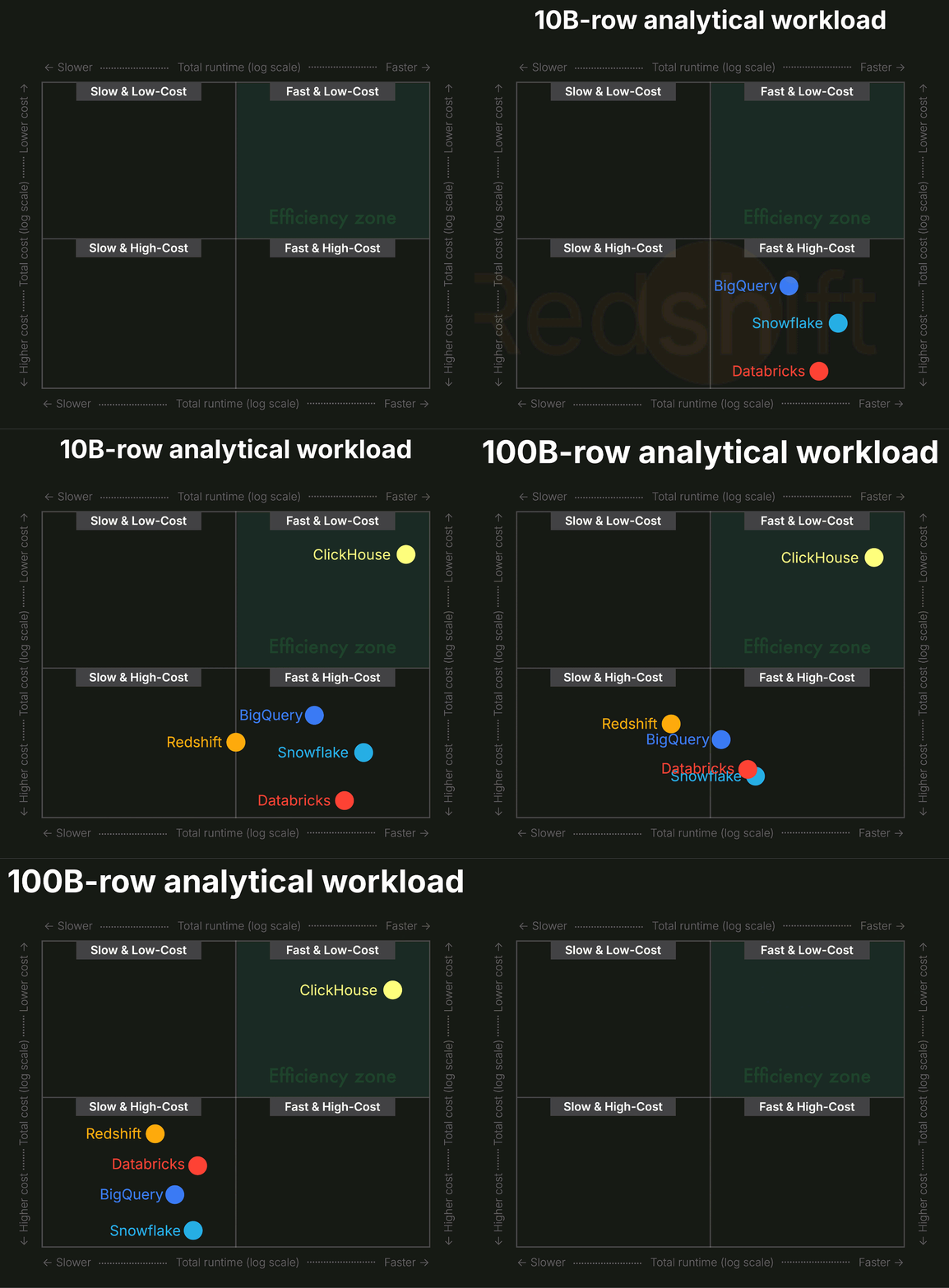
For analytical workloads at scale, ClickHouse Cloud delivers an order-of-magnitude better value than any other system.
Get started with ClickHouse Cloud today and receive $300 in credits. At the end of your 30-day trial, continue with a pay-as-you-go plan, or contact us to learn more about our volume-based discounts. Visit our pricing page for details.