50.3k
50.3k
Last month we released clickhousectl, a CLI for ClickHouse that manages local installations, runs local servers, and operates ClickHouse Cloud.
This is exciting for me as every month my colleague Tom Schreiber and I write the ClickHouse release post and we often compare query performances between versions. Before clickhousectl, we'd either have to use Docker or look through GitHub releases to find old binaries in order to do this.
Now we can just use clickhousectl and in this blog post we'll have a look at how to compare query performances between different versions for improvements made in recent versions.
If you just want to see the query comparisons, you can skip forward to DISTINCT over low cardinality columns or Parquet metadata cache.
Installing clickhousectl
But first things first, we need to get clickhousectl installed on our machine. We can do this using the following command:
curl https://clickhouse.com/cli | shYou should see something like the following output:
Detected platform: aarch64-apple-darwin
Fetching latest release...
Latest release: v0.1.18
Downloading https://github.com/ClickHouse/clickhousectl/releases/download/v0.1.18/clickhousectl-aarch64-apple-darwin...
Installed clickhousectl to /Users/markhneedham/.local/bin/clickhousectl
Created alias: chctl -> clickhousectlWe should now have a clickhousectl and chctl command, and if we run that we'll see the following output (trimmed for brevity):
The official CLI for ClickHouse: local and cloud
Usage: chctl <COMMAND>
Commands:
local Work with local ClickHouse installations
cloud Work with serverless ClickHouse in ClickHouse Cloud
skills Install ClickHouse agent skills into supported coding agents
update Update clickhousectl to the latest version
help Print this message or the help of the given subcommand(s)
Options:
-h, --help Print help
-V, --version Print versionInstalling local servers
We're going to install two ClickHouse versions on my machine - 25.12 and 26.3.
To have operations run locally, we use the local sub command.
We can download a version of ClickHouse by running this command:
chctl local install 26.3I've actually got this version installed already, so I'll see the following output:
Resolving 26.3...
ClickHouse 26.3 is already installed as 26.3.10.16
Use --force to re-download the latest build
Installed version 26.3.10.16If we use the --force flag that the output suggested, it will download the latest build of 26.3:
Resolving 26.3...
Downloading ClickHouse 26.3...
[00:00:16] [###################################] 143.05 MiB/143.05 MiB (0s)
Detecting version...
Installed ClickHouse 26.3.10.30
Installed version 26.3.10.30Starting local servers
Next, let's have a look at how to start local servers. First up, let's start a server running ClickHouse 25.12:
chctl local server start --version 25.12 --name oldWe haven't actually installed this version yet, but that's ok - the CLI will automatically download it for us:
Resolving 25.12...
Downloading ClickHouse 25.12...
[00:00:13] [#####################################] 111.51 MiB/111.51 MiB (0s)
Detecting version...
Installed ClickHouse 25.12.10.7
Server 'old' started in background (PID: 58145)
HTTP port: 8123
TCP port: 9000
Version: 25.12.10.7This server uses the default HTTP and TCP ports.
We can start a server running ClickHouse 26.3 as well:
chctl local server start --version 26.3 --name newResolving 26.3...
Note: 1 server already running (use `clickhousectl local server list` to see them)
Note: default ports in use, auto-assigned HTTP:8124 TCP:9001
Server 'new' started in background (PID: 58406)
HTTP port: 8124
TCP port: 9001
Version: 26.3.10.30This time it recognizes that there's already a server running and therefore uses different ports.
We can run the following command to check which servers are running:
chctl local server list╭──────┬─────────┬───────┬────────────┬───────────┬──────────╮
│ Name │ Status │ PID │ Version │ HTTP Port │ TCP Port │
├──────┼─────────┼───────┼────────────┼───────────┼──────────┤
│ new │ running │ 58406 │ 26.3.10.30 │ 8124 │ 9001 │
│ old │ running │ 58145 │ 25.12.10.7 │ 8123 │ 9000 │
╰──────┴─────────┴───────┴────────────┴───────────┴──────────╯This shows the servers running for a given project, which means if we run the command from a different directory, we'll see the following output:
No serversWe can use the --global flag to show all servers running across our machine:
chctl local server list --global╭──────┬─────────┬───────┬────────────┬───────────┬──────────┬──────────────╮
│ Name │ Status │ PID │ Version │ HTTP Port │ TCP Port │ Project │
├──────┼─────────┼───────┼────────────┼───────────┼──────────┼──────────────┤
│ old │ running │ 58145 │ 25.12.10.7 │ 8123 │ 9000 │ .../ch-test │
│ new │ running │ 58406 │ 26.3.10.30 │ 8124 │ 9001 │ .../ch-test │
╰──────┴─────────┴───────┴────────────┴───────────┴──────────┴──────────────╯Loading data into ClickHouse
Now that we've got our servers running, it's time to load some data. We'll first connect to the 25.12 server:
chctl local client --name old -mnAnd then run the following query to create the UK price paid table:
CREATE OR REPLACE TABLE uk_price_paid
(
price UInt32,
date Date,
postcode1 LowCardinality(String),
postcode2 LowCardinality(String),
type Enum8('terraced' = 1, 'semi-detached' = 2, 'detached' = 3,
'flat' = 4, 'other' = 0),
is_new UInt8,
duration Enum8('freehold' = 1, 'leasehold' = 2, 'unknown' = 0),
addr1 String,
addr2 String,
street LowCardinality(String),
locality LowCardinality(String),
town LowCardinality(String),
district LowCardinality(String),
county LowCardinality(String)
)
ENGINE = MergeTree
ORDER BY (date, postcode1, postcode2, addr1, addr2)
SETTINGS add_minmax_index_for_numeric_columns=1,
add_minmax_index_for_string_columns;For simplicity's sake, I've got this data in Parquet format and I'm serving it locally via a HTTP server. We can import it like this:
INSERT INTO uk_price_paid
SELECT * FROM url('http://127.0.0.1:8000/uk_all.parquet');30452463 rows in set. Elapsed: 8.990 sec. Processed 30.45 million rows, 170.44 MB (3.39 million rows/s., 18.96 MB/s.)
Peak memory usage: 2.00 GiB.30 million rows imported! Now we need to get the same data into the 26.3 server.
One of the handy things about clickhousectl is that you can copy a table schema from one local server to another entirely from the CLI, without touching any files. First, fetch the create table statement from the old server:
chctl local client --name old \
--query "SHOW CREATE TABLE uk_price_paid" \
--output-format LineAsStringCREATE TABLE default.uk_price_paid
(
`price` UInt32,
`date` Date,
`postcode1` LowCardinality(String),
`postcode2` LowCardinality(String),
`type` Enum8('other' = 0, 'terraced' = 1, 'semi-detached' = 2, 'detached' = 3, 'flat' = 4),
`is_new` UInt8,
`duration` Enum8('unknown' = 0, 'freehold' = 1, 'leasehold' = 2),
`addr1` String,
`addr2` String,
`street` LowCardinality(String),
`locality` LowCardinality(String),
`town` LowCardinality(String),
`district` LowCardinality(String),
`county` LowCardinality(String)
)
ENGINE = MergeTree
ORDER BY (date, postcode1, postcode2, addr1, addr2)
SETTINGS index_granularity = 8192By default, SHOW CREATE TABLE returns its output wrapped in a table with a header and borders. LineAsString treats each row of the result as a plain string and prints it as-is, with no decorators — just the raw SQL. We can then pipe that straight into the 26.3 server in one command:
chctl local client --name old \
--query "SHOW CREATE TABLE uk_price_paid" \
--output-format LineAsString |
chctl local client --name newThe table now exists on the new server. To copy the data across, we connect to the 26.3 server and use the remote table function to read directly from the 25.12 server:
chctl local client --name new -mnINSERT INTO uk_price_paid
SELECT *
FROM remote('localhost:9000', 'default', 'uk_price_paid');30452463 rows in set. Elapsed: 15.169 sec. Processed 30.45 million rows, 1.33 GB (2.01 million rows/s., 87.96 MB/s.)
Peak memory usage: 339.23 MiB.This is a useful pattern any time you want to copy data from one local server to another.
DISTINCT over low cardinality columns (added in 26.1)
Now it's time to test a performance improvement made to DISTINCT over low cardinality columns in ClickHouse 26.1. Below is a slide from Alexey's 26.1 release call slide deck:
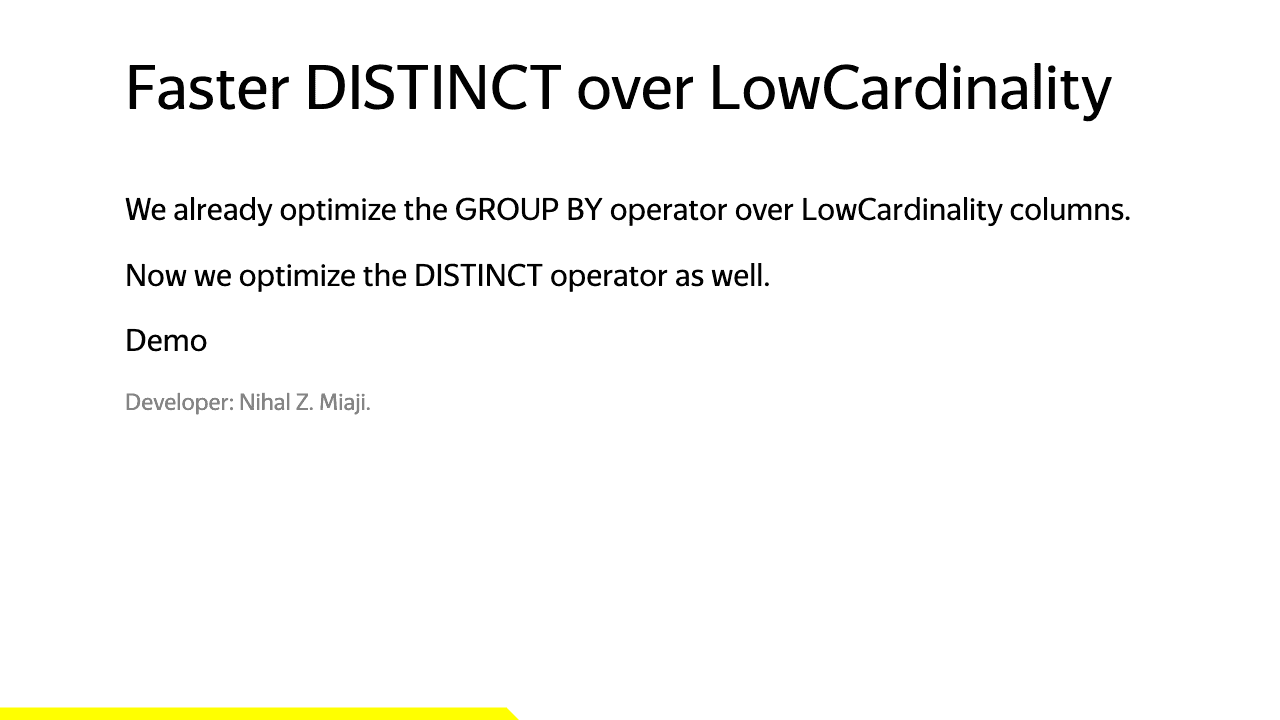
We'll first run the query 5 times against 25.12:
for i in {1..5}; do
chctl local client \
--name old \
--query 'SELECT distinct(county) FROM uk_price_paid' \
--time \
-- --output-format Null;
done0.076
0.082
0.075
0.074
0.073The --time flag outputs times in seconds, so the best time here is 0.076 seconds (76ms).
Now let's do the same against 26.3:
for i in {1..5}; do
chctl local client \
--name new \
--query 'SELECT distinct(county) FROM uk_price_paid' \
--time \
-- --output-format Null;
done0.015
0.016
0.014
0.017
0.014The best time here is 0.014 seconds (14ms), which is a little more than 5 times faster than on ClickHouse 25.12. Success!
Parquet metadata cache (added in 26.3)
In the 26.3 release last month, we introduced a metadata cache that stores Parquet file footer metadata (structure, row group layout, column statistics), keyed by ETag for consistency.
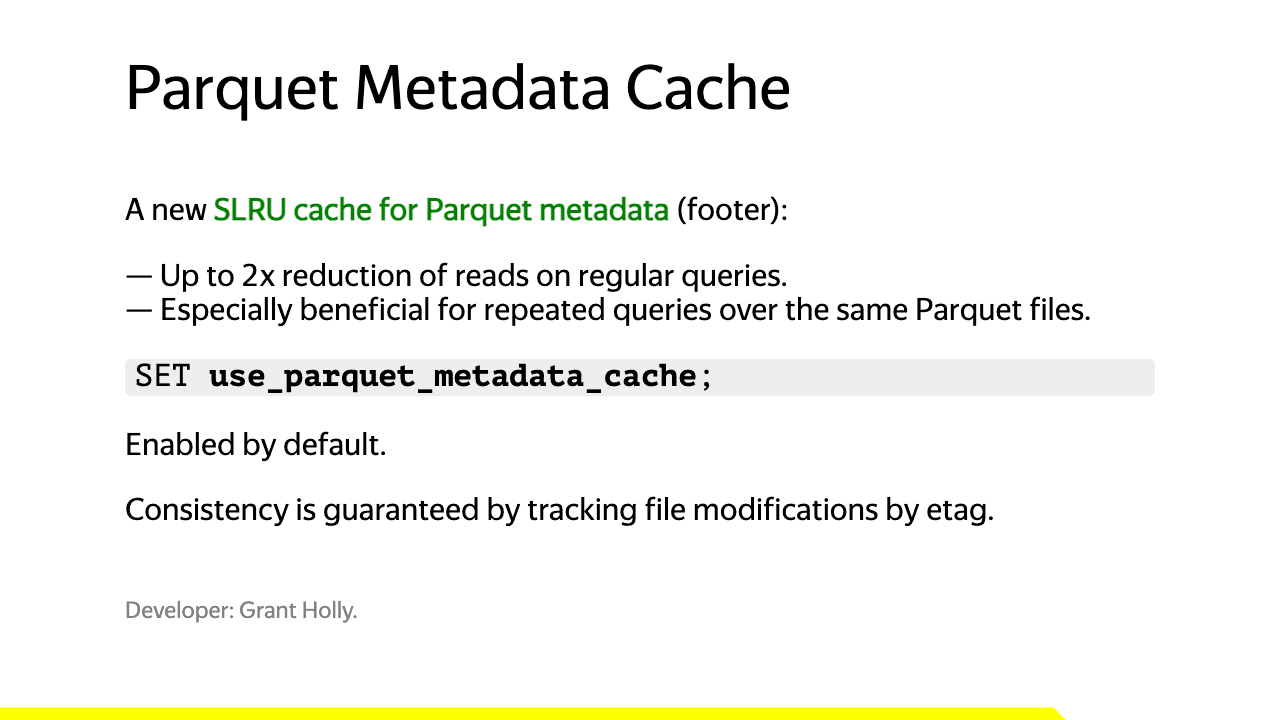
This will be especially useful when running repeat queries on Parquet files in S3.
I asked Claude Code to recommend a dataset containing Parquet files and it suggested the AWS public blockchain dataset.
The following query, which we'll save to parquet.sql, returns the number of rows and average gas price for block numbers between 19500000 and 19501000.
SELECT count(), avg(gas_price)
FROM s3(
's3://aws-public-blockchain/v1.0/eth/transactions/date=2024-*/*.parquet',
NOSIGN,
Parquet
)
WHERE block_number BETWEEN 19500000 AND 19501000
SETTINGS use_query_condition_cache=0;We'll first run the query five times against 25.12 by passing the file name in using the --queries-file flag:
for i in {1..5}; do
chctl local client --name old --queries-file parquet.sql --time;
done┌─count()─┬────avg(gas_price)─┐
1. │ 168399 │ 20033038997.74929 │
└─────────┴───────────────────┘
11.480
┌─count()─┬────avg(gas_price)─┐
1. │ 168399 │ 20033038997.74929 │
└─────────┴───────────────────┘
9.473
┌─count()─┬────avg(gas_price)─┐
1. │ 168399 │ 20033038997.74929 │
└─────────┴───────────────────┘
9.102
┌─count()─┬────avg(gas_price)─┐
1. │ 168399 │ 20033038997.74929 │
└─────────┴───────────────────┘
9.604
┌─count()─┬────avg(gas_price)─┐
1. │ 168399 │ 20033038997.74929 │
└─────────┴───────────────────┘
8.957And now the same query against 26.3:
for i in {1..5}; do
chctl local client --name new --queries-file parquet.sql --time;
done┌─count()─┬────avg(gas_price)─┐
1. │ 168399 │ 20033038997.74929 │
└─────────┴───────────────────┘
12.463
┌─count()─┬────avg(gas_price)─┐
1. │ 168399 │ 20033038997.74929 │
└─────────┴───────────────────┘
2.224
┌─count()─┬────avg(gas_price)─┐
1. │ 168399 │ 20033038997.74929 │
└─────────┴───────────────────┘
1.696
┌─count()─┬────avg(gas_price)─┐
1. │ 168399 │ 20033038997.74929 │
└─────────┴───────────────────┘
1.639
┌─count()─┬────avg(gas_price)─┐
1. │ 168399 │ 20033038997.74929 │
└─────────┴───────────────────┘
1.687The initial run takes around 11-12 seconds on both versions. Subsequent runs take around 8-9 seconds on ClickHouse 25.12, which is possibly due to file system caching.
With 26.3, we see a huge reduction in the query time of subsequent runs down to around 1-2 seconds, which is around 5 times faster than it was on the first run.
Inspecting the Parquet metadata cache
There are a couple of system tables that we can query to learn more about the Parquet metadata cache.
First up, there are some settings that we can query via system.server_settings:
SELECT name, value
FROM system.server_settings
WHERE name ILIKE '%parquet_metadata_cache%';┌─name───────────────────────────────┬─value─────┐
1. │ parquet_metadata_cache_policy │ SLRU │
2. │ parquet_metadata_cache_size │ 536870912 │
3. │ parquet_metadata_cache_max_entries │ 5000 │
4. │ parquet_metadata_cache_size_ratio │ 0.5 │
└────────────────────────────────────┴───────────┘The cache size is 512MB or 5,000 entries, whichever value's reached first!
We can also query system.metrics to see how much data we've populated in the cache:
SELECT name, value
FROM system.metrics
WHERE name ILIKE '%parquet%metadata%';┌─name──────────────────────┬────value─┐
1. │ ParquetMetadataCacheBytes │ 46067740 │
2. │ ParquetMetadataCacheFiles │ 366 │
└───────────────────────────┴──────────┘We have the metadata cached for 366 files and it's taking up 46MB of space.
Conclusion
In this post we've seen how clickhousectl makes it easy to spin up multiple ClickHouse versions side by side and compare query performance between them.
We demonstrated two improvements that shipped in recent releases:
- A 5x speedup for DISTINCT queries over low cardinality columns (introduced in 26.1)
- A Parquet metadata cache (introduced in 26.3) that reduces repeat S3 query times from ~9 seconds down to ~1-2 seconds.
If you want to try this yourself, install clickhousectl with:
curl https://clickhouse.com/cli | shAnd check the clickhousectl documentation for more on what you can do with it.
Get started today
Interested in seeing how ClickHouse works on your data? Get started with ClickHouse Cloud in minutes and receive $300 in free credits.
Sign up