50.9k

If you've been around the ClickHouse community for a while, you know that we ship fast. But all that speed comes with a side effect. It can be easy to miss things. And often the newest stuff is the easiest to miss. Historically, our preview Cloud features have lived behind a velvet rope, and to get in, you had to know a guy. Maybe your account team mentioned it on a call. Maybe you said the magic words in a support ticket. Whatever it may be, it caused unnecessary friction. And as a product manager, user feedback is priceless, so the more we can get, the better.
We also know that you, as a ClickHouse user, want to be the most innovative AND want access to all the toys. So today, we are democratizing access.
We're rolling out Self-Service Previews in ClickHouse Cloud: one page in the console where everyone can see what's in preview. This will be your place to see what previews are available and ready for either self-service enablement or need a waitlist signup. No guy required.
Previews
Longtime ClickHouse users know that we have these magical settings that start with allow_experimental_* that give you access to new features that are usable but might need some more finesse.
Previews are the same idea for ClickHouse Cloud: features that are built and ready for feedback but not quite ready to be enabled by default.
On the Previews page, every preview comes in one of two flavors:
- Self-Enablement: These features can be enabled by you. Read the docs, toggle on the new feature and provide us feedback all in the same page.
- Self-signups: These are features may need additional support. Sign up for the waitlist via the pop-up form and we will contact you to give you access.
We still recommend you exercise caution and be mindful of the environment you might be enabling this for (Production vs Development). Previews are not covered by the default SLAs due to the experimental factor. Once a preview graduates to the next product stage, it leaves the page and simply becomes part of ClickHouse.
How to access it
Head to Organization Settings → Previews. Every preview you're eligible for will be displayed.
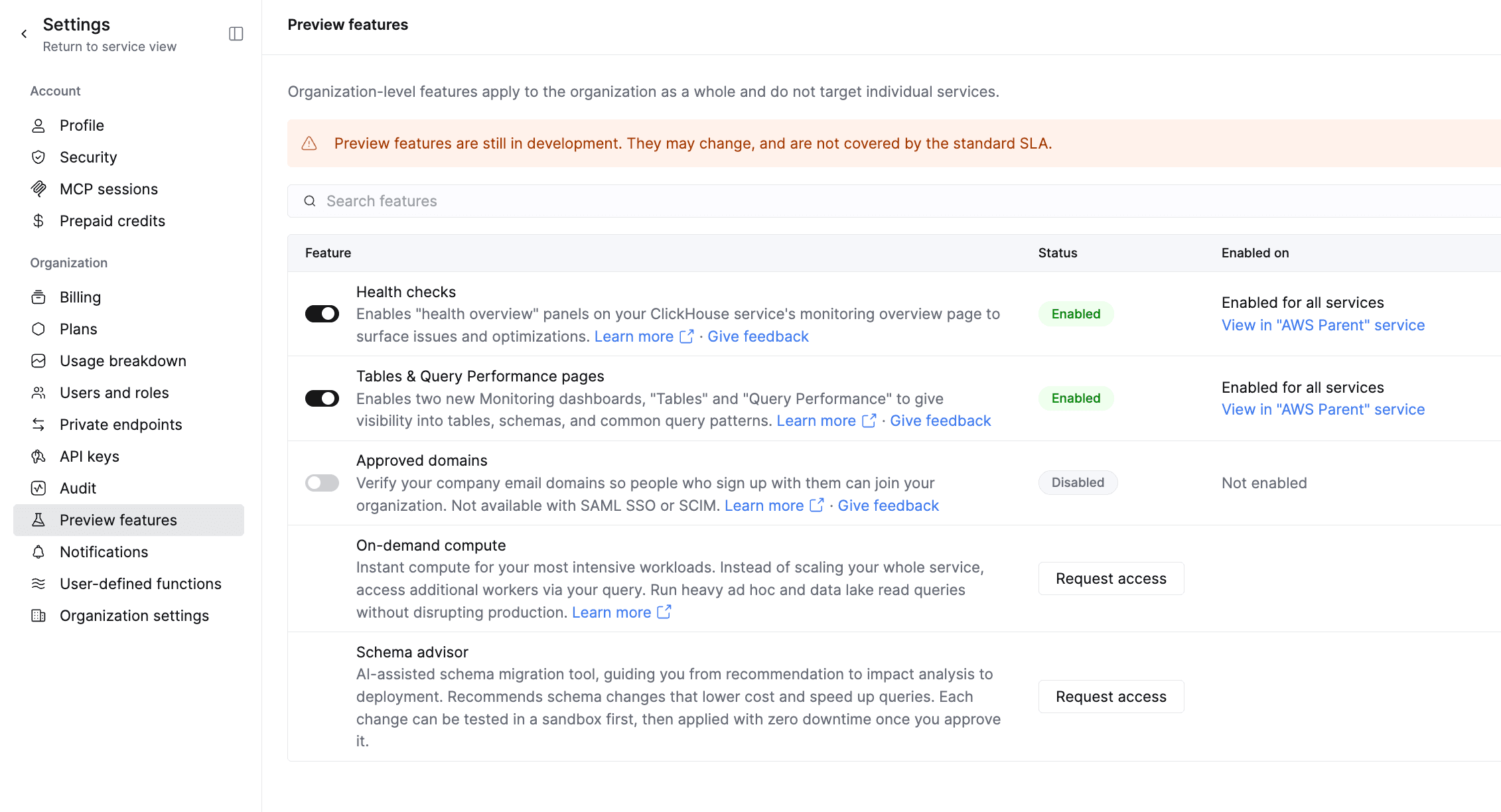
That's it. That's the page. It’s boring in the best way.
A few details for the admins in the room:
- Org-wide previews can only be toggled by Org Admins. Everyone else can see them (discovery!), but the toggle is grayed out with a friendly nudge to go talk to their admin.
- Every change lands in your audit log. When someone enables or disables a preview, you'll know who and when.
- What you see depends on what you qualify for. Some previews are only available in certain regions or plans. If something isn't available to you yet, it simply won't show up.
So what can I use today?
This initial rollout contains organizational level features.
Ready to toggle:
- Health Checks: Enables "health overview" panels on your ClickHouse service's monitoring overview page to surface issues and optimizations. Learn more
- Table Views: Enables two new Monitoring dashboards, "Tables" and "Query Performance" to give visibility into tables, schemas, and common query patterns
- Approved Domains: Verify your company email domains so people who sign up with them can join your organization. Not available with SAML SSO or SCIM.
Open for waitlist signups:
- On-Demand Compute: Instant compute for your most intensive workloads. Instead of scaling your whole service, access additional workers via your query. Run heavy ad hoc and data lake read queries without disrupting production
- Schema Advisor: AI-assisted schema migration tool, guiding you from recommendation to impact analysis to deployment. Recommends schema changes that lower cost and speed up queries. Each change can be tested in a sandbox first, then applied with zero downtime once you approve it.
More previews will show up over time, including user level feature flags. Consider this your new favorite page to refresh. 🙂
For the automation crowd
If clicking things in a UI isn't your vibe, the same controls are available through the ClickHouse Cloud OpenAPI:
# What previews can I see?
GET /v1/organizations/{organizationId}/previews
# Turn one on (or off)
PATCH /v1/organizations/{organizationId}/previews/{previewId}
{ "enabled": boolean } # Request bodyDon’t worry, we didn’t forget about the robots. Agent support is also coming soon.
Tell us what you think (we mean it!)
The whole point of a preview is to learn from you before we call something done. Every public preview has a feedback button: a thumbs-up or thumbs-down, an optional comment, and a checkbox indicating whether you're open to us following up.
Your feedback lands in a ClickHouse table. And don’t worry - we are watching it to make sure we capture all of your thoughts. Closely. Possibly too closely. 💀
Now go flip some toggles
Self-Service Previews started rolling out on November 3. Once it reaches your org, head to Organization Settings → Previews, see what's available, turn on whatever looks interesting, and request access for what’s next. Let us know what you think!
Get started today
Interested in seeing how ClickHouse works on your data? Get started with ClickHouse Cloud in minutes and receive $300 in free credits.
Sign up