50.5k
50.5k
We recently launched a managed service that brings PostgreSQL and ClickHouse together as a single, unified data stack. The goal is simple: let teams run transactional and analytical workloads side by side without stitching together multiple systems or maintaining complex pipelines. This launch reflects a pattern we have seen repeatedly in production. PostgreSQL remains the system of record, while ClickHouse handles analytics at scale.
Start with PostgreSQL, scale with ClickHouse.
In this post, we step back from the managed service and focus on its open source foundations. We show how to build the same unified data stack using open source components, how the integration works in practice, and how to offload analytics to ClickHouse without rewriting applications or rebuilding pipelines.
Introducing an open source data stack
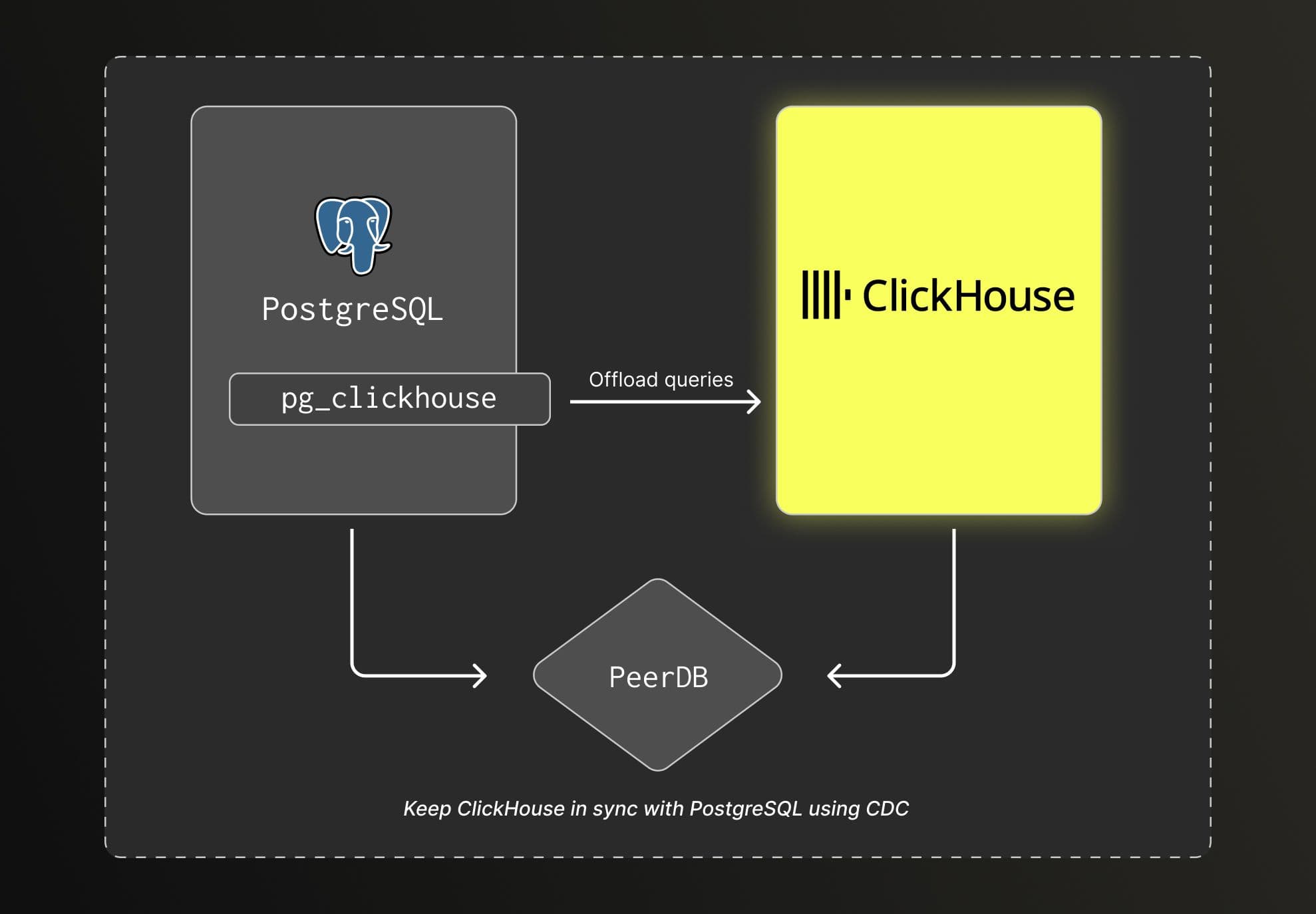
The Open Source unified data stack, available on Github, is simple and built on top of four open source components:
-
Postgres is the primary database of the data stack acting as the system of records and handling all transactional workload.
-
ClickHouse is a purpose-built open source analytical database of the data stack. As data volume grows, this is the preferred database to handle analytical workload.
-
PeerDB is an open source tool to stream data from PostgreSQL to Data warehouse, including ClickHouse. It uses change data capture (CDC) to replicate inserts, updates, and deletes into ClickHouse in near real-time.
-
pg_clickhouse is an open source postgres extension that runs analytics queries on ClickHouse directly from PostgreSQL without rewriting any SQL.
These four components come together to form the open source unified data stack. Below is a high-level overview of the stack.
Implementing the stack
Running PostgreSQL and ClickHouse side by side is a well established pattern. Many teams use this architecture in production, and GitLab described it publicly as early as 2022. Depending on the workload, the implementation falls into two main patterns, Change data capture or split-writes.
Change data capture (CDC)
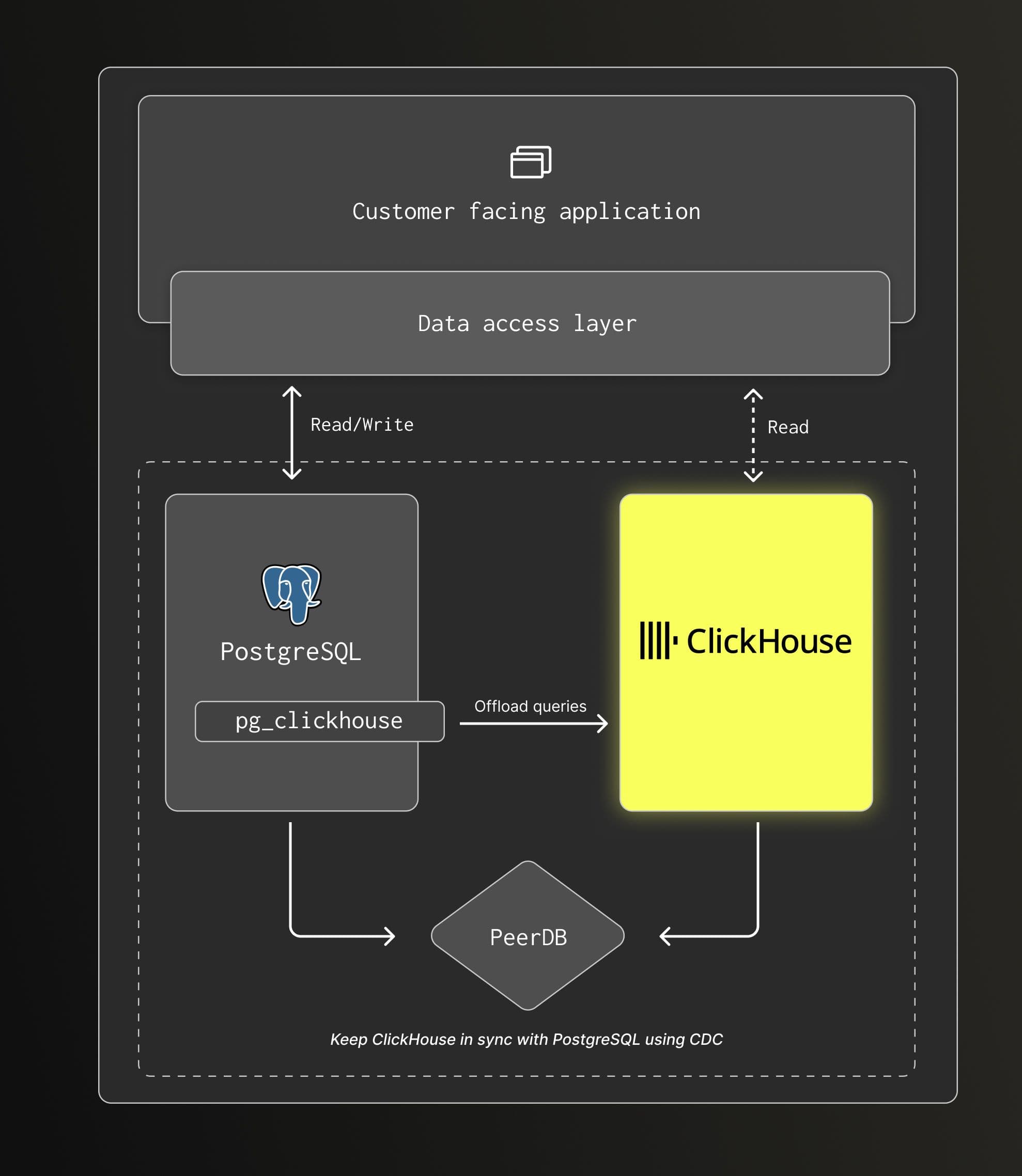
Components: Postgres, ClickHouse, PeerDB and pg_clickhouse (optional).
This approach is well suited for operational, real-time analytical workloads where analytics run directly on application data. Common use cases include retail platforms, financial systems, and CSM or CRM applications.
PostgreSQL remains the system of record. All writes go to PostgreSQL, while PeerDB streams inserts, updates, and deletes into ClickHouse using CDC. ClickHouse maintains a near real-time copy of the data, allowing analytical queries to run on the latest state without adding additional load to the transactional database.
Applications can continue to send both transactional and analytical queries to PostgreSQL thanks to pg_clickhouse which transparently offloads analytical queries to ClickHouse. This keeps application changes minimal. Alternatively, applications can query ClickHouse directly if needed.
Customer examples: Seemplicity, Sewer AI
Split-writes
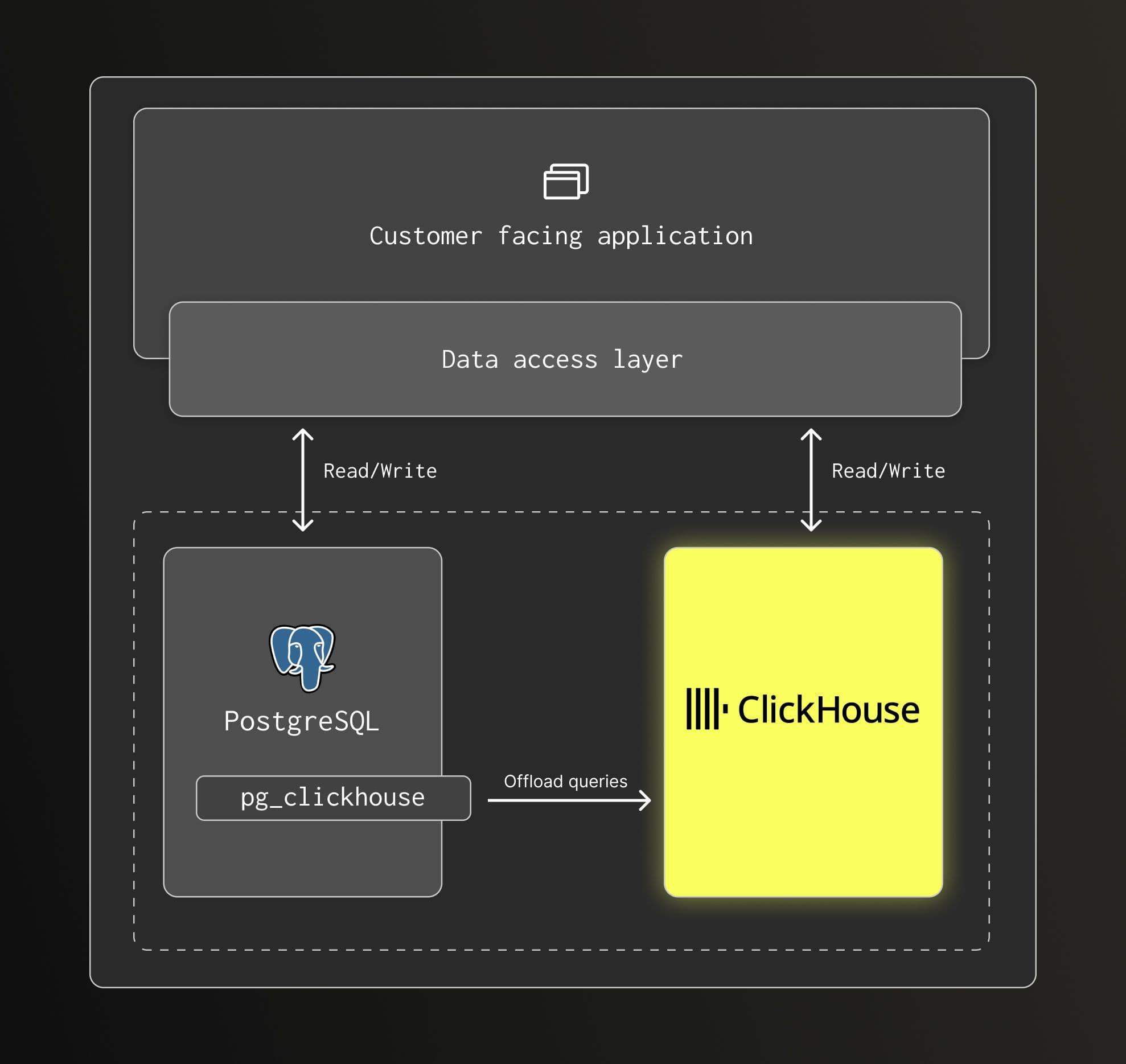
Components: PostgreSQL, ClickHouse, and pg_clickhouse (optional).
This pattern is commonly used for observability or event-based workloads, where analytical data consists of logs, metrics, or events. These datasets do not require transaction support and are written at high volume.
In this case, analytical data can be written directly to ClickHouse, or routed through PostgreSQL using pg_clickhouse when minimal application change is preferred. PostgreSQL is not the system of record for this data and does not need to store the full analytical dataset.
Querying follows the same model as the CDC approach. Analytical queries run on ClickHouse, either transparently offloaded from PostgreSQL via pg_clickhouse or issued directly to ClickHouse.
Customer examples: Langfuse, Langchain
Get started locally
Whether you're implementing a new application or extending an existing PostgreSQL application, getting started locally is straightforward. The Getting started guide explains how to run the stack locally. Once you have it running locally, you can simply connect your application to the exposed PostgreSQL database instance.
At that point, it is no different than running it with your own PostgreSQL instance. You might stop here while your application is running just fine on PostgreSQL only. Then once you need to improve the analytical workload performance, it is very simple to do:
- Create a database in ClickHouse for replicated tables.
- Replicate data from PostgreSQL using PeerDB.
- Configure the pg_clickhouse extension.
- Direct queries to the pg_clickhouse tables via your PostgreSQL connection string.
The application still relies on PostgreSQL as the primary database, making the required changes to the application code very minimal, just a new connection option. Note that you can also connect your application directly to ClickHouse if that works better for you.
The project provides an end to end example with a sample application that initially runs the entire workload in PostgreSQL. A script migrates the analytical workload in just a few steps.
When to start with the stack
Starting with this setup makes sense when:
- PostgreSQL is your primary database
- Analytical queries are part of the product, not just offline reporting
- You expect data volume or query complexity to grow
As growth timelines shrink, waiting to "outgrow" PostgreSQL often means reacting under pressure. Starting with PostgreSQL and ClickHouse together avoids a disruptive transition. But even if you adopt the stack later, PostgreSQL remains the main interface, keeping changes contained.
From open source to production-ready
The open source data stack provides a strong foundation, but many production environments require managed services with clear operational boundaries and predictable behavior. Running and upgrading databases, operating replication pipelines, and handling failures often become the limiting factors rather than the architecture itself.
We recently launched a managed version of the unified data stack that delivers the same architecture as a single, integrated experience under one ClickHouse Cloud account.
Deployment, scaling, upgrades, and reliability are handled by the platform, removing the need to operate clusters or data pipelines manually. PostgreSQL by ClickHouse connects directly to ClickHouse through ClickPipes, the managed alternative to PeerDB. Managed PostgreSQL also comes with the pg_clickhouse extension preinstalled and configured, allowing analytical queries to be offloaded to ClickHouse without rewriting applications.
Get started with our native Postgres Service
To try ClickHouse's native Postgres service, sign up for Private Preview using this link.
Sign upA new baseline
PostgreSQL and ClickHouse are not competing databases. They are complementary systems designed for different workloads.
With mature CDC and query offload tooling, using both from the start no longer requires complex pipelines or duplicated application logic. PostgreSQL remains the system of record for transactions, while ClickHouse handles analytical queries efficiently as data volume and query complexity grow.
The default open data stack is no longer a single database. It is PostgreSQL for transactions, ClickHouse for analytics, and a clean, well-defined bridge between the two.