50.5k
50.5k
We're happy to announce a new Postgres extension: chdb. This extension expands Postgres import and export features via the chDB library, an in-process ClickHouse engine, providing efficient, flexible conversion to and from a wide array of data formats living on your favorite cloud storage systems.
Benchmark
And boy howdy do we mean efficient! We compared chdb's performance importing the NYC Taxi dataset (1m rows, wide table) in a number of data formats to three other Postgres extensions, all reading from a regionally-colocated AWS S3 bucket. To the chart!
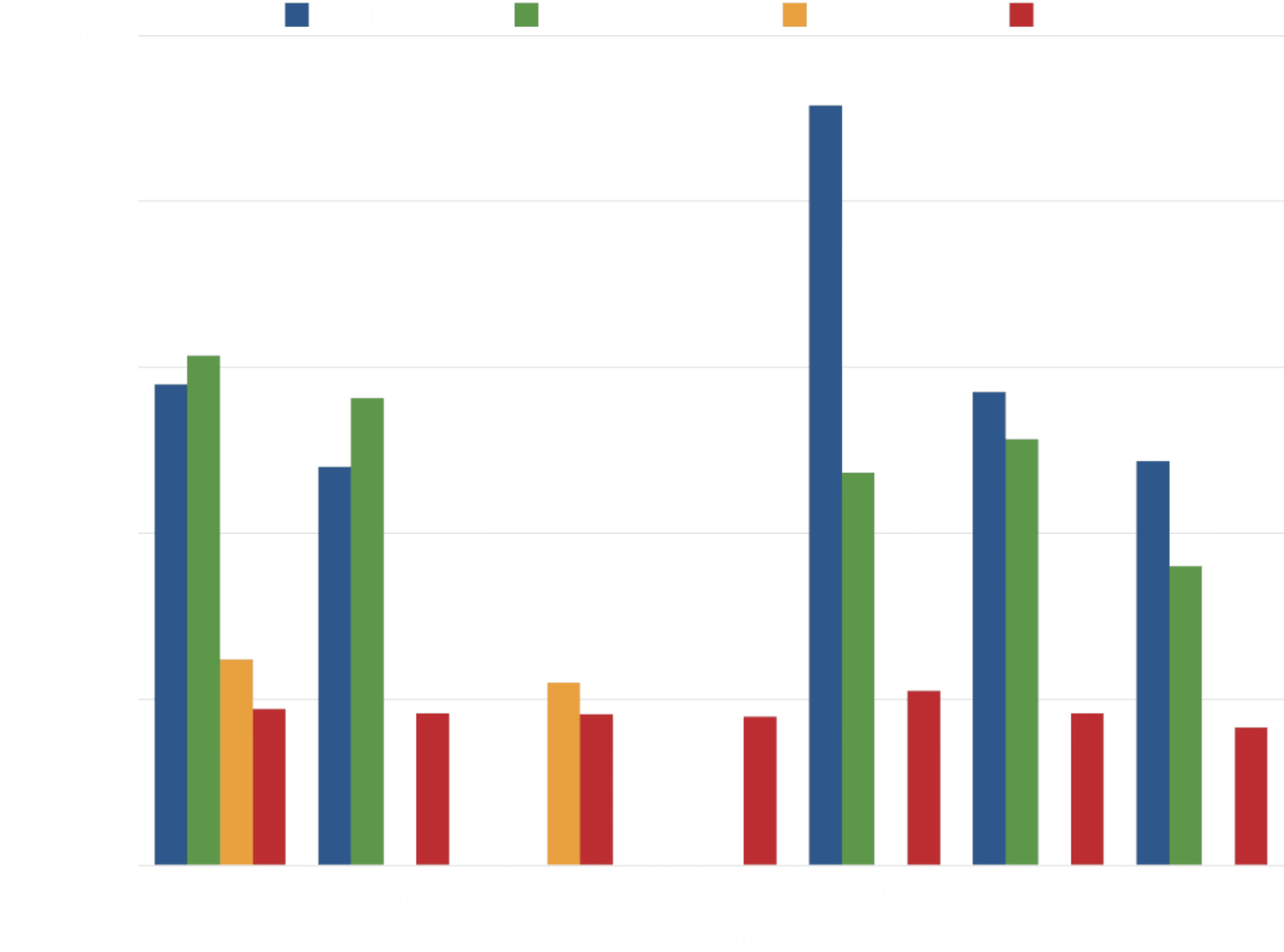
In order to minimize differences and to optimize for measurement of extension performance rather than infrastructure, the chdb, pg_lake, and pg_duckdb benchmarks ran on
r8id.xlargeClickHouse Managed Postgres services with 4 vCPUs and 32 GB RAM; the aws_s3 benchmark ran on adb.r8g.xlargeAWS RDS host, also with 4 vCPUs and 32 GB RAM. Results average three runs for each import. See the benchmark source code for details.
Of the four extensions, chdb exhibits the most consistent performance. pg_duckdb and pg_lake, both backed by DuckDB, take around 2-3x as long to import data from CSV, JSON, and Parquet. Only aws_s3 approaches chdb's performance, but it supports a much more limited array of data formats.
Data formats
Did we mention data formats? The chdb extension can read and write a slew of data formats --- all those that ClickHouse itself supports. This table summarizes the supported data formats and compression algorithms of the extensions we compared; note that this chdb list of formats is but a subset of the formats it supports:
| Extension | Compression | Data Formats |
|---|---|---|
| aws_s3 | none | Text (TSV), CSV, Postgres Binary |
| pg_lake | gzip, zstd, snappy (Parquet only) | CSV, JSON, Parquet |
| pg_duckdb | gzip, zstd, snappy (Parquet only) | CSV, JSON, Parquet |
| chdb | gzip, zstd, lz4, bz2, snappy, brotli | TSV, CSV, JSON, BSON, Prometheus, Protobuf, Avro, Parquet, Arrow, XML, CapnProto, Markdown, MsgPack, ORC, and more! |
As ClickHouse and the chDB library add more, the chdb extension will get them for free!
We benchmarked chdb performance loading the NYC Taxi dataset for a number of these formats, where it demonstrated quite consistent performance:
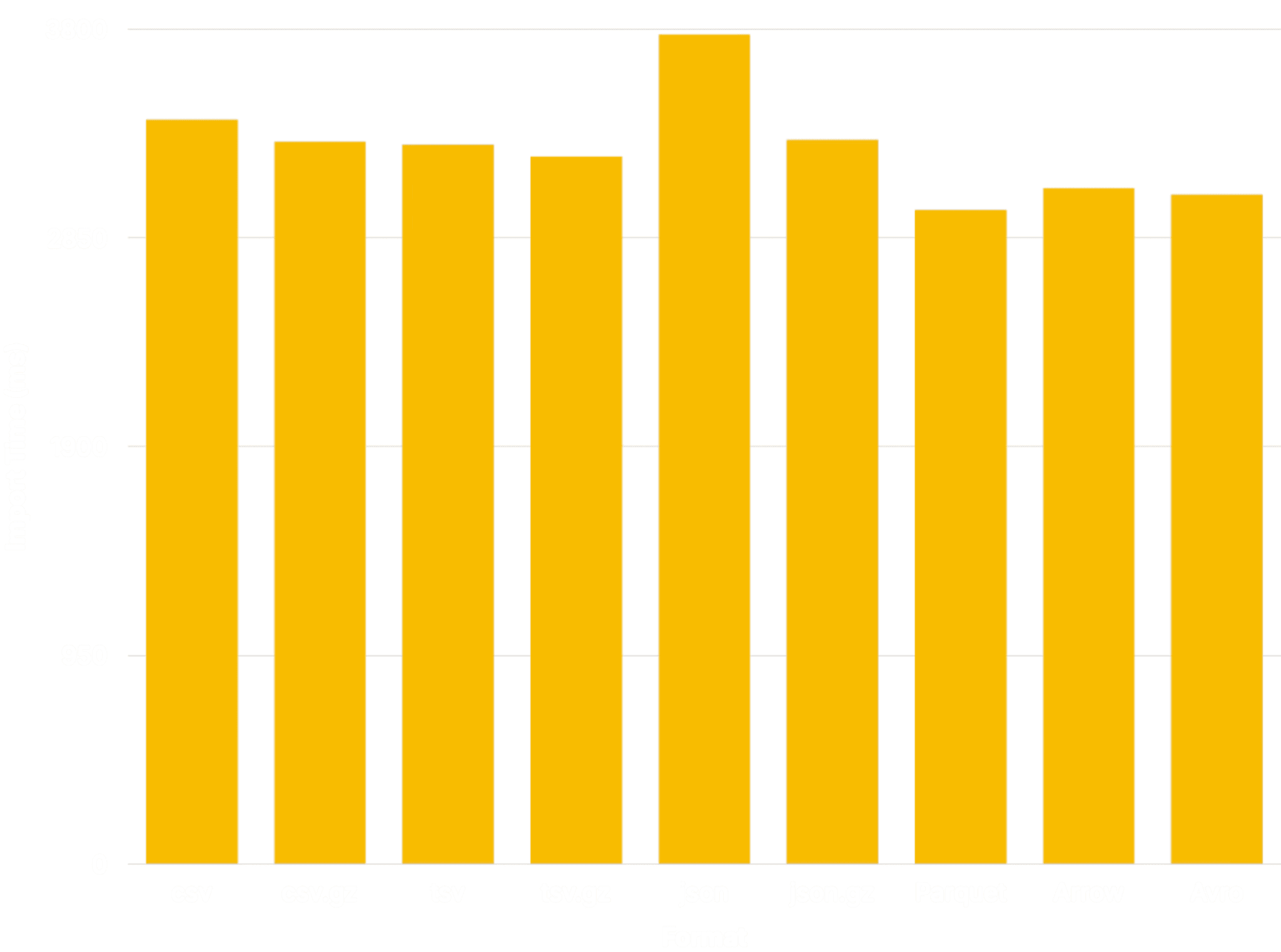
We used the JSONCompact format for compatibility with the other extensions. Other JSON formats, such as JSONCompactEachRow, will more closely approximate the performance of the other formats.
Usage
The chdb package ships with two extensions: a CREATE EXTENSION extension named chdb and a hook module named chdb_hook.
chdb extension
The chdb extension (docs) provides the chdb_query() function,
which executes a single chDB query. For example, this query:
SELECT * FROM chdb_query($$
SELECT * FROM s3('s3://datasets-documentation/my-test-bucket-768/some_prefix/some_file_1.csv');
$$) AS (id int, months int, days int);Outputs:
id | months | days
----+--------+------
1 | 2 | 3
3 | 2 | 1
4 | 5 | 6
(3 rows)chdb_hook module
The chdb_hook module (docs) hooks into the COPY command to
copy data to or from an AWS S3, Google Cloud Storage, Azure Blob Storage, file, or http URL. This example loads records from a CSV file on S3:
CREATE TABLE times (
id INT NOT NULL,
months INT NOT NULL,
days INT NOT NULL
);
LOAD 'chdb_hook';
COPY times FROM 's3://datasets-documentation/my-test-bucket-768/some_prefix/some_file_1.csv';After which the times table contains the records from the file:
# SELECT * FROM times;
id | months | days
----+--------+------
1 | 2 | 3
3 | 2 | 1
4 | 5 | 6
(3 rows)A CREATE TABLE command may also derive its columns, and load its rows, from such a URL. Try this one (all the URLs in this piece point to legit data files):
CREATE TABLE reviews () WITH (
copy_from = 's3://datasets-documentation/amazon_reviews/amazon_reviews_2015.snappy.parquet'
);The resulting, fully-loaded table has this structure:
| Column | Type |
|---|---|
| review_date | integer |
| marketplace | text |
| customer_id | numeric(20,0) |
| review_id | text |
| product_id | text |
| product_parent | numeric(20,0) |
| product_title | text |
| product_category | text |
| star_rating | smallint |
| helpful_votes | bigint |
| total_votes | bigint |
| vine | boolean |
| verified_purchase | boolean |
| review_headline | text |
| review_body | text |
Data types
Like pg_clickhouse, chdb relies on the pg-clickhouse-c headers-only
library to convert values from ClickHouse to Postgres, including its type mapping, as in the CREATE TABLE example above. The current release maps
nearly all of the ClickHouse types to Postgres types and vice versa. These
mappings work most of the time; when they don't, use the structure option to
tell chdb what type to use.
For example, pg-clickhouse-c maps a Postgres JSON value to ClickHouse String, because ClickHouse JSON currently recognizes only JSON objects, while Postgres JSON supports objects, arrays, and JSON scalar values. But perhaps you're confident your JSON columns contain only objects, thanks to a check constraint:
CREATE TABLE projects (
name TEXT PRIMARY KEY,
meta JSON NOT NULL CHECK (json_typeof(meta) = 'object')
);
INSERT INTO projects
VALUES ( 'chdb', '{"status": "release"}' ),
( 'walrus', '{"status": "revise"}' );To benefit from the increased flexibility and storage for object-aware storage
formats such as Parquet JSON, use the structure option to map it to
ClickHouse JSON:
COPY projects to 'file:///tmp/projects.parquet' (
structure 'name String, meta JSON'
);Cloud storage URLs
The chdb_hook extension reads and writes to all your favorite storage platforms. It determines the appropriate protocol from the URL scheme.
| Schemes | Target |
|---|---|
file | Absolute path on the Postgres server |
http, https | HTTP URL |
s3 | AWS S3 |
gs, gcs, oss | Google Cloud Storage |
az, azure, abfss, abfs | Azure Blob Storage or Azure ABFS |
hdfs | Hadoop Distributed File System |
URLs may also use a number of wildcards to concurrently fetch multiple files.
Revisiting the CREATE TABLE example above, this command finds and imports
six files from S3:
CREATE TABLE times () WITH (
copy_from = 's3://datasets-documentation/my-test-bucket-768/{some,another}_prefix/some_file_{1..3}.csv'
);After which the times table contains the records from each file it loaded:
SELECT * FROM times;
c1 | c2 | c3
----+----+----
1 | 2 | 3
3 | 2 | 1
4 | 5 | 6
1 | 2 | 3
3 | 2 | 1
4 | 5 | 6
1 | 2 | 3
3 | 2 | 1
4 | 5 | 6
1 | 2 | 3
3 | 2 | 1
4 | 5 | 6
1 | 2 | 3
3 | 2 | 1
4 | 5 | 6
1 | 2 | 3
3 | 2 | 1
4 | 5 | 6
(18 rows)Architecture
Support for such a vast array of data formats and cloud platforms demands a panoply of dependencies. We avoid managing those dependencies by delegating the problem to the chDB library. But loading that library into a Postgres backend would be excessive, especially for typically occasional or periodic tasks such as loading from a data source once a day.
Data loading extensions thus take a variety of approaches to managing the size and complexity of such a library by a variety of means:
- aws_s3 simply downloads files to the local file system and passes control to COPY; hence its limitation to AWS S3 sources and the formats that Postgres COPY supports
- pg_duckdb embeds the DuckDB engine in the Postgres backend, overkill for occasional COPY needs
- pg_lake runs a separate DuckDB-powered service and communicates with it via the libpq protocol, which permanently consumes resources on the Postgres host
The chdb extension adopts its own distinctive architecture: It embeds
the chDB library into a separate helper application. Neither the extension
nor chdb_hook link chDB. Instead, they start the helper app on demand and
communicate with it via an efficient, in-memory channel: file descriptors
(STDIN, STDOUT, and STDERR, plus another for configuration information).
This design prevents the chDB library from consuming any more resources than necessary to carry out a single command. It also isolates the PostgreSQL cluster itself from out of memory issues that using shared memory with a background worker would suffer.
When the helper app finishes executing a command and has passed all its results to the backend (in ClickHouse Native format, straight from the source), it simply cleans up and exits, leaving the server resources to the service that most matters: PostgreSQL.
+-------------+
| helper |
+----------+ | app | +------+
| Postgres | | +---------+ | | chDB |
| Backend |<---->| | chDB | |<---->| Data |
+----------+ | | Library | | +------+
| +---------+ |
+-------------+What's next?
We plan to continue making chdb better. Potential roadmap items include:
- Complete type mapping. We're gradually filling in the gap between Postgres and ClickHouse data types, to the benefit of both chdb and pg_clickhouse.
- Access control to object storage via credential chain. Currently credentials required to read and write object stores must be passed explicitly in each chdb call. We'd like to allow transparent, server-configured credentialing to work as well.
- Support for
COPY (query) TO - Support for a
WHEREcondition on COPY - Support for all of the existing COPY options
- Support for the Iceberg format
- Query files directly from storage
Give it a try
Find the chdb extension in all the usual places, including GitHub
and PGXN. We also provide it as part of the broader pg_clickhouse
package on ClickHouse Managed Postgres; ask your support contact to add
chdb_hook to your default configuration, or just connect to a superuser
account via psql or your favorite client, run CREATE EXTENSION chdb; or
LOAD 'chdb_hook'; and get started!
Get started with ClickHouse Managed Postgres today
Interested in seeing how ClickHouse Managed Postgres works on your data? Get started with ClickHouse Cloud in minutes and receive $300 in free credits.
Sign up