50.6k
50.6k
The Problem: A Great Engine Trapped Behind Serialization
If you've worked with data in Python, you know the drill: Pandas is everywhere. It's the lingua franca of data science, the format that bridges your data loading, cleaning, analysis, and visualization. But when datasets grow beyond a few million rows, Pandas starts to struggle. Single-threaded execution, memory-hungry operations, and clunky syntax for complex aggregations become real pain points.
Meanwhile, ClickHouse sits there—the fastest open-source OLAP engine on the planet—waiting to help. But traditionally, using ClickHouse meant setting up servers, loading data into tables, and managing a whole database infrastructure. Not exactly what you want when you just need to run a quick aggregation on a DataFrame.
That's why we built chDB: ClickHouse packaged as a simple Python library. pip install chdb and you're done.
But here's the thing—our first version had a dirty secret.
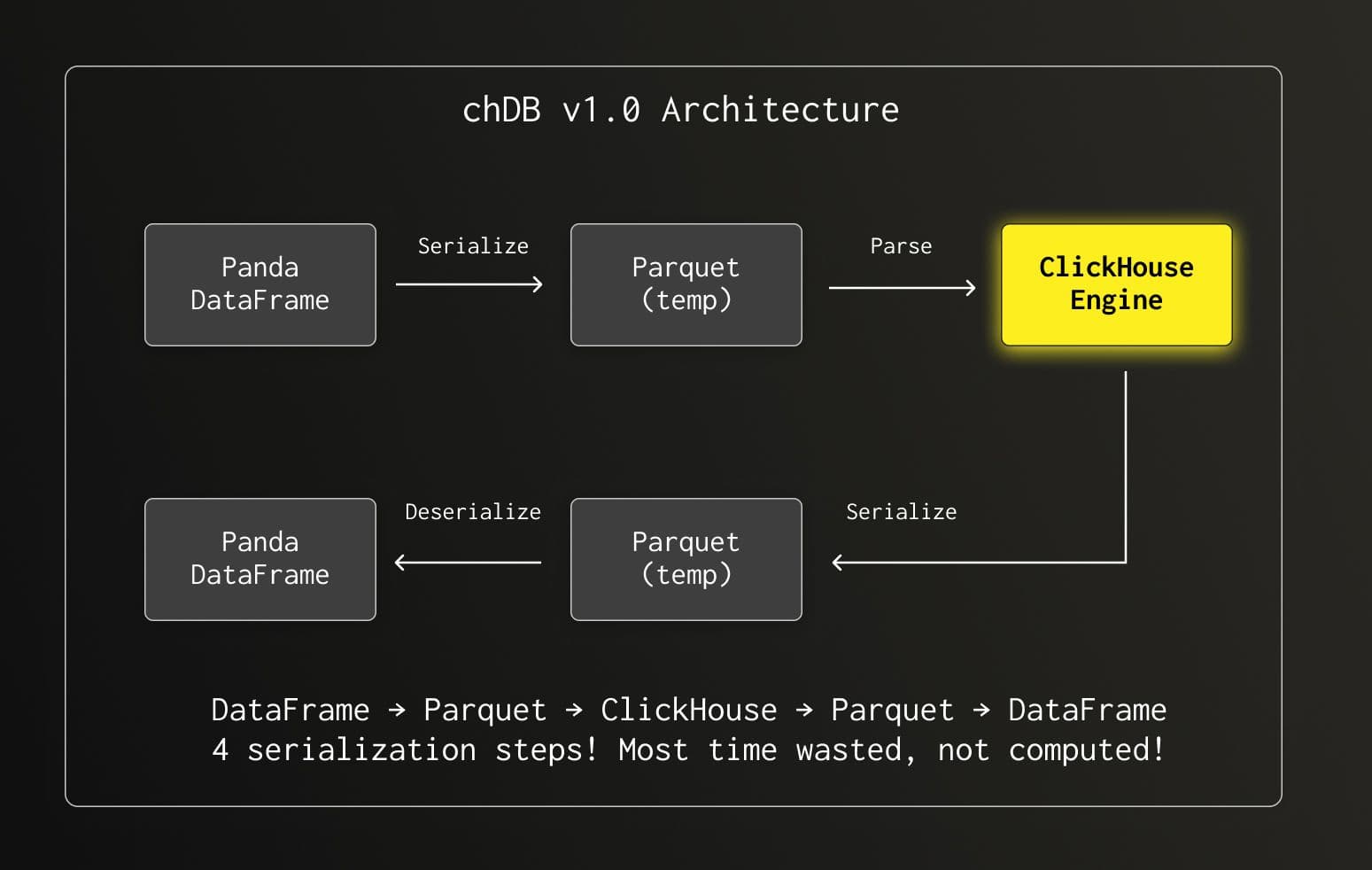
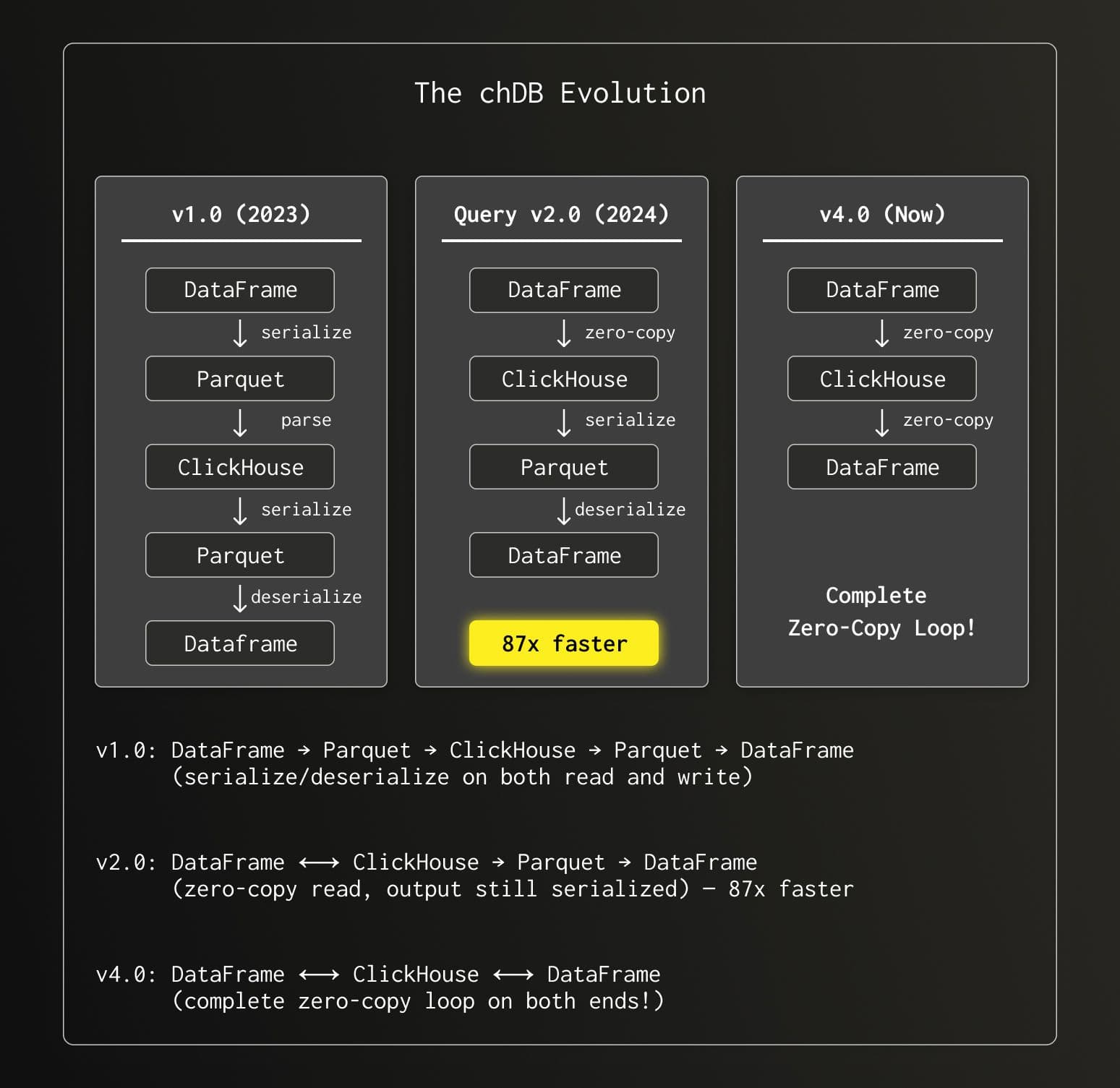
Every query went through four serialization/deserialization steps. The result? Almost every query took over 100ms, regardless of complexity. We had the world's fastest engine, but it was choking on data conversion overhead.
The Vision: What Users Actually Needed
From the user's perspective, what they wanted was simple:
"I have a DataFrame. I want to run SQL on it. Give me back a DataFrame. Fast."
No temp files. No format conversions. No memory explosions. Just seamless, native integration.
More specifically:
- DataFrame In, DataFrame Out — Query any Pandas DataFrame with SQL, get results as a DataFrame
- Zero Configuration — No registration, no schema definitions, just reference your variable name in SQL
- ClickHouse Performance — Multi-threaded execution, vectorized processing, all the good stuff
- Memory Efficient — Handle datasets larger than RAM through streaming
This is what we set out to build with chDB v2.
What We Built: True Native Integration
After months of work, here's what using chDB looks like today:
import pandas as pd
import chdb
# Your data, wherever it comes from
the_df = pd.DataFrame({
'user_id': range(1_000_000),
'category': ['A', 'B', 'C'] * 333334,
'value': [i * 0.1 for i in range(1_000_000)]
})
# SQL on DataFrame — just reference the variable name!
result = chdb.query("""
SELECT category,
COUNT(*) as cnt,
AVG(value) as avg_val
FROM Python(the_df)
GROUP BY category
ORDER BY cnt DESC
""", "DataFrame")
print(result)That's it. No registration. No temp files. The DataFrame variable df is automatically discovered and made available as a table. The result comes back as a DataFrame, ready for your next Pandas operation or visualization.
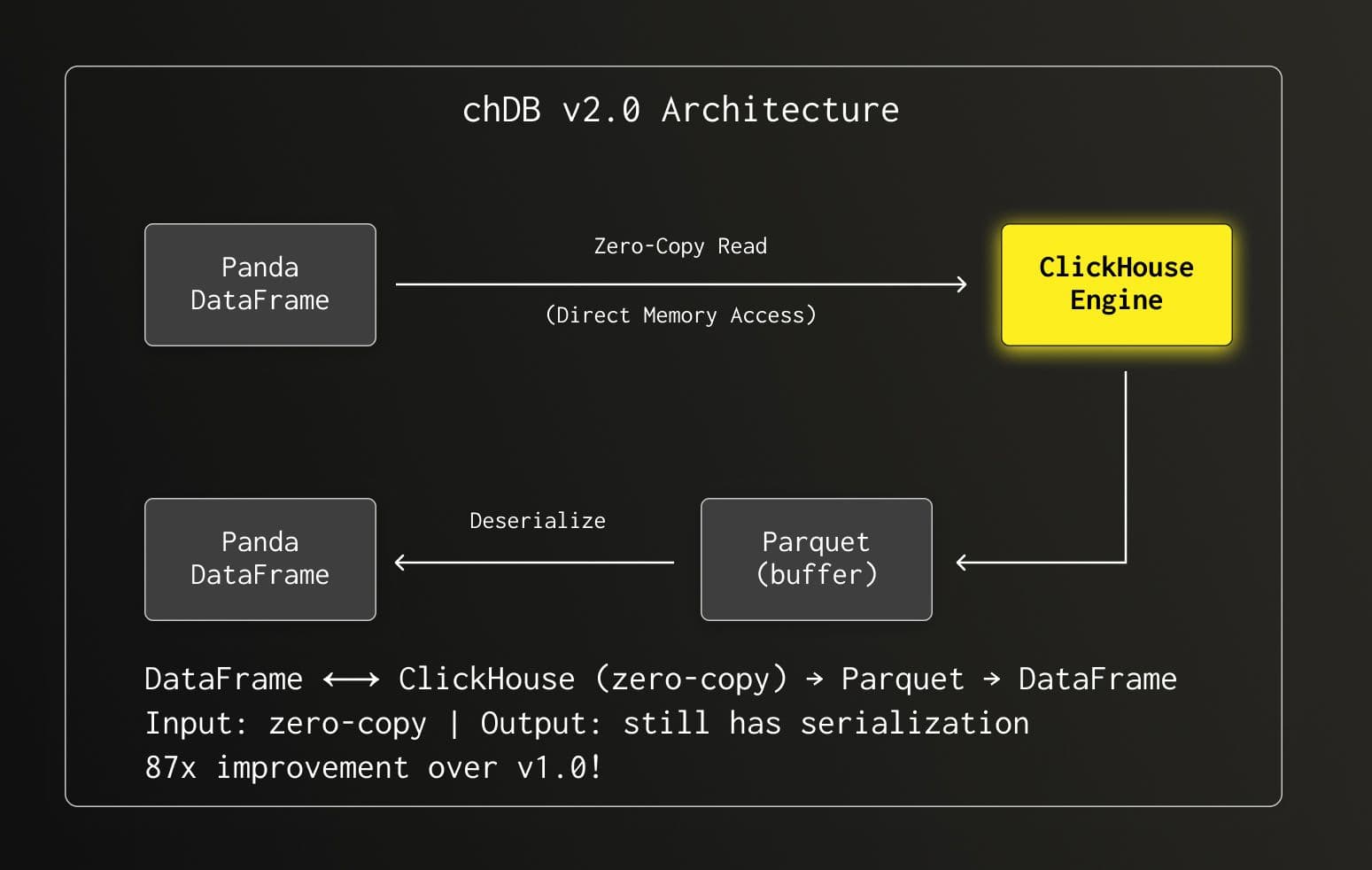
This was a huge leap—87x faster than v1.0! But we weren't done yet.
Under the Hood: The Technical Journey
Challenge 1: Automatic DataFrame Discovery
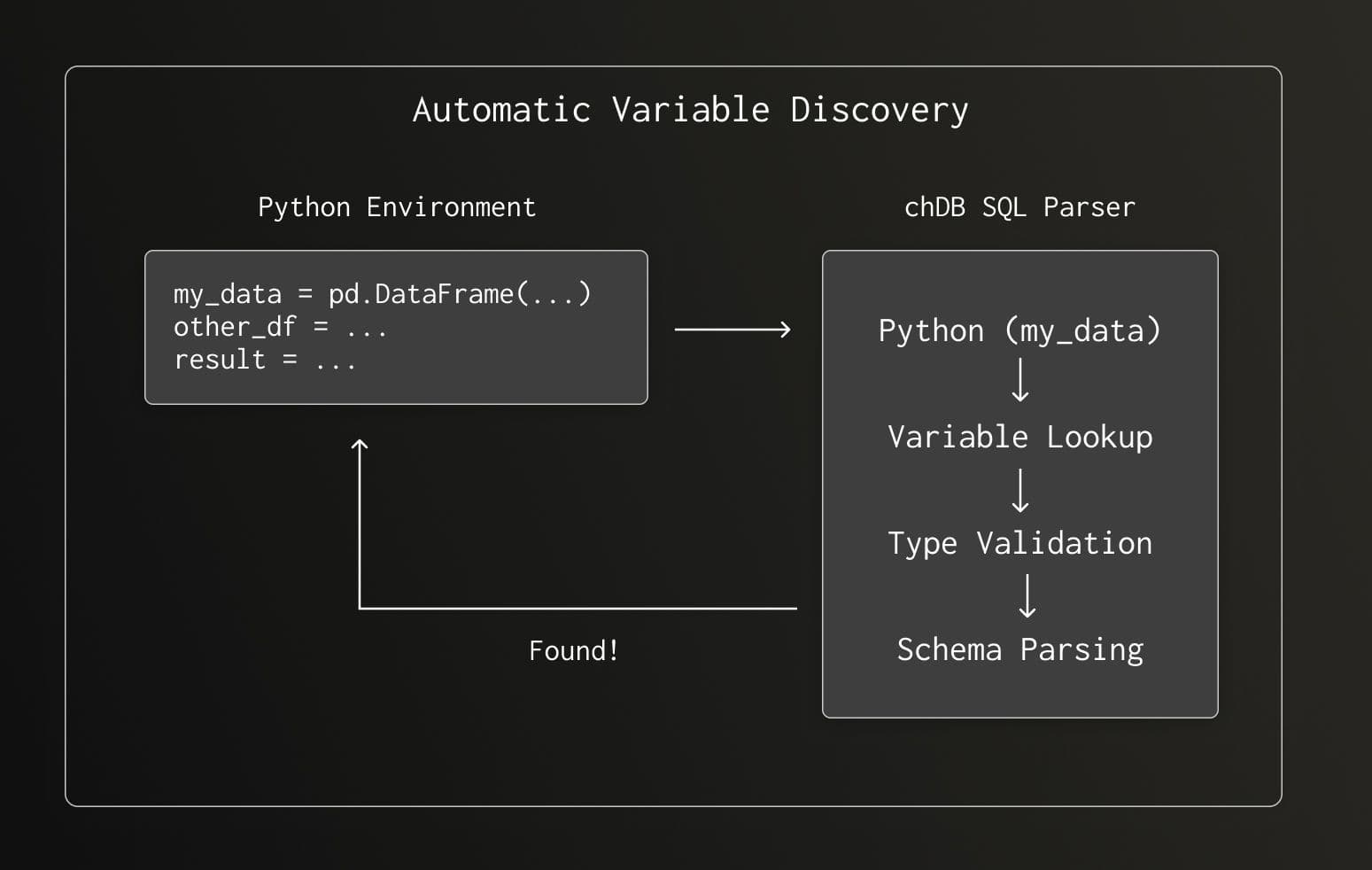
When you write Python(df) in your SQL, chDB needs to find that variable in your Python environment. We built an automatic discovery mechanism that:
- Searches for the variable name in local and global scope
- Validates it's actually a Pandas DataFrame
- Parses column names and data types
- Wraps it as a ClickHouse table function
No explicit registration required—just name your DataFrame and use it.
Challenge 2: The GIL Problem
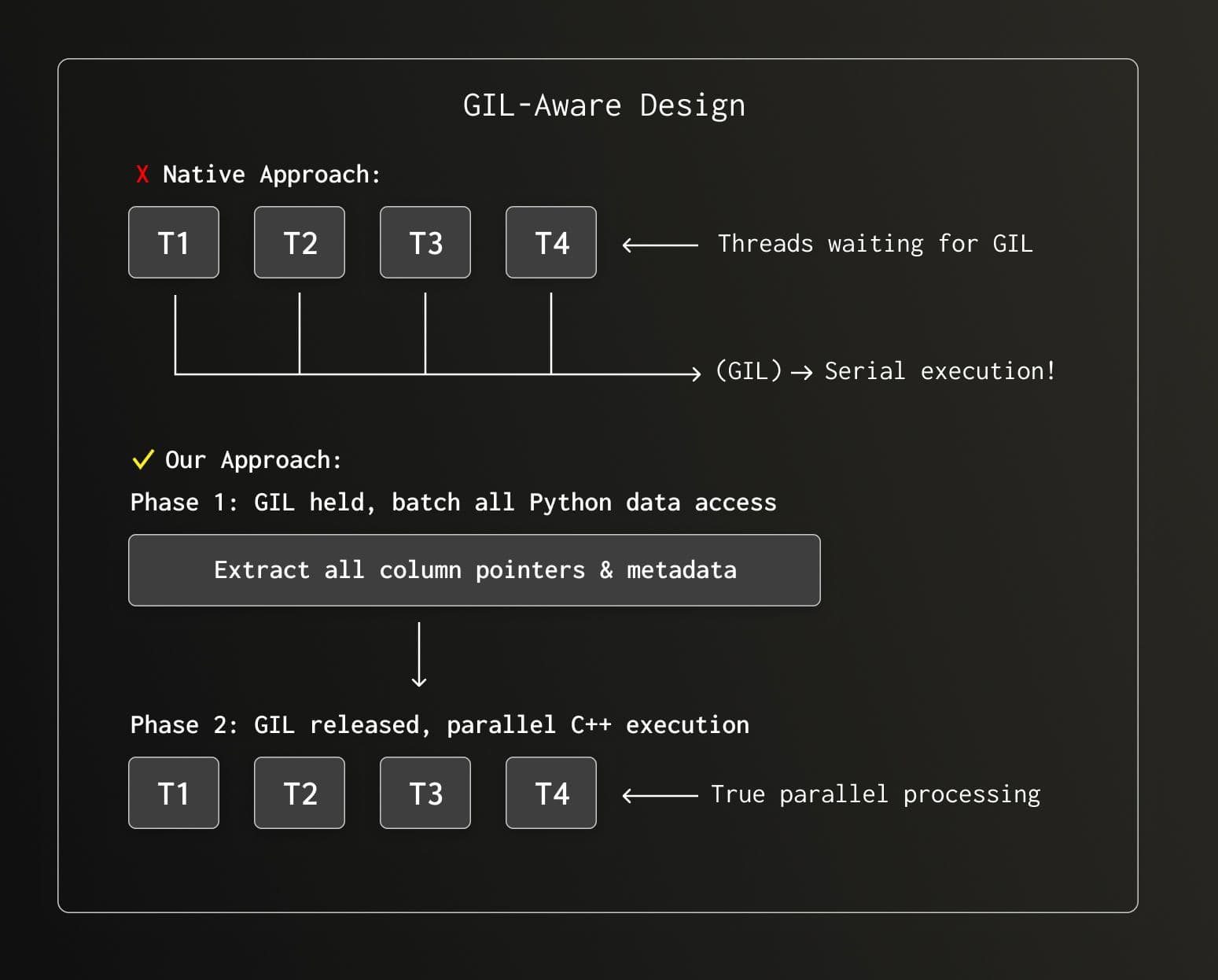
Here's where things got interesting. ClickHouse is a massively parallel engine—it wants to use all your CPU cores. Python's Global Interpreter Lock (GIL) says "one thread at a time, please."
If we called Python's C API for every data access, our multi-threaded engine would degrade to single-threaded execution. The solution? Minimize CPython API calls and batch all Python interactions before the parallel pipeline starts.
Challenge 3: Python String Encoding Nightmare
Python's str type is... complicated. It could be UTF-8, UTF-16, UTF-32, or something else entirely. Converting to UTF-8 (what ClickHouse expects) via Python's API? That means acquiring the GIL for every string.
So we did something a bit crazy: we rewrote Python's string encoding logic in C++. This let us handle string conversion in parallel, without touching the GIL.
The result? Our test query Q23 (SELECT * FROM hits WHERE URL LIKE '%google%' ORDER BY EventTime LIMIT 10) went from 8.6 seconds to 0.56 seconds—a 15x improvement from this single optimization.
┌─────────────────────────────────────────────────────────────────┐
│              String Encoding Performance Impact                 │
│                                                                 │
│   Q23 Query Time (seconds)                                      │
│                                                                 │
│   Python API Encoding:  ████████████████████████████████ 8.6s   │
│   C++ Native Encoding:  ██ 0.56s                                │
│                                                                 │
│   15x faster! 🚀                                                │
└─────────────────────────────────────────────────────────────────┘
Semi-Structured Data: Beyond Simple Columns
Real-world DataFrames often contain messy object columns with nested dictionaries. chDB handles these automatically:
import pandas as pd
import chdb
# DataFrame with nested JSON-like data
data = pd.DataFrame({
'event': [
{'type': 'click', 'metadata': {'x': 100, 'y': 200}},
{'type': 'scroll', 'metadata': {'x': 150, 'y': 300}},
{'type': 'click', 'metadata': {'x': 200, 'y': 400}}
]
})
# Query nested fields directly with ClickHouse JSON syntax
result = chdb.query("""
SELECT
event.type,
event.metadata.x as x_coord,
event.metadata.y as y_coord
FROM Python(data)
WHERE event.type = 'click'
""", "DataFrame")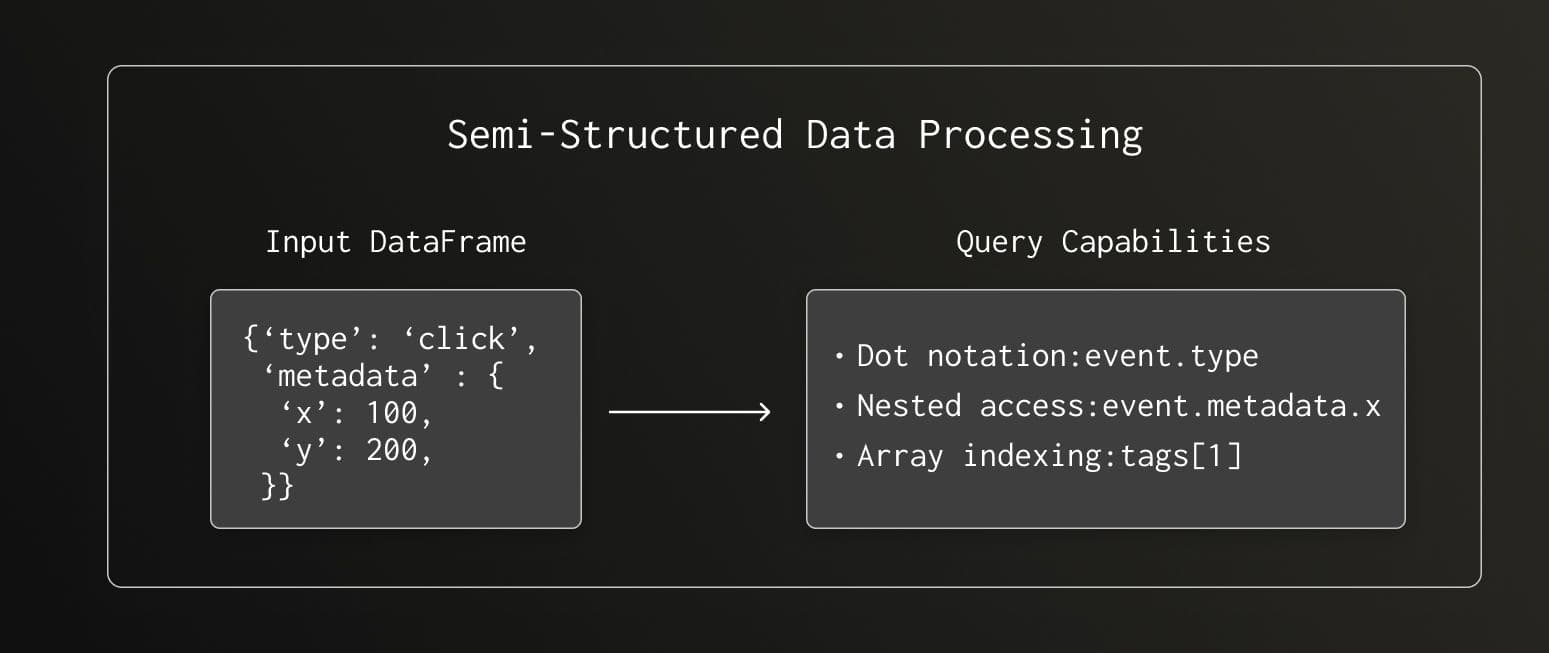
chDB samples object columns, detects dictionary structures, and automatically maps them to ClickHouse's native JSON type—giving you full access to ClickHouse's powerful JSON functions.
Performance: The Numbers
We benchmarked chDB against native Pandas operations using the in-mem DataFrame ClickBench dataset (1M rows, ~117MB in Parquet).
Simple Aggregation: COUNT(*)
chDB SQL Statement:
SELECT COUNT(*) FROM Python(df);Corresponding Pandas Operation:
df.count()By fully utilizing multi-core CPUs through ClickHouse's multi-threaded execution engine, chDB's speed in executing COUNT(*) aggregation is far beyond Pandas, with performance improved by nearly 247x.
| Engine | Time | Speedup |
|---|---|---|
| Pandas | 0.8643s | 1x |
| chDB | 0.0035s | 247x |
Complex Query: GROUP BY + Multiple Aggregations
chDB SQL Statement:
SELECT
RegionID,
SUM(AdvEngineID),
COUNT(*) AS c,
AVG(ResolutionWidth),
COUNT(DISTINCT UserID)
FROM Python(df)
GROUP BY RegionID
ORDER BY c DESC
LIMIT 10Corresponding Pandas Operation:
df.groupby("RegionID")
.agg(
AdvEngineID=("AdvEngineID", "sum"),
ResolutionWidth=("ResolutionWidth", "mean"),
UserID=("UserID", "nunique"),
c=("RegionID", "size")
)
.sort_values("c", ascending=False)
.head(10)Thanks to the refined and optimized Group By operations by ClickHouse's query execution engine, chDB still outperforms Pandas native operations in complex scenarios involving "grouping + sorting + multi-aggregation".
| Engine | Time | Speedup |
|---|---|---|
| Pandas | 0.0623s | 1x |
| chDB | 0.0219s | 2.8x |
Streaming: Breaking Memory Limits
What if your query result is too large to fit in memory? chDB supports streaming results:
import chdb
# Initialize chDB connection
conn = chdb.connect()
# Construct query (generate 500,000 rows of data)
query = "SELECT number FROM numbers(500000)"
# Stream query: retrieve results by block and process
with conn.send_query(query, "DataFrame") as stream_result:
for chunk_df in stream_result:
# Custom business logic
print(chunk_df)
# Close connection
conn.close()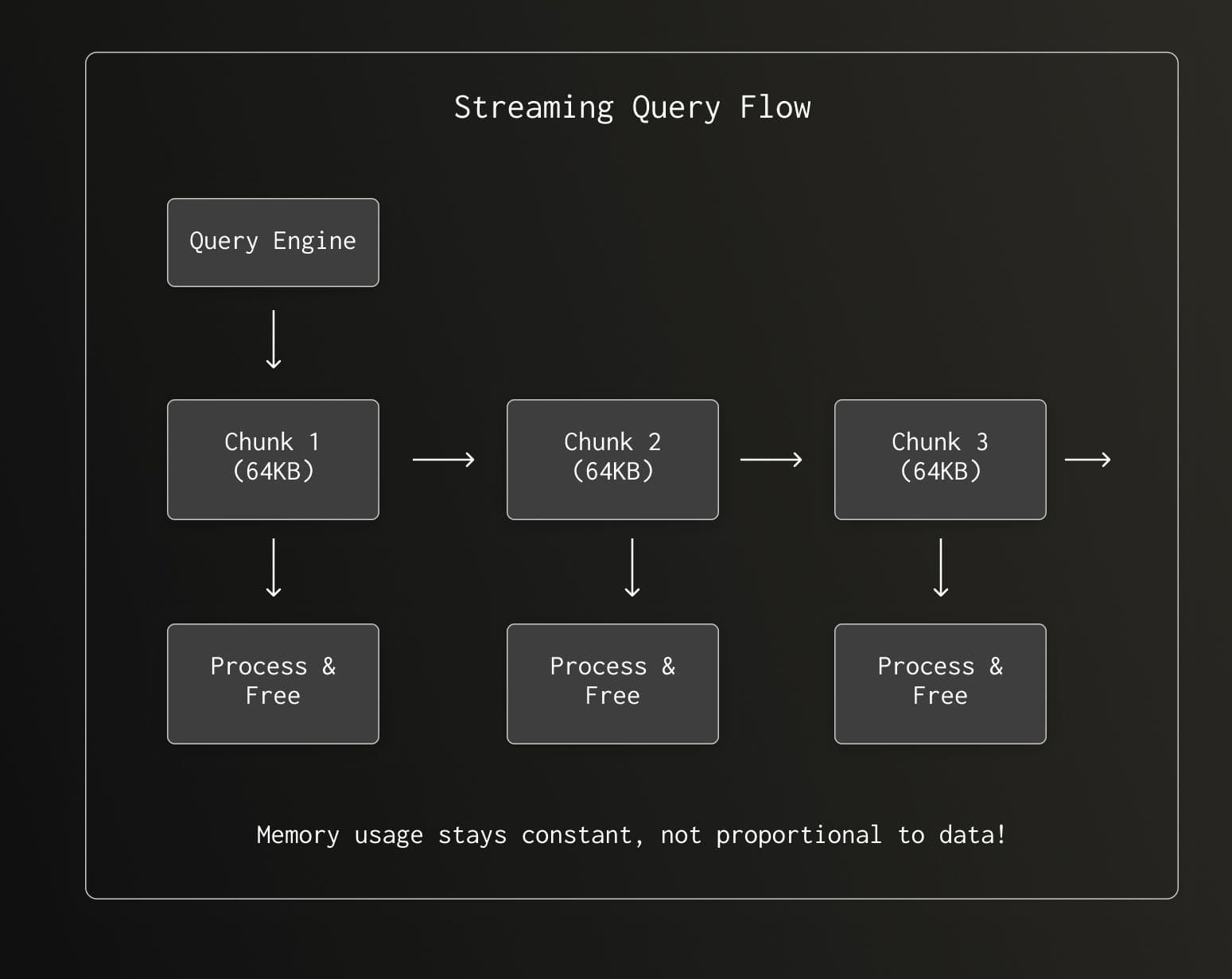
No more OOM errors. Process terabytes of data on your laptop.
v4.0: Closing the Zero-Copy Loop
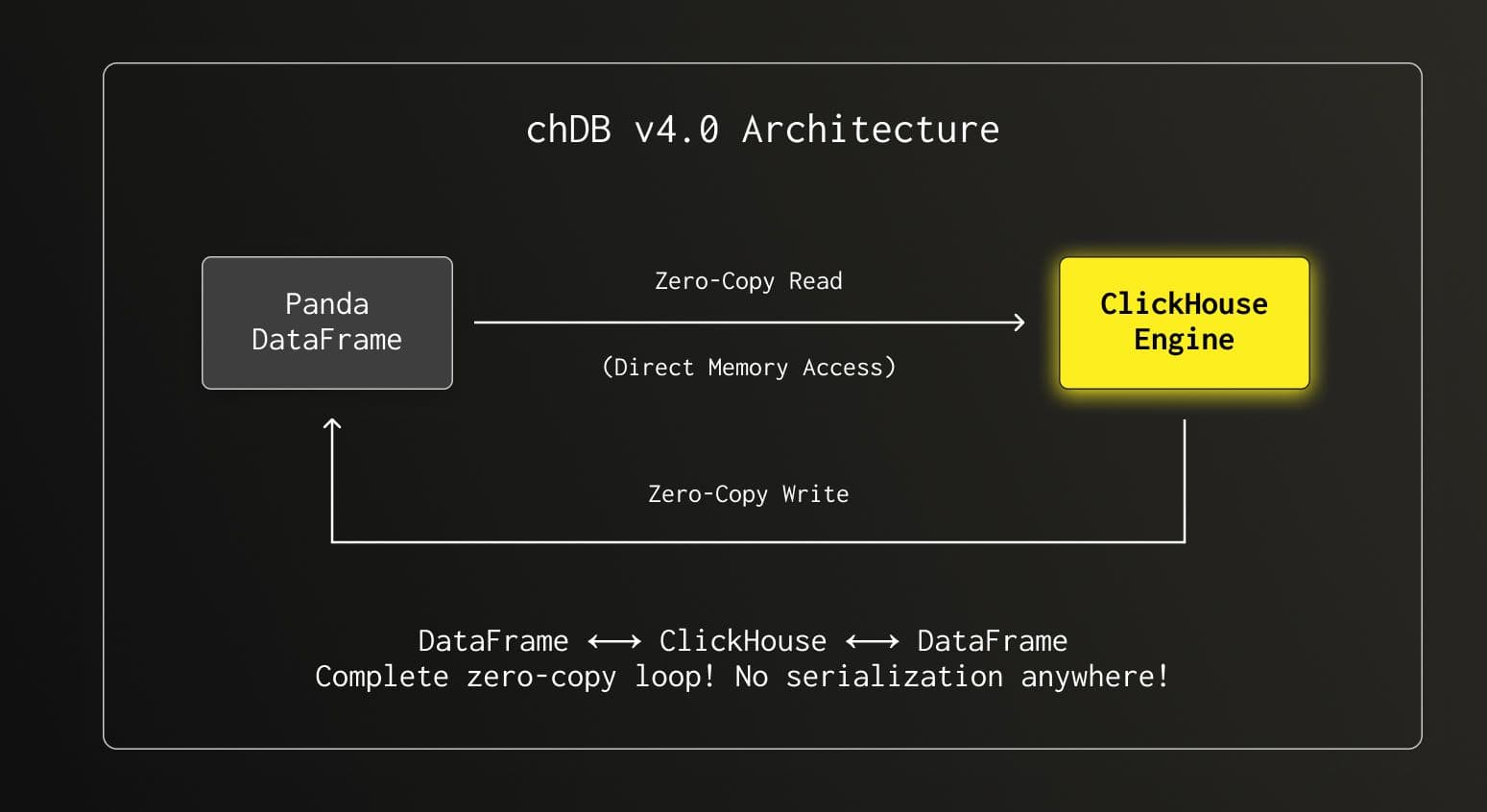
With v2.0, we achieved zero-copy on the input side—reading DataFrames directly without serialization. But the output path still went through Parquet serialization. In chDB v4.0, we completed the circle.
How Output Zero-Copy Works
When ClickHouse produces query results, instead of serializing to Parquet and deserializing back, we now:
- Direct Type Mapping: Map ClickHouse column types directly to NumPy dtypes
- Memory Sharing: Share underlying memory buffers where possible
- Batch Conversion: Convert result chunks directly to NumPy arrays using SIMD-optimized routines
Here's the complete type mapping we implemented:
| ClickHouse Type | Python/NumPy Type |
|---|---|
| Int8/16/32/64 | numpy.int8/16/32/64 |
| UInt8/16/32/64 | numpy.uint8/16/32/64 |
| Float32/64 | numpy.float32/64 |
| String | Python str |
| Date/DateTime | numpy.datetime64 |
| Array | numpy.ndarray |
| Map | Python dict |
| JSON | Python dict (recursive) |
| Nullable(T) | numpy.ma.MaskedArray |
Benchmark: v4.0 Output Performance
We benchmarked chDB’s performance in exporting query results to Pandas DataFrames against DuckDB, a similar embedded analytics engine, using the ClickBench hits dataset.
Test Environment
- Dataset: ClickBench hits dataset (1 million rows, Parquet format, file size ~117MB)
- Hardware Environment: AWS EC2 c6a.4xlarge instance
- Test Method: Execute a single query 3 times and take the best result
- Comparison Scenario: chDB exporting to DataFrame vs. DuckDB exporting to Pandas DataFrame
Test Code:
# chDB: Query Parquet file and export to Pandas DataFrame
import chdb
chdb.query("SELECT * FROM file('hits_0.parquet')", "DataFrame")
# DuckDB: Query Parquet file and export to Pandas DataFrame
import duckdb
duckdb.query("SELECT * FROM read_parquet('hits_0.parquet')").df()Export Time
- chDB: 2.6418 seconds
- DuckDB: 3.4744 seconds
Test results show that in the scenario of exporting 1 million rows of data to Pandas DataFrame, chDB's time consumption is reduced by about 24% compared to DuckDB, demonstrating superior data conversion performance.
Benchmark for daily Pandas usage
To provide everyone with a relatively complete performance comparison of libraries that can directly read and write Pandas DataFrames, we selected 14 common operations and conducted benchmarks on chDB, Pandas, and DuckDB across three different data sizes. The testing hardware was MacBook M4 Pro + 48G memory. We can clearly see several facts:
- For slicing operations like Head/Limit, Pandas itself has always been the fastest
- As data volume increases, the advantages of chDB and DuckDB begin to emerge, with chDB maintaining a lead in most 1M and 10M row challenges
- In most cases, chDB and DuckDB performance is very close, and thanks to v4.0.0 improvements, chDB maintains a certain advantage, achieving 7:3:4 comparing with Pandas and DuckDB with 10M data volume
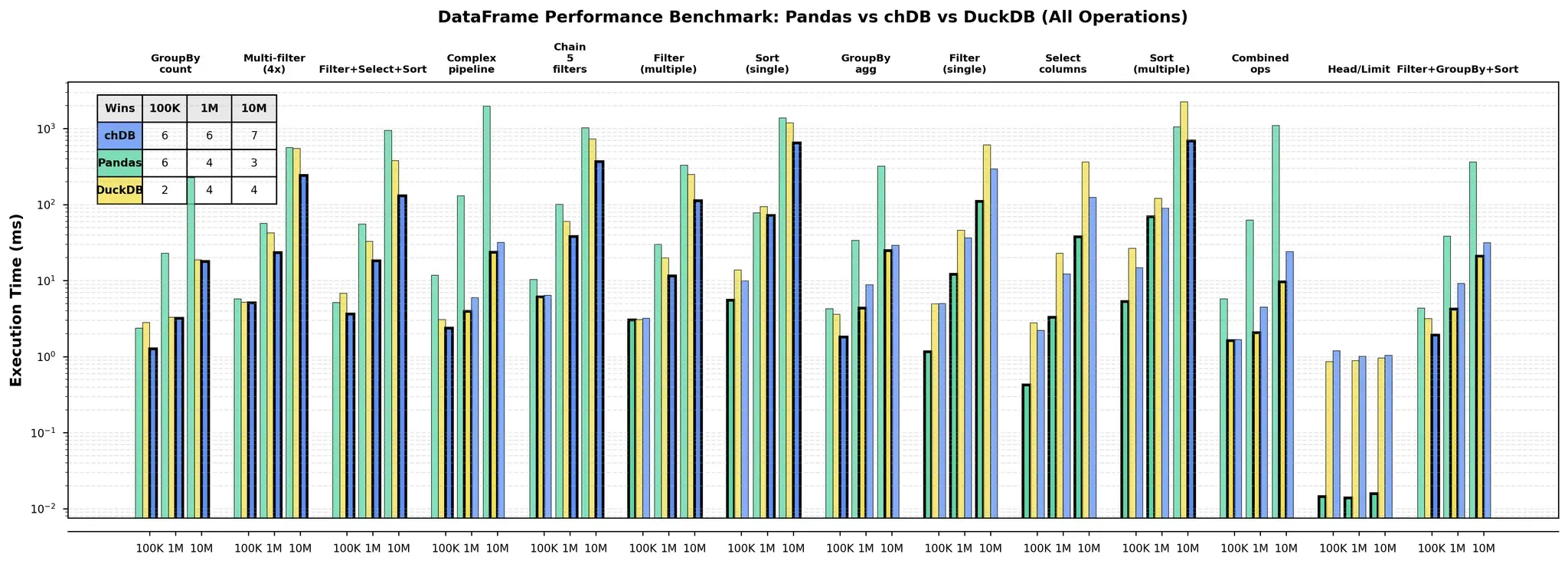
Benchmark and the chart code in github.com/auxten/chdb-ds.
Where We Started, Where We Are
What You Get as a User
Let's summarize what chDB + Pandas integration means for you:
| Capability | What It Means |
|---|---|
| DataFrame In | Query any Pandas DataFrame with SQL, no registration needed |
| DataFrame Out | Results come back as DataFrames, ready for visualization |
| ClickHouse Speed | Multi-threaded, vectorized execution on your data |
| Zero Config | Just pip install chdb and you're ready |
| JSON Support | Query nested dictionaries naturally |
| Streaming | Process datasets larger than your RAM |
| 80+ Formats | Also query CSV, Parquet, S3, MySQL, PostgreSQL... |
Getting Started
chDB v4 is now in beta!
We welcome everyone to test chDB v4 and share feedback. pip install "chdb>=4.0.0b2"
#pip install chdb
import pandas as pd
import chdb
# Load your data however you want
df = pd.read_csv("your_data.csv")
# Query with SQL
result = chdb.query("""
SELECT column_a, SUM(column_b)
FROM Python(df)
GROUP BY column_a
""", "DataFrame")
# Use the result with any Pandas-compatible tool
result.plot(kind='bar')Join the Community
We're always looking to make chDB better. Here's how to connect:
- 📧 Email: auxten.wang@clickhouse.com
- 💬 Discord: Join our community
- 🐛 Issues: GitHub Issues
- ⭐ Star us: github.com/chdb-io/chdb
The journey from 30 seconds to 0.5 seconds was long, but we're just getting started. What will you build with chDB