50.4k
50.4k
TL;DR;
We see the ClickHouse and Grafana pairing as a key part of the ClickHouse observability experience. In this post we explore how we’re investing in the plugin and our vision for making it more powerful and easy to use.
ClickHouse has become the engine behind a growing number of observability and real-time analytics deployments. Teams choose it because it handles the volume of billions of log lines, millions of traces, time series at scale, without breaking the bank or the query performance.
We give users the freedom to consume their observability data however they choose, with Grafana and ClickStack as two powerful options. ClickStack focuses on a rich, exploratory experience and is ideal for teams that want a native ClickHouse interface. Grafana, on the other hand, fits naturally into existing ecosystems. Engineers already know it, organizations already run it, and it excels at bringing data from multiple sources together in a single view. Whether driven by familiarity, standardization, or the need to unify multiple signals, it’s a pairing we see widely across both observability and analytics use cases.
Adoption has been strong and continues to grow as more teams use ClickHouse with Grafana for observability and analytics.
At the same time, we recognize that the current experience can be challenging, particularly where the plugin requires users to write SQL. In ClickStack, much of this complexity is abstracted away, making it easier to explore data without deep knowledge of the schema. We’ve learned a lot from that experience, and our goal now is to bring those lessons back into the Grafana plugin, making it easier than ever to get started and ensuring every user can be productive from day one.
With a vision in place that focuses on making the plugin easier than ever to use, here’s what that might look like in practice.
> These ideas reflect what we’ve been exploring and prototyping, not a defined or committed roadmap. While much of this work has been tested, we’re still in an experimental phase and actively looking for feedback. Think of this as a forward-looking view of where we believe the plugin can go, rather than a final plan.
Get started today
Interested in seeing how ClickHouse works on your data? Get started with ClickHouse Cloud in minutes and receive $300 in free credits.
Sign upA truly native Grafana experience
Grafana exposes a rich set of built-in capabilities for its plugins - click-to-filter, attribute collections, log volume histograms, dashboards with smart variables and annotations.
But these features are only activated and available to the end user when a plugin declares support for them.
Currently the ClickStack plugin doesn't expose all of the available capabilities. Our priority is therefore to start cataloguing and implementing every relevant interface so the ClickHouse plugin can deliver a truly first-class, well-integrated Grafana experience.
So what does this mean in practice?
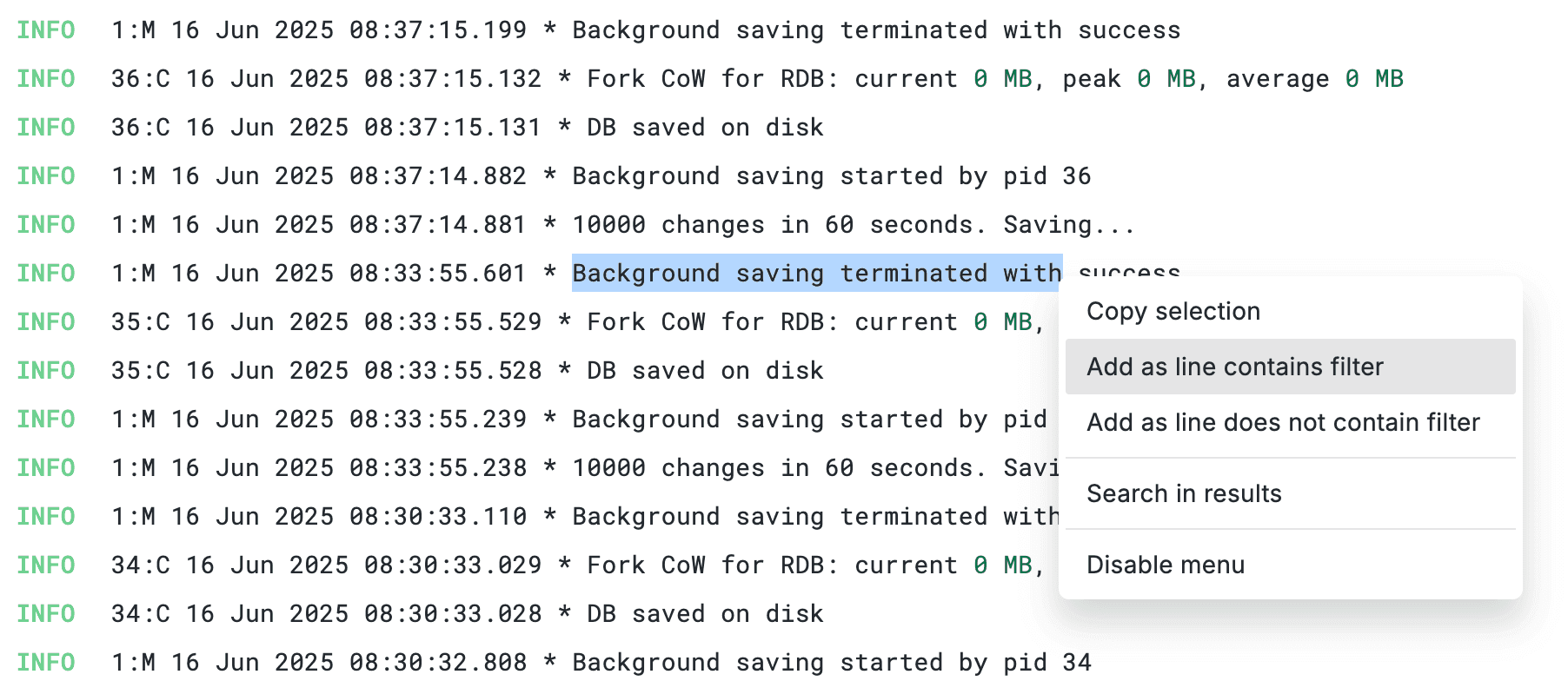
Instant filtering from log details
You're looking at a log line during an incident. You see ServiceName: payment-gateway. Instead of navigating to the query builder to manually add a filter - you click the "+" icon next to the field. Done, the query updates instantly and the data is filtered to the service. Likewise, clicking "-" excludes the services dataset. Select text inside the log body, hit "line contains filter" and it adds a full-text search.
The result is an experience where, rather than fighting the UI, the user can slice and filter data seamlessly, accelerating incident investigation.
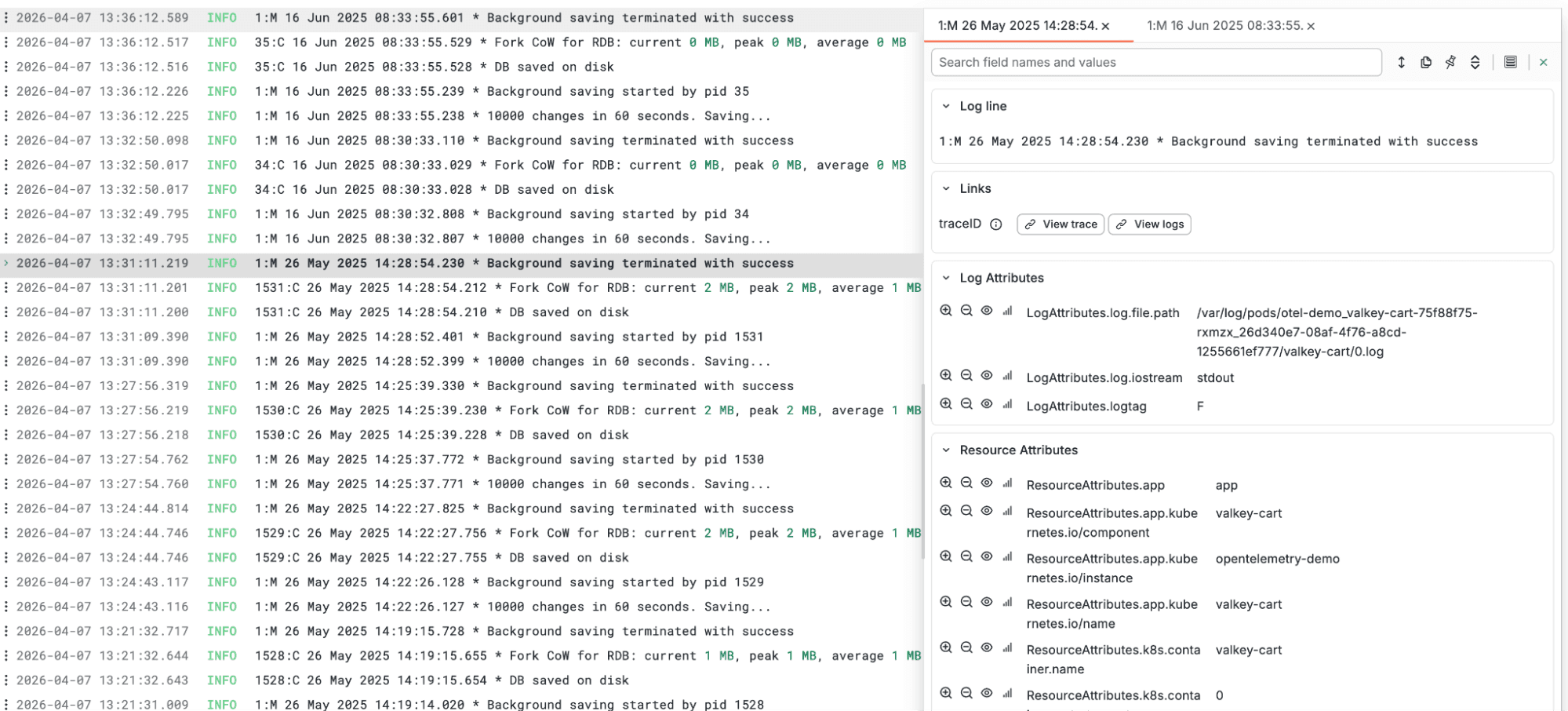
Structured attribute display
Both OpenTelemetry logs and traces can carry 40+ fields across resource, log, span and scope attributes, but today they appear as a single flat list. We’re exploring ways to introduce clearer visual separation, grouping attributes by category to better reflect how OTel data is structured. The goal is to make fields easier to locate, so instead of scanning endlessly, you can quickly find what you need.
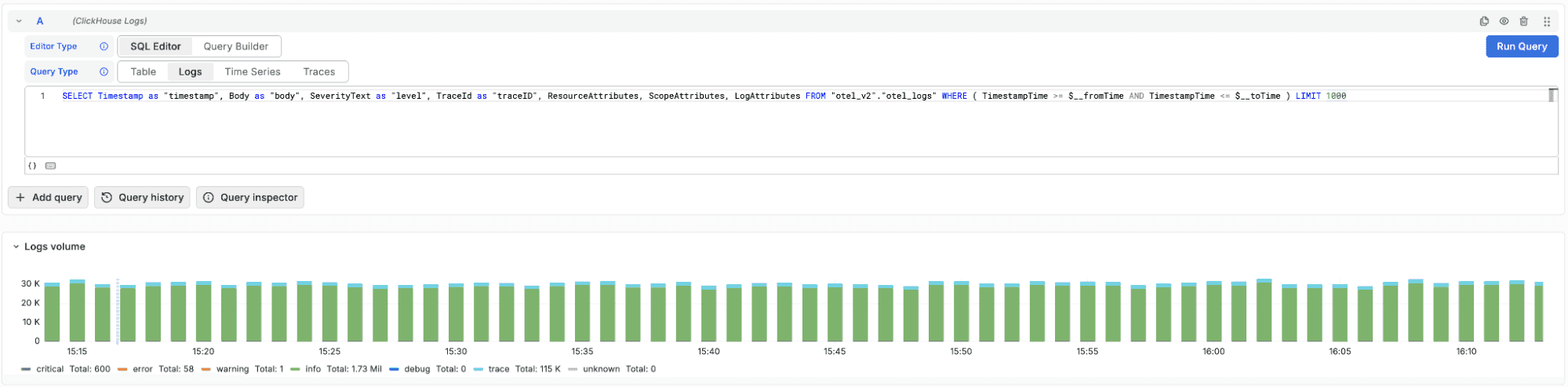
Automatic log volume histogram in SQL mode
The log volume histogram, already available in query builder mode today, should also work for raw SQL queries. When OTel columns are configured, the plugin can generate the volume breakdown by severity automatically, even when it can't parse your custom SQL. No need to write a separate aggregation query alongside your log search.
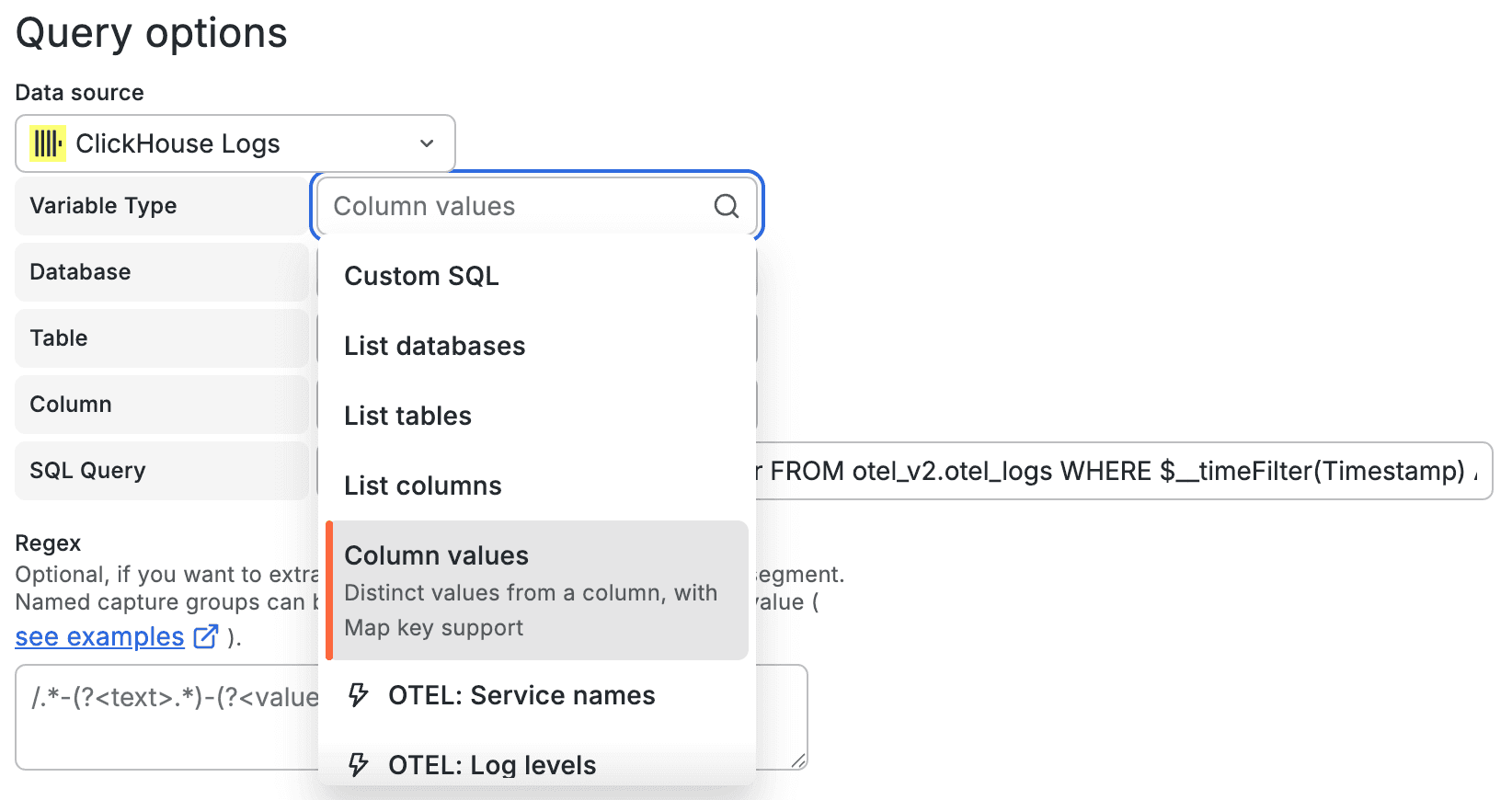
Smarter dashboard variables
Today the variable editor requires writing raw SQL to populate dashboard dropdowns - you need to know the exact database, table, and column names upfront. We aim to improve that with a guided editor that generates the SQL for you.
Select a variable type to dynamically generate a query. Choose from listing databases, tables, columns, or retrieving distinct values for a column. Alternatively, use predefined OTel presets such as service names or log levels. Cascading dropdowns let you navigate from database to specific columns without memorizing the schema. Selecting a specific column retrieves its distinct values as variable options, completing the database -> table -> column -> values workflow without a need to work with any SQL.
Annotations - deployments and K8s events from your OTel data
Grafana annotations show as vertical markers on time series panels - useful for correlating changes with charts showing trending KPIs. Today, most teams set these up via CI/CD webhooks or manual API calls and populate individual events from a supplementary database.
OTel data makes this unnecessary. Your traces and logs already carry ResourceAttributes['service.version'] and ResourceAttributes['container.image.tag']. A SQL annotation query can detect when these values change - surfacing deployments and rollbacks as markers on your dashboards, automatically derived from data your services already emit. No external integration needed.
Similarly, Kubernetes events ingested by the OTel collector (pod restarts, OOM kills, scaling events) are naturally discrete events with timestamps. They map directly to annotations with a simple WHERE filter.
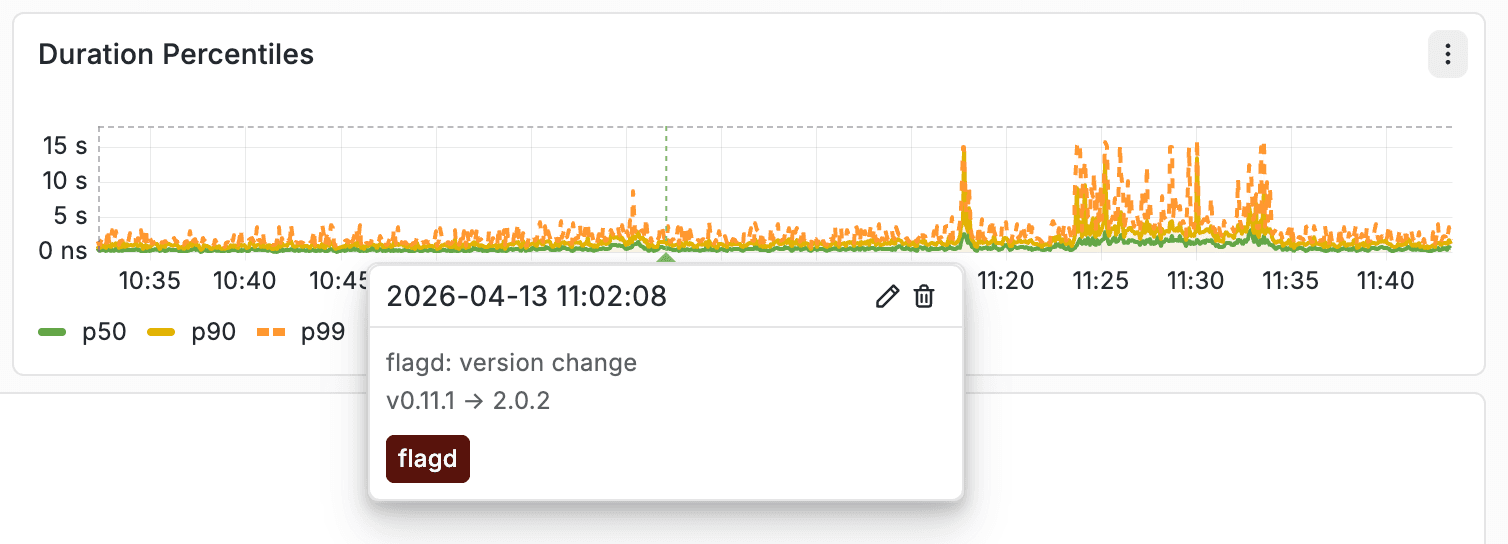
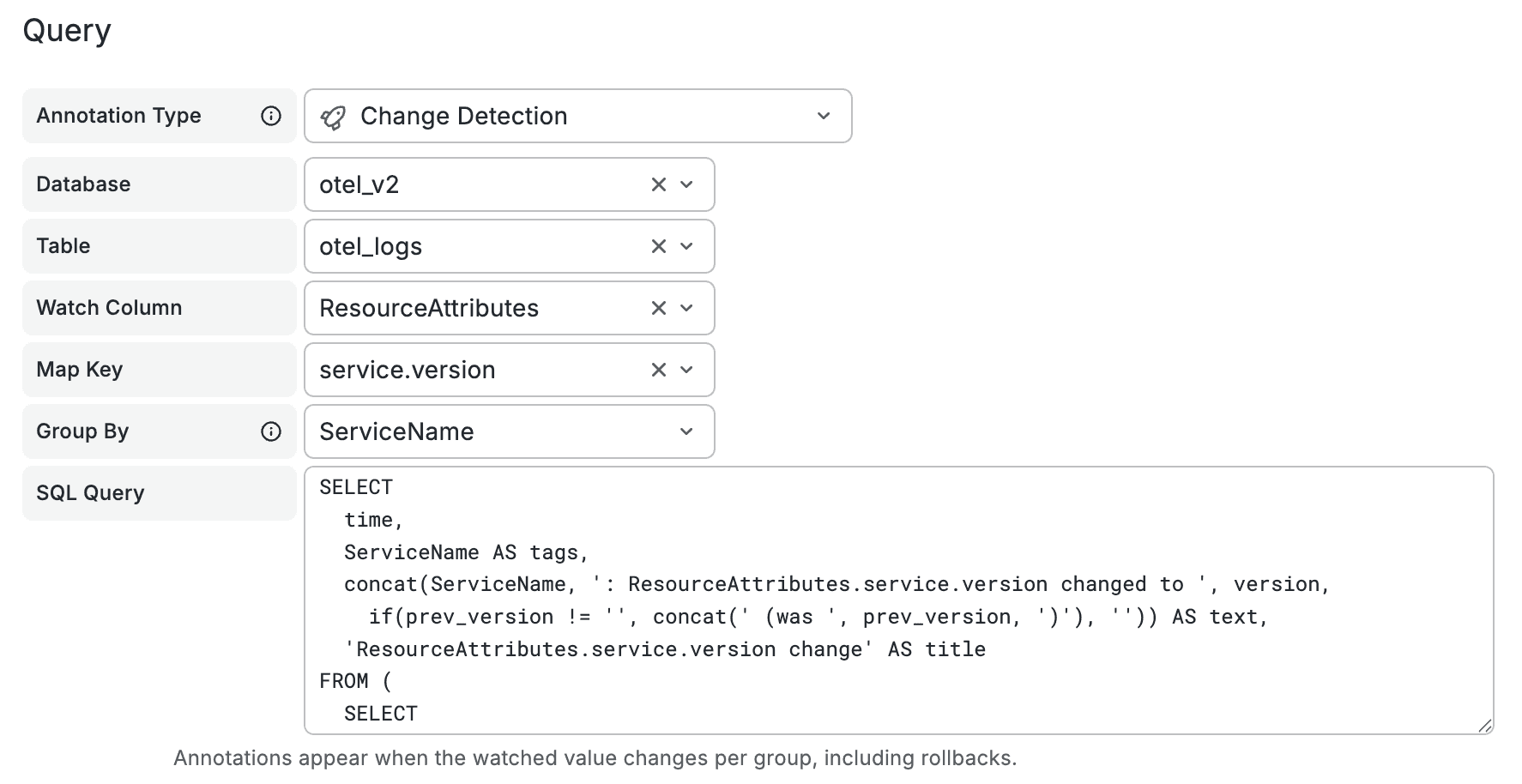
We're looking into options to bring annotation presets into the editor - simply select "Change detection" or "K8s lifecycle events" and get a working query without writing SQL. For attribute change detection, the plugin could handle the diffing automatically: write a simple SELECT of service versions over time, and only actual transitions become annotation markers. Custom SQL annotations would continue to work as before.
Filter preservation across datasources
Switching between data sources in Explore today often means losing your working context. Filters, conditions, and refinements that took time to build have to be recreated from scratch, slowing down investigation and breaking your flow.
Ideally we’d like to preserve that context when switching, so filters carry over automatically - allowing you to continue your analysis without rebuilding queries and making cross-datasource exploration faster and far less disruptive.
None of these are groundbreaking on their own - they're standard behaviors users expect. And that's exactly the point. The experience should feel familiar, not require a learning curve.
Search first, SQL when you need it
The current query builder is designed for maximum flexibility - any database, any table, any columns, any query type. That’s the right default for a general-purpose SQL datasource, but it comes at a cost. It forces users to know, or repeatedly rediscover, the schema every time they open Explore, even for simple tasks like searching logs.
To make this simpler, we’re experimenting with a compact query mode that starts from the search bar. Similar to ClickStack, this allows users to search logs naturally without needing to write SQL, making the initial experience more intuitive and removing the need to understand the underlying schema upfront.
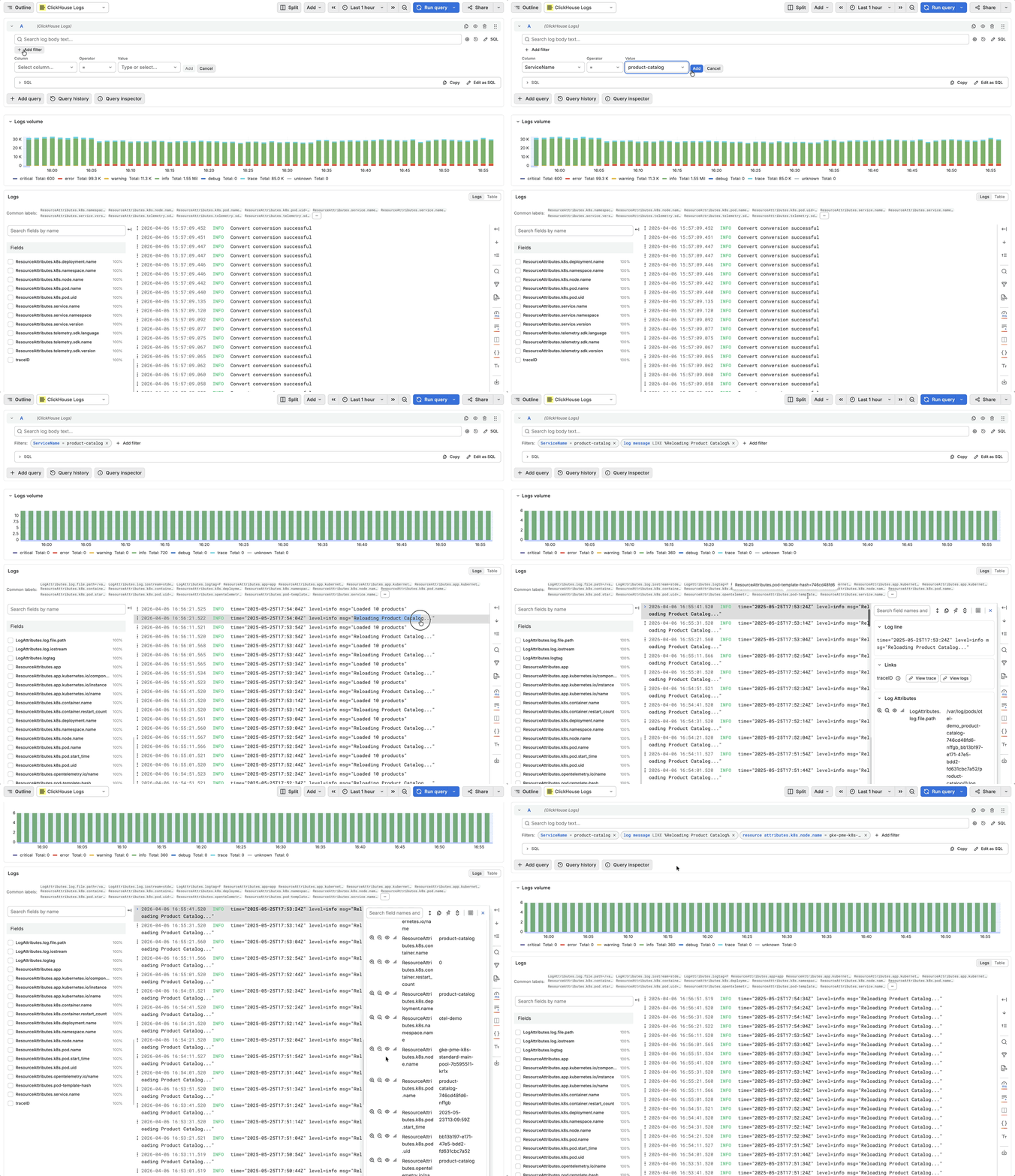
Our current prototype for the new search behavior.
Picking up datasource will present a new editor collapsed to essentials, with a search bar and filter pills. Just type a search term and hit Enter. Under the hood it would use ClickHouse's hasToken() function, which is optimized for full-text search on indexed columns to search across billions of log lines in seconds. Facets will appear as a compact listing with autocomplete-enabled search for column names, operators, and values.
Need custom ordering or limits? One click on the gear icon.
Need to see the generated SQL? Expand the preview.
Need full control? "Edit as SQL" will drop you into the raw editor with your current query pre-filled.
The theme is simple: the common path is simple and intuitive, while more advanced workflows remain close at hand. Nothing is hidden, just kept out of the way until you need it.
Building on this theme, even selecting and working with data sources in Explore today introduces unnecessary friction. Users are required to specify whether they’re working with logs or traces at query time, with a data source capable of supporting either. In most cases, however, users are searching the same type of data.This adds an extra, repetitive step that slows down exploration.
To simplify this, we’re planning a single-table datasource mode. Configure a datasource for a table with logs, and opening Explore drops you straight into the log search experience with no mode selector or table picker required. Just open Explore, select your datasource, and start searching and analyzing.
Out of the box dashboards
Today, if you deploy the OpenTelemetry Collector with the ClickHouse exporter your data lands in ClickHouse, but you still have to build dashboards from scratch in Grafana. To make the getting started experience simpler, we plan to ship out-of-the-box dashboards for OpenTelemetry and Kubernetes observability use cases that should work immediately with standard schemas.
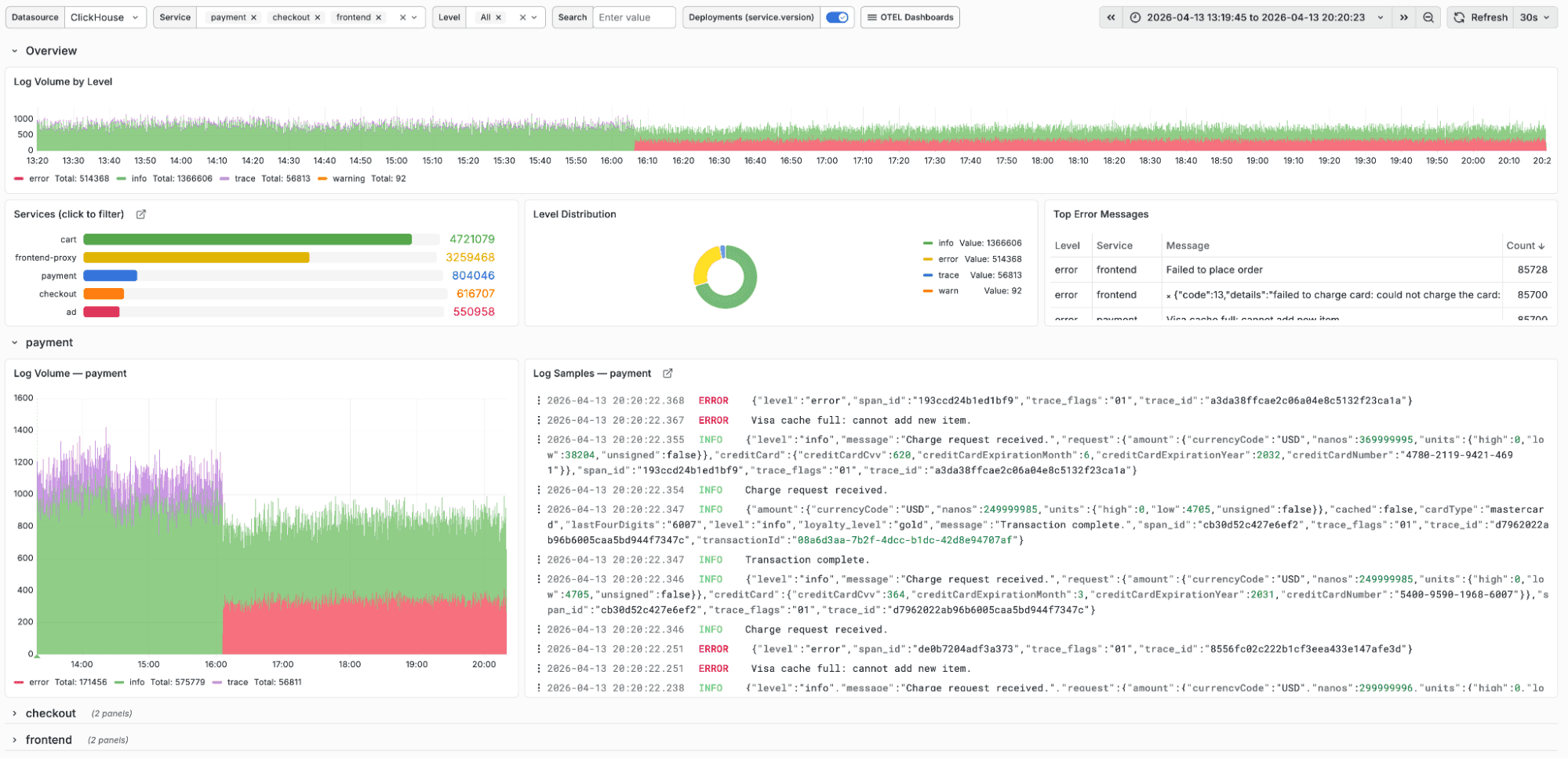
The initial set should cover the core observability workflows: a logs dashboard showing volume by severity with a per-service breakdown; and a trace dashboard with duration distribution and service dependency mapping, per-service RED metrics (request rate, error rate, duration) and visibility into top spans. Dashboard would also showcase usage of variables and annotations.
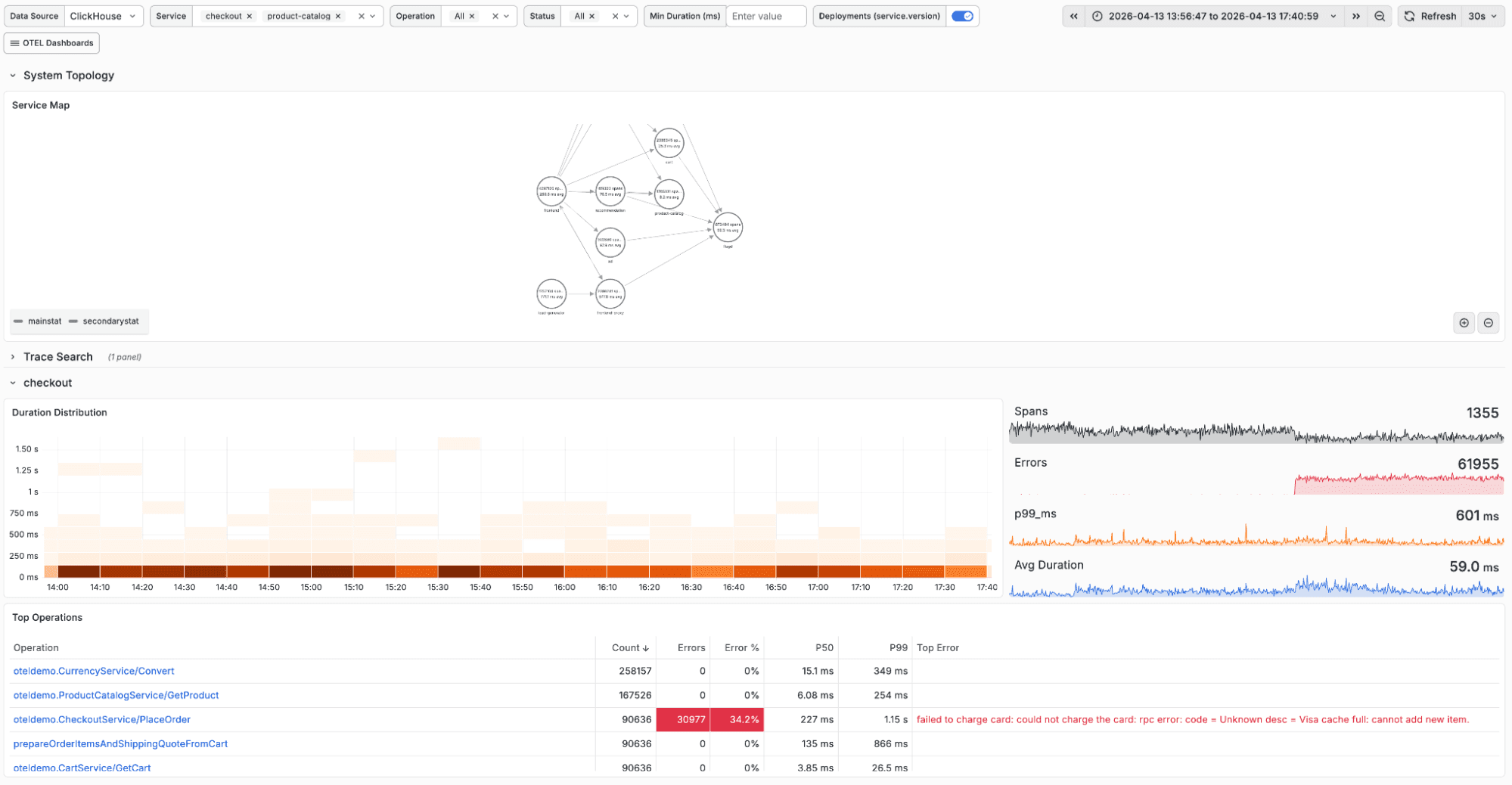
The goal is that a team deploying ClickHouse for observability should be able to go from data ingestion to usable dashboards in minutes, not hours, with users able to simply import the dashboards of interest when configuring the datasource.
Metrics exploration without raw SQL
The ClickHouse OpenTelemetry exporter already supports ingesting metrics such as CPU usage, memory, network I/O, and other infrastructure signals from OTel agents and Kubernetes.
The challenge is that exploring this data visually in Grafana often requires writing SQL aggregation queries by hand, which isn’t the experience users expect from metrics-native data sources.
Similar to how ClickStack provides a native query builder so users don’t have to write complex SQL queries, we want to bring that same experience into Grafana. This compact metrics builder would allow the user to pick a table type, select a metric, choose an aggregation, and add group-by dimensions. For OTel Map columns like ResourceAttributes, selecting one might open a key picker to allow drill-down into fields like k8s.namespace.name or host.name without requiring the user to write bracket notation.
The result is intended to be that your infrastructure and runtime metrics become explorable the same way they would be in any metrics-first tool, without maintaining a separate system to query them.
Looking further ahead
The above represent changes we’re aiming to deliver in the near term. Looking a bit further ahead, a few areas we’re exploring:
Bidirectional SQL parsing
Today, the query builder generates SQL for you, but the flow is one-way. If you edit that SQL, you can’t switch back to the builder with those changes preserved. This points to a deeper limitation: the system doesn’t truly understand the query itself.
By introducing a proper SQL parser and building a full AST, we can move beyond that constraint. You could paste in a query from a runbook, have it automatically translated into filter pills and volume histograms, and switch freely between builder and editor without losing work, because the query is fully understood in both directions.
Per-user query identity
Today, every Grafana query runs as the datasource’s configured ClickHouse user. This makes it difficult to enforce fine-grained access control, often forcing teams to rely on separate data sources per team and manage access at that level, which quickly becomes hard to scale and govern.
With JWT forwarding, each query would carry the identity of the Grafana user. This enables proper audit trails, per-user query cost tracking, and row-level access control based on who is actually running the query, aligning access and visibility with real user context rather than shared credentials.
AI-assisted query building
LLMs have gotten good at writing ClickHouse SQL, and ClickHouse has tooling to help them understand your schema. We're exploring a conversational mode where you'd describe what you want to see and get a working query - with full context of your tables, columns, and data model.
We want to hear from you
Whether you’re using ClickHouse with Grafana for observability, real-time analytics, or both, we’d love your feedback on this direction. What resonates? What’s missing? Where does it fall short for your use case? and what would make the experience better for your team?
Subscribe to our observability newsletter
Stay informed on observability related feature releases and news for ClickStack and the Grafana plugin!