50.5k
50.5k

For most data teams on Microsoft Fabric, the question of where data lives is settled. It's in OneLake, governed and unified. The harder question is what to do when an AI agent starts querying that data and expects answers in milliseconds, at a concurrency no team of analysts could ever generate. Real-time interactive dashboards and customer-facing applications create the same pressure; agents just get there faster.
Ask teams running Fabric today how they handle these workloads, and you'll hear about workarounds: pre-aggregation pipelines in their existing engines, custom caching layers, or an external database running alongside Fabric with hand-rolled ETL to keep it fed. Each of these works, and each one is extra infrastructure to build, secure, and maintain outside the platform.
The ClickHouse workload for Microsoft Fabric aims to address this problem, and it's now in public preview, available from the Fabric workload hub. It brings ClickHouse, the fastest open-source analytical database, directly into your Fabric workspace as a native workload: an acceleration layer for OneLake.
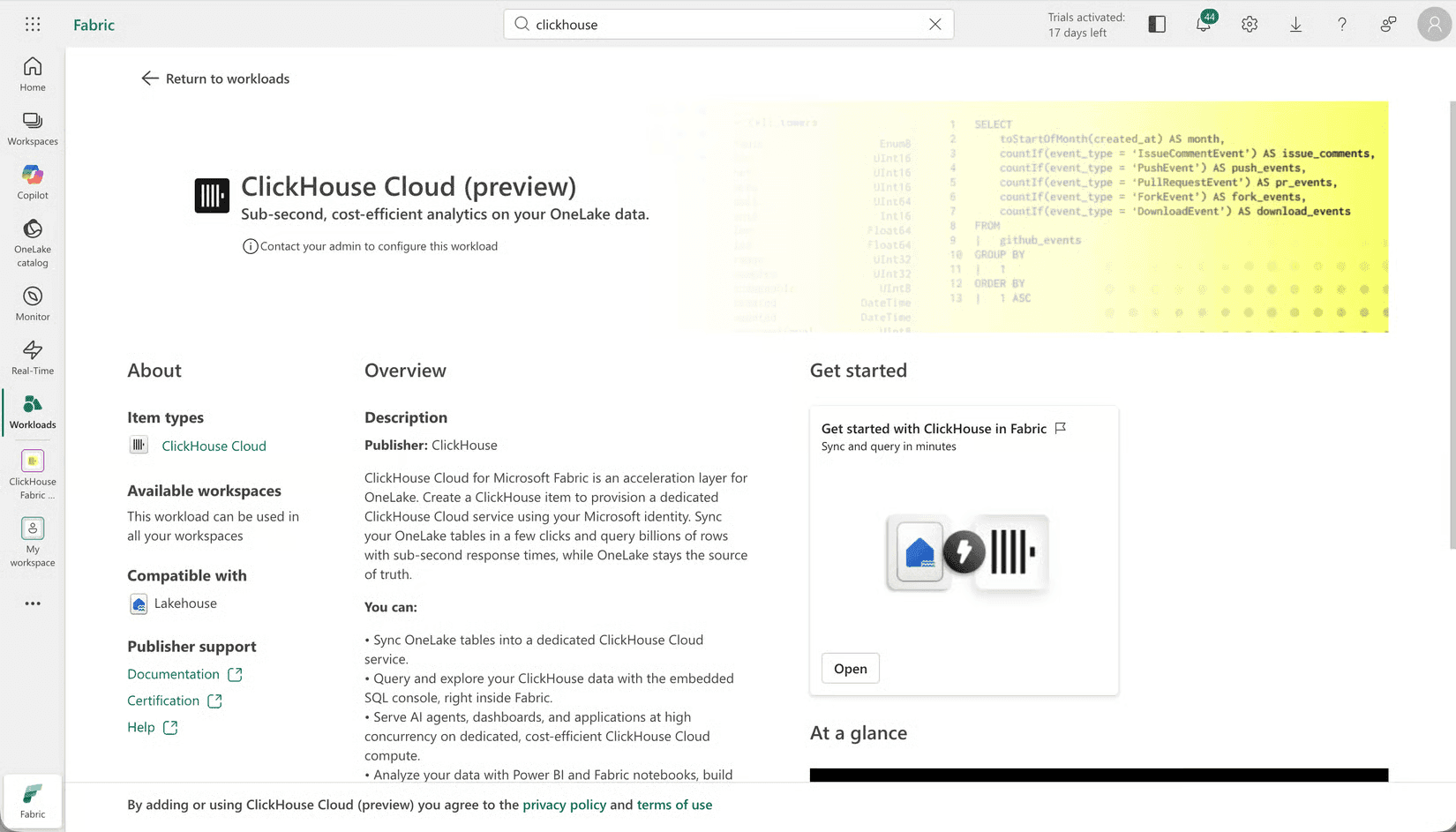
The ClickHouse workload at a glance
Sync your OneLake tables into a dedicated ClickHouse Cloud service in a few clicks, query billions of rows with sub-second response times from inside Fabric, and OneLake stays the source of truth throughout.
Creating a ClickHouse item in your workspace provisions a dedicated ClickHouse Cloud service on Microsoft Azure using your Microsoft Entra account, with a trial included.
With the workload you can:
- Serve AI agents, dashboards, and applications at high concurrency on dedicated, cost-efficient ClickHouse Cloud compute, without consuming your Fabric capacity
- Sync OneLake tables into ClickHouse as accelerated copies, with no pipelines to build or maintain
- Query and explore with an embedded SQL console right inside Fabric, saving your own queries to return to
- Connect everything: governed, read-only access for agents in Microsoft Copilot Studio and GitHub Copilot. Beyond agents, you can consume with Power BI through the certified ClickHouse connector, analyze in Fabric notebooks, or build with the official ClickHouse clients
A quick tour
Create a ClickHouse item. In your workspace, select + New item and pick ClickHouse Cloud. Your workspace is mapped to a ClickHouse organization, and your item is mapped to a dedicated service. Every member in your workspace is added as a ClickHouse user the first time they open the item.
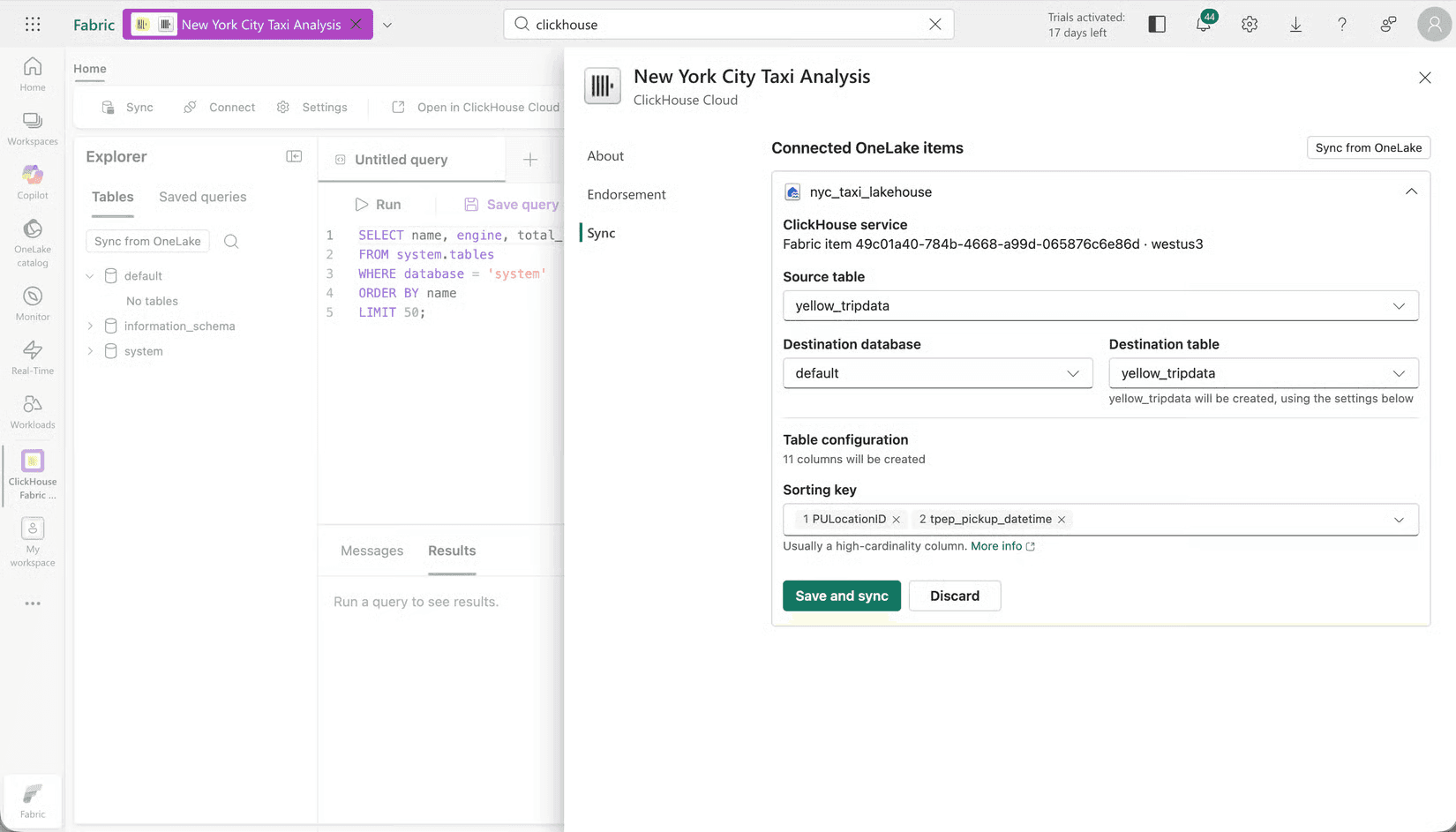
Sync from OneLake. Pick a Lakehouse, select the tables you want to accelerate, and start the sync. You can accept a destination table with inferred types, or define your own table first. In public preview, syncs are point-in-time snapshots with no ingestion charges.
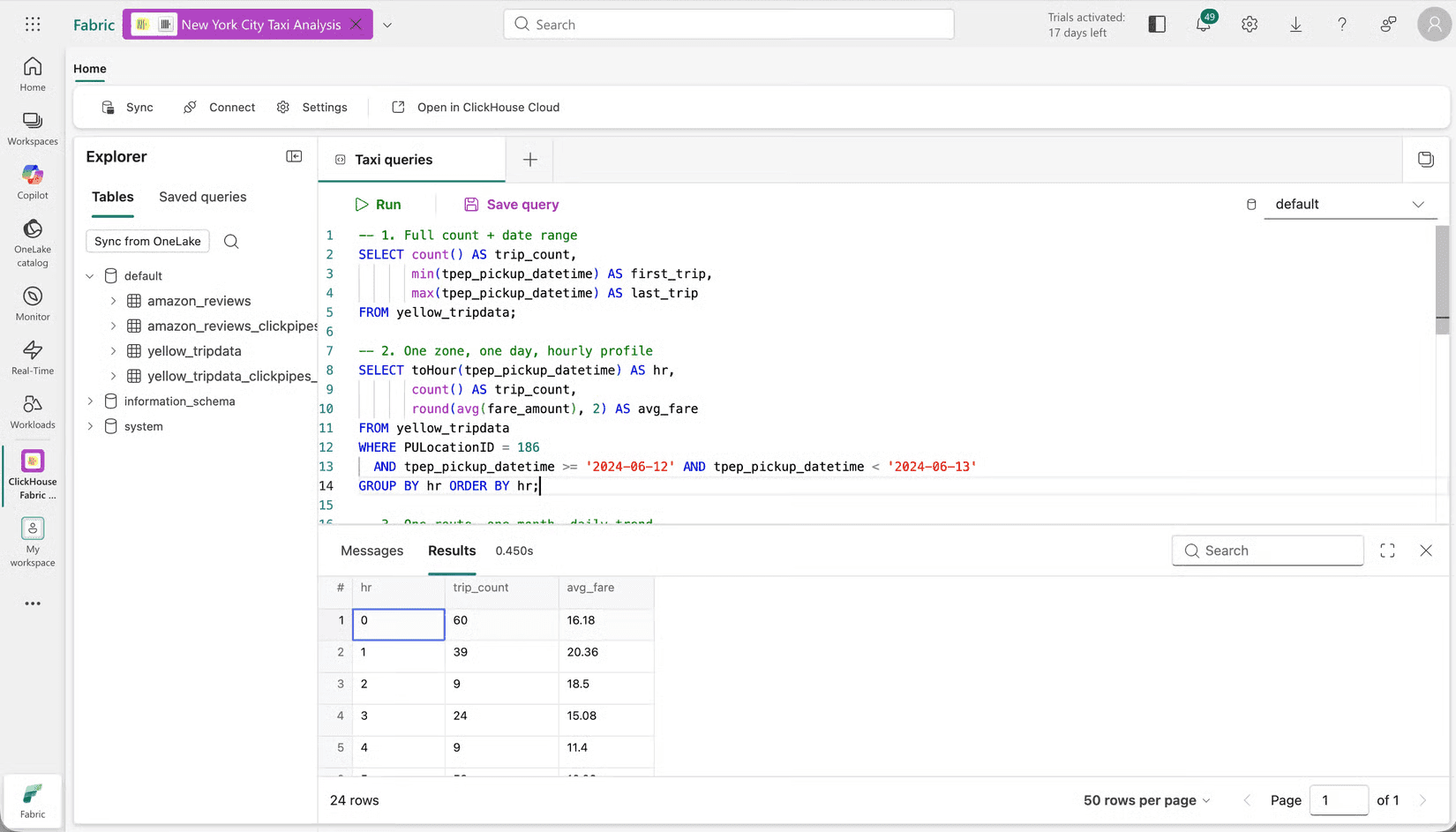
Query it. The embedded SQL console is standard SQL with ClickHouse's full analytical toolkit behind it, so existing queries and skills carry straight over. Full-table aggregations over billions of rows come back in milliseconds, consistently, even with many clients querying at once. Save the queries worth keeping and come back to them anytime. In public preview, saved queries are personal to each user.
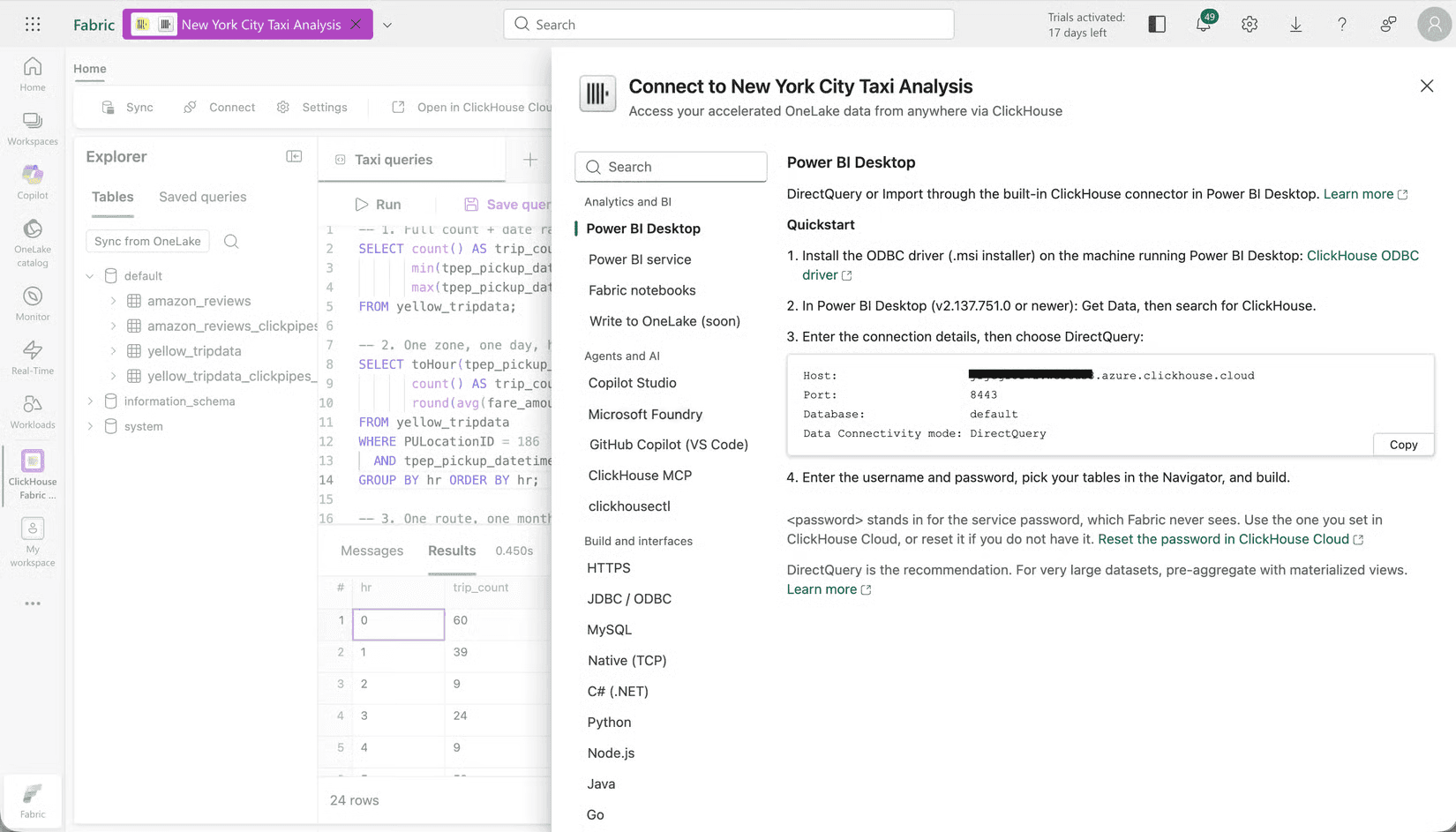
Connect your tools. The Connect screen has copy-paste quickstarts for everything that can reach the service. Turn on agent access and the service becomes a governed, read-only endpoint for Copilot Studio, Microsoft Foundry, GitHub Copilot, and any MCP-compatible tool. Quickstarts also cover Power BI Desktop and service, Fabric notebooks, HTTPS, JDBC/ODBC, MySQL protocol, and the official clients for Python, Node.js, Java, Go, C#, Rust and more.
Open in ClickHouse Cloud. One click takes you to the Cloud console, signed in with Microsoft SSO, for scaling, idling, monitoring, backups, and everything else administrators need. Day to day, you can stay in Fabric and the Cloud console is just a click away when you need it.
Under the hood
Going a bit deeper, here's how a third-party database becomes a native Fabric experience.
Provisioning. The workload is built on the Fabric Extensibility Toolkit. When you create a ClickHouse item, Fabric calls our backend through the item lifecycle API, and we provision the organization, service, and trial automatically. Users are created just-in-time through a token exchange. The Fabric Workload Client SDK hands us your Entra token, we validate it and establish the matching ClickHouse Cloud identity, deterministically derived from your tenant and object IDs. Your ClickHouse organization role is mapped from your Fabric workspace role, so admins arrive as admins and viewers arrive read-only.
Syncing. Every sync from OneLake runs through ClickPipes, the same managed ingestion machinery that powers our object storage pipes for S3 and Azure Blob Storage. The ClickPipe reads the table directly from OneLake using your authorized credentials, maps the types, and streams the data into your service. Data flows directly between OneLake and your dedicated service, and because everything runs within Azure, there are no egress costs.
The engine. The service behind the item is ClickHouse Cloud on Azure, provisioned in the region nearest your Fabric capacity. These are our supported regions, which include EU regions for data residency requirements. This is dedicated compute that scales vertically and horizontally, with idling enabled by default. And because it's billed through the Microsoft Marketplace as dedicated infrastructure, agent and application load never competes with your Power BI capacity.
For security, privacy, and compliance details, view our vendor attestation.
What's next
The most common asks from teams we've spoken with are write-back to OneLake, permission sync, and deeper Microsoft Power BI integration, and that's where we're headed. Here's what we're looking to build next:
- Write-back to OneLake: bringing OneLake write into the workload, so accelerated results, like materialized view output, land back in your Lakehouse for Power BI, semantic models, and the rest of Fabric to consume
- Richer replication: continuous sync from OneLake, beyond today's point-in-time snapshots
- Permission sync: more granular access control, carrying OneLake's permissions into ClickHouse
- A deeper workload experience: more access control and shared saved queries for collaboration, private networking with Private Link, and more of the service's management and administrative capabilities surfaced directly in Fabric
- Purpose-built experiences on ClickHouse strengths: full-text search, vector search, and materialized views, surfaced as first-class experiences inside the Fabric workload
Get started
The workload is live in the Fabric workload hub today, with a trial included on the ClickHouse Scale tier. The documentation includes a getting started tutorial built on Fabric's public holidays sample data. With it you can try the whole flow, sync, query, Power BI, even asking an agent, without bringing your own dataset.
Try it with your own OneLake tables and let us know what you think. This is a public preview, and the feedback we get now shapes what ships next.
Get started today
Interested in seeing how ClickHouse works on your data? Get started with ClickHouse Cloud in minutes and receive $300 in free credits.
Sign up