50.5k
50.5k
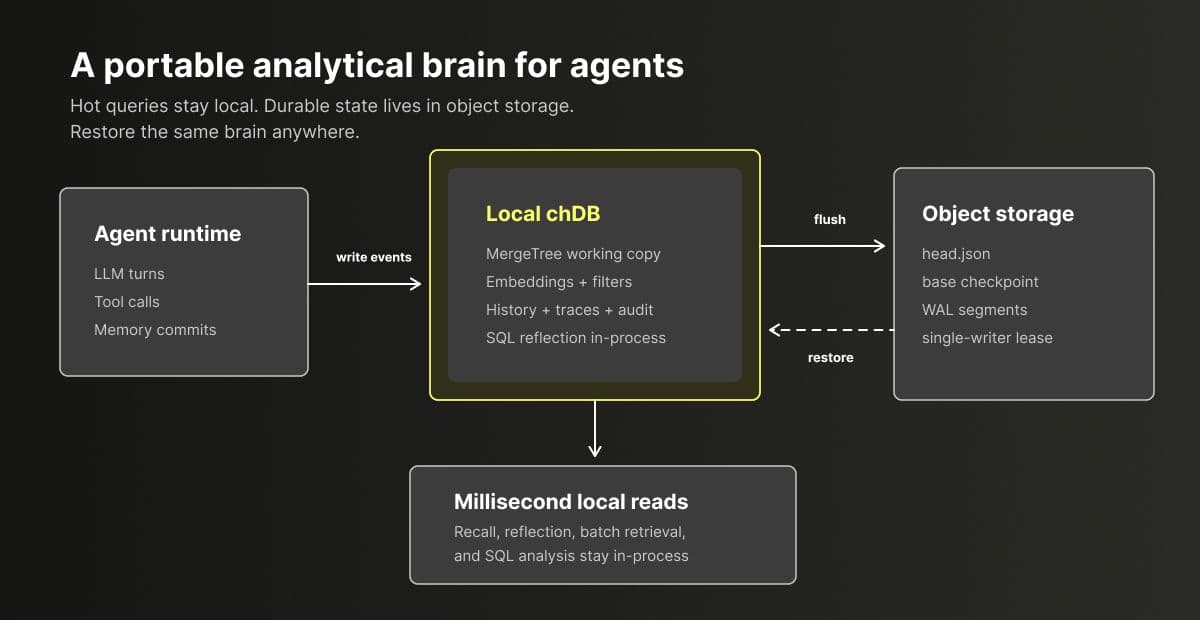
The state that did not come back with us
Here is how it started for us.
We were building agent memory on top of chDB, an embedded SQL OLAP engine powered by ClickHouse. A coding agent had been running on one laptop for weeks, and its embedded chDB had quietly accumulated a lot of state: project rules, user preferences, decisions that had been revised twice, the raw transcripts behind those decisions, and traces showing which memories were recalled for which tasks. The setup worked well. Recall was a local query, and no data had to leave the machine.
Then the story stopped being just one laptop. The same memory needed to show up in CI, inside a sandbox that might disappear after an hour, and on a second laptop. That is when the local-disk assumption started to hurt: the memory lived in a MergeTree directory on one disk, and that disk did not exist anywhere else.
Our first fix was to add a ClickHouse server backend. That solves portability, but it breaks the part we liked most: recall is a local function call, not a network round trip. Every tool call now has to pay for credentials, connection management, and remote latency. What used to be a directory now needs a service to run or rent.
That left a gap between a local single-machine store and a cloud database server. For agent memory, we wanted something lighter: a way to publish recoverable analytical state to storage we own, without turning every recall into a remote query and without asking the user to operate a server.
The requirement became simple: we needed a local analytical database whose state could survive the host that created it. That is the problem the chDB Durable Layer solves: a small durability layer around chDB that keeps recoverable state in object storage.
How people usually handle agent memory today
Before getting into the chDB Durable Layer, it helps to look at how agent memory is usually stored today. None of the following options are wrong. Each one is good at a different part of the problem, and the gaps are what define the space for the chDB Durable Layer.
Embedded key-value state: SQLite checkpointers and simple memory stores. This is the common and reasonable starting point. LangGraph has SqliteSaver, and the OpenAI Agents SDK has SQLiteSession. In this pattern, the local store preserves runtime state and small facts across sessions, so the agent can resume where it left off. These systems are small, transactional, embeddable, and mature.
The mismatch shows up when memory becomes history. We wanted to ask where a memory came from, which transcript supported it, which older belief it replaced, which recalls never helped, and whether a failed tool call created bad state. Those questions need filtering, grouping, sorting, joins, audit trails, and batch recall. They are OLAP questions over append-only memory, traces, and conversation history. SQLite can store the checkpoint, but it is not the shape we wanted for analyzing that history, and it still tends to be tied to a file or directory on one machine.
Replicated local SQLite: SQLite plus Litestream. Litestream is a replication tool for SQLite: it continuously copies WAL files to object storage, so a new process can restore the database from the bucket. This fixes the single-disk problem for SQLite. It still leaves you with a row-store database and a replication process to run.
Server database or memory platform: Postgres, pgvector, server-side ClickHouse, Letta, mem0 Platform, and Zep Cloud. For team-scale deployments, multiple writers, and shared services, this is often the right answer. You get shared access, centralized operations, and real concurrency. The cost is that the agent now depends on a remote service: network calls, credentials, connection management, and a system someone has to run. For a single-user or single-project memory that mainly works on one machine, this can be too much infrastructure just to keep a recoverable copy.
Vendor-owned durable state: Cloudflare Durable Objects. Durable Objects have an elegant shape: every object has an identity, single-threaded execution, and bound persistent storage. That identity plus single-writer model is close to what we wanted. The tradeoff is vendor coupling and less transparent storage: the object lives behind the platform boundary, and the model is closer to application state than embedded columnar analytics.
Local embedded OLAP DB: DuckDB or chDB. Local OLAP is fast, serverless, and pleasant to use. This is exactly the hot path we wanted to keep. The remaining problem is the one that started the story: state is still just a directory on one disk.
| Option | Where compute runs | Durability | Ops burden | Writers | Analytics |
|---|---|---|---|---|---|
| SQLite agent checkpointer / memory store | In process | Local file | None | One process | No analytical history scans |
| SQLite + Litestream | In process | WAL replicated to object storage | Sidecar, PVC / StatefulSet | One process | Still OLTP; Row-store plus sidecar |
| Postgres / pgvector / server-side ClickHouse / hosted memory service | Remote service | Handled by the service | Run or rent a service; hot path crosses the network | Many | Server required; hot path crosses network |
| Cloudflare Durable Objects | Inside the platform | Handled by the platform | Platform binding | One per object | Platform-bound; not columnar |
| DuckDB / chDB on local disk | In process | Local disk | None | One process | Tied to one disk |
| chDB Durable Layer | In process | Your object storage, with explicit flush() / checkpoint() | One bucket | One per object, enforced by lease | Full columnar OLAP, recoverable state |
The last row is the missing shape: keep the in-process OLAP hot path, put the authoritative copy in storage you own, and avoid a database server, PVC, or sidecar.
The chDB Durable Layer: local working copy, authoritative bucket copy
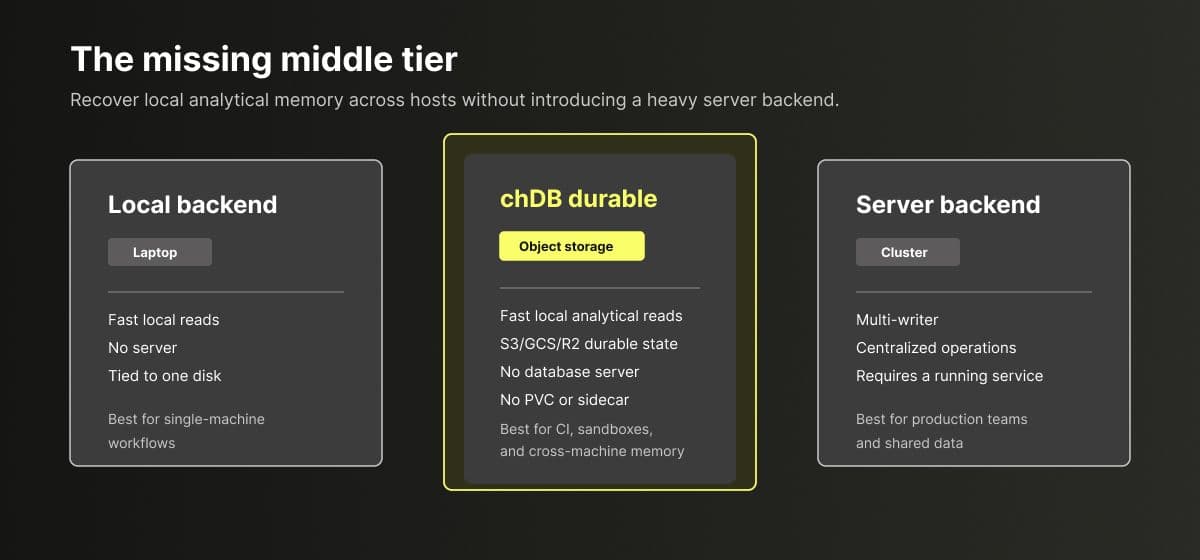 The chDB Durable Layer is an addressable, single-writer, recoverable embedded analytical object. Each object is a complete chDB database. You open it by name inside a namespace, query it locally, and choose when local state becomes durable.
Install chDB 4.4 or later with the durable extra. This includes the S3 backend. GCS and Azure Blob use separate extras.
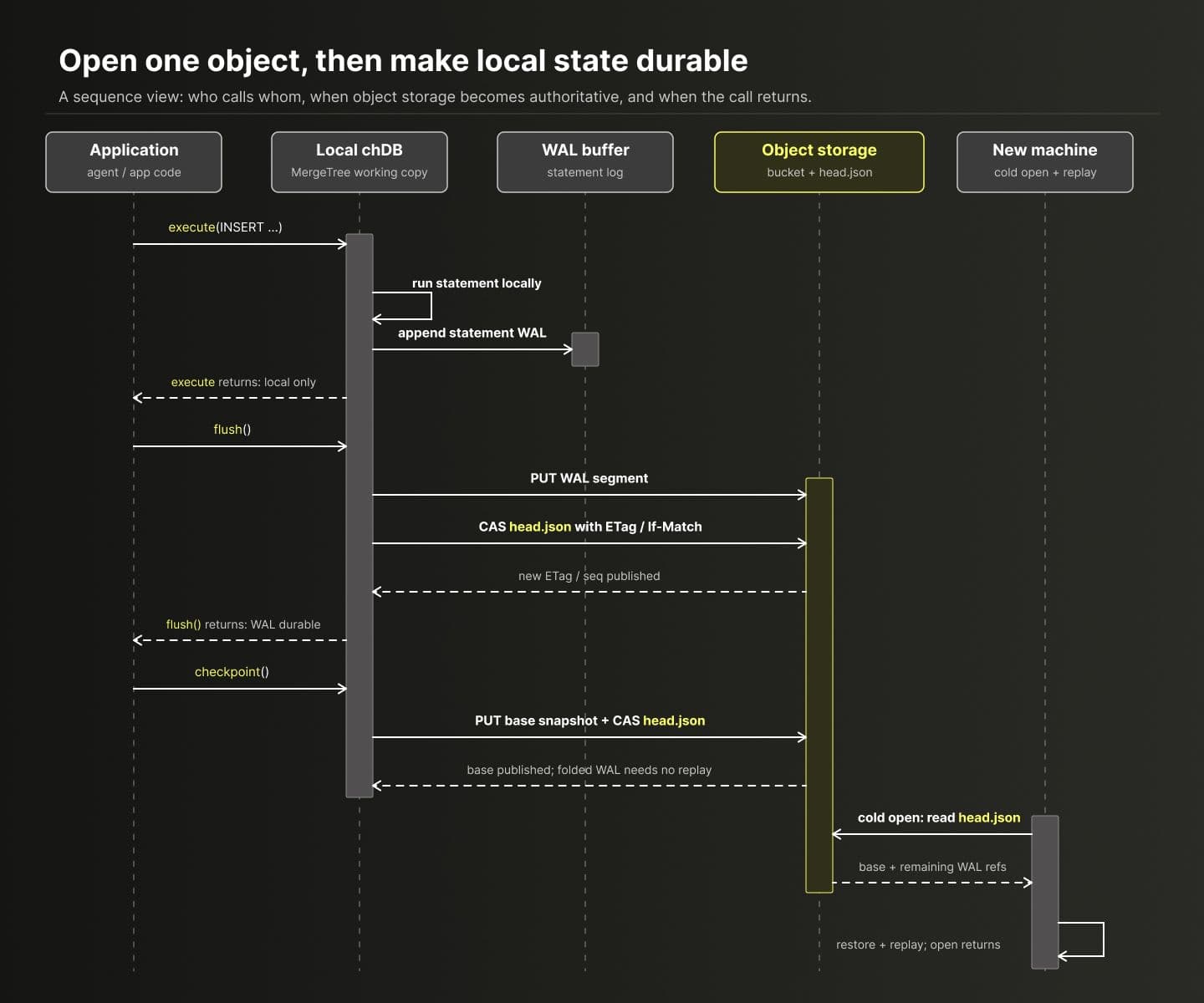
pip install "chdb[durable]"The sequence diagram below shows how Durable backs up local state and restores it on another machine:
End-to-end example: write and recover
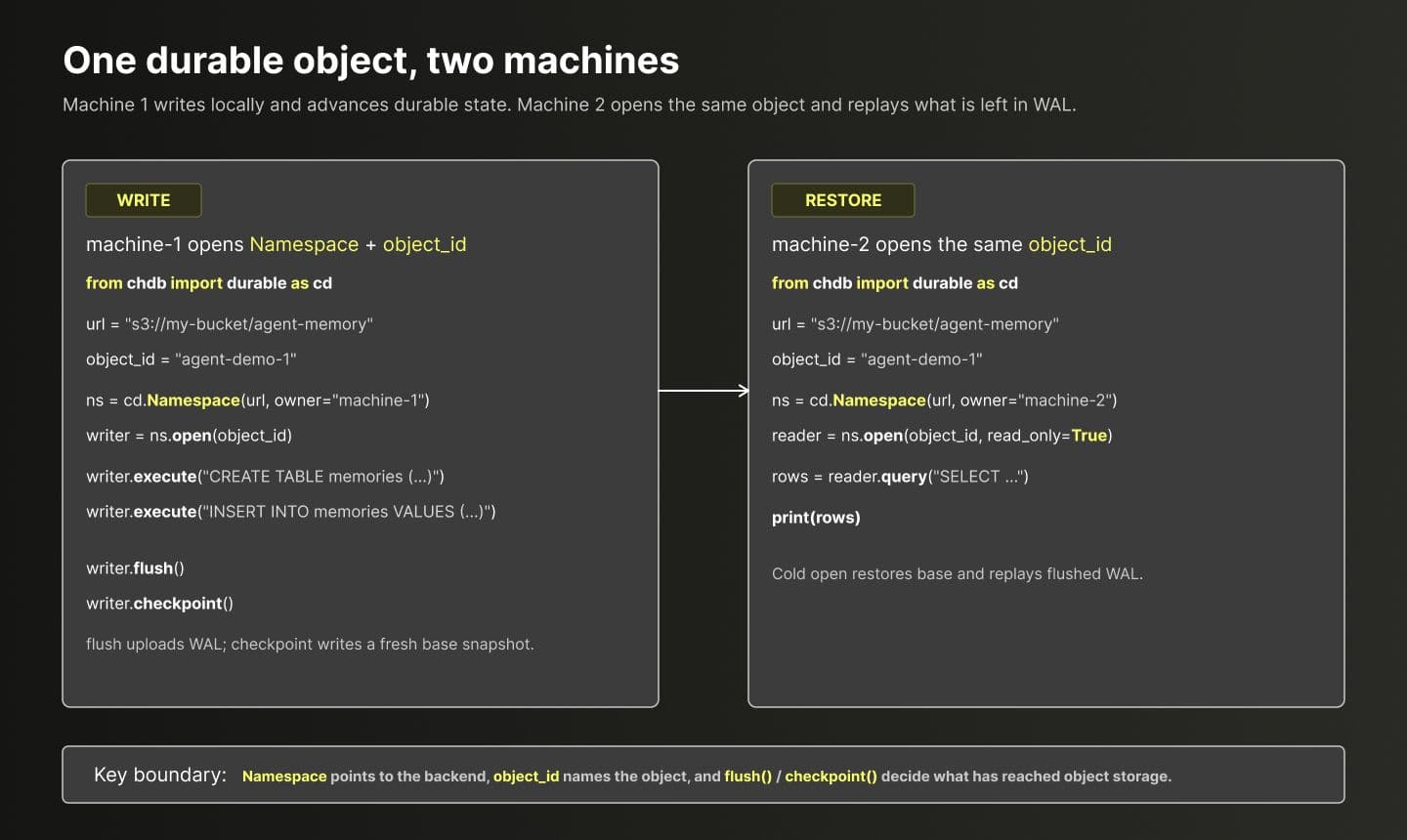 The interface is small. It has five parts.
| Part | Role |
|---|---|
| ● Local MergeTree working copy | Queries run against an embedded chDB database on local disk, so the hot path does not need a remote round trip. chDB uses the same on-disk format as ClickHouse Local, so the working copy is an ordinary ClickHouse database directory, not a proprietary cache. See chDB joins the ClickHouse family. |
| ● Object storage as the authoritative state | The copy that counts lives in a bucket you own. s3:// is the main backend. chdb[durable] installs boto3, and S3-compatible stores that support conditional PutObject can be used through CHDB_DURABLE_S3_ENDPOINT. gcs:// is provided by chdb[durable-gcs] with GCS generation preconditions. azure:// is provided by chdb[durable-azure] with Azure ETags. local: is for development and single-machine use. |
● flush() is the durability boundary | Writes stay local until the application asks to publish them. When flush() returns, the writes it covers have reached object storage. The application chooses this boundary, which matters for small continuous writes. |
● checkpoint() folds the log | Between checkpoints, durable state consists of a base snapshot plus WAL. checkpoint() writes a new base snapshot, so the next open does not have to replay a long log. |
● head.json plus conditional writes gives a lease | Each object has a head record in the bucket. Compare-and-swap writes against that record acquire and advance ownership, giving single-writer lease and fencing semantics. Two processes should not both believe they own the same embedded database. |
The boundaries are worth spelling out:
- It is single-writer. For one “brain” per user or project, this is a useful property. For a shared team database, it is the wrong tool.
- The V1 WAL replays write statements, so those statements must be deterministic.
INSERTstatements that callnow()are a typical thing to avoid. - It is not an OLTP database and not a Postgres replacement. High-frequency point updates and multi-writer transactions belong in another system.
More than another storage backend
If the only requirement is “save this checkpoint,” SQLite already does that. Adding another backend would not be interesting in itself.
What the chDB Durable Layer adds is a deployment shape that was missing: embedded OLAP over a recoverable working copy, with the authoritative copy in storage you own and no service in between.
- Local compute: hot queries stay inside the agent process.
- Analytical layout: MergeTree fits compressed append-only history, batch recall, filtering, aggregation, and vector-assisted search.
- Portable durability: the same object can be recovered on another laptop, in CI, or inside a short-lived sandbox.
- Explicit control: the application decides when to call
flush()and when to callcheckpoint(). - No service to run: no database server, PVC, or replication sidecar. SQLite keeps local state from disappearing. The chDB Durable Layer keeps local analytical state recoverable while still letting the agent analyze it locally.
What this buys you in practice
While building the chDB Durable Layer, three properties kept showing up as the reason it fit agent memory.
Keep hot queries local; only persist decisions. The hot analytical work stays inside the chDB process. The Durable Layer only publishes state worth carrying across machines: committed memories, revisions, checkpoints, and the evidence behind them.
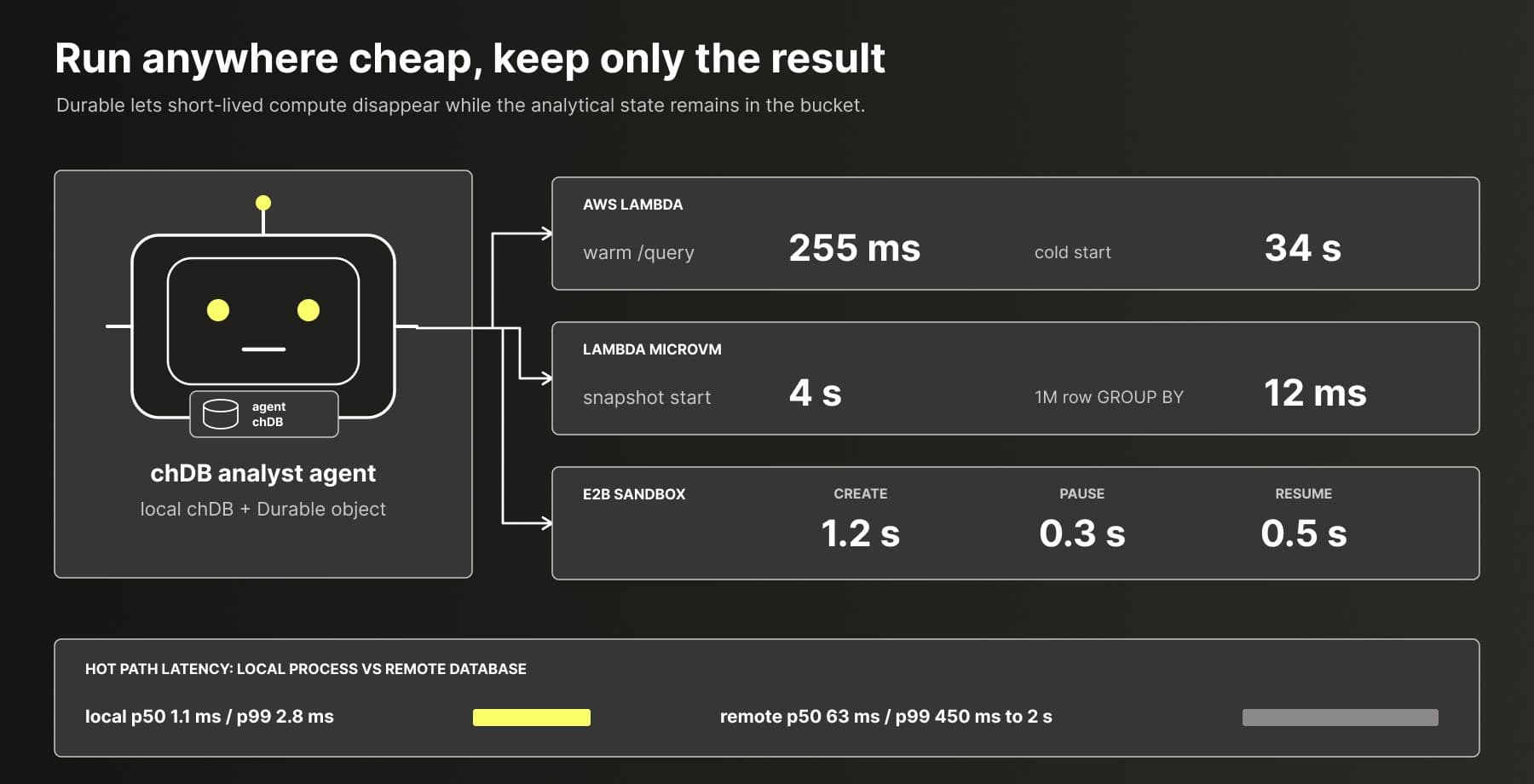
The chDB cookbook’s Deploy a chDB analyst recipes show this operating model across Lambda, Lambda MicroVMs, Cloud Run, Azure Container Apps, and E2B: the agent runtime can be created, restored, paused, and destroyed with lifecycle costs in the seconds or sub-second range, so the compute instance does not have to be the durable thing. In our local-vs-remote benchmark, local queries were 58x faster than remote queries, which is the other half of the point: hot recall should not become a remote database round trip.
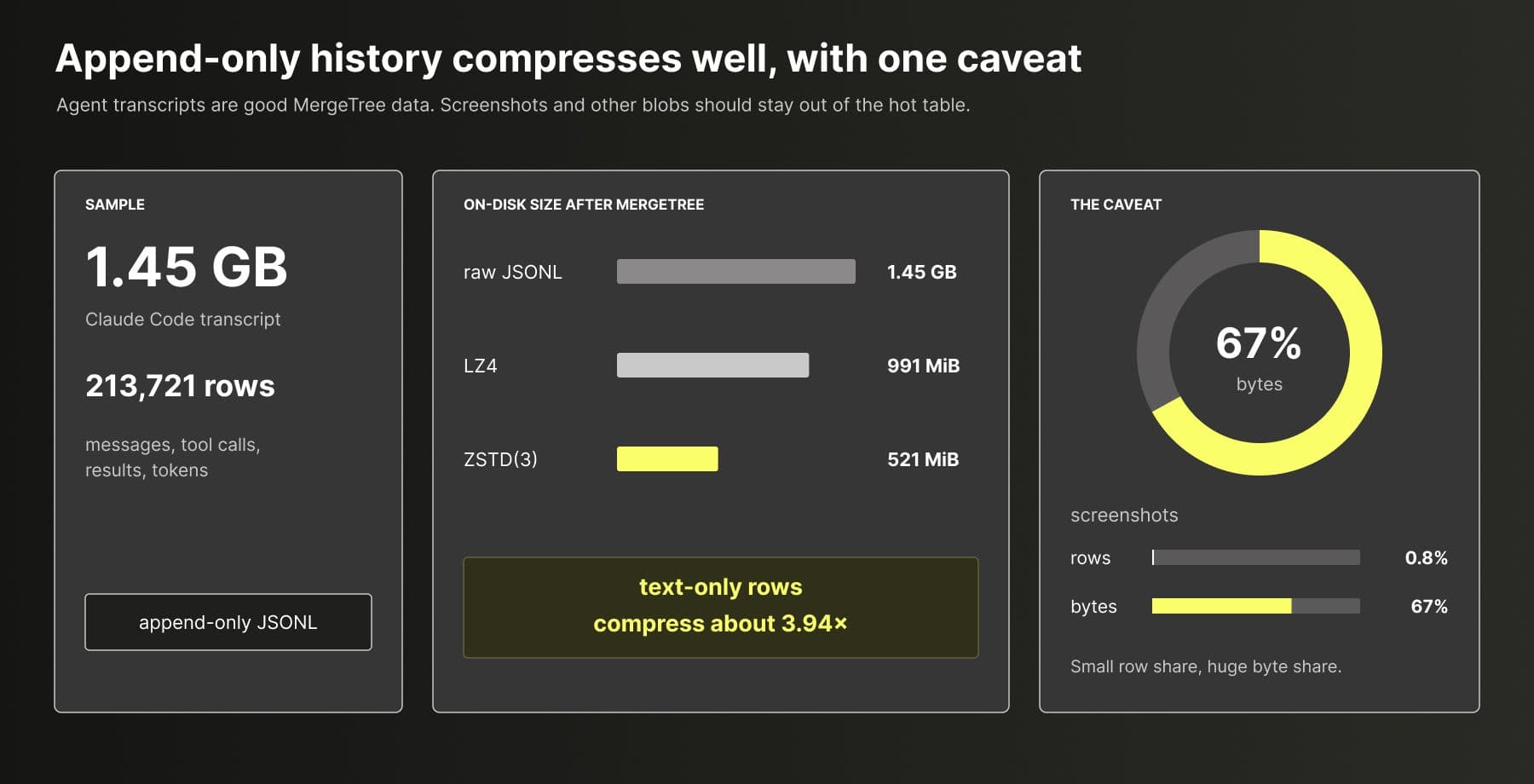
 Append-only memory compresses well. Agent memory is mostly append-only JSONL: messages, tool calls, tool results, token counts, revisions, and evidence. In a small local experiment, a 1.45 GB Claude Code transcript sample with 213,721 rows became 521 MiB with ZSTD(3), or 991 MiB with LZ4, after loading into MergeTree.
The text compressed well. The expensive part was screenshots: they were only 0.8% of rows, but about two thirds of the bytes in this sample. That is why binary blobs should live outside the table, with references kept in typed columns.
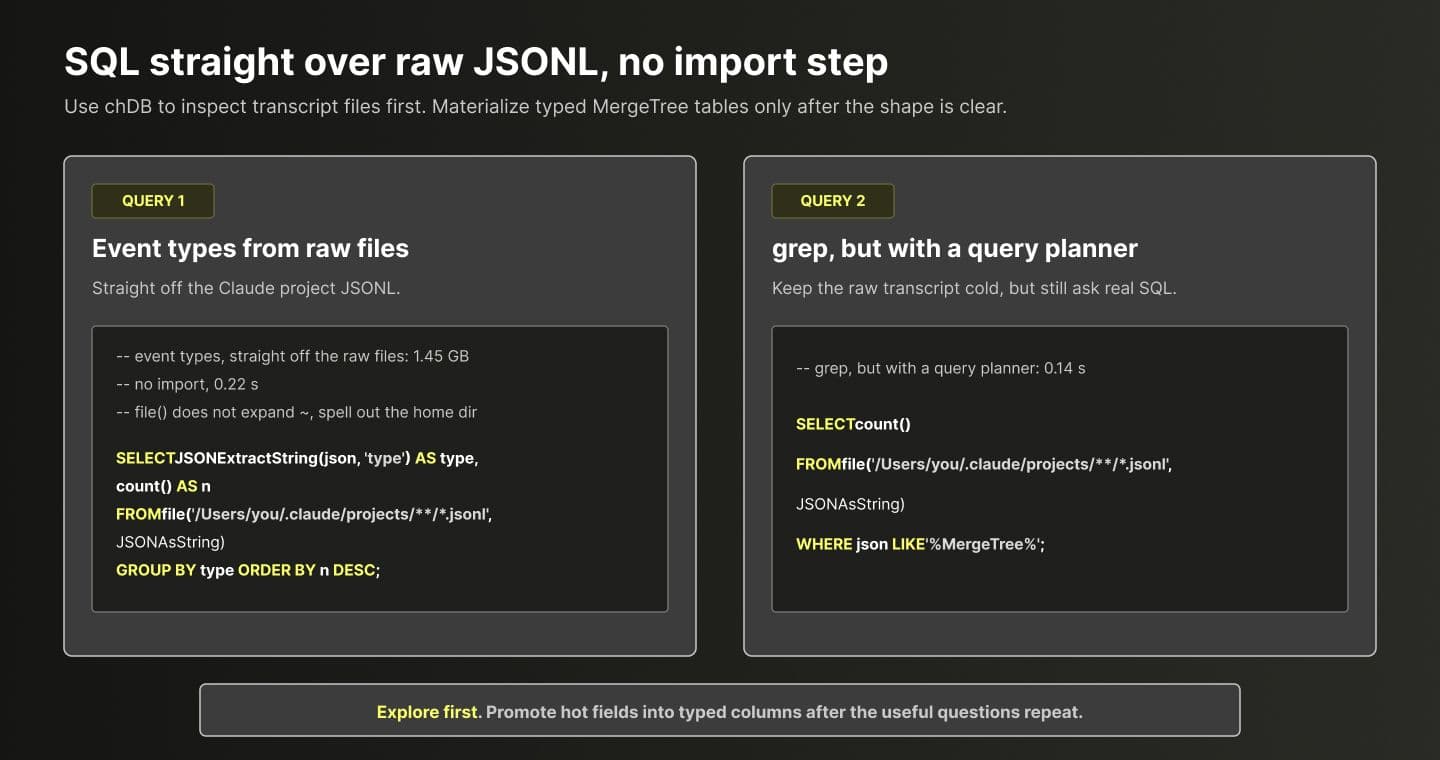
 Query raw JSONL before modeling it. chDB can query
 file(..., JSONAsString) directly, so you can inspect transcripts before deciding on a schema. That is useful early on: count event types, search for tool names, find expensive calls, then promote repeated fields like project, timestamp, model, tool, tokens, and cost into typed MergeTree columns.
The two query cards below show the shape: one query groups raw event types, and the other searches the same JSONL corpus without an import step.
 Other people have noticed the same pattern. Subara3’s
 ccsql loads Claude JSONL into a typed MergeTree table and ships cost, tool, cache, session, and heatmap reports, while claude-scope turns Claude history into a local dashboard. Those projects show the ingest and query side; Durable adds the portability layer for the resulting MergeTree state.
Best practices
These patterns come from building the system and from the projects below.
Model memory as append-only tables, not as one document. Useful tables include memories for current beliefs, memory_history for revision rows, raw_evidence for cold transcripts and tool output, recall_traces for what was recalled and whether it helped, conflicts for semantically close rows that contradict each other, and tool_events. Append rows with a version or timestamp. Soft-delete with flags. Derive current state with ORDER BY version DESC LIMIT 1 BY memory_id. The agent local data engine post shows current-state queries, full-history queries, and point-in-time queries.
Keep raw evidence cold and compressed, and keep blobs out. Put transcripts and tool output in raw_evidence with CODEC(ZSTD(3)). Text commonly compresses by about 4x, and the hot path does not read it. Screenshots and other binary payloads should live in an external bucket, with only keys stored in the table. Otherwise they dominate every checkpoint. Columns used for filtering and grouping should be typed, with LowCardinality where it fits, so hot queries do not have to touch JSON.
Flush after meaningful batches, not after every row. Agent writes are often a stream of small events. Let the working copy absorb them, then call flush() at boundaries such as the end of a task, the end of a tool loop, or after N committed memories. The interval between flushes is the amount of data loss you are willing to accept.
Checkpoint at compaction points. Good checkpoint moments include after a bulk import, after many revisions, at the end of a long session, or before handing an object to another host. A fresh base snapshot makes the next open faster and keeps the log short.
Use one writer per object name. The lease enforces this, and the application should lean into it. If two workers must write concurrently, use two objects or use a server database.
Use one namespace per user or project. Namespace("s3://bucket/agent-memory", owner=...) plus object names such as user-123 or org/repo keeps failure domains small, makes deletion a prefix operation, and leaves room to list or query objects later.
Know when to use a server. If you need multi-writer collaboration, sub-millisecond point updates from many clients, a working set larger than local disk, or centralized compliance controls, use server-side ClickHouse or Postgres. The SQL and MergeTree layout can still carry over, and remote() gives you a migration path without rewriting the application.
Example: ClickMem
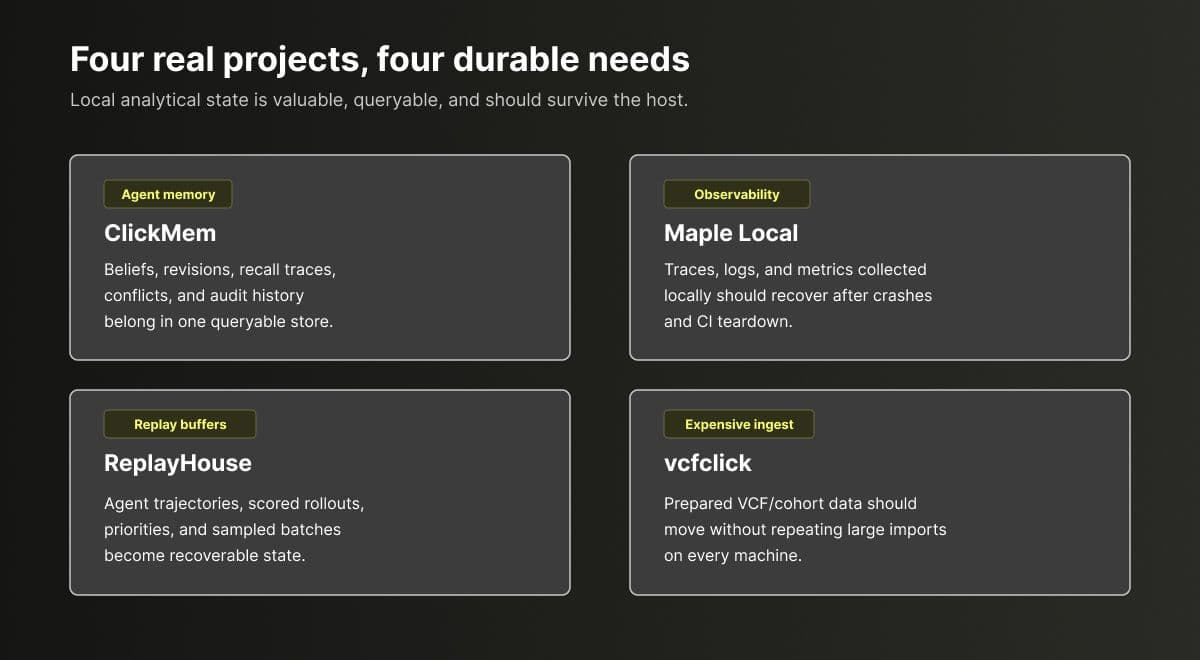 ClickMem is the project that pushed this work into focus, and it is the clearest example of the Durable use case.
ClickMem deliberately avoids turning itself into a “chat history vector database.” Nothing becomes memory automatically. A fact enters the store only when a user or agent explicitly submits it with clickmem_remember, or when curated documents such as AGENTS.md and .cursor/rules/*.mdc are imported. Raw transcripts are kept as cold evidence: searchable and auditable, but not injected into context as memory. On top of that is a belief revision model with five operations: expand, revise, contract, reinforce, and refuse. When a new memory is semantically close to an existing memory but disagrees with it, both rows are marked as a conflict until someone resolves it. Each recall can produce a trace explaining why a result matched.
From a data-modeling point of view, this is exactly the set of tables described above: committed memories, revision history, cold transcripts, conflicting rows, recall traces, plus scopes for projects, privacy, and labels. The ClickMem dashboard answers history questions. How did this belief evolve? Which conflicts are open? Why did this recall match? Which transcript produced this memory? That is why it runs on chDB and MergeTree instead of a key-value store.
Today ClickMem has two storage modes. A single machine or LAN-shared host uses embedded chDB under ~/.clickmem/data. Multiple devices can share memory through ClickHouse server. It also has export / import, including embeddings, to move a brain by hand.
The chDB Durable Layer adds a third shape between those two. The hot path stays embedded, and recall remains a local query. The authoritative copy for each user or project lives in that user’s bucket. The same object can be opened later on another laptop, in a CI job that needs project rules, or inside a sandbox that will disappear in an hour. Flush after each batch of committed memories, checkpoint after imports and conflict-resolution passes, and use one object per project. Then the memory store no longer depends on the machine where it was first built.
Three other shapes of the same problem
Agent memory is the obvious example, but the same pattern shows up anywhere an embedded analytical database stops being a disposable cache.
Maple Local: local-first observability. Maple Local receives traces, logs, and metrics, embeds chDB, and provides local queries and dashboards. Once the database contains telemetry gathered over days, durability becomes a product feature: crash recovery, dirty-store recovery, checkpoint, and restore. Durable moves that recovery pattern into the database layer while letting the application decide when to flush, when to checkpoint, and how to name each object.
ReplayHouse: replay buffers and training state. ReplayHouse is a ClickHouse-based replay buffer that uses embedded chDB for local work: it stores trajectories and scored rollouts, samples weighted training batches, writes training errors back as priority, and queries exactly what the trainer consumed. That is hidden long-lived state in the middle of a workflow. A replay buffer contains expensive experience gathered over a long run. With Durable, it can flush at batch, epoch, or milestone boundaries and move from laptop to CI to training machine. Because the engine is still chDB, sampling distribution and priority drift remain inspectable with SQL.
vcfclick: query-ready data after expensive import. vcfclick is a research bioinformatics VCF database built on embedded ClickHouse, with DuckDB annotation and an MCP natural-language layer. The raw VCF files may already be safely stored elsewhere. The expensive asset is the prepared state: imported, normalized, annotated, indexed, and ready to query. Without a durable checkpoint, every new machine has to repeat that import. With one, a prepared cohort database can be checkpointed once and reopened anywhere as a local query copy.
Current status and coming soon
The Durable V1 contract is now shared across the bindings. chDB 4.4 ships the Python implementation with chdb[durable] for S3-compatible storage, plus chdb[durable-gcs] and chdb[durable-azure] for native GCS and Azure Blob. Node, Go, and Rust now expose the same object layout and lifecycle through chdb@3.4.0, chdb-go/v2@2.2.0, and chdb-rust@2.0.0.
All of them build on the Durable V1 pieces in chdb-core 26.7.3: backup, restore, statement classification, head.json, WAL, checkpoints, CAS, lease behavior, error categories, and cross-binding fixtures. An object written by one binding is meant to be recoverable by another binding that speaks the same contract.
For local-first agent systems, the shape is simple: no database server, no PVC, no replication sidecar, and no remote call on every recall. The database stays embedded. The state survives the machine.
Agent memory may not need a larger context window as much as it needs a local analytical brain that can survive a move.
Try it next
- Install
pip install "chdb[durable]", open a namespace on a bucket you own, and attach an existing chDB memory table to it. - For a clearer runnable example, read the durable-agent-memory cookbook recipe.
- For the full Durable contract and implementation details, see chdb durable docs.
- If you have a use case, question, or design feedback, start a discussion in chdb-io/chdb.
Get started today
Interested in seeing how ClickHouse works on your data? Get started with ClickHouse Cloud in minutes and receive $300 in free credits.
Sign up