 50.3k
50.3k
Amazon Aurora has been the go-to choice for scaling PostgreSQL workloads on AWS. But as your application grows and data ingestion volumes reach certain thresholds, you start to see cracks in the architecture.
For engineering teams managing high-velocity event streams, complex telemetry data, or heavy analytical aggregations, Aurora's I/O charges become unpredictable. And as your dataset grows into the multi-terabyte range, I/O-amplifying maintenance operations compound costs in ways that can feel like a pricing cliff. AI workloads sharpen the problem. Agent-driven requests collapse the old line between transactional and analytical queries, so a single row-store engine now must handle both unpredictable OLTP bursts and heavy aggregations simultaneously.
This guide helps you match your specific workload shape to the right managed database alternative. Depending on your constraints, you might stay on native AWS infrastructure, move to an Aurora-class competitor, or adopt a unified transactional and analytical stack.
The focus is on cost predictability, raw write throughput, and the architectural realities of scaling.
TL;DR
- Aurora breaks down for high-ingest workloads due to unpredictable I/O costs and a single-writer bottleneck. Like every row-store Postgres, it also suffers when analytics queries compete with OLTP, but Aurora's per-I/O pricing makes that contention more expensive than on fixed-cost alternatives.
- If you have a narrow, well-defined read pattern and can redesign your data model, choose DynamoDB for AWS-native, horizontally scaled writes.
- If you must stay on AWS-native services and want predictable bills, choose RDS for PostgreSQL (io2).
- If you're willing to move to GCP for an Aurora-like experience with better analytics acceleration, choose AlloyDB.
- For high-volume ingestion and heavy analytics, the recommended path is Managed Postgres by ClickHouse, a Unified Data Stack where vanilla Postgres on local NVMe handles OLTP as the system of record, and native CDC via ClickPipes feeds ClickHouse for OLAP, one console, one bill.
Why teams outgrow Amazon Aurora and how to choose an alternative (5 criteria)
Outgrowing Aurora rarely means your database is failing completely. Most of the time, it's about architectural friction that builds gradually.
The system works great until your ingestion rates, storage volumes, or querying patterns trigger fundamental bottlenecks in Aurora's custom storage layer. You need to understand exactly how and why Aurora breaks under pressure before you can evaluate alternatives properly.
How Amazon Aurora I/O pricing creates unpredictable costs
The most common reason teams migrate off Aurora is the billing shock from storage I/O operations.
Aurora Standard pricing uncouples storage volume from storage performance, charging $0.20 per million I/O requests. For read-heavy applications with predictable cache hit ratios, this adds negligible cost.
For high-volume ingestion workloads, heavy indexing, or analytical queries that sweep through tables sequentially, these per-request I/O charges generate unpredictable and often staggering monthly bills.
AWS tried to fix this with Aurora I/O-Optimized. This tier eliminates per-request I/O charges entirely, which sounds like a reprieve for write-heavy applications. The tradeoff is that I/O-Optimized requires significantly higher baseline compute and storage costs.
This creates a tricky cost-model situation. Amazon says I/O-Optimized only saves money when your I/O spend consistently exceeds 25%of your total Aurora bill. So your team has to predict whether your workload's I/O patterns will stay aggressive enough to justify the elevated fixed baseline.
The cost picture changes shape past 10 TB. At smaller volumes, per-I/O charges are an annoyance line item. At 10 terabytes and beyond, the operations that scale with data size all compound the same per-I/O cost, including snapshot creation, cross-region replica provisioning, routine vacuum and analyze passes, and point-in-time restores. Each one touches storage proportional to the dataset size. What teams report is a discontinuity where infrastructure spend jumps to a different order of magnitude once data crosses that threshold. The pricing cliff isn't a fixed dollar amount, but the point where I/O-amplifying maintenance work overtakes serving traffic in your bill.
Evaluation criterion: Cost predictability. You need to distinguish between solutions offering fixed, provisioned-resource pricing and variable, usage-based models that penalize burst ingestion.
Why Amazon Aurora hits a single-writer bottleneck on bulk inserts
Aurora achieves its durability by replicating data six ways across three distinct Availability Zones. To acknowledge a write as durable, the system needs a quorum consensus of four out of six storage nodes.
This replication architecture provides exceptional fault tolerance, but it creates a bottleneck during massive bulk insert operations.
In a standard Aurora cluster, one primary writer instance accepts write traffic and performs all data modifications to the shared cluster volume. Under high-concurrency ingestion, especially with many small autocommit inserts, the writer can spend increasing amounts of time waiting for the Aurora storage subsystem to acknowledge transaction commits. In Aurora PostgreSQL, this pressure shows up as elevated IO:XactSync waits.
Unless you carefully batch transactions and group write operations into single commits, the quorum replication physics will throttle bulk-insert throughput, no matter how large you scale the primary compute node.
Evaluation criterion: Write throughput & bulk-insert behavior. Any viable alternative needs to handle high-velocity event streams and massive batch operations without artificially throttling concurrent connections.
How Amazon Aurora failover affects application availability
High availability in a distributed database is only as valuable as your application's ability to survive the failover event.
When an Aurora primary node fails, the cluster promotes an existing read replica to the primary role. The underlying custom storage layer recovers rapidly, but the client application experience depends entirely on DNS propagation.
During an Aurora failover, applications routinely experience approximately 10 seconds of complete disruption as client connections wait for new routing to propagate. Adding an intermediate connection pooling layer like Amazon RDS Proxy can reduce this to roughly two seconds, but you're adding architectural complexity.
There's another catch. During a failover, the promoted reader keeps its page cache, but the original failed primary boots back up as a reader with a cold cache. That causes secondary performance degradation.
Evaluation criterion: High-availability behavior. Compare alternatives on their specific failover mechanics. How do they handle connection survival? What's the actual impact on application availability during infrastructure loss?
Why running analytics on Aurora OLTP degrades performance
A significant portion of Aurora’s performance degradation is self-inflicted. Teams run complex analytical queries directly against their primary transactional database. Heavy aggregations, multi-table joins, and window functions on a row-oriented storage engine create massive resource contention.
Analytical queries rely on sequential scans that aggressively churn the shared buffer cache. They directly evict hot transactional data that your application needs to serve user requests.
Running analytical queries with heavy parallelism also increases lock contention inside the database engine, specifically within the lock manager and buffer manager. This directly degrades concurrent transactional throughput.
Throwing more compute at the problem via Aurora Serverless v2 or sharding data via Aurora Limitless Database doesn't solve the fundamental physical problem. You're running aggregations on a row-store.
Evaluation criterion: Workload shape fit. Does your application need a pure transactional database, or does the workload demand an architecture that can support mixed analytical and transactional queries without compromising latency?
Which PostgreSQL extensions are limited on Amazon Aurora
PostgreSQL owes much of its dominance to its vast, open-source extension ecosystem. But because Aurora strips out and replaces the native PostgreSQL storage layer with a proprietary distributed system, Aurora can't safely support many low-level extensions.
This creates a walled garden where database administrators can't implement specialized extensions or access superuser-level configuration parameters for custom tuning.
Teams using complex spatial analytics, vector search components, or specialized background workers often find themselves blocked by Aurora's locked-down environment.
Evaluation criterion: Extension and configuration freedom. How compatible is the alternative with the broader open-source extension ecosystem? What level of administrative control do you actually get?
Note: High-volume ingestion funnels entirely through a single compute node, forcing sequential durability acknowledgments that throttle raw throughput.
How to read this guide
Two questions determine which alternative fits:
- Can you redesign your data model away from relational SQL? If yes, you have a narrow, well-defined read pattern, you don't need analytics, and you want to stay on AWS, DynamoDB fits. If no, you need a Postgres-compatible alternative.
- Is your workload purely transactional, or also append-only and analytical? Pure OLTP fits standard managed Postgres alternatives. Event-heavy or analytics-heavy workloads are better served by Postgres-for-OLTP paired with a columnar engine, not by another OLTP database.
The comparison matrix at the end maps each alternative against both questions. The walkthrough below runs from AWS-native non-Postgres to a Postgres-plus-columnar architecture.
Top Amazon Aurora alternatives for high-ingest workloads (2026)
The following managed database solutions represent the most viable engineering paths away from Aurora. They're ordered by their architectural difference from the standard Aurora model.
Each option forces a specific tradeoff: data-model rewrite (DynamoDB), slower failover and lost Aurora operational features (RDS), cold-start latency and a bespoke serverless storage engine (Neon), lost AWS-native integration (Crunchy Bridge), cross-cloud migration (AlloyDB), or the need to understand two best of breed databases working together (Managed Postgres and ClickHouse on ClickHouse Cloud).
The right pick depends on which tradeoff is acceptable for your workload. For high-ingest workloads with analytics requirements, the two-database surface is usually the cleanest fit, as it's the only tradeoff that doesn't compromise on cost predictability, write throughput, or analytical performance.
Amazon DynamoDB as an Aurora alternative for key-value write throughput on AWS
Best for
Teams that can redesign their data model around key-value access patterns, have the engineering bandwidth to rewrite the data access layer, and want to stay on AWS.
Overview
Amazon DynamoDB is AWS's native, fully managed NoSQL database service, operating entirely outside the relational paradigm. Because DynamoDB partitions data horizontally across storage nodes based on a partition key, there's no single primary writer to overwhelm. As ingestion scales, the underlying infrastructure automatically splits partitions to accommodate the load.
Key differences vs. Amazon Aurora
DynamoDB eliminates the single-writer bottleneck and avoids Aurora's per-I/O storage model. Billing is highly predictable, calculated primarily in Write Capacity Units and Read Capacity Units. You can provision throughput in advance or use on-demand capacity, which bills at a flat, predictable rate per million requests. There are also strict physical limits. Individual items are capped at 400KB. At the partition level, a single logical partition can only support a maximum of 1,000 write capacity units per second. Amazon has introduced adaptive capacity to dynamically adjust to hot partitions, but a poorly designed partition key will still result in aggressive request throttling under high-volume ingestion.
Pros and cons
Gain: Massive write scalability via partition-key horizontal scaling, predictable per-request billing when access patterns match the partition key design. Deviating from anticipated query patterns forces Global Secondary Index fan-out, which can generate its own cost surprises.
Give up: SQL, joins, ad-hoc analytical queries, and foreign key constraints. Adopting DynamoDB requires a total teardown and redesign of your data model. Data must be duplicated and heavily denormalized to support specific access patterns.
Pricing and migration
WCU/RCU pricing model, on-demand or provisioned throughput.
Migration difficulty: Complex. The data-model rewrite typically requires a multi-quarter engineering effort to redesign the application's data access layer.
Amazon RDS for PostgreSQL as a cost-predictable Aurora alternative
Best for
Cost-sensitive teams that want standard PostgreSQL on AWS with fixed, provisioned bills, and can accept slower failover and manual storage scaling in exchange for that predictability.
Overview
Amazon RDS for PostgreSQL is the standard, community-compatible managed database offering on AWS. It uses traditional block storage volumes rather than a proprietary distributed storage engine. Transitioning to RDS directly improves the Aurora variable cost problem by returning to a predictable, provisioned storage model.
Key differences vs. Amazon Aurora
When paired with high-performance storage configurations, specifically io2 Block Express volumes, standard RDS becomes a formidable ingestion engine. The io2 Block Express architecture can deliver up to 256,000 provisioned IOPS with sub-millisecond latency and throughput scaling up to 4,000 MiB/s on supported instance types. Independent benchmarks from AWS indicate that io2 Block Express volumes can deliver over twice the transactions per minute and four times faster I/O response times compared to standard general-purpose storage. Because you pay a flat provisioned rate for this performance, heavy bulk inserts don't generate punitive variable billing charges.
One caveat the benchmark exposes: io2 Block Express is still network-attached storage, so every commit fsync crosses the network, the same overhead that collocated NVMe avoids. On PostgresBench, RDS trailed the field at the 500 GB scale, with 5,092 TPS (on GP3) against 26,328 for NVMe-backed Postgres. io2 narrows that gap but does not close it, because the storage still lives off-box.
Pros and cons
Gain: Predictable provisioned-rate pricing, competitive performance via io2 Block Express, escape from Aurora's variable I/O charges.
Give up: Aurora's automated operational conveniences. RDS doesn't offer sub-second read replica replication lag, and the storage volume doesn't automatically grow and shrink with granular precision. Failover mechanics rely on traditional multi-AZ instance promotion, typically requiring between 60 and 120 seconds to fully promote the standby and redirect traffic, which is significantly slower than Aurora's DNS propagation window. RDS solves the variable I/O cost problem, but it is still a row-store. Aggregations on large datasets still evict transactional pages from cache, the same analytics-on-OLTP contention covered in the Aurora section above.
Pricing and migration
Flat provisioned rate plus IOPS tier (io2 Block Express for the high-IOPS configurations described above).
Migration difficulty: Easy. RDS is the same engine family as Aurora, so logical replication moves cleanly, and AWS tooling supports zero-downtime cutover.
Neon as a serverless Postgres alternative to Aurora (scale to zero)
Best for
Serverless application stacks using frameworks like Vercel, massive fleets of isolated testing environments, and multi-tenant architectures where thousands of idle databases must exist without accumulating minimum baseline compute charges.
Overview
Neon is an open-source, serverless PostgreSQL alternative designed from the ground up with completely decoupled compute and storage. Neon replaces the standard PostgreSQL storage layer with a bespoke engine consisting of Pageservers for data storage and Safekeepers for managing the write-ahead log stream. This ensures durability without requiring continuously running compute nodes. The Pageserver layer is network-attached storage. Like Aurora's distributed storage and unlike NVMe-backed Postgres, every page fault crosses the network. This is the right tradeoff for elastic scale-to-zero, but it adds latency under sustained write pressure.
Key differences vs. Amazon Aurora
Neon solves the heavy baseline cost problem built into Aurora Serverless v2. While Aurora Serverless v2 claims instant scaling, it requires maintaining a minimum baseline of Aurora Capacity Units, so you're billed even when the database is completely idle. Neon offers better cost efficiency for intermittent or variable workloads by scaling compute capacity to zero during inactivity. Neon also relies heavily on integrated connection pooling via PgBouncer.
Pros and cons
Gain: Potential scale-to-zero economics for intermittent or variable workloads. Instant database branching, useful for some development workflows.
Give up: Cold-start latency. By default, Neon spins down compute instances after five minutes of inactivity. When a new connection request arrives, activating the compute environment from an idle state requires time to initialize before the database can serve the query. This additional start up latency can often be unacceptable and require disabling scale-to-zero. Neon's Pageserver is network-attached storage, and that shows under sustained write load. On PostgresBench at the 500 GB scale, Neon delivered 7,802 TPS compared to 26,328 for NVMe-backed Postgres, roughly a 3.4x gap. For high-ingest workloads, the storage architecture is the binding constraint.
Pricing and migration
Usage-based pricing by compute hours, storage volume, and WAL stream.
Migration difficulty: Easy. Standard Postgres logical replication moves data cleanly into Neon's storage engine.
Crunchy Bridge as a managed Postgres alternative with full extension support
Best for
Engineers looking for a vanilla PostgreSQL, with flexible system tuning capabilities.
Overview
Crunchy Bridge is a fully managed PostgreSQL service. It can run across multiple cloud providers, including AWS. Crunchy Bridge runs on cloud-provider block storage with configurable IOPS, not collocated NVMe. On PostgresBench at the 500 GB scale, Crunchy Bridge delivered 11,113 TPS, competitive with Aurora (10,402 TPS) but well behind NVMe-backed Postgres (26,328 TPS). Configurable IOPS narrows the gap with gp3 defaults, but block storage still can't match collocated NVMe latency.
Key differences vs. Amazon Aurora
Crunchy Bridge removes the Aurora extension walled garden. Since it runs standard, unmodified PostgreSQL rather than a proprietary fork, it delivers increased configuration freedom. Database administrators get superuser access, allowing unrestricted use of the open-source extension ecosystem, including advanced spatial analytics processing tools that AWS either restricts or version-locks. Crunchy Bridge also uses a stronger high-availability architecture than standard RDS. Instead of relying on DNS propagation for failover,, it maintains a completely hidden hot standby instance that continuously receives the same write stream as the primary, so promotion is near-instant.
Pros and cons
Gain: Extension freedom, superuser access, near-instant failover via hot-standby HA.
Give up: Crunchy Bridge is a pure managed Postgres. There is no native analytics offload path, so analytics-heavy workloads still require you to build and maintain an external pipeline to a separate warehouse or columnar engine. For teams whose pain is analytics-on-OLTP contention, Crunchy doesn't address that problem out of the box.
Pricing and migration
Predictable instance-size-based pricing.
Migration difficulty: Easy. Crunchy Bridge supports standard Postgres logical replication for zero-downtime cutover.
Google AlloyDB as the GCP-native alternative to Amazon Aurora
Best for
Organizations actively executing multi-cloud strategies, teams already planning a broader migration to GCP, or environments requiring an Aurora-like distributed storage experience completely detached from Amazon's specific I/O pricing.
Overview
Google AlloyDB is GCP's fully managed, PostgreSQL-compatible database featuring a highly customized distributed storage engine tightly integrated with a proprietary columnar acceleration layer. The storage layer is Google Colossus, a distributed network-attached system. Like Aurora's storage, it's a sophisticated distributed design, but every I/O still crosses the network rather than hitting NVMe drives collocated with compute.
Key differences vs. Amazon Aurora
AlloyDB improves upon what Aurora built. It improves Aurora's analytical query limitations by implementing an intelligent, memory-resident columnar engine that identifies heavily queried analytical data, organizes it into a columnar format in memory, and accelerates aggregate queries without requiring any SQL syntax changes. Official Google Cloud benchmarks emphasize this columnar caching ability, demonstrating substantial performance improvements on complex analytical queries compared to standard row-oriented PostgreSQL. Google also engineered the underlying storage layer to simplify and accelerate standard PostgreSQL vacuuming processes, preventing transaction ID wraparound issues that can plague massive ingestion workloads.
Pros and cons
Gain: In-engine columnar acceleration for analytical queries, no per-I/O fees, accelerated vacuuming.
Give up: AlloyDB's columnar engine is an HTAP approach, where both transactional and analytical work run on the same engine. That delivers a single-system experience, but analytical and transactional workloads still contend on the same engine, and although read pool nodes can absorb some analytical reads, the columnar engine still shares the write-path instance. The contention mechanism differs from Aurora's row-store cache eviction, but the outcome is similar at scale. Heavy aggregations can pressure the resources available for OLTP. Decoupled OLTP + OLAP stacks avoid that contention by separating the engines entirely. The other primary tradeoff is infrastructural. Adopting AlloyDB requires physically migrating data storage and application compute out of AWS and into GCP, with significant cross-cloud latency constraints and egress charges if you split the application and database across clouds. If AlloyDB data needs to flow downstream to BigQuery,Google offers Datastream as a managed CDC path. For other downstream targets, the pipeline runs on Google Dataflow, a separate managed service with its own configuration and bill.
Pricing and migration
GCP cloud consumption model, no per-I/O fees.
Migration difficulty: Moderate. Migration requires cross-cloud networking and configuration via Google's Database Migration Service.
Managed Postgres by ClickHouse for high-ingest OLTP plus OLAP offload
Best for high-ingest OLTP plus OLAP offload
Engineering teams running out of operational runway on traditional PostgreSQL due to high-volume event ingestion, user-facing analytics requirements, and heavy aggregation queries that continuously exhaust Aurora CPU limits and storage budgets. For teams whose Aurora deployments are hitting I/O cost unpredictability, single-writer write limits, or analytics-on-OLTP contention in production, this is the recommended path. It also fits AI-native applications, where agent-driven traffic generates unpredictable bursts that hit transactional and analytical paths at once and need both served from one data foundation.
Overview
Managed Postgres by ClickHouse takes a different approach. Instead of forcing a single database engine to handle conflicting workload shapes, this Unified Data Stack provides a single control plane that provisions both Managed PostgreSQL for transactional duties and ClickHouse for analytical aggregation.
The Postgres side runs on local NVMe storage collocated with compute, delivering microsecond disk latency rather than the milliseconds you get from network-attached storage like Aurora's distributed storage layer or RDS's EBS volumes. PostgresBench, a reproducible TPC-B-style benchmark, shows this translates to roughly 2.3× to 2.5× higher TPS than Aurora at the same instance size, with 28,668 TPS for Managed Postgres by ClickHouse versus 12,628 TPS for Aurora on a ~100 GB working set, and 26,328 versus 10,402 TPS on a ~500 GB working set. The same benchmark puts Neon at 7,802 TPS and Crunchy Bridge at 11,113 TPS at the 500 GB scale, confirming the pattern that collocated NVMe wins over network-attached or block storage at sustained write load. The write throughput advantage is structural, not configuration-dependent.
The Postgres side is also vanilla, unmodified PostgreSQL with standard extensions and standard tooling. You also get full superuser access and 90+ extensions, including PostGIS for spatial, pgvector for vector search, and pg_cron for scheduling. Postgres and PgBouncer configuration parameters are editable too. The spatial, vector, background-worker, and low-level tuning cases that Aurora locks down all run here unchanged. The pg_clickhouse extension is open source, and the Postgres CDC pipeline in ClickPipes is built on PeerDB, which is also open source. There is no proprietary fork or compatibility layer to escape if priorities change.
Enterprise operations include high availability with up to two standbys, point-in-time recovery, database branching, read replicas, Private Link, Query Insights, Prometheus-compatible metrics, and Infrastructure as Code via OpenAPI.
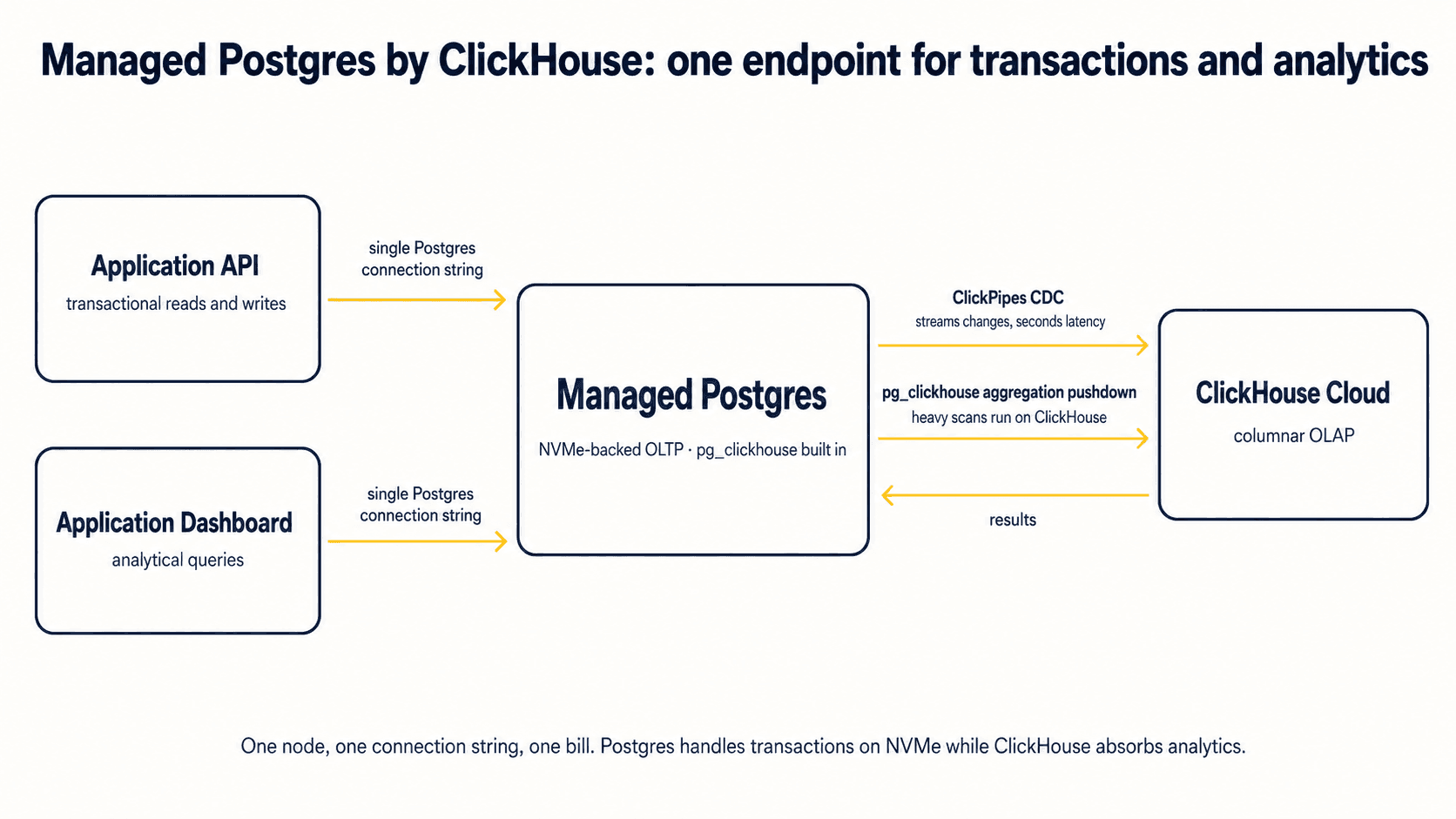 Note: By splitting the workloads, the PostgreSQL instance handles purely low-latency transactional constraints, while ClickHouse absorbs the heavy analytical scans and high-volume data retention without competing for system memory.
Key differences vs. Amazon Aurora
This architecture solves Aurora's dual problems of unpredictable I/O costs and analytical performance degradation by physically separating the workloads. Massive-volume data ingestion and heavy sequential analytical queries are fundamentally hostile to row-oriented transactional databases. By pairing a standard managed PostgreSQL instance with a purpose-built columnar ClickHouse engine, you stop burdening your transactional system with workloads it wasn’t designed for.
- Built-in real-time CDC: ClickPipes performs real-time logical replication from the PostgreSQL write-ahead log into ClickHouse. CDC and pg_clickhouse are included at no additional cost, with no separate per-GB or ETL bill to manage.
- Query transparency: Engineers use the native pg_clickhouse extension to query ClickHouse directly through the Postgres connection string. Existing ORMs, dashboards, and cron jobs keep their current SQL; complex joins, heavy aggregations, and supported query patterns push down to the columnar engine transparently, with no code changes. (Currently, 12 of 22 TPC-H queries are fully pushed down; CTE and window-function pushdown is on the roadmap.)
- Unified billing and management: One vendor, one bill, one control plane for both transactional and analytical workloads.
Pros
Public TPC-H benchmarks show analytical queries dropping from 4,478 milliseconds of execution time in native PostgreSQL down to 73 milliseconds when routed through the ClickHouse extension, a 61x speedup. The architecture also eliminates data engineering overhead for maintaining ingestion pipelines, and lets you right-size Postgres for transactions instead of vastly over-provisioning compute to absorb analytics.
Common workloads effectively offloaded from Aurora to ClickHouse:
- Interactive user dashboards: Applications providing real-time, user-facing analytics require sub-second query latency. Serving these complex aggregation dashboards directly from an Aurora primary inevitably spikes compute usage. Offloading these queries to ClickHouse keeps the transactional database responsive to user requests.
- Real-time event funnel analysis: Ingesting high-velocity user behavior data, including clicks, page views, and conversion metrics, generates massive write volume. ClickHouse's columnar storage compresses this data exceptionally well, allowing product teams to query behavioral funnels in real time without generating punitive I/O charges on a transactional datastore.
- Log and telemetry analytics: Storing high-cardinality observability data, infrastructure metrics, and application logs quickly exhausts standard relational storage capacity. Moving this time-series-adjacent data to ClickHouse allows for massive scale retention and rapid forensic querying during operational incidents.
Cons
The tradeoff is bounded but real. Analytical reads come from a CDC replica, so they trail OLTP writes by seconds (sub-second replication via CDC v2 is planned for a future release). For dashboards and reporting, that's invisible, but for use cases that need sub-second freshness on analytical queries today, the lag matters. Engineers also need to know that data lives on two engines under the hood, even though application code, queries, and operations stay unified through pg_clickhouse and a single console.
Pricing model
Postgres managed by ClickHouse is in public beta on ClickHouse Cloud. The service is free until usage metering begins on June 15, 2026, and all plans carry a 50% beta discount after that. The platform offers more than 50 local NVMe-backed VM configurations, from 1 vCPU / 8 GB RAM / 59 GB NVMe at roughly $32/month up to 96 vCPUs / 768 GB RAM / 60 TB NVMe. Backups and network egress are included during beta.
Migration from Amazon Aurora (logical replication + CDC)
Migration difficulty: Easy. Fully managed migrations via ClickPipes are available for Aurora, RDS, CloudSQL, Neon, and others, with continuous real-time replication and simplified cutover.
Who has already moved off Aurora
Several companies are running multi-terabyte, mission-critical production workloads on ClickHouse Managed Postgres today. Customers have migrated from RDS, Aurora, CloudSQL, Neon, and PlanetScale Postgres across cybersecurity, fintech, retail, real estate, and social media.
The two most relevant cases for this guide are direct Aurora migrations.
Sterling Labs migrated from Aurora and now runs roughly 8.5 TB of hot data in Postgres on NVMe.
"Postgres managed by ClickHouse has been an incredible fit for us as we migrated from Aurora and scaled our production workload... We're now running around 8.5 TB of hot data in Postgres, and enjoy the super low-latency offered by the NVMe drives. The performance has been simply impressive."
DoControl moved multiple multi-terabyte cybersecurity workloads off RDS and Aurora.
"We moved multiple multi-terabyte workloads from RDS and Aurora to Postgres managed by ClickHouse with hands-on support from the ClickHouse team. Given the scale and complexity of our cybersecurity data sources, reliability and price-performance were critical. Postgres managed by ClickHouse lets us move Postgres workloads more easily, use ClickPipes, and bring data into ClickHouse without the operational complexity we originally expected."
Which Amazon Aurora alternative fits your workload? (comparison matrix)
Selecting the right path means mapping your application's fundamental constraints against the physical realities of the underlying database architecture.
| Alternative path | Best for | Cost predictability | High-volume write throughput | Native analytical query support | Extension & tuning freedom |
|---|---|---|---|---|---|
| Amazon DynamoDB | High write throughput, key-value access | Fixed (Provisioned capacity) | Substantial (Partition scaling) | None (Requires external ETL) | N/A (No extensions) |
| Amazon RDS for PostgreSQL | Cost-predictable AWS Postgres | Fixed (Provisioned IOPS limits) | High on io2, but network-attached | Poor (Row-store eviction) | Restricted (AWS managed) |
| Neon | Serverless Postgres with scale-to-zero | Variable (Scale to zero compute) | Moderate (Safekeeper limits) | Poor (Row-store architecture) | Moderate (Vetted list) |
| Crunchy Bridge | Full Postgres extension support | Fixed (Provisioned instances) | High (Dedicated infrastructure) | Poor (Row-store limits) | Unrestricted (Superuser granted) |
| Google AlloyDB | GCP-native Aurora-class Postgres | Variable (Cloud consumption) | High (Distributed storage) | Good (Columnar acceleration) | Restricted (GCP managed) |
| Managed Postgres by ClickHouse | High-ingest OLTP + OLAP offload, AI-native apps | VM-based, starts ~$32/mo, 50% beta discount | Exceptional (Collocated NVMe storage) | Exceptional (Purpose-built OLAP) | High (100+ extensions, superuser access) |
Reading the matrix: Of the six alternatives, only Managed Postgres by ClickHouse rates Exceptional on both high-volume write throughput and native analytical query support, the two dimensions that matter most for the high-ingest workloads this guide covers. (The NVMe write-throughput advantage over Aurora holds at both tested sizes, roughly 2.3x. The gap narrows only against other well-provisioned NVMe competitors at the smallest config.) AlloyDB gets Good on analytical support but pays for it with HTAP contention and cross-cloud migration. The other four are row-store-only options.
Procurement scorecard guidance: Use this matrix for vendor evaluation conversations. If your primary pain point is unpredictable billing during steady-state operations, filter strictly for options with high cost predictability. If analytical dashboards are degrading transactional performance, rule out any purely row-oriented architectures and prioritize the columnar analytical support paths.
How to migrate off Amazon Aurora (logical replication playbook)
Migrating away from Aurora requires precise execution because AWS blocks physical, file-level backup restorations to non-Aurora database targets. You can't detach an Aurora storage volume and attach it to standard PostgreSQL. Migration strictly requires logical replication.
Pre-migration diagnostics: what to measure on Aurora
Before you move any data, audit your existing environment using the pg_stat_statements extension.
Determine whether your current Aurora I/O costs stem from aggressive write amplification, chatty and unoptimized read queries, or massive sequential aggregations. Moving a poorly optimized workload to a new platform without understanding the root cause of the database strain will just transfer the bottleneck.
Logical replication constraints when migrating from Aurora
Moving the physical data requires streaming the database state via logical replication. Tools like AWS Database Migration Service, open-source Debezium, or ClickPipes are standard options, but each has specific limitations:
- AWS Database Migration Service (DMS): While heavily used, DMS can't support CDC extraction if routed through an RDS Proxy source. DMS also fails to process two-phase commits, and replication will yield highly unpredictable data integrity issues if primary key constraints on the source don't perfectly match the target.
- Debezium and logical replication slots: Using native PostgreSQL logical replication requires establishing replication slots. This approach carries risk for high-volume ingestion workloads. If the receiving consumer goes offline or experiences latency, the primary database can't delete its write-ahead log files. The database will retain all WAL data until the slot reconnects. In massive ingestion environments, an orphaned replication slot will cause unbounded disk growth, rapidly resulting in a full-disk database outage.
Migration risk mitigation checklist
- Always benchmark massive bulk-insert scripts on the destination target before beginning a production cutover.
- Make sure your application's connection pooling logic is fully tested against the new architecture.
- Pay special attention to differences in connection handling between Amazon RDS Proxy and standard PgBouncer implementations.
Conclusion: choosing the right Amazon Aurora alternative for high-ingest workloads
Outgrowing Aurora is a common and predictable milestone for highly successful, data-intensive engineering organizations.
Forcing a single distributed row-store architecture to handle unbounded event ingestion and complex analytical dashboards leads to escalating costs and unpredictable latency. Throwing increasingly expensive instance sizes at Aurora I/O limits won’t solve the underlying problem. You need a different architectural approach.
If unpredictable analytical queries and heavy event ingestion are driving up your managed database bills, continuing to scale vertically isn't the answer.
Explore Managed Postgres by ClickHouse for vanilla Postgres on local NVMe, native ClickPipes CDC into ClickHouse for real-time analytics, queried through one Postgres connection string via pg_clickhouse. One console, one bill, no proprietary fork. Free until June 15, 2026, with a 50% beta discount after, and $300 in credits for new accounts.
Frequently asked questions
What is the best AWS Aurora alternative for high-volume data ingestion?
If you need relational OLTP plus fast analytics at high ingest rates, the most reliable approach is separating OLTP and OLAP (managed Postgres for transactions + a columnar analytics database via CDC). If you can redesign to key-value access patterns, DynamoDB is the most scalable AWS-native write path.
Is Amazon Aurora the same as PostgreSQL?
Aurora PostgreSQL is Postgres wire-compatible, but it uses a proprietary distributed storage layer. That changes I/O behavior and can limit low-level extensions compared to standard PostgreSQL.
Why does Aurora get expensive at high ingestion volumes?
Aurora Standard charges per I/O request, so heavy writes, indexing, and large scans can create unpredictable bills. Aurora I/O-Optimized removes per-I/O charges but raises the fixed baseline cost.
Why are bulk inserts slower on Amazon Aurora than PostgreSQL?
Aurora routes durable writes through a single writer and requires quorum acknowledgments across its distributed storage. That can throttle sustained bulk insert throughput compared to simpler storage paths.
When should I choose Amazon RDS for PostgreSQL instead of Aurora?
Choose RDS when you want more predictable costs and can provision storage performance (e.g., io2 Block Express) rather than paying variable Aurora I/O charges. Aurora is often better when you prioritize Aurora-specific operational features and can tolerate its pricing model.
Does Aurora Serverless v2 actually reduce cost?
It can for spiky workloads with real idle time, but many production systems pay for a minimum ACU floor that makes it more expensive than provisioned instances. Auto-pause is disabled when you use RDS Proxy, logical replication/CDC, or global databases.
What's the simplest migration path off Aurora?
Most migrations require logical replication/CDC (e.g., AWS DMS, Debezium, or vendor pipelines) because you can't detach Aurora storage and restore it elsewhere. Plan for replication slot/WAL growth and validate cutover with load tests.
Should you use HTAP to fix Aurora analytics performance?
Often, the safer pattern is OLTP + OLAP separation, with Postgres handling transactions and a columnar engine managing analytics, connected by CDC. This avoids the tradeoff inherent in HTAP designs, where analytical and transactional workloads share compute and memory on a single engine.
Can I keep PostgreSQL and still get fast analytics without moving off AWS?
Yes. Keep Postgres as the system of record and replicate changes via CDC to a columnar analytics engine. For example, Managed Postgres by ClickHouse connects the two with native ClickPipes CDC and pg_clickhouse, so dashboards and aggregations run on ClickHouse without contention on the OLTP database.
Which Aurora alternative is best if I need Postgres extensions and superuser access?
Pick a managed Postgres provider that runs standard PostgreSQL and offers broad extension support and elevated privileges (often not possible on Aurora because of its storage architecture and managed constraints).


