50.6k
50.6k
The Problem You Already Know
You have a lot of data sitting in your analytical database. Millions of customers, billions of transactions. And now someone asks: “Which customers are connected through shared purchases? What fraud rings exist in our transaction network?”
If you’ve tried answering relationship questions with SQL, you know what happens. You write a recursive CTE. It times out at 3 hops. You try self-joins. The query plan explodes. So you think: maybe I need a graph database.
And that’s where things get complicated.
To use a graph database, you need to copy your data there. That means building an ETL pipeline. Maintaining it. Watching it break when schemas change upstream. Organizations report that data engineers spend 12 hours per week just “chasing data” across disconnected systems. The ETL tools market is projected to grow from $8.5 billion to $24.7 billion by 2033 - that’s a lot of money spent moving data around instead of using it.
Here’s the thing: every time you copy data, you create a sync problem. Now you have two systems, two schemas, and queries running on data that’s already stale.
What if you didn’t have to copy the data at all?
How It Usually Works (And Why It Breaks Down)
The traditional approach treats your OLAP database and your graph database as separate systems:
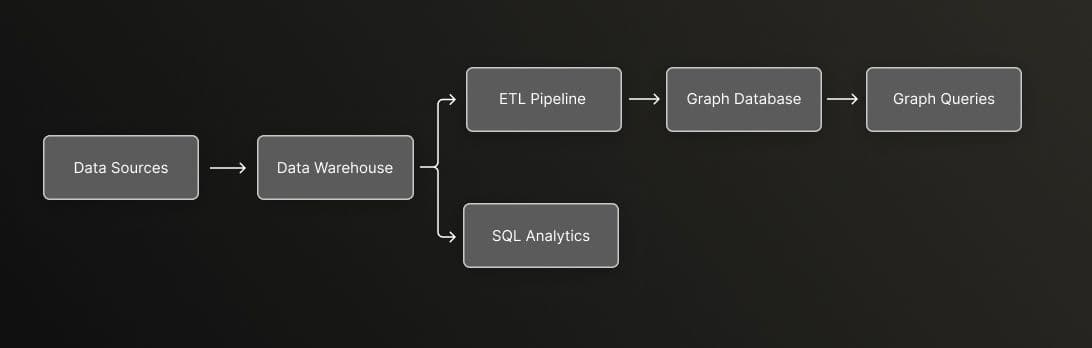
You get SQL analytics from your warehouse. You get graph queries from your graph database. But connecting them requires that ETL pipeline in the middle.
The pain points add up:
- Dual storage costs - You’re paying to store the same data twice
- Sync lag - Your graph queries run on data that’s minutes to hours old
- Schema evolution - Change a column in the warehouse, now you’re debugging two systems
- Pipeline ownership - Someone has to maintain that sync job forever
One case study showed that migrating away from traditional ETL reduced latency by 98% (from 30 minutes to under 30 seconds) and cut operational costs by 66%. That’s not a marginal improvement - that’s a different way of working.
The Zero-Copy Alternative
So what if you could query relationships directly on your existing data?
That’s the idea behind zero-copy graph analytics. Instead of copying data into a separate graph database, you add a graph query layer on top of your analytical database.
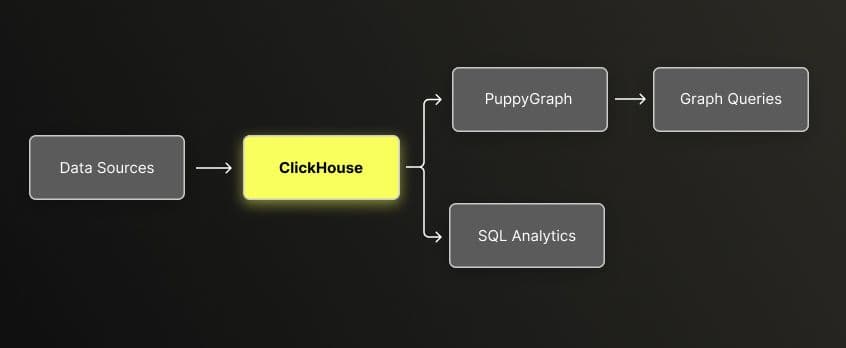
PuppyGraph connects to ClickHouse via JDBC and provides a graph query interface (Cypher/Gremlin). No data movement. The same tables that power your SQL dashboards also serve graph traversals.
What you get:
- Real-time data - Query data as it exists now, not as of last sync
- Single source of truth - One schema, one storage layer
- No sync pipeline - Nothing to maintain, nothing to break
- Lower costs - No duplicate storage
The key insight is simple: your data already has relationships. Customers buy products. Accounts make transactions. Devices connect to accounts. You don’t need to move data to query those relationships - you just need the right query interface.
The Bigger Picture: Lakehouse Graph
Zero-copy isn’t just a technique - it’s part of a broader shift in how we think about data architecture.
Think of it like this: you have a library. For years, if you wanted to study books (SQL analytics), you went to the main reading room. If you wanted to understand how books cite each other (graph queries), you had to photocopy everything and take it to a separate research annex across town. Every time the library got new books, someone had to update the annex. It worked, but it was slow and expensive.
The data lakehouse changed the first part of this equation. Open table formats like Delta Lake and Iceberg turned that reading room into a proper research library - warehouse-grade reliability on low-cost object storage. SQL engines, ML pipelines, and streaming workloads all started converging on the same data. One library, many ways to use it.
But graph remained the outlier. If you wanted to trace relationships, you still had to make copies and maintain that research annex.
The Lakehouse Graph approach finally closes this gap. Instead of copying data to a separate graph database, you add a graph query layer directly to your lakehouse. The same tables that serve your SQL dashboards also serve graph traversals. One library. All the tools you need. No photocopies.
Here’s what this means in practice: your data team isn’t maintaining two systems anymore. When new data lands in ClickHouse, it’s immediately available for both aggregation queries and relationship traversals. Schema changes happen once. There’s no “graph is 2 hours behind” conversation.
ClickHouse handles what it’s good at - the heavy aggregations, time-series analysis, and analytical queries that need to scan billions of rows fast. PuppyGraph adds the graph layer on top, giving you multi-hop relationship queries without moving data elsewhere. You’re not replacing one system with another - you’re extending what your existing system can do.
This is the direction modern data architecture is heading: fewer specialized systems, more capabilities on the same data. The question isn’t “SQL or graph?” anymore. It’s “what question do you have?” and the same data answers both.
Why Graph Queries Matter
Not all questions fit naturally into SQL.
SQL works well for set-based operations: filter these rows, aggregate that column, join these tables. But some questions are fundamentally about traversing relationships:
- Which customers bought similar products to this customer?
- What accounts share devices with flagged accounts?
- How does money flow through a network of transfers?
If you’ve written a 5-hop query in SQL (find accounts connected to accounts connected to accounts…), you’ve seen the query plan explode. Each hop adds another join. Performance degrades exponentially.
Graph databases handle this differently. They use index-free adjacency - each node stores direct pointers to its neighbors. Traversing a relationship is a constant-time operation, not a table scan. Studies show graph databases can be 50% faster for multi-hop relationship queries compared to relational systems.
The trade-off was always: do I copy my data into another system? Zero-copy removes that trade-off.
What This Looks Like in Practice
I built a reference implementation with two use cases to demonstrate how this works. The full code is in the GitHub repository.
Customer 360: Product Recommendations
The dataset has 35.4 million records: 1 million customers, 7.3 million transactions, 27 million interactions.
For aggregations, you use SQL:
-- Customer lifetime value by segment
SELECT segment, AVG(ltv) as avg_ltv, COUNT(*) as customers
FROM customers
GROUP BY segment
ORDER BY avg_ltv DESC;For relationship queries, you use Cypher:
// Find products frequently bought together
MATCH (c:Customer)-[:PURCHASED]->(p1:Product)
MATCH (c)-[:PURCHASED]->(p2:Product)
WHERE p1.category = 'Electronics'
AND p2.category = 'Electronics'
AND p1 <> p2
RETURN p1.name, p2.name, COUNT(DISTINCT c) as co_purchases
ORDER BY co_purchases DESC
LIMIT 10;Both queries run on the same underlying tables. No sync. No lag.
Fraud Detection: Finding Hidden Networks
The fraud dataset has 1.29 million records with 5 embedded fraud patterns: account takeover rings, money laundering networks, card fraud, synthetic identity, and merchant collusion.
Individual transactions look normal. It’s only when you see the network that fraud patterns emerge.
// Detect accounts sharing devices (account takeover pattern)
MATCH (a1:FraudAccount)-[:USED_DEVICE]->(d:FraudDevice)<-[:USED_DEVICE]-(a2:FraudAccount)
WHERE a1 <> a2 AND d.is_suspicious = 1
RETURN d.device_id, d.location,
COLLECT(DISTINCT a1.account_id) as connected_accounts
ORDER BY SIZE(connected_accounts) DESC
LIMIT 10;This query finds accounts that share a suspicious device - a classic account takeover pattern. In SQL, this would require self-joins that get slow at scale. As a graph traversal, it runs in milliseconds.
What About Query Performance
There is always this question “what is the impact on query performance?” when we talk about running Graph Queries without having a native Graph Storage. Yes, we will experience a higher query latency for the trade-off we have made. To objectively analyze if this query latency will be significant enough to make a difference we generated appropriate queries for the two use cases we covered in the previous section. It was a total of 97 queries comprised of 42 SQL and 55 Cypher queries that covered specific areas across the two use cases, the following is the summary of the Zero-Copy Query Performance:
| Metric | Value |
|---|---|
| Median Latency | 28ms |
| P95 Latency | 148ms |
The raw numbers matter less than what they represent: you can run both analytical queries and graph traversals on the same data, with response times suitable for interactive use.
And the architecture scales. ClickHouse powers analytics at companies like Tesla, Anthropic and Cloudflare at petabyte scale. PuppyGraph is a stateless query layer that scales horizontally with the underlying database.
Try It Yourself
The reference implementation is available on GitHub with everything you need:
# Start ClickHouse and PuppyGraph
make local
# Generate test data
make generate-local
# Access PuppyGraph UI
open http://localhost:8081The repository includes:
- Two use cases (Customer 360, Fraud Detection) with realistic data patterns
- 97 validated queries you can run immediately
- Both local and hybrid deployment options
The Takeaway
If you have relationship questions about your data, you don’t need to choose between copying data to a graph database or writing painful recursive SQL.
The Lakehouse Graph approach brings graph queries to where your data already lives. Zero-copy means fresher data, simpler architecture, and less infrastructure to maintain. Whether you’re building recommendations, detecting fraud, or mapping supply chains - the pattern is the same: query relationships without moving data.
The repository has working code you can run in 10 minutes. Take a look.
References