50.6k
50.6k
Bringing the ClickStack MCP Server to the Cloud
Last month at Open House, we introduced the ClickStack MCP server, making the same observability investigation capabilities that power ClickStack available to external agents and AI workflows. Initially released as part of open-source ClickStack, it gave users a way to connect tools such as Claude, Cursor, and Codex directly to their observability data through a set of specialized investigation primitives designed specifically for logs, metrics, and traces.
Today, we’re bringing those same capabilities to Managed ClickStack in ClickHouse Cloud.
For Managed ClickStack users, this means agents can now access the same specialized observability tools while benefiting from the underlying ClickStack architecture that allows teams to retain more telemetry for longer, store unsampled logs, metrics, and traces at low cost, and avoid the rollups often used elsewhere to manage observability spend.
These capabilities give agents access to significantly more context. They can reason across longer historical windows, identify trends that emerge over time, and investigate using complete telemetry rather than sampled or aggregated views of the underlying system.
The MCP server also benefits from the broader ClickStack Cloud architecture. Agent workloads can run against dedicated compute resources, independent of ingestion and user-facing workloads, while features such as compute-compute separation, notebooks, dashboards, and collaborative investigation workflows remain available. The result is a straightforward way to bring AI agents to production observability without introducing another system to operate.
If you're interested in using the ClickStack MCP server, see the full setup and configuration guide.
Why a specialized observability MCP?
There is already a generic ClickHouse MCP server available today, and it works well for broad analytical tasks and SQL-driven exploration. But while building AI Notebooks, we repeatedly found that observability workflows behave differently from general BI workloads. Models perform much better when they operate against structured investigative tools rather than generating raw SQL queries repeatedly.
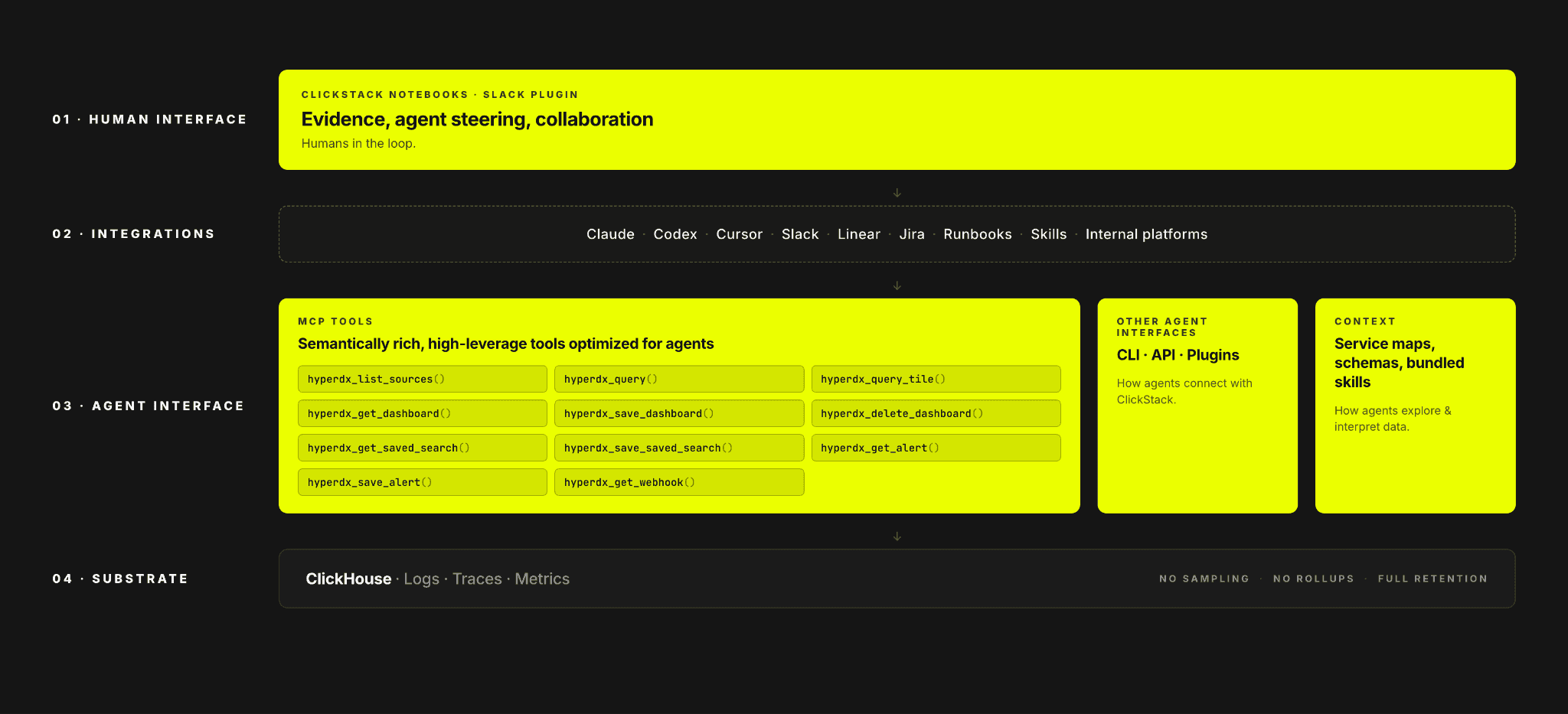
Raw SQL is powerful, but many observability investigations are awkward to express as one-off queries. Tasks like mining recurring log patterns, comparing behavior across time windows, root causing trace outliers, or following an investigation across logs, metrics, and traces require multi-step analysis and domain-specific logic. Leaving all of that to the model means it has to reconstruct the required query patterns and analysis logic from scratch each time, spending context on query mechanics instead of the problem itself.
The ClickStack MCP server gives agents higher-level semantic tools for observability work. Instead of exposing only a raw SQL interface, it provides stable tools for finding trends in patterns of logs, correlating attributes with outliers, inspecting slow traces, and moving through an investigation with repeatable workflows. Under the hood, those tools still execute optimized ClickHouse queries, but the agent interacts with intent-level operations rather than hand-assembling complex analysis every time.
The result of these tools is that our internal benchmarks show that investigations completed with 25% fewer tool calls, with a 2.5x increase in consistency and an almost 20% increase in evaluation scores vs the standard ClickHouse MCP. A large part of that came from giving the model high-leverage semantic investigation tools instead of forcing it to generate every workflow from raw SQL alone.
Get started today
Interested in seeing how the MCP server works on your data? Get started with Managed ClickStrack in minutes and receive $300 in free credits.
Sign upExample tool - event patterns
As an example, consider the event patterns tool.
Event patterns in ClickStack are used to make sense of large volumes of logs or traces by clustering similar events together.
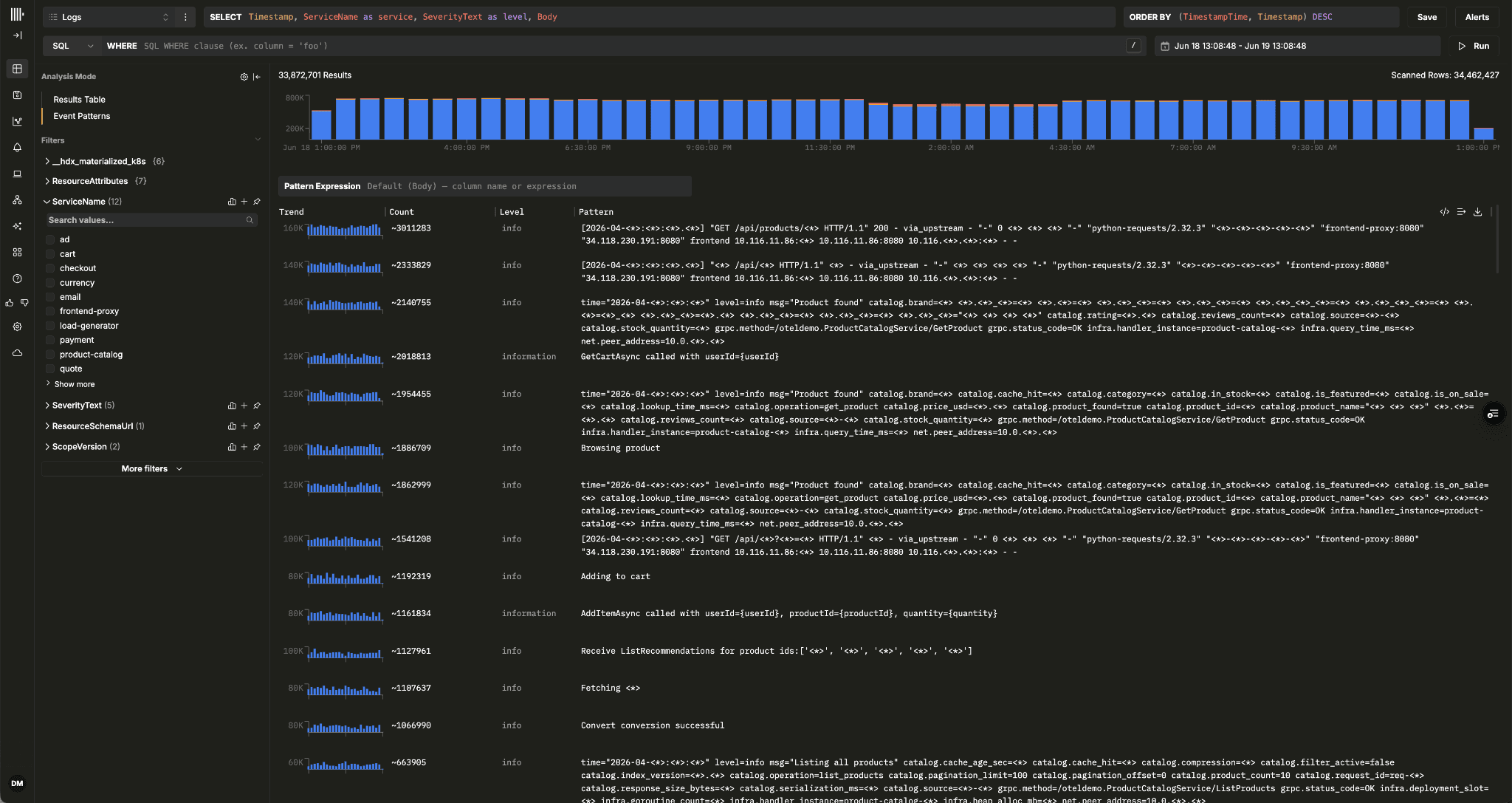
Instead of scrolling through millions of individual log lines, users get a smaller set of meaningful groups that show which errors are recurring, which are new, and which are driving changes in event volume.
In raw SQL, this is difficult to express efficiently. A model would typically need to generate a query that normalizes the event body, often using regular expressions, then group by the resulting pattern and count occurrences over time. On a large dataset, this scales with the amount of data being scanned and can quickly run into high-cardinality outputs, long query times, or unnecessary server pressure. Quotas and query complexity limits can contain the worst cases, but the user still often ends up narrowing the time range or tuning the underlying data model before the question can be answered.
The ClickStack MCP server takes a different path. For event patterns, it can run a small number of lighter queries, including a random sample of matching events and a count of the total result set. The sample is then processed in the MCP layer using the Drain3 algorithm to identify patterns, with the final counts extrapolated and ranked before being returned to the agent.
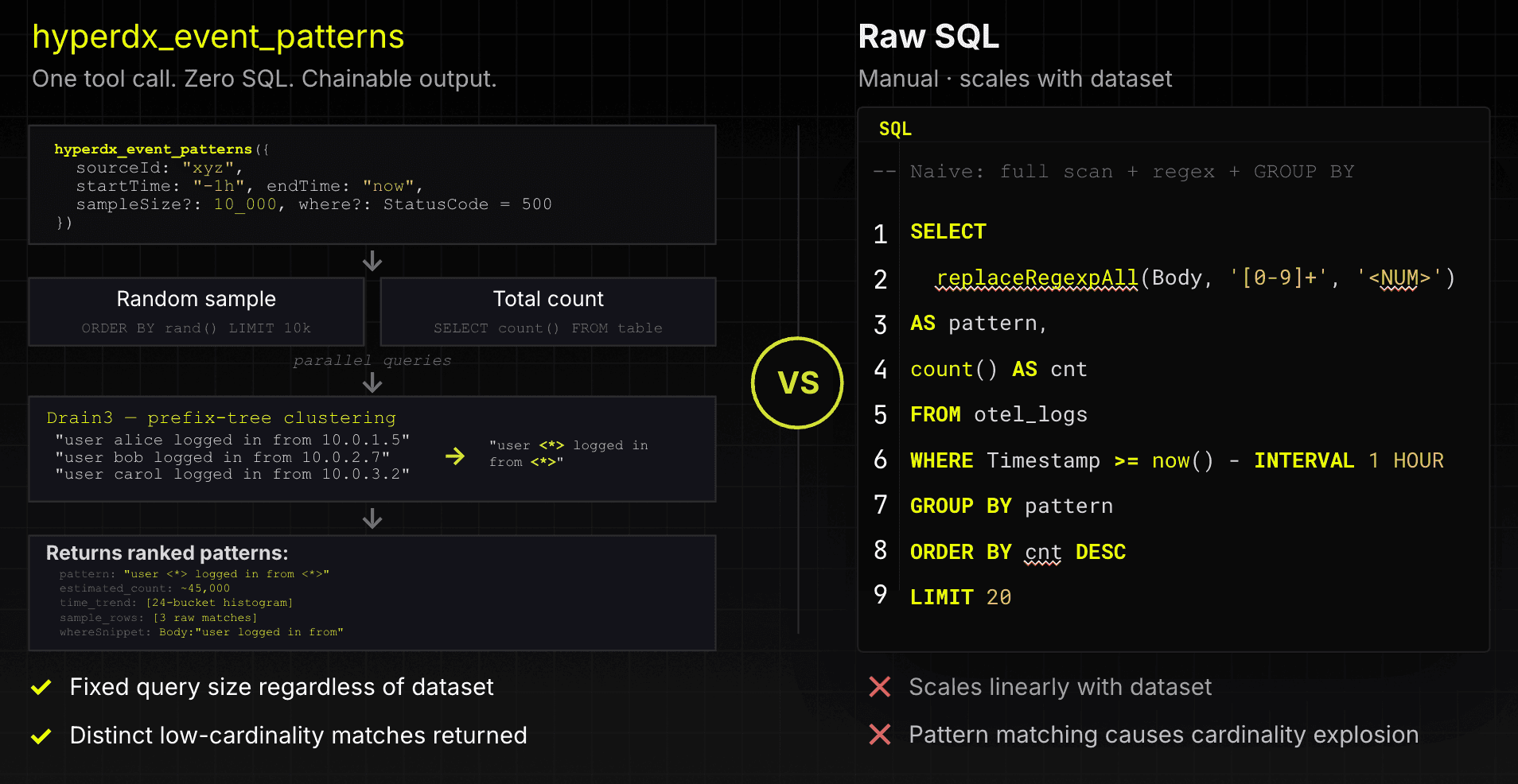
This gives the model a much better primitive to work with. The query overhead is fixed rather than growing linearly with the full dataset, the raw output has much lower cardinality, and the tool continues to work well even when the underlying event bodies are highly variable.
Reusing tools
These same tools are used inside ClickStack AI Notebooks. The model is not manually stitching together large SQL statements for every step of an investigation. Instead, it works against specialized tools that already understand the underlying observability workflows and ClickStack optimizations.
Retaining flexibility
At the same time, we do not think structured investigative tools should completely replace direct SQL access.
One of the reasons ClickHouse works so well for agentic workloads and observability is that SQL remains an incredibly powerful exploratory language. Sometimes an incident eventually reaches a point where there is no higher-level abstraction that helps anymore, and you simply need direct access to the underlying data. The structured tools handle many of the repetitive and common investigation paths efficiently, but SQL remains the escape hatch when engineers or agents need to go deeper, test unusual hypotheses, or answer questions the system was never explicitly designed around.
In practice, the workflows end up complementing each other quite naturally: use optimized investigative primitives for the majority of the investigation, then drop into native queries when the situation calls for it.
Orchestration, not just investigation
While some engineers are perfectly happy working directly in the terminal or inside an agent harness like Claude Code, investigations eventually need to be shared with other people. SREs need to collaborate, preserve context, and present evidence once they reach a conclusion.
That is why we do not think observability MCP servers should only expose investigative primitives. Real operational workflows also require orchestration primitives for creating dashboards, persisting searches, managing alerts, and sharing findings across teams.
This becomes especially important for local agent workflows. If an agent investigates an incident locally, the resulting evidence needs to be persisted somewhere for sharing and review by the larger team. Copying raw chat output into documents or generating static reports quickly breaks down during real incidents, leading to inconsistencies.
For that reason, the ClickStack MCP server exposes bi-directional management tools directly inside ClickStack itself. Agents can not only investigate incidents, but also create dashboards, persist searches, and validate that the resulting artifacts contain the required evidence and visualizations.
In practice, investigations naturally evolve into persistent operational artifacts rather than disposable chat histories.
An MCP server with full context and dedicated compute
As observability becomes increasingly agent-driven, we expect both the number of queries and the amount of data being analyzed to grow significantly. Unlike traditional dashboards, agents are inherently exploratory, iteratively investigating systems, testing hypotheses, and traversing across logs, metrics, and traces.
At the same time, the quality of these investigations depends heavily on context. Agents benefit from access to longer retention windows for historical analysis and trend discovery, as well as unsampled telemetry that allows them to understand the complete picture. Without that context, an investigation can easily end up following a promising path only to discover that the relevant data was sampled away, aggregated, or no longer retained.
Taken together, these trends place new demands on the underlying observability platform. It needs to retain full-fidelity telemetry cost-effectively for long periods of time while supporting significantly higher query volumes as agents continuously explore, investigate, and validate hypotheses.
Managed ClickStack is designed for exactly these workloads. Built on ClickHouse Cloud, it allows teams to retain large volumes of logs, metrics, and traces cost-effectively while avoiding the sampling and rollups often used to control observability costs.
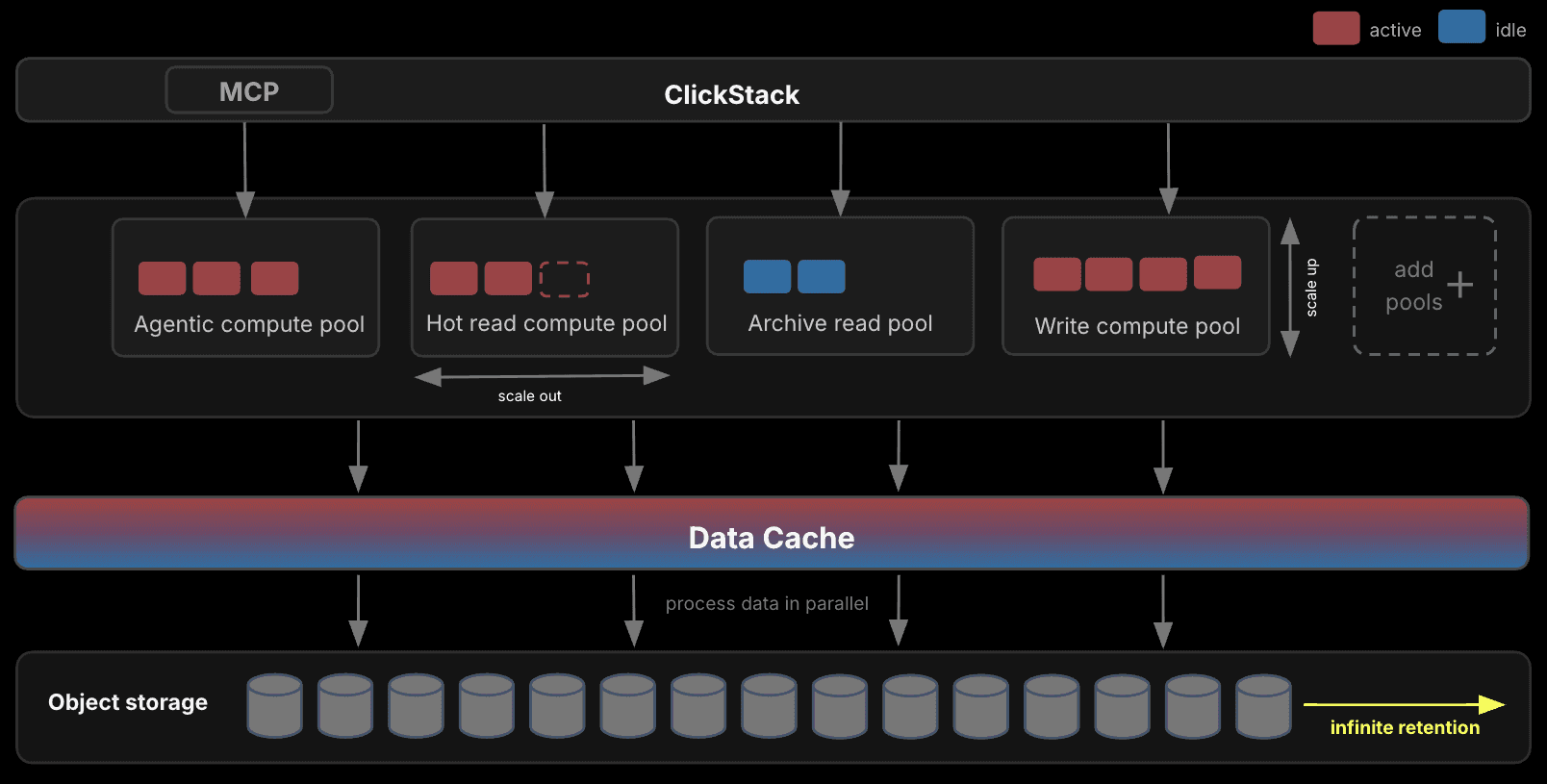
Just as importantly, agent workloads can be isolated from both ingestion and user-facing workloads using dedicated compute resources. This allows teams to scale agent-driven investigations independently while ensuring production dashboards, alerts, and ingestion pipelines remain unaffected.
Connecting the MCP Server in Managed ClickStack
Getting started with the Managed ClickStack MCP server is straightforward. ClickStack on ClickHouse Cloud exposes a managed MCP endpoint at https://mcp.clickhouse.cloud/clickstack and uses OAuth 2.0 for authentication.
Before connecting, ensure you have a ClickHouse Cloud service with ClickStack enabled. MCP access can be enabled from the Cloud console by selecting Connect → Connect with MCP and toggling MCP support on.
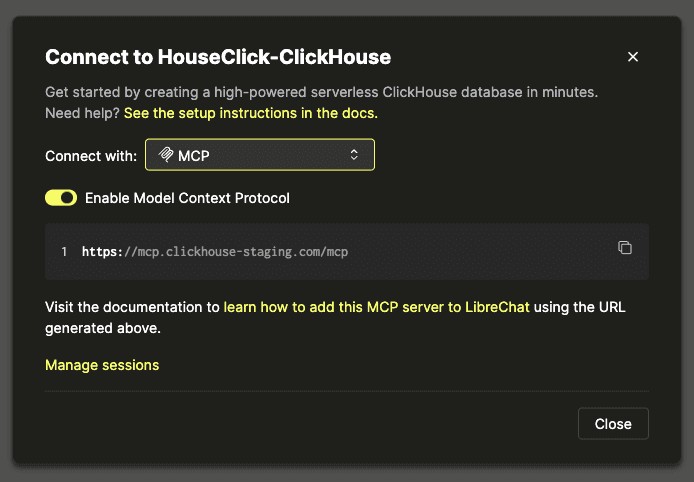
Once enabled, navigate to ClickStack for the service, and select Team Settings → API & Agents. Here, ClickStack provides pre-configured connection strings for common MCP clients, including Claude Code, Cursor, and Codex CLI.
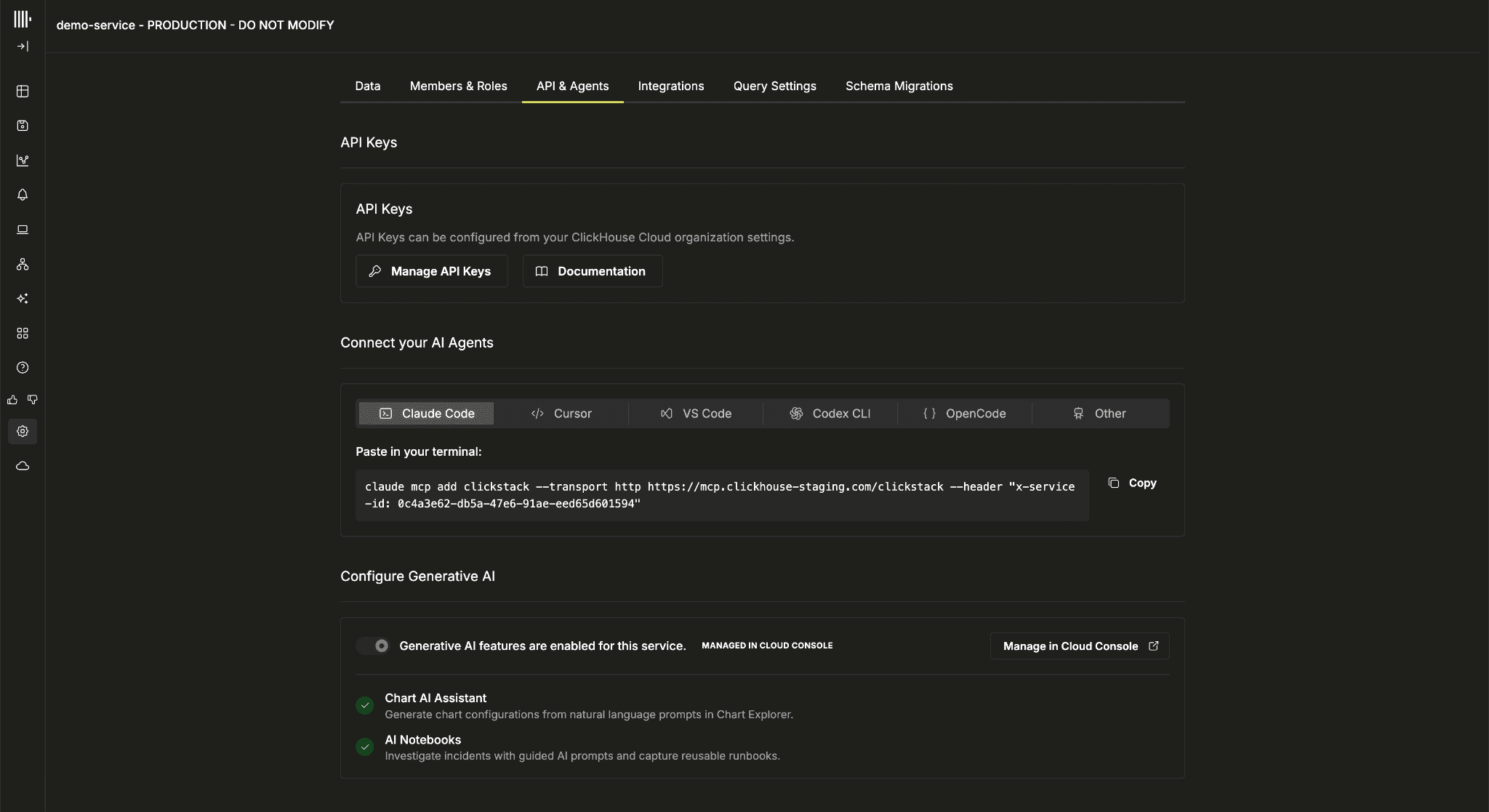
Once configured, you'll need to complete authentication. For example, assume you've copied an MCP connection string for Claude.
claude mcp add clickstack --transport http https://mcp.clickhouse.cloud/clickstack --header "x-service-id: 11e1031f-9a13-4cac-9bc7-d4ec9286ec17"In this case, launch Claude Code and run /mcp, then select clickstack-cloud to complete the OAuth flow.
One important detail is that the generated connection string contains a ClickHouse Cloud service ID. This determines which ClickHouse service executes the underlying queries. If you want agent workloads to run on dedicated compute, isolated from your other workloads, you can create a child service and launch ClickStack from that service. The generated MCP configuration will then automatically target the appropriate service, allowing agent-driven investigations to scale independently from ingestion and user-facing workloads.
Once connected, the agent can begin interacting directly with ClickStack’s observability primitives. For example, you can ask questions like:
"Show me the services with the highest error rate over the last 24 hours"
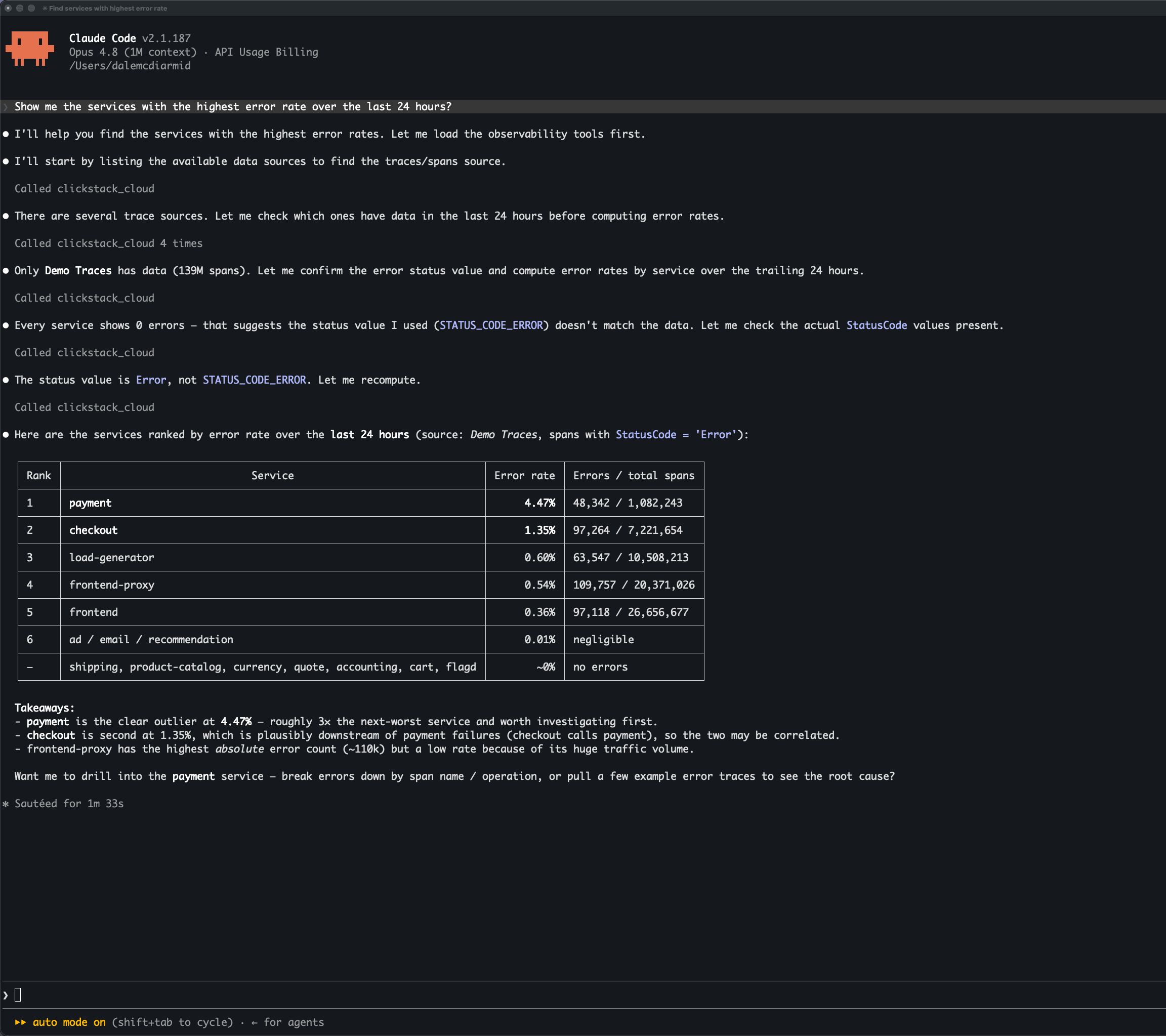
Under the hood, the MCP server routes these requests through the same optimized investigative tools used by AI Notebooks rather than relying entirely on ad hoc SQL generation.
Suppose we investigate elevated latency in a payment service and eventually determine, through Claude, that the root cause is a cache eviction issue.
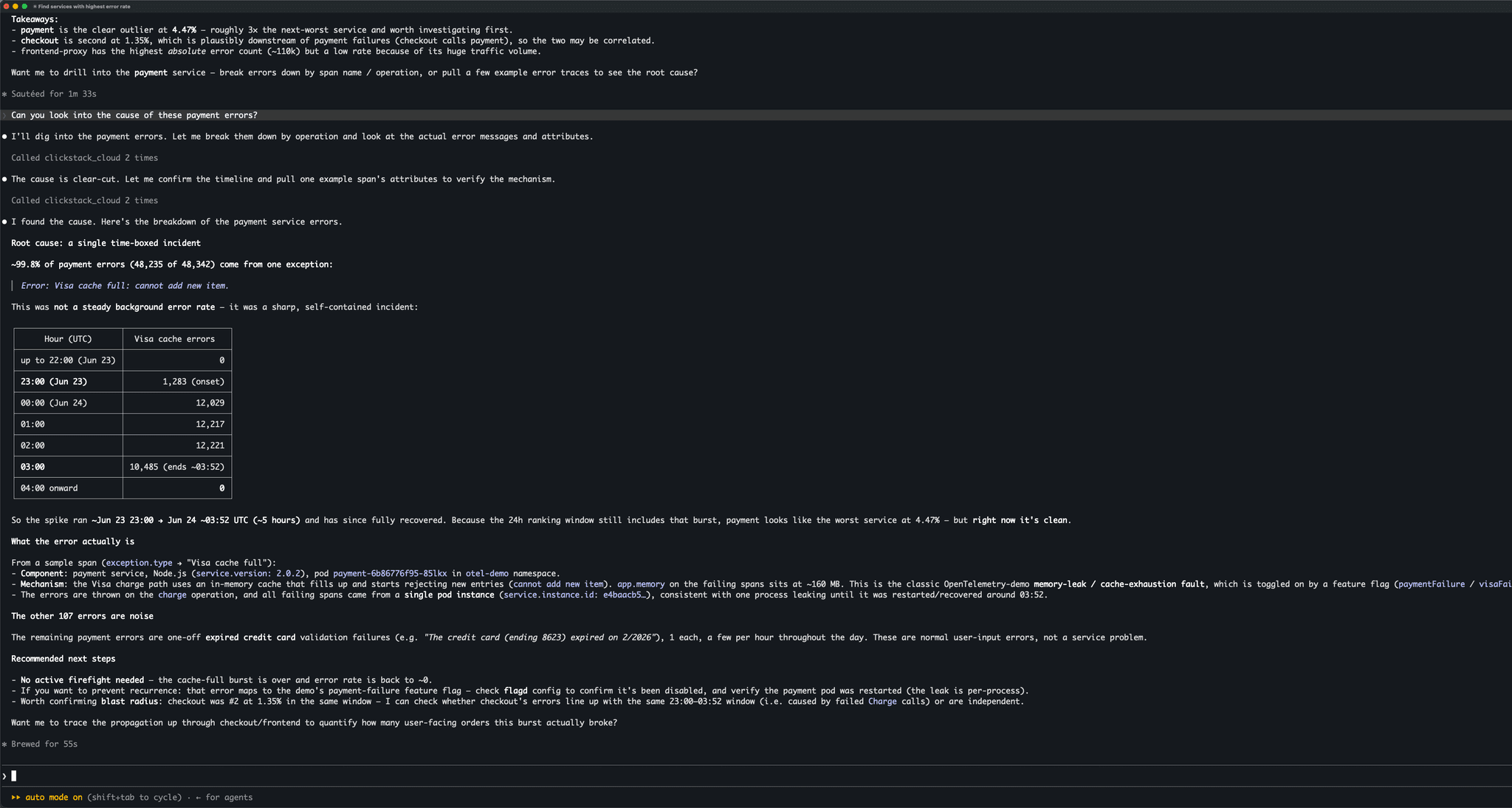
At that point, we need a way to persist and share the investigation. We could copy the raw Claude output into a document or ask the model to generate a static HTML report, but neither workflow feels particularly natural.
Below, we use the MCP server to generate a dashboard summarizing the investigation and to persist the findings directly in ClickStack, with a validation step confirming that the dashboard presents the required evidence.
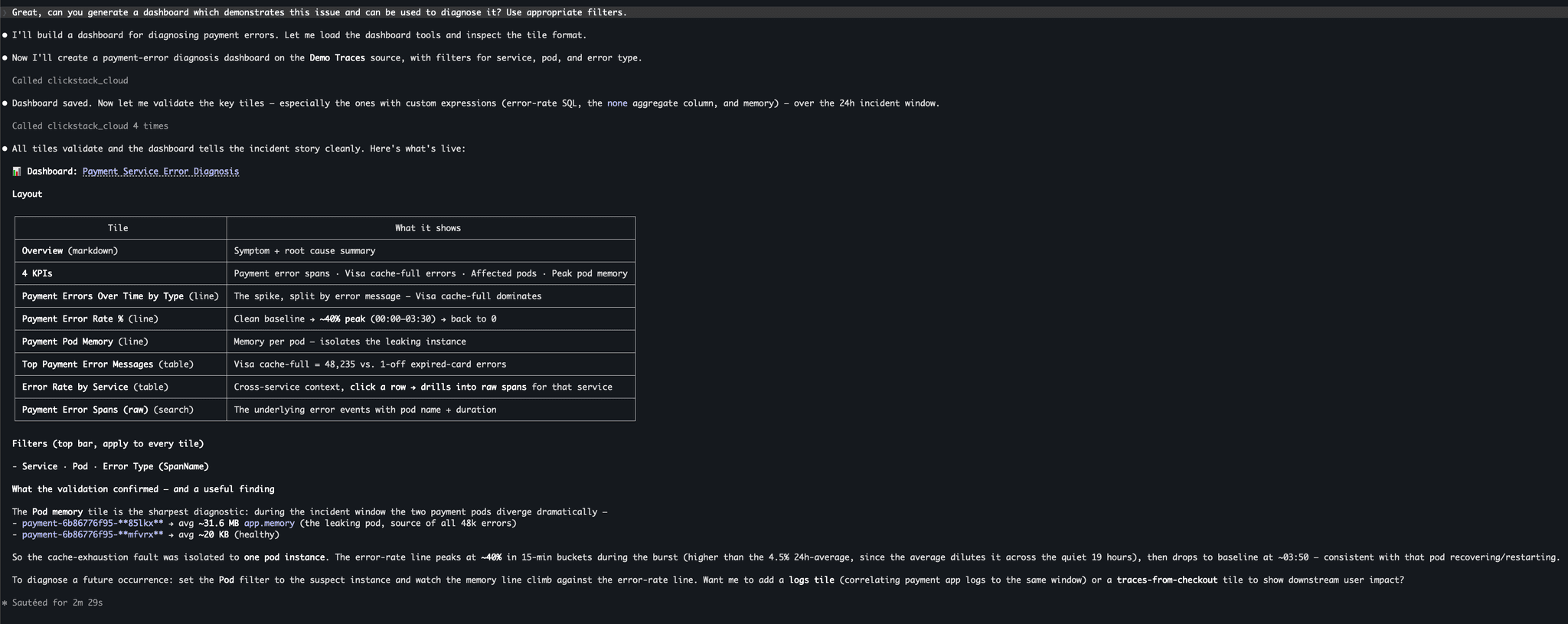
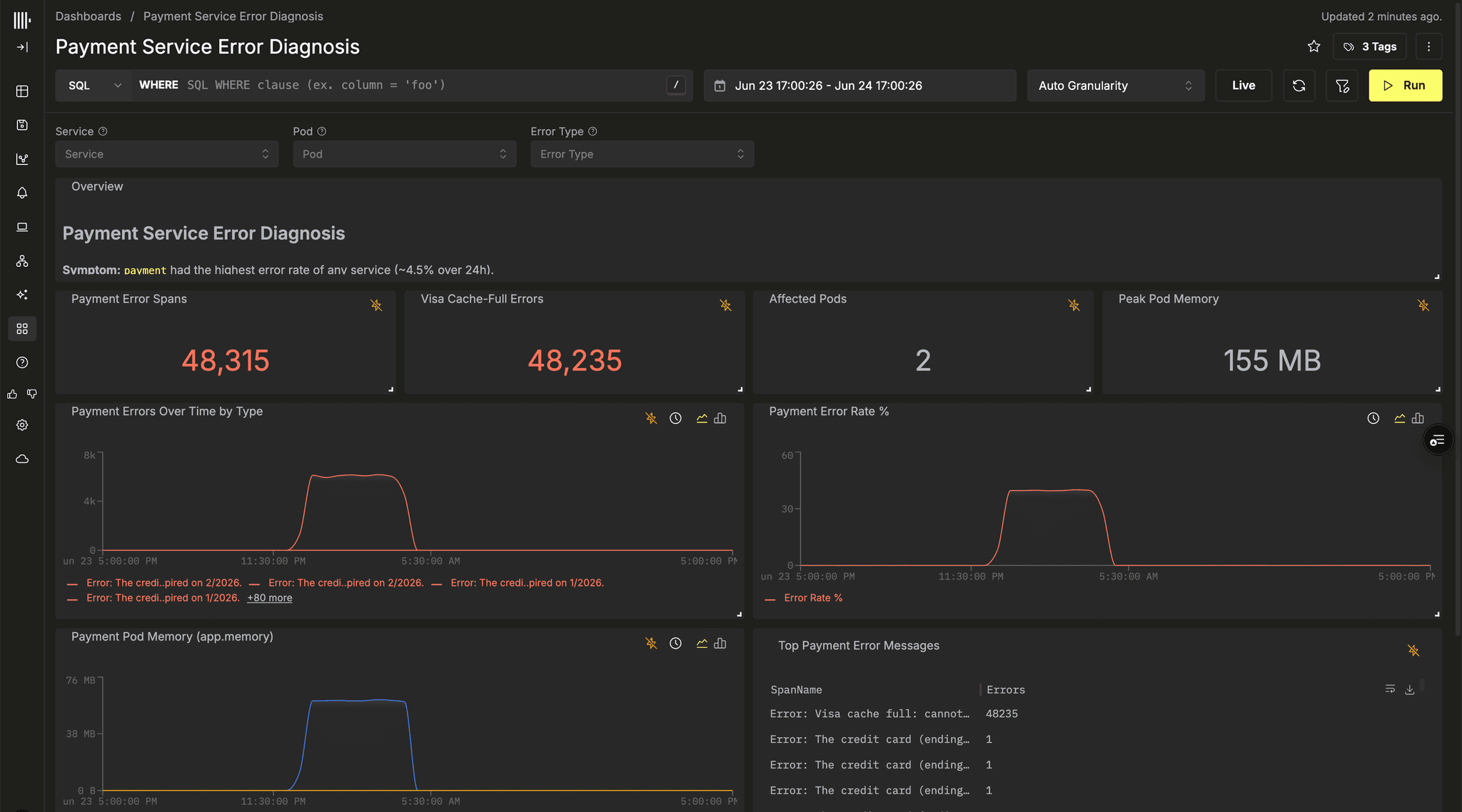
Our resulting dashboard provides a persisted artifact summarizing the incident and presenting evidence for any RCA document.
If you're interested in using the ClickStack MCP server, see the full setup and configuration guide.
Conclusion
We believe observability is becoming increasingly agent-driven, but for agents to be effective, they need more than access to raw data. They need specialized investigation tools, long-term context, full-fidelity telemetry, and the ability to operate at scale. With the Managed ClickStack