

@workos/sync-clickhouse, solves two problems:
- Sign-in history that outlives WorkOS’s retention. WorkOS keeps events for 90 days, and the
authentication.*events (every sign-in, success or failure) have no list endpoint. The engine tails the Events API into append-only ClickHouse tables, so the history is yours for as long as you keep it. - Joins with the rest of your analytics. Users, organizations, memberships, directories, SSO connections and roles are mirrored next to the event tables, so a question such as “failed sign-ins per organization per hour” is one query instead of several paginated API calls.
How it works
The engine runs in your infrastructure, as a Node.js command or a Docker container, and connects to ClickHouse over the HTTP interface with the official JavaScript client. It does three things:- Backfill loads current state from the WorkOS REST list endpoints.
- Tail polls the WorkOS Events API from a durable cursor and applies each event.
- Reconcile compares ids against the API and repairs anything the tail missed.
workos database containing:
The engine writes one
String column, _raw, holding the JSON payload. Every other column is a DEFAULT expression over _raw, so a field WorkOS adds later is queryable with JSONExtractString(_raw, 'field') without a schema change.
Prerequisites
- A WorkOS account and an API key for the environment to mirror.
- Node.js 22 or later, or Docker. The engine is published as the npm package
@workos/sync-clickhouseand as the container imageghcr.io/workos/sync-clickhouse. - ClickHouse Cloud, or self-hosted ClickHouse 23.11 or later.
- For self-hosted ClickHouse, a ClickHouse Keeper or ZooKeeper that the server can reach, with
keeper_map_path_prefixset. See Connect to self-hosted ClickHouse. ClickHouse Cloud has both already. - Network access from the host running the engine to the ClickHouse HTTP interface (port 8443 on Cloud; 8123, or 8443 with TLS, on self-hosted).
Setup
Connect to ClickHouse Cloud
To connect to ClickHouse with HTTP(S) you need this information:
The details for your ClickHouse Cloud service are available in the ClickHouse Cloud console.
Select a service and click Connect:
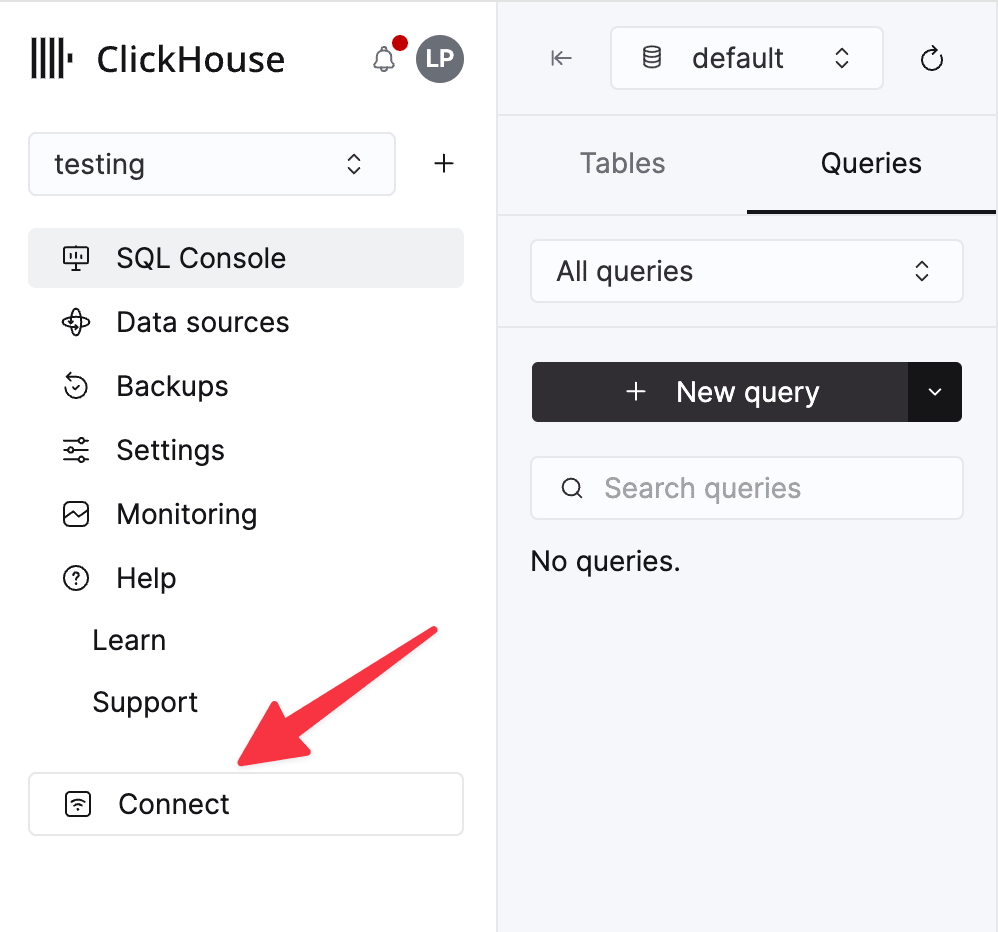
curl command.
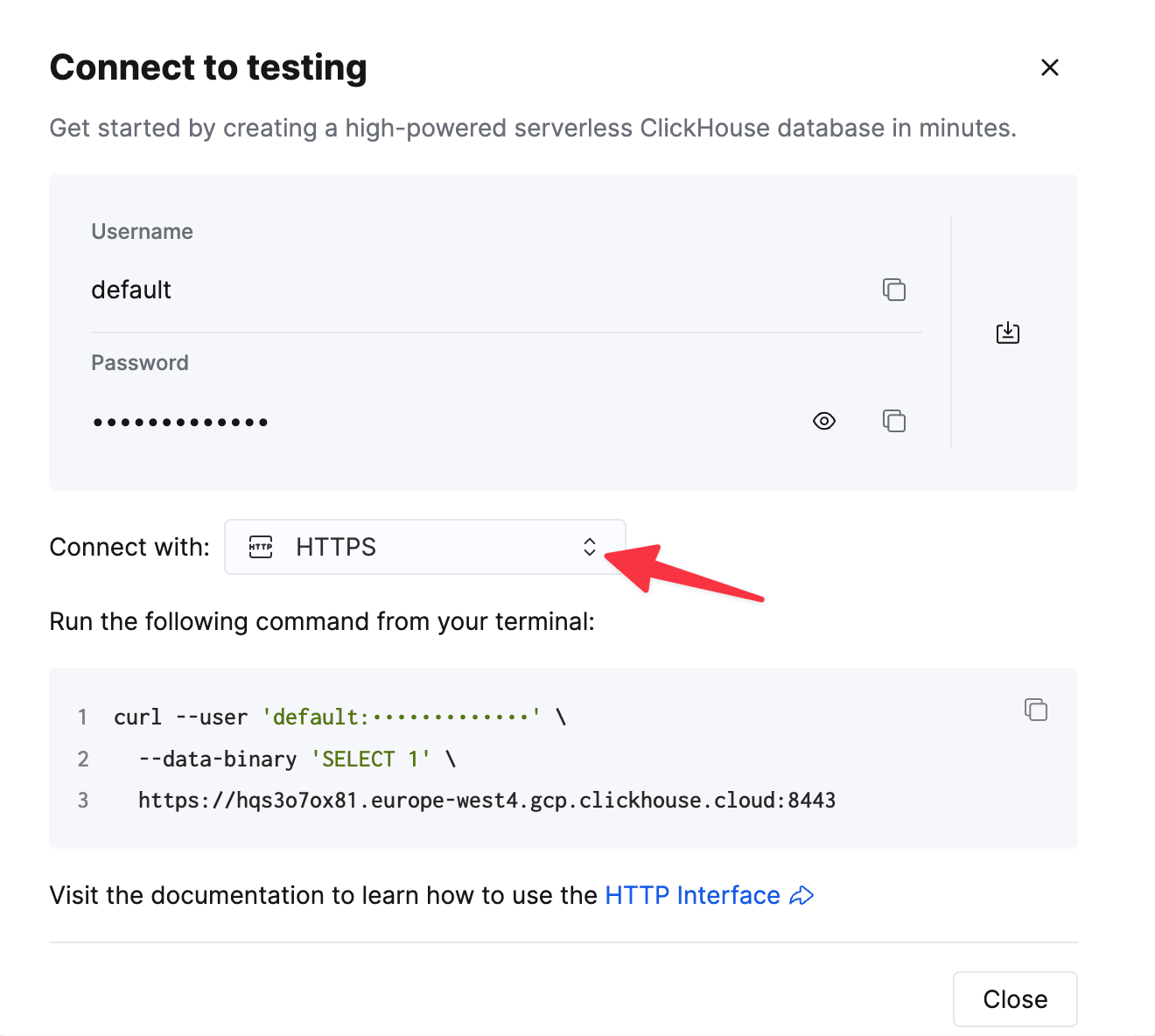
- Add the address the engine connects from to the service’s IP access list. A refused address looks like a connection timeout, not an authentication error.
-
Put the credentials in front of the HTTPS endpoint to form the connection string, and export it with your WorkOS API key:
Percent-encode the password if it contains characters that are reserved in a URL. A path in the URL is ignored: the mirror lives in the
workosdatabase, or the one named byWORKOS_SYNC_SCHEMA. -
Create the schema, load current state, and start the tail:
init creates its KeeperMap tables like any other.
Connect to self-hosted ClickHouse
-
Enable
KeeperMap. The engine keeps its cursor and lease inKeeperMaptables, which need a Keeper and a path prefix in the server configuration. On a cluster that already uses ClickHouse Keeper or ZooKeeper, add the prefix:A single node with no Keeper also needs the embedded Keeper turned on:/etc/clickhouse-server/config.d/keeper_map.xmlRestart the server after adding the file./etc/clickhouse-server/config.d/keeper_map.xml -
Point the connection string at the HTTP interface: port 8123 without TLS, or 8443 with it.
-
Run the same three commands as for Cloud:
init,backfill, thenlisten.
Run it as a container
The container image takes the same environment variables and commands:listen as a long-lived process, or run tick (one poll, then exit) from a scheduler. status reports the cursor, the time since the last successful poll and per-stream row counts. The package README lists every command, flag and environment variable.
Authentication
The user the engine connects as needs
CREATE DATABASE the first time (or an existing database it may create tables in), plus CREATE TABLE, CREATE VIEW, DROP TABLE, ALTER, INSERT and SELECT on that database. ALTER covers the lightweight DELETE that the redact command runs. The default user is enough for an evaluation. For production, create a dedicated user with those grants; see Cloud access management.
On the WorkOS side, the engine authenticates with one API key per environment. Dedicate a key to the sync so that its requests can be told apart from your application’s.
The User-Agent header of every connection starts with workos-sync-engine, so the engine’s statements can be found by http_user_agent in system.query_log.
Example: failed sign-ins per organization
The engine’s input is your own WorkOS environment rather than a file, so this example uses that data instead of a sample dataset. Any WorkOS environment with a few users and sign-ins works, including a staging environment.-
Create the schema and load current state:
-
Start the tail and leave it running. Sign-in history begins now: there is no endpoint that lists past sign-ins, so
backfillcan’t recover them. - Sign in to your application a few times, including at least one failed attempt.
-
Confirm that the mirror has rows, from the Cloud SQL console or
clickhouse client: -
Join the sign-in log to the mirror tables:
_env column, production unless WORKOS_ENVIRONMENT_NAME says otherwise, so several WorkOS environments can share one database. Join on it as shown.
Known limits
- The mirror is a read model. It is eventually consistent, usually within seconds, and one-directional. Keep writes and authorization decisions on the WorkOS API.
- Sign-in history starts when the tail starts. WorkOS keeps events for 90 days. A tail that was stopped for less than that resumes from its cursor. One stopped for longer needs
backfillandreconcile --repairto restore current state, and the sign-ins in the gap are gone. - One writer per environment. A second
listenwaits for the first one’s lease.tickexits with code 3 while a listener holds it. listenkeeps a Cloud service awake. It polls every 5 seconds by default, so the service never idles. Runtickon a schedule to let the service idle between runs, at the cost of a wake per run.- Small inserts by default. Each poll applies up to 100 events as a few asynchronous inserts that the engine waits for. Raise
WORKOS_SYNC_MAX_EVENTS_PER_TICKon a busy environment so that each poll produces fewer, larger inserts. - The
_liveviews read withFINAL. They suit analytical queries. For an application that reads single rows by key, the Postgres or MySQL destination is a better fit. - The mirror tables keep the newest version of each row only. Older versions survive until the next merge.
workos.eventsis where history is kept. - Columns are projected from JSON. A value that a typed column can’t cast is
NULLin that column and still present in_raw. - No
ON CLUSTERDDL.inithas been run against ClickHouse Cloud and single-node open source. A self-managed multi-node cluster isn’t part of the test matrix.
Troubleshooting
The first command times out
On ClickHouse Cloud, the address the engine runs from is missing from the IP access list, or the network blocks outbound traffic on port 8443. Check the port from the same host:Ok. means the service is reachable from that host. A command against an idle service also spends its first seconds waiting for the service to wake. The engine allows two minutes per request, so that isn’t a failure.
KeeperMap is disabled because 'keeper_map_path_prefix' config is not defined
init on a self-hosted server that has no keeper_map_path_prefix. Add the configuration in Connect to self-hosted ClickHouse and restart the server.
unsupported ClickHouse URL scheme
The connection string must start with http:// or https:// and point at the HTTP interface. A clickhouse:// URL, or the native protocol’s port, isn’t accepted.
A statement from init --print-sql fails with Could not find table
init --print-sql prints the DDL instead of running it. Applied by hand to a service with more than one replica, one statement per request, a CREATE VIEW can reach a replica before the CREATE TABLE it selects from. Run the script again: every statement in it is idempotent. The engine’s own init isn’t affected.
Related resources
- ClickHouse Cloud guide in the WorkOS documentation
- WorkOS Sync Engine on GitHub : source, issues, and guides to operations and consistency
-
@workos/sync-clickhousereference : commands, environment variables, the schema, and embedding the engine as a library - WorkOS Events API