5.1万


Shared agent memory, checked against your code as it changes.
Loom is an open-source tool built on ClickHouse. It gives coding agents a shared code index and a place to keep what they learn, so the next session doesn't start from zero.
On our own benchmarks, introducing Loom pushed the mean answer-quality score on ClickHouse code questions from 0.78 up to 0.84.
Why did we build Loom?
GroeneAI, our autonomous contributor, has been working on ClickHouse pull requests since March: reproducing CI failures, hunting for bugs and missing tests, and babysitting its own PRs through review; and by October it had more than 3,000 merged pull requests. Those numbers hide an early weakness, though: every GroeneAI session started from almost nothing.
Starting from nothing was really becoming a burden. Each branch had a relatively normal lifecycle: a build, an overnight CI run, a reviewer who came back later in the week, a detour turning up a test turned flaky since last Tuesday. Standard practices and quirks that built up into a sore lack of being able to start at the current state of history with no memory of linear history whatsoever. Without memory, the agent rebuilds all of linear history to get to the decision it has to make at-hand, or worse, guesses. With memory, it just simply… remembers. In one session GroeneAI remembered that a particular logical error had two throw sites and the open fix only covered one, checked the code, and pointed a maintainer at the right one.
So we went shopping for a memory system. We ran the two strongest agent memory tools we could find side by side on live traffic for three months, and both made the agent's answers better. Along the way, they took in more than 82,000 memory writes and 328 million characters of the agent's own transcripts, so we got a very good look at what they could and couldn't do.
The memory tools remembered what the agent had written about the code, but they could not see the code themselves. ClickHouse is more than 92,000 files and 318,000 commits on master, written by about 2,700 people over the years, and the median file has been edited by six different authors. For some perspective, this puts us at more commits than GCC, MySQL or Kubernetes. Nobody can (or should) hold the whole timeline of commits in their head, and the memory tools couldn’t either. While memories were persisted about the code, code search itself remained local. Local code search kept its own private index and couldn't tell you which function called which, or how all of the pieces fit together. Searching code and reasoning about it needed to converge on the same system instead of two that happened to live next to each other in Terminal.app on a developer’s laptop.
That is where we stopped evaluating and started building. We needed a memory that understood the repository as well as the transcripts, that let us reuse what GroeneAI had learned and share it with people and other agents, without exposing anything private. That became Loom.
What did we build?
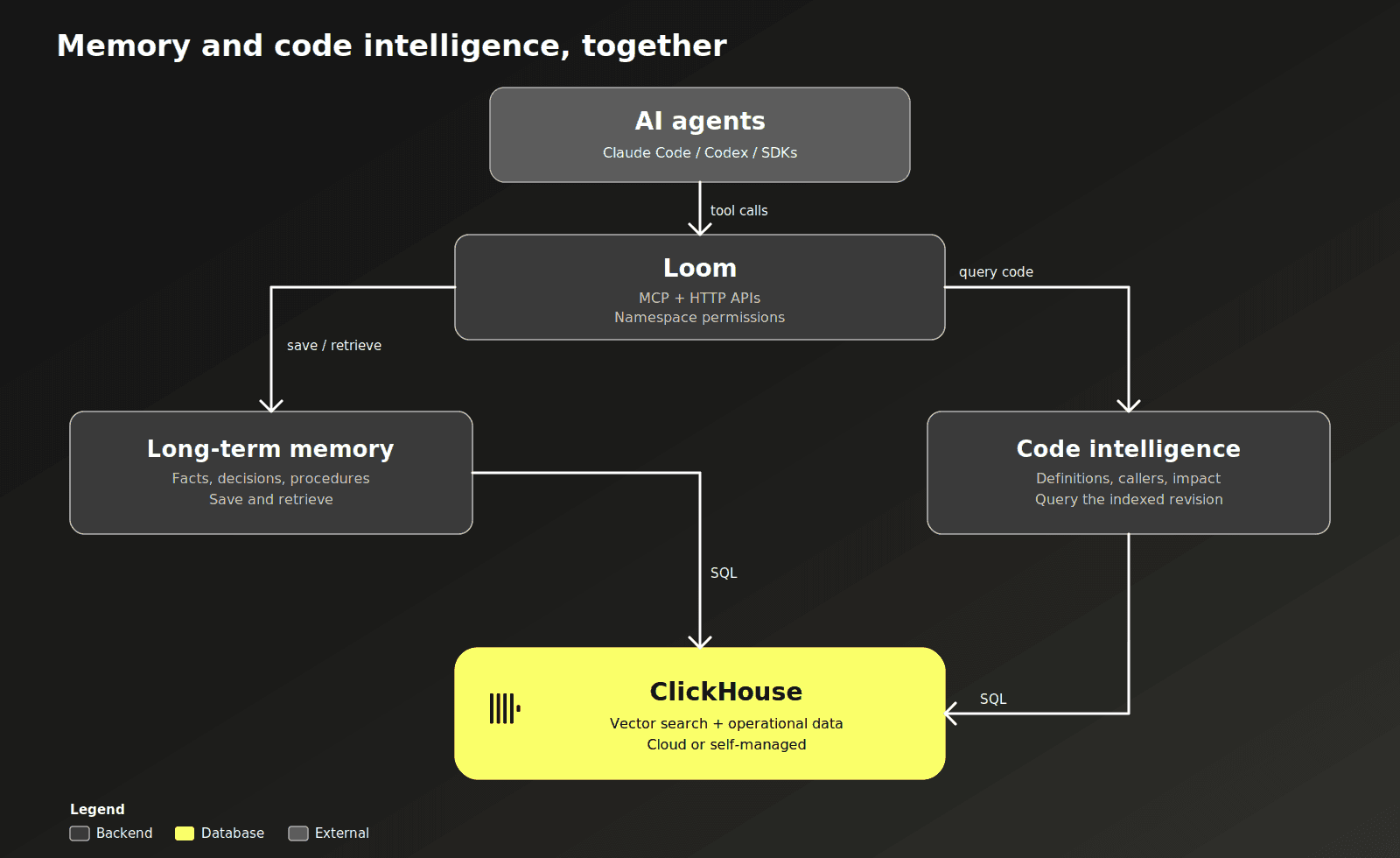
Loom keeps memory and a code index in the same ClickHouse database, under one set of permissions. A maintainer's note gets stored with its source and linked to the code it describes, so you can tell later whether it's still accurate. Every run gets logged too: what the agent loaded, what it cost, and whether it actually finished.
It's open-source, and any team can run it against its own repository, with its own agents.
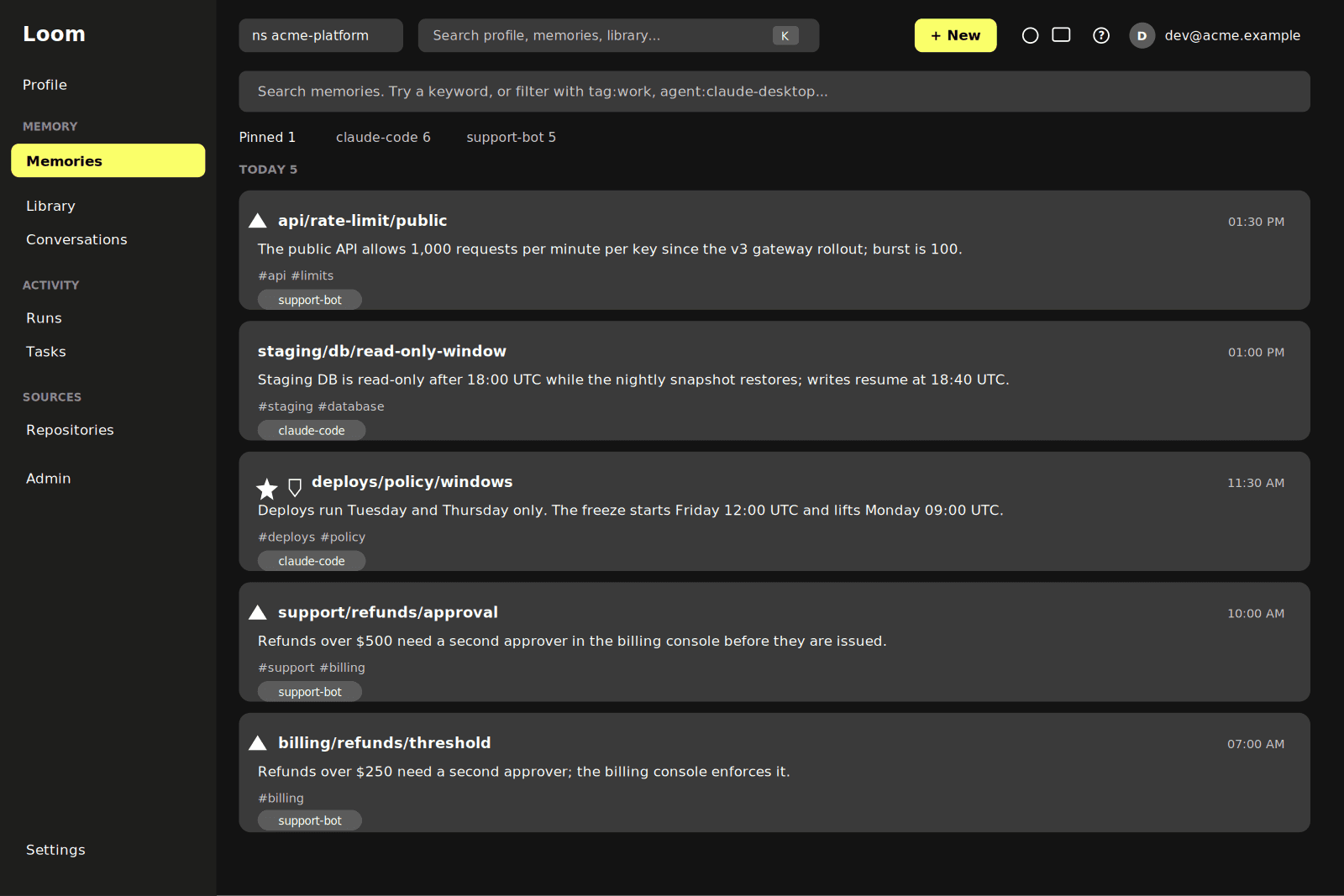
Memory and the code index work fine on their own, but they're built to work together! A client connects over MCP, the HTTP API, or the Python and TypeScript SDKs, and that one connection can save memories, search code, record runs, and search documents.
How does Loom actually work?
As much as we love trusting the flashy authority of blog posts these days, we’d like to explain some concepts of what set Loom apart from other memory tools, and what design decisions were made along the way.
What can Loom remember?
Facts and preferences and step-by-step procedures show up in an ordinary search. Reflections on finished work, past events, background profiles, and scratch notes on work in progress mostly stay out of the way until something specifically asks for them.
Facts get revised instead of just piling up and becoming stale. Say an agent notes in March that a service defaults to max_threads: 16, then learns in June that the default has doubled. June doesn't erase March, it's a new version of the same fact, and the old value is still there if you ask what was true in April. If two people save conflicting facts around similar subjects, Loom flags it instead of just picking one, and a pin stops an update from silently overwriting a fact someone cares about. Just like your own brain, memories evolve with new context but retain the history of what you’ve learned when! It’s just nice to be able to write them down in a database instead of having to comb through all of those composition notebooks collecting dust under your childhood bed.
Documents, procedures, and one-off tasks get the same treatment: searchable when relevant, otherwise out of the way. A fact about code gets checked against the actual definition too, and flagged if that code changes. Humans are great at remembering state and state-change with the code they’ve been responsible for, but in an ever-growing repository like ClickHouse, it would be unreasonable to expect every human to centralize the state and state-change of every other human’s work.
How does it read your code?
Before an agent asks anything, Loom has already read the repository: every function, every class, and which ones call which. Ask where something is implemented, or what calls a given function, and you get real code and file paths back, not just text that matches your search terms, or our favorite: “Let me read the code before I answer anything!” accompanied by a full clone. A fast pass covers most languages; a slower, compiler-accurate pass backs it up for the big ones, and whichever is more precise wins.
That same index tells Loom when a saved memory might be going stale. If a note says a function leaks its buffer when called twice, and that function gets renamed, Loom follows the rename. If the function gets rewritten instead, the note gets flagged for review rather than silently going out of date. Nothing gets rewritten automatically. A flagged memory just shows up marked as changed, so whoever reads it next knows to double check. Imagine a bunch of sticky notes on your mental monitor that point out all of the times you had realized you had to look something up to remain a subject matter expert… might be nice. But it would be even nicer if everyone could leverage everyone else’s sticky notes so that we did not have hundreds of memory banks producing hundreds of the same or similar facts. It would be cool to be able to share those, wouldn’t it?
How can teams share memories?
Say one developer uses Claude Code to figure out what a change would break, and a teammate uses Codex, on a different laptop, to actually make the change. If they're both pointed at the same Loom deployment, Claude Code's findings are just there when Codex starts working, source and commit included, because both agents read and write the same namespace.
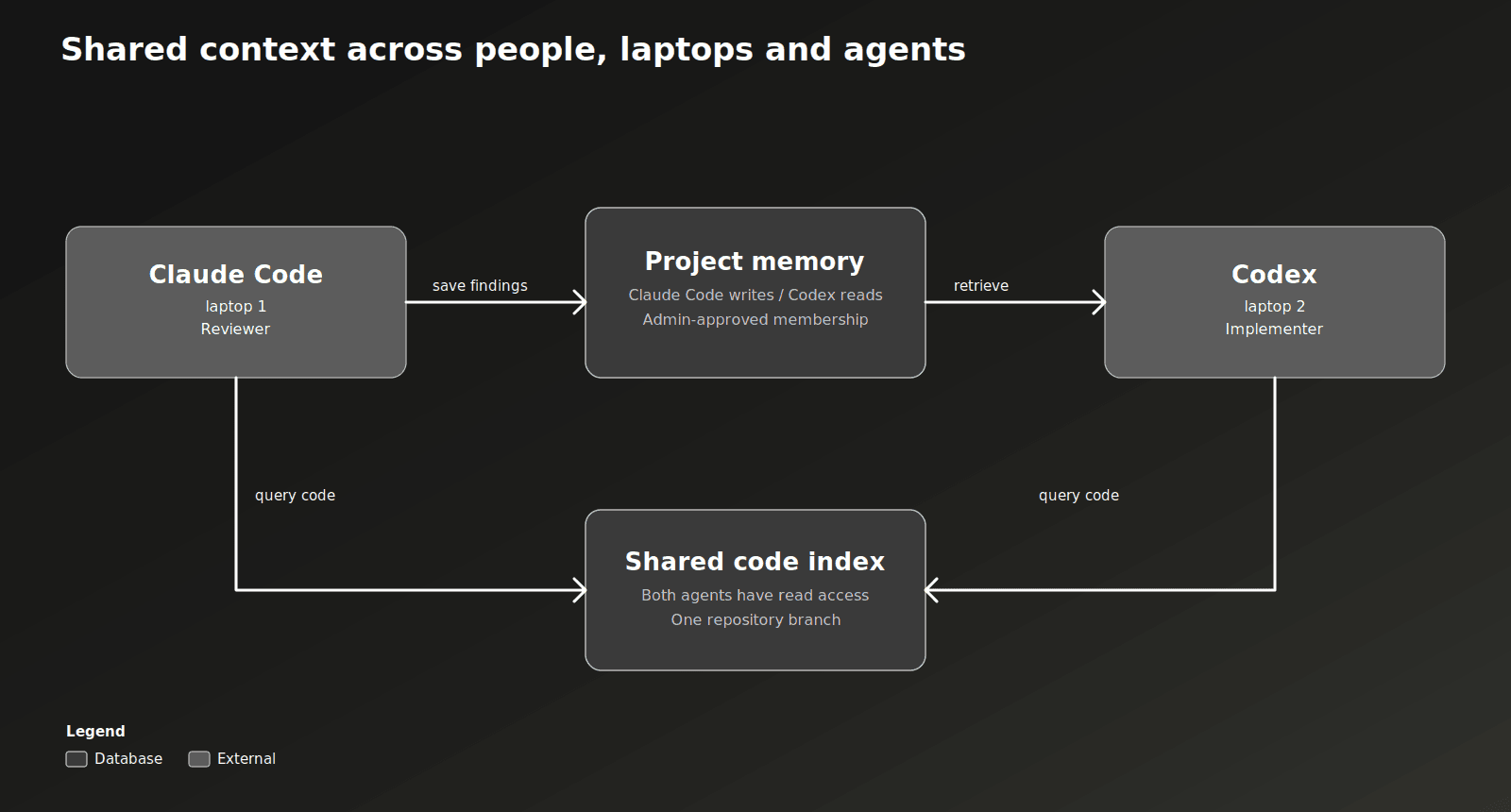
You can control which side of that each agent gets. It’s not as if we just stuck everyone’s memories into the same namespace and said “fight for victory”. We have a few situations we’ve adopted:
- One-way: where a research agent writes and a coding agent reads. Appropriate for reduction of inference cost when you invest most of your cost in research and assignment. It’s like measuring twice and cutting once, but you’ve remembered literally every measurement you’ve ever made.
- Two/N-way: where both/all read and write. Appropriate for internal knowledge bases of company culture and colloquialisms. “Which team to go to for Topic X”, “What Slack channel is best for Question Y”, and most importantly: “What’s with everyone using this one random emoji?”
- Personal-to-Shared Promotions: where someone reads a shared team namespace but writes into their own, and promotes things across once they're ready to share. Teams can set a namespace open, approval-only, or closed, same as any other access control. Appropriate for teams who have to collaborate on maintaining the taste and design decisions of their codebase (hint: ClickHouse), ensuring that just like code, memories can be reviewed and maintained.
How does a memory search actually run?
When an agent asks memory a question, Loom doesn't run one nearest-neighbour lookup. It embeds the question and runs several searches in ClickHouse at once: a vector search over the fact embeddings, a keyword search with BM25 scoring over the same facts, a pass over verbatim chunks of long values, and, when the question names people or services, a hop through the entity graph. Every one of those is scoped to the namespaces the caller can read inside the query itself, not filtered afterwards.
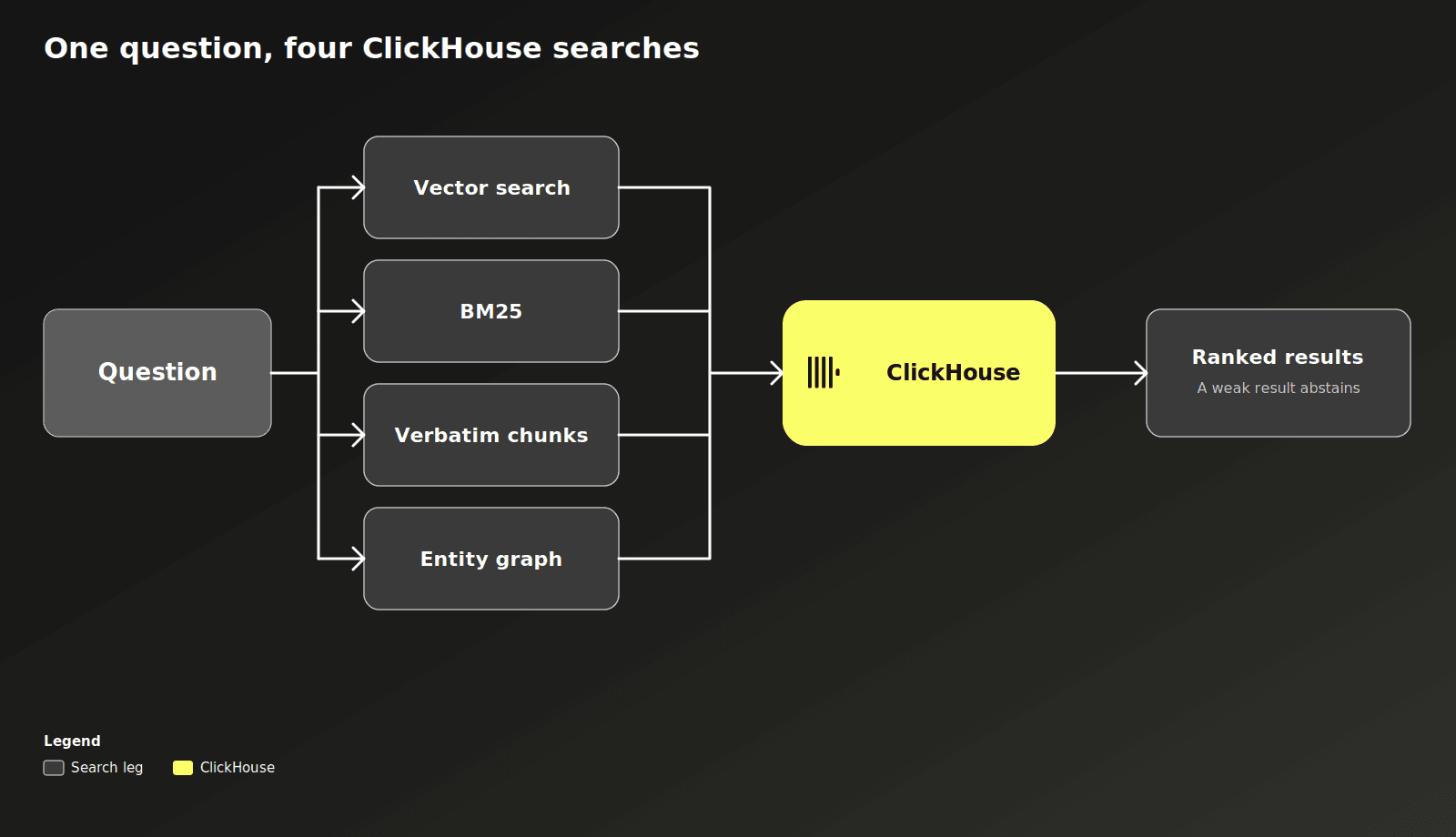
The results get fused into one ranking. Confidence, provenance, and reinforcement from past runs can nudge near-ties, but they're capped so they can't beat a closer match. Finally, Loom checks the winner's raw similarity without the previous weights applied. If the similarity ranking doesn't exceed dissimilarly ranked results, the search still returns the hits, but it tells the agent it doesn't know and marks them as too weak to answer from. Every result carries the scores that put it there.
Writes get the same scrutiny. A new fact is judged against its neighbours before it lands: merged, flagged as a duplicate, marked as a conflict, or rejected. Every version is kept, so a search can run as of a past date. The full inside view is in the memory architecture doc. Every one of those search legs is a plain ClickHouse query against the same tables.
Where do the memories get stored?
Please try to hold back your surprise, but… we store the memories in ClickHouse. Shocker, we know. But bias aside, it’s an extremely appropriate datastore for this shape of data!
Most agent-memory setups end up as a pile of separate services: one for vector search, one for keyword search, one for the relationship graph, one for jobs, one for analytics. Every one of those is another thing to deploy, secure, and keep in sync.
Loom puts all of it. The facts, the embeddings, the full-text index, the code graph, task state, and the cost and audit trail, into one ClickHouse database. A search gets scoped to what the caller can see, then ranked by the vector and BM25 search above, and the usage data sits right next to everything else instead of living in a separate analytics tool. Updates, corrections, and embeddings each get a ClickHouse storage engine tuned for how they're actually read and written, not one generic table for everything.
Oh, and of course, traces can be sent to the best-in-class observability suite, Langfuse.
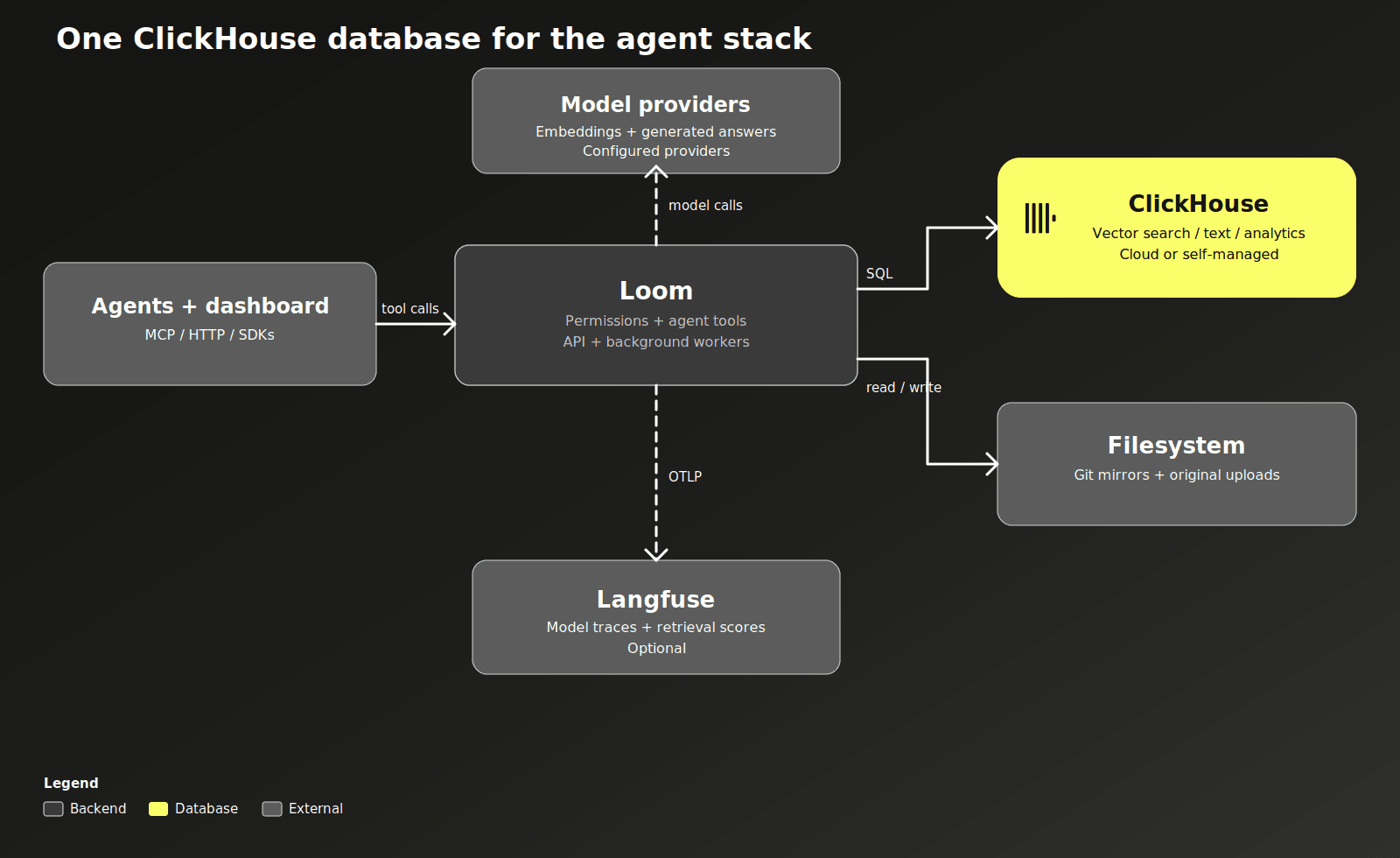
The setup also makes it easy to tell whether any of this is actually helping. Every run is logged with what it used and how it turned out, so a memory that keeps helping gets reinforced and one that doesn't just fades. For a closer look at any one request, model calls, costs, retrieval scores, we just simply turn to Langfuse.
Loom can run on self-managed ClickHouse or ClickHouse Cloud. ClickHouse 26.5 or later is required, and 26.8 or later is recommended if you want the faster vector-search path.
Ok, but you benchmarked this, right?
We measured two different things: whether an agent with Loom explains code and finds the right file better than one with just grep, Read, and Glob, and whether retrieved memories beat handing a model the full conversation history. Both comparisons used the same questions and the same models on each side, with Loom switched on or off.
For coding questions, a reference answer lists the key points a good reply should hit. A separate model grades how many of those points the agent's actual answer covers, and knocks the score down hard if the answer contradicts the reference outright. Across 24 questions with 3 runs each, the mean score moved from 0.78 to 0.84, about an 8% lift, and the average cost per question dropped from $0.212 to $0.17. On a separate file-finding task, 36 questions with 10 runs each, accuracy went from 91.4% to 96.4%, at a similar cost reduction.
We aren’t going to wave some gigantic blow-away number in front of you and say that it’s worth migrating today, but +8% matters, a lot. Equally as much as -$0.042 and +5%. ClickHouse itself was not built with some grandiose change that landed after months of waiting, it was consistent and incremental progress throughout more than a decade of care.
What about measuring memory itself?
On 100 questions from LongMemEval-S, the same model answered better with Loom's retrieved memories (94%) than with the entire conversation history stuffed into the prompt (90%), while reading about 90% fewer tokens to do it. That particular gap isn't big enough to call statistically significant on its own, the bigger number is memory.ask scoring 96.6% across the full 500-question benchmark under its official judge, which is closer to what you'd see running it for real.
Full methodology and per-question results are in the benchmarks folder on GitHub.
The easiest way to see whether any of this holds up is to try it on your own repository!
How can I try it?
Install Docker and Docker Compose, then run:
curl -fsSL https://github.com/ClickHouse/loom/releases/latest/download/install.sh | shThat starts Loom and ClickHouse, waits for everything to come up, and prints a dashboard URL. Open http://localhost:7777/me and set your model and embedding keys under Settings → Models & keys. Loom ships with placeholder models, so it runs without any keys at all. You just won't get meaning-based search or generated answers until you add real ones.
This is a personal setup by default: one person, one or several agents, all on localhost. Sharing it across a team, with real accounts and namespace permissions, is covered in the team deployment guide.
For a local coding agent, the Claude Code plugin and Codex plugin connect automatically once your repository is indexed. They read your git remotes, find the right namespace, and start sending queries there. Cursor connects over MCP. There's also an HTTP API and Python and TypeScript SDKs if you're building something custom.
The best way to get a feel for it is to ask a real question from your own work, something like “what would break if I changed this function?”, check what comes back, save the finding, and pull it up again in a new session. The quickstart and first-agent tutorial walk through exactly that. One thing to know going in: the index is built on top of the server’s mirror of the branch you are working in, so uncommitted changes won't show up until you commit and push them!
If you want to read the source to confirm all of our claims, Loom is on GitHub under Apache-2.0. Run it on your own repository, and let us know what it misses.
If you ever want to see the memory vaults we have created for ourselves, take a look at our Careers page. ClickHouse is always looking for talent in a new era of agentic coding that can share and leverage the work of teammates even more.