5.1万


PostgreSQL 19 was released on November 19, 2026, and it has been generally available on ClickHouse Managed Postgres since release day. Not in preview, and not behind a waitlist: you can create a PostgreSQL 19 instance right now. Below we explain what it takes on the engineering side to support a new major version on day one, then survey the PostgreSQL 19 features we think matter most and what each one means for ClickHouse Managed Postgres.
What it takes to support PostgreSQL 19 on release day
We lean on the expertise of the PostgreSQL Global Development Group (PGDG) APT repository for our Postgres server and all third-party extensions. This enables us to provide 100% community Postgres immediately upon release, with all supported extensions up-to-date and ready to go. The only bits we package ourselves are our first-party extensions, which we likewise build against the community Postgres for immediate inclusion on release day.
The PostgreSQL community packaging frees us to focus on updating the ClickHouse Managed Postgres platform to support the new version, while an agile release process with continuous automated validation against fully integrated staging environments enables moving fast once release day arrives.
That work doesn't happen on release day, of course. Roughly, it is these steps:
- Readiness checklist, started well ahead of the release. Every component that touches Postgres has to work with the new version: ClickPipes CDC, WalShadow (private preview), third-party extensions, and our server parameter defaults.
- VM images built from the release candidate. Together with Ubicloud, we added PostgreSQL 19 RC2 to the VM images we deploy from and made it available in our provisioning and fleet management workflows.
- Extension packaging. Third-party extensions come from the PGDG repository, so each one is available as soon as its maintainers publish a PostgreSQL 19 build. We package our own extensions ourselves:
pg_clickhouse,chdb,pg_stat_chandpg_re2. - Control plane. A feature flag lets us light up PostgreSQL 19 in the console, API and admin tooling in staging first and then switch it on for everyone at GA.
- Testing. Our end-to-end stress test suite runs the Postgres batches on PostgreSQL 19 in staging, on AWS and GCP. The testing matrix covers managed service features, such as high availability, scaling, read replicas, telemetry and billing. Failovers in different high availability setups are tested under continuous stress with injection of hardware and software failures. By release day, we are confident the service runs PostgreSQL 19 at GA quality.
- Rollout. Once the official PostgreSQL 19 builds are available in the package sources, we prepare and validate the VM image to deploy on our fleet. Separation of control plane and VM image deployments enables us to move newly built images to production in a matter of hours without compromising on validation across the testing matrix.
The option to deploy PostgreSQL 19 on a fully managed service on day one of the release is an advantage for users. As the service team, we optimized our processes, control plane and release pipeline to make the new major version available with minimal hassle, risk or disruption. What made it possible is our commitment to a 100% open-source engine with no fork to maintain, our partners at Ubicloud, and PGDG packaging and tooling.
We're excited to see you try PostgreSQL 19 on ClickHouse Managed Postgres, as a standalone service or as part of an integrated OLTP + OLAP solution with the ClickHouse analytical engine.
On ClickHouse Managed Postgres: If you are already running an earlier major version, there are two ways to move to PostgreSQL 19. Managed in-place major version upgrades are available in private preview: we handle the upgrade for you, with a few minutes of downtime during the switchover (reach out to us if you want to try it). If you need more control over the cutover and want to keep downtime to a minimum, you can set up a Postgres-to-Postgres migration with logical replication into a new PostgreSQL 19 instance and switch your application over once the replica has caught up.
PostgreSQL 19 highlights
REPACK
If we had to pick one feature to get the biggest "finally" from people who run Postgres, it would be this one. PostgreSQL 19 adds the REPACK command to replace VACUUM FULL and CLUSTER (Antonin Houska). The two old commands did very similar things under confusing names and still work for compatibility, but the one to use from now on is REPACK.
The bigger news is the CONCURRENTLY option (Antonin Houska, Mihail Nikalayeu, Álvaro Herrera). Without it, REPACK holds an ACCESS EXCLUSIVE lock for the whole rewrite, just like VACUUM FULL always did. With it, most of the work runs under a SHARE UPDATE EXCLUSIVE lock. Changes made while REPACK copies the table are captured with logical decoding, and ACCESS EXCLUSIVE is only taken for the final swap.
-- reclaim space from a bloated table without blocking reads and writes
REPACK (CONCURRENTLY, VERBOSE) orders;
-- rewrite and physically order the table by an index (what CLUSTER used to do)
REPACK orders USING INDEX orders_created_at_idx;Progress shows up in the new pg_stat_progress_repack view.
Because locks are Gülçin’s favorite topic 😀 we want to point out the fine print before anyone assumes CONCURRENTLY is free:
- It is not MVCC-safe. Once the repack commits, the table looks empty to concurrent transactions whose snapshot was taken before the repack started.
- It still needs
ACCESS EXCLUSIVEat the end, so a long-running transaction on the table can still make it wait, and every query behind it waits too. Alock_timeoutis your friend. - It doesn't work on partitioned tables, unlogged tables, materialized views or system catalogs, or on tables without a primary key or index-based replica identity. It can fail if someone runs DDL on the table in the meantime, and it fails if more than about 104 million rows are updated or deleted while it runs.
- It needs a replication slot from a pool separate from the regular replication slots, sized by the new
max_repack_replication_slotssetting.
If you have used the pg_repack extension (which we also ship), the pattern will look familiar. The difference is that this is now in core.
On ClickHouse Managed Postgres: REPACK is especially valuable here. It simplifies proactive management of table size and helps prevent disk saturation and the need to scale up the server, and with CONCURRENTLY it does so without blocking production workloads. It needs room to work, though: REPACK writes a new copy of the table and its indexes, so you need at least that much free disk space, plus space for the changes captured during a concurrent run. Run it before the disk is close to full.
Read-your-writes with WAIT
Gülçin wrote a whole post about WAIT FOR, so here is the short version. The new WAIT command (the syntax is WAIT FOR LSN ...) lets a session on a standby wait until WAL has been replayed up to a given LSN before it reads. That gives you read-your-writes on an asynchronous replica without making every commit wait for the replica.
-- on the primary, right after the write
SELECT pg_current_wal_insert_lsn();
-- on the replica, before the read
WAIT FOR LSN '0/306EE20' WITH (TIMEOUT '2s', NO_THROW);On ClickHouse Managed Postgres: WAIT matters only for read replicas, since HA standbys are not exposed for reads. By default, read replicas replay WAL shipped through object storage, so lag is typically a few seconds and can approach a minute on a quiet primary. WAIT gives correct results there, but the wait can be as long as that lag: always set a TIMEOUT and decide what to do when it expires, for example fall back to the primary. If you need sub-second lag, streaming replication is available through support.
Logical replication: sequences and EXCEPT
Two changes that anyone who has performed a logical-replication-based migration or upgrade will recognize:
- Sequences can finally be replicated (Vignesh C, Tomas Vondra):
CREATE PUBLICATION ... FOR ALL SEQUENCESpublishes them, andALTER SUBSCRIPTION ... REFRESH SEQUENCESsyncs their values on the subscriber. Forgetting to bump sequences after a logical cutover is a classic mistake, and now there is a built-in feature to avoid it. Two limits to know: sequence values are copied when you run the command, not streamed continuously, so runREFRESH SEQUENCESright before cutover; and the publisher must be PostgreSQL 19 or later, so it does not help yet when you migrate into 19 from 17 or 18. EXCEPTfor publications (Vignesh C, Shlok Kyal):FOR ALL TABLES EXCEPT ...lets you skip a few tables without listing all the others.
CREATE PUBLICATION app_pub
FOR ALL TABLES EXCEPT (TABLE audit_log, session_cache), ALL SEQUENCES;On ClickHouse Managed Postgres: wal_level is set to logical on every instance and is not a setting you can change, so the PostgreSQL 19 change that removes the restart when moving from wal_level = replica to logical does not affect you.
Autovacuum: parallel index vacuuming and a scoring system
Autovacuum can now vacuum a table's indexes with parallel workers (Daniil Davydov), controlled by autovacuum_max_parallel_workers and the per-table storage parameter autovacuum_parallel_workers. It only helps tables with two or more sizeable indexes, and the per-table parameter can lower the server-wide limit or turn it off for one table, but not raise it. Autovacuum also processes tables in an order determined by a score rather than the order in which it happens to find them (Nathan Bossart), and the new pg_stat_autovacuum_scores view (Sami Imseih) shows how it ranks your tables. We covered the scoring system and the view in detail in New system views in PostgreSQL 19.
One change to keep in mind: parallel vacuum workers now share the cost-based delay budget with their leader, so VACUUM with parallel workers and cost-based delay can run more slowly than before.
On ClickHouse Managed Postgres: autovacuum_max_parallel_workers keeps the upstream default of 0, so autovacuum does not use parallel index workers unless you raise it in Settings. The workers come out of max_parallel_workers, which is 4 by default on the service. The per-table autovacuum_parallel_workers parameter is set with ALTER TABLE as usual. The scoring system runs with the upstream weights, and pg_stat_autovacuum_scores is there to query. The five autovacuum_*_score_weight parameters are not in Settings, so reach out to us if you need to change them.
Observability
Gülçin has already written two posts about this (and talked about it at PGConf.EU 2026 in Valencia), so we will keep it short and link to them:
- What's New with Monitoring in PostgreSQL 19:
log_lock_waitson by default, per-processlog_min_messages,log_autoanalyze_min_duration,wal_fpi_bytes, new wait events,pg_get_multixact_stats()and the earlier wraparound warnings. - New system views in PostgreSQL 19:
pg_stat_lock,pg_stat_recovery,pg_stat_autovacuum_scoresandpg_dsm_registry_allocations.
One thing to add: EXPLAIN (ANALYZE, IO) now reports asynchronous I/O activity, and auto_explain.log_io can log it.
On ClickHouse Managed Postgres: pg_stat_ch is verified on PostgreSQL 19, and log_lock_waits keeps the upstream default (on) and can be changed in Settings.
pg_plan_advice and pg_stash_advice
PostgreSQL 19 ships a new contrib module, pg_plan_advice (Robert Haas). It describes the planner's key decisions in a small "plan advice" language, so you can reproduce a plan or nudge the planner. pg_stash_advice (Robert Haas, Lukas Fittl) applies advice automatically per query ID.
LOAD 'pg_plan_advice';
EXPLAIN (COSTS OFF, PLAN_ADVICE)
SELECT * FROM orders o JOIN customers c ON o.customer_id = c.id;
-- the plan output ends with a "Generated Plan Advice:" section,
-- e.g. JOIN_ORDER(...), HASH_JOIN(...), SEQ_SCAN(...)
-- to change the plan, supply only the items you want to control:
-- here, start from customers and put orders on the inner side of a hash join
SET pg_plan_advice.advice = 'JOIN_ORDER(c o) HASH_JOIN(o)';
EXPLAIN (COSTS OFF)
SELECT * FROM orders o JOIN customers c ON o.customer_id = c.id;
-- the plan output now ends with a "Supplied Plan Advice:" section that
-- reports on each item, e.g. JOIN_ORDER(c o) /* matched */To change a plan, set pg_plan_advice.advice for your session, as in the second half of the example. You don't need the whole generated string: supply only the items you want to control, such as the join order, and the planner decides the rest. Targets are the aliases the query uses (the table name only where there is no alias), and a join-method item names the relation on the inner side of the join. Advice only narrows the choices the planner already had, so planning does not fail, but advice that can't be followed can leave you with a worse plan than no advice at all. EXPLAIN shows it: the item is flagged as partially matched, not matched or failed, and plan nodes can be marked Disabled: true. Check the Supplied Plan Advice section before you rely on it. The docs carry their own warning, and we agree with it: the planner usually makes good decisions, and pinning a plan can backfire when your data changes. Use it to stabilize a plan you know is good, or for experiments.
On ClickHouse Managed Postgres: pg_plan_advice ships with the PostgreSQL 19 contrib modules, so you can load it per session with LOAD or through session_preload_libraries. Both need a superuser, such as the default postgres user. For an application role, run ALTER ROLE app_user SET session_preload_libraries = 'pg_plan_advice' once as postgres, and new sessions for that role load it automatically. pg_stash_advice loads the same way, after CREATE EXTENSION pg_stash_advice. Its stashes are kept in shared memory on the server, and reloading them after a restart needs shared_preload_libraries, which is not available for this module on the service today, so a restart or failover clears them. Keep the statements that create your stashes in a script you can rerun.
Performance improvements
Highlights from the release notes:
- Faster foreign key checks (Junwang Zhao, Amit Langote, Chao Li).
- Regular table scans can now mark pages all-visible in the visibility map, which used to be possible only for
VACUUMandCOPY ... FREEZE(Melanie Plageman). - Radix sort, SIMD for
COPY FROMtext/CSV parsing, andNOTIFYwaking up only the backends that listen.
Benchmarks
As we prepared for the release, we added PostgreSQL 19 to the performance testing matrix and ran the same benchmarks on PostgreSQL 18 and PostgreSQL 19 side by side. Results without HA and on TPC-C are stable between the two versions. With one synchronous standby, the PostgresBench 500 GB scenario (pgbench's TPC-B-like workload with 256 clients on 16 vCPU and 64 GiB of RAM) averaged 22,814 TPS on PostgreSQL 19 against 22,299 TPS on PostgreSQL 18. That is about 2% higher, close to the variation we see between runs:
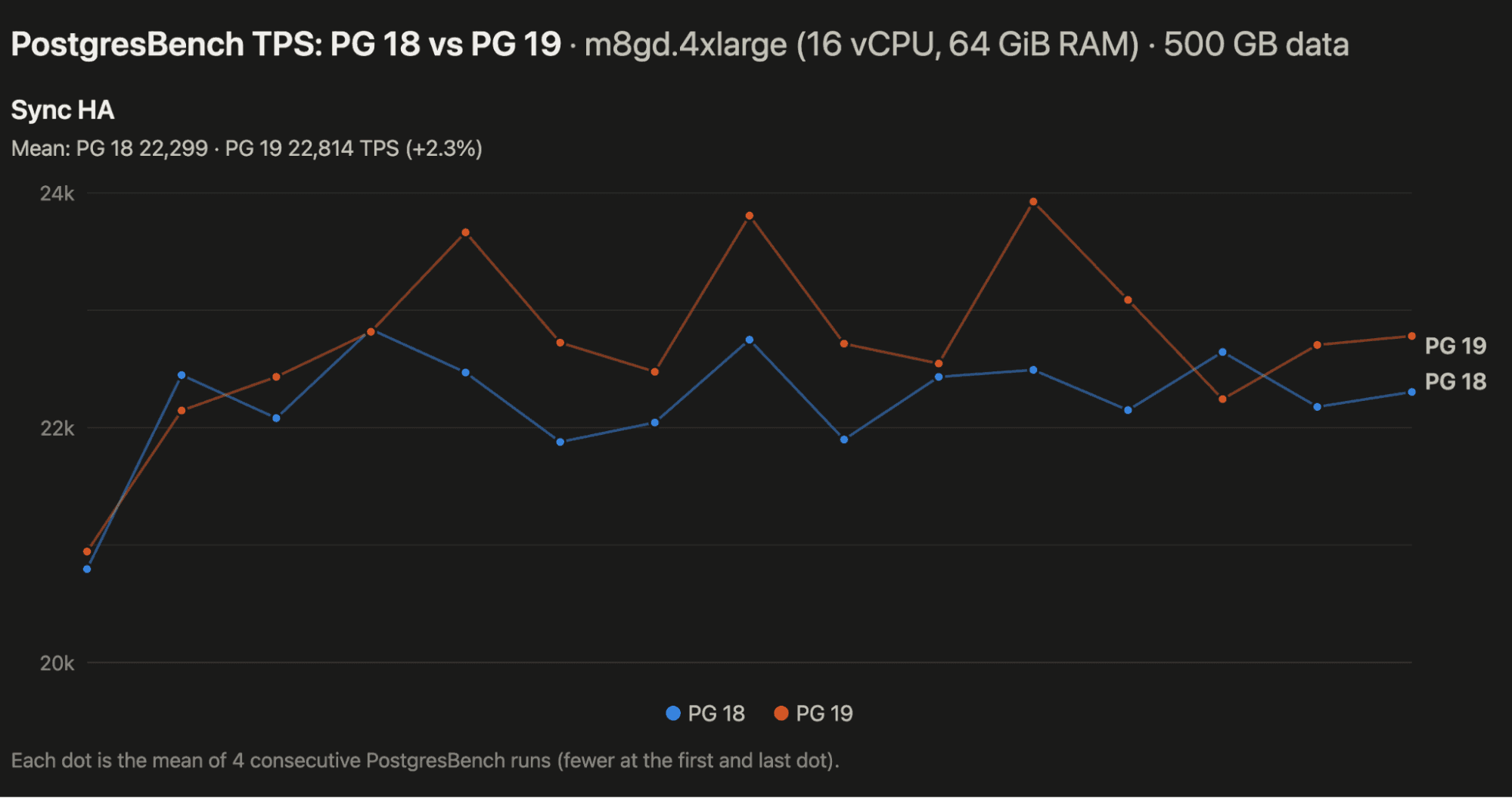
We will publish more detailed PostgreSQL 19 results with the next PostgresBench release.
New defaults
A few defaults also changed in PostgreSQL 19: jit is off, default_toast_compression is lz4, log_lock_waits is on, and max_locks_per_transaction is 128 (the lock allocation changed, so double an old custom value to keep the same capacity). With io_method = worker, the number of I/O workers now scales automatically. io_workers is removed and replaced by io_min_workers, io_max_workers, io_worker_idle_timeout and io_worker_launch_interval (Thomas Munro).
On ClickHouse Managed Postgres: We keep these defaults and run io_method = worker. default_toast_compression was already lz4 on earlier versions here. In Settings, io_min_workers and io_max_workers replace io_workers on PostgreSQL 19.
Small things developers will like
COPY TOcan write JSON:COPY orders TO STDOUT (FORMAT json, FORCE_ARRAY);COPY FROM ... (ON_ERROR SET_NULL)sets bad input values toNULLinstead of failing the load.- Window functions get
IGNORE NULLS/RESPECT NULLSforlead(),lag(),first_value(),last_value()andnth_value(). - The
psqlprompt can show the search path (%S) and whether you are on a hot standby (%i). INSERT ... ON CONFLICT DO SELECT ... RETURNINGreturns the existing row on conflict, optionally locked withFOR UPDATE/SHARE. No more "insert, and if it conflicts, select again":
Outro
PostgreSQL 19 is a big release, and the community did great work on it. A huge thank you to everyone in the acknowledgments list. Happy upgrades, and if you want to try PostgreSQL 19 today, you can do it on ClickHouse Managed Postgres.
Get started with ClickHouse Managed Postgres today
Interested in seeing how ClickHouse Managed Postgres works on your data? Get started with ClickHouse Cloud in minutes and receive $300 in free credits.
Sign up